
 压缩和存储
压缩和存储
# 压缩和存储
# 压缩参数设置
要在 Hadoop 中启用压缩,可以配置如下参数(mapred-site.xml 文件中):
| 参数 | 默认值 | 阶段 | 建议 |
|---|---|---|---|
| io.compression.codecs (在 core-site.xml 中配置) | org.apache.hadoop.io.compress.DefaultCodec, org.apache.hadoop.io.compress.GzipCodec, org.apache.hadoop.io.compress.BZip2Codec, org.apache.hadoop.io.compress.Lz4Codec | 输入压缩 | Hadoop 使用文件扩展名判断是否支持某种编解码器 |
| mapreduce.map.output.compress | false | mapper 输出 | 这个参数设为 true 启用压缩 |
| mapreduce.map.output.compress.codec | org.apache.hadoop.io.compress.DefaultCodec | mapper 输出 | 使用 LZO、LZ4 或 snappy 编解码器在此阶段压缩数据 |
| mapreduce.output.fileoutputformat.compress | false | reducer 输出 | 这个参数设为 true 启用压缩 |
| mapreduce.output.fileoutputformat.compress.codec | org.apache.hadoop.io.compress. DefaultCodec | reducer 输出 | 使用标准工具或者编解码器,如 gzip 和 bzip2 |
| mapreduce.output.fileoutputformat.compress.type | RECORD | reducer 输出 | SequenceFile 输出使用的压缩类型:NONE 和 BLOCK |
# 开启 map 输出阶段压缩 (MR 引擎)
临时开启
set hive.exec.compress.intermediate=true; -- 开启hive中间传送的压缩功能
set mapreduce.map.output.compress=true; -- 开启mapreduce中map输出压缩功能
set mapreduce.map.output.compress.codec=org.apache.hadoop.io.compress.SnappyCodec; -- 设置指定的压缩方式
2
3
# 开启 Reduce 输出阶段压缩
set hive.exec.compress.output=true; -- 开启hive最终输出数据压缩
set mapreduce.output.fileoutputformat.compress=true; -- 开启mapreduce最终输出数据压缩
set mapreduce.output.fileoutputformat.compress.codec =org.apache.hadoop.io.compress.SnappyCodec; -- 设置压缩方式
set mapreduce.output.fileoutputformat.compress.type=BLOCK; -- 设置mapreduce最终输出压缩方式
2
3
4
# 文件存储格式
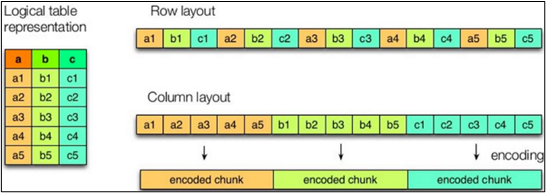
Hive 支持的存储数据的格式主要有:
行存储 TEXTFILE 、SEQUENCEFILE
列存储 ORC、PARQUET Hive 中使用列存储比较好
# TEXTFILE
默认格式,数据不做压缩,磁盘开销大,数据解析开销大。可结合 Gzip、Bzip2 使用,但使用 Gzip 这种方式,hive 不会对数据进行切分,从而无法对数据进行并行操作。
# Orc 格式
Orc 文件由 1 个或多个 stripe 组成,每个 stripe 一般为 HDFS 的块大小,每一个 stripe 包含多条记录,这些记录按照列进行独立存储,对应到 Parquet 中的 row group 的概念。每个 Stripe 里有三部分组成,分别是 Index Data,Row Data,Stripe Footer:
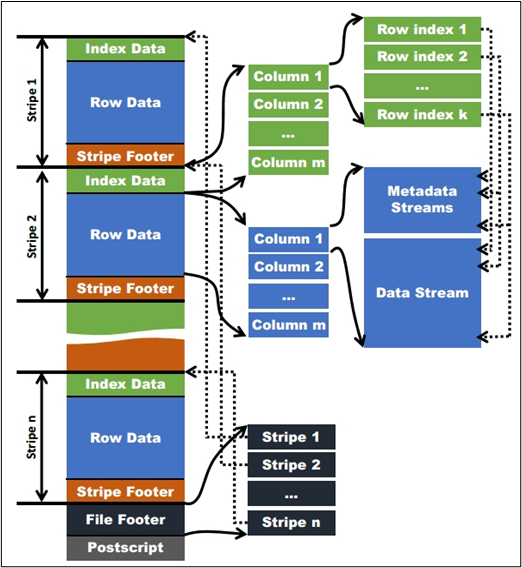
1)Index Data:一个轻量级的 index,默认是每隔 1W 行做一个索引。这里做的索引应该只是记录某行的各字段在 Row Data 中的 offset。
2)Row Data:存的是具体的数据,先取部分行,然后对这些行按列进行存储。对每个列进行了编码,分成多个 Stream 来存储。
3)Stripe Footer:存的是各个 Stream 的类型,长度等信息。
每个文件有一个 File Footer,这里面存的是每个 Stripe 的行数,每个 Column 的数据类型信息等;每个文件的尾部是一个 PostScript,这里面记录了整个文件的压缩类型以及 FileFooter 的长度信息等。在读取文件时,会 seek 到文件尾部读 PostScript,从里面解析到 File Footer 长度,再读 FileFooter,从里面解析到各个 Stripe 信息,再读各个 Stripe,即从后往前读。
# Parquet 格式
Parquet 文件是以二进制方式存储的,所以是不可以直接读取的,文件中包括该文件的数据和元数据,因此 Parquet 格式文件是自解析的。
(1)行组 (Row Group):每一个行组包含一定的行数,在一个 HDFS 文件中至少存储一个行组,类似于 orc 的 stripe 的概念。
(2)列块 (Column Chunk):在一个行组中每一列保存在一个列块中,行组中的所有列连续的存储在这个行组文件中。一个列块中的值都是相同类型的,不同的列块可能使用不同的算法进行压缩。
(3)页 (Page):每一个列块划分为多个页,一个页是最小的编码的单位,在同一个列块的不同页可能使用不同的编码方式。
# 指定文件存储格式
# textfile
在建表时通过 stored 关键字指定格式
create table log_text (
track_time string,
url string,
session_id string,
referer string,
ip string,
end_user_id string,
city_id string
)
row format delimited fields terminated by '\t'
stored as textfile;  -- 指定为textfile 默认也是textfile
2
3
4
5
6
7
8
9
10
11
# orc
create table log_orc(
track_time string,
url string,
session_id string,
referer string,
ip string,
end_user_id string,
city_id string
)
row format delimited fields terminated by '\t'
stored as orc  -- 指定为orc格式
tblproperties("orc.compress"="NONE"); -- 去掉压缩
2
3
4
5
6
7
8
9
10
11
12
只能插入数据 不能直接加数据文件
insert into table log_orc select * from log_text ;
# parquet
create table log_parquet(
track_time string,
url string,
session_id string,
referer string,
ip string,
end_user_id string,
city_id string
)
row format delimited fields terminated by '\t'
stored as parquet ;
2
3
4
5
6
7
8
9
10
11
插入数据
insert into table log_parquet select * from log_text ;
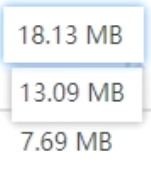
# 三种存储格式大小比较
# 存储和压缩结合
# orc 存储方式的压缩
| Key | Default | Notes |
|---|---|---|
| orc.compress | ZLIB | high level compression (one of NONE, ZLIB, SNAPPY) |
| orc.compress.size | 262,144 | number of bytes in each compression chunk |
| orc.stripe.size | 268,435,456 | number of bytes in each stripe |
| orc.row.index.stride | 10,000 | number of rows between index entries (must be >= 1000) |
| orc.create.index | true | whether to create row indexes |
| orc.bloom.filter.columns | "" | comma separated list of column names for which bloom filter should be created |
| orc.bloom.filter.fpp | 0.05 | false positive probability for bloom filter (must >0.0 and <1.0) |
所有关于 ORCFile 的参数都是在 HQL 语句的 TBLPROPERTIES 字段里面出现 在建表时指定
# ZLIB 压缩格式
create table log_zlib(
track_time string,
url string,
session_id string,
referer string,
ip string,
end_user_id string,
city_id string
)
row format delimited fields terminated by '\t'
stored as orc
tblproperties("orc.compress"="ZLIB"); -- 指定压缩为ZLIB 默认也为ZLIB
2
3
4
5
6
7
8
9
10
11
12
插入数据
insert into log_orc_zlib select * from log_text;
# SNAPPY 压缩格式
create table log_orc_snappy(
track_time string,
url string,
session_id string,
referer string,
ip string,
end_user_id string,
city_id string
)
row format delimited fields terminated by '\t'
stored as orc
tblproperties("orc.compress"="SNAPPY");
2
3
4
5
6
7
8
9
10
11
12
插入数据
insert into log_orc_snappy select * from log_text;
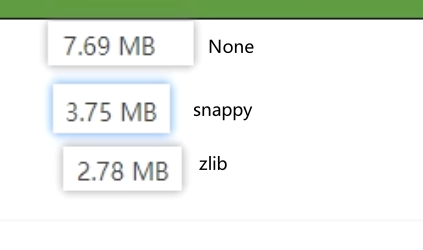
# 压缩后文件大小比较
# Parquet 存储方式的压缩
create table log_par_snappy(
track_time string,
url string,
session_id string,
referer string,
ip string,
end_user_id string,
city_id string
)
row format delimited fields terminated by '\t'
stored as parquet
tblproperties("parquet.compression"="SNAPPY");

insert into log_par_snappy select * from log_text;
2
3
4
5
6
7
8
9
10
11
12
13
14
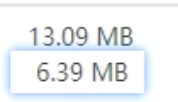
未压缩和压缩之后文件大小
# 总结
在实际的项目开发当中,hive 表的数据存储格式一般选择:orc 或 parquet。压缩方式一般选择 snappy,lzo。