
 数仓搭建-DWD层
# 数仓搭建 - DWD 层
- 对用户行为数据解析
- 对核心数据进行判空过滤。
- 对业务数据采用维度模型重新建模,即维度退化。
# DWD 层(启动日志解析)
# get_json_object 函数使用
原始 JSON 数据
[{"name":"大郎","sex":"男","age":"25"},{"name":"西门庆","sex":"男","age":"47"}]
取出第一个 json 对象
select get_json_object('[{"name":"大郎","sex":"男","age":"25"},{"name":"西门庆","sex":"男","age":"47"}]','$[0]');
结果是:{"name":"大郎","sex":"男","age":"25"}
取出第一个 json 的 age 字段的值
SELECT get_json_object('[{"name":"大郎","sex":"男","age":"25"},{"name":"西门庆","sex":"男","age":"47"}]',"$[0].age");
结果是:25
# 创建启动表
use gmall;
drop table if exists dwd_start_log;
CREATE EXTERNAL TABLE dwd_start_log(
`mid_id` string,
`user_id` string,
`version_code` string,
`version_name` string,
`lang` string,
`source` string,
`os` string,
`area` string,
`model` string,
`brand` string,
`sdk_version` string,
`gmail` string,
`height_width` string,
`app_time` string,
`network` string,
`lng` string,
`lat` string,
`entry` string,
`open_ad_type` string,
`action` string,
`loading_time` string,
`detail` string,
`extend1` string
)
PARTITIONED BY (dt string)
stored as parquet -- 存储为 parquet 列式存储
location '/warehouse/gmall/dwd/dwd_start_log/'
TBLPROPERTIES('parquet.compression'='lzo') -- parquet 压缩格式为 lzo 与 lzop 区别 lzo 没有索引;
2
3
4
5
6
7
8
9
10
11
12
13
14
15
16
17
18
19
20
21
22
23
24
25
26
27
28
29
30
31
# 向启动表导入数据
insert overwrite table dwd_start_log
PARTITION (dt='2020-03-10')
select
    get_json_object(line,'$.mid') mid_id,
    get_json_object(line,'$.uid') user_id,
    get_json_object(line,'$.vc') version_code,
    get_json_object(line,'$.vn') version_name,
    get_json_object(line,'$.l') lang,
    get_json_object(line,'$.sr') source,
    get_json_object(line,'$.os') os,
    get_json_object(line,'$.ar') area,
    get_json_object(line,'$.md') model,
    get_json_object(line,'$.ba') brand,
    get_json_object(line,'$.sv') sdk_version,
    get_json_object(line,'$.g') gmail,
    get_json_object(line,'$.hw') height_width,
    get_json_object(line,'$.t') app_time,
    get_json_object(line,'$.nw') network,
    get_json_object(line,'$.ln') lng,
    get_json_object(line,'$.la') lat,
    get_json_object(line,'$.entry') entry,
    get_json_object(line,'$.open_ad_type') open_ad_type,
    get_json_object(line,'$.action') action,
    get_json_object(line,'$.loading_time') loading_time,
    get_json_object(line,'$.detail') detail,
    get_json_object(line,'$.extend1') extend1
from ods_start_log
where dt='2020-03-10';
2
3
4
5
6
7
8
9
10
11
12
13
14
15
16
17
18
19
20
21
22
23
24
25
26
27
28
查看数据
select * from dwd_start_log limit 2;
# DWD 层启动表加载数据脚本
vim /home/atguigu/bin/ods_to_dwd_start_log.sh
在脚本中编写如下内容
#!/bin/bash

# 定义变量方便修改
APP=gmall
hive=/opt/module/hive/bin/hive

# 如果是输入的日期按照取输入日期;如果没输入日期取当前时间的前一天
if [ -n "$1" ] ;then
	do_date=$1
else
	do_date=`date -d "-1 day" +%F`
fi

sql="
insert overwrite table ${APP}.dwd_start_log
PARTITION (dt='$do_date')
select
    get_json_object(line,'$.mid') mid_id,
    get_json_object(line,'$.uid') user_id,
    get_json_object(line,'$.vc') version_code,
    get_json_object(line,'$.vn') version_name,
    get_json_object(line,'$.l') lang,
    get_json_object(line,'$.sr') source,
    get_json_object(line,'$.os') os,
    get_json_object(line,'$.ar') area,
    get_json_object(line,'$.md') model,
    get_json_object(line,'$.ba') brand,
    get_json_object(line,'$.sv') sdk_version,
    get_json_object(line,'$.g') gmail,
    get_json_object(line,'$.hw') height_width,
    get_json_object(line,'$.t') app_time,
    get_json_object(line,'$.nw') network,
    get_json_object(line,'$.ln') lng,
    get_json_object(line,'$.la') lat,
    get_json_object(line,'$.entry') entry,
    get_json_object(line,'$.open_ad_type') open_ad_type,
    get_json_object(line,'$.action') action,
    get_json_object(line,'$.loading_time') loading_time,
    get_json_object(line,'$.detail') detail,
    get_json_object(line,'$.extend1') extend1
from ${APP}.ods_start_log
where dt='$do_date';
"

$hive -e "$sql"
2
3
4
5
6
7
8
9
10
11
12
13
14
15
16
17
18
19
20
21
22
23
24
25
26
27
28
29
30
31
32
33
34
35
36
37
38
39
40
41
42
43
44
45
执行
chmod +x ods_to_dwd_start_log.sh
ods_to_dwd_start_log.sh 2020-03-10
2
查询导入结果
select * from dwd_start_log where dt='2020-03-10' limit 2;
# DWD 层(事件日志解析之基础表)
# 创建基础明细表
明细表用于存储 ODS 层原始表转换过来的明细数据。
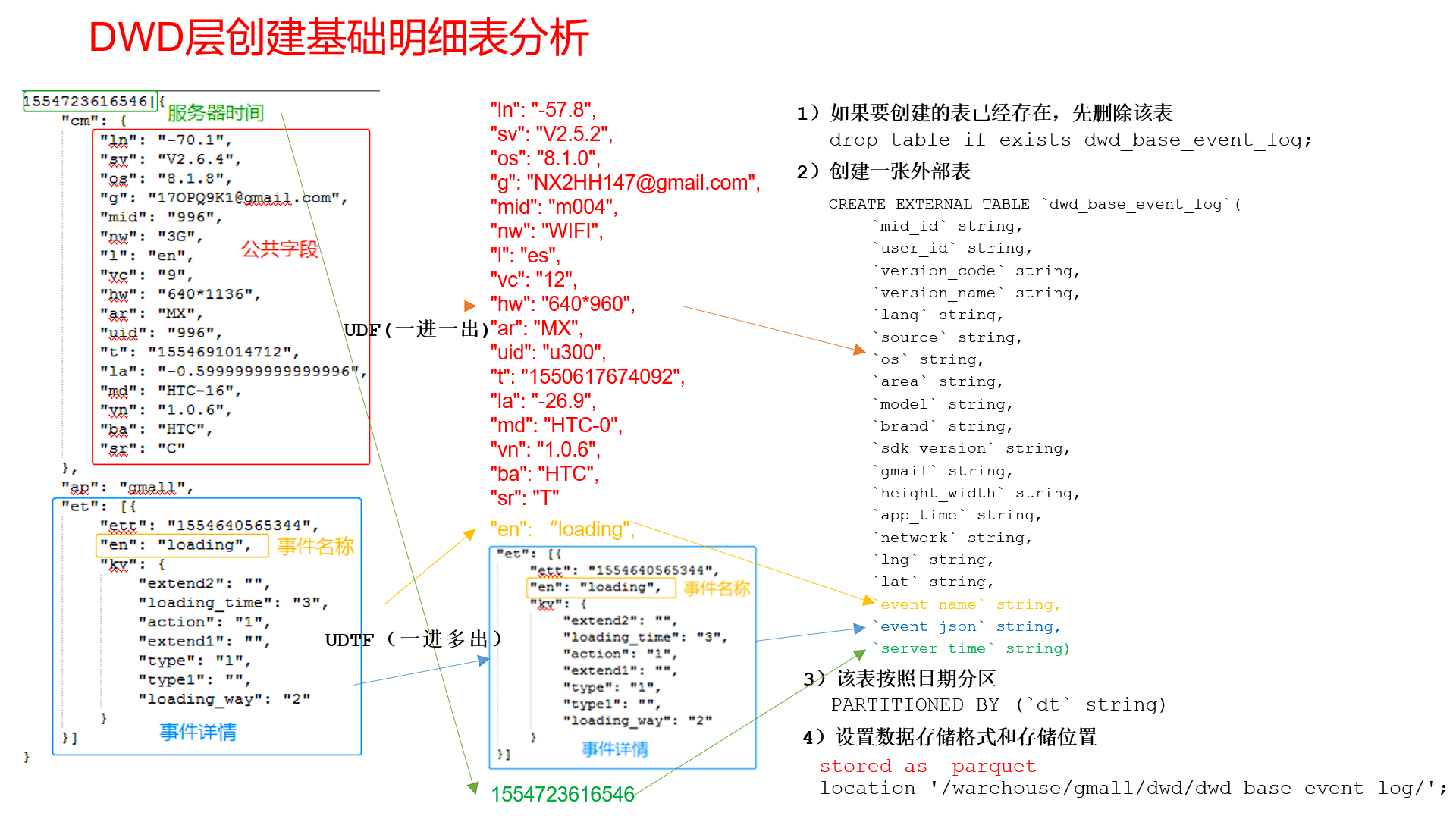
创建事件日志基础明细表
use gmall;
drop table if exists dwd_base_event_log;
CREATE EXTERNAL TABLE dwd_base_event_log(
`mid_id` string,
`user_id` string,
`version_code` string,
`version_name` string,
`lang` string,
`source` string,
`os` string,
`area` string,
`model` string,
`brand` string,
`sdk_version` string,
`gmail` string,
`height_width` string,
`app_time` string,
`network` string,
`lng` string,
`lat` string,
`event_name` string,
`event_json` string,
`server_time` string)
PARTITIONED BY (`dt` string)
stored as parquet
location '/warehouse/gmall/dwd/dwd_base_event_log/'
TBLPROPERTIES('parquet.compression'='lzo');
2
3
4
5
6
7
8
9
10
11
12
13
14
15
16
17
18
19
20
21
22
23
24
25
26
27
其中 event_name 和 event_json 用来对应事件名和整个事件。这个地方将原始日志 1 对多的形式拆分出来了。操作的时候我们需要将原始日志展平,需要用到 UDF 和 UDTF。
# 自定义 UDF 函数(解析公共字段)
JSON 原始格式
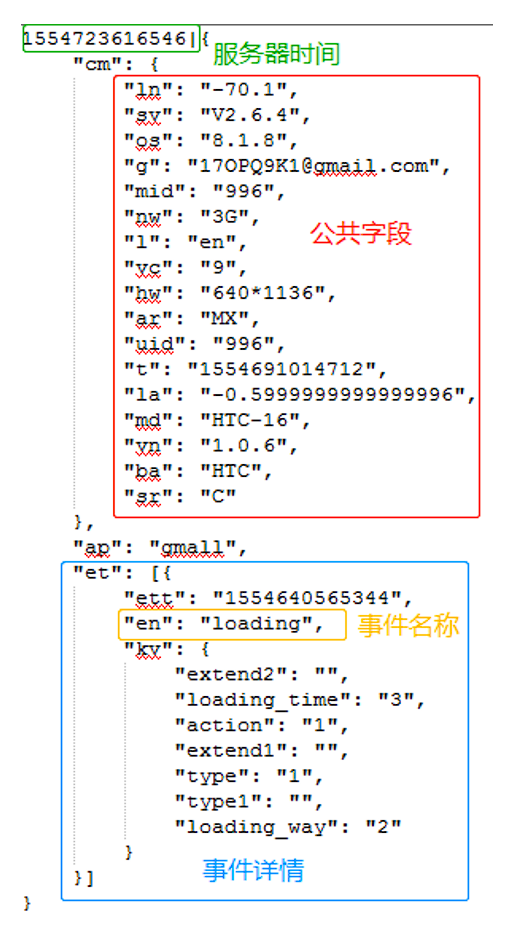
自定义 UDF 函数,根据传入进来的 key,获取对应的 value 值
String x = new BaseFieldUDF().evaluate(line, "mid");
- 将传入的 line,用 “|” 切割:取出服务器时间 serverTime 和 json 数据
- 根据切割后获取的 json 数据,创建一个 JSONObject 对象
- 判断输入的 key 值,如果 key 为 st,返回 serverTime
- 判断输入的 key 值,如果 key 为 et,返回上述 JSONObject 对象的 et。
- 判断输入的 key 值,如果 key 既不是 st,又不是 et,先获取 JSONObject 的 cm,然后根据 key 值,获取 cmJSON 中的 value。
下面开始编写自定义 UDF 函数
创建一个 maven 工程:hive-200105
创建包名:com.atguigu.gmall.hive
在 pom.xml 文件中添加如下内容
    <properties>
        <project.build.sourceEncoding>UTF8</project.build.sourceEncoding>
        <hive.version>3.1.2</hive.version>
    </properties>

    <repositories>
        <repository>
            <id>spring</id>
            <url>https://maven.aliyun.com/repository/spring</url>
        </repository>
    </repositories>

    <dependencies>

        <!--添加hive依赖-->
        <dependency>
            <groupId>org.apache.hive</groupId>
            <artifactId>hive-exec</artifactId>
            <version>${hive.version}</version>
        </dependency>
    </dependencies>

    <build>
        <plugins>
            <plugin>
                <artifactId>maven-compiler-plugin</artifactId>
                <version>2.3.2</version>
                <configuration>
                    <source>1.8</source>
                    <target>1.8</target>
                </configuration>
            </plugin>
            <plugin>
                <artifactId>maven-assembly-plugin</artifactId>
                <configuration>
                    <descriptorRefs>
                        <descriptorRef>jar-with-dependencies</descriptorRef>
                    </descriptorRefs>
                </configuration>
                <executions>
                    <execution>
                        <id>make-assembly</id>
                        <phase>package</phase>
                        <goals>
                            <goal>single</goal>
                        </goals>
                    </execution>
                </executions>
            </plugin>
        </plugins>
    </build>
2
3
4
5
6
7
8
9
10
11
12
13
14
15
16
17
18
19
20
21
22
23
24
25
26
27
28
29
30
31
32
33
34
35
36
37
38
39
40
41
42
43
44
45
46
47
48
49
50
51
52
53
创建 LogUDF 类,实现 UDF 用于解析公共字段
package com.atguigu.gmall.hive;

import org.apache.commons.lang.StringUtils;
import org.apache.hadoop.hive.ql.exec.UDF;
import org.json.JSONObject;

public class LogUDF extends UDF {

    public String evaluate(String line, String key) {

        if (StringUtils.isBlank(line)) {
            return "";
        }

        String[] split = line.split("\\|");

        if (split.length != 2) {
            return "";
        }

        String serverTime = split[0];
        String jsonStr = split[1];

        JSONObject jsonObject = new JSONObject(jsonStr);

        if("st".equals(key)){
            return serverTime;
        }else if("et".equals(key)){
            // 判断json中是否有et这个key的
            if(jsonObject.has("et")){
                return jsonObject.getString("et");
            }
        }else {
            // 获取cm公共字段的值
            JSONObject cm = jsonObject.getJSONObject("cm");
            // 在子json里提取指定key
            if(cm.has(key)){
                return cm.getString(key);
            }
        }

        return "";
    }

    public static void main(String[] args) throws JSONException {

        String line = "1541217850324|{\"cm\":{\"mid\":\"m7856\",\"uid\":\"u8739\",\"ln\":\"-74.8\",\"sv\":\"V2.2.2\",\"os\":\"8.1.3\",\"g\":\"[email protected]\",\"nw\":\"3G\",\"l\":\"es\",\"vc\":\"6\",\"hw\":\"640*960\",\"ar\":\"MX\",\"t\":\"1541204134250\",\"la\":\"-31.7\",\"md\":\"huawei-17\",\"vn\":\"1.1.2\",\"sr\":\"O\",\"ba\":\"Huawei\"},\"ap\":\"weather\",\"et\":[{\"ett\":\"1541146624055\",\"en\":\"display\",\"kv\":{\"goodsid\":\"n4195\",\"copyright\":\"ESPN\",\"content_provider\":\"CNN\",\"extend2\":\"5\",\"action\":\"2\",\"extend1\":\"2\",\"place\":\"3\",\"showtype\":\"2\",\"category\":\"72\",\"newstype\":\"5\"}},{\"ett\":\"1541213331817\",\"en\":\"loading\",\"kv\":{\"extend2\":\"\",\"loading_time\":\"15\",\"action\":\"3\",\"extend1\":\"\",\"type1\":\"\",\"type\":\"3\",\"loading_way\":\"1\"}},{\"ett\":\"1541126195645\",\"en\":\"ad\",\"kv\":{\"entry\":\"3\",\"show_style\":\"0\",\"action\":\"2\",\"detail\":\"325\",\"source\":\"4\",\"behavior\":\"2\",\"content\":\"1\",\"newstype\":\"5\"}},{\"ett\":\"1541202678812\",\"en\":\"notification\",\"kv\":{\"ap_time\":\"1541184614380\",\"action\":\"3\",\"type\":\"4\",\"content\":\"\"}},{\"ett\":\"1541194686688\",\"en\":\"active_background\",\"kv\":{\"active_source\":\"3\"}}]}";
        String x = new BaseFieldUDF().evaluate(line, "mid");
        System.out.println(x);
    }
}
2
3
4
5
6
7
8
9
10
11
12
13
14
15
16
17
18
19
20
21
22
23
24
25
26
27
28
29
30
31
32
33
34
35
36
37
38
39
40
41
42
43
44
45
46
47
48
49
50
51
# 自定义 UDTF 函数(解析事件字段)
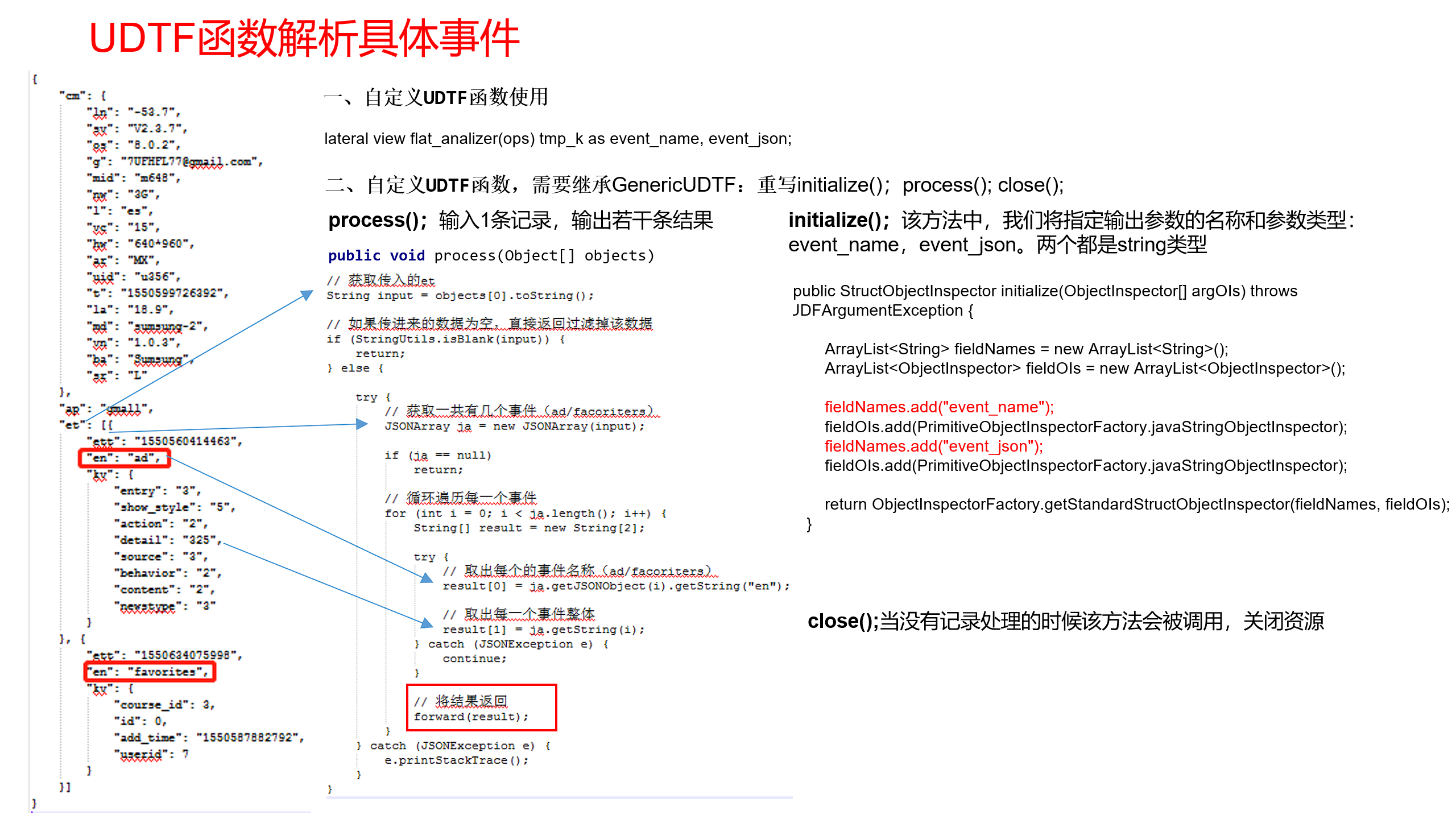
创建 LogUDTF 类,用于展开业务字段
package com.atguigu.gmall.hive;

import org.apache.hadoop.hive.ql.exec.UDFArgumentException;
import org.apache.hadoop.hive.ql.metadata.HiveException;
import org.apache.hadoop.hive.ql.udf.generic.GenericUDTF;
import org.apache.hadoop.hive.serde2.objectinspector.ObjectInspector;
import org.apache.hadoop.hive.serde2.objectinspector.ObjectInspectorFactory;
import org.apache.hadoop.hive.serde2.objectinspector.StructField;
import org.apache.hadoop.hive.serde2.objectinspector.StructObjectInspector;
import org.apache.hadoop.hive.serde2.objectinspector.primitive.PrimitiveObjectInspectorFactory;
import org.json.JSONArray;

import java.util.ArrayList;
import java.util.List;

public class LogUDTF extends GenericUDTF {

    //当没有记录处理的时候该方法会被调用,用来清理代码或者产生额外的输出
    @Override
    public void close() throws HiveException {

    }

    //该方法中,我们将指定输出参数的名称和参数类型:
    @Override
    public StructObjectInspector initialize(StructObjectInspector argOIs) throws UDFArgumentException {

        // 获取参数集合
        List<? extends StructField> allStructFieldRefs = argOIs.getAllStructFieldRefs();
        if (allStructFieldRefs.size() != 1) {
            throw new UDFArgumentException("参数个数只能为1");
        }

        // 获取的数据类型是 hive 中的数据类型
        if (!"string".equals(allStructFieldRefs.get(0).getFieldObjectInspector().getTypeName())) {
            throw new UDFArgumentException("参数类型只能为string");
        }


        ArrayList<String> fieldNames = new ArrayList<String>();
        ArrayList<ObjectInspector> fieldOIs = new ArrayList<ObjectInspector>();

        //列名
        fieldNames.add("event_name");
        fieldNames.add("event_json");
        //对象检查器
        fieldOIs.add(PrimitiveObjectInspectorFactory.javaStringObjectInspector);
        fieldOIs.add(PrimitiveObjectInspectorFactory.javaStringObjectInspector);
        return ObjectInspectorFactory.getStandardStructObjectInspector(fieldNames,
                fieldOIs);
    }

     //输入1条记录,输出若干条结果
    @Override
    public void process(Object[] args) throws HiveException {
		// 前面通过对象检查器已经限定了参数只有一个 直接获取第一个元素
        String eventArray = args[0].toString();

        JSONArray jsonArray = new JSONArray(eventArray);

        for (int i = 0; i < jsonArray.length(); i++) {

            String[] result = new String[2];
			//列1 event_name ,数组中子对象的类型 通过key en进行获取
            result[0] = jsonArray.getJSONObject(i).getString("en");
            //列2 event_json,子对象
            result[1] = jsonArray.getString(i);

			//通过forward方法 返回行数据给对象检查器 再返回给hive
            forward(result);
        }
    }
}
2
3
4
5
6
7
8
9
10
11
12
13
14
15
16
17
18
19
20
21
22
23
24
25
26
27
28
29
30
31
32
33
34
35
36
37
38
39
40
41
42
43
44
45
46
47
48
49
50
51
52
53
54
55
56
57
58
59
60
61
62
63
64
65
66
67
68
69
70
71
72
73
74
使用 maven 打包,将不带依赖的 jar 包上传到 HDFS 上的 /user/hive/jars 中
创建永久函数与开发好的 java class 关联
use gmall;
create function base_analizer as 'com.atguigu.gmall.hive.LogUDF' using jar 'hdfs://hadoop102:8020/user/hive/jars/hive-200105-1.0-SNAPSHOT.jar';
create function flat_analizer as 'com.atguigu.gmall.hive.LogUDTF' using jar 'hdfs://hadoop102:8020/user/hive/jars/hive-200105-1.0-SNAPSHOT.jar';
2
3
查看是否创建成功
show functions;
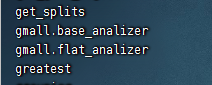
测试函数是否能使用
select flat_analizer(1);
对象检查器正常

# 解析事件日志基础明细表
解析事件日志基础明细表
use gmall;
-- 设置hive的任务队列
set mapreduce.job.queuename=hive;
-- 默认是: org.apache.hadoop.hive.ql.io.CombineHiveInputFormat会对 map 端的小文件进行合并,可能会把lzo压缩文件中的index索引文件,也进行合并,从而导致多了一条异常数据
set hive.input.format=org.apache.hadoop.hive.ql.io.HiveInputFormat;
insert overwrite table dwd_base_event_log partition(dt='2020-03-10')
select
    base_analizer(line,'mid') as mid_id,
    base_analizer(line,'uid') as user_id,
    base_analizer(line,'vc') as version_code,
    base_analizer(line,'vn') as version_name,
    base_analizer(line,'l') as lang,
    base_analizer(line,'sr') as source,
    base_analizer(line,'os') as os,
    base_analizer(line,'ar') as area,
    base_analizer(line,'md') as model,
    base_analizer(line,'ba') as brand,
    base_analizer(line,'sv') as sdk_version,
    base_analizer(line,'g') as gmail,
    base_analizer(line,'hw') as height_width,
    base_analizer(line,'t') as app_time,
    base_analizer(line,'nw') as network,
    base_analizer(line,'ln') as lng,
    base_analizer(line,'la') as lat,
    event_name,
    event_json,
    base_analizer(line,'st') as server_time
from ods_event_log lateral view flat_analizer(base_analizer(line,'et')) tmp_flat as event_name,event_json
where dt='2020-03-10' and base_analizer(line,'et') <> '';
2
3
4
5
6
7
8
9
10
11
12
13
14
15
16
17
18
19
20
21
22
23
24
25
26
27
28
29
查看是否有数据
select * from dwd_base_event_log limit 2;
# DWD 层数据解析脚本
在 hadoop102 的 /home/atguigu/bin 目录下创建脚本
vim /home/atguigu/bin/ods_to_dwd_base_log.sh
在脚本中编写如下内容
#!/bin/bash

# 定义变量方便修改
APP=gmall
hive=/opt/module/hive/bin/hive

# 如果是输入的日期按照取输入日期;如果没输入日期取当前时间的前一天
if [ -n "$1" ] ;then
	do_date=$1
else
	do_date=`date -d "-1 day" +%F`
fi

sql="
set hive.input.format=org.apache.hadoop.hive.ql.io.HiveInputFormat;
insert overwrite table ${APP}.dwd_base_event_log partition(dt='$do_date')
select
    ${APP}.base_analizer(line,'mid') as mid_id,
    ${APP}.base_analizer(line,'uid') as user_id,
    ${APP}.base_analizer(line,'vc') as version_code,
    ${APP}.base_analizer(line,'vn') as version_name,
    ${APP}.base_analizer(line,'l') as lang,
    ${APP}.base_analizer(line,'sr') as source,
    ${APP}.base_analizer(line,'os') as os,
    ${APP}.base_analizer(line,'ar') as area,
    ${APP}.base_analizer(line,'md') as model,
    ${APP}.base_analizer(line,'ba') as brand,
    ${APP}.base_analizer(line,'sv') as sdk_version,
    ${APP}.base_analizer(line,'g') as gmail,
    ${APP}.base_analizer(line,'hw') as height_width,
    ${APP}.base_analizer(line,'t') as app_time,
    ${APP}.base_analizer(line,'nw') as network,
    ${APP}.base_analizer(line,'ln') as lng,
    ${APP}.base_analizer(line,'la') as lat,
    event_name,
    event_json,
    ${APP}.base_analizer(line,'st') as server_time
from ${APP}.ods_event_log lateral view ${APP}.flat_analizer(${APP}.base_analizer(line,'et')) tem_flat as event_name,event_json
where dt='$do_date'  and ${APP}.base_analizer(line,'et') <> '';
"

$hive -e "$sql";
2
3
4
5
6
7
8
9
10
11
12
13
14
15
16
17
18
19
20
21
22
23
24
25
26
27
28
29
30
31
32
33
34
35
36
37
38
39
40
41
42
增加脚本执行权限
chmod +x /home/atguigu/bin/ods_to_dwd_base_log.sh
dwd_base_log.sh 2020-03-11
2
查询导入结果
select * from dwd_base_event_log where dt='2020-03-11' limit 2;
# DWD 层(事件日志解析之具体事件表)
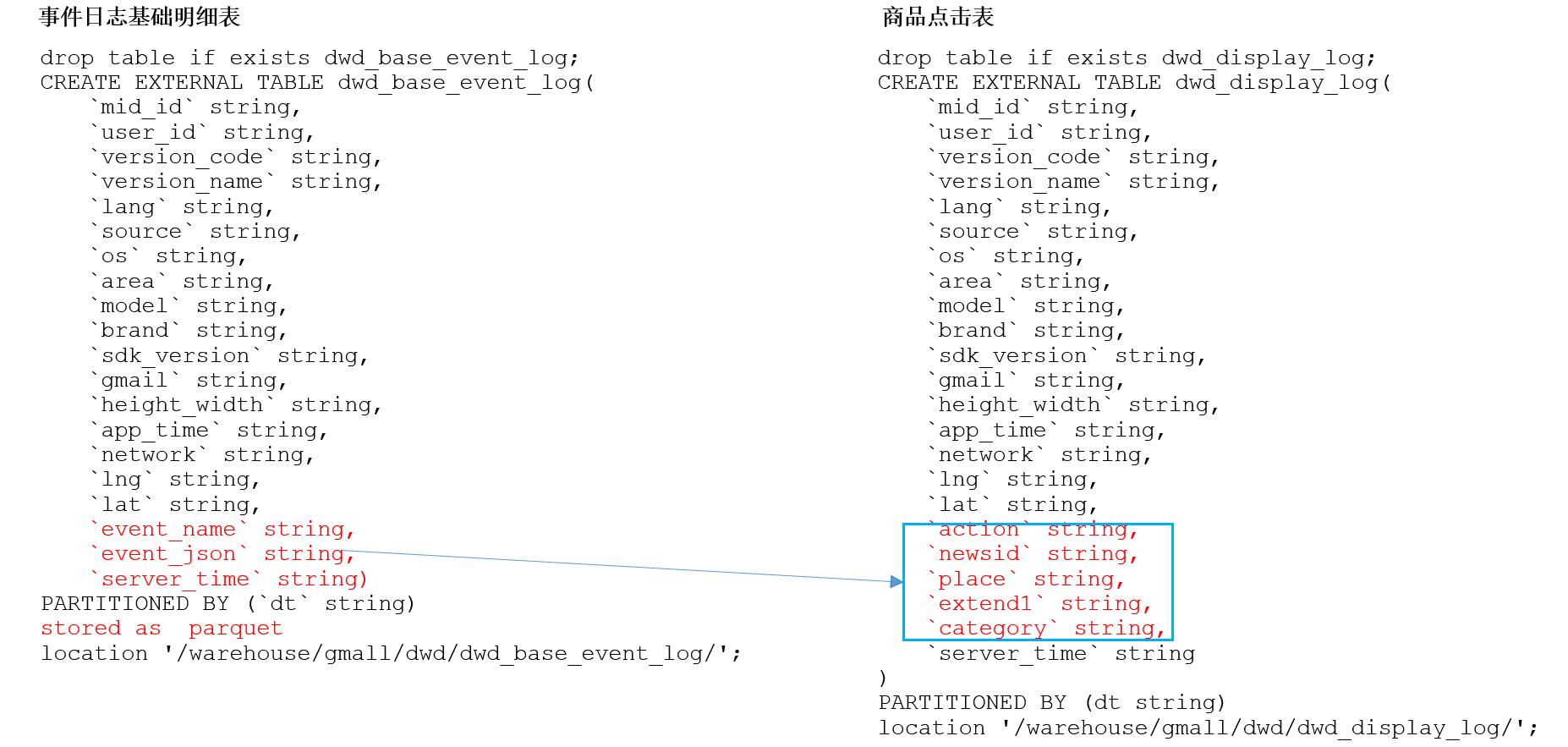
# 具体事件表建表语句
use gmall;
-- 商品曝光表
drop table if exists dwd_display_log;
CREATE EXTERNAL TABLE dwd_display_log(
    `mid_id` string,
    `user_id` string,
    `version_code` string,
    `version_name` string,
    `lang` string,
    `source` string,
    `os` string,
    `area` string,
    `model` string,
    `brand` string,
    `sdk_version` string,
    `gmail` string,
    `height_width` string,
    `app_time` string,
    `network` string,
    `lng` string,
    `lat` string,
    `action` string,
    `goodsid` string,
    `place` string,
    `extend1` string,
    `category` string,
    `server_time` string
    )
PARTITIONED BY (dt string)
stored as parquet
location '/warehouse/gmall/dwd/dwd_display_log/'
TBLPROPERTIES('parquet.compression'='lzo');

-- 商品详情页表
drop table if exists dwd_newsdetail_log;
CREATE EXTERNAL TABLE dwd_newsdetail_log(
    `mid_id` string,
    `user_id` string,
    `version_code` string,
    `version_name` string,
    `lang` string,
    `source` string,
    `os` string,
    `area` string,
    `model` string,
    `brand` string,
    `sdk_version` string,
    `gmail` string,
    `height_width` string,
    `app_time` string,
    `network` string,
    `lng` string,
    `lat` string,
    `entry` string,
    `action` string,
    `goodsid` string,
    `showtype` string,
    `news_staytime` string,
    `loading_time` string,
    `type1` string,
    `category` string,
    `server_time` string)
PARTITIONED BY (dt string)
stored as parquet
location '/warehouse/gmall/dwd/dwd_newsdetail_log/'
TBLPROPERTIES('parquet.compression'='lzo');

-- 商品列表页表
drop table if exists dwd_loading_log;
CREATE EXTERNAL TABLE dwd_loading_log(
    `mid_id` string,
    `user_id` string,
    `version_code` string,
    `version_name` string,
    `lang` string,
    `source` string,
    `os` string,
    `area` string,
    `model` string,
    `brand` string,
    `sdk_version` string,
    `gmail` string,
    `height_width` string,
    `app_time` string,
    `network` string,
    `lng` string,
    `lat` string,
    `action` string,
    `loading_time` string,
    `loading_way` string,
    `extend1` string,
    `extend2` string,
    `type` string,
    `type1` string,
    `server_time` string)
PARTITIONED BY (dt string)
stored as parquet
location '/warehouse/gmall/dwd/dwd_loading_log/'
TBLPROPERTIES('parquet.compression'='lzo');

-- 广告表
drop table if exists dwd_ad_log;
CREATE EXTERNAL TABLE dwd_ad_log(
    `mid_id` string,
    `user_id` string,
    `version_code` string,
    `version_name` string,
    `lang` string,
    `source` string,
    `os` string,
    `area` string,
    `model` string,
    `brand` string,
    `sdk_version` string,
    `gmail` string,
    `height_width` string,
    `app_time` string,
    `network` string,
    `lng` string,
    `lat` string,
    `entry` string,
    `action` string,
    `contentType` string,
    `displayMills` string,
    `itemId` string,
    `activityId` string,
    `server_time` string)
PARTITIONED BY (dt string)
stored as parquet
location '/warehouse/gmall/dwd/dwd_ad_log/'
TBLPROPERTIES('parquet.compression'='lzo');

-- 消息通知表
drop table if exists dwd_notification_log;
CREATE EXTERNAL TABLE dwd_notification_log(
    `mid_id` string,
    `user_id` string,
    `version_code` string,
    `version_name` string,
    `lang` string,
    `source` string,
    `os` string,
    `area` string,
    `model` string,
    `brand` string,
    `sdk_version` string,
    `gmail` string,
    `height_width` string,
    `app_time` string,
    `network` string,
    `lng` string,
    `lat` string,
    `action` string,
    `noti_type` string,
    `ap_time` string,
    `content` string,
    `server_time` string
)
PARTITIONED BY (dt string)
stored as parquet
location '/warehouse/gmall/dwd/dwd_notification_log/'
TBLPROPERTIES('parquet.compression'='lzo');

-- 用户后台活跃表
drop table if exists dwd_active_background_log;
CREATE EXTERNAL TABLE dwd_active_background_log(
    `mid_id` string,
    `user_id` string,
    `version_code` string,
    `version_name` string,
    `lang` string,
    `source` string,
    `os` string,
    `area` string,
    `model` string,
    `brand` string,
    `sdk_version` string,
    `gmail` string,
     `height_width` string,
    `app_time` string,
    `network` string,
    `lng` string,
    `lat` string,
    `active_source` string,
    `server_time` string
)
PARTITIONED BY (dt string)
stored as parquet
location '/warehouse/gmall/dwd/dwd_background_log/'
TBLPROPERTIES('parquet.compression'='lzo');

-- 评论表
drop table if exists dwd_comment_log;
CREATE EXTERNAL TABLE dwd_comment_log(
    `mid_id` string,
    `user_id` string,
    `version_code` string,
    `version_name` string,
    `lang` string,
    `source` string,
    `os` string,
    `area` string,
    `model` string,
    `brand` string,
    `sdk_version` string,
    `gmail` string,
    `height_width` string,
    `app_time` string,
    `network` string,
    `lng` string,
    `lat` string,
    `comment_id` int,
    `userid` int,
    `p_comment_id` int,
    `content` string,
    `addtime` string,
    `other_id` int,
    `praise_count` int,
    `reply_count` int,
    `server_time` string
)
PARTITIONED BY (dt string)
stored as parquet
location '/warehouse/gmall/dwd/dwd_comment_log/'
TBLPROPERTIES('parquet.compression'='lzo');

-- 收藏表
drop table if exists dwd_favorites_log;
CREATE EXTERNAL TABLE dwd_favorites_log(
    `mid_id` string,
    `user_id` string,
    `version_code` string,
    `version_name` string,
    `lang` string,
    `source` string,
    `os` string,
    `area` string,
    `model` string,
    `brand` string,
    `sdk_version` string,
    `gmail` string,
    `height_width` string,
    `app_time` string,
    `network` string,
    `lng` string,
    `lat` string,
    `id` int,
    `course_id` int,
    `userid` int,
    `add_time` string,
    `server_time` string
)
PARTITIONED BY (dt string)
stored as parquet
location '/warehouse/gmall/dwd/dwd_favorites_log/'
TBLPROPERTIES('parquet.compression'='lzo');

-- 点赞表
drop table if exists dwd_praise_log;
CREATE EXTERNAL TABLE dwd_praise_log(
    `mid_id` string,
    `user_id` string,
    `version_code` string,
    `version_name` string,
    `lang` string,
    `source` string,
    `os` string,
    `area` string,
    `model` string,
    `brand` string,
    `sdk_version` string,
    `gmail` string,
    `height_width` string,
    `app_time` string,
    `network` string,
    `lng` string,
    `lat` string,
    `id` string,
    `userid` string,
    `target_id` string,
    `type` string,
    `add_time` string,
    `server_time` string
)
PARTITIONED BY (dt string)
stored as parquet
location '/warehouse/gmall/dwd/dwd_praise_log/'
TBLPROPERTIES('parquet.compression'='lzo');

-- 错误日志表
drop table if exists dwd_error_log;
CREATE EXTERNAL TABLE dwd_error_log(
    `mid_id` string,
    `user_id` string,
    `version_code`string,
    `version_name`string,
    `lang` string,
    `source` string,
    `os` string,
    `area` string,
    `model` string,
    `brand` string,
    `sdk_version` string,
    `gmail` string,
    `height_width` string,
    `app_time` string,
    `network` string,
    `lng` string,
    `lat` string,
    `errorBrief` string,
    `errorDetail` string,
    `server_time` string)
PARTITIONED BY (dt string)
stored as parquet
location '/warehouse/gmall/dwd/dwd_error_log/'
TBLPROPERTIES('parquet.compression'='lzo');
2
3
4
5
6
7
8
9
10
11
12
13
14
15
16
17
18
19
20
21
22
23
24
25
26
27
28
29
30
31
32
33
34
35
36
37
38
39
40
41
42
43
44
45
46
47
48
49
50
51
52
53
54
55
56
57
58
59
60
61
62
63
64
65
66
67
68
69
70
71
72
73
74
75
76
77
78
79
80
81
82
83
84
85
86
87
88
89
90
91
92
93
94
95
96
97
98
99
100
101
102
103
104
105
106
107
108
109
110
111
112
113
114
115
116
117
118
119
120
121
122
123
124
125
126
127
128
129
130
131
132
133
134
135
136
137
138
139
140
141
142
143
144
145
146
147
148
149
150
151
152
153
154
155
156
157
158
159
160
161
162
163
164
165
166
167
168
169
170
171
172
173
174
175
176
177
178
179
180
181
182
183
184
185
186
187
188
189
190
191
192
193
194
195
196
197
198
199
200
201
202
203
204
205
206
207
208
209
210
211
212
213
214
215
216
217
218
219
220
221
222
223
224
225
226
227
228
229
230
231
232
233
234
235
236
237
238
239
240
241
242
243
244
245
246
247
248
249
250
251
252
253
254
255
256
257
258
259
260
261
262
263
264
265
266
267
268
269
270
271
272
273
274
275
276
277
278
279
280
281
282
283
284
285
286
287
288
289
290
291
292
293
294
295
296
297
298
299
300
301
302
303
304
305
306
307
308
309
310
311
312
313
314
315
316
317
查询是否创建成功
show tables;
一种十张表 加上之前的两张表 dwd 层一共十二张表
dwd_active_background_log
dwd_ad_log
dwd_comment_log
dwd_display_log
dwd_error_log
dwd_favorites_log
dwd_newsdetail_log
dwd_loading_log
dwd_notification_log
dwd_praise_log
2
3
4
5
6
7
8
9
10
# DWD 层事件表加载数据脚本
在 hadoop102 的 /home/atguigu/bin 目录下创建脚本
vim /home/atguigu/bin/dwd_events_log.sh
在脚本中编写如下内容
#!/bin/bash

# 定义变量方便修改
APP=gmall
hive=/opt/module/hive/bin/hive

# 如果是输入的日期按照取输入日期;如果没输入日期取当前时间的前一天
if [ -n "$1" ] ;then
	do_date=$1
else
	do_date=`date -d "-1 day" +%F`
fi

sql="
-- 设置动态分区模式为非严格模式
set hive.exec.dynamic.partition.mode=nonstrict;

insert overwrite table "$APP".dwd_display_log
PARTITION (dt='$do_date')
select
	mid_id,
	user_id,
	version_code,
	version_name,
	lang,
	source,
	os,
	area,
	model,
	brand,
	sdk_version,
	gmail,
	height_width,
	app_time,
	network,
	lng,
	lat,
	get_json_object(event_json,'$.kv.action') action,
	get_json_object(event_json,'$.kv.goodsid') goodsid,
	get_json_object(event_json,'$.kv.place') place,
	get_json_object(event_json,'$.kv.extend1') extend1,
	get_json_object(event_json,'$.kv.category') category,
	server_time
from "$APP".dwd_base_event_log
where dt='$do_date' and event_name='display';


insert overwrite table "$APP".dwd_newsdetail_log
PARTITION (dt='$do_date')
select
	mid_id,
	user_id,
	version_code,
	version_name,
	lang,
	source,
	os,
	area,
	model,
	brand,
	sdk_version,
	gmail,
	height_width,
	app_time,
	network,
	lng,
	lat,
	get_json_object(event_json,'$.kv.entry') entry,
	get_json_object(event_json,'$.kv.action') action,
	get_json_object(event_json,'$.kv.goodsid') goodsid,
	get_json_object(event_json,'$.kv.showtype') showtype,
	get_json_object(event_json,'$.kv.news_staytime') news_staytime,
	get_json_object(event_json,'$.kv.loading_time') loading_time,
	get_json_object(event_json,'$.kv.type1') type1,
	get_json_object(event_json,'$.kv.category') category,
	server_time
from "$APP".dwd_base_event_log
where dt='$do_date' and event_name='newsdetail';


insert overwrite table "$APP".dwd_loading_log
PARTITION (dt='$do_date')
select
	mid_id,
	user_id,
	version_code,
	version_name,
	lang,
	source,
	os,
	area,
	model,
	brand,
	sdk_version,
	gmail,
	height_width,
	app_time,
	network,
	lng,
	lat,
	get_json_object(event_json,'$.kv.action') action,
	get_json_object(event_json,'$.kv.loading_time') loading_time,
	get_json_object(event_json,'$.kv.loading_way') loading_way,
	get_json_object(event_json,'$.kv.extend1') extend1,
	get_json_object(event_json,'$.kv.extend2') extend2,
	get_json_object(event_json,'$.kv.type') type,
	get_json_object(event_json,'$.kv.type1') type1,
	server_time
from "$APP".dwd_base_event_log
where dt='$do_date' and event_name='loading';


insert overwrite table "$APP".dwd_ad_log
PARTITION (dt='$do_date')
select
	mid_id,
	user_id,
	version_code,
	version_name,
	lang,
	source,
	os,
	area,
	model,
	brand,
	sdk_version,
	gmail,
	height_width,
	app_time,
	network,
	lng,
	lat,
    get_json_object(event_json,'$.kv.entry') entry,
    get_json_object(event_json,'$.kv.action') action,
    get_json_object(event_json,'$.kv.contentType') contentType,
    get_json_object(event_json,'$.kv.displayMills') displayMills,
    get_json_object(event_json,'$.kv.itemId') itemId,
    get_json_object(event_json,'$.kv.activityId') activityId,
	server_time
from "$APP".dwd_base_event_log
where dt='$do_date' and event_name='ad';


insert overwrite table "$APP".dwd_notification_log
PARTITION (dt='$do_date')
select
	mid_id,
	user_id,
	version_code,
	version_name,
	lang,
	source,
	os,
	area,
	model,
	brand,
	sdk_version,
	gmail,
	height_width,
	app_time,
	network,
	lng,
	lat,
	get_json_object(event_json,'$.kv.action') action,
	get_json_object(event_json,'$.kv.noti_type') noti_type,
	get_json_object(event_json,'$.kv.ap_time') ap_time,
	get_json_object(event_json,'$.kv.content') content,
	server_time
from "$APP".dwd_base_event_log
where dt='$do_date' and event_name='notification';


insert overwrite table "$APP".dwd_active_background_log
PARTITION (dt='$do_date')
select
	mid_id,
	user_id,
	version_code,
	version_name,
	lang,
	source,
	os,
	area,
	model,
	brand,
	sdk_version,
	gmail,
	height_width,
	app_time,
	network,
	lng,
	lat,
	get_json_object(event_json,'$.kv.active_source') active_source,
	server_time
from "$APP".dwd_base_event_log
where dt='$do_date' and event_name='active_background';


insert overwrite table "$APP".dwd_comment_log
PARTITION (dt='$do_date')
select
	mid_id,
	user_id,
	version_code,
	version_name,
	lang,
	source,
	os,
	area,
	model,
	brand,
	sdk_version,
	gmail,
	height_width,
	app_time,
	network,
	lng,
	lat,
	get_json_object(event_json,'$.kv.comment_id') comment_id,
	get_json_object(event_json,'$.kv.userid') userid,
	get_json_object(event_json,'$.kv.p_comment_id') p_comment_id,
	get_json_object(event_json,'$.kv.content') content,
	get_json_object(event_json,'$.kv.addtime') addtime,
	get_json_object(event_json,'$.kv.other_id') other_id,
	get_json_object(event_json,'$.kv.praise_count') praise_count,
	get_json_object(event_json,'$.kv.reply_count') reply_count,
	server_time
from "$APP".dwd_base_event_log
where dt='$do_date' and event_name='comment';


insert overwrite table "$APP".dwd_favorites_log
PARTITION (dt='$do_date')
select
	mid_id,
	user_id,
	version_code,
	version_name,
	lang,
	source,
	os,
	area,
	model,
	brand,
	sdk_version,
	gmail,
	height_width,
	app_time,
	network,
	lng,
	lat,
	get_json_object(event_json,'$.kv.id') id,
	get_json_object(event_json,'$.kv.course_id') course_id,
	get_json_object(event_json,'$.kv.userid') userid,
	get_json_object(event_json,'$.kv.add_time') add_time,
	server_time
from "$APP".dwd_base_event_log
where dt='$do_date' and event_name='favorites';


insert overwrite table "$APP".dwd_praise_log
PARTITION (dt='$do_date')
select
	mid_id,
	user_id,
	version_code,
	version_name,
	lang,
	source,
	os,
	area,
	model,
	brand,
	sdk_version,
	gmail,
	height_width,
	app_time,
	network,
	lng,
	lat,
	get_json_object(event_json,'$.kv.id') id,
	get_json_object(event_json,'$.kv.userid') userid,
	get_json_object(event_json,'$.kv.target_id') target_id,
	get_json_object(event_json,'$.kv.type') type,
	get_json_object(event_json,'$.kv.add_time') add_time,
	server_time
from "$APP".dwd_base_event_log
where dt='$do_date' and event_name='praise';


insert overwrite table "$APP".dwd_error_log
PARTITION (dt='$do_date')
select
	mid_id,
	user_id,
	version_code,
	version_name,
	lang,
	source,
	os,
	area,
	model,
	brand,
	sdk_version,
	gmail,
	height_width,
	app_time,
	network,
	lng,
	lat,
	get_json_object(event_json,'$.kv.errorBrief') errorBrief,
	get_json_object(event_json,'$.kv.errorDetail') errorDetail,
	server_time
from "$APP".dwd_base_event_log
where dt='$do_date' and event_name='error';
"

$hive -e "$sql"
2
3
4
5
6
7
8
9
10
11
12
13
14
15
16
17
18
19
20
21
22
23
24
25
26
27
28
29
30
31
32
33
34
35
36
37
38
39
40
41
42
43
44
45
46
47
48
49
50
51
52
53
54
55
56
57
58
59
60
61
62
63
64
65
66
67
68
69
70
71
72
73
74
75
76
77
78
79
80
81
82
83
84
85
86
87
88
89
90
91
92
93
94
95
96
97
98
99
100
101
102
103
104
105
106
107
108
109
110
111
112
113
114
115
116
117
118
119
120
121
122
123
124
125
126
127
128
129
130
131
132
133
134
135
136
137
138
139
140
141
142
143
144
145
146
147
148
149
150
151
152
153
154
155
156
157
158
159
160
161
162
163
164
165
166
167
168
169
170
171
172
173
174
175
176
177
178
179
180
181
182
183
184
185
186
187
188
189
190
191
192
193
194
195
196
197
198
199
200
201
202
203
204
205
206
207
208
209
210
211
212
213
214
215
216
217
218
219
220
221
222
223
224
225
226
227
228
229
230
231
232
233
234
235
236
237
238
239
240
241
242
243
244
245
246
247
248
249
250
251
252
253
254
255
256
257
258
259
260
261
262
263
264
265
266
267
268
269
270
271
272
273
274
275
276
277
278
279
280
281
282
283
284
285
286
287
288
289
290
291
292
293
294
295
296
297
298
299
300
301
302
303
304
305
306
307
308
309
310
311
312
313
314
315
316
317
318
增加脚本执行权限
chmod +x /home/atguigu/bin/dwd_events_log.sh
dwd_events_log.sh 2020-03-10
2
如果重新无法创建 spark client 的错误 修改 hive-site.xml 中的 spark 连接超时时间 然后再次执行脚本

vim /opt/module/hive/conf/hive-site.xml
添加以下配置
<property>
	<name>hive.spark.client.connect.timeout</name>
	<value>2000ms</value>
</property>
2
3
4
如果还是无法正常运行脚本 可以尝试减少 spark 的资源分配
vim /opt/module/hive/conf/spark-defaults.conf
修改下面两个属性的值为 1g
spark.driver.memory                             1g
spark.executor.memory                           1g
2
查询导入结果
use gmall;
select * from dwd_comment_log where dt='2020-03-10' limit 2;
2
# DWD 层(业务数据)
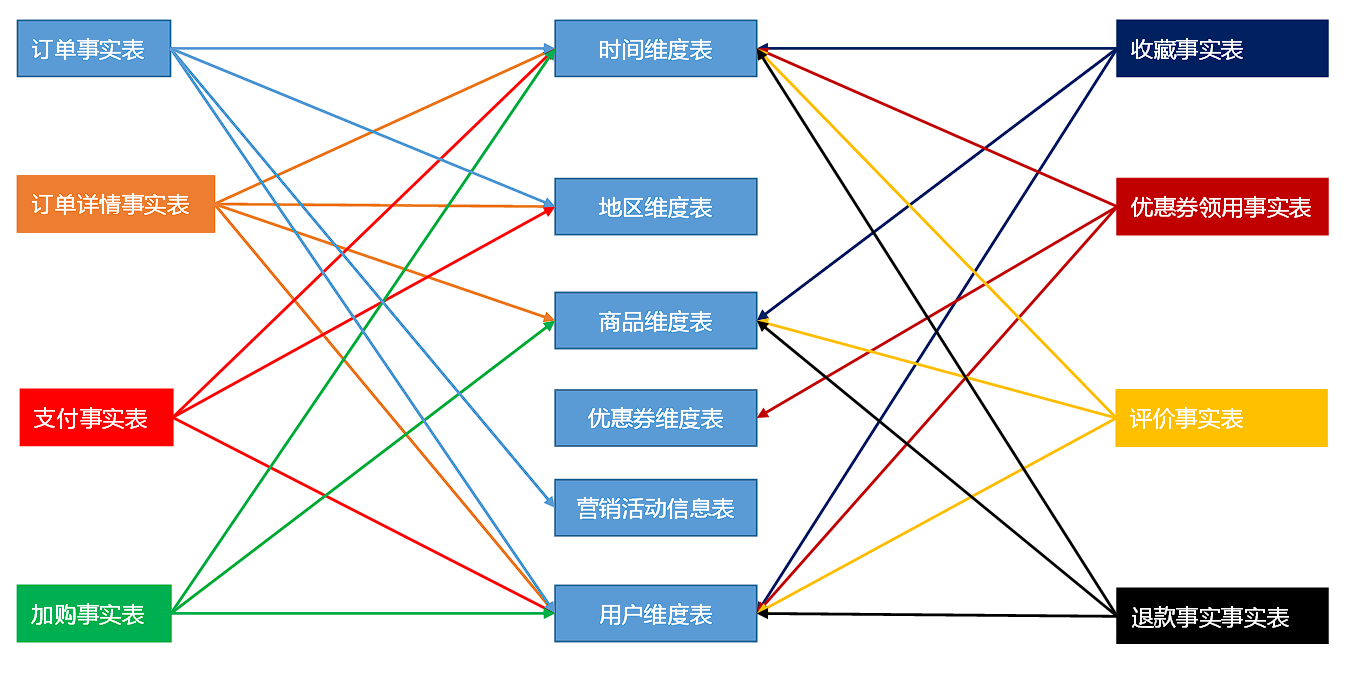
# 商品维度表(全量表)
DROP TABLE IF EXISTS `dwd_dim_sku_info`;
CREATE EXTERNAL TABLE `dwd_dim_sku_info` (
    `id` string COMMENT '商品id',
    `spu_id` string COMMENT 'spuid',
    `price` double COMMENT '商品价格',
    `sku_name` string COMMENT '商品名称',
    `sku_desc` string COMMENT '商品描述',
    `weight` double COMMENT '重量',
    `tm_id` string COMMENT '品牌id',
    `tm_name` string COMMENT '品牌名称',
    `category3_id` string COMMENT '三级分类id',
    `category2_id` string COMMENT '二级分类id',
    `category1_id` string COMMENT '一级分类id',
    `category3_name` string COMMENT '三级分类名称',
    `category2_name` string COMMENT '二级分类名称',
    `category1_name` string COMMENT '一级分类名称',
    `spu_name` string COMMENT 'spu名称',
    `create_time` string COMMENT '创建时间'
)
COMMENT '商品维度表'
PARTITIONED BY (`dt` string)
stored as parquet
location '/warehouse/gmall/dwd/dwd_dim_sku_info/'
tblproperties ("parquet.compression"="lzo");
2
3
4
5
6
7
8
9
10
11
12
13
14
15
16
17
18
19
20
21
22
23
24
数据装载
可以不单独装载,后面由导入脚本统一装载,除了两张特殊表时间维度表和用户维度表。详情请看 DWD 层业务数据导入脚本
SET hive.input.format=org.apache.hadoop.hive.ql.io.HiveInputFormat;
insert overwrite table dwd_dim_sku_info partition(dt='2020-03-10')
select
    sku.id,
    sku.spu_id,
    sku.price,
    sku.sku_name,
    sku.sku_desc,
    sku.weight,
    sku.tm_id,
    ob.tm_name,
    sku.category3_id,
    c2.id category2_id,
    c1.id category1_id,
    c3.name category3_name,
    c2.name category2_name,
    c1.name category1_name,
    spu.spu_name,
    sku.create_time
from
(
    select * from ods_sku_info where dt='2020-03-10'
)sku
join
(
    select * from ods_base_trademark where dt='2020-03-10'
)ob on sku.tm_id=ob.tm_id
join
(
    select * from ods_spu_info where dt='2020-03-10'
)spu on spu.id = sku.spu_id
join
(
    select * from ods_base_category3 where dt='2020-03-10'
)c3 on sku.category3_id=c3.id
join
(
    select * from ods_base_category2 where dt='2020-03-10'
)c2 on c3.category2_id=c2.id
join
(
    select * from ods_base_category1 where dt='2020-03-10'
)c1 on c2.category1_id=c1.id;
2
3
4
5
6
7
8
9
10
11
12
13
14
15
16
17
18
19
20
21
22
23
24
25
26
27
28
29
30
31
32
33
34
35
36
37
38
39
40
41
42
43
查询
select * from dwd_dim_sku_info where dt='2020-03-10';
# 优惠券信息表(全量)
把 ODS 层 ods_coupon_info 表数据导入到 DWD 层优惠卷信息表,在导入过程中可以做适当的清洗。
drop table if exists dwd_dim_coupon_info;
create external table dwd_dim_coupon_info(
    `id` string COMMENT '购物券编号',
    `coupon_name` string COMMENT '购物券名称',
    `coupon_type` string COMMENT '购物券类型 1 现金券 2 折扣券 3 满减券 4 满件打折券',
    `condition_amount` string COMMENT '满额数',
    `condition_num` string COMMENT '满件数',
    `activity_id` string COMMENT '活动编号',
    `benefit_amount` string COMMENT '减金额',
    `benefit_discount` string COMMENT '折扣',
    `create_time` string COMMENT '创建时间',
    `range_type` string COMMENT '范围类型 1、商品 2、品类 3、品牌',
    `spu_id` string COMMENT '商品id',
    `tm_id` string COMMENT '品牌id',
    `category3_id` string COMMENT '品类id',
    `limit_num` string COMMENT '最多领用次数',
    `operate_time`  string COMMENT '修改时间',
    `expire_time`  string COMMENT '过期时间'
) COMMENT '优惠券信息表'
PARTITIONED BY (`dt` string)
row format delimited fields terminated by '\t'
stored as parquet
location '/warehouse/gmall/dwd/dwd_dim_coupon_info/'
tblproperties ("parquet.compression"="lzo");
2
3
4
5
6
7
8
9
10
11
12
13
14
15
16
17
18
19
20
21
22
23
24
数据装载
SET hive.input.format=org.apache.hadoop.hive.ql.io.HiveInputFormat;
insert overwrite table dwd_dim_coupon_info partition(dt='2020-03-10')
select
    id,
    coupon_name,
    coupon_type,
    condition_amount,
    condition_num,
    activity_id,
    benefit_amount,
    benefit_discount,
    create_time,
    range_type,
    spu_id,
    tm_id,
    category3_id,
    limit_num,
    operate_time,
    expire_time
from ods_coupon_info
where dt='2020-03-10';
2
3
4
5
6
7
8
9
10
11
12
13
14
15
16
17
18
19
20
21
# 活动维度表(全量)
drop table if exists dwd_dim_activity_info;
create external table dwd_dim_activity_info(
    `id` string COMMENT '编号',
    `activity_name` string  COMMENT '活动名称',
    `activity_type` string  COMMENT '活动类型',
    `condition_amount` string  COMMENT '满减金额',
    `condition_num` string  COMMENT '满减件数',
    `benefit_amount` string  COMMENT '优惠金额',
    `benefit_discount` string  COMMENT '优惠折扣',
    `benefit_level` string  COMMENT '优惠级别',
    `start_time` string  COMMENT '开始时间',
    `end_time` string  COMMENT '结束时间',
    `create_time` string  COMMENT '创建时间'
) COMMENT '活动信息表'
PARTITIONED BY (`dt` string)
row format delimited fields terminated by '\t'
stored as parquet
location '/warehouse/gmall/dwd/dwd_dim_activity_info/'
tblproperties ("parquet.compression"="lzo");
2
3
4
5
6
7
8
9
10
11
12
13
14
15
16
17
18
19
数据装载
SET hive.input.format=org.apache.hadoop.hive.ql.io.HiveInputFormat;
insert overwrite table dwd_dim_activity_info partition(dt='2020-03-10')
select
    info.id,
    info.activity_name,
    info.activity_type,
    rule.condition_amount,
    rule.condition_num,
    rule.benefit_amount,
    rule.benefit_discount,
    rule.benefit_level,
    info.start_time,
    info.end_time,
    info.create_time
from
(
    select * from ods_activity_info where dt='2020-03-10'
)info
left join
(
    select * from ods_activity_rule where dt='2020-03-10'
)rule on info.id = rule.activity_id;
2
3
4
5
6
7
8
9
10
11
12
13
14
15
16
17
18
19
20
21
22
# 地区维度表(特殊)
DROP TABLE IF EXISTS `dwd_dim_base_province`;
CREATE EXTERNAL TABLE `dwd_dim_base_province` (
    `id` string COMMENT 'id',
    `province_name` string COMMENT '省市名称',
    `area_code` string COMMENT '地区编码',
    `iso_code` string COMMENT 'ISO编码',
    `region_id` string COMMENT '地区id',
    `region_name` string COMMENT '地区名称'
)
COMMENT '地区省市表'
stored as parquet
location '/warehouse/gmall/dwd/dwd_dim_base_province/'
tblproperties ("parquet.compression"="lzo");
2
3
4
5
6
7
8
9
10
11
12
13
数据装载
SET hive.input.format=org.apache.hadoop.hive.ql.io.HiveInputFormat;
insert overwrite table dwd_dim_base_province
select
    bp.id,
    bp.name,
    bp.area_code,
    bp.iso_code,
    bp.region_id,
    br.region_name
from ods_base_province bp
join ods_base_region br
on bp.region_id=br.id;
2
3
4
5
6
7
8
9
10
11
12
# 时间维度表(特殊)
DROP TABLE IF EXISTS `dwd_dim_date_info`;
CREATE EXTERNAL TABLE `dwd_dim_date_info`(
    `date_id` string COMMENT '日',
    `week_id` int COMMENT '周',
    `week_day` int COMMENT '周的第几天',
    `day` int COMMENT '每月的第几天',
    `month` int COMMENT '第几月',
    `quarter` int COMMENT '第几季度',
    `year` int COMMENT '年',
    `is_workday` int COMMENT '是否是周末',
    `holiday_id` int COMMENT '是否是节假日'
)
row format delimited fields terminated by '\t'
stored as parquet
location '/warehouse/gmall/dwd/dwd_dim_date_info/'
tblproperties ("parquet.compression"="lzo");
2
3
4
5
6
7
8
9
10
11
12
13
14
15
16
# 从文件中导入数据
把 date_info.txt 文件上传到 hadoop102 的 /opt/module/db_log/ 路径
数据装载
- 创建临时表,非列式存储
DROP TABLE IF EXISTS `dwd_dim_date_info_tmp`;
CREATE EXTERNAL TABLE `dwd_dim_date_info_tmp`(
    `date_id` string COMMENT '日',
    `week_id` int COMMENT '周',
    `week_day` int COMMENT '周的第几天',
    `day` int COMMENT '每月的第几天',
    `month` int COMMENT '第几月',
    `quarter` int COMMENT '第几季度',
    `year` int COMMENT '年',
    `is_workday` int COMMENT '是否是周末',
    `holiday_id` int COMMENT '是否是节假日'
)
row format delimited fields terminated by '\t'
location '/warehouse/gmall/dwd/dwd_dim_date_info_tmp/';
2
3
4
5
6
7
8
9
10
11
12
13
14
- 将数据导入临时表
load data local inpath '/opt/module/db_log/date_info.txt' into table dwd_dim_date_info_tmp;
- 将数据导入正式表
insert overwrite table dwd_dim_date_info select * from dwd_dim_date_info_tmp;
# 订单明细事实表(事务型事实表)
| 时间 | 用户 | 地区 | 商品 | 优惠券 | 活动 | 编码 | 度量值 | |
|---|---|---|---|---|---|---|---|---|
| 订单详情 | √ | √ | √ | 件数 / 金额 |
drop table if exists dwd_fact_order_detail;
create external table dwd_fact_order_detail (
    `id` string COMMENT '',
    `order_id` string COMMENT '',
    `province_id` string COMMENT '',
    `user_id` string COMMENT '',
    `sku_id` string COMMENT '',
    `create_time` string COMMENT '',
    `total_amount` decimal(20,2) COMMENT '',
    `sku_num` bigint COMMENT ''
)
PARTITIONED BY (`dt` string)
stored as parquet
location '/warehouse/gmall/dwd/dwd_fact_order_detail/'
tblproperties ("parquet.compression"="lzo");
2
3
4
5
6
7
8
9
10
11
12
13
14
15
数据装载
SET hive.input.format=org.apache.hadoop.hive.ql.io.HiveInputFormat;
insert overwrite table dwd_fact_order_detail partition(dt='2020-03-10')
select
    od.id,
    od.order_id,
    oi.province_id,
    od.user_id,
    od.sku_id,
    od.create_time,
    od.order_price*od.sku_num,
    od.sku_num
from
(
    select * from ods_order_detail where dt='2020-03-10'
) od
join
(
    select * from ods_order_info where dt='2020-03-10'
) oi
on od.order_id=oi.id;
2
3
4
5
6
7
8
9
10
11
12
13
14
15
16
17
18
19
20
# 支付事实表(事务型事实表)
| 时间 | 用户 | 地区 | 商品 | 优惠券 | 活动 | 编码 | 度量值 | |
|---|---|---|---|---|---|---|---|---|
| 支付 | √ | √ | 金额 |
drop table if exists dwd_fact_payment_info;
create external table dwd_fact_payment_info (
    `id` string COMMENT '',
    `out_trade_no` string COMMENT '对外业务编号',
    `order_id` string COMMENT '订单编号',
    `user_id` string COMMENT '用户编号',
    `alipay_trade_no` string COMMENT '支付宝交易流水编号',
    `payment_amount`    decimal(16,2) COMMENT '支付金额',
    `subject`         string COMMENT '交易内容',
    `payment_type` string COMMENT '支付类型',
    `payment_time` string COMMENT '支付时间',
    `province_id` string COMMENT '省份ID'
)
PARTITIONED BY (`dt` string)
stored as parquet
location '/warehouse/gmall/dwd/dwd_fact_payment_info/'
tblproperties ("parquet.compression"="lzo");
2
3
4
5
6
7
8
9
10
11
12
13
14
15
16
17
数据装载
SET hive.input.format=org.apache.hadoop.hive.ql.io.HiveInputFormat;
insert overwrite table dwd_fact_payment_info partition(dt='2020-03-10')
select
    pi.id,
    pi.out_trade_no,
    pi.order_id,
    pi.user_id,
    pi.alipay_trade_no,
    pi.total_amount,
    pi.subject,
    pi.payment_type,
    pi.payment_time,
    oi.province_id
from
(
    select * from ods_payment_info where dt='2020-03-10'
)pi
join
(
    select id, province_id from ods_order_info where dt='2020-03-10'
)oi
on pi.order_id = oi.id;
2
3
4
5
6
7
8
9
10
11
12
13
14
15
16
17
18
19
20
21
22
# 退款事实表(事务型事实表)
把 ODS 层 ods_order_refund_info 表数据导入到 DWD 层退款事实表,在导入过程中可以做适当的清洗。
| 时间 | 用户 | 地区 | 商品 | 优惠券 | 活动 | 编码 | 度量值 | |
|---|---|---|---|---|---|---|---|---|
| 退款 | √ | √ | √ | 件数 / 金额 |
drop table if exists dwd_fact_order_refund_info;
create external table dwd_fact_order_refund_info(
    `id` string COMMENT '编号',
    `user_id` string COMMENT '用户ID',
    `order_id` string COMMENT '订单ID',
    `sku_id` string COMMENT '商品ID',
    `refund_type` string COMMENT '退款类型',
    `refund_num` bigint COMMENT '退款件数',
    `refund_amount` decimal(16,2) COMMENT '退款金额',
    `refund_reason_type` string COMMENT '退款原因类型',
    `create_time` string COMMENT '退款时间'
) COMMENT '退款事实表'
PARTITIONED BY (`dt` string)
row format delimited fields terminated by '\t'
location '/warehouse/gmall/dwd/dwd_fact_order_refund_info/';
2
3
4
5
6
7
8
9
10
11
12
13
14
15
数据装载
SET hive.input.format=org.apache.hadoop.hive.ql.io.HiveInputFormat;
insert overwrite table dwd_fact_order_refund_info partition(dt='2020-03-10')
select
    id,
    user_id,
    order_id,
    sku_id,
    refund_type,
    refund_num,
    refund_amount,
    refund_reason_type,
    create_time
from ods_order_refund_info
where dt='2020-03-10';
2
3
4
5
6
7
8
9
10
11
12
13
14
# 评价事实表(事务型事实表)
把 ODS 层 ods_comment_info 表数据导入到 DWD 层评价事实表,在导入过程中可以做适当的清洗。
| 时间 | 用户 | 地区 | 商品 | 优惠券 | 活动 | 编码 | 度量值 | |
|---|---|---|---|---|---|---|---|---|
| 评价 | √ | √ | √ | 个数 |
drop table if exists dwd_fact_comment_info;
create external table dwd_fact_comment_info(
    `id` string COMMENT '编号',
    `user_id` string COMMENT '用户ID',
    `sku_id` string COMMENT '商品sku',
    `spu_id` string COMMENT '商品spu',
    `order_id` string COMMENT '订单ID',
    `appraise` string COMMENT '评价',
    `create_time` string COMMENT '评价时间'
) COMMENT '评价事实表'
PARTITIONED BY (`dt` string)
row format delimited fields terminated by '\t'
location '/warehouse/gmall/dwd/dwd_fact_comment_info/';
2
3
4
5
6
7
8
9
10
11
12
13
数据装载
SET hive.input.format=org.apache.hadoop.hive.ql.io.HiveInputFormat;
insert overwrite table dwd_fact_comment_info partition(dt='2020-03-10')
select
    id,
    user_id,
    sku_id,
    spu_id,
    order_id,
    appraise,
    create_time
from ods_comment_info
where dt='2020-03-10';
2
3
4
5
6
7
8
9
10
11
12
# 加购事实表(周期型快照事实表,每日快照)
由于购物车的数量是会发生变化,所以导增量不合适。
每天做一次快照,导入的数据是全量,区别于事务型事实表是每天导入新增。
周期型快照事实表劣势:存储的数据量会比较大。
解决方案:周期型快照事实表存储的数据比较讲究时效性,时间太久了的意义不大,可以删除以前的数据。
| 时间 | 用户 | 地区 | 商品 | 优惠券 | 活动 | 编码 | 度量值 | |
|---|---|---|---|---|---|---|---|---|
| 加购 | √ | √ | √ | 件数 / 金额 |
drop table if exists dwd_fact_cart_info;
create external table dwd_fact_cart_info(
    `id` string COMMENT '编号',
    `user_id` string  COMMENT '用户id',
    `sku_id` string  COMMENT 'skuid',
    `cart_price` string  COMMENT '放入购物车时价格',
    `sku_num` string  COMMENT '数量',
    `sku_name` string  COMMENT 'sku名称 (冗余)',
    `create_time` string  COMMENT '创建时间',
    `operate_time` string COMMENT '修改时间',
    `is_ordered` string COMMENT '是否已经下单。1为已下单;0为未下单',
    `order_time` string  COMMENT '下单时间'
) COMMENT '加购事实表'
PARTITIONED BY (`dt` string)
row format delimited fields terminated by '\t'
location '/warehouse/gmall/dwd/dwd_fact_cart_info/';
2
3
4
5
6
7
8
9
10
11
12
13
14
15
16
数据装载
SET hive.input.format=org.apache.hadoop.hive.ql.io.HiveInputFormat;
insert overwrite table dwd_fact_cart_info partition(dt='2020-03-10')
select
    id,
    user_id,
    sku_id,
    cart_price,
    sku_num,
    sku_name,
    create_time,
    operate_time,
    is_ordered,
    order_time
from ods_cart_info
where dt='2020-03-10';
2
3
4
5
6
7
8
9
10
11
12
13
14
15
# 收藏事实表(周期型快照事实表,每日快照)
收藏的标记,是否取消,会发生变化,做增量不合适。
每天做一次快照,导入的数据是全量,区别于事务型事实表是每天导入新增。
| 时间 | 用户 | 地区 | 商品 | 优惠券 | 活动 | 编码 | 度量值 | |
|---|---|---|---|---|---|---|---|---|
| 收藏 | √ | √ | √ | 个数 |
drop table if exists dwd_fact_favor_info;
create external table dwd_fact_favor_info(
    `id` string COMMENT '编号',
    `user_id` string  COMMENT '用户id',
    `sku_id` string  COMMENT 'skuid',
    `spu_id` string  COMMENT 'spuid',
    `is_cancel` string  COMMENT '是否取消',
    `create_time` string  COMMENT '收藏时间',
    `cancel_time` string  COMMENT '取消时间'
) COMMENT '收藏事实表'
PARTITIONED BY (`dt` string)
row format delimited fields terminated by '\t'
location '/warehouse/gmall/dwd/dwd_fact_favor_info/';
2
3
4
5
6
7
8
9
10
11
12
13
数据装载
SET hive.input.format=org.apache.hadoop.hive.ql.io.HiveInputFormat;
insert overwrite table dwd_fact_favor_info partition(dt='2020-03-10')
select
    id,
    user_id,
    sku_id,
    spu_id,
    is_cancel,
    create_time,
    cancel_time
from ods_favor_info
where dt='2020-03-10';
2
3
4
5
6
7
8
9
10
11
12
# 优惠券领用事实表(累积型快照事实表)
| 时间 | 用户 | 地区 | 商品 | 优惠券 | 活动 | 编码 | 度量值 | |
|---|---|---|---|---|---|---|---|---|
| 优惠券领用 | √ | √ | √ | 个数 |
优惠卷的生命周期:领取优惠卷 --> 用优惠卷下单 --> 优惠卷参与支付
累积型快照事实表使用:统计优惠卷领取次数、优惠卷下单次数、优惠卷参与支付次数
drop table if exists dwd_fact_coupon_use;
create external table dwd_fact_coupon_use(
    `id` string COMMENT '编号',
    `coupon_id` string  COMMENT '优惠券ID',
    `user_id` string  COMMENT 'userid',
    `order_id` string  COMMENT '订单id',
    `coupon_status` string  COMMENT '优惠券状态',
    `get_time` string  COMMENT '领取时间',
    `using_time` string  COMMENT '使用时间(下单)',
    `used_time` string  COMMENT '使用时间(支付)'
) COMMENT '优惠券领用事实表'
PARTITIONED BY (`dt` string)
row format delimited fields terminated by '\t'
location '/warehouse/gmall/dwd/dwd_fact_coupon_use/';
2
3
4
5
6
7
8
9
10
11
12
13
14
数据装载
注意:dt 是按照优惠卷领用时间 get_time 做为分区,所有导入数据时需要开启动态分区的非严格模式
set hive.exec.dynamic.partition.mode=nonstrict;
insert overwrite table dwd_fact_coupon_use partition(dt)
select
    if(new.id is null,old.id,new.id),
    if(new.coupon_id is null,old.coupon_id,new.coupon_id),
    if(new.user_id is null,old.user_id,new.user_id),
    if(new.order_id is null,old.order_id,new.order_id),
    if(new.coupon_status is null,old.coupon_status,new.coupon_status),
    if(new.get_time is null,old.get_time,new.get_time),
    if(new.using_time is null,old.using_time,new.using_time),
    if(new.used_time is null,old.used_time,new.used_time),
    date_format(if(new.get_time is null,old.get_time,new.get_time),'yyyy-MM-dd')
from
(
    select
        id,
        coupon_id,
        user_id,
        order_id,
        coupon_status,
        get_time,
        using_time,
        used_time
    from dwd_fact_coupon_use
    where dt in
    (
        select
            date_format(get_time,'yyyy-MM-dd')
        from ods_coupon_use
        where dt='2020-03-10'
    )
)old
full outer join
(
    select
        id,
        coupon_id,
        user_id,
        order_id,
        coupon_status,
        get_time,
        using_time,
        used_time
    from ods_coupon_use
    where dt='2020-03-10'
)new
on old.id=new.id
2
3
4
5
6
7
8
9
10
11
12
13
14
15
16
17
18
19
20
21
22
23
24
25
26
27
28
29
30
31
32
33
34
35
36
37
38
39
40
41
42
43
44
45
46
47
# 订单事实表(累积型快照事实表)
# concat 函数
concat 函数在连接字符串的时候,只要其中一个是 NULL,那么将返回 NULL
select concat('a','b');
-- 输出结果:ab
select concat('a','b',null);
-- 输出结果:NULL
2
3
4
# concat_ws 函数
concat_ws 函数在连接字符串的时候,只要有一个字符串不是 NULL,就不会返回 NULL。concat_ws 函数需要指定分隔符。
select concat_ws('-','a','b');
-- 输出结果:a-b
select concat_ws('-','a','b',null);
-- 输出结果:a-b
select concat_ws('','a','b',null);
-- 输出结果:ab
2
3
4
5
6
# STR_TO_MAP 函数
语法描述
STR_TO_MAP(VARCHAR text, VARCHAR listDelimiter, VARCHAR keyValueDelimiter)
使用 listDelimiter 将 text 分隔成 K-V 对,然后使用 keyValueDelimiter 分隔每个 K-V 对,组装成 MAP 返回。默认 listDelimiter 为( ,),keyValueDelimiter 为(=)。
select str_to_map('1001=2020-03-10,1002=2020-03-10',  ','  ,  '=');
-- 输出结果:{"1001":"2020-03-10","1002":"2020-03-10"}
2
# 测试用例
select order_id, concat(order_status,'=', operate_time) from ods_order_status_log where dt='2020-03-10';
-- 输出结果
-- 3210    1001=2020-03-10 00:00:00.0
-- 3211    1001=2020-03-10 00:00:00.0

select order_id, collect_set(concat(order_status,'=',operate_time)) from ods_order_status_log where dt='2020-03-10' group by order_id;
-- 输出结果
-- 3210    ["1001=2020-03-10 00:00:00.0","1002=2020-03-10 00:00:00.0","1005=2020-03-10 00:00:00.0"]
-- 3211    ["1001=2020-03-10 00:00:00.0","1002=2020-03-10 00:00:00.0","1004=2020-03-10 00:00:00.0"]

select order_id, concat_ws(',', collect_set(concat(order_status,'=',operate_time))) from ods_order_status_log where dt='2020-03-10' group by order_id;
-- 输出结果
-- 3210    1001=2020-03-10 00:00:00.0,1002=2020-03-10 00:00:00.0,1005=2020-03-10 00:00:00.0
-- 3211    1001=2020-03-10 00:00:00.0,1002=2020-03-10 00:00:00.0,1004=2020-03-10 00:00:00.0

select order_id, str_to_map(concat_ws(',',collect_set(concat(order_status,'=',operate_time))), ','  ,  '=') from ods_order_status_log where dt='2020-03-10' group by order_id;
-- 输出结果
-- 3210    {"1001":"2020-03-10 00:00:00.0","1002":"2020-03-10 00:00:00.0","1005":"2020-03-10 00:00:00.0"}
-- 3211    {"1001":"2020-03-10 00:00:00.0","1002":"2020-03-10 00:00:00.0","1004":"2020-03-10 00:00:00.0"}
2
3
4
5
6
7
8
9
10
11
12
13
14
15
16
17
18
19
# 建表语句
| 时间 | 用户 | 地区 | 商品 | 优惠券 | 活动 | 编码 | 度量值 | |
|---|---|---|---|---|---|---|---|---|
| 订单 | √ | √ | √ | √ | 件数 / 金额 |
订单生命周期:创建时间 --> 支付时间 --> 取消时间 --> 完成时间 --> 退款时间 --> 退款完成时间。
由于 ODS 层订单表只有创建时间和操作时间两个状态,不能表达所有时间含义,所以需要关联订单状态表。订单事实表里面增加了活动 id,所以需要关联活动订单表。
drop table if exists dwd_fact_order_info;
create external table dwd_fact_order_info (
    `id` string COMMENT '订单编号',
    `order_status` string COMMENT '订单状态',
    `user_id` string COMMENT '用户id',
    `out_trade_no` string COMMENT '支付流水号',
    `create_time` string COMMENT '创建时间(未支付状态)',
    `payment_time` string COMMENT '支付时间(已支付状态)',
    `cancel_time` string COMMENT '取消时间(已取消状态)',
    `finish_time` string COMMENT '完成时间(已完成状态)',
    `refund_time` string COMMENT '退款时间(退款中状态)',
    `refund_finish_time` string COMMENT '退款完成时间(退款完成状态)',
    `province_id` string COMMENT '省份ID',
    `activity_id` string COMMENT '活动ID',
    `original_total_amount` string COMMENT '原价金额',
    `benefit_reduce_amount` string COMMENT '优惠金额',
    `feight_fee` string COMMENT '运费',
    `final_total_amount` decimal(10,2) COMMENT '订单金额'
)
PARTITIONED BY (`dt` string)
stored as parquet
location '/warehouse/gmall/dwd/dwd_fact_order_info/'
tblproperties ("parquet.compression"="lzo");
2
3
4
5
6
7
8
9
10
11
12
13
14
15
16
17
18
19
20
21
22
23
数据装载
set hive.exec.dynamic.partition.mode=nonstrict;
insert overwrite table dwd_fact_order_info partition(dt)
select
    if(new.id is null,old.id,new.id),
    if(new.order_status is null,old.order_status,new.order_status),
    if(new.user_id is null,old.user_id,new.user_id),
    if(new.out_trade_no is null,old.out_trade_no,new.out_trade_no),
    if(new.tms['1001'] is null,old.create_time,new.tms['1001']),--1001对应未支付状态
    if(new.tms['1002'] is null,old.payment_time,new.tms['1002']),
    if(new.tms['1003'] is null,old.cancel_time,new.tms['1003']),
    if(new.tms['1004'] is null,old.finish_time,new.tms['1004']),
    if(new.tms['1005'] is null,old.refund_time,new.tms['1005']),
    if(new.tms['1006'] is null,old.refund_finish_time,new.tms['1006']),
    if(new.province_id is null,old.province_id,new.province_id),
    if(new.activity_id is null,old.activity_id,new.activity_id),
    if(new.original_total_amount is null,old.original_total_amount,new.original_total_amount),
    if(new.benefit_reduce_amount is null,old.benefit_reduce_amount,new.benefit_reduce_amount),
    if(new.feight_fee is null,old.feight_fee,new.feight_fee),
    if(new.final_total_amount is null,old.final_total_amount,new.final_total_amount),
    date_format(if(new.tms['1001'] is null,old.create_time,new.tms['1001']),'yyyy-MM-dd')
from
(
    select
        id,
        order_status,
        user_id,
        out_trade_no,
        create_time,
        payment_time,
        cancel_time,
        finish_time,
        refund_time,
        refund_finish_time,
        province_id,
        activity_id,
        original_total_amount,
        benefit_reduce_amount,
        feight_fee,
        final_total_amount
    from dwd_fact_order_info
    where dt in
    (
        select
            date_format(create_time,'yyyy-MM-dd')
        from ods_order_info
        where dt='2020-03-10'
    )
)old
full outer join
(
    select
        info.id,
        info.order_status,
        info.user_id,
        info.out_trade_no,
        info.province_id,
        act.activity_id,
        log.tms,
        info.original_total_amount,
        info.benefit_reduce_amount,
        info.feight_fee,
        info.final_total_amount
    from
    (
        select
            order_id,
            str_to_map(concat_ws(',',collect_set(concat(order_status,'=',operate_time))),',','=') tms
        from ods_order_status_log
        where dt='2020-03-10'
        group by order_id
    )log
    join
    (
        select * from ods_order_info where dt='2020-03-10'
    )info
    on log.order_id=info.id
    left join
    (
        select * from ods_activity_order where dt='2020-03-10'
    )act
    on log.order_id=act.order_id
)new
on old.id=new.id
2
3
4
5
6
7
8
9
10
11
12
13
14
15
16
17
18
19
20
21
22
23
24
25
26
27
28
29
30
31
32
33
34
35
36
37
38
39
40
41
42
43
44
45
46
47
48
49
50
51
52
53
54
55
56
57
58
59
60
61
62
63
64
65
66
67
68
69
70
71
72
73
74
75
76
77
78
79
80
81
82
83
# 用户维度表(拉链表)
# 拉链表
用户表中的数据每日既有可能新增,也有可能修改,但修改频率并不高,属于缓慢变化维度,此处采用拉链表存储用户维度数据。
什么是拉链表?
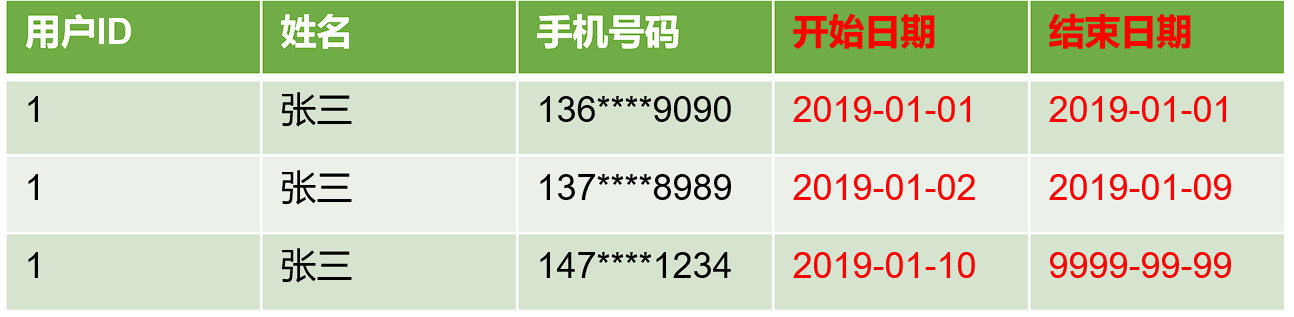
拉链表,记录每条信息的生命周期,一旦一条记录的生命周期结束,就重新开始一条新的记录,并把当前日期放入生效开始日期。
如果当前信息至今有效,在生效结束日期中填入一个极大值(如 9999-99-99 ),如下方表格所示。
为什么要做拉链表
拉链表适合于:数据会发生变化,但是大部分是不变的。(即:缓慢变化维)
比如:用户信息会发生变化,但是每天变化的比例不高。如果数据量有一定规模,按照每日全量的方式保存效率很低。 比如:1 亿用户 * 365 天,每天一份用户信息。(做每日全量效率低)
如何使用拉链表
通过,生效开始日期 <= 某个日期 且 生效结束日期>= 某个日期 ,能够得到某个时间点的数据全量切片。
拉链表数据
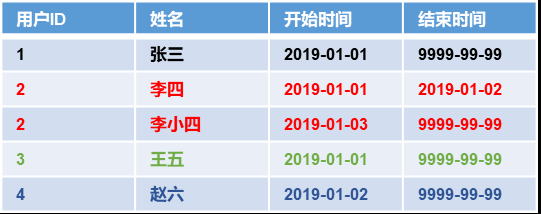
例如获取 2019-01-01 的历史切片
select * from user_info where start_date<='2019-01-01' and end_date>='2019-01-01';1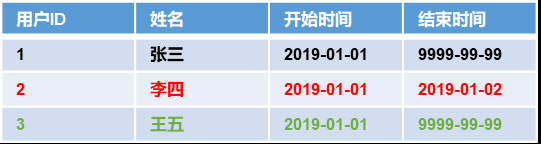
例如获取 2019-01-02 的历史切片
select * from order_info where start_date<='2019-01-02' and end_date>='2019-01-02';1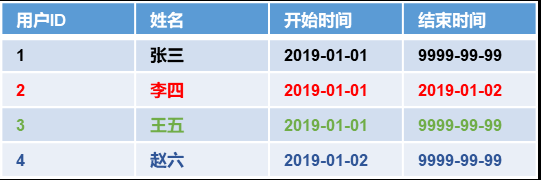
拉链表形成过程
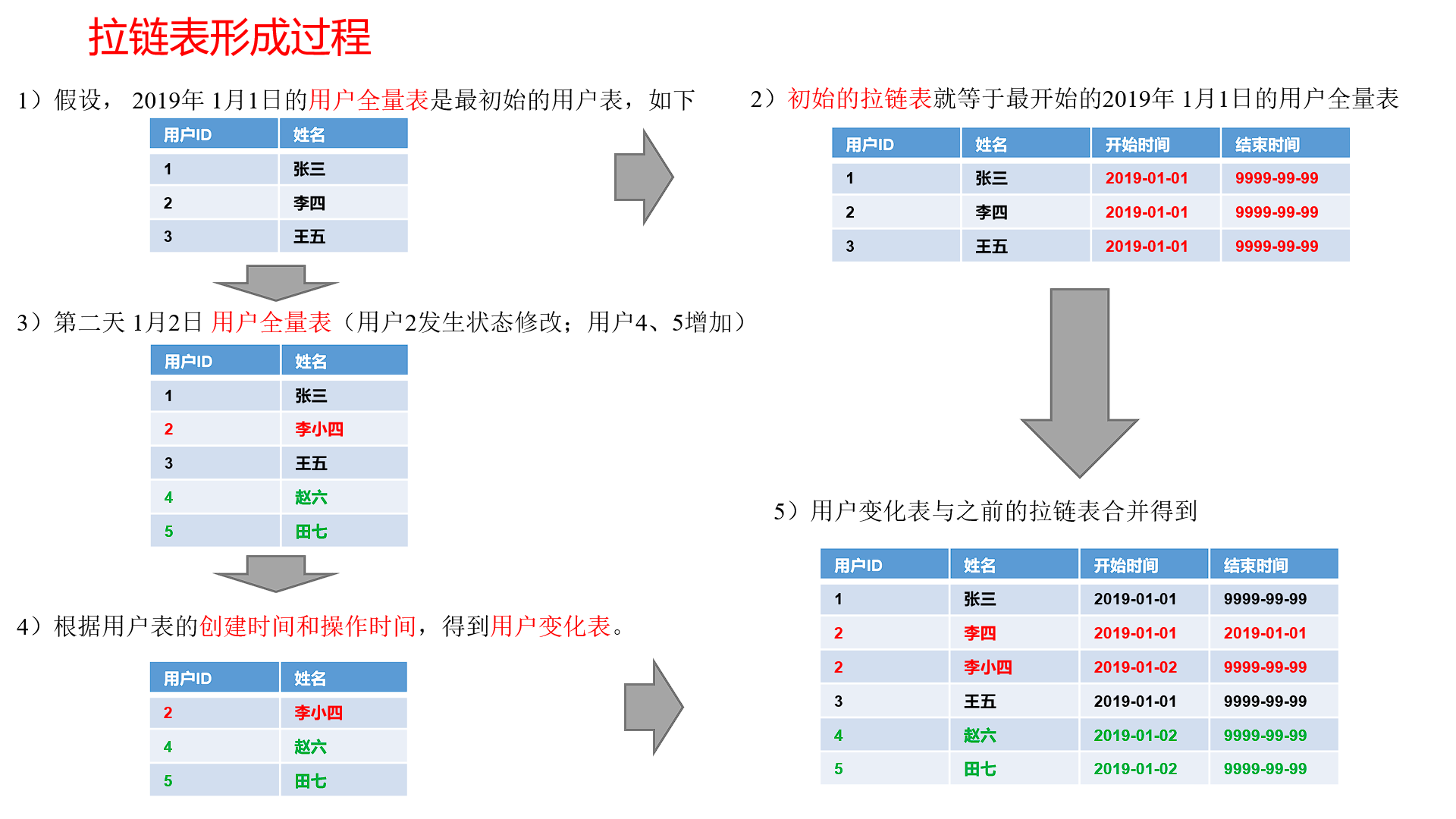
拉链表制作过程图
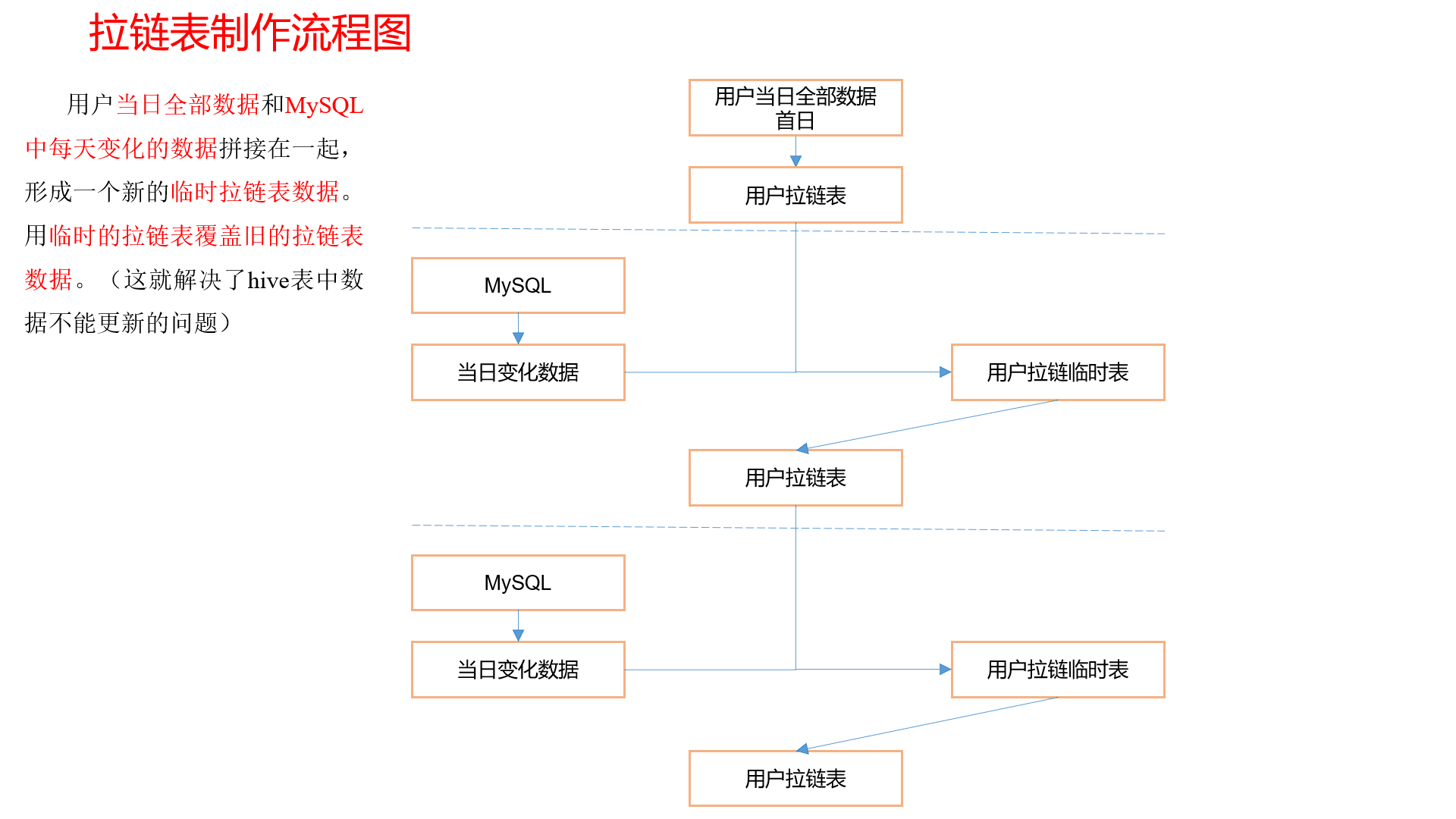
# 拉链表制作
步骤 0:初始化拉链表(首次独立执行)
建立拉链表
drop table if exists dwd_dim_user_info_his;
create external table dwd_dim_user_info_his(
    `id` string COMMENT '用户id',
    `name` string COMMENT '姓名',
    `birthday` string COMMENT '生日',
    `gender` string COMMENT '性别',
    `email` string COMMENT '邮箱',
    `user_level` string COMMENT '用户等级',
    `create_time` string COMMENT '创建时间',
    `operate_time` string COMMENT '操作时间',
    `start_date`  string COMMENT '有效开始日期',
    `end_date`  string COMMENT '有效结束日期'
) COMMENT '订单拉链表'
stored as parquet
location '/warehouse/gmall/dwd/dwd_dim_user_info_his/'
tblproperties ("parquet.compression"="lzo");
2
3
4
5
6
7
8
9
10
11
12
13
14
15
16
初始化拉链表,将业务系统中的用户表的全量数据,一次性导入到拉链表。 一般首次初始化导入使用 sqoop 单独执行初始化工作,这里我们使用 dwd 层的 user info 表,因为我们之前 dwd 就是全量导入 mysql 的数据没有进行变化,在生成环境中不建议这么操作。
insert overwrite table dwd_dim_user_info_his
select
    id,
    name,
    birthday,
    gender,
    email,
    user_level,
    create_time,
    operate_time,
    '2020-05-30',
    '9999-99-99'
from ods_user_info oi
where oi.dt='2020-03-10';
2
3
4
5
6
7
8
9
10
11
12
13
14
步骤 1:制作当日变动数据(包括新增,修改)每日执行
如何获得每日变动表
- ods_order_info 中,当天分区中存储的就是当日的变动数据
- 如果没有,可以利用第三方工具监控比如 canal,监控 MySQL 的实时变化进行记录(比较麻烦)。
- 逐行对比前后两天的数据,检查 md5 (concat (全部有可能变化的字段)) 是否相同 (low)
因为 ods_order_info 本身导入过来就是新增变动明细的表,所以不用处理
数据库中新增 2020-03-11 一天的数据
通过 Sqoop 把 2020-03-11 日所有数据导入
mysqlTohdfs.sh all 2020-03-111ods 层数据导入
hdfs_to_ods_db.sh all 2020-03-111
步骤 2:先合并变动信息,再追加新增信息,插入到临时表中
- 建立临时表
drop table if exists dwd_dim_user_info_his_tmp;
create external table dwd_dim_user_info_his_tmp(
    `id` string COMMENT '用户id',
    `name` string COMMENT '姓名',
    `birthday` string COMMENT '生日',
    `gender` string COMMENT '性别',
    `email` string COMMENT '邮箱',
    `user_level` string COMMENT '用户等级',
    `create_time` string COMMENT '创建时间',
    `operate_time` string COMMENT '操作时间',
    `start_date`  string COMMENT '有效开始日期',
    `end_date`  string COMMENT '有效结束日期'
) COMMENT '订单拉链临时表'
stored as parquet
location '/warehouse/gmall/dwd/dwd_dim_user_info_his_tmp/'
tblproperties ("parquet.compression"="lzo");
2
3
4
5
6
7
8
9
10
11
12
13
14
15
16
- 插入带临时表
insert overwrite table dwd_dim_user_info_his_tmp
select
    id,
    name,
    birthday,
    gender,
    email,
    user_level,
    create_time,
    operate_time,
    '2020-03-11',
    '9999-99-99'
from ods_user_info
where dt='2020-03-11'
union all
select
    his.id,
    his.name,
    his.birthday,
    his.gender,
    his.email,
    his.user_level,
    his.create_time,
    his.operate_time,
    his.start_date,
    if(oi.id is not null and his.end_date='9999-99-99',date_add('2020-03-11',-1),his.end_date)
from dwd_dim_user_info_his his
left join
(
    select * from ods_user_info where dt='2020-03-11'
)oi
on his.id=oi.id
2
3
4
5
6
7
8
9
10
11
12
13
14
15
16
17
18
19
20
21
22
23
24
25
26
27
28
29
30
31
32
步骤 3:把临时表覆盖给拉链表
insert overwrite table dwd_dim_user_info_his select * from dwd_dim_user_info_his_tmp
# DWD 层业务数据导入脚本
在 /home/atguigu/bin 目录下创建脚本 ods_to_dwd_db.sh
vim /home/atguigu/bin/ods_to_dwd_db.sh
注意:该脚本中不包含时间维度表的数据导入以及用户维度表的初始化导入,上述工作应手动执行。
在脚本中填写如下内容
#!/bin/bash

APP=gmall
hive=/opt/module/hive/bin/hive

# 如果是输入的日期按照取输入日期;如果没输入日期取当前时间的前一天
if [ -n "$2" ] ;then
    do_date=$2
else
    do_date=`date -d "-1 day" +%F`
fi

sql1="
set hive.exec.dynamic.partition.mode=nonstrict;

insert overwrite table ${APP}.dwd_dim_sku_info partition(dt='$do_date')
select
    sku.id,
    sku.spu_id,
    sku.price,
    sku.sku_name,
    sku.sku_desc,
    sku.weight,
    sku.tm_id,
    ob.tm_name,
    sku.category3_id,
    c2.id category2_id,
    c1.id category1_id,
    c3.name category3_name,
    c2.name category2_name,
    c1.name category1_name,
    spu.spu_name,
    sku.create_time
from
(
    select * from ${APP}.ods_sku_info where dt='$do_date'
)sku
join
(
    select * from ${APP}.ods_base_trademark where dt='$do_date'
)ob on sku.tm_id=ob.tm_id
join
(
    select * from ${APP}.ods_spu_info where dt='$do_date'
)spu on spu.id = sku.spu_id
join
(
    select * from ${APP}.ods_base_category3 where dt='$do_date'
)c3 on sku.category3_id=c3.id
join
(
    select * from ${APP}.ods_base_category2 where dt='$do_date'
)c2 on c3.category2_id=c2.id
join
(
    select * from ${APP}.ods_base_category1 where dt='$do_date'
)c1 on c2.category1_id=c1.id;


insert overwrite table ${APP}.dwd_dim_coupon_info partition(dt='$do_date')
select
    id,
    coupon_name,
    coupon_type,
    condition_amount,
    condition_num,
    activity_id,
    benefit_amount,
    benefit_discount,
    create_time,
    range_type,
    spu_id,
    tm_id,
    category3_id,
    limit_num,
    operate_time,
    expire_time
from ${APP}.ods_coupon_info
where dt='$do_date';


insert overwrite table ${APP}.dwd_dim_activity_info partition(dt='$do_date')
select
    info.id,
    info.activity_name,
    info.activity_type,
    rule.condition_amount,
    rule.condition_num,
    rule.benefit_amount,
    rule.benefit_discount,
    rule.benefit_level,
    info.start_time,
    info.end_time,
    info.create_time
from
(
    select * from ${APP}.ods_activity_info where dt='$do_date'
)info
left join
(
    select * from ${APP}.ods_activity_rule where dt='$do_date'
)rule on info.id = rule.activity_id;


insert overwrite table ${APP}.dwd_fact_order_detail partition(dt='$do_date')
select
    od.id,
    od.order_id,
    oi.province_id,
    od.user_id,
    od.sku_id,
    od.create_time,
    od.order_price*od.sku_num,
    od.sku_num
from
(
    select * from ${APP}.ods_order_detail where dt='$do_date'
) od
join
(
    select * from ${APP}.ods_order_info where dt='$do_date'
) oi
on od.order_id=oi.id;


insert overwrite table ${APP}.dwd_fact_payment_info partition(dt='$do_date')
select
    pi.id,
    pi.out_trade_no,
    pi.order_id,
    pi.user_id,
    pi.alipay_trade_no,
    pi.total_amount,
    pi.subject,
    pi.payment_type,
    pi.payment_time,
    oi.province_id
from
(
    select * from ${APP}.ods_payment_info where dt='$do_date'
)pi
join
(
    select id, province_id from ${APP}.ods_order_info where dt='$do_date'
)oi
on pi.order_id = oi.id;


insert overwrite table ${APP}.dwd_fact_order_refund_info partition(dt='$do_date')
select
    id,
    user_id,
    order_id,
    sku_id,
    refund_type,
    refund_num,
    refund_amount,
    refund_reason_type,
    create_time
from ${APP}.ods_order_refund_info
where dt='$do_date';


insert overwrite table ${APP}.dwd_fact_comment_info partition(dt='$do_date')
select
    id,
    user_id,
    sku_id,
    spu_id,
    order_id,
    appraise,
    create_time
from ${APP}.ods_comment_info
where dt='$do_date';


insert overwrite table ${APP}.dwd_fact_cart_info partition(dt='$do_date')
select
    id,
    user_id,
    sku_id,
    cart_price,
    sku_num,
    sku_name,
    create_time,
    operate_time,
    is_ordered,
    order_time
from ${APP}.ods_cart_info
where dt='$do_date';


insert overwrite table ${APP}.dwd_fact_favor_info partition(dt='$do_date')
select
    id,
    user_id,
    sku_id,
    spu_id,
    is_cancel,
    create_time,
    cancel_time
from ${APP}.ods_favor_info
where dt='$do_date';

insert overwrite table ${APP}.dwd_fact_coupon_use partition(dt)
select
    if(new.id is null,old.id,new.id),
    if(new.coupon_id is null,old.coupon_id,new.coupon_id),
    if(new.user_id is null,old.user_id,new.user_id),
    if(new.order_id is null,old.order_id,new.order_id),
    if(new.coupon_status is null,old.coupon_status,new.coupon_status),
    if(new.get_time is null,old.get_time,new.get_time),
    if(new.using_time is null,old.using_time,new.using_time),
    if(new.used_time is null,old.used_time,new.used_time),
    date_format(if(new.get_time is null,old.get_time,new.get_time),'yyyy-MM-dd')
from
(
    select
        id,
        coupon_id,
        user_id,
        order_id,
        coupon_status,
        get_time,
        using_time,
        used_time
    from ${APP}.dwd_fact_coupon_use
    where dt in
    (
        select
            date_format(get_time,'yyyy-MM-dd')
        from ${APP}.ods_coupon_use
        where dt='$do_date'
    )
)old
full outer join
(
    select
        id,
        coupon_id,
        user_id,
        order_id,
        coupon_status,
        get_time,
        using_time,
        used_time
    from ${APP}.ods_coupon_use
    where dt='$do_date'
)new
on old.id=new.id;


insert overwrite table ${APP}.dwd_fact_order_info partition(dt)
select
    if(new.id is null,old.id,new.id),
    if(new.order_status is null,old.order_status,new.order_status),
    if(new.user_id is null,old.user_id,new.user_id),
    if(new.out_trade_no is null,old.out_trade_no,new.out_trade_no),
    if(new.tms['1001'] is null,old.create_time,new.tms['1001']),--1001对应未支付状态
    if(new.tms['1002'] is null,old.payment_time,new.tms['1002']),
    if(new.tms['1003'] is null,old.cancel_time,new.tms['1003']),
    if(new.tms['1004'] is null,old.finish_time,new.tms['1004']),
    if(new.tms['1005'] is null,old.refund_time,new.tms['1005']),
    if(new.tms['1006'] is null,old.refund_finish_time,new.tms['1006']),
    if(new.province_id is null,old.province_id,new.province_id),
    if(new.activity_id is null,old.activity_id,new.activity_id),
    if(new.original_total_amount is null,old.original_total_amount,new.original_total_amount),
    if(new.benefit_reduce_amount is null,old.benefit_reduce_amount,new.benefit_reduce_amount),
    if(new.feight_fee is null,old.feight_fee,new.feight_fee),
    if(new.final_total_amount is null,old.final_total_amount,new.final_total_amount),
    date_format(if(new.tms['1001'] is null,old.create_time,new.tms['1001']),'yyyy-MM-dd')
from
(
    select
        id,
        order_status,
        user_id,
        out_trade_no,
        create_time,
        payment_time,
        cancel_time,
        finish_time,
        refund_time,
        refund_finish_time,
        province_id,
        activity_id,
        original_total_amount,
        benefit_reduce_amount,
        feight_fee,
        final_total_amount
    from ${APP}.dwd_fact_order_info
    where dt
    in
    (
        select
          date_format(create_time,'yyyy-MM-dd')
        from ${APP}.ods_order_info
        where dt='$do_date'
    )
)old
full outer join
(
    select
        info.id,
        info.order_status,
        info.user_id,
        info.out_trade_no,
        info.province_id,
        act.activity_id,
        log.tms,
        info.original_total_amount,
        info.benefit_reduce_amount,
        info.feight_fee,
        info.final_total_amount
    from
    (
        select
            order_id,
            str_to_map(concat_ws(',',collect_set(concat(order_status,'=',operate_time))),',','=') tms
        from ${APP}.ods_order_status_log
        where dt='$do_date'
        group by order_id
    )log
    join
    (
        select * from ${APP}.ods_order_info where dt='$do_date'
    )info
    on log.order_id=info.id
    left join
    (
        select * from ${APP}.ods_activity_order where dt='$do_date'
    )act
    on log.order_id=act.order_id
)new
on old.id=new.id;
"

sql2="
insert overwrite table ${APP}.dwd_dim_base_province
select
    bp.id,
    bp.name,
    bp.area_code,
    bp.iso_code,
    bp.region_id,
    br.region_name
from ${APP}.ods_base_province bp
join ${APP}.ods_base_region br
on bp.region_id=br.id;
"

sql3="
insert overwrite table ${APP}.dwd_dim_user_info_his_tmp
select * from
(
    select
        id,
        name,
        birthday,
        gender,
        email,
        user_level,
        create_time,
        operate_time,
        '$do_date' start_date,
        '9999-99-99' end_date
    from ${APP}.ods_user_info where dt='$do_date'

    union all
    select
        uh.id,
        uh.name,
        uh.birthday,
        uh.gender,
        uh.email,
        uh.user_level,
        uh.create_time,
        uh.operate_time,
        uh.start_date,
        if(ui.id is not null  and uh.end_date='9999-99-99', date_add(ui.dt,-1), uh.end_date) end_date
    from ${APP}.dwd_dim_user_info_his uh left join
    (
        select
            *
        from ${APP}.ods_user_info
        where dt='$do_date'
    ) ui on uh.id=ui.id
)his
order by his.id, start_date;

insert overwrite table ${APP}.dwd_dim_user_info_his
select * from ${APP}.dwd_dim_user_info_his_tmp;
"

case $1 in
"first"){
    $hive -e "$sql1$sql2"
};;
"all"){
    $hive -e "$sql1$sql3"
};;
esac
2
3
4
5
6
7
8
9
10
11
12
13
14
15
16
17
18
19
20
21
22
23
24
25
26
27
28
29
30
31
32
33
34
35
36
37
38
39
40
41
42
43
44
45
46
47
48
49
50
51
52
53
54
55
56
57
58
59
60
61
62
63
64
65
66
67
68
69
70
71
72
73
74
75
76
77
78
79
80
81
82
83
84
85
86
87
88
89
90
91
92
93
94
95
96
97
98
99
100
101
102
103
104
105
106
107
108
109
110
111
112
113
114
115
116
117
118
119
120
121
122
123
124
125
126
127
128
129
130
131
132
133
134
135
136
137
138
139
140
141
142
143
144
145
146
147
148
149
150
151
152
153
154
155
156
157
158
159
160
161
162
163
164
165
166
167
168
169
170
171
172
173
174
175
176
177
178
179
180
181
182
183
184
185
186
187
188
189
190
191
192
193
194
195
196
197
198
199
200
201
202
203
204
205
206
207
208
209
210
211
212
213
214
215
216
217
218
219
220
221
222
223
224
225
226
227
228
229
230
231
232
233
234
235
236
237
238
239
240
241
242
243
244
245
246
247
248
249
250
251
252
253
254
255
256
257
258
259
260
261
262
263
264
265
266
267
268
269
270
271
272
273
274
275
276
277
278
279
280
281
282
283
284
285
286
287
288
289
290
291
292
293
294
295
296
297
298
299
300
301
302
303
304
305
306
307
308
309
310
311
312
313
314
315
316
317
318
319
320
321
322
323
324
325
326
327
328
329
330
331
332
333
334
335
336
337
338
339
340
341
342
343
344
345
346
347
348
349
350
351
352
353
354
355
356
357
358
359
360
361
362
363
364
365
366
367
368
369
370
371
372
373
374
375
376
377
378
379
380
381
382
383
384
385
386
387
388
389
390
391
392
393
394
395
396
397
398
399
400
401
402
增加脚本执行权限
chmod +x /home/atguigu/bin/ods_to_dwd_db.sh
# 初次导入
其余表
ods_to_dwd_db.sh first 2020-03-101
# 每日定时导入
后续使用 Azkaban 定时执行
ods_to_dwd_db.sh all 2020-03-11