
 Maven
Maven
# Maven
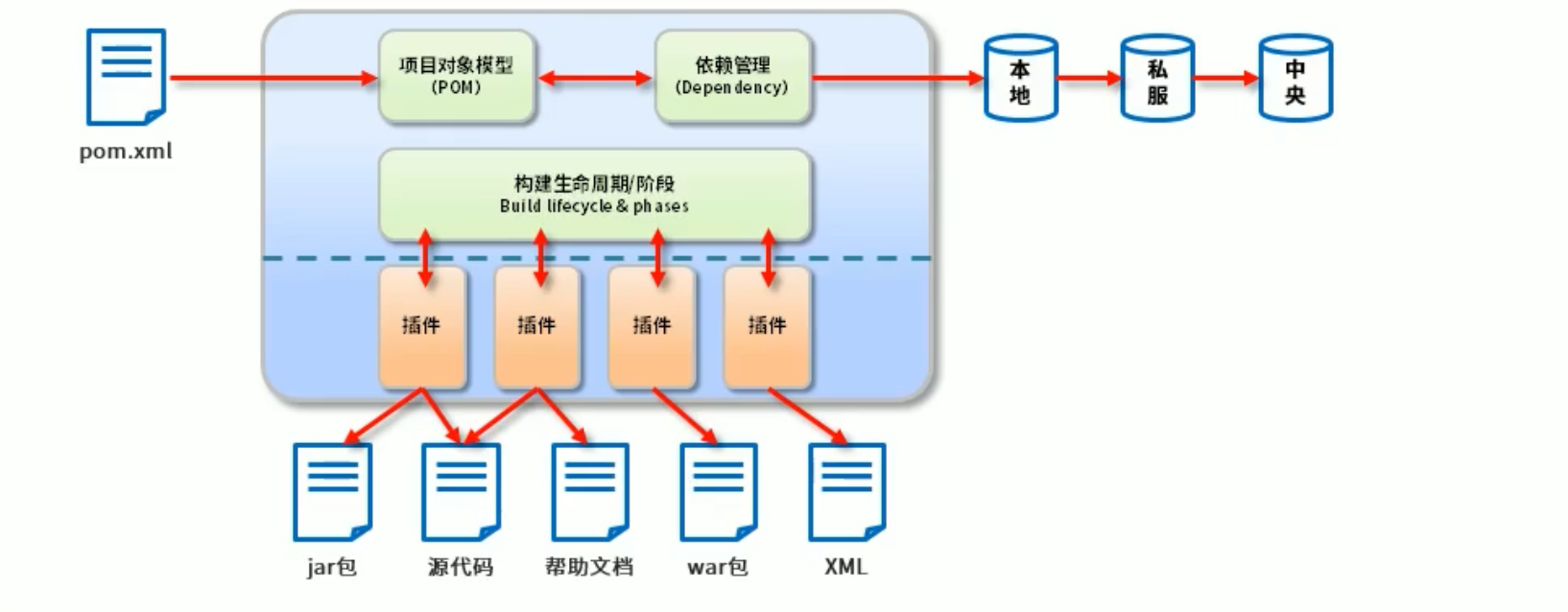
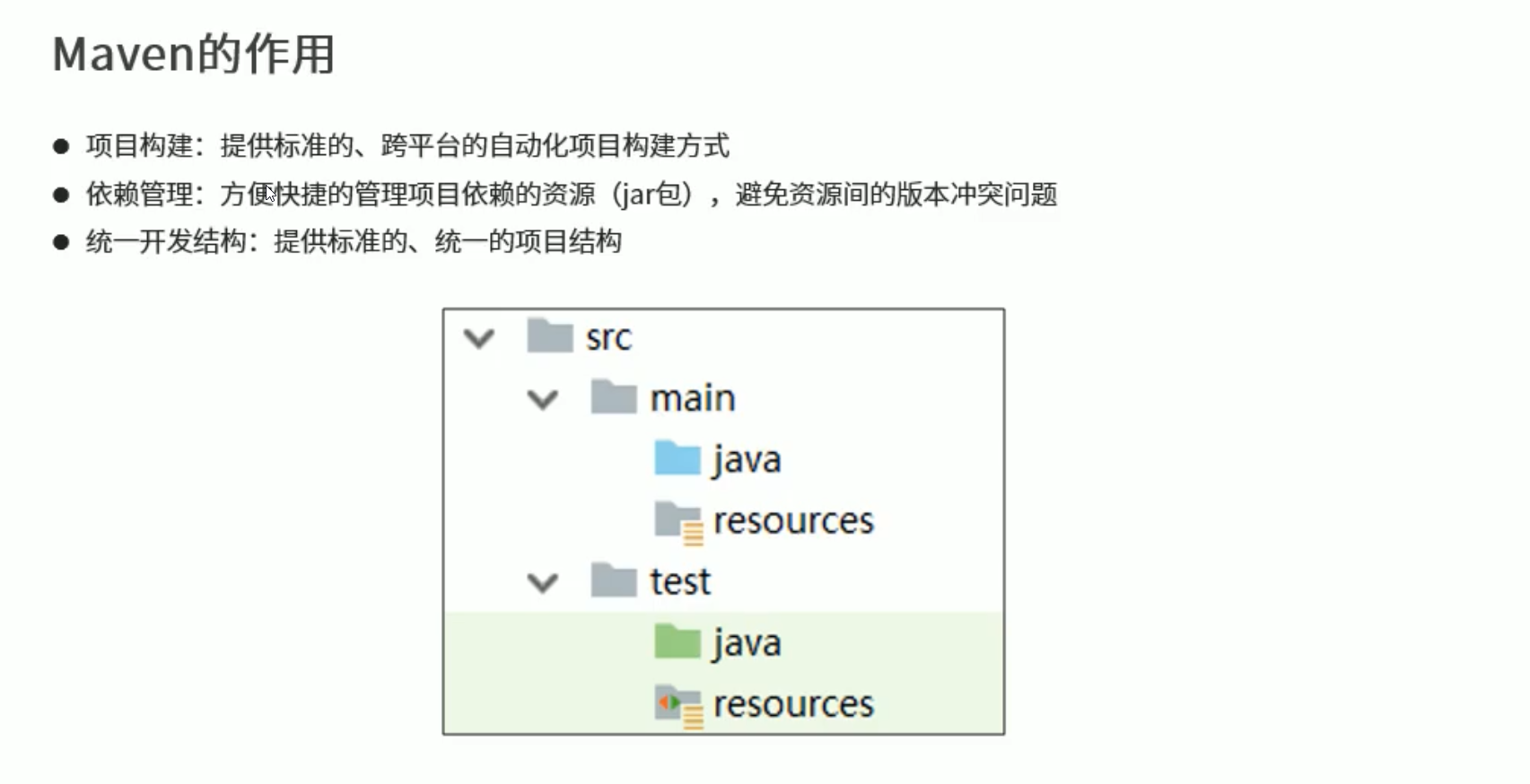
Maven 是一个项目管理工具,将项目开发和管理过程抽象成一个项目对象模型 (POM)
POM (Project Object Model) 项目对象模型
# 环境变量
配置 MAVEN_HOME = MAVEN 目录
然后在 path 中 配置 % MAVEN_HOME%\bin
mvn
1
# 坐标
Maven 中的坐标用于描述仓库中资源的位置
https://repo1.maven.org/maven2/
https://mvnrepository.com/
# 仓库配置
自定义本地仓库 默认为 c:/ 用户 /.m2 目录下
创建 repository 目录 并把 maven 中 conf 的 settings.xml 放到同级中
<!-- 配置 settings -->
<localRepository>D:\compile\maven\repository</localRepository>
1
2
2
然后把修改后的 settings 同样覆盖掉 maven conf 下的文件
# 远程仓库配置
默认远程仓库都是在 https://repo1.maven.org/maven2/ 我们换成阿里巴巴的镜像
配置同样是 settings.xml 中
<mirror>
      <id>aliyunmaven</id>
      <mirrorOf>*</mirrorOf>
      <name>阿里云公共仓库</name>
      <url>https://maven.aliyun.com/repository/public</url>
</mirror>
1
2
3
4
5
6
2
3
4
5
6
# 构建
- mvn compile 编译
- mvn clean 清理
- mvn test 测试
- mvn package 打包
- mvn install 安装到本地仓库
# 依赖管理
<!-- 依赖父标签 -->
<dependencies>
    <!-- 依赖子标签每个依赖需要用dependency包裹 -->
    <dependency>
        <!-- 所属群组id -->
        <groupId>com.alibaba</groupId>
        <!-- 所属项目id -->
        <artifactId>fastjson</artifactId>
        <!-- 版本号 -->
        <version>1.2.75</version>
    </dependency>
</dependencies>
1
2
3
4
5
6
7
8
9
10
11
12
2
3
4
5
6
7
8
9
10
11
12
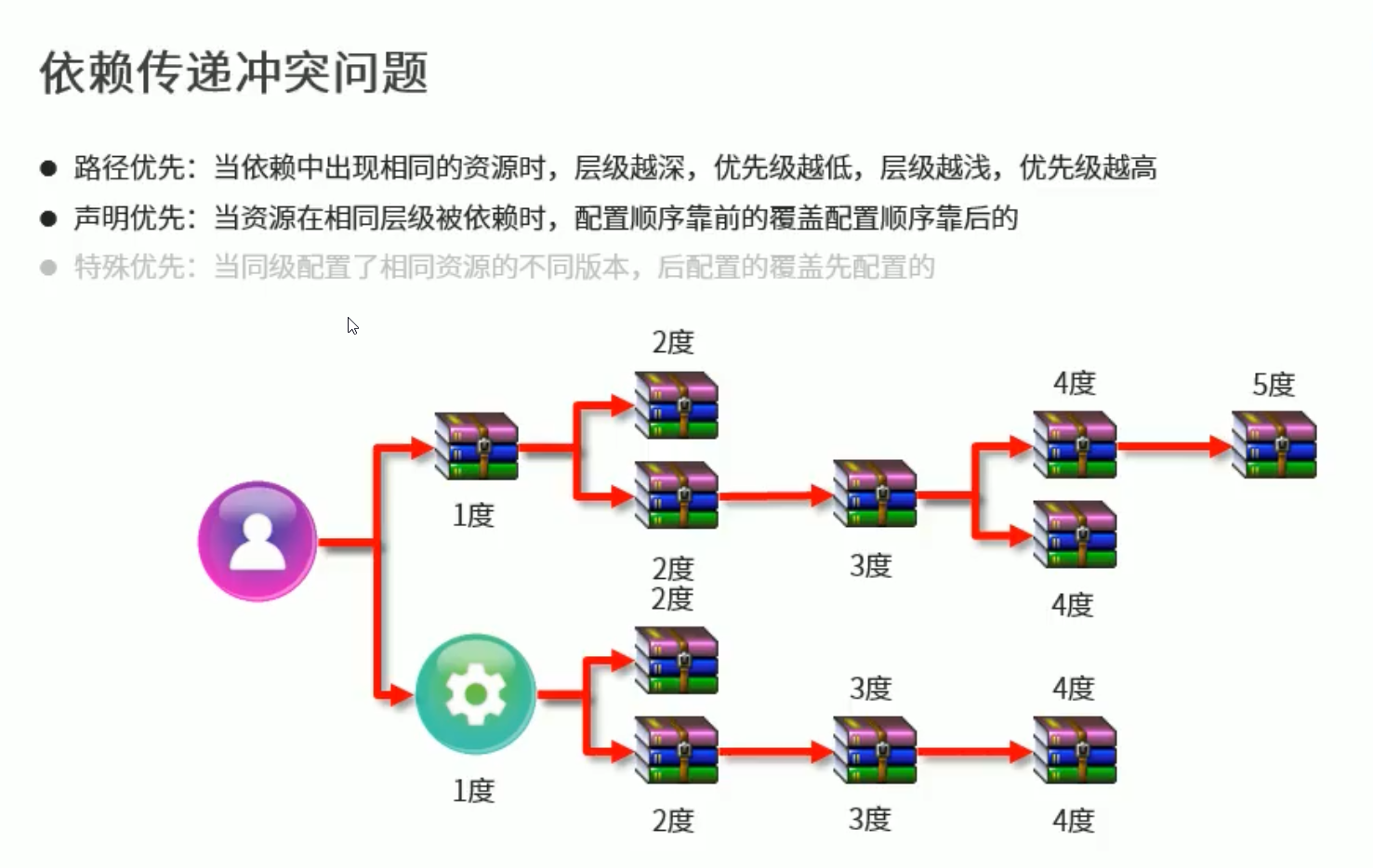
可以进行依赖传递 即依赖可以加载另外一个项目中依赖 只需要提供群组 id 和项目 id
# 可选依赖
可以选择对外隐藏指定的依赖资源 只有依赖传递才能用
<dependencies>
    <dependency>
        <groupId>com.alibaba</groupId>
        <artifactId>fastjson</artifactId>
        <version>1.2.75</version>
        <!-- 对外是否隐藏 -->
        <optional>true</optional>
    </dependency>
</dependencies>
1
2
3
4
5
6
7
8
9
2
3
4
5
6
7
8
9
# 排除依赖
排除指定的依赖 黑名单
<dependencies>
    <dependency>
        <groupId>依赖传递下级路径</groupId>
        <artifactId>fastjson</artifactId>
        <version>1.2.75</version>
    </dependency>
        <!-- 排除依赖 -->
        <exclusions>
            <exclusion>
                 <!-- 所属群组id -->
                <groupId>org.antlr</groupId>
                 <!-- 所属项目id -->
                <artifactId>antlr4-runtime</artifactId>
            </exclusion>
        </exclusions>
</dependencies>
1
2
3
4
5
6
7
8
9
10
11
12
13
14
15
16
2
3
4
5
6
7
8
9
10
11
12
13
14
15
16
# 依赖范围
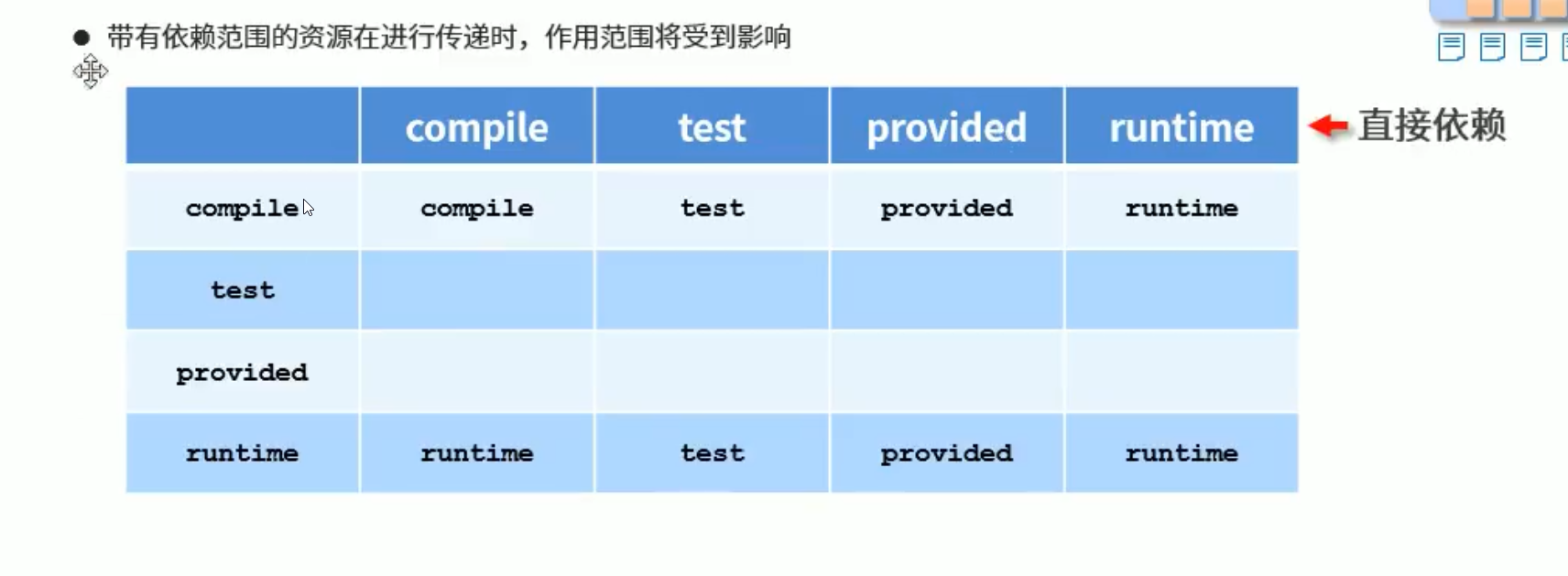
依赖的 jar 默认在任何地方都可以用 使用 scope 标签设定其作用范围
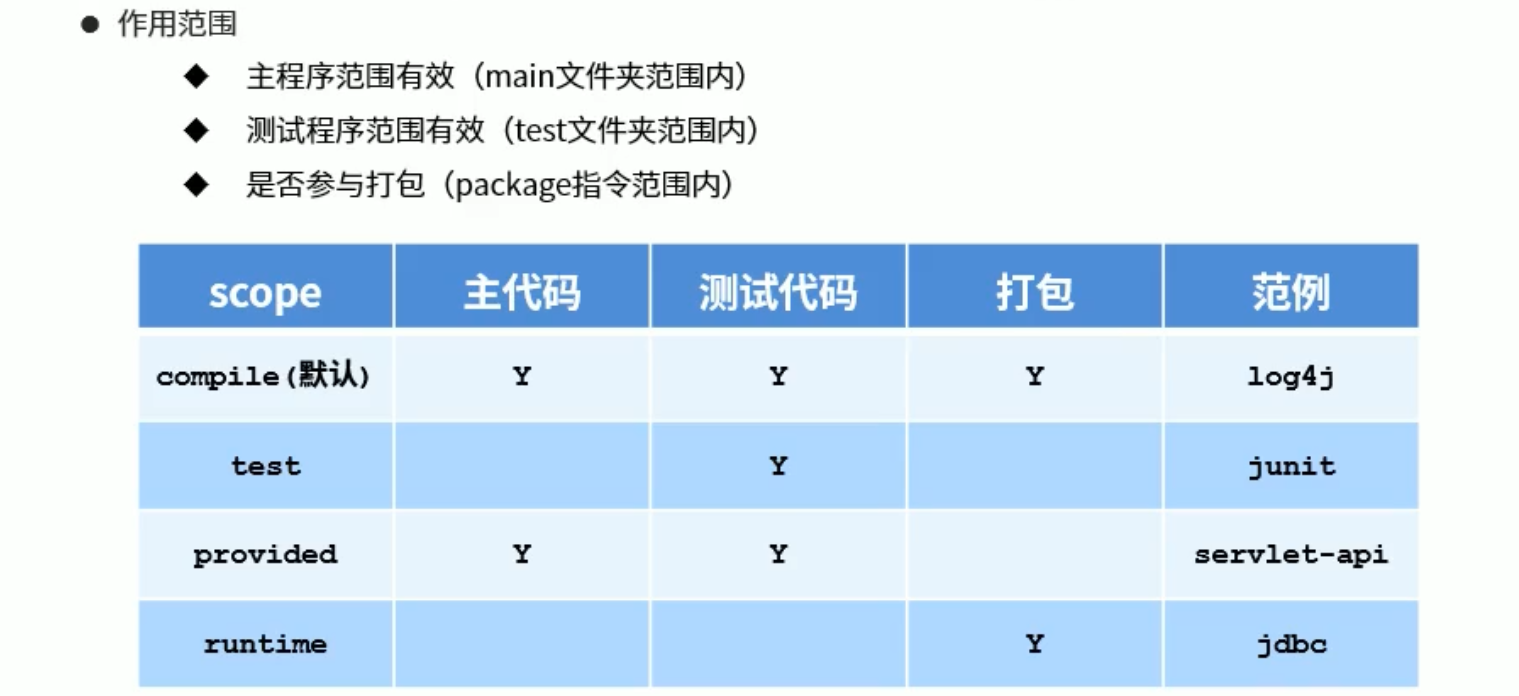
依赖传递 作用范围也会有影响
# 生命周期
- clean 清理工作
- pre-clean
- clean
- post-clea
- default 构建
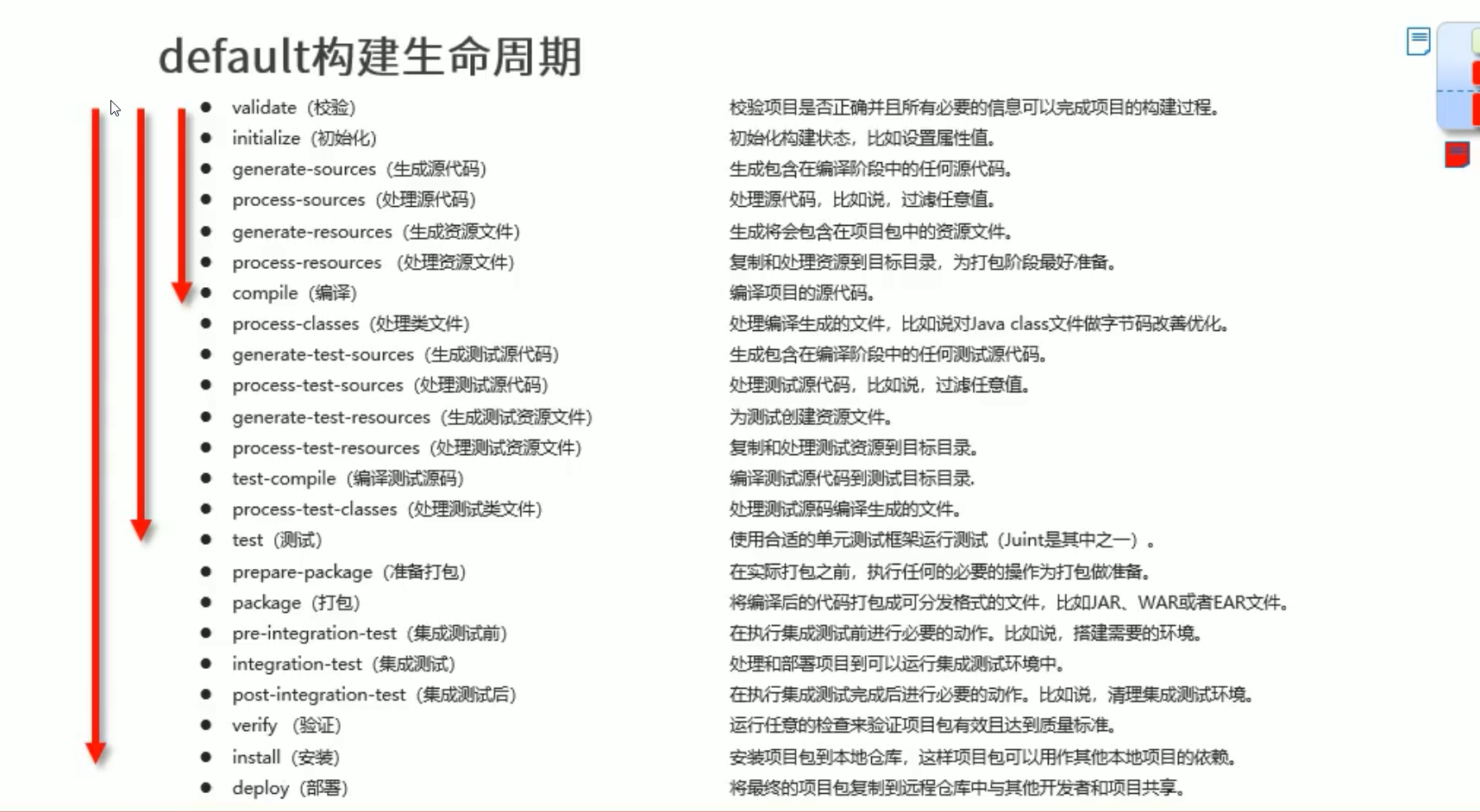
- 执行哪个构建 就执行到那个构建就结束 下面的不会执行
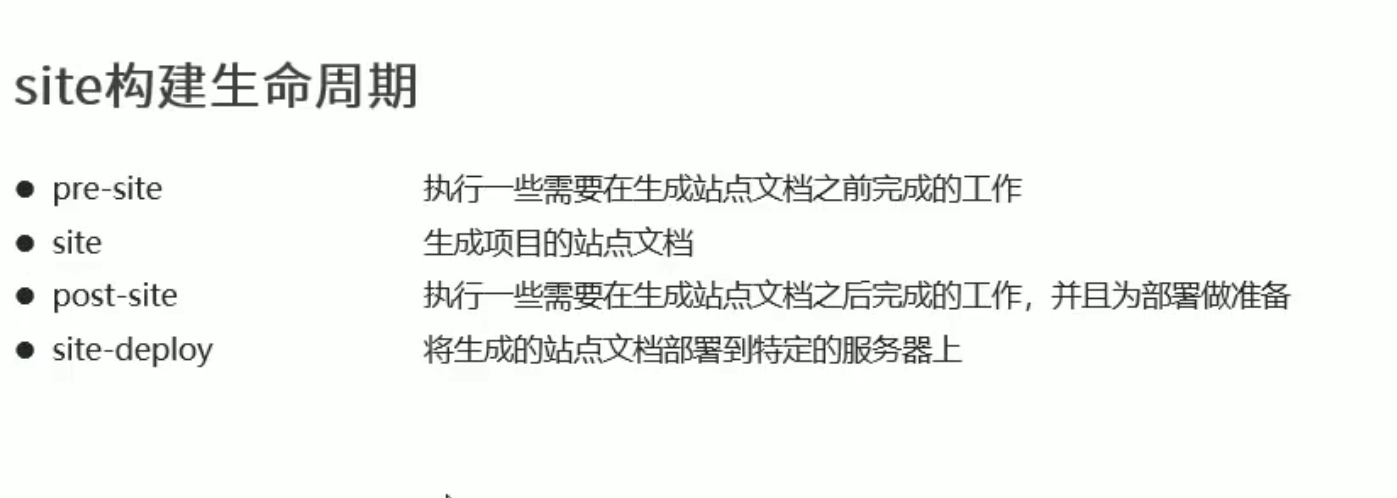
- site
# 插件
https://maven.apache.org/plugins/index.html
插件与生命周期内的阶段绑定 执行到对应生命周期就执行对应的插件给你
<project xmlns="http://maven.apache.org/POM/4.0.0" xmlns:xsi="http://www.w3.org/2001/XMLSchema-instance"
         xsi:schemaLocation="http://maven.apache.org/POM/4.0.0 https://maven.apache.org/xsd/maven-4.0.0.xsd">
    <build>
        <plugins>
            <plugin>
                <groupId>org.springframework.boot</groupId>
                <artifactId>spring-boot-maven-plugin</artifactId>
                <executions>
                    <execution>
                        <!-- 此插件在什么生命周期运行 -->
                        <phase>generate-test-resources</phase>
                    </execution>
                </executions>
            </plugin>
        </plugins>
    </build>
</project>
1
2
3
4
5
6
7
8
9
10
11
12
13
14
15
16
17
2
3
4
5
6
7
8
9
10
11
12
13
14
15
16
17
编辑 (opens new window)
上次更新: 2023/12/06, 01:31:48