
 Day08 Thymeleaf
# Day08 Thymeleaf
# Thymeleaf
thymeleaf 是一个 XML/XHTML/HTML5 模板引擎,可用于 Web 与非 Web 环境中的应用开发。它是一个开源的 Java 库,基于 Apache License 2.0 许可,由 Daniel Fernández 创建,该作者还是 Java 加密库 Jasypt 的作者。
Thymeleaf 提供了一个用于整合 Spring MVC 的可选模块,在应用开发中,你可以使用 Thymeleaf 来完全代替 JSP 或其他模板引擎,如 Velocity、FreeMarker 等。Thymeleaf 的主要目标在于提供一种可被浏览器正确显示的、格式良好的模板创建方式,因此也可以用作静态建模。你可以使用它创建经过验证的 XML 与 HTML 模板。相对于编写逻辑或代码,开发者只需将标签属性添加到模板中即可。接下来,这些标签属性就会在 DOM(文档对象模型)上执行预先制定好的逻辑。
# Springboot 整合 thymeleaf (入门案例)
创建一个测试 thymeleaf 项目 导入 pom
<?xml version="1.0" encoding="UTF-8"?>
<project xmlns="http://maven.apache.org/POM/4.0.0"
         xmlns:xsi="http://www.w3.org/2001/XMLSchema-instance"
         xsi:schemaLocation="http://maven.apache.org/POM/4.0.0 http://maven.apache.org/xsd/maven-4.0.0.xsd">
    <modelVersion>4.0.0</modelVersion>

    <groupId>com.itheima</groupId>
    <artifactId>springboot-thymeleaf</artifactId>
    <version>1.0-SNAPSHOT</version>

    <parent>
        <groupId>org.springframework.boot</groupId>
        <artifactId>spring-boot-starter-parent</artifactId>
        <version>2.1.4.RELEASE</version>
    </parent>

    <dependencies>
        <!--web起步依赖-->
        <dependency>
            <groupId>org.springframework.boot</groupId>
            <artifactId>spring-boot-starter-web</artifactId>
        </dependency>

        <!--thymeleaf配置-->
        <dependency>
            <groupId>org.springframework.boot</groupId>
            <artifactId>spring-boot-starter-thymeleaf</artifactId>
        </dependency>
    </dependencies>
</project>
2
3
4
5
6
7
8
9
10
11
12
13
14
15
16
17
18
19
20
21
22
23
24
25
26
27
28
29
30
创建包 com.itheima.thymeleaf 启动类
@SpringBootApplication
public class ThymeleafApplication {

    public static void main(String[] args) {
        SpringApplication.run(ThymeleafApplication.class,args);
    }
}
2
3
4
5
6
7
application 设置 thymeleaf 的缓存设置,设置为 false。默认加缓存的,用于测试。
spring:
  thymeleaf:
    cache: false
2
3
创建 com.itheima.controller.TestController
@Controller
@RequestMapping("/test")
public class TestController {

    /***
     * 访问/test/hello  跳转到demo1页面
     * @param model
     * @return
     */
    @RequestMapping("/hello")
    public String hello(Model model){
        model.addAttribute("hello","hello welcome");
        return "demo";
    }
}
2
3
4
5
6
7
8
9
10
11
12
13
14
15
在 resources 中创建 templates 目录,在 templates 目录创建 demo.html
<!DOCTYPE html>
<html xmlns:th="http://www.thymeleaf.org">
<head>
    <title>Thymeleaf的入门</title>
    <meta http-equiv="Content-Type" content="text/html; charset=UTF-8"/>
</head>
<body>
<!--输出hello数据-->
<p th:text="${hello}"></p>
</body>
</html>
2
3
4
5
6
7
8
9
10
11
<html xmlns:th="http://www.thymeleaf.org"> : 这句声明使用 thymeleaf 标签
<p th:text="${hello}"></p> : 这句使用 th:text="${变量名}" 表示 使用 thymeleaf 获取文本数据,类似于 EL 表达式。
# 基本语法
th:action 定义后台控制器路径,类似
<form>标签的 action 属性。<form th:action="@{/test/hello}" > <input th:type="text" th:name="id"> <button>提交</button> </form>1
2
3
4
th:each 对象遍历,功能类似 jstl 中的
<c:forEach>标签。<table> <tr> <td>下标</td> <td>编号</td> <td>姓名</td> <td>住址</td> </tr> <tr th:each="user,userStat:${users}"> <td> 下标:<span th:text="${userStat.index}"></span>, </td> <td th:text="${user.id}"></td> <td th:text="${user.name}"></td> <td th:text="${user.address}"></td> </tr> </table>1
2
3
4
5
6
7
8
9
10
11
12
13
14
15
16/*** * 访问/test/hello 跳转到demo1页面 * @param model * @return */ @RequestMapping("/hello") public String hello(Model model){ model.addAttribute("hello","hello welcome"); //集合数据 List<User> users = new ArrayList<User>(); users.add(new User(1,"张三","深圳")); users.add(new User(2,"李四","北京")); users.add(new User(3,"王五","武汉")); model.addAttribute("users",users); return "demo1"; }1
2
3
4
5
6
7
8
9
10
11
12
13
14
15
16
17
map 输出
//Map定义
Map<String,Object> dataMap = new HashMap<String,Object>();
dataMap.put("No","123");
dataMap.put("address","深圳");
model.addAttribute("dataMap",dataMap);
1
2
3
4
5<div th:each="map,mapStat:${dataMap}"> <div th:text="${map}"></div> key:<span th:text="${mapStat.current.key}"></span><br/> value:<span th:text="${mapStat.current.value}"></span><br/> ============================================== </div>1
2
3
4
5
6
数组输出
//存储一个数组
String[] names = {"张三","李四","王五"};
model.addAttribute("names",names);
1
2
3<div th:each="nm,nmStat:${names}"> <span th:text="${nmStat.count}"></span><span th:text="${nm}"></span> ============================================== </div>1
2
3
4
Date 输出
//日期
model.addAttribute("now",new Date());
1
2<div> <span th:text="${#dates.format(now,'yyyy-MM-dd hh:ss:mm')}"></span> </div>1
2
3
th:if 条件
//if条件
model.addAttribute("age",22);
1
2<div> <span th:if="${(age>=18)}">终于长大了!</span> </div>1
2
3
th:unless if 取反
th:fragment 定义一个模块 并导出
<!DOCTYPE html>
<html xmlns:th="http://www.thymeleaf.org">
<head>
    <meta http-equiv="Content-Type" content="text/html;charset=charset=utf-8">
    <title>fragment</title>
</head>
<body>
<div id="C" th:fragment="copy" >
    关于我们<br/>
</div>
</body>
1
2
3
4
5
6
7
8
9
10
11
th:include 导入模块 可以直接引入
th:fragment, 在 demo1.html 中引入如下代码: footer 为页面文件名称<div id="A" th:include="footer::copy"></div>1
# 搜索页面渲染
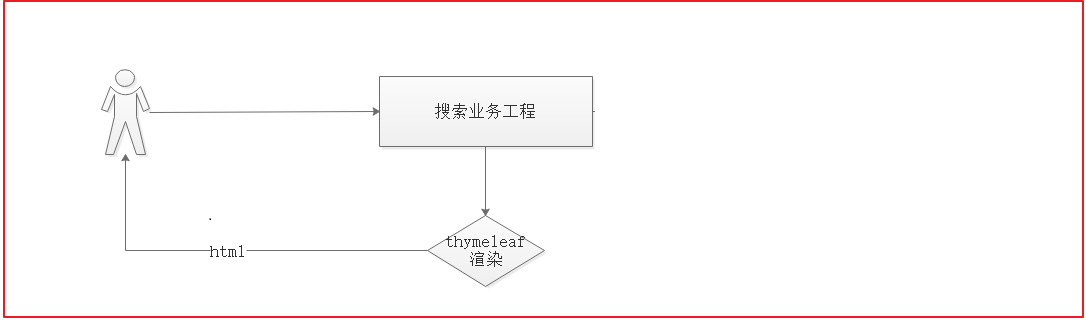
搜索的业务流程如上图,用户每次搜索的时候,先经过搜索业务工程,搜索业务工程调用搜索微服务工程。
# 搜索工程搭建
在 changgou-service_search 工程中的 pom.xml 中引入如下依赖:
<dependency>
  <groupId>org.springframework.boot</groupId>
  <artifactId>spring-boot-starter-thymeleaf</artifactId>
</dependency>
2
3
4
application 添加以下内容
thymeleaf:
    cache: false
2
在 resource 下创建 static 包和 templates 包 将资源中的内容拷贝进去
# 基础数据渲染
更新 SearchController, 定义跳转搜索结果页面方法
package com.changgou.search.controller;

import com.changgou.search.service.SearchService;
import org.springframework.beans.factory.annotation.Autowired;
import org.springframework.stereotype.Controller;
import org.springframework.ui.Model;
import org.springframework.web.bind.annotation.*;

import java.util.Map;
import java.util.Set;

@Controller
@RequestMapping("/search")
public class SearchController {
    @Autowired
    private SearchService searchService;

    @GetMapping
    @ResponseBody
    public Map search(@RequestParam Map<String, String> searchMap) {
        //特殊符号处理
        this.handleSearchMap(searchMap);
        Map searchResult = searchService.search(searchMap);
        return searchResult;
    }

    private void handleSearchMap(Map<String, String> searchMap) {
        Set<Map.Entry<String, String>> entries = searchMap.entrySet();
        for (Map.Entry<String, String> entry : entries) {
            if (entry.getKey().startsWith("spec_")) {
                searchMap.put(entry.getKey(), entry.getValue().replace("+", "%2B"));
            }
        }
    }

    @GetMapping("/list")
    public String list(@RequestParam Map<String, String> searchMap, Model model){
        //特殊符号处理
        this.handleSearchMap(searchMap);
        //获取查询结果
        Map resultMap = searchService.search(searchMap);
        model.addAttribute("result",resultMap); //写入搜索结果
        model.addAttribute("searchMap",searchMap); //回写搜索条件
        return "search";
    }


}
2
3
4
5
6
7
8
9
10
11
12
13
14
15
16
17
18
19
20
21
22
23
24
25
26
27
28
29
30
31
32
33
34
35
36
37
38
39
40
41
42
43
44
45
46
47
48
搜索结果页面渲染 回显数据
添加 th 声明
<html xmlns:th="http://www.thymeleaf.org">
第 466 行代码
<ul class="fl sui-breadcrumb">
   <li>
      <a href="#">全部结果</a>
   </li>
   <li class="active"><span th:text="${searchMap.keywords}" ></span></li>
</ul>
<ul class="fl sui-tag">
   <li class="with-x" th:if="${(#maps.containsKey(searchMap,'brand'))}">品牌:<span th:text="${searchMap.brand}"></span><i>×</i></li>
   <li class="with-x" th:if="${(#maps.containsKey(searchMap,'price'))}">价格:<span th:text="${searchMap.price}"></span><i>×</i></li>
   <li class="with-x" th:each="sm:${searchMap}" th:if="${#strings.startsWith(sm.key,'spec_')}"><span th:text="${#strings.replace(sm.key,'spec_','')}"></span>:<span th:text="${#strings.replace(sm.value,'%2B','+')}"></span><i>×</i></li>
</ul>
2
3
4
5
6
7
8
9
10
11
# 品牌信息显示
如果用户筛选条件携带品牌则不显示品牌列表 否则根据搜索结果中的品牌列表显示内容
第 486 行
<div class="type-wrap logo" th:unless="${#maps.containsKey(searchMap,'brand')}">
   <div class="fl key brand">品牌</div>
   <div class="value logos">
      <ul class="logo-list">
                        <li th:each="brand,brandSate:${result.brandList}"><a th:text="${brand}"></a></li>

      </ul>
   </div>
2
3
4
5
6
7
8
# 商品属性及规格显示
在 SearchServiceImpl 添加处理规格 json 转换为 map 的方法
/**
 * 将原有json数据转为map
 *
 * @param specList
 * @return
 */
public Map<String, Set<String>> formartSpec(List<String> specList) {
    Map<String, Set<String>> resultMap = new HashMap<>();
    if (specList != null && specList.size() > 0) {
        for (String specJsonString : specList) {
            //将json转为map
            Map<String, String> specMap = JSON.parseObject(specJsonString, Map.class);
            for (String specKey : specMap.keySet()) {
                Set<String> specSet = resultMap.get(specKey);
                if (specSet == null) {
                    specSet = new HashSet<String>();
                }
                //将规格放入set中
                specSet.add(specMap.get(specKey));
                //将set放人map中
                resultMap.put(specKey, specSet);
            }
        }
    }
    return resultMap;
}
2
3
4
5
6
7
8
9
10
11
12
13
14
15
16
17
18
19
20
21
22
23
24
25
26
查询返回结果时调用此方法
//封装规格分组结果
StringTerms specTerms = (StringTerms) resultInfo.getAggregation(skuSpec);
List<String> specList = specTerms.getBuckets().stream().map(bucket -> bucket.getKeyAsString()).collect(Collectors.toList());
resultMap.put("specList", this.formartSpec(specList));
2
3
4
完整 Impl 代码
package com.changgou.search.service.impl;

import com.alibaba.fastjson.JSON;
import com.changgou.search.pojo.SkuInfo;
import com.changgou.search.service.SearchService;
import org.apache.commons.lang.StringUtils;
import org.elasticsearch.action.search.SearchResponse;
import org.elasticsearch.index.query.BoolQueryBuilder;
import org.elasticsearch.index.query.Operator;
import org.elasticsearch.index.query.QueryBuilders;
import org.elasticsearch.search.SearchHit;
import org.elasticsearch.search.SearchHits;
import org.elasticsearch.search.aggregations.AggregationBuilders;
import org.elasticsearch.search.aggregations.bucket.terms.StringTerms;
import org.elasticsearch.search.fetch.subphase.highlight.HighlightBuilder;
import org.elasticsearch.search.fetch.subphase.highlight.HighlightField;
import org.elasticsearch.search.sort.SortBuilders;
import org.elasticsearch.search.sort.SortOrder;
import org.springframework.beans.factory.annotation.Autowired;
import org.springframework.data.domain.PageRequest;
import org.springframework.data.domain.Pageable;
import org.springframework.data.elasticsearch.core.ElasticsearchTemplate;
import org.springframework.data.elasticsearch.core.SearchResultMapper;
import org.springframework.data.elasticsearch.core.aggregation.AggregatedPage;
import org.springframework.data.elasticsearch.core.aggregation.impl.AggregatedPageImpl;
import org.springframework.data.elasticsearch.core.query.NativeSearchQueryBuilder;
import org.springframework.stereotype.Service;

import java.util.*;
import java.util.stream.Collectors;

@Service
public class SearchServiceImpl implements SearchService {

    @Autowired
    private ElasticsearchTemplate elasticsearchTemplate;

    /**
     * 根据前端传过来的字段进行查询
     *
     * @param searchMap
     * @return
     */
    @Override
    public Map search(Map<String, String> searchMap) {
        Map<String, Object> resultMap = new HashMap<>();
        //构建查询
        if (searchMap != null) {
            //构建查询条件封装对象
            NativeSearchQueryBuilder nativeSearchQueryBuilder = new NativeSearchQueryBuilder();
            BoolQueryBuilder boolQuery = QueryBuilders.boolQuery();

            //按照关键字查询
            if (StringUtils.isNotEmpty(searchMap.get("keywords"))) {
                boolQuery.must(QueryBuilders.matchQuery("name", searchMap.get("keywords")).operator(Operator.AND));
            }

            //按照品牌进行过滤查询
            if (StringUtils.isNotEmpty(searchMap.get("brand"))) {
                boolQuery.filter(QueryBuilders.termQuery("brandName", searchMap.get("brand")));
            }

            //按照规格进行过滤查询
            for (String key : searchMap.keySet()) {
                if (key.startsWith("spec_")) {
                    String value = searchMap.get(key).replace("%2B", "+");
                    boolQuery.filter(QueryBuilders.termQuery("specMap." + key.substring(5) + ".keyword", value));
                }
            }

            nativeSearchQueryBuilder.withQuery(boolQuery);

            //按照价格进行区间过滤查询
            if (StringUtils.isNotEmpty(searchMap.get("price"))) {
                String[] prices = searchMap.get("price").split("-");
                if (prices.length == 2) {
                    //是xx - xx 价格区间的条件
                    boolQuery.filter(QueryBuilders.rangeQuery("price").lte(prices[1]));
                }
                boolQuery.filter(QueryBuilders.rangeQuery("price").gte(prices[0]));
            }

            //按照品牌进行分组(聚合)查询
            String skuBrand = "skuBrand";
            nativeSearchQueryBuilder.addAggregation(AggregationBuilders.terms(skuBrand).field("brandName"));

            //按照规格进行聚合查询
            String skuSpec = "skuSpec";
            nativeSearchQueryBuilder.addAggregation(AggregationBuilders.terms(skuSpec).field("spec.keyword"));

            //开启分页查询
            String pageNum = searchMap.get("pageNum"); //当前页
            String pageSize = searchMap.get("pageSize"); //每页显示多少条
            if (StringUtils.isEmpty(pageNum)) {
                pageNum = "1";
            }
            if (StringUtils.isEmpty(pageSize)) {
                pageSize = "30";
            }
            //设置分页
            nativeSearchQueryBuilder.withPageable(PageRequest.of(Integer.parseInt(pageNum) - 1, Integer.parseInt(pageSize)));

            //按照相关字段进行排序查询
            //1.当前域 2.当前的排序操作(升序ASC,降序DESC)
            if (StringUtils.isNotEmpty(searchMap.get("sortField")) && StringUtils.isNotEmpty(searchMap.get("sortRule"))) {
                if ("ASC".equals(searchMap.get("sortRule"))) {
                    //升序操作
                    nativeSearchQueryBuilder.withSort(SortBuilders.fieldSort(searchMap.get("sortField")).order(SortOrder.ASC));
                } else {
                    //降序
                    nativeSearchQueryBuilder.withSort(SortBuilders.fieldSort(searchMap.get("sortField")).order(SortOrder.DESC));
                }
            }

            //设置高亮域以及高亮的样式
            HighlightBuilder.Field field = new HighlightBuilder.Field("name")//高亮域
                    //高亮前缀
                    .preTags("<span style='color:red'>")
                    //高亮后缀
                    .postTags("</span>");
            nativeSearchQueryBuilder.withHighlightFields(field);

            //开启查询
            /**
             * 第一个参数: 条件的构建对象
             * 第二个参数: 查询操作实体类
             * 第三个参数: 查询结果操作对象
             */
            AggregatedPage<SkuInfo> resultInfo = elasticsearchTemplate.queryForPage(nativeSearchQueryBuilder.build(), SkuInfo.class,
                    new SearchResultMapper() {
                        @Override
                        public <T> AggregatedPage<T> mapResults(SearchResponse searchResponse, Class<T> aClass, Pageable pageable) {
                            //查询结果操作
                            List<T> list = new ArrayList<>();
                            //获取查询命中的数据
                            SearchHits hits = searchResponse.getHits();
                            if (hits != null) {
                                //非空
                                for (SearchHit hit : hits) {
                                    //SearchHit转换为skuinfo
                                    SkuInfo skuInfo = JSON.parseObject(hit.getSourceAsString(), SkuInfo.class);
                                    Map<String, HighlightField> highlightFields = hit.getHighlightFields(); //获取所有高亮域
                                    if (highlightFields != null && highlightFields.size() > 0) {
                                        //替换数据
                                        skuInfo.setName(highlightFields.get("name").getFragments()[0].toString());
                                    }

                                    list.add((T) skuInfo);
                                }
                            }
                            return new AggregatedPageImpl<T>(list, pageable, hits.getTotalHits(), searchResponse.getAggregations());
                        }
                    });

            //封装最终返回结果
            //总记录数
            resultMap.put("total", resultInfo.getTotalElements());
            //总页数
            resultMap.put("totalPages", resultInfo.getTotalPages());
            //数据集合
            resultMap.put("rows", resultInfo.getContent());

            //封装品牌的分组结果
            StringTerms brandTerms = (StringTerms) resultInfo.getAggregation(skuBrand);
            List<String> brandList = brandTerms.getBuckets().stream().map(bucket -> bucket.getKeyAsString()).collect(Collectors.toList());
            resultMap.put("brandList", brandList);

            //封装规格分组结果
            StringTerms specTerms = (StringTerms) resultInfo.getAggregation(skuSpec);
            List<String> specList = specTerms.getBuckets().stream().map(bucket -> bucket.getKeyAsString()).collect(Collectors.toList());
            resultMap.put("specList", this.formartSpec(specList));

            //当前页
            resultMap.put("pageNum", pageNum);

            return resultMap;
        }

        return null;
    }

    /**
     * 将原有json数据转为map
     *
     * @param specList
     * @return
     */
    public Map<String, Set<String>> formartSpec(List<String> specList) {
        Map<String, Set<String>> resultMap = new HashMap<>();
        if (specList != null && specList.size() > 0) {
            for (String specJsonString : specList) {
                //将json转为map
                Map<String, String> specMap = JSON.parseObject(specJsonString, Map.class);
                for (String specKey : specMap.keySet()) {
                    Set<String> specSet = resultMap.get(specKey);
                    if (specSet == null) {
                        specSet = new HashSet<String>();
                    }
                    //将规格放入set中
                    specSet.add(specMap.get(specKey));
                    //将set放人map中
                    resultMap.put(specKey, specSet);
                }
            }
        }
        return resultMap;
    }
}
2
3
4
5
6
7
8
9
10
11
12
13
14
15
16
17
18
19
20
21
22
23
24
25
26
27
28
29
30
31
32
33
34
35
36
37
38
39
40
41
42
43
44
45
46
47
48
49
50
51
52
53
54
55
56
57
58
59
60
61
62
63
64
65
66
67
68
69
70
71
72
73
74
75
76
77
78
79
80
81
82
83
84
85
86
87
88
89
90
91
92
93
94
95
96
97
98
99
100
101
102
103
104
105
106
107
108
109
110
111
112
113
114
115
116
117
118
119
120
121
122
123
124
125
126
127
128
129
130
131
132
133
134
135
136
137
138
139
140
141
142
143
144
145
146
147
148
149
150
151
152
153
154
155
156
157
158
159
160
161
162
163
164
165
166
167
168
169
170
171
172
173
174
175
176
177
178
179
180
181
182
183
184
185
186
187
188
189
190
191
192
193
194
195
196
197
198
199
200
201
202
203
204
205
206
207
208
第 625 行
<div class="type-wrap" th:each="spec,specStat:${result.specList}"
     th:unless="${#maps.containsKey(searchMap,'spec_'+spec.key)}">
    <div class="fl key" th:text="${spec.key}"></div>
    <div class="fl value">
        <ul class="type-list">
            <li th:each="op,opstat:${spec.value}">
                <a th:text="${op}"></a>
            </li>

        </ul>
    </div>
    <div class="fl ext"></div>
</div>
<div class="type-wrap" th:unless="${#maps.containsKey(searchMap,'price')}">
    <div class="fl key">价格</div>
    <div class="fl value">
        <ul class="type-list">
            <li>
                <a th:text="0-500元"></a>
            </li>
            <li>
                <a th:text="500-1000元"></a>
            </li>
            <li>
                <a th:text="1000-1500元"></a>
            </li>
            <li>
                <a th:text="1500-2000元"></a>
            </li>
            <li>
                <a th:text="2000-3000元"></a>
            </li>
            <li>
                <a th:text="3000元以上"></a>
            </li>
        </ul>
    </div>
2
3
4
5
6
7
8
9
10
11
12
13
14
15
16
17
18
19
20
21
22
23
24
25
26
27
28
29
30
31
32
33
34
35
36
37
# 商品列表显示
第 715 行
<ul class="yui3-g">
    <li class="yui3-u-1-5" th:each="sku,skpStat:${result.rows}">
        <div class="list-wrap">
            <div class="p-img">
                <a href="item.html" target="_blank"><img th:src="${sku.image}"/></a>
            </div>
            <div class="price">
                <strong>
                    <em>¥</em>
                    <i th:text="${sku.price}"></i>
                </strong>
            </div>
            <div class="attr">
                <a target="_blank" href="item.html" th:title="${sku.spec}" th:utext="${sku.name}"></a>
            </div>
            <div class="commit">
                <i class="command">已有<span>2000</span>人评价</i>
            </div>
            <div class="operate">
                <a href="success-cart.html" target="_blank" class="sui-btn btn-bordered btn-danger">加入购物车</a>
                <a href="javascript:void(0);" class="sui-btn btn-bordered">收藏</a>
            </div>
        </div>
    </li>
</ul>
2
3
4
5
6
7
8
9
10
11
12
13
14
15
16
17
18
19
20
21
22
23
24
25
# 关键字搜索
更改搜索 from 表单提交地址 第 57 行代码
<form th:action="${/search/list}" class="sui-form form-inline">
    <!--searchAutoComplete-->
    <div class="input-append">
        <input th:type="text" th:value="${searchMap.keywords}" id="autocomplete"
               class="input-error input-xxlarge"/>
        <button class="sui-btn btn-xlarge btn-danger" th:type="submit">搜索</button>
    </div>
</form>
2
3
4
5
6
7
8
将搜索输入框的内容提交给 search/list 请求路径中
# 条件搜索
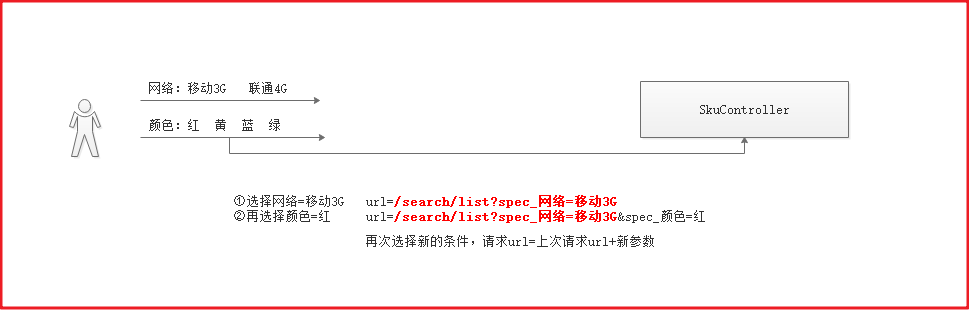
用户每次点击搜索的时候,其实在上次搜索的基础之上加上了新的搜索条件,也就是在上一次请求的 URL 后面追加了新的搜索条件,我们可以在后台每次拼接组装出上次搜索的 URL,然后每次将 URL 存入到 Model 中,页面每次点击不同条件的时候,从 Model 中取出上次请求的 URL,然后再加上新点击的条件参数实现跳转即可。
在 SerachController 的 list 方法添加拼接 url 方法
//拼接url
StringBuilder url = new StringBuilder("/search/list");
if (searchMap != null && searchMap.size() > 0) {
    //map中有查询条件
    url.append("?");
    for (String paramKey : searchMap.keySet()) {
        if (!"sortRule".equals(paramKey) && !"sortField".equals(paramKey) && !"pageNum".equals(paramKey)){
            url.append(paramKey).append("=").append(searchMap.get(paramKey)).append("&");
        }
    }
    String urlString = url.toString();
    //截取最后一个&号
    urlString = urlString.substring(0,urlString.length()-1);
    model.addAttribute("url",urlString);

}else {
    model.addAttribute("url",url);
}
2
3
4
5
6
7
8
9
10
11
12
13
14
15
16
17
18
完整 list 代码
@GetMapping("/list")
public String list(@RequestParam Map<String, String> searchMap, Model model) {
    //特殊符号处理
    this.handleSearchMap(searchMap);
    //获取查询结果
    Map resultMap = searchService.search(searchMap);
    model.addAttribute("result", resultMap); //写入搜索结果
    model.addAttribute("searchMap", searchMap); //回写搜索条件

    //拼接url
    StringBuilder url = new StringBuilder("/search/list");
    if (searchMap != null && searchMap.size() > 0) {
        //map中有查询条件
        url.append("?");
        for (String paramKey : searchMap.keySet()) {
            if (!"sortRule".equals(paramKey) && !"sortField".equals(paramKey) && !"pageNum".equals(paramKey)){
                url.append(paramKey).append("=").append(searchMap.get(paramKey)).append("&");
            }
        }
        String urlString = url.toString();
        //截取最后一个&号
        urlString = urlString.substring(0,urlString.length()-1);
        model.addAttribute("url",urlString);

    }else {
        model.addAttribute("url",url);
    }

    return "search";
}
2
3
4
5
6
7
8
9
10
11
12
13
14
15
16
17
18
19
20
21
22
23
24
25
26
27
28
29
30
第 613 行代码
  <div class="clearfix selector">
            <div class="type-wrap logo" th:unless="${#maps.containsKey(searchMap,'brand')}">
                <div class="fl key brand">品牌</div>
                <div class="value logos">
                    <ul class="logo-list">
                        <li th:each="brand,brandSate:${result.brandList}"><a th:text="${brand}"
                                                                             th:href="@{${url}(brand=${brand})}"></a>
                        </li>

                    </ul>
                </div>
                <div class="ext">
                    <a href="javascript:void(0);" class="sui-btn">多选</a>
                    <a href="javascript:void(0);">更多</a>
                </div>
            </div>
            <div class="type-wrap" th:each="spec,specStat:${result.specList}"
                 th:unless="${#maps.containsKey(searchMap,'spec_'+spec.key)}">
                <div class="fl key" th:text="${spec.key}"></div>
                <div class="fl value">
                    <ul class="type-list">
                        <li th:each="op,opstat:${spec.value}">
                            <a th:text="${op}" th:href="@{${url}('spec_'+${spec.key}=${op})}"></a>
                        </li>

                    </ul>
                </div>
                <div class="fl ext"></div>
            </div>
            <div class="type-wrap" th:unless="${#maps.containsKey(searchMap,'price')}">
                <div class="fl key">价格</div>
                <div class="fl value">
                    <ul class="type-list">
                        <li>
                            <a th:text="0-500元" th:href="@{${url}(price='0-500')}"></a>
                        </li>
                        <li>
                            <a th:text="500-1000元" th:href="@{${url}(price='500-1000')}"></a>
                        </li>
                        <li>
                            <a th:text="1000-1500元" th:href="@{${url}(price='1000-1500')}"></a>
                        </li>
                        <li>
                            <a th:text="1500-2000元" th:href="@{${url}(price='1500-2000')}"></a>
                        </li>
                        <li>
                            <a th:text="2000-3000元" th:href="@{${url}(price='2000-3000')}"></a>
                        </li>
                        <li>
                            <a th:text="3000元以上" th:href="@{${url}(price='3000')}"></a>
                        </li>
                    </ul>
                </div>
                <div class="fl ext">
                </div>
            </div>
2
3
4
5
6
7
8
9
10
11
12
13
14
15
16
17
18
19
20
21
22
23
24
25
26
27
28
29
30
31
32
33
34
35
36
37
38
39
40
41
42
43
44
45
46
47
48
49
50
51
52
53
54
55
56
# 移除搜索条件
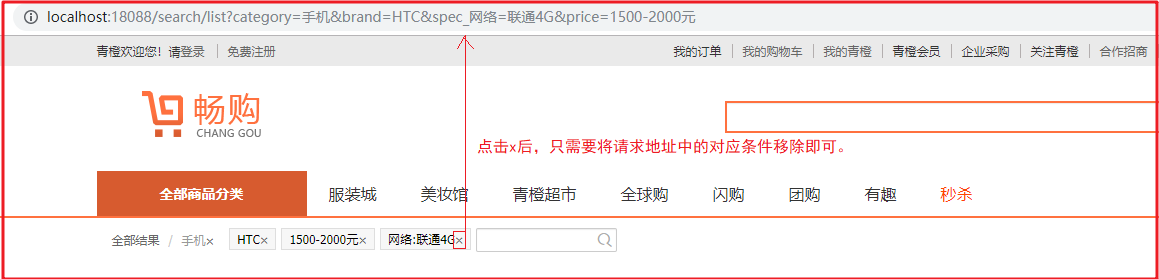
如上图,用户点击条件搜索后,要将选中的条件显示出来,并提供移除条件的 x 按钮,显示条件我们可以从 searchMap 中获取,移除其实就是将之前的请求地址中的指定条件删除即可。
第 596 行
<ul class="fl sui-tag">
    <li class="with-x" th:if="${(#maps.containsKey(searchMap,'brand'))}">品牌:<span
            th:text="${searchMap.brand}"></span><a th:href="@{${#strings.replace(url,'&brand='+searchMap.brand,'')}}">×</a></li>
    <li class="with-x" th:if="${(#maps.containsKey(searchMap,'price'))}">价格:<span
            th:text="${searchMap.price}"></span><a th:href="@{${#strings.replace(url,'&price='+searchMap.price,'')}}">×</a></li>
    <li class="with-x" th:each="sm:${searchMap}" th:if="${#strings.startsWith(sm.key,'spec_')}"><span
            th:text="${#strings.replace(sm.key,'spec_','')}"></span>:<span
            th:text="${#strings.replace(sm.value,'%2B','+')}"></span><a th:href="@{${#strings.replace(url,'&'+sm.key+'='+sm.value,'')}}">×</a></li>
</ul>
2
3
4
5
6
7
8
9
# 价格排序
提供 a 标签拼接排序查询关键字
第 711 行
<li>
    <a th:href="@{${url}(sortRule='ASC',sortField='price')}">价格↑</a>
</li>
<li >
    <a th:href="@{${url}(sortRule='DESC',sortField='price')}">价格↓</a>
</li>
2
3
4
5
6
# 分页搜索
将 page 放入 changgou_common 下的 entity 包
package com.changgou.entity;

import java.io.Serializable;
import java.util.List;

/**
 * 分页对象
 * @param <T>
 */
public class Page <T> implements Serializable{

   //当前默认为第一页
   public static final Integer pageNum = 1;
   //默认每页显示条件
   public static final Integer pageSize = 20;


   //判断当前页是否为空或是小于1
   public static Integer cpn(Integer pageNum){
      if(null == pageNum || pageNum < 1){
         pageNum = 1;
      }
      return pageNum;
   }


   // 页数(第几页)
   private long currentpage;

   // 查询数据库里面对应的数据有多少条
   private long total;// 从数据库查处的总记录数

   // 每页显示多少分页标签
   private int size;

   // 下页
   private int next;

   private List<T> list;

   // 最后一页
   private int last;

   private int lpage;

   private int rpage;

   //从哪条开始查
   private long start;

   //全局偏移量
   public int offsize = 2;

   public Page() {
      super();
   }

   /****
    *
    * @param currentpage 当前页
    * @param total 总记录数
    * @param pagesize 每页显示多少条
    */
   public void setCurrentpage(long currentpage,long total,long pagesize) {

      //如果整除表示正好分N页,如果不能整除在N页的基础上+1页
      int totalPages = (int) (total%pagesize==0? total/pagesize : (total/pagesize)+1);

      //总页数
      this.last = totalPages;

      //判断当前页是否越界,如果越界,我们就查最后一页
      if(currentpage>totalPages){
         this.currentpage = totalPages;
      }else{
         this.currentpage=currentpage;
      }

      //计算起始页
      this.start = (this.currentpage-1)*pagesize;
   }

  /****
    * 初始化分页
    * @param total
    * @param currentpage
    * @param pagesize
    */
   public void initPage(long total,int currentpage,int pagesize){
      //总记录数
      this.total = total;
      //每页显示多少条
      this.size=pagesize;

      //计算当前页和数据库查询起始值以及总页数
      setCurrentpage(currentpage, total, pagesize);

      //分页计算
      int leftcount =this.offsize,   //需要向上一页执行多少次
            rightcount =this.offsize;

      //起点页
      this.lpage =currentpage;
      //结束页
      this.rpage =currentpage;

      //2点判断
      this.lpage = currentpage-leftcount;          //正常情况下的起点
      this.rpage = currentpage+rightcount;      //正常情况下的终点

      //页差=总页数和结束页的差
      int topdiv = this.last-rpage;           //判断是否大于最大页数

      /***
       * 起点页
       * 1、页差<0  起点页=起点页+页差值
       * 2、页差>=0 起点和终点判断
       */
      this.lpage=topdiv<0? this.lpage+topdiv:this.lpage;

      /***
       * 结束页
       * 1、起点页<=0   结束页=|起点页|+1
       * 2、起点页>0    结束页
       */
      this.rpage=this.lpage<=0? this.rpage+(this.lpage*-1)+1: this.rpage;

      /***
       * 当起点页<=0  让起点页为第一页
       * 否则不管
       */
      this.lpage=this.lpage<=0? 1:this.lpage;

      /***
       * 如果结束页>总页数   结束页=总页数
       * 否则不管
       */
      this.rpage=this.rpage>last? this.last:this.rpage;
   }

  /****
    *
    * @param total   总记录数
    * @param currentpage  当前页
    * @param pagesize 每页显示多少条
    */
   public Page(long total,int currentpage,int pagesize) {
      initPage(total,currentpage,pagesize);
   }

   //上一页
   public long getUpper() {
      return currentpage>1? currentpage-1: currentpage;
   }

   //总共有多少页,即末页
   public void setLast(int last) {
      this.last = (int) (total%size==0? total/size : (total/size)+1);
   }

   /****
    * 带有偏移量设置的分页
    * @param total
    * @param currentpage
    * @param pagesize
    * @param offsize
    */
   public Page(long total,int currentpage,int pagesize,int offsize) {
      this.offsize = offsize;
      initPage(total, currentpage, pagesize);
   }

   public long getNext() {
      return  currentpage<last? currentpage+1: last;
   }

   public void setNext(int next) {
      this.next = next;
   }

   public long getCurrentpage() {
      return currentpage;
   }

   public long getTotal() {
      return total;
   }

   public void setTotal(long total) {
      this.total = total;
   }

   public long getSize() {
      return size;
   }

   public void setSize(int size) {
      this.size = size;
   }

   public long getLast() {
      return last;
   }

   public long getLpage() {
      return lpage;
   }

   public void setLpage(int lpage) {
      this.lpage = lpage;
   }

   public long getRpage() {
      return rpage;
   }

   public void setRpage(int rpage) {
      this.rpage = rpage;
   }

   public long getStart() {
      return start;
   }

   public void setStart(long start) {
      this.start = start;
   }

   public void setCurrentpage(long currentpage) {
      this.currentpage = currentpage;
   }

   /**
    * @return the list
    */
   public List<T> getList() {
      return list;
   }

   /**
    * @param list the list to set
    */
   public void setList(List<T> list) {
      this.list = list;
   }

   public static void main(String[] args) {
         //总记录数
         //当前页
         //每页显示多少条
         int cpage =17;
         Page page = new Page(1001,cpage,50,7);
         System.out.println("开始页:"+page.getLpage()+"__当前页:"+page.getCurrentpage()+"__结束页"+page.getRpage()+"____总页数:"+page.getLast());
   }
}
2
3
4
5
6
7
8
9
10
11
12
13
14
15
16
17
18
19
20
21
22
23
24
25
26
27
28
29
30
31
32
33
34
35
36
37
38
39
40
41
42
43
44
45
46
47
48
49
50
51
52
53
54
55
56
57
58
59
60
61
62
63
64
65
66
67
68
69
70
71
72
73
74
75
76
77
78
79
80
81
82
83
84
85
86
87
88
89
90
91
92
93
94
95
96
97
98
99
100
101
102
103
104
105
106
107
108
109
110
111
112
113
114
115
116
117
118
119
120
121
122
123
124
125
126
127
128
129
130
131
132
133
134
135
136
137
138
139
140
141
142
143
144
145
146
147
148
149
150
151
152
153
154
155
156
157
158
159
160
161
162
163
164
165
166
167
168
169
170
171
172
173
174
175
176
177
178
179
180
181
182
183
184
185
186
187
188
189
190
191
192
193
194
195
196
197
198
199
200
201
202
203
204
205
206
207
208
209
210
211
212
213
214
215
216
217
218
219
220
221
222
223
224
225
226
227
228
229
230
231
232
233
234
235
236
237
238
239
240
241
242
243
244
245
246
247
248
249
250
251
252
253
254
255
在 SearchConroller 添加分页数据到页面中
//封装分页数据并返回
Page<SkuInfo> page =new Page<>(
        Long.parseLong(String.valueOf(resultMap.get("total"))), //总条数
        Integer.parseInt(String.valueOf(resultMap.get("pageNum"))), //当前页
        Page.pageSize //每页多少条数据
);
model.addAttribute("page",page);
2
3
4
5
6
7
完整 conroller
package com.changgou.search.controller;

import com.changgou.entity.Page;
import com.changgou.search.pojo.SkuInfo;
import com.changgou.search.service.SearchService;
import org.springframework.beans.factory.annotation.Autowired;
import org.springframework.stereotype.Controller;
import org.springframework.ui.Model;
import org.springframework.web.bind.annotation.*;

import java.util.Map;
import java.util.Set;

@Controller
@RequestMapping("/search")
public class SearchController {
    @Autowired
    private SearchService searchService;

    @GetMapping
    @ResponseBody
    public Map search(@RequestParam Map<String, String> searchMap) {
        //特殊符号处理
        this.handleSearchMap(searchMap);
        Map searchResult = searchService.search(searchMap);
        return searchResult;
    }

    private void handleSearchMap(Map<String, String> searchMap) {
        Set<Map.Entry<String, String>> entries = searchMap.entrySet();
        for (Map.Entry<String, String> entry : entries) {
            if (entry.getKey().startsWith("spec_")) {
                searchMap.put(entry.getKey(), entry.getValue().replace("+", "%2B"));
            }
        }
    }

    @GetMapping("/list")
    public String list(@RequestParam Map<String, String> searchMap, Model model) {
        //特殊符号处理
        this.handleSearchMap(searchMap);
        //获取查询结果
        Map resultMap = searchService.search(searchMap);
        model.addAttribute("result", resultMap); //写入搜索结果
        model.addAttribute("searchMap", searchMap); //回写搜索条件

        //封装分页数据并返回
        Page<SkuInfo> page =new Page<>(
                Long.parseLong(String.valueOf(resultMap.get("total"))), //总条数
                Integer.parseInt(String.valueOf(resultMap.get("pageNum"))), //当前页
                Page.pageSize //每页多少条数据
        );
        model.addAttribute("page",page);

        //拼接url
        StringBuilder url = new StringBuilder("/search/list");
        if (searchMap != null && searchMap.size() > 0) {
            //map中有查询条件
            url.append("?");
            for (String paramKey : searchMap.keySet()) {
                if (!"sortRule".equals(paramKey) && !"sortField".equals(paramKey) && !"pageNum".equals(paramKey)){
                    url.append(paramKey).append("=").append(searchMap.get(paramKey)).append("&");
                }
            }
            String urlString = url.toString();
            //截取最后一个&号
            urlString = urlString.substring(0,urlString.length()-1);
//            System.out.println(urlString);
            model.addAttribute("url",urlString);
        }else {
            model.addAttribute("url",url);
        }

        return "search";
    }


}
2
3
4
5
6
7
8
9
10
11
12
13
14
15
16
17
18
19
20
21
22
23
24
25
26
27
28
29
30
31
32
33
34
35
36
37
38
39
40
41
42
43
44
45
46
47
48
49
50
51
52
53
54
55
56
57
58
59
60
61
62
63
64
65
66
67
68
69
70
71
72
73
74
75
76
77
78
修改 th 静态页面 第 751 行
<div class="fr page">
<div class="sui-pagination pagination-large">
<ul>
<li class="prev disabled">
<a th:href="@{${url}(pageNum=${page.upper})}">«上一页</a>
</li>
<li th:each="i:${#numbers.sequence(page.lpage,page.rpage)}"
th:class="${i}==${page.currentpage}?'active':''">
<a th:href="@{${url}(pageNum=${i})}" th:text="${i}"></a>
</li>
<li class="dotted"><span>...</span></li>
<li class="next">
<a th:href="@{${url}(pageNum=${page.next})}">下一页»</a>
</li>
</ul>
<div><span>共<i th:text="${page.last}"></i>页 </span>共<i th:text="${page.total}"></i>个视频<span>
到第
<input type="text" class="page-num">
页 <button class="page-confirm" onclick="alert(1)">确定</button></span></div>
</div>
</div>
</div>
2
3
4
5
6
7
8
9
10
11
12
13
14
15
16
17
18
19
20
21
22
23
# 商品详情页
当系统审核完成商品,需要将商品详情页进行展示,那么采用静态页面生成的方式生成,并部署到高性能的 web 服务器中进行访问是比较合适的。所以,开发流程如下图所示:
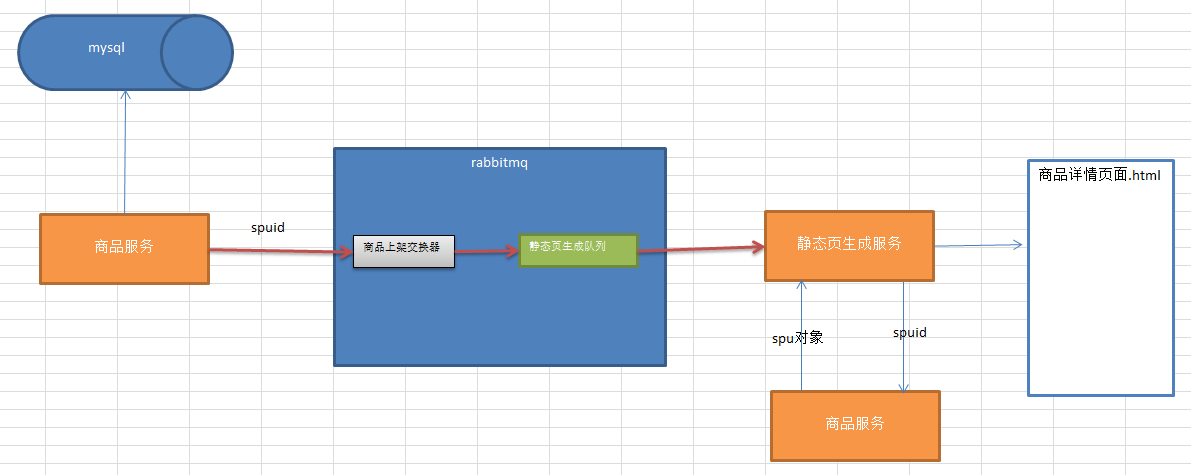
在 changgou-service 下创建一个名称为 changgou_service_page 的项目,作为静态化页面生成服务 添加依赖
<dependencies>
    <dependency>
        <groupId>com.changgou</groupId>
        <artifactId>changgou_common</artifactId>
        <version>1.0-SNAPSHOT</version>
    </dependency>
    <dependency>
        <groupId>org.springframework.boot</groupId>
        <artifactId>spring-boot-starter-thymeleaf</artifactId>
    </dependency>
    <dependency>
        <groupId>org.springframework.boot</groupId>
        <artifactId>spring-boot-starter-amqp</artifactId>
    </dependency>
    <dependency>
        <groupId>com.changgou</groupId>
        <artifactId>changgou_service_goods_api</artifactId>
        <version>1.0-SNAPSHOT</version>
    </dependency>
</dependencies>
2
3
4
5
6
7
8
9
10
11
12
13
14
15
16
17
18
19
20
application
server:
  port: 9011
spring:
  application:
    name: page
  rabbitmq:
    host: 192.168.130.128
  main:
    allow-bean-definition-overriding: true #当遇到同样名字的时候,是否允许覆盖注册
eureka:
  client:
    service-url:
      defaultZone: http://127.0.0.1:6868/eureka
  instance:
    prefer-ip-address: true
feign:
  hystrix:
    enabled: false
  client:
    config:
      default:   #配置全局的feign的调用超时时间  如果 有指定的服务配置 默认的配置不会生效
        connectTimeout: 600000 # 指定的是 消费者 连接服务提供者的连接超时时间 是否能连接  单位是毫秒
        readTimeout: 600000  # 指定的是调用服务提供者的 服务 的超时时间()  单位是毫秒
#hystrix 配置
hystrix:
  command:
    default:
      execution:
        timeout:
          #如果enabled设置为false,则请求超时交给ribbon控制
          enabled: true
        isolation:
          strategy: SEMAPHORE
# 生成静态页的位置
pagepath: D:\items
2
3
4
5
6
7
8
9
10
11
12
13
14
15
16
17
18
19
20
21
22
23
24
25
26
27
28
29
30
31
32
33
34
35
在 com.changgou.page 下创建启动类
package com.changgou.page;


import org.springframework.boot.SpringApplication;
import org.springframework.boot.autoconfigure.SpringBootApplication;
import org.springframework.cloud.netflix.eureka.EnableEurekaClient;
import org.springframework.cloud.openfeign.EnableFeignClients;

@SpringBootApplication
@EnableEurekaClient
@EnableFeignClients(basePackages = {"com.changgou.goods.feign"})
public class PageApplication {
    public static void main(String[] args) {
        SpringApplication.run(PageApplication.class, args);
    }
}
2
3
4
5
6
7
8
9
10
11
12
13
14
15
16
# 生成静态页面
# Feign 创建
需要查询 SPU 和 SKU 以及 Category,所以我们需要先创建 Feign,修改 changgou-service-goods-api, 添加 CategoryFeign
package com.changgou.goods.feign;

import com.changgou.entity.Result;
import com.changgou.goods.pojo.Category;
import org.springframework.cloud.openfeign.FeignClient;
import org.springframework.web.bind.annotation.GetMapping;
import org.springframework.web.bind.annotation.PathVariable;

@FeignClient(name = "goods")
public interface CategoryFeign {

    @GetMapping("/category/{id}")
    public Result<Category> findById(@PathVariable Integer id);


}
2
3
4
5
6
7
8
9
10
11
12
13
14
15
16
17
在 changgou-service-goods-api, 添加 SkuFeign, 并添加根据 SpuID 查询 Sku 集合
    @GetMapping("/findSpuById/{id}")
    public Result<Spu> findSpuById(@PathVariable String id) {
        Spu spu = spuService.findById(id);
//        Goods goods = spuService.findGoodsById(id);

        return new Result(true, StatusCode.OK, "查询成功", spu);
    }
2
3
4
5
6
7
在 changgou-service-goods-api, 添加 SpuFeign, 并添加根据 SpuID 查询 Spu 信息
package com.changgou.goods.feign;

import com.changgou.entity.Result;
import com.changgou.goods.pojo.Spu;
import org.springframework.cloud.openfeign.FeignClient;
import org.springframework.web.bind.annotation.GetMapping;
import org.springframework.web.bind.annotation.PathVariable;

@FeignClient(name = "goods")
public interface SpuFeign {
    @GetMapping("/spu/findSpuById/{id}")
    public Result<Spu> findSpuById(@PathVariable String id);
}
2
3
4
5
6
7
8
9
10
11
12
13
# 静态页面
在 changgou_service_page 的 com.changgou.page.service 下创建
PageService
package com.changgou.page.service;

public interface PageService {

    //生成静态化页面
    void generateHtml(String spuId);
}
2
3
4
5
6
7
8
impl
package com.changgou.page.service.impl;

import com.alibaba.fastjson.JSON;
import com.changgou.entity.Result;
import com.changgou.goods.feign.CategoryFeign;
import com.changgou.goods.feign.SkuFeign;
import com.changgou.goods.feign.SpuFeign;
import com.changgou.goods.pojo.Category;
import com.changgou.goods.pojo.Sku;
import com.changgou.goods.pojo.Spu;
import com.changgou.page.service.PageService;
import org.apache.commons.lang.StringUtils;
import org.springframework.beans.factory.annotation.Autowired;
import org.springframework.beans.factory.annotation.Value;
import org.springframework.stereotype.Service;
import org.thymeleaf.TemplateEngine;
import org.thymeleaf.context.Context;

import java.io.File;
import java.io.IOException;
import java.io.PrintWriter;
import java.io.Writer;
import java.util.HashMap;
import java.util.List;
import java.util.Map;

@Service
public class PageServiceImpl implements PageService {

    @Autowired
    private SpuFeign spuFeign;

    @Autowired
    private CategoryFeign categoryFeign;

    @Autowired
    private SkuFeign skuFeign;

    @Value("${pagepath}")
    private String pagepath;

    //注入模板
    @Autowired
    private TemplateEngine templateEngine;


    @Override
    public void generateHtml(String spuId) {
        //获取context对象 用于存储商品的相关数据
        Context context = new Context();
        //获取静态化页面相关数据
        Map<String, Object> itemData = this.getItemData(spuId);
        context.setVariables(itemData);
        //获取商品详情页面的存储位置
        File dir = new File(pagepath);
        //判断当前存储位置的文件夹是否存在 如不存在则新建
        if (!dir.exists()) {
            dir.mkdirs();
        }
        //定义输出流 完成文件的生成
        File file = new File(dir + "/" + spuId + ".html");
        Writer out = null;
        try {
            out = new PrintWriter(file);
            //生成静态化页面
            /**
             * 1.模板名称
             * 2.context
             * 3.输出流
             */
            templateEngine.process("item", context, out);

        } catch (Exception e) {
            e.printStackTrace();
        } finally {
            //关闭流
            if (out != null) {
                try {
                    out.close();
                } catch (IOException e) {
                    e.printStackTrace();
                }
            }
        }

    }

    //获取静态化页面
    private Map<String, Object> getItemData(String spuId) {
        Map<String, Object> resultMap = new HashMap<>();
        //获取spu
        Spu spu = spuFeign.findSpuById(spuId).getData();
        resultMap.put("spu", spu);
        //获取图片信息
        if (spu != null) {
            if (StringUtils.isNotEmpty(spu.getImages())) {
                resultMap.put("imageList", spu.getImages().split(","));
            }
        }
        //获取商品的分类信息
        Category category1 = categoryFeign.findById(spu.getCategory1Id()).getData();
        resultMap.put("category1", category1);
        Category category2 = categoryFeign.findById(spu.getCategory2Id()).getData();
        resultMap.put("category2", category2);
        Category category3 = categoryFeign.findById(spu.getCategory3Id()).getData();
        resultMap.put("category3", category3);
        //获取sku的相关信息
        List<Sku> skuList = skuFeign.findSkuListBySpuId(spuId);
        resultMap.put("skuList", skuList);
        //获取商品规格信息
        resultMap.put("specificationList", JSON.parseObject(spu.getSpecItems(), Map.class));
        return resultMap;
    }
}
2
3
4
5
6
7
8
9
10
11
12
13
14
15
16
17
18
19
20
21
22
23
24
25
26
27
28
29
30
31
32
33
34
35
36
37
38
39
40
41
42
43
44
45
46
47
48
49
50
51
52
53
54
55
56
57
58
59
60
61
62
63
64
65
66
67
68
69
70
71
72
73
74
75
76
77
78
79
80
81
82
83
84
85
86
87
88
89
90
91
92
93
94
95
96
97
98
99
100
101
102
103
104
105
106
107
108
109
110
111
112
113
114
声明 page_create_queue 队列,并绑定到商品上架交换机
package com.changgou.page.config;

import org.springframework.amqp.core.*;
import org.springframework.beans.factory.annotation.Qualifier;
import org.springframework.context.annotation.Bean;
import org.springframework.context.annotation.Configuration;


@Configuration
public class RabbitMQConfig {
    //定义交换机名称
    public static final String GOODS_UP_EXCHANGE = "goods_up_exchange";
    public static final String GOODS_DOWN_EXCHANGE="goods_down_exchange";


    //定义队列名称
    public static final String AD_UPDATE_QUEUE = "ad_update_queue";
    public static final String SEARCH_ADD_QUEUE = "search_add_queue";
    public static final String SEARCH_DEL_QUEUE="search_del_queue";
    public static final String PAGE_CREATE_QUEUE="page_create_queue";

    //声明队列
    @Bean
    public Queue queue() {
        return new Queue(AD_UPDATE_QUEUE);
    }

    @Bean(SEARCH_ADD_QUEUE)
    public Queue SEARCH_ADD_QUEUE() {
        return new Queue(SEARCH_ADD_QUEUE);
    }

    @Bean(SEARCH_DEL_QUEUE)
    public Queue SEARCH_DEL_QUEUE(){
        return new Queue(SEARCH_DEL_QUEUE);
    }

    @Bean(PAGE_CREATE_QUEUE)
    public Queue PAGE_CREATE_QUEUE(){
        return new Queue(PAGE_CREATE_QUEUE);
    }

    //声明交换机
    @Bean(GOODS_UP_EXCHANGE)
    public Exchange GOODS_UP_EXCHANGE() {
        return ExchangeBuilder.fanoutExchange(GOODS_UP_EXCHANGE).durable(true).build();
    }

    @Bean(GOODS_DOWN_EXCHANGE)
    public Exchange GOODS_DOWN_EXCHANGE(){
        return ExchangeBuilder.fanoutExchange(GOODS_DOWN_EXCHANGE).durable(true).build();
    }


    //队列与交换机绑定
    @Bean
    public Binding GOODS_UP_EXCHANGE_BINDING(@Qualifier(SEARCH_ADD_QUEUE) Queue queue, @Qualifier(GOODS_UP_EXCHANGE) Exchange exchange) {
        return BindingBuilder.bind(queue).to(exchange).with("").noargs();
    }

    @Bean
    public Binding PAGE_CREATE_QUEUE_BINDING(@Qualifier(PAGE_CREATE_QUEUE)Queue queue,@Qualifier(GOODS_UP_EXCHANGE)Exchange exchange){
        return BindingBuilder.bind(queue).to(exchange).with("").noargs();
    }


    @Bean
    public Binding GOODS_DOWN_EXCHANGE_BINDING(@Qualifier(SEARCH_DEL_QUEUE)Queue queue,@Qualifier(GOODS_DOWN_EXCHANGE)Exchange exchange){
        return BindingBuilder.bind(queue).to(exchange).with("").noargs();
    }


}
2
3
4
5
6
7
8
9
10
11
12
13
14
15
16
17
18
19
20
21
22
23
24
25
26
27
28
29
30
31
32
33
34
35
36
37
38
39
40
41
42
43
44
45
46
47
48
49
50
51
52
53
54
55
56
57
58
59
60
61
62
63
64
65
66
67
68
69
70
71
72
73
74
75
创建 PageListener 监听类,监听 page_create_queue 队列,获取消息,并生成静态化页面
package com.changgou.page.listener;

import com.changgou.page.config.RabbitMQConfig;
import com.changgou.page.service.PageService;
import org.springframework.amqp.rabbit.annotation.RabbitListener;
import org.springframework.beans.factory.annotation.Autowired;
import org.springframework.stereotype.Component;

@Component
public class PageListener {

    @Autowired
    private PageService pageService;

    @RabbitListener(queues = RabbitMQConfig.PAGE_CREATE_QUEUE)
    public void receiveMessage(String spuId){
        System.out.println("获取静态化页面的id为:"+spuId);
        //调用业务层完成静态化页面生成
        pageService.generateHtml(spuId);

    }
}
2
3
4
5
6
7
8
9
10
11
12
13
14
15
16
17
18
19
20
21
22
更新 canal 中消息队列配置类与 Page 服务一致
canal 中的 SpuListener 添加监听审核状态
//获取最新被审核通过的商品  status 从0变成1
if ("0".equals(oldData.get("status")) && "1".equals(newData.get("status"))){
    //将商品的spu id 发送到mq队列中
    rabbitTemplate.convertAndSend(RabbitMQConfig.GOODS_UP_EXCHANGE,"",newData.get("id"));
}
2
3
4
5
# 模板填充
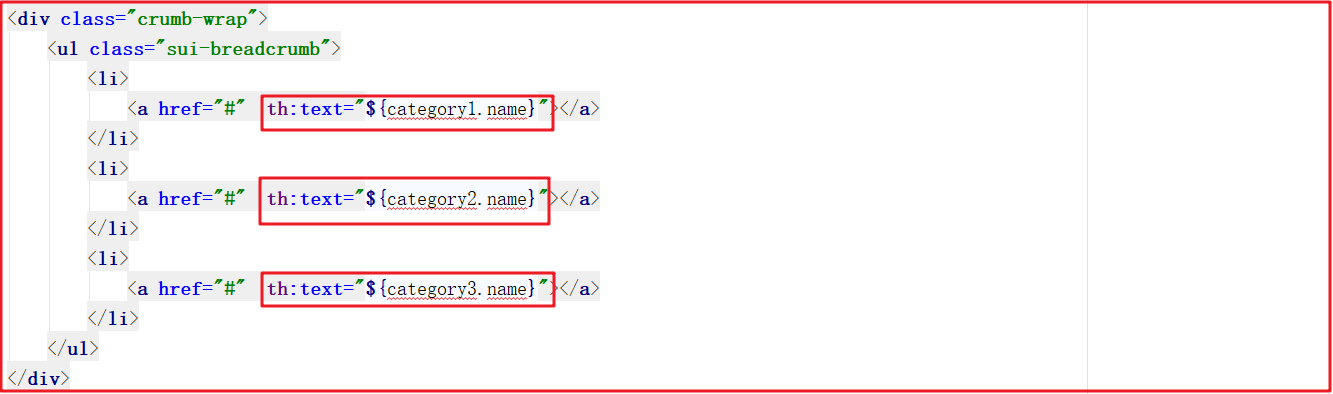
(1) 面包屑数据
修改 item.html,填充三个分类数据作为面包屑,代码如下:
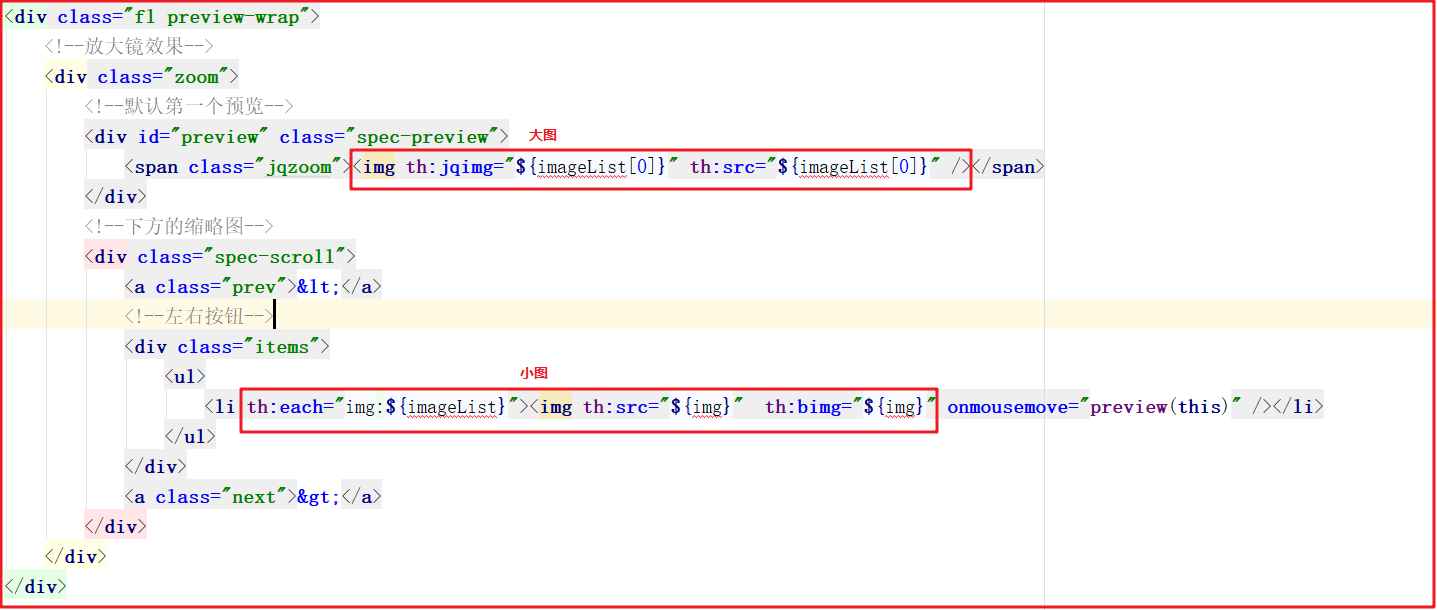
(2) 商品图片
修改 item.html,将商品图片信息输出,在真实工作中需要做空判断,代码如下:
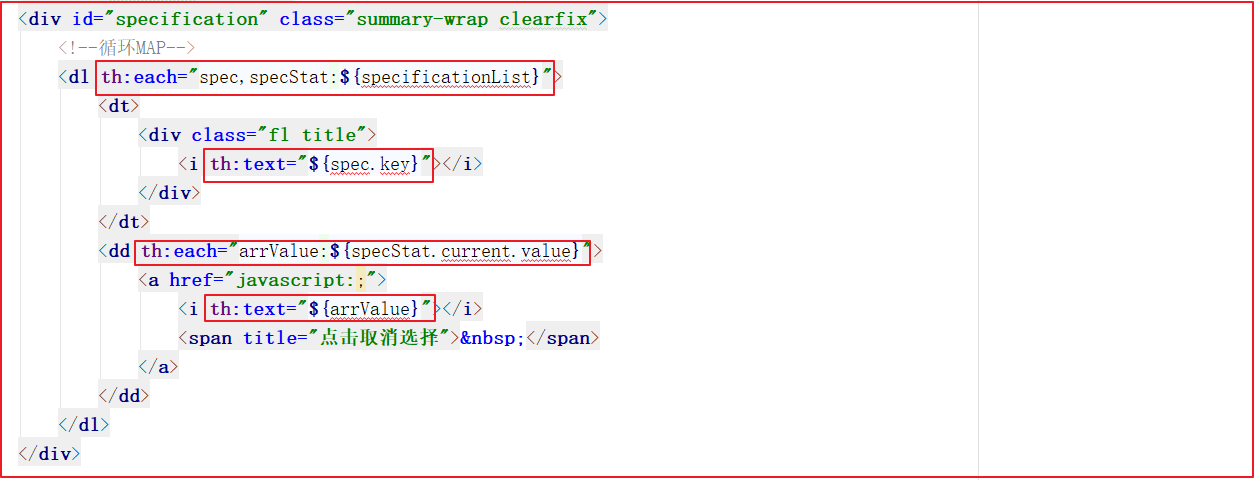
(3) 规格输出
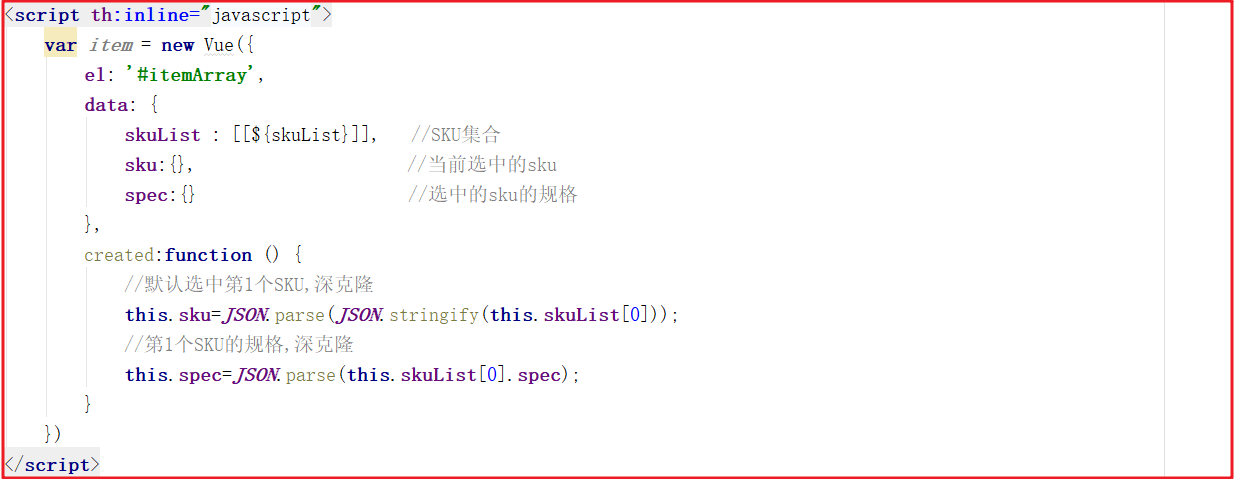
(4) 默认 SKU 显示
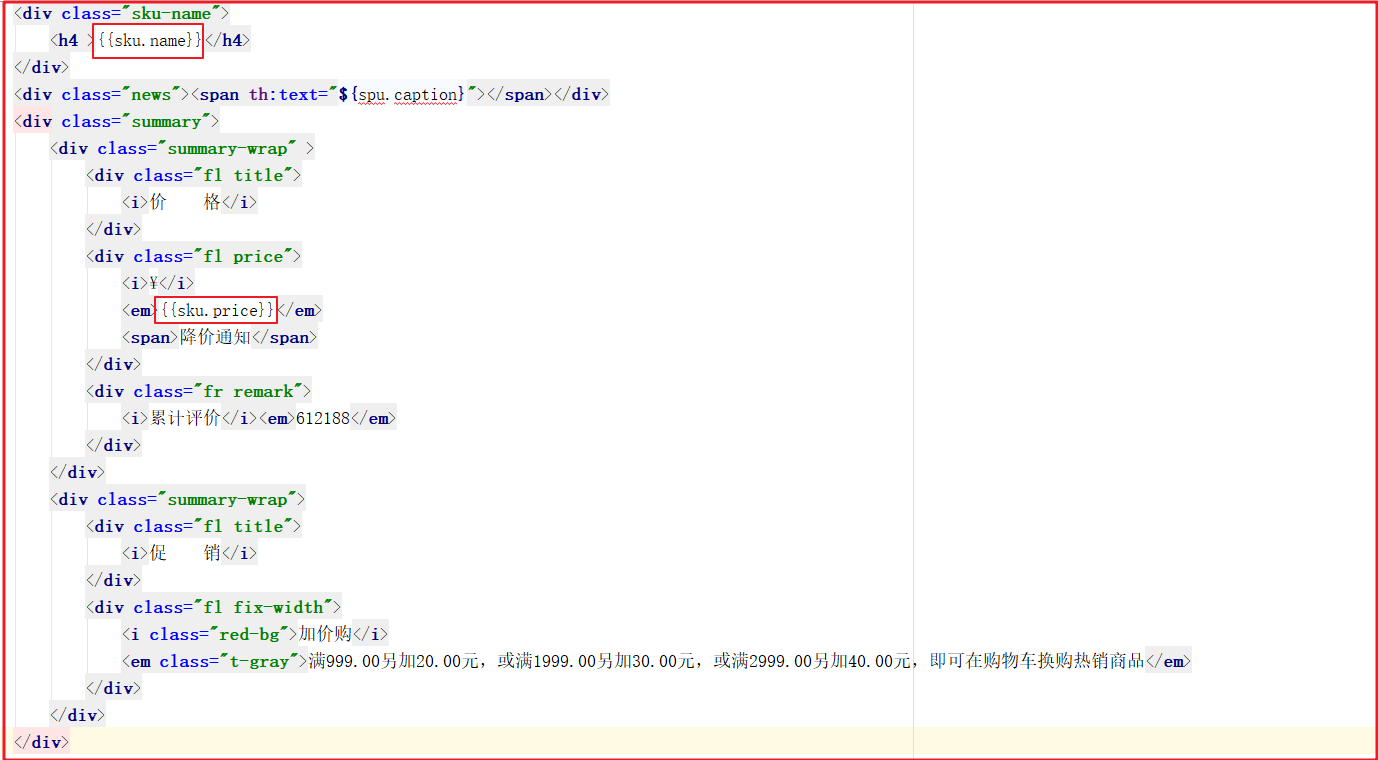
静态页生成后,需要显示默认的 Sku,我们这里默认显示第 1 个 Sku 即可,这里可以结合着 Vue 一起实现。可以先定义一个集合,再定义一个 spec 和 sku,用来存储当前选中的 Sku 信息和 Sku 的规格,代码如下:
页面显示默认的 Sku 信息
(5) 记录选中的 Sku
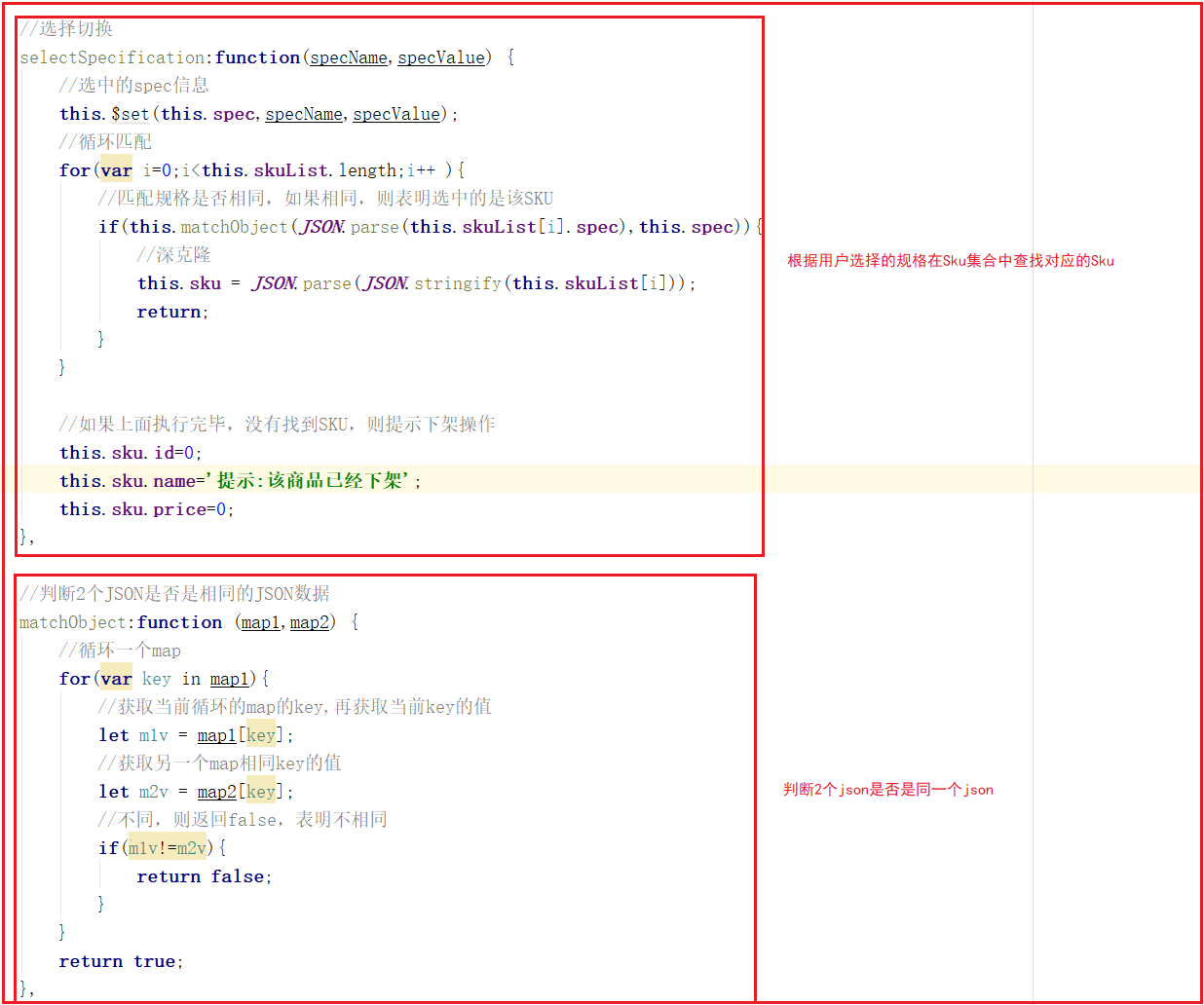
在当前 Spu 的所有 Sku 中 spec 值是唯一的,我们可以根据 spec 来判断用户选中的是哪个 Sku,我们可以在 Vue 中添加代码来实现,代码如下:
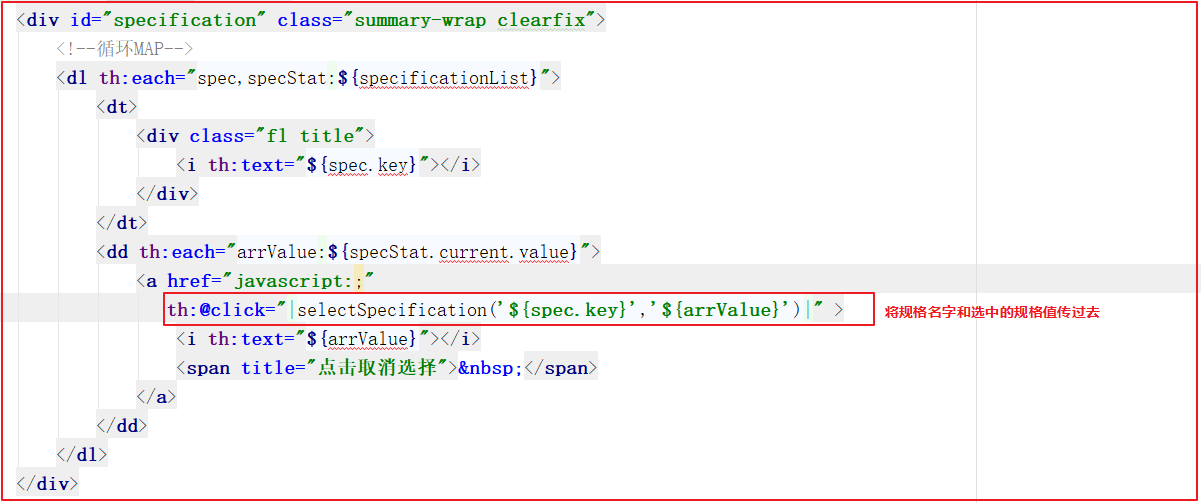
添加规格点击事件
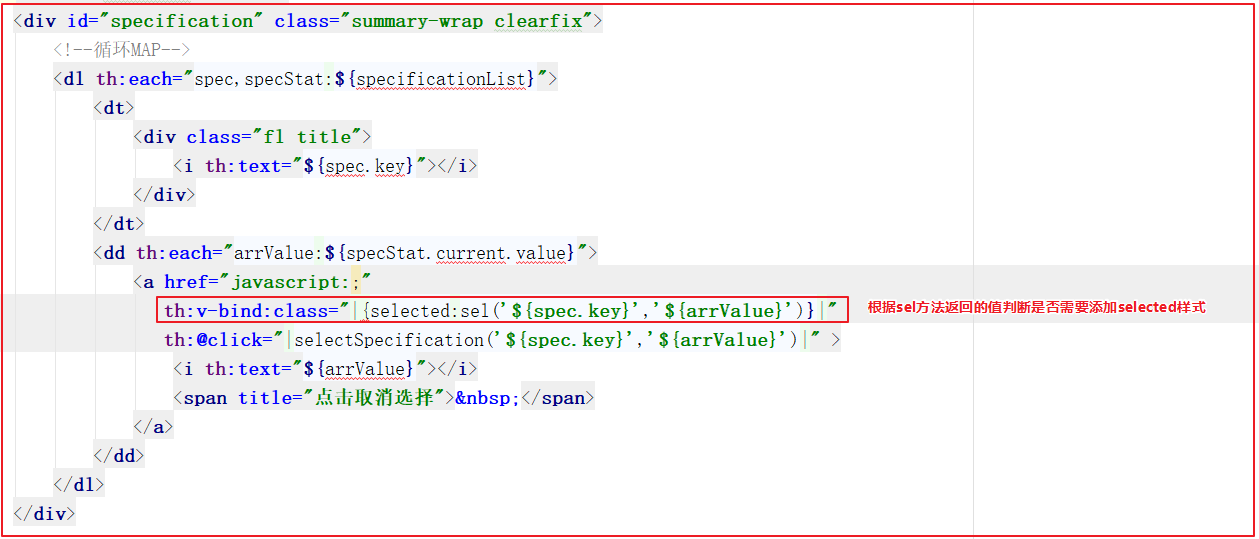
(6) 样式切换
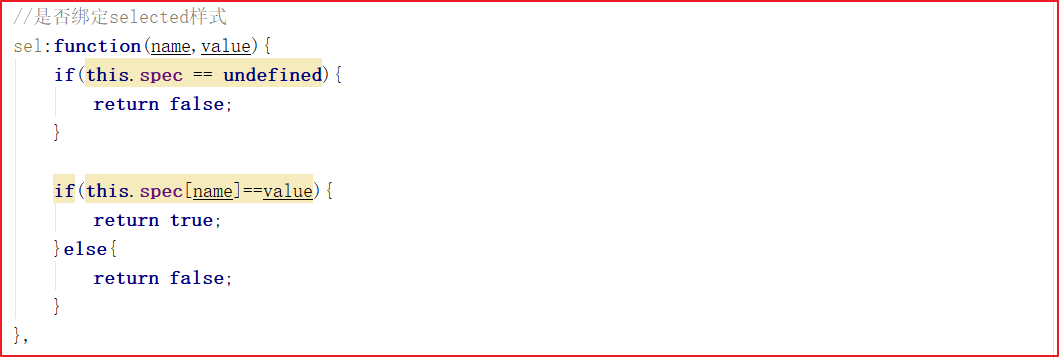
点击不同规格后,实现样式选中,我们可以根据每个规格判断该规格是否在当前选中的 Sku 规格中,如果在,则返回 true 添加 selected 样式,否则返回 false 不添加 selected 样式。
Vue 添加代码:
页面添加样式绑定,代码如下:
# 基于 nginx 完成静态页访问
更改搜索页面的详情超链接
第 728 行
<div class="p-img">
    <a th:href="'http://192.168.130.128:8081/'+${sku.spuId}+'.html'" target="_blank"><img th:src="${sku.image}"/></a>
</div>
2
3
将静态页面上传到 nginx 的 html