
 项目环境和开发讲师管理接口
# 项目环境和开发讲师管理接口
# 数据库设计规则
以下规则只针对本模块,更全面的文档参考《阿里巴巴 Java 开发手册》:
1、库名与应用名称尽量一致
2、表名、字段名必须使用小写字母或数字,禁止出现数字开头,
3、表名不使用复数名词
4、表的命名最好是加上 “业务名称_表的作用”。如,edu_teacher
5、表必备三字段:id, gmt_create, gmt_modified
说明:
其中 id 必为主键,类型为 bigint unsigned、单表时自增、步长为 1。
(如果使用分库分表集群部署,则 id 类型为 verchar,非自增,业务中使用分布式 id 生成器)
gmt_create, gmt_modified 的类型均为 datetime 类型,前者现在时表示主动创建,后者过去分词表示被 动更新。
6、单表行数超过 500 万行或者单表容量超过 2GB,才推荐进行分库分表。 说明:如果预计三年后的数据量根本达不到这个级别,请不要在创建表时就分库分表。
7、表达是与否概念的字段,必须使用 is_xxx 的方式命名,数据类型是 unsigned tinyint (1 表示是,0 表示否)。
说明:任何字段如果为非负数,必须是 unsigned。
注意:**POJO 类中的任何布尔类型的变量,都不要加 is 前缀。** 数据库表示是与否的值,使用 tinyint 类型,坚持 is_xxx 的 命名方式是为了明确其取值含义与取值范围。
正例:表达逻辑删除的字段名 is_deleted,1 表示删除,0 表示未删除。
8、小数类型为 decimal,禁止使用 float 和 double。 说明:float 和 double 在存储的时候,存在精度损失的问题,很可能在值的比较时,得到不 正确的结果。如果存储的数据范围超过 decimal 的范围,建议将数据拆成整数和小数分开存储。
9、如果存储的字符串长度几乎相等,使用 char 定长字符串类型。
10、varchar 是可变长字符串,不预先分配存储空间,长度不要超过 5000,如果存储长度大于此值,定义字段类型为 text,独立出来一张表,用主键来对应,避免影响其它字段索 引效率。
11、唯一索引名为 uk_字段名;普通索引名则为 idx_字段名。
说明:uk_ 即 unique key;idx_ 即 index 的简称
12、** 不得使用外键与级联,一切外键概念必须在应用层解决。** 外键与级联更新适用于单机低并发,不适合分布式、高并发集群;级联更新是强阻塞,存在数据库更新风暴的风险;外键影响数据库的插入速度。
# 项目搭建
项目目录结构
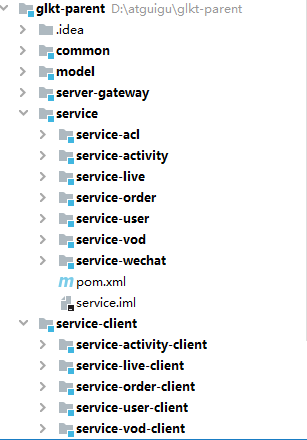
**ggkt_parent:** 硅谷课堂根目录(父工程),管理多个子模块:
common:公共模块父节点
common_util:工具类模块,所有模块都可以依赖于它
service_utils:service 服务的 base 包,包含 service 服务的公共配置类,所有 service 模块依赖于它
rabbit_utils:rabbitmq 封装工具类
model:实体类相关模块
server-gateway:服务网关
service:api 接口服务父节点
service_acl:权限管理接口服务
service_activity:优惠券 api 接口服务
service_live:直播课程 api 接口服务
service_order:订单 api 接口服务
service_user:用户 api 接口服务
service_vod:点播课程 api 接口服务
service_wechat:公众号 api 接口服务
service-client:feign 服务调用父节点
service-activity-client:优惠券 api 接口
service-live-client:直播课程 api 接口
service-order-client:订单 api 接口
service-user-client:用户 api 接口
service-vod-client:点播课程 api 接口
# 创建父工程
创建父工程 ggkt_parent
pom.xml
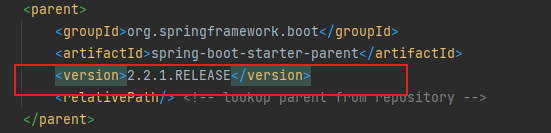
修改 SpringBoot 版本为 : 2.2.1.RELEASE
添加依赖
如果无法导入依赖可以尝试把继承标签注释掉 <dependencyManagement>
<properties>
    <skipTests>true</skipTests>
    <java.version>1.8</java.version>
    <cloud.version>Hoxton.RELEASE</cloud.version>
    <alibaba.version>2.2.0.RELEASE</alibaba.version>
    <mybatis-plus.version>3.4.1</mybatis-plus.version>
    <mysql.version>5.1.46</mysql.version>
    <swagger.version>2.9.2</swagger.version>
    <jwt.version>0.7.0</jwt.version>
    <fastjson.version>1.2.29</fastjson.version>
    <httpclient.version>4.5.1</httpclient.version>
    <easyexcel.version>2.2.0-beta2</easyexcel.version>
    <aliyun.version>4.5.14</aliyun.version>
    <jodatime.version>2.10.1</jodatime.version>
    <jwt.version>0.7.0</jwt.version>
    <xxl-job.version>2.3.0</xxl-job.version>
    <aliyun.oss.version>3.9.0</aliyun.oss.version>
</properties>

<!--配置dependencyManagement锁定依赖的版本-->
<dependencyManagement>
    <dependencies>
        <dependency>
            <groupId>org.springframework.cloud</groupId>
            <artifactId>spring-cloud-dependencies</artifactId>
            <version>${cloud.version}</version>
            <type>pom</type>
            <scope>import</scope>
        </dependency>

        <dependency>
            <groupId>com.alibaba.cloud</groupId>
            <artifactId>spring-cloud-alibaba-dependencies</artifactId>
            <version>${alibaba.version}</version>
            <type>pom</type>
            <scope>import</scope>
        </dependency>

        <!--mybatis-plus 持久层-->
        <dependency>
            <groupId>com.baomidou</groupId>
            <artifactId>mybatis-plus-boot-starter</artifactId>
            <version>${mybatis-plus.version}</version>
        </dependency>

        <dependency>
            <groupId>mysql</groupId>
            <artifactId>mysql-connector-java</artifactId>
            <version>${mysql.version}</version>
        </dependency>

        <dependency>
            <groupId>com.github.xiaoymin</groupId>
            <artifactId>knife4j-spring-boot-starter</artifactId>
            <version>2.0.8</version>
        </dependency>

        <dependency>
            <groupId>io.jsonwebtoken</groupId>
            <artifactId>jjwt</artifactId>
            <version>${jwt.version}</version>
        </dependency>

        <dependency>
            <groupId>org.apache.httpcomponents</groupId>
            <artifactId>httpclient</artifactId>
            <version>${httpclient.version}</version>
        </dependency>

        <dependency>
            <groupId>com.alibaba</groupId>
            <artifactId>fastjson</artifactId>
            <version>${fastjson.version}</version>
        </dependency>

        <dependency>
            <groupId>com.alibaba</groupId>
            <artifactId>easyexcel</artifactId>
            <version>${easyexcel.version}</version>
        </dependency>
        <dependency>
            <groupId>com.aliyun</groupId>
            <artifactId>aliyun-java-sdk-core</artifactId>
            <version>${aliyun.version}</version>
        </dependency>

        <!--aliyunOSS-->
        <dependency>
            <groupId>com.aliyun.oss</groupId>
            <artifactId>aliyun-sdk-oss</artifactId>
            <version>${aliyun.oss.version}</version>
        </dependency>

        <!--日期时间工具-->
        <dependency>
            <groupId>joda-time</groupId>
            <artifactId>joda-time</artifactId>
            <version>${jodatime.version}</version>
        </dependency>

        <dependency>
            <groupId>com.xuxueli</groupId>
            <artifactId>xxl-job-core</artifactId>
            <version>${xxl-job.version}</version>
        </dependency>
        <!--swagger-->
        <dependency>
            <groupId>io.springfox</groupId>
            <artifactId>springfox-swagger2</artifactId>
            <version>${swagger.version}</version>
        </dependency>
        <!--swagger ui-->
        <dependency>
            <groupId>io.springfox</groupId>
            <artifactId>springfox-swagger-ui</artifactId>
            <version>${swagger.version}</version>
        </dependency>
    </dependencies>
</dependencyManagement>
2
3
4
5
6
7
8
9
10
11
12
13
14
15
16
17
18
19
20
21
22
23
24
25
26
27
28
29
30
31
32
33
34
35
36
37
38
39
40
41
42
43
44
45
46
47
48
49
50
51
52
53
54
55
56
57
58
59
60
61
62
63
64
65
66
67
68
69
70
71
72
73
74
75
76
77
78
79
80
81
82
83
84
85
86
87
88
89
90
91
92
93
94
95
96
97
98
99
100
101
102
103
104
105
106
107
108
109
110
111
112
113
114
115
116
117
118
119
# 创建 model 模块
创建子模块 model
pom.xml
    <dependencies>
        <dependency>
            <groupId>org.projectlombok</groupId>
            <artifactId>lombok</artifactId>
        </dependency>

        <!--mybatis-plus-->
        <dependency>
            <groupId>com.baomidou</groupId>
            <artifactId>mybatis-plus-boot-starter</artifactId>
            <scope>provided </scope>
        </dependency>

        <dependency>
            <groupId>com.alibaba</groupId>
            <artifactId>easyexcel</artifactId>
            <scope>provided </scope>
        </dependency>
        <dependency>
            <groupId>com.github.xiaoymin</groupId>
            <artifactId>knife4j-spring-boot-starter</artifactId>
            <!--在引用时请在maven中央仓库搜索2.X最新版本号-->
            <scope>provided</scope>
        </dependency>

        <dependency>
            <groupId>org.springframework.boot</groupId>
            <artifactId>spring-boot-starter-data-mongodb</artifactId>
            <scope>provided </scope>
        </dependency>

        <dependency>
            <groupId>com.alibaba</groupId>
            <artifactId>fastjson</artifactId>
            <scope>provided </scope>
        </dependency>

        <!--创建索引库的-->
        <dependency>
            <groupId>org.springframework.boot</groupId>
            <artifactId>spring-boot-starter-data-elasticsearch</artifactId>
            <scope>provided </scope>
        </dependency>
    </dependencies>
2
3
4
5
6
7
8
9
10
11
12
13
14
15
16
17
18
19
20
21
22
23
24
25
26
27
28
29
30
31
32
33
34
35
36
37
38
39
40
41
42
43
44
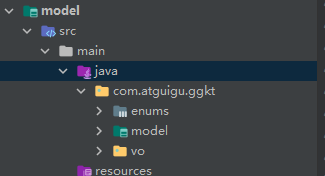
把资源文件夹下的实体类包直接复制到 model 项目中
# 创建 service 模块
创建子模块 service
pom.xml
<dependencies>
    <!--数据载体-->
    <dependency>
        <groupId>com.atguigu</groupId>
        <artifactId>model</artifactId>
        <version>0.0.1-SNAPSHOT</version>
    </dependency>

    <!--web 需要启动项目-->
    <dependency>
        <groupId>org.springframework.boot</groupId>
        <artifactId>spring-boot-starter-web</artifactId>
    </dependency>

    <!--mybatis-plus-->
    <dependency>
        <groupId>com.baomidou</groupId>
        <artifactId>mybatis-plus-boot-starter</artifactId>
    </dependency>

    <!--mysql-->
    <dependency>
        <groupId>mysql</groupId>
        <artifactId>mysql-connector-java</artifactId>
    </dependency>

    <!-- 服务注册 -->
    <dependency>
        <groupId>com.alibaba.cloud</groupId>
        <artifactId>spring-cloud-starter-alibaba-nacos-discovery</artifactId>
    </dependency>

    <!-- 服务调用feign -->
    <dependency>
        <groupId>org.springframework.cloud</groupId>
        <artifactId>spring-cloud-starter-openfeign</artifactId>
    </dependency>

    <!-- 流量控制 -->
    <dependency>
        <groupId>com.alibaba.cloud</groupId>
        <artifactId>spring-cloud-starter-alibaba-sentinel</artifactId>
    </dependency>

    <!--开发者工具-->
    <dependency>
        <groupId>org.springframework.boot</groupId>
        <artifactId>spring-boot-devtools</artifactId>
        <optional>true</optional>
    </dependency>
</dependencies>
2
3
4
5
6
7
8
9
10
11
12
13
14
15
16
17
18
19
20
21
22
23
24
25
26
27
28
29
30
31
32
33
34
35
36
37
38
39
40
41
42
43
44
45
46
47
48
49
50
51
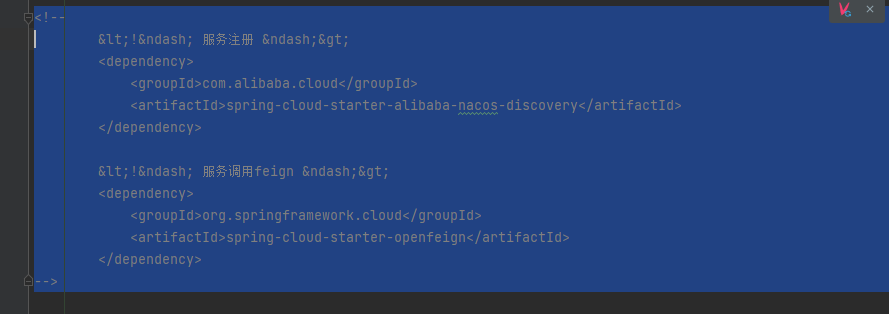
由于前期并没有使用 nocos、openfeign 微服务组件先把他们注释掉 否则会报错
# 创建 service_vod 模块
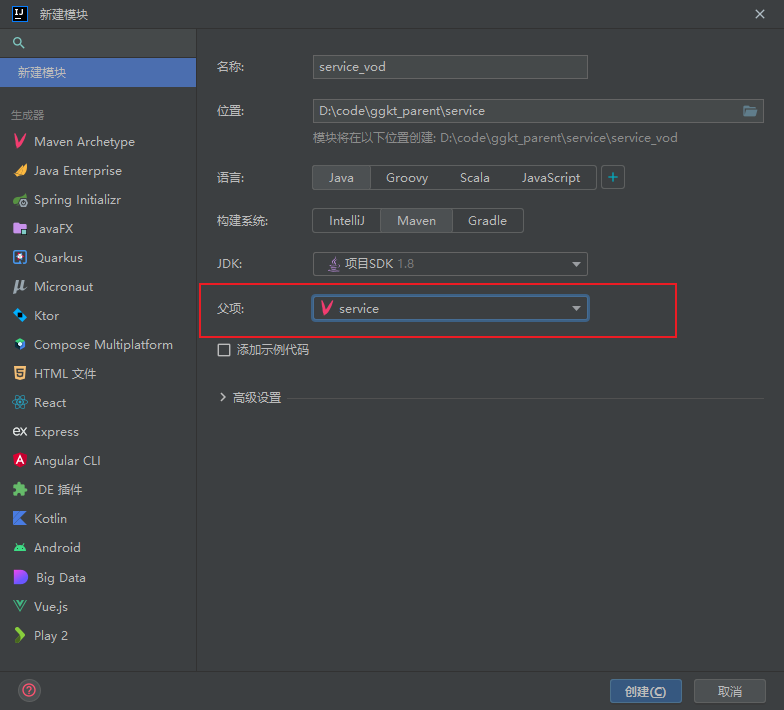
在 service 模块创建子模块 service_vod
# 后台管理系统 - 讲师管理接口
添加课程时候,需要选择所属讲师,所以要对讲师进行管理,就是基于讲师的 CRUD 操作
# 讲师管理模块配置
# 生成模块代码
在 service_vod 中引入代码生成器依赖
<dependency>
    <groupId>com.baomidou</groupId>
    <artifactId>mybatis-plus-generator</artifactId>
    <version>3.3.1</version>
</dependency>

<dependency>
    <groupId>org.apache.velocity</groupId>
    <artifactId>velocity-engine-core</artifactId>
    <version>2.0</version>
</dependency>
2
3
4
5
6
7
8
9
10
11
复制生成代码工具类
修改代码中路径、数据库、包和表,复制到 test 目录下
注意修改 代码路径 项目引用路径 扫描项目名称 数据库配置等参数
package com.atguigu;


import com.baomidou.mybatisplus.annotation.DbType;
import com.baomidou.mybatisplus.generator.AutoGenerator;
import com.baomidou.mybatisplus.generator.config.DataSourceConfig;
import com.baomidou.mybatisplus.generator.config.GlobalConfig;
import com.baomidou.mybatisplus.generator.config.PackageConfig;
import com.baomidou.mybatisplus.generator.config.StrategyConfig;
import com.baomidou.mybatisplus.generator.config.rules.NamingStrategy;

public class CodeGet {

    public static void main(String[] args) {

        // 1、创建代码生成器
        AutoGenerator mpg = new AutoGenerator();

        // 2、全局配置
        // 全局配置
        GlobalConfig gc = new GlobalConfig();
        String projectPath = System.getProperty("user.dir");
        //gc.setOutputDir(projectPath + "/src/main/java");

        //注意代码存放路径
        gc.setOutputDir("D:\\code\\ggkt_parent\\service\\service_vod"+"/src/main/java");

        //默认为IUserService
        gc.setServiceName("%sService");	//去掉Service接口的首字母I
        gc.setAuthor("atguigu");
        gc.setOpen(false);
        mpg.setGlobalConfig(gc);

        // 3、数据源配置
        DataSourceConfig dsc = new DataSourceConfig();
        dsc.setUrl("jdbc:mysql://localhost:3306/glkt_vod");
        dsc.setDriverName("com.mysql.jdbc.Driver");
        dsc.setUsername("root");
        dsc.setPassword("123456");
        dsc.setDbType(DbType.MYSQL);
        mpg.setDataSource(dsc);

        // 4、包配置
        PackageConfig pc = new PackageConfig();
        pc.setParent("com.atguigu.ggkt");
        pc.setModuleName("vod"); //模块名

        pc.setController("controller");
        pc.setEntity("entity");
        pc.setService("service");
        pc.setMapper("mapper");
        mpg.setPackageInfo(pc);

        // 5、策略配置
        StrategyConfig strategy = new StrategyConfig();

        //表名
        strategy.setInclude("teacher");

        strategy.setNaming(NamingStrategy.underline_to_camel);//数据库表映射到实体的命名策略

        strategy.setColumnNaming(NamingStrategy.underline_to_camel);//数据库表字段映射到实体的命名策略
        strategy.setEntityLombokModel(true); // lombok 模型 @Accessors(chain = true) setter链式操作

        strategy.setRestControllerStyle(true); //restful api风格控制器
        strategy.setControllerMappingHyphenStyle(true); //url中驼峰转连字符

        mpg.setStrategy(strategy);

        // 6、执行
        mpg.execute();
    }
}
2
3
4
5
6
7
8
9
10
11
12
13
14
15
16
17
18
19
20
21
22
23
24
25
26
27
28
29
30
31
32
33
34
35
36
37
38
39
40
41
42
43
44
45
46
47
48
49
50
51
52
53
54
55
56
57
58
59
60
61
62
63
64
65
66
67
68
69
70
71
72
73
74
运行测试 生成完成

查看指定生成项目下的类
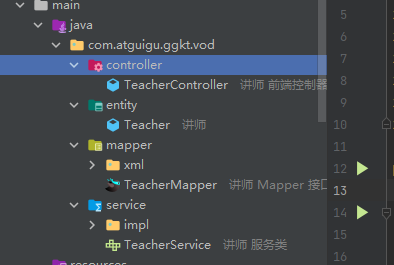
删除项目下生成 entity 包 因为我们在 model 项目中已经存放了对应实体
将 mapper、service、serviceimpl 中的 teacher 都改成 model 中的 Teacher
修改 TeacherCollection 的类地址
@RestController
@RequestMapping(value="/admin/vod/teacher")
public class TeacherController {

    @Autowired
    private TeacherService teacherService;

}
2
3
4
5
6
7
8
9
# 新版生成器
依赖
<dependency>
    <groupId>com.baomidou</groupId>
    <artifactId>mybatis-plus-generator</artifactId>
    <version>3.3.1</version>
</dependency>

<dependency>
    <groupId>org.apache.velocity</groupId>
    <artifactId>velocity-engine-core</artifactId>
    <version>2.0</version>
</dependency>
2
3
4
5
6
7
8
9
10
11
编码
package com.iekr.library;

import com.baomidou.mybatisplus.annotation.FieldFill;
import com.baomidou.mybatisplus.annotation.IdType;
import com.baomidou.mybatisplus.generator.FastAutoGenerator;
import com.baomidou.mybatisplus.generator.config.DataSourceConfig;
import com.baomidou.mybatisplus.generator.config.OutputFile;
import com.baomidou.mybatisplus.generator.config.converts.MySqlTypeConvert;
import com.baomidou.mybatisplus.generator.config.querys.MySqlQuery;
import com.baomidou.mybatisplus.generator.config.rules.DateType;
import com.baomidou.mybatisplus.generator.config.rules.NamingStrategy;
import com.baomidou.mybatisplus.generator.fill.Column;
import com.baomidou.mybatisplus.generator.fill.Property;
import com.baomidou.mybatisplus.generator.keywords.MySqlKeyWordsHandler;

import java.util.Collections;

// 代码自动生成器
public class Generator {
    // 数据库连接字段配置
    private static final String JDBC_URL = "jdbc:mysql://localhost:3306/st_library?useUnicode=true&characterEncoding=utf-8&serverTimezone=GMT%2B8&useSSl=true";
    private static final String JDBC_USER_NAME = "root";
    private static final String JDBC_PASSWORD = "123456";

    // 包名和模块名
    private static final String PACKAGE_NAME = "com.iekr";
    private static final String MODULE_NAME = "library";

    // 表名,多个表使用英文逗号分割
    private static final String[] TBL_NAMES = {"tb_book", "tb_user", "tb_category","tb_teacher_user","tb_sys_log","tb_library_info"};

    // 表名的前缀,从表生成代码时会去掉前缀
    private static final String TABLE_PREFIX = "tb_";


    public static void main(String[] args) {

        //获取当前工程路径(这里无需修改)
        String projectPath = System.getProperty("user.dir");


        /**
         * 1.数据库配置(设置数据源)
         配置数据库连接以及需要使用的字段
         */
        DataSourceConfig.Builder dataSourceConfigBuilder = new DataSourceConfig.Builder(JDBC_URL, JDBC_USER_NAME,
                JDBC_PASSWORD)
                .dbQuery(new MySqlQuery())
                .typeConvert(new MySqlTypeConvert())
                .keyWordsHandler(new MySqlKeyWordsHandler());


        FastAutoGenerator fastAutoGenerator = FastAutoGenerator.create(dataSourceConfigBuilder);


        /**
         * 2.全局配置
         */
        fastAutoGenerator.globalConfig(
                globalConfigBuilder -> globalConfigBuilder
                        .fileOverride()     // 覆盖已生成文件
                        .disableOpenDir()   // 不打开生成文件目录
                        .outputDir(projectPath + "/src/main/java") // 指定输出目录,注意斜杠的表示
                        .author("iekr") // 设置注释的作者
                        .commentDate("yyyy-MM-dd HH:mm:ss") // 设置注释的日期格式
                        .dateType(DateType.TIME_PACK)   // 使用java8新的时间类型
                        .enableSwagger()    // 开启swagger文档
        );

        /**
         日期类型 DateType
         DateType.ONLY_DATE 使用 java.util.date包下的 Date
         DateType.SQL_PACK 使用 java.sql包下的 Date
         DateType.TIME_PACK   因为会使用 java.time.LocalDateTime jdk1.8以上才支持  (推荐使用)
         */


        /**
         * 3.包配置
         */
        fastAutoGenerator.packageConfig(
                packageConfigBuilder -> packageConfigBuilder
                        .parent(PACKAGE_NAME)   // 设置父包名
                        .moduleName(MODULE_NAME) // 设置父包模块名
                        .entity("entity") // 设置MVC下各个模块的包名
                        .mapper("dao")
                        .service("service")
                        .serviceImpl("service.impl")
                        .controller("controller")
                        .xml("dao.xml") // 设置XML资源文件的目录
                        .pathInfo(Collections.singletonMap(OutputFile.xml, projectPath + "Mysql-lib-api\\src\\main\\resources\\mapper" ))// 设置XML资源文件的目录

        );

        /**
         * 4.模板配置(第五部分会说明)
         */
        /*
        fastAutoGenerator.templateConfig(
                templateConfigBuilder -> templateConfigBuilder
                        .disable(TemplateType.ENTITY)   // 禁用模板
                        .entity("/templates/entity.java")   // 设置实体模板路径(JAVA)
                        .service("/templates/service.java") // 设置service模板路径
                        .serviceImpl("/templates/serviceImpl.java") // 设置serviceImpl模板路径
                        .mapper("/templates/mapper.java")   // 设置mapper模板路径
                        .xml("/templates/mapper.xml")   // 设置mapperXml模板路径
                        .controller("/templates/controller.java")   // 设置controller模板路径
        );
        */

        /**
         * 5.注入配置 TODO
         */


        /**
         * 6.策略配置
         */
        fastAutoGenerator.strategyConfig(
                strategyConfigBuilder -> strategyConfigBuilder
                        .enableCapitalMode()    // 开启大写命名
                        .enableSkipView()   // 开启跳过视图
                        .disableSqlFilter() // 禁用sql过滤
                        .addInclude(TBL_NAMES)  // 设置需要生成的表名
                        .addTablePrefix(TABLE_PREFIX)   // 设置过滤表前缀
        );


        /**
         * 6.1 Entity策略配置
         */
        fastAutoGenerator.strategyConfig(
                strategyConfigBuilder -> strategyConfigBuilder.entityBuilder()
                        .enableTableFieldAnnotation()   // 生成实体时生成字段的注解,包括@TableId注解等---
                        .naming(NamingStrategy.underline_to_camel)  // 数据库表和字段映射到实体的命名策略,为下划线转驼峰
                        .columnNaming(NamingStrategy.underline_to_camel)
                        .idType(IdType.AUTO)    // 全局主键类型为AUTO(自增)
                        .enableLombok() // 支持lombok开启注解
//                        .logicDeleteColumnName("deleted")   // 逻辑删除字段名(数据库)
//                        .logicDeletePropertyName("deleted") // 逻辑删除属性名(实体)
                        .addTableFills(new Column("create_time", FieldFill.INSERT)) // 自动填充配置  create_time  update_time 两种方式
                        .addTableFills(new Property("updateTime", FieldFill.INSERT_UPDATE))
//                        .versionColumnName("version")   // 开启乐观锁
                        .disableSerialVersionUID()  // 禁用生成 serialVersionUID,默认值:true
                        .enableChainModel() // 开启实体类链式编程
                        .formatFileName("%sEntity") // 实体名称格式化为XXXEntity   formatFileName("%sEntity")
        );

        /**
         * 6.2 Controller策略配置
         */
        fastAutoGenerator.strategyConfig(
                strategyConfigBuilder -> strategyConfigBuilder.controllerBuilder()
                        .enableRestStyle()  // 开启生成@RestController控制器
                        .enableHyphenStyle()    // 开启驼峰转连字符 localhost:8080/hello_id_2
        );

        /**
         * 6.3 Service策略配置
         格式化service接口和实现类的文件名称,去掉默认的ServiceName前面的I ----
         */
        fastAutoGenerator.strategyConfig(
                strategyConfigBuilder -> strategyConfigBuilder.serviceBuilder()
                        .formatServiceFileName("%sService")
                        .formatServiceImplFileName("%sServiceImpl"));

        /**
         * 6.4 Mapper策略配置
         格式化 mapper文件名,格式化xml实现类文件名称
         */
        fastAutoGenerator.strategyConfig(
                strategyConfigBuilder -> strategyConfigBuilder.mapperBuilder()
                        .enableMapperAnnotation()   // 开启 @Mapper 注解
                        .formatMapperFileName("%sMapper")
                        .formatXmlFileName("%sMapper"));

        /** 7.生成代码
         *
         */
//        fastAutoGenerator.templateEngine(new FreemarkerTemplateEngine()); // 使用Freemarker引擎模板,默认的是Velocity引擎模板
        fastAutoGenerator.execute();

    }


}
2
3
4
5
6
7
8
9
10
11
12
13
14
15
16
17
18
19
20
21
22
23
24
25
26
27
28
29
30
31
32
33
34
35
36
37
38
39
40
41
42
43
44
45
46
47
48
49
50
51
52
53
54
55
56
57
58
59
60
61
62
63
64
65
66
67
68
69
70
71
72
73
74
75
76
77
78
79
80
81
82
83
84
85
86
87
88
89
90
91
92
93
94
95
96
97
98
99
100
101
102
103
104
105
106
107
108
109
110
111
112
113
114
115
116
117
118
119
120
121
122
123
124
125
126
127
128
129
130
131
132
133
134
135
136
137
138
139
140
141
142
143
144
145
146
147
148
149
150
151
152
153
154
155
156
157
158
159
160
161
162
163
164
165
166
167
168
169
170
171
172
173
174
175
176
177
178
179
180
181
182
183
184
185
186
187
# 创建配置和启动类
编写配置类
application.properties
# 服务端口
server.port=8301
# 服务名
spring.application.name=service-vod

# 环境设置:dev、test、prod
spring.profiles.active=dev

# mysql数据库连接
spring.datasource.driver-class-name=com.mysql.jdbc.Driver
spring.datasource.url=jdbc:mysql://localhost:3306/glkt_vod?characterEncoding=utf-8&useSSL=false
spring.datasource.username=root
spring.datasource.password=123456

#返回json的全局时间格式
spring.jackson.date-format=yyyy-MM-dd HH:mm:ss
spring.jackson.time-zone=GMT+8

#mybatis日志
namespacemybatis-plus.configuration.log-impl=org.apache.ibatis.logging.stdout.StdOutImpl
2
3
4
5
6
7
8
9
10
11
12
13
14
15
16
17
18
19
20
创建 config 包并创建配置类 VodConfig
@Configuration
@MapperScan("com.atguigu.ggkt.vod.mapper")
public class VodConfig {
}
2
3
4
创建启动类 ServiceVodApplication
@SpringBootApplication
public class ServiceVodApplication {
    public static void main(String[] args) {
        SpringApplication.run(ServiceVodApplication.class,args);
    }
}
2
3
4
5
6
# 查询所有讲师列表接口
controller
@RestController
@RequestMapping(value = "/admin/vod/teacher")
public class TeacherController {

    @Autowired
    private TeacherService teacherService;

    //查询所有讲师
    @GetMapping("/findAll")
    public List<Teacher> findAllTeacher() {
        List<Teacher> teacherList = teacherService.list();
        return teacherList;
    }

}
2
3
4
5
6
7
8
9
10
11
12
13
14
15
# 逻辑删除讲师接口
controller
TeacherController 添加删除方法
/**
    删除讲师
     */
@DeleteMapping("/remove/{id}")
public boolean removeById(@PathVariable("id") Long id) {
    return teacherService.removeById(id);
}
2
3
4
5
6
7
# 配置 Swagger2 生成 API 接口文档
前后端分离开发模式中,api 文档是最好的沟通方式。Swagger 是一个规范和完整的框架,用于生成、描述、调用和可视化 RESTful 风格的 Web 服务。及时性 (接口变更后,能够及时准确地通知相关前后端开发人员) 规范性 (并且保证接口的规范性,如接口的地址,请求方式,参数及响应格式和错误信息) 一致性 (接口信息一致,不会出现因开发人员拿到的文档版本不一致,而出现分歧) 可测性 (直接在接口文档上进行测试,以方便理解业务)
# 配置 Swagger2
在父工程下创建 common 项目
pom.xml
<dependencies>
    <dependency>
        <groupId>org.springframework.boot</groupId>
        <artifactId>spring-boot-starter-web</artifactId>
        <scope>provided </scope>
    </dependency>

    <!--mybatis-plus-->
    <dependency>
        <groupId>com.baomidou</groupId>
        <artifactId>mybatis-plus-boot-starter</artifactId>
        <scope>provided </scope>
    </dependency>

    <!--lombok用来简化实体类:需要安装lombok插件-->
    <dependency>
        <groupId>org.projectlombok</groupId>
        <artifactId>lombok</artifactId>
    </dependency>

    <!--swagger-->
    <dependency>
        <groupId>io.springfox</groupId>
        <artifactId>springfox-swagger2</artifactId>
    </dependency>
    <dependency>
        <groupId>io.springfox</groupId>
        <artifactId>springfox-swagger-ui</artifactId>
    </dependency>

    <dependency>
        <groupId>com.alibaba</groupId>
        <artifactId>fastjson</artifactId>
    </dependency>
</dependencies>
2
3
4
5
6
7
8
9
10
11
12
13
14
15
16
17
18
19
20
21
22
23
24
25
26
27
28
29
30
31
32
33
34
35
在 common 下创建子模块 service_utils
在 service_utils 创建 com.atguigu.ggkt.swagger 包
创建 Swagger2Config 配置类
package com.atguigu.ggkt.swagger;

import org.springframework.context.annotation.Bean;
import org.springframework.context.annotation.Configuration;
import springfox.documentation.builders.ApiInfoBuilder;
import springfox.documentation.service.ApiInfo;
import springfox.documentation.service.Contact;
import springfox.documentation.spi.DocumentationType;
import springfox.documentation.spring.web.plugins.Docket;
import springfox.documentation.swagger2.annotations.EnableSwagger2;

/**
 * @author Iekr
 * Date:  2022/6/28/0028 22:51
 */
@Configuration
@EnableSwagger2
public class Swagger2Config {
    @Bean
    public Docket webApiConfig(){
        return new Docket(DocumentationType.SWAGGER_2)
                .groupName("ggkt")
                .apiInfo(webApiInfo())
                .select()
                //只显示api路径下的页面
                //.paths(Predicates.and(PathSelectors.regex("/api/.*")))
                .build();
    }

    private ApiInfo webApiInfo(){
        return new ApiInfoBuilder()
                .title("网站-API文档")
                .description("本文档描述了网站微服务接口定义")
                .version("1.0")
                .contact(new Contact("atguigu", "http://atguigu.com", "atguigu.com"))
                .build();
    }
}
2
3
4
5
6
7
8
9
10
11
12
13
14
15
16
17
18
19
20
21
22
23
24
25
26
27
28
29
30
31
32
33
34
35
36
37
38
在 service 模块引入 service_utils 依赖
<dependency>
    <groupId>com.atguigu</groupId>
    <artifactId>service_utils</artifactId>
    <version>0.0.1-SNAPSHOT</version>
</dependency>
2
3
4
5
在 service_vod 启动类上添加 @ComponentScan() 注解,进行测试
@SpringBootApplication
@ComponentScan("com.atguigu")
public class ServiceVodApplication {
    public static void main(String[] args) {
        SpringApplication.run(ServiceVodApplication.class, args);
    }
}
2
3
4
5
6
7
# 定义接口说明和参数说明
| 定义范围 | 注解 |
|---|---|
| 定义在类上 | @Api |
| 定义在方法上 | @ApiOperation |
| 定义在参数上 | @ApiParam |
| 定义在成员属性上 | @ApiModelProperty |
以刚刚的讲师接口为例子
@Api(tags = "讲师管理接口")
@RestController
@RequestMapping(value = "/admin/vod/teacher")
public class TeacherController {

    @Autowired
    private TeacherService teacherService;

    /**
     *     /查询所有讲师
     */
    @ApiOperation("所有讲师列表")
    @GetMapping("/findAll")
    public List<Teacher> findAllTeacher() {
        List<Teacher> teacherList = teacherService.list();
        return teacherList;
    }

    /**
    删除讲师
     */
    @ApiOperation("逻辑删除讲师")
    @DeleteMapping("/remove/{id}")
    public boolean removeById(@ApiParam(name = "id", value = "ID", required = true) @PathVariable("id") Long id) {
        return teacherService.removeById(id);
    }

}
2
3
4
5
6
7
8
9
10
11
12
13
14
15
16
17
18
19
20
21
22
23
24
25
26
27
28
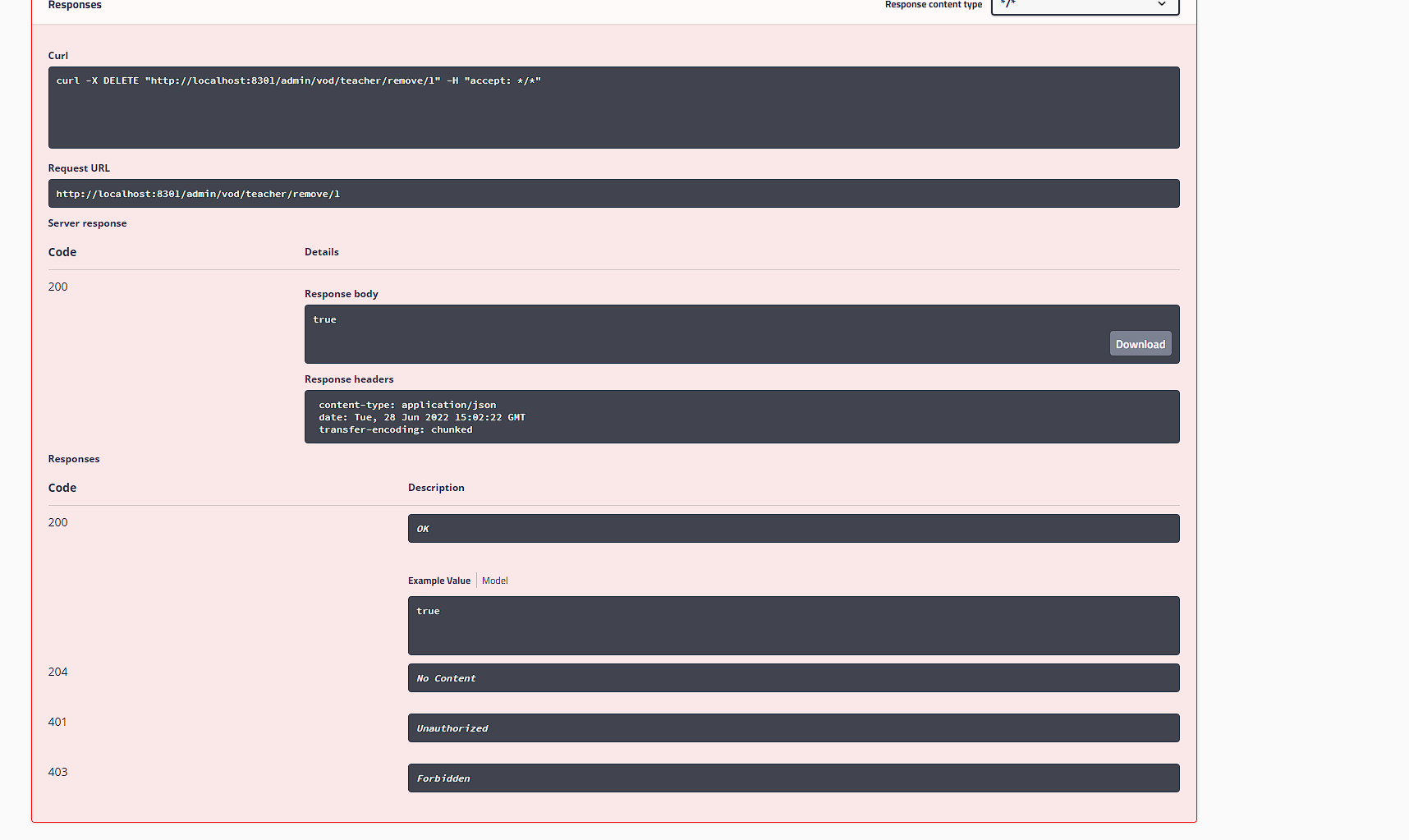
# Swagger2 测试
浏览器输入固定地址 http://localhost:8301/swagger-ui.html
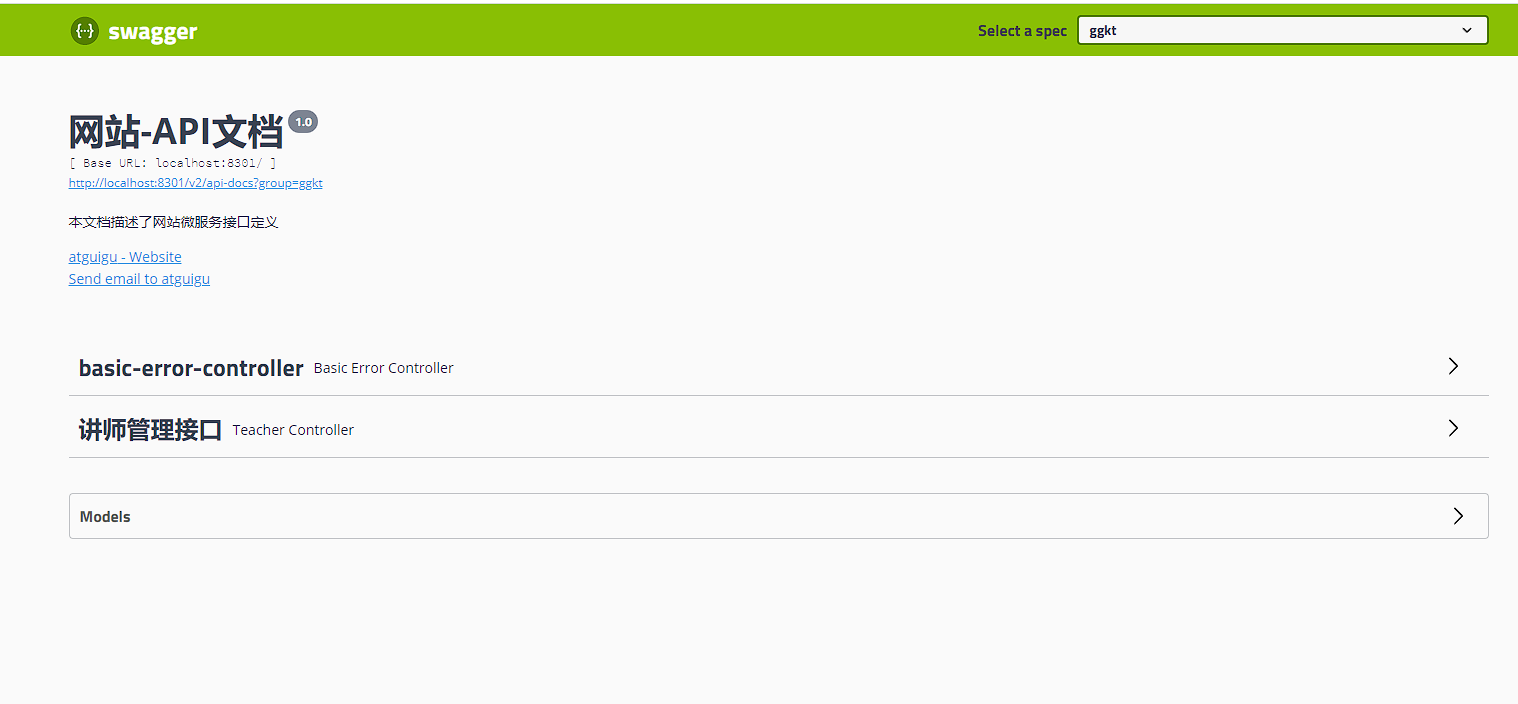
查看接口

测试接口

填写参数 执行
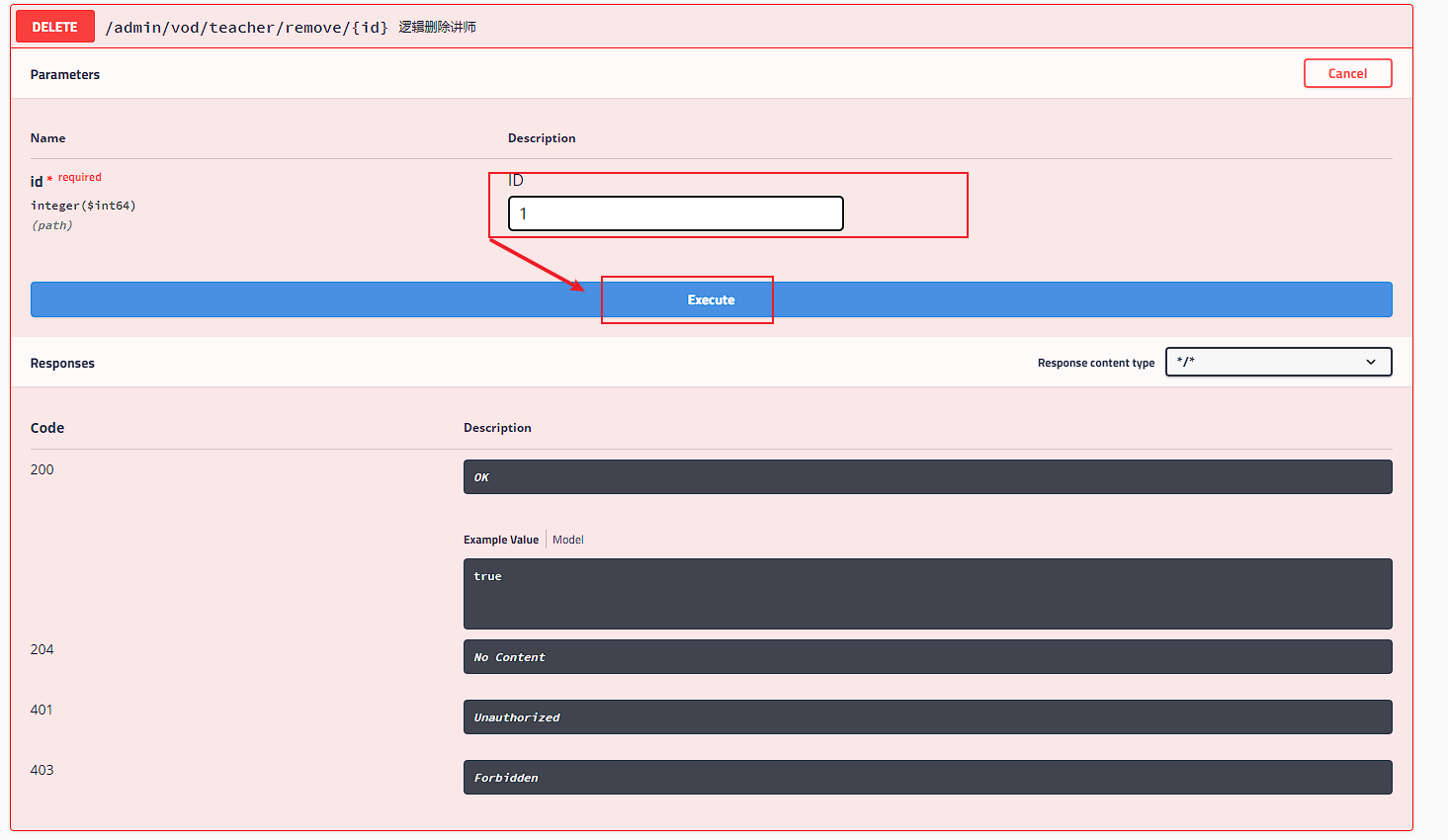
查看结果
# 定义统一返回结果对象
项目中我们会将响应封装成 json 返回,一般我们会将所有接口的数据格式统一, 使前端 (iOS Android, Web) 对数据的操作更一致、轻松。
一般情况下,统一返回数据格式没有固定的格式,只要能描述清楚返回的数据状态以及要返回的具体数据就可以。但是一般会包含状态码、返回消息、数据这几部分内容
列表返回
{
  "code": 200,
  "message": "成功",
  "data": [
    {
      "id": 2,
      "name": "欧阳老师",
      "intro": "高级讲师"
    }
  ],
  "ok": true
}
2
3
4
5
6
7
8
9
10
11
12
分页返回
{
  "code": 200,
  "message": "成功",
  "data": {
    "records": [
      {
        "id": 2,
        "name": "欧阳老师",
        "intro": "高级讲师"
      },
      {
        "id": 4,
        "name": "上官老师",
        "intro": "高级讲师"
      },
      {
        "id": 5,
        "name": "东方老师",
        "intro": "高级老师"
      }
    ],
    "total": 10,
    "size": 3,
    "current": 1,
    "orders": [],
    "hitCount": false,
    "searchCount": true,
    "pages": 2
  },
  "ok": true
}
2
3
4
5
6
7
8
9
10
11
12
13
14
15
16
17
18
19
20
21
22
23
24
25
26
27
28
29
30
31
没有数据返回
{
  "code": 200,
  "message": "成功",
  "data": null,
  "ok": true
}
2
3
4
5
6
失败返回
{
  "code": 201,
  "message": "失败",
  "data": null,
  "ok": false
}
2
3
4
5
6
# 创建结果类
在 service_utils 模块创建 reslt 包创建 ResultCodeEnum 类定义返回状态码
@Getter
public enum ResultCodeEnum {

    //成功
    SUCCESS(200, "成功"),
    //失败
    FAIL(201, "失败"),
    //服务异常
    SERVICE_ERROR(2012, "服务异常"),
    DATA_ERROR(204, "数据异常"),
    ILLEGAL_REQUEST(205, "非法请求"),
    REPEAT_SUBMIT(206, "重复提交"),

    LOGIN_AUTH(208, "未登陆"),
    PERMISSION(209, "没有权限"),

    PHONE_CODE_ERROR(211, "手机验证码错误"),

    MTCLOUD_ERROR(210, "直播接口异常"),

    COUPON_GET(220, "优惠券已经领取"),
    COUPON_LIMIT_GET(221, "优惠券已发放完毕"),

    FILE_UPLOAD_ERROR(21004, "文件上传错误"),
    FILE_DELETE_ERROR(21005, "文件刪除错误"),

    VOD_PALY_ERROR(209, "请购买后观看"),
    ;

    private Integer code;

    private String message;

    private ResultCodeEnum(Integer code, String message) {
        this.code = code;
        this.message = message;
    }
}
2
3
4
5
6
7
8
9
10
11
12
13
14
15
16
17
18
19
20
21
22
23
24
25
26
27
28
29
30
31
32
33
34
35
36
37
38
在 service_utils 模块的 reslt 包 定义 Result 类 统一返回结果
@Data
@ApiModel(value = "全局统一返回结果")
public class Result<T> {

    @ApiModelProperty(value = "返回码")
    private Integer code;

    @ApiModelProperty(value = "返回消息")
    private String message;

    @ApiModelProperty(value = "返回数据")
    private T data;

    public Result(){}

    public static <T> Result<T> build(T body, Integer code, String message) {
        Result<T> result = new Result<T>();
        if (body != null) {
            result.setData(body);
        }
        result.setCode(code);
        result.setMessage(message);
        return result;
    }

    public static<T> Result<T> ok(){
        return Result.ok(null);
    }

    /**
     * 操作成功
     * @param data  baseCategory1List
     * @param <T>
     * @return
     */
    public static<T> Result<T> ok(T data){
        return build(data,200,"成功");
    }

    public static<T> Result<T> fail(){
        return Result.fail(null);
    }

    /**
     * 操作失败
     * @param data
     * @param <T>
     * @return
     */
    public static<T> Result<T> fail(T data){
        return build(data, 201,"失败");
    }

    public Result<T> message(String msg){
        this.setMessage(msg);
        return this;
    }

    public Result<T> code(Integer code){
        this.setCode(code);
        return this;
    }
}
2
3
4
5
6
7
8
9
10
11
12
13
14
15
16
17
18
19
20
21
22
23
24
25
26
27
28
29
30
31
32
33
34
35
36
37
38
39
40
41
42
43
44
45
46
47
48
49
50
51
52
53
54
55
56
57
58
59
60
61
62
63
修改 controller 返回结果
@Api(tags = "讲师管理接口")
@RestController
@RequestMapping(value = "/admin/vod/teacher")
public class TeacherController {

    @Autowired
    private TeacherService teacherService;

    /**
     *     /查询所有讲师
     */
    @ApiOperation("所有讲师列表")
    @GetMapping("/findAll")
    public Result findAllTeacher() {
        List<Teacher> teacherList = teacherService.list();
        return Result.ok(teacherList).message("查询数据成功");
    }

    /**
    删除讲师
     */
    @ApiOperation("逻辑删除讲师")
    @DeleteMapping("/remove/{id}")
    public Result removeById(@ApiParam(name = "id", value = "ID", required = true) @PathVariable("id") Long id) {
        boolean isSuccess = teacherService.removeById(id);
        if (isSuccess){
            return Result.ok();
        } else {
            return Result.fail();
        }
    }


}
2
3
4
5
6
7
8
9
10
11
12
13
14
15
16
17
18
19
20
21
22
23
24
25
26
27
28
29
30
31
32
33
34
# 条件分页查询讲师列表接口
在 Vodconfig 配置类中添加分页插件的 bean
@Configuration
@MapperScan("com.atguigu.ggkt.vod.mapper")
public class VodConfig {

    /**
     * 分页插件
     */
    @Bean
    public PaginationInterceptor paginationInterceptor() {
        return new PaginationInterceptor();
    }
}
2
3
4
5
6
7
8
9
10
11
12
创建查询条件对象
@Data
public class TeacherQueryVo {

	@ApiModelProperty(value = "讲师姓名")
	private String name;

	@ApiModelProperty(value = "头衔 1高级讲师 2首席讲师")
	private Integer level;

	@ApiModelProperty(value = "入驻时间")
	private String joinDateBegin;

	@ApiModelProperty(value = "入驻时间")
	private String joinDateEnd;
}
2
3
4
5
6
7
8
9
10
11
12
13
14
15
编写 controller
 /**
     * 条件查询分页接口
     */
    @ApiOperation("条件查询分页")
    @PostMapping("findQueryPage/{current}/{limit}")
    public Result findPage(@ApiParam(name = "current", value = "当前页码", required = true) @PathVariable int current,
                           @ApiParam(name = "limit", value = "每页记录数", required = true) @PathVariable int limit,
                           @ApiParam(name = "teacherVo", value = "查询对象", required = false) @RequestBody(required = false) TeacherQueryVo teacherQueryVo) {
        //创建page对象
        Page<Teacher> teacherPage = new Page<>(current, limit);
        //判断teacherQueryVo是否为空
        if (teacherQueryVo == null) {
            //条件为空直接返回无条件查询
            IPage<Teacher> page = teacherService.page(teacherPage);
            return Result.ok(page);
        } else {
            // 获取条件值
            String name = teacherQueryVo.getName();
            Integer level = teacherQueryVo.getLevel();
            String joinDateBegin = teacherQueryVo.getJoinDateBegin();
            String joinDateEnd = teacherQueryVo.getJoinDateEnd();
            // 进行非空判断 条件封装
            QueryWrapper<Teacher> wrapper = new QueryWrapper<>();
            if (!StringUtils.isEmpty(name)) {
                wrapper.like("name", name);
            }
            if (!StringUtils.isEmpty(level)) {
                wrapper.eq("level", level);
            }
            if (!StringUtils.isEmpty(joinDateBegin)) {
                wrapper.ge("join_date", joinDateBegin);
            }
            if (!StringUtils.isEmpty(joinDateEnd)) {
                wrapper.le("join_date", joinDateEnd);
            }
            //调用方法分页查询

            IPage<Teacher> page = teacherService.page(teacherPage, wrapper);

            return Result.ok(page);


        }
    }
2
3
4
5
6
7
8
9
10
11
12
13
14
15
16
17
18
19
20
21
22
23
24
25
26
27
28
29
30
31
32
33
34
35
36
37
38
39
40
41
42
43
44
注意:
@RequestBody是将对象以 json 形式进行传参,并且要与 POST 请求方式来进行使用@RequestBody(required = false)中的required=false表示条件则可以为空
# 添加讲师接口
/**
 * 添加讲师
 */
@ApiOperation("添加讲师")
@PostMapping("/saveTeacher")
public Result saveTeacher(@RequestBody Teacher teacher) {
    boolean isSuccess = teacherService.save(teacher);
    if (isSuccess){
        return Result.ok();
    } else {
        return Result.fail();
    }
}
2
3
4
5
6
7
8
9
10
11
12
13
# 修改讲师接口
编写 id 查询方法
/**
     * 根据id查询
     */
@ApiOperation("根据ID查询")
@GetMapping("/getTeacher/{id}")
public Result getTeacher(@PathVariable Long id){
    Teacher teacher = teacherService.getById(id);
    return Result.ok(teacher);
}
2
3
4
5
6
7
8
9
编写修改讲师方法
/**
 * 修改讲师接口
 */
@ApiOperation("修改讲师接口")
@PostMapping("/updateTeacher")
public Result updateTeacher(@RequestBody Teacher teacher){
    boolean isSuccess = teacherService.updateById(teacher);
    if (isSuccess){
        return Result.ok();
    } else {
        return Result.fail();
    }
}
2
3
4
5
6
7
8
9
10
11
12
13
# 批量删除讲师接口
/**
 * 批量删除讲师
 */
@ApiOperation("批量删除讲师")
@DeleteMapping("/removeBatch")
public Result removeBatch(@RequestBody List<Long> idList) {
    boolean isSuccess = teacherService.removeByIds(idList);
    if (isSuccess) {
        return Result.ok();
    } else {
        return Result.fail();
    }

}
2
3
4
5
6
7
8
9
10
11
12
13
14
# 统一异常处理
# 全局异常处理
在 service_utils 中创建 exception 包 编写统一异常处理类 GlobalExceptionHandler
//aop
@ControllerAdvice
public class GlobalExceptionHandler {

    /**
     * 全局异常处理
     */
    @ExceptionHandler(Exception.class)
    @ResponseBody
    public Result error(Exception e){
        e.printStackTrace();
        return Result.fail().message("执行全局异常处理");
    }
}
2
3
4
5
6
7
8
9
10
11
12
13
14
# 特定异常处理
/**
 * 处理特定异常
 */
@ExceptionHandler(ArithmeticException.class)
@ResponseBody
public Result error(ArithmeticException e){
    e.printStackTrace();
    return Result.fail().message("执行ArithmeticException异常处理");
}
2
3
4
5
6
7
8
9
如果一个项目中即有全局异常又有特定异常 那 spring 会输出特定的先 拦截最小的情况 从小到大
# 自定义异常处理
创建自定义异常类
/**
 * 自定义异常类
 * @author Iekr
 * Date:  2022/6/29/0029 17:14
 */
@Data
@AllArgsConstructor
@NoArgsConstructor
public class GgktException extends RuntimeException {
    private Integer code;
    private String msg;
}
2
3
4
5
6
7
8
9
10
11
12
添加自定义异常处理方法
/**
     * 自定义异常处理
     */
@ExceptionHandler(GgktException.class)
@ResponseBody
public Result error(GgktException e){
    e.printStackTrace();
    return Result.fail().code(e.getCode()).message(e.getMsg());
}
2
3
4
5
6
7
8
9
业务中手动抛出自定义异常进行测试
try {
    int a = 10/0;
}catch(Exception e) {
    throw new GgktException(20001,"出现自定义异常");
}
2
3
4
5