
 Kafka API
# Kafka API
# Producer API
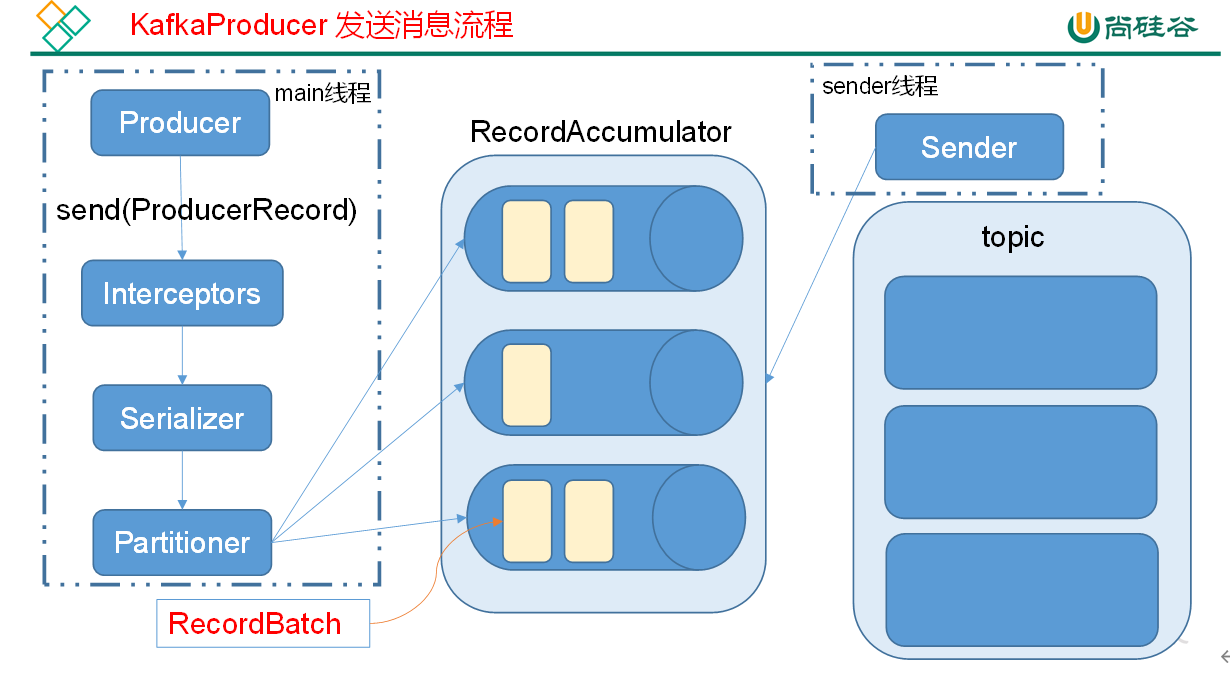
Kafka 的 Producer 发送消息采用的是异步发送的方式。在消息发送的过程中,涉及到了两个线程 ——main 线程和 Sender 线程,以及一个线程共享变量 ——RecordAccumulator。main 线程将消息发送给 RecordAccumulator,Sender 线程不断从 RecordAccumulator 中拉取消息发送到 Kafka broker。
# 异步发送 API
导入依赖
<dependency>
<groupId>org.apache.kafka</groupId>
<artifactId>kafka-clients</artifactId>
<version>2.4.1</version>
</dependency>
2
3
4
5
api 使用
package com.atguigu.producer;

import org.apache.kafka.clients.producer.Callback;
import org.apache.kafka.clients.producer.KafkaProducer;
import org.apache.kafka.clients.producer.ProducerRecord;
import org.apache.kafka.clients.producer.RecordMetadata;

import java.util.Properties;
import java.util.concurrent.ExecutionException;
import java.util.concurrent.Future;

public class Producer {
    public static void main(String[] args) throws ExecutionException, InterruptedException {
        //实例化kafka集群
        Properties properties = new Properties();
        properties.setProperty("key.serializer", "org.apache.kafka.common.serialization.StringSerializer"); //key的序列化类
        properties.setProperty("value.serializer", "org.apache.kafka.common.serialization.StringSerializer"); //value的序列化类
        properties.setProperty("acks", "all"); //ack级别
        properties.setProperty("bootstrap.servers", "hadoop102:9092");
        properties.setProperty("buffer.memory", "33554432");//RecordAccumulator缓冲区大小
        properties.setProperty("retries", "1"); //重试次数
        properties.setProperty("batch.size", "16384");//打包大小
        properties.setProperty("linger.ms", "1");//等待时间
        //当缓冲区大小达到16384时就向broker发送一次 如果没有达到但时间已经等待了1毫秒也会发送
        KafkaProducer<String, String> producer = new KafkaProducer<String, String>(properties);
        //用集群对象发送数据
        for (int i = 0; i < 100; i++) {
            Future<RecordMetadata> fist = producer.send(
                    //封装ProducerRecord
                    new ProducerRecord<>("first", Integer.toString(i), "Value" + i), new Callback() {
                        //回调函数
                        @Override
                        public void onCompletion(RecordMetadata recordMetadata, Exception e) {
                            if (e == null) {
                                System.out.println(recordMetadata);
                            }
                        }
                    });
            System.out.println("发完了" + i + "条数据");
        }
        //关闭资源
        producer.close();
    }
}
2
3
4
5
6
7
8
9
10
11
12
13
14
15
16
17
18
19
20
21
22
23
24
25
26
27
28
29
30
31
32
33
34
35
36
37
38
39
40
41
42
43
44
45
回调函数不是必须的 也可以不传递回调函数
回调函数会在 producer 收到 ack 时调用,为异步调用,该方法有两个参数,分别是 RecordMetadata 和 Exception,如果 Exception 为 null,说明消息发送成功,如果 Exception 不为 null,说明消息发送失败。
注意:消息发送失败会自动重试,不需要我们在回调函数中手动重试。
# 同步发送 API
同步发送的意思就是,一条消息发送之后,会阻塞当前线程,直至返回 ack。
由于 send 方法返回的是一个 Future 对象,根据 Futrue 对象的特点,我们也可以实现同步发送的效果,只需在调用 Future 对象的 get 方发即可。
package com.atguigu.producer;

import org.apache.kafka.clients.producer.*;

import java.util.Properties;
import java.util.concurrent.ExecutionException;
import java.util.concurrent.Future;

public class Producer {
    public static void main(String[] args) throws ExecutionException, InterruptedException {
        //实例化kafka集群
        Properties properties = new Properties();
        properties.setProperty("key.serializer", "org.apache.kafka.common.serialization.StringSerializer"); //key的序列化类
        properties.setProperty("value.serializer", "org.apache.kafka.common.serialization.StringSerializer"); //value的序列化类
        properties.setProperty("acks", "all"); //ack级别
//        properties.put(ProducerConfig.ACKS_CONFIG,1); //ProducerConfig封装配置所有key
        properties.setProperty("bootstrap.servers", "hadoop102:9092");
        properties.setProperty("buffer.memory", "33554432");//RecordAccumulator缓冲区大小
        properties.setProperty("retries", "1"); //重试次数
        properties.setProperty("batch.size", "16384");//打包大小
        properties.setProperty("linger.ms", "1");//等待时间
        //当缓冲区大小达到16384时就向broker发送一次 如果没有达到但时间已经等待了1毫秒也会发送
        KafkaProducer<String, String> producer = new KafkaProducer<String, String>(properties);
//        producer.beginTransaction(); //获取事务对象
        //用集群对象发送数据
        for (int i = 0; i < 100; i++) {
            Future<RecordMetadata> fist = producer.send(
                    //封装ProducerRecord
                    new ProducerRecord<>("first", Integer.toString(i), "Value" + i), new Callback() {
                        //回调函数
                        @Override
                        public void onCompletion(RecordMetadata recordMetadata, Exception e) {
                            if (e == null) {
                                System.out.println(recordMetadata);
                            }
                        }
                    });
            RecordMetadata recordMetadata = fist.get();  //直到返回ack后 RecordMetadata 有数据了 才发下一条数据
            System.out.println("发完了" + i + "条数据");
        }
        //关闭资源
        producer.close();
    }
}
2
3
4
5
6
7
8
9
10
11
12
13
14
15
16
17
18
19
20
21
22
23
24
25
26
27
28
29
30
31
32
33
34
35
36
37
38
39
40
41
42
43
44
# Consumer API
# 自动提交 offset
读取 properties 文件
bootstrap.servers=hadoop102:9092
group.id=test
enable.auto.commit=true
auto.commit.interval.ms=1000
key.deserializer=org.apache.kafka.common.serialization.StringDeserializer
value.deserializer=org.apache.kafka.common.serialization.StringDeserializer
auto.offset.reset=earliest
# 默认为latest从最后一条数据后拉取 earliest从开头拉取
2
3
4
5
6
7
8
consumer 类
package com.atguigu.consumer;

import org.apache.kafka.clients.consumer.ConsumerRecord;
import org.apache.kafka.clients.consumer.ConsumerRecords;
import org.apache.kafka.clients.consumer.KafkaConsumer;

import java.io.IOException;
import java.util.Collections;
import java.util.Properties;

public class Consumer {
    public static void main(String[] args) throws IOException, InterruptedException {
        //实例化一个Consumer对象
        Properties properties = new Properties();
        properties.load(Consumer.class.getClassLoader().getResourceAsStream("conusumer1.properties"));
        KafkaConsumer<String, String> consumer = new KafkaConsumer<String, String>(properties);
        //接受消息
        consumer.subscribe(Collections.singleton("first")); //定义话题
        while (true) {
            ConsumerRecords<String, String> poll = consumer.poll(2000); //从话题中拉取数据 2000毫秒
            if (poll.count() == 0){
               Thread.sleep(100);
            }
            for (ConsumerRecord<String, String> record : poll) {
                System.out.println(record);
            }
        }
        //关闭Consumer
//        consumer.close();
    }
}
2
3
4
5
6
7
8
9
10
11
12
13
14
15
16
17
18
19
20
21
22
23
24
25
26
27
28
29
30
31
32
# 手动提交 offset
虽然自动提交 offset 十分简介便利,但由于其是基于时间提交的,开发人员难以把握 offset 提交的时机。因此 Kafka 还提供了手动提交 offset 的 API。
properties 文件
bootstrap.servers=hadoop102:9092
group.id=test
enable.auto.commit=flase
#自动提交offset 默认为true 如果自动提交offset由broker来进行保存
auto.commit.interval.ms=1000
#多久提交一次offset
key.deserializer=org.apache.kafka.common.serialization.StringDeserializer
value.deserializer=org.apache.kafka.common.serialization.StringDeserializer
auto.offset.reset=earliest
# 默认为latest从最后一条数据后拉取 earliest从开头拉取
auto.commit.interval.ms=5000
#自动提交offset的时间 默认为5000毫秒
2
3
4
5
6
7
8
9
10
11
12
consumer 类
package com.atguigu.consumer;

import org.apache.kafka.clients.consumer.*;
import org.apache.kafka.common.TopicPartition;

import java.io.IOException;
import java.util.Collections;
import java.util.Map;
import java.util.Properties;

public class Consumer {
    public static void main(String[] args) throws IOException, InterruptedException {
        //实例化一个Consumer对象
        Properties properties = new Properties();
        properties.load(Consumer.class.getClassLoader().getResourceAsStream("conusumer1.properties"));
        KafkaConsumer<String, String> consumer = new KafkaConsumer<String, String>(properties);
        //接受消息
        consumer.subscribe(Collections.singleton("first")); //定义话题
        while (true) {
            ConsumerRecords<String, String> poll = consumer.poll(2000); //从话题中拉取数据 2000毫秒
            //ConsumerRecords<String, String> poll = consumer.poll(Duration.ofMillis(2000)); //从话题中拉取数据 2000毫秒
            if (poll.count() == 0) {
                Thread.sleep(100);
            }
            for (ConsumerRecord<String, String> record : poll) {
                System.out.println(record);
            }
//            consumer.commitSync(); //手动提交offset 同步提交
            consumer.commitAsync(new OffsetCommitCallback() {
                //回调函数
                @Override
                public void onComplete(Map<TopicPartition, OffsetAndMetadata> map, Exception e) {
                    if (e !=null){
                        System.out.println("Commit failed for " + map);
                    }
                }
            }); //手动提交offset 异步提交
        }
        //关闭Consumer
//        consumer.close();
    }
}
2
3
4
5
6
7
8
9
10
11
12
13
14
15
16
17
18
19
20
21
22
23
24
25
26
27
28
29
30
31
32
33
34
35
36
37
38
39
40
41
42
手动提交 offset 的方法有两种:分别是 commitSync(同步提交)和 commitAsync(异步提交)。两者的相同点是,都会将本次 poll 的一批数据最高的偏移量提交;不同点是,commitSync 阻塞当前线程,一直到提交成功,并且会自动失败重试(由不可控因素导致,也会出现提交失败);而 commitAsync 则没有失败重试机制,故有可能提交失败。
# 数据漏消费和重复消费分析
无论是同步提交还是异步提交 offset,都有可能会造成数据的漏消费或者重复消费。先提交 offset 后消费,有可能造成数据的漏消费;而先消费后提交 offset,有可能会造成数据的重复消费。
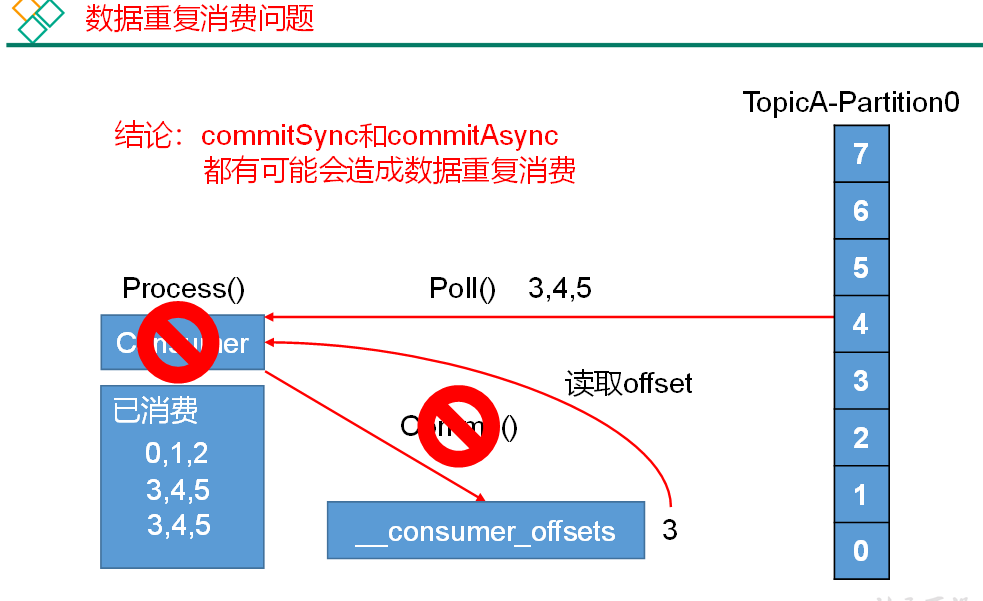
解决方案:只有将消费和提交 offset 进行一个原子绑定才能解决
# 自定义存储 offset
package com.atguigu.consumer;

import org.apache.kafka.clients.consumer.ConsumerRebalanceListener;
import org.apache.kafka.clients.consumer.ConsumerRecord;
import org.apache.kafka.clients.consumer.ConsumerRecords;
import org.apache.kafka.clients.consumer.KafkaConsumer;
import org.apache.kafka.common.TopicPartition;

import java.io.*;
import java.util.*;

/*
自定义保存
 */
public class ConsumerManual {
    //用于记录top 分区
    private static Map<TopicPartition, Long> offset = new HashMap<>();
    private static String file = "d:/offset";

    public static void main(String[] args) throws IOException {
        //实例化一个Consumer对象
        Properties properties = new Properties();
        properties.load(Consumer.class.getClassLoader().getResourceAsStream("conusumer1.properties"));
        KafkaConsumer<String, String> consumer = new KafkaConsumer<String, String>(properties);
        //订阅话题 拉取消息
        consumer.subscribe(Collections.singleton("first"), new ConsumerRebalanceListener() {
            //分区分配之前做的操作
            @Override
            public void onPartitionsRevoked(Collection<TopicPartition> collection) {
                //提交旧的offset
                commit();
            }

            //分区分配之后做的操作
            @Override
            public void onPartitionsAssigned(Collection<TopicPartition> collection) {
                //获取新的offset
                readOffset(collection);
                for (TopicPartition partition : collection) {
                    Long os = offset.get(partition);
                    if (os == null) {
                        consumer.seek(partition, 0);
                    } else {
                        consumer.seek(partition, os);
                    }
                }
            }
        });
        while (true) {
            ConsumerRecords<String, String> records = consumer.poll(2000);
            //原子绑定
            for (ConsumerRecord<String, String> record : records) {
                //消费
                System.out.println(record);
                //消费完后 写入map中
                offset.put(
                        new TopicPartition(record.topic(), record.partition()), record.offset());
            }
            commit();
        }
    }

    /**
     * 从自定义介质读取offset到缓存
     *
     * @param collection
     */
    private static void readOffset(Collection<TopicPartition> collection) {
        ObjectInputStream objectInputStream = null;
        Map<TopicPartition, Long> temp;
        try {
            objectInputStream = new ObjectInputStream(new FileInputStream(file));
            temp = (Map<TopicPartition, Long>) objectInputStream.readObject();
        } catch (Exception e) {
            temp = new HashMap<>();
        } finally {
            if (objectInputStream != null) {
                try {
                    objectInputStream.close();
                } catch (IOException e) {
                    e.printStackTrace();
                }
            }
        }
        //从全部分区offset中读取我们分配到的分区的offset
        for (TopicPartition partition : collection) {
            offset.put(partition, temp.get(partition));
        }
    }

    /**
     * 将缓存中的offset提交到自定义介质中
     */
    private static void commit() {
        //先从文件中读取旧的所有的offset
        ObjectInputStream objectInputStream = null;
        Map<TopicPartition, Long> temp;
        try {
            objectInputStream = new ObjectInputStream(new FileInputStream(file));
            temp = (Map<TopicPartition, Long>) objectInputStream.readObject();
        } catch (Exception e) {
            temp = new HashMap<>();
        } finally {
            if (objectInputStream != null) {
                try {
                    objectInputStream.close();
                } catch (IOException e) {
                    e.printStackTrace();
                }
            }
        }
        //合并offset
        temp.putAll(offset);
        //将新的offset写出去
        ObjectOutputStream objectOutputStream = null;
        try {
            objectOutputStream = new ObjectOutputStream(new FileOutputStream(file));
            objectOutputStream.writeObject(temp);
        } catch (IOException e) {
            e.printStackTrace();
        } finally {
            if (objectInputStream != null) {
                try {
                    objectInputStream.close();
                } catch (IOException e) {
                    e.printStackTrace();
                }
            }
        }
    }
}
2
3
4
5
6
7
8
9
10
11
12
13
14
15
16
17
18
19
20
21
22
23
24
25
26
27
28
29
30
31
32
33
34
35
36
37
38
39
40
41
42
43
44
45
46
47
48
49
50
51
52
53
54
55
56
57
58
59
60
61
62
63
64
65
66
67
68
69
70
71
72
73
74
75
76
77
78
79
80
81
82
83
84
85
86
87
88
89
90
91
92
93
94
95
96
97
98
99
100
101
102
103
104
105
106
107
108
109
110
111
112
113
114
115
116
117
118
119
120
121
122
123
124
125
126
127
128
129
130
131
132
# 自定义 Interceptor (拦截器)
拦截器实现的接口是 ProducerInterceptor
# 使用拦截器统计消息发送成功和失败的数量
package com.atguigu.interceptor;

import org.apache.kafka.clients.producer.ProducerInterceptor;
import org.apache.kafka.clients.producer.ProducerRecord;
import org.apache.kafka.clients.producer.RecordMetadata;

import java.util.Map;

/**
 * 统计消息发送成功和失败的数量
 */
public class CountInterceptor implements ProducerInterceptor<String, String> {

    private long success = 0;
    private long fail = 0;

    @Override
    public ProducerRecord<String, String> onSend(ProducerRecord<String, String> producerRecord) {
        return producerRecord;
    }

    /**
     * 收到ACK后做计数
     *
     * @param recordMetadata
     * @param e
     */
    @Override
    public void onAcknowledgement(RecordMetadata recordMetadata, Exception e) {
        if (e == null) {
            success++;
        } else {
            fail++;
        }
    }

    @Override
    public void close() {
        System.out.println("成功了" + success + "条");
        System.out.println("失败了" + fail + "条");
    }

    @Override
    public void configure(Map<String, ?> map) {

    }
}
2
3
4
5
6
7
8
9
10
11
12
13
14
15
16
17
18
19
20
21
22
23
24
25
26
27
28
29
30
31
32
33
34
35
36
37
38
39
40
41
42
43
44
45
46
47
# 使用拦截器 将值改为 自定义前缀 + 时间戳 + 值
package com.atguigu.interceptor;

import org.apache.kafka.clients.producer.ProducerInterceptor;
import org.apache.kafka.clients.producer.ProducerRecord;
import org.apache.kafka.clients.producer.RecordMetadata;

import java.util.Map;

public class TimeInterceptor implements ProducerInterceptor<String, String> {

    //前缀
    private String prefix;

    /**
     * 自定义Record 修改时间戳可以在此方法中修改
     *
     * @param producerRecord 原始Record
     * @return 修改后的Record
     */
    @Override
    public ProducerRecord<String, String> onSend(ProducerRecord<String, String> producerRecord) {
        Long timestamp = producerRecord.timestamp();
        //Record只能获取 不能修改 所有我们只重新创建一个Record 并把对应的值赋上去
        return new ProducerRecord<String, String>(
                producerRecord.topic(),
                producerRecord.partition(),
                producerRecord.timestamp(),
                producerRecord.key(),
                prefix + System.currentTimeMillis() + producerRecord.value(),
                producerRecord.headers()
        );
    }

    /**
     * 收到 ACK以后调用
     *
     * @param recordMetadata
     * @param e
     */
    @Override
    public void onAcknowledgement(RecordMetadata recordMetadata, Exception e) {

    }

    /**
     * 关闭Producer时调用
     */
    @Override
    public void close() {

    }

    /**
     * 定义拦截器的方法
     *
     * @param map
     */
    @Override
    public void configure(Map<String, ?> map) {
        //定义前缀
        //获取配置文件中配置值
        prefix = (String) map.get("prefix");
    }
}
2
3
4
5
6
7
8
9
10
11
12
13
14
15
16
17
18
19
20
21
22
23
24
25
26
27
28
29
30
31
32
33
34
35
36
37
38
39
40
41
42
43
44
45
46
47
48
49
50
51
52
53
54
55
56
57
58
59
60
61
62
63
64
# 生产者调用自定义拦截器
package com.atguigu.interceptor;

import org.apache.kafka.clients.producer.*;

import java.util.ArrayList;
import java.util.Properties;
import java.util.concurrent.ExecutionException;
import java.util.concurrent.Future;

public class Producer {
    public static void main(String[] args) throws ExecutionException, InterruptedException {
        //实例化kafka集群
        Properties properties = new Properties();
        properties.setProperty("key.serializer", "org.apache.kafka.common.serialization.StringSerializer"); //key的序列化类
        properties.setProperty("value.serializer", "org.apache.kafka.common.serialization.StringSerializer"); //value的序列化类
        properties.setProperty("acks", "all"); //ack级别
        properties.setProperty("bootstrap.servers", "hadoop102:9092");
        properties.setProperty("buffer.memory", "33554432");//RecordAccumulator缓冲区大小
        properties.setProperty("retries", "1"); //重试次数
        properties.setProperty("batch.size", "16384");//打包大小
        properties.setProperty("linger.ms", "1");//等待时间

        //自定义拦截器 列表
        ArrayList<String> interceptors = new ArrayList<>();
        interceptors.add("com.atguigu.interceptor.TimeInterceptor"); //执行顺序为添加顺序
        interceptors.add("com.atguigu.interceptor.CountInterceptor"); //值为类引用路径
        properties.put(ProducerConfig.INTERCEPTOR_CLASSES_CONFIG, interceptors); //添加到properties中
        //自定义前缀
        properties.setProperty("prefix","自定义前缀测试");

        KafkaProducer<String, String> producer = new KafkaProducer<String, String>(properties);
        //用集群对象发送数据
        for (int i = 0; i < 10; i++) {
            Future<RecordMetadata> fist = producer.send(
                    //封装ProducerRecord
                    new ProducerRecord<>("first", Integer.toString(i), "Value" + i), new Callback() {
                        //回调函数
                        @Override
                        public void onCompletion(RecordMetadata recordMetadata, Exception e) {
                            if (e == null) {
                                System.out.println(recordMetadata);
                            }
                        }
                    });
            RecordMetadata recordMetadata = fist.get();  //直到返回ack后 RecordMetadata 有数据了 才发下一条数据
            System.out.println("发完了" + i + "条数据");
        }
        //关闭资源
        producer.close();
    }
}
2
3
4
5
6
7
8
9
10
11
12
13
14
15
16
17
18
19
20
21
22
23
24
25
26
27
28
29
30
31
32
33
34
35
36
37
38
39
40
41
42
43
44
45
46
47
48
49
50
51