
 后台管理系统-课程分类管理模块
# 后台管理系统 - 课程分类管理模块
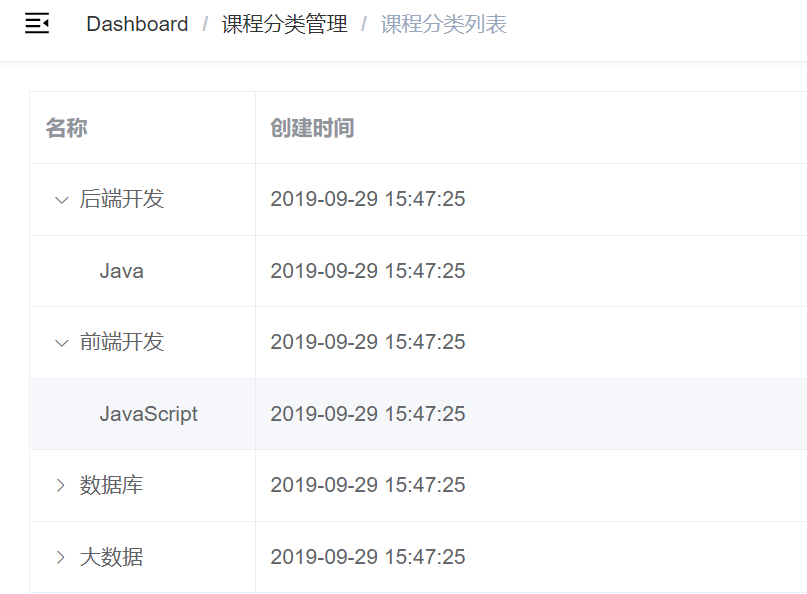
课程分类列表功能
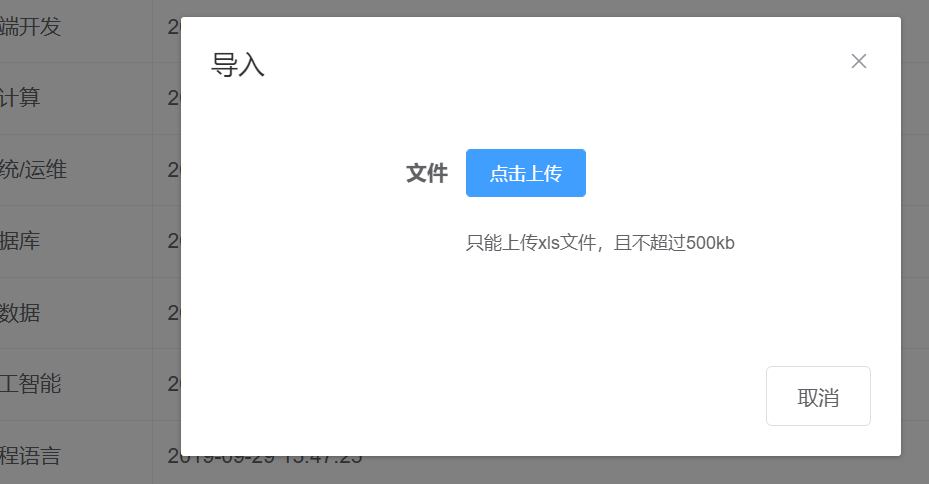
课程分类导入功能

课程分类导出功能
# 课程分类列表
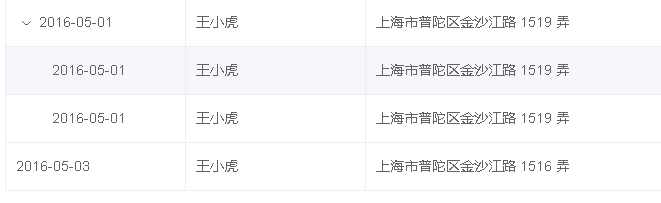
课程分类采用树形展示,我们使用 “树形数据与懒加载” 的方式展现数据列表,因此需要提供的接口如下:根据上级 id 获取下级数据,参考 element-ui 文档:https://element.eleme.cn/#/zh-CN/component/table,页面搜索:树形数据与懒加载
生成 mapper 使用 mybatis-plus 的生成器 生成 修改表名即可以
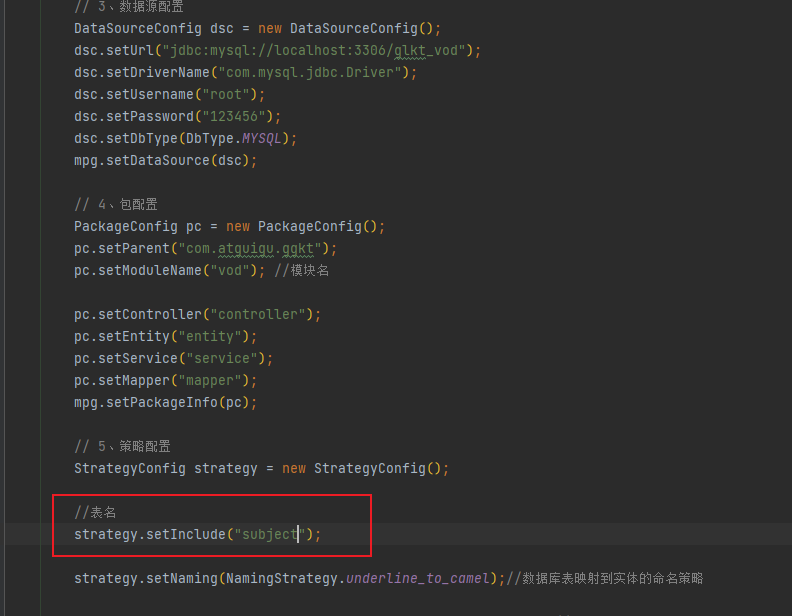
运行并删除
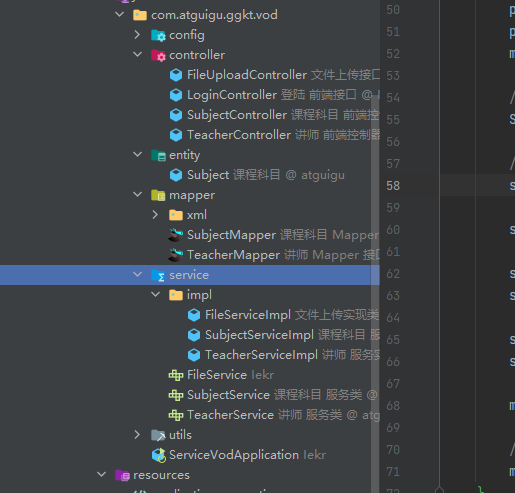
删除生成器生成的实体类 并更换实体类为 common 项目下的实体类
编写 SubjectService
public interface SubjectService extends IService<Subject> {
    /**
     * 根据id查询课程分类列表
     * @param id
     * @return
     */
    List<Subject> selectList(Long id);
}
2
3
4
5
6
7
8
9
编写 SubjectServiceImpl
@Service
public class SubjectServiceImpl extends ServiceImpl<SubjectMapper, Subject> implements SubjectService {
    /**
     * 查询下一层课程分类
     */
    @Override
    public List<Subject> selectList(Long id) {
        QueryWrapper<Subject> wrapper = new QueryWrapper<>();
        wrapper.eq("parent_id", id);
        List<Subject> subjectList = baseMapper.selectList(wrapper);
        //向list集合每个Subject对象中设置hasChildren
        for (Subject subject : subjectList) {
            Long subjectId = subject.getId();
            boolean isChild = this.isChildren(subjectId);
            subject.setHasChildren(isChild);
        }
        return subjectList;
    }

    /**
     * 判断id下面是否有子节点
     */
    private boolean isChildren(Long id) {
        QueryWrapper<Subject> wrapper = new QueryWrapper<>();
        wrapper.eq("parent_id", id);
        Integer count = baseMapper.selectCount(wrapper);
        return count > 0;
    }
}
2
3
4
5
6
7
8
9
10
11
12
13
14
15
16
17
18
19
20
21
22
23
24
25
26
27
28
29
编写 SubjectController
@Api(tags = "课程分类管理")
@RestController
@RequestMapping(value="/admin/vod/subject")
@CrossOrigin
public class SubjectController {

    @Autowired
    private SubjectService subjectService;

    /**
     * 查询下一层课程分类
     * 根据parent_id
     */

    @ApiOperation("课程分类列表")
    @GetMapping("/getChildSubject/{id}")
    public Result getChildSubject(@PathVariable Long id) {
        List<Subject> list = subjectService.selectList(id);
        return Result.ok(list);
    }
}
2
3
4
5
6
7
8
9
10
11
12
13
14
15
16
17
18
19
20
21
# 课程分类列表前端
添加数据字典路由 修改 router/index.js 文件
  {
    path: '/subject',
    component: Layout,
    redirect: '/subject/list',
    name: '课程分类管理',
    alwaysShow: true,
    meta: { title: '课程分类管理', icon: 'example' },
    children: [
      {
        path: 'list',
        name: '课程分类列表',
        component: () => import('@/views/vod/subject/list'),
        meta: { title: '课程分类列表', icon: 'table' }
      }
    ]
  },
2
3
4
5
6
7
8
9
10
11
12
13
14
15
16
定义数据字典列表接口
创建文件 src/api/vod/ subject.js
import request from '@/utils/request'

const api_name = '/admin/vod/subject'

export default {
  getChildList(id) {
    return request({
      url: `${api_name}/getChildSubject/${id}`,
      method: 'get'
    })
  }
}
2
3
4
5
6
7
8
9
10
11
12
编写 /views//vod/subject/ list.vue
<template>
    <div  class="app-container">
    <el-table
        :data="list"
        style="width: 100%"
        row-key="id"
        border
        lazy
        :load="load"
        :tree-props="{children: 'children', hasChildren: 'hasChildren'}">
        <el-table-column
        prop="title"
        label="名称"
        width="150">
        </el-table-column>
        <el-table-column
        prop="createTime"
        label="创建时间">
        </el-table-column>
    </el-table>
    </div>
</template>

<script>
import subjectApi from '@/api/vod/subject'
export default {
    data() {
        return {
            list:[] //数据字典列表数组
        }
    },
    created() {
        this.getSubList(0)
    },
    methods: {
        //数据字典列表
        getSubList(id) {
            subjectApi.getChildList(id)
                .then(response => {
                    this.list = response.data
                })
        },
        load(tree, treeNode, resolve) {
            subjectApi.getChildList(tree.id).then(response => {
                resolve(response.data)
            })
      }
    }
}
</script>
2
3
4
5
6
7
8
9
10
11
12
13
14
15
16
17
18
19
20
21
22
23
24
25
26
27
28
29
30
31
32
33
34
35
36
37
38
39
40
41
42
43
44
45
46
47
48
49
50
# EasyExcel
# EasyExcel 介绍
EasyExcel 是阿里巴巴开源的一个 excel 处理框架,以使用简单、节省内存著称。EasyExcel 能大大减少占用内存的主要原因是在解析 Excel 时没有将文件数据一次性全部加载到内存中,而是从磁盘上一行行读取数据,逐个解析。
# EasyExcel 特点
- Java 领域解析、生成 Excel 比较有名的框架有 Apache poi、jxl 等。但他们都存在一个严重的问题就是非常的耗内存。如果你的系统并发量不大的话可能还行,但是一旦并发上来后一定会 OOM 或者 JVM 频繁的 full gc。
- EasyExcel 采用一行一行的解析模式,并将一行的解析结果以观察者的模式通知处理(AnalysisEventListener)
- EasyExcel 是一个基于 Java 的简单、省内存的读写 Excel 的开源项目。在尽可能节约内存的情况下支持读写百 M 的 Excel。
# EasyExcel 写操作
导入依赖
<dependencies>
    <!-- https://mvnrepository.com/artifact/com.alibaba/easyexcel -->
    <dependency>
        <groupId>com.alibaba</groupId>
        <artifactId>easyexcel</artifactId>
        <version>2.1.1</version>
    </dependency>
</dependencies>
2
3
4
5
6
7
8
创建实体类
设置表头和添加的数据字段
@Data
public class Stu {
    //设置表头名称
    @ExcelProperty("学生编号")
    private int sno;
    //设置表头名称
    @ExcelProperty("学生姓名")
    private String sname;
}
2
3
4
5
6
7
8
9
实现写操作
创建方法循环设置要添加到 Excel 的数据
//循环设置要添加的数据,最终封装到list集合中
private static List<Stu> data() {
    List<Stu> list = new ArrayList<Stu>();
    for (int i = 0; i < 10; i++) {
        Stu data = new Stu();
        data.setSno(i);
        data.setSname("张三"+i);
        list.add(data);
    }
    return list;
}
2
3
4
5
6
7
8
9
10
11
实现最终的添加操作
public static void main(String[] args) throws Exception {
    // 写法1
    String fileName = "F:\\11.xlsx";
    // 这里 需要指定写用哪个class去写,然后写到第一个sheet,名字为模板 然后文件流会自动关闭
    // 如果这里想使用03 则 传入excelType参数即可
    EasyExcel.write(fileName, DemoData.class).sheet("写入方法").doWrite(data());
}
2
3
4
5
6
7
# EasyExcel 读操作
创建实体类
@Data
public class Stu {
    //设置表头名称
    //设置列对应的属性
    @ExcelProperty(value = "学生编号",index = 0)
    private int sno;
    //设置表头名称
    //设置列对应的属性
    @ExcelProperty(value = "学生姓名",index = 1)
    private String sname;
}
2
3
4
5
6
7
8
9
10
11
创建读取操作的监听器
public class ExcelListener extends AnalysisEventListener<Stu> {
    //创建list集合封装最终的数据
    List<Stu> list = new ArrayList<Stu>();
    //一行一行去读取excle内容
    @Override
    public void invoke(Stu user, AnalysisContext analysisContext) {
        System.out.println("***"+user);
        list.add(user);
    }
    //读取excel表头信息
    @Override
    public void invokeHeadMap(Map<Integer, String> headMap, AnalysisContext context) {
        System.out.println("表头信息:"+headMap);
    }
    //读取完成后执行
    @Override
    public void doAfterAllAnalysed(AnalysisContext analysisContext) {
    }
}
2
3
4
5
6
7
8
9
10
11
12
13
14
15
16
17
18
19
调用实现最终的读取
   public static void main(String[] args) throws Exception {
        String fileName = "F:\\11.xlsx";
        // 这里 需要指定读用哪个class去读,然后读取第一个sheet 文件流会自动关闭
        EasyExcel.read(fileName, ReadData.class, new ExcelListener()).sheet().doRead();
}
2
3
4
5
# 功能实现 - 课程分类导出
在 model 模块查看实体:com.atguigu.ggkt.vo.vod.SubjectEeVo
@Data
public class SubjectEeVo {

	@ExcelProperty(value = "id" ,index = 0)
	private Long id;

	@ExcelProperty(value = "课程分类名称" ,index = 1)
	private String title;

	@ExcelProperty(value = "上级id" ,index = 2)
	private Long parentId;

	@ExcelProperty(value = "排序" ,index = 3)
	private Integer sort;
}
2
3
4
5
6
7
8
9
10
11
12
13
14
15
SubjectService 添加导出抽象方法
    /**
     * 导出
     * @param response
     */
    void exportData(HttpServletResponse response);
2
3
4
5
SubjectServiceImpl 实现抽象方法
/**
 * 课程分类导出
 * @param response
 */
@Override
public void exportData(HttpServletResponse response) {
    try {
        //设置为excel类型
        response.setContentType("application/vnd.ms-excel");
        response.setCharacterEncoding("utf-8");
        // 这里URLEncoder.encode可以防止中文乱码 当然和easyexcel没有关系
        String fileName = URLEncoder.encode("课程分类", "UTF-8");
        //下载头
        response.setHeader("Content-disposition", "attachment;filename="+ fileName + ".xlsx");
        List<Subject> dictList = baseMapper.selectList(null);
        List<SubjectEeVo> dictVoList = new ArrayList<>(dictList.size());
        for(Subject dict : dictList) {
            SubjectEeVo dictVo = new SubjectEeVo();
            BeanUtils.copyProperties(dict,dictVo);
            dictVoList.add(dictVo);
        }
        EasyExcel.write(response.getOutputStream(), SubjectEeVo.class).sheet("课程分类").doWrite(dictVoList);
    } catch (IOException e) {
        e.printStackTrace();
        throw  new GgktException(20001,"导出课程表失败");
    }
}
2
3
4
5
6
7
8
9
10
11
12
13
14
15
16
17
18
19
20
21
22
23
24
25
26
27
添加 Controller 方法
/**
 * 课程分类导出
 */
@ApiOperation(value="课程分类导出")
@GetMapping(value = "/exportData")
public void exportData(HttpServletResponse response) {
    subjectService.exportData(response);
}
2
3
4
5
6
7
8
# 前端调用
/subject/ list.vue 页面 表格的下面添加导出按钮
<div class="el-toolbar">
    <div class="el-toolbar-body" style="justify-content: flex-start;">
      <el-button type="text" @click="exportData"><i class="fa fa-plus"/> 导出</el-button>
    </div>
</div>
2
3
4
5
编写调用方法
exportData() {
    window.open("http://localhost:8301/admin/vod/subject/exportData")
},
2
3
# 功能实现 - 课程分类导入
# 创建读取监听器
在 service_vod 创建 listener 包 创建 SubjectListener 监听类
@Component
public class SubjectListener extends AnalysisEventListener<SubjectEeVo> {
    @Autowired
    private SubjectMapper dictMapper;
    //一行一行读取
    @Override
    public void invoke(SubjectEeVo subjectEeVo, AnalysisContext analysisContext) {
        //调用方法添加数据库
        Subject subject = new Subject();
        BeanUtils.copyProperties(subjectEeVo,subject);
        dictMapper.insert(subject);
    }
    @Override
    public void doAfterAllAnalysed(AnalysisContext analysisContext) {
    }
}
2
3
4
5
6
7
8
9
10
11
12
13
14
15
16
# 添加 controller 方法
    /**
     * 课程分类导入
     */
    @ApiOperation(value = "课程分类导入")
    @PostMapping("/importData")
    public Result importData(MultipartFile file) {
        subjectService.importDictData(file);
        return Result.ok();
    }
2
3
4
5
6
7
8
9
# 添加 service 方法
service 添加抽象方法
    /**
     * 导入
     * @param file
     */
    void importDictData(MultipartFile file);
2
3
4
5
impl 实现抽象方法
    @Autowired
    private SubjectListener subjectListener;

    /**
     * 导入
     * @param file
     */
    @Override
    public void importDictData(MultipartFile file) {
        try {
            EasyExcel.read(file.getInputStream(),
                    SubjectEeVo.class,subjectListener).sheet().doRead();
        } catch (IOException e) {
            e.printStackTrace();
            throw new GgktException(20001,"导入课程错误");
        }
    }
2
3
4
5
6
7
8
9
10
11
12
13
14
15
16
17
# 数据字典导入前端
在 /subject/ list.vue 页面添加导入按钮
<el-button type="text" @click="importData"><i class="fa fa-plus"/> 导入</el-button>
添加导入弹出层
<el-dialog title="导入" :visible.sync="dialogImportVisible" width="480px">
    <el-form label-position="right" label-width="170px">
        <el-form-item label="文件">
            <el-upload
                       :multiple="false"
                       :on-success="onUploadSuccess"
                       :action="'http://localhost:8301/admin/vod/subject/importData'"
                       class="upload-demo">
                <el-button size="small" type="primary">点击上传</el-button>
                <div slot="tip" class="el-upload__tip">只能上传xls文件,且不超过500kb</div>
            </el-upload>
        </el-form-item>
    </el-form>
    <div slot="footer" class="dialog-footer">
        <el-button @click="dialogImportVisible = false">取消</el-button>
    </div>
</el-dialog>
2
3
4
5
6
7
8
9
10
11
12
13
14
15
16
17
添加导入弹出层属性
data() {
    return {
        dialogImportVisible: false,
        list:[] //数据字典列表数组
    }
},
2
3
4
5
6
添加导入方法
importData() {
    this.dialogImportVisible = true
},
onUploadSuccess(response, file) {
    this.$message.info('上传成功')
    this.dialogImportVisible = false
    this.getSubList(0)
},
2
3
4
5
6
7
8