
 Token
Token
# Token
# Token 处理
1、在登录成功以后将用户信息存储到本地存储
    login () {
      // 获取 表单数据 表单验证  验证通过提交登陆 处理结果
      this.loginLoading = true

      login(this.user).then(res => {
        // console.log(res)
        this.$message({
          message: '登陆成功',
          type: 'success'
        })

        // 关闭 登录按钮的loading
        this.loginLoading = false

        // 将接口返回的用户相关数据放到本地存储,方便应用数据共享
        // 本地存储只能存储字符串,而res返回的是一个对象
        // 如果想要存储对象、数组类型的数据,则把它们转为json字符串进行存储
        // 任何对象obj.toString() 都为 object
        // 使用json.stringify()方法
        // 本地存储为字符串
        window.localStorage.setItem('user', JSON.stringify(res.data.data))

        // 登录成功跳转到首页   如果路由中没有指定name则需要加上地址后缀 非常冗余
        this.$router.push({
          name: 'home'
        })

        // eslint-disable-next-line handle-callback-err
      }).catch(err => {
        this.$message.error('登陆失败,手机号或验证码错误')
        // console.log(err)
        this.loginLoading = false
      })
    }
1
2
3
4
5
6
7
8
9
10
11
12
13
14
15
16
17
18
19
20
21
22
23
24
25
26
27
28
29
30
31
32
33
34
2
3
4
5
6
7
8
9
10
11
12
13
14
15
16
17
18
19
20
21
22
23
24
25
26
27
28
29
30
31
32
33
34
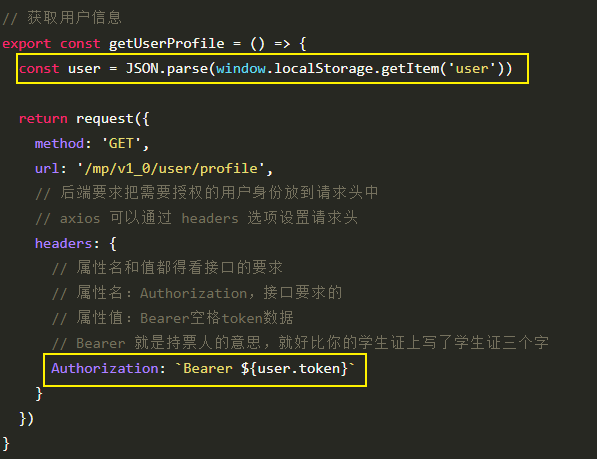
2、然后在请求的时候获取本地存储中的 user 数据使用 token
# 使用拦截器统一设置用户 Token
axios 拦截器官方示例:https://github.com/axios/axios#interceptors
在 request 请求模块中添加如下代码:
// 请求拦截器
request.interceptors.request.use(
  // 任何所有请求会经过这里
  // config 是当前请求相关的配置信息对象
  // config 是可以修改的
  function (config) {
    const user = JSON.parse(window.localStorage.getItem('user'))

    // 如果有登录用户信息,则统一设置 token
    if (user) {
      config.headers.Authorization = `Bearer ${user.token}`
    }

    // 然后我们就可以在允许请求出去之前定制统一业务功能处理
    // 例如:统一的设置 token

    // 当这里 return config 之后请求在会真正的发出去
    return config
  },
  // 请求失败,会经过这里
  function (error) {
    return Promise.reject(error)
  }
)
1
2
3
4
5
6
7
8
9
10
11
12
13
14
15
16
17
18
19
20
21
22
23
24
2
3
4
5
6
7
8
9
10
11
12
13
14
15
16
17
18
19
20
21
22
23
24
# 用户退出
1、给退出按钮注册点击事件
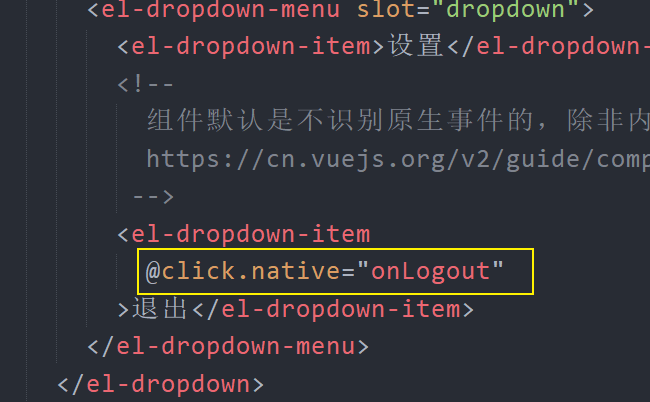
注意:并不是所有的组件在注册事件的时候需要使用
.native修饰符,例如 el-button 组件注册点击事件就不需要,这主要是因为该组件内部处理了。什么时候使用
.native?首先肯定是在组件上注册事件可能会用到,如果普通方式注册不上,这个时候加.native修饰符。例如你给一个组件注册一个
input事件,如果直接@input注册无效,那就试一下@input.native。
2、处理函数如下
onLogout () {
  this.$confirm('确认退出吗?', '退出提示', {
    confirmButtonText: '确定',
    cancelButtonText: '取消',
    type: 'warning'
  }).then(() => {
    // 把用户的登录状态清除
    window.localStorage.removeItem('user')

    // 跳转到登录页面
    this.$router.push('/login')
  }).catch(() => {
    this.$message({
      type: 'info',
      message: '已取消退出'
    })
  })
}
1
2
3
4
5
6
7
8
9
10
11
12
13
14
15
16
17
18
2
3
4
5
6
7
8
9
10
11
12
13
14
15
16
17
18
编辑 (opens new window)
上次更新: 2023/12/06, 01:31:48