
 Vue3核心语法
# Vue3 核心语法
# OptionsAPI 与 CompositionAPI
Vue2的API设计是Options(配置)风格的。Vue3的API设计是Composition(组合)风格的。
# Options API 的弊端
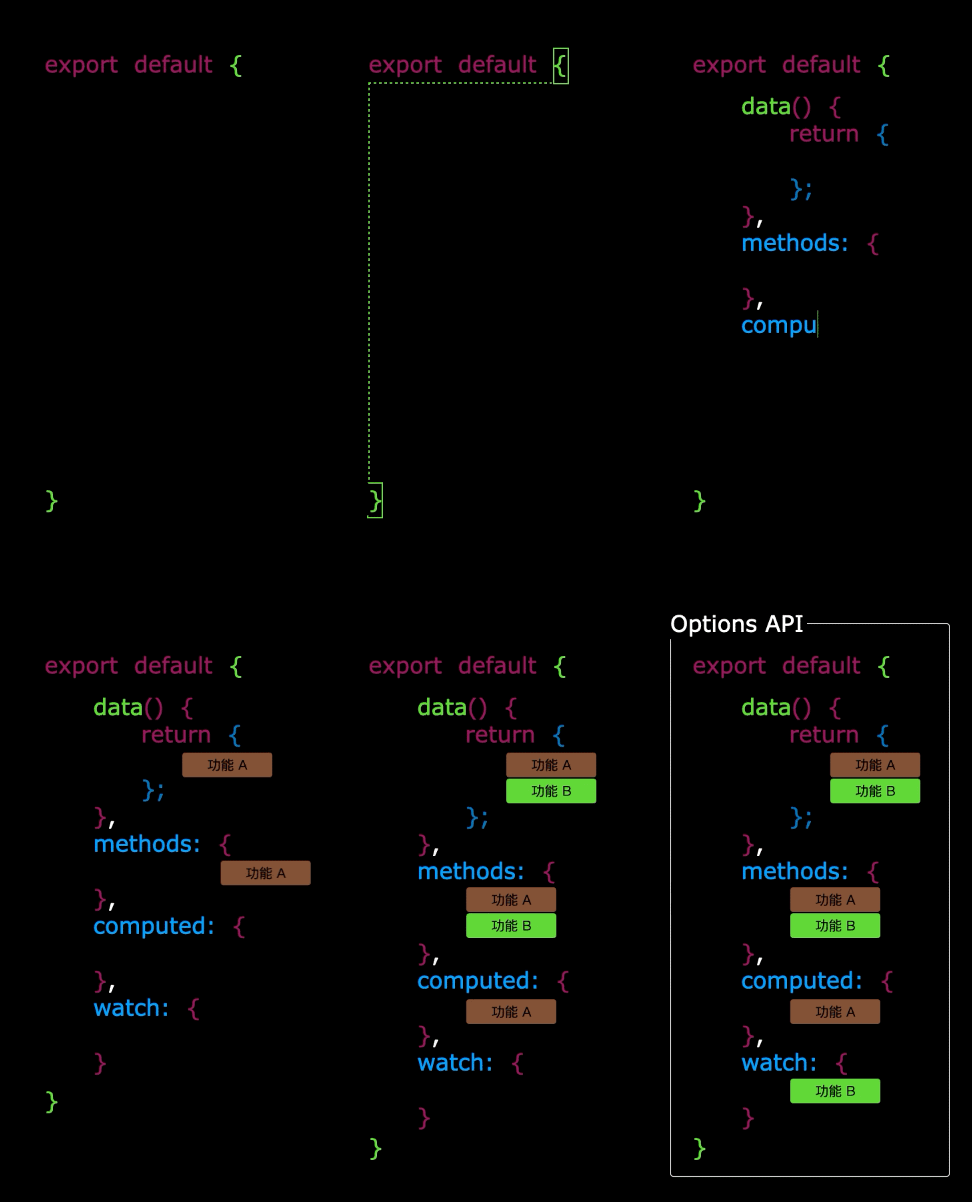
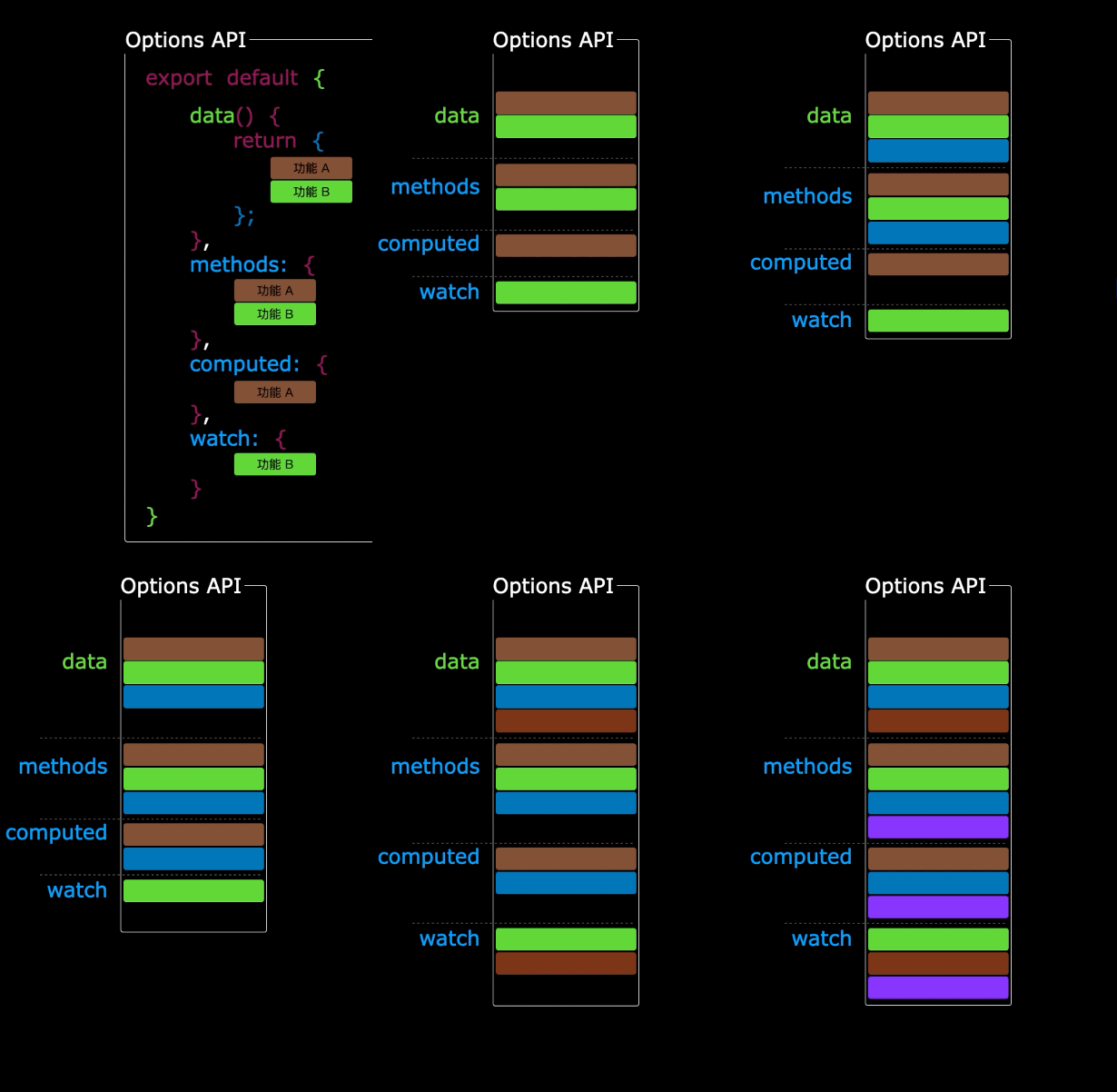
Options 类型的 API ,数据、方法、计算属性等,是分散在: data 、 methods 、 computed 中的,若想新增或者修改一个需求,就需要分别修改: data 、 methods 、 computed ,不便于维护和复用。
# Composition API 的优势
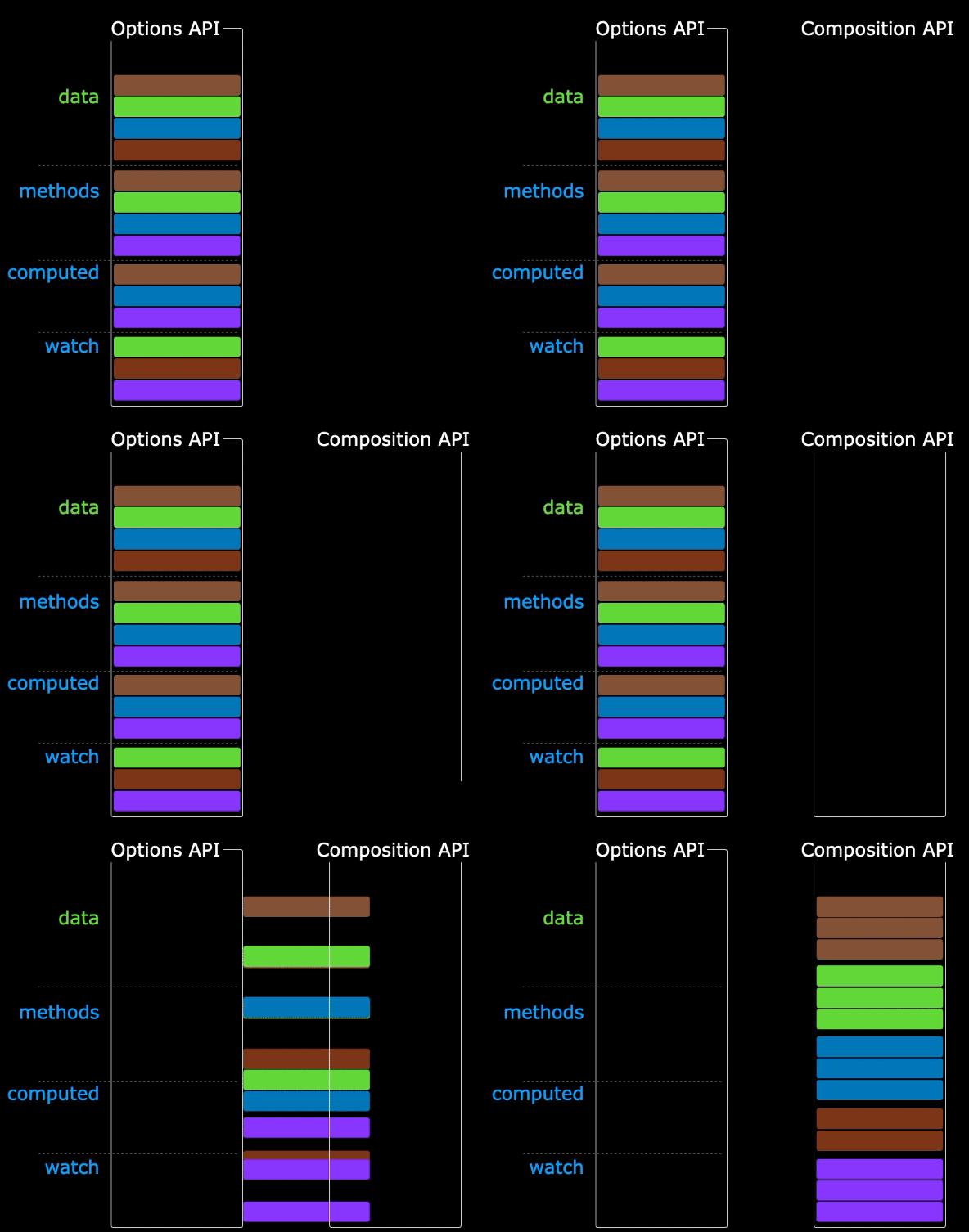
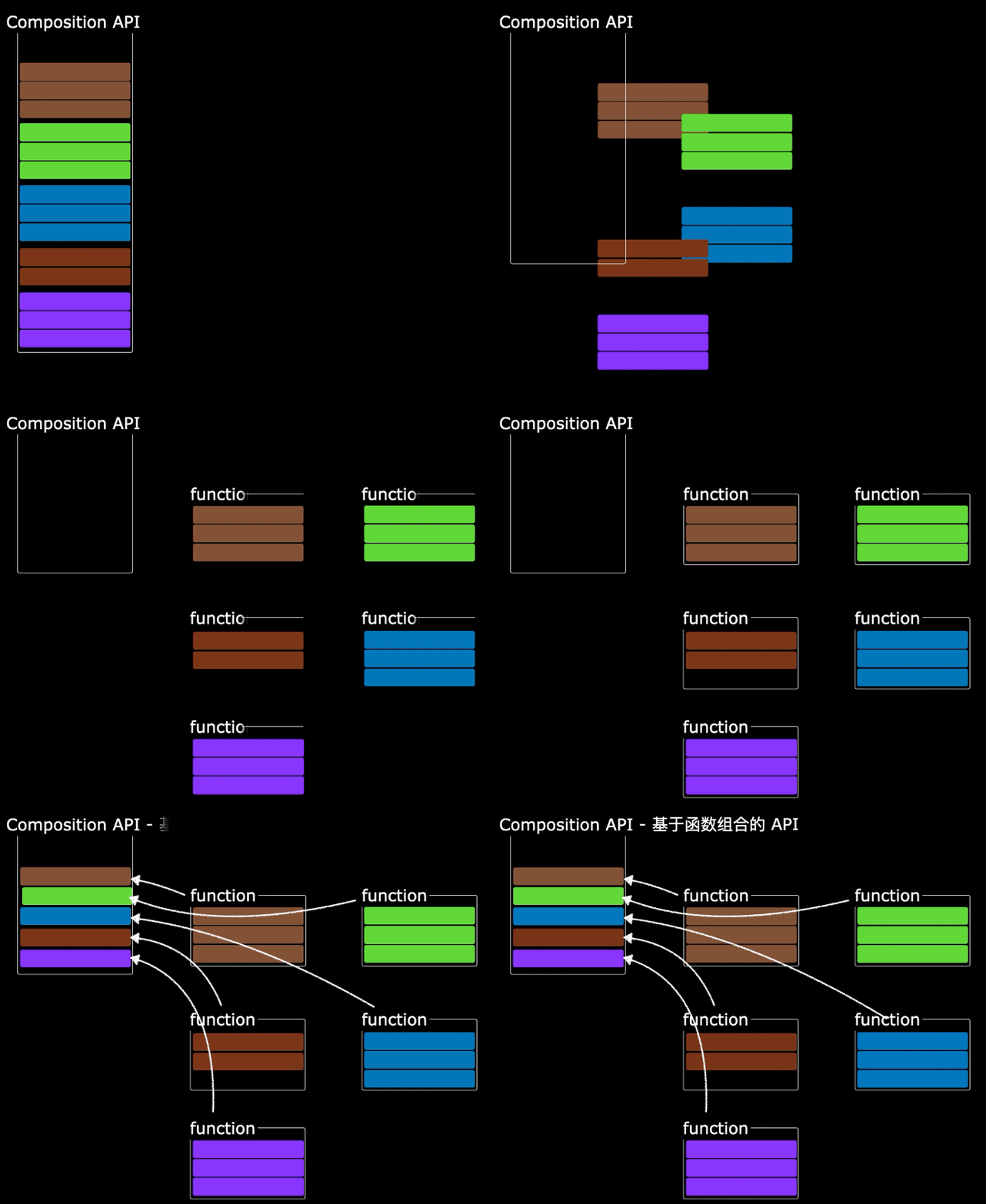
可以用函数的方式,更加优雅的组织代码,让相关功能的代码更加有序的组织在一起。
# setup
setup 是 Vue3 中一个新的配置项,值是一个函数,它是 Composition API “表演的舞台”,组件中所用到的:数据、方法、计算属性、监视...... 等等,均配置在 setup 中。
特点如下:
setup函数返回的对象中的内容,可直接在模板中使用。setup中访问this是undefined。setup函数会在beforeCreate之前调用,它是 “领先” 所有钩子执行的。
<template>
  <div class="person">
    <h2>姓名:{{name}}</h2>
    <h2>年龄:{{age}}</h2>
    <button @click="changeName">修改名字</button>
    <button @click="changeAge">年龄+1</button>
    <button @click="showTel">点我查看联系方式</button>
  </div>
</template>

<script lang="ts">
  export default {
    name:'Person',
    setup(){
      // 数据,原来写在data中(注意:此时的name、age、tel数据都不是响应式数据)
      let name = '张三'
      let age = 18
      let tel = '13888888888'

      // 方法,原来写在methods中
      function changeName(){
        name = 'zhang-san' //注意:此时这么修改name页面是不变化的
        console.log(name)
      }
      function changeAge(){
        age += 1 //注意:此时这么修改age页面是不变化的
        console.log(age)
      }
      function showTel(){
        alert(tel)
      }

      // 返回一个对象,对象中的内容,模板中可以直接使用
      return {name,age,tel,changeName,changeAge,showTel}
    }
  }
</script>
2
3
4
5
6
7
8
9
10
11
12
13
14
15
16
17
18
19
20
21
22
23
24
25
26
27
28
29
30
31
32
33
34
35
36
37
# setup 的返回值
- 若返回一个对象:则对象中的:属性、方法等,在模板中均可以直接使用 **(重点关注)。**
- 若返回一个函数:则可以自定义渲染内容,代码如下:
setup(){
  return ()=> '你好啊!'
}
2
3
# setup 与 Options API 的关系
Vue2的配置(data、methos......)中可以访问到setup中的属性、方法。- 但在
setup中不能访问到Vue2的配置(data、methos......)。 - 如果与
Vue2冲突,则setup优先。
# setup 语法糖
setup 函数有一个语法糖,这个语法糖,可以让我们把 setup 独立出去,代码如下:
<template>
  <div class="person">
    <h2>姓名:{{name}}</h2>
    <h2>年龄:{{age}}</h2>
    <button @click="changName">修改名字</button>
    <button @click="changAge">年龄+1</button>
    <button @click="showTel">点我查看联系方式</button>
  </div>
</template>

<script lang="ts">
  export default {
    name:'Person',
  }
</script>

<!-- 下面的写法是setup语法糖 -->
<script setup lang="ts">
  console.log(this) //undefined

  // 数据(注意:此时的name、age、tel都不是响应式数据)
  let name = '张三'
  let age = 18
  let tel = '13888888888'

  // 方法
  function changName(){
    name = '李四'//注意:此时这么修改name页面是不变化的
  }
  function changAge(){
    console.log(age)
    age += 1 //注意:此时这么修改age页面是不变化的
  }
  function showTel(){
    alert(tel)
  }
</script>
2
3
4
5
6
7
8
9
10
11
12
13
14
15
16
17
18
19
20
21
22
23
24
25
26
27
28
29
30
31
32
33
34
35
36
37
扩展:上述代码,还需要编写一个不写 setup 的 script 标签,去指定组件名字,比较麻烦,我们可以借助 vite 中的插件简化
第一步安装 vite-plugin-vue-setup-extend 插件
npm i vite-plugin-vue-setup-extend -D
第二步修改配置文件 vite.config.ts
import { defineConfig } from 'vite'
import VueSetupExtend from 'vite-plugin-vue-setup-extend'

export default defineConfig({
  plugins: [ VueSetupExtend() ]
})
2
3
4
5
6
第三步直接在 script 标签标记组件名字
<script setup lang="ts" name="Person">
  console.log(this) //undefined

  // 数据(注意:此时的name、age、tel都不是响应式数据)
  let name = '张三'
  let age = 18
  let tel = '13888888888'

  // 方法
  function changName(){
    name = '李四'//注意:此时这么修改name页面是不变化的
  }
  function changAge(){
    console.log(age)
    age += 1 //注意:此时这么修改age页面是不变化的
  }
  function showTel(){
    alert(tel)
  }
</script>
2
3
4
5
6
7
8
9
10
11
12
13
14
15
16
17
18
19
20
# ref
# 基本类型的响应式数据
- ** 作用:** 定义响应式变量。
- 语法:
let xxx = ref(初始值)。 - ** 返回值:** 一个
RefImpl的实例对象,简称ref对象或ref,ref对象的value属性是响应式的。 - 注意点:
JS中操作数据需要:xxx.value,但模板中不需要.value,直接使用即可。- 对于
let name = ref('张三')来说,name不是响应式的,name.value是响应式的。
<template>
  <div class="person">
    <h2>姓名:{{name}}</h2>
    <h2>年龄:{{age}}</h2>
    <button @click="changeName">修改名字</button>
    <button @click="changeAge">年龄+1</button>
    <button @click="showTel">点我查看联系方式</button>
  </div>
</template>

<script setup lang="ts" name="Person">
  import {ref} from 'vue'
  // name和age是一个RefImpl的实例对象,简称ref对象,它们的value属性是响应式的。
  let name = ref('张三')
  let age = ref(18)
  // tel就是一个普通的字符串,不是响应式的
  let tel = '13888888888'

  function changeName(){
    // JS中操作ref对象时候需要.value
    name.value = '李四'
    console.log(name.value)

    // 注意:name不是响应式的,name.value是响应式的,所以如下代码并不会引起页面的更新。
    // name = ref('zhang-san')
  }
  function changeAge(){
    // JS中操作ref对象时候需要.value
    age.value += 1
    console.log(age.value)
  }
  function showTel(){
    alert(tel)
  }
</script>
2
3
4
5
6
7
8
9
10
11
12
13
14
15
16
17
18
19
20
21
22
23
24
25
26
27
28
29
30
31
32
33
34
35
# 对象类型的响应式数据
- 其实
ref接收的数据可以是:基本类型、对象类型。 - 若
ref接收的是对象类型,内部其实也是调用了reactive函数。
<template>
  <div class="person">
    <h2>汽车信息:一台{{ car.brand }}汽车,价值{{ car.price }}万</h2>
    <h2>游戏列表:</h2>
    <ul>
      <li v-for="g in games" :key="g.id">{{ g.name }}</li>
    </ul>
    <h2>测试:{{obj.a.b.c.d}}</h2>
    <button @click="changeCarPrice">修改汽车价格</button>
    <button @click="changeFirstGame">修改第一游戏</button>
    <button @click="test">测试</button>
  </div>
</template>

<script lang="ts" setup name="Person">
import { ref } from 'vue'

// 数据
let car = ref({ brand: '奔驰', price: 100 })
let games = ref([
  { id: 'ahsgdyfa01', name: '英雄联盟' },
  { id: 'ahsgdyfa02', name: '王者荣耀' },
  { id: 'ahsgdyfa03', name: '原神' }
])
let obj = ref({
  a:{
    b:{
      c:{
        d:666
      }
    }
  }
})

console.log(car)

function changeCarPrice() {
  car.value.price += 10
}
function changeFirstGame() {
  games.value[0].name = '流星蝴蝶剑'
}
function test(){
  obj.value.a.b.c.d = 999
}
</script>
2
3
4
5
6
7
8
9
10
11
12
13
14
15
16
17
18
19
20
21
22
23
24
25
26
27
28
29
30
31
32
33
34
35
36
37
38
39
40
41
42
43
44
45
46
# reactive
reactiv 的创建:对象类型的响应式数据
- 作用:定义一个响应式对象(基本类型不要用它,要用
ref,否则报错) - 语法:
let 响应式对象= reactive(源对象)。 - ** 返回值:** 一个
Proxy的实例对象,简称:响应式对象。 - 注意点:
reactive定义的响应式数据是 “深层次” 的。
<template>
  <div class="person">
    <h2>汽车信息:一台{{ car.brand }}汽车,价值{{ car.price }}万</h2>
    <h2>游戏列表:</h2>
    <ul>
      <li v-for="g in games" :key="g.id">{{ g.name }}</li>
    </ul>
    <h2>测试:{{obj.a.b.c.d}}</h2>
    <button @click="changeCarPrice">修改汽车价格</button>
    <button @click="changeFirstGame">修改第一游戏</button>
    <button @click="test">测试</button>
  </div>
</template>

<script lang="ts" setup name="Person">
import { reactive } from 'vue'

// 数据
let car = reactive({ brand: '奔驰', price: 100 })
let games = reactive([
  { id: 'ahsgdyfa01', name: '英雄联盟' },
  { id: 'ahsgdyfa02', name: '王者荣耀' },
  { id: 'ahsgdyfa03', name: '原神' }
])
let obj = reactive({
  a:{
    b:{
      c:{
        d:666
      }
    }
  }
})

function changeCarPrice() {
  car.price += 10
}
function changeFirstGame() {
  games[0].name = '流星蝴蝶剑'
}
function test(){
  obj.a.b.c.d = 999
}
</script>
2
3
4
5
6
7
8
9
10
11
12
13
14
15
16
17
18
19
20
21
22
23
24
25
26
27
28
29
30
31
32
33
34
35
36
37
38
39
40
41
42
43
44
# ref 对比 reactive
宏观角度看:
ref用来定义:基本类型数据、对象类型数据;reactive用来定义:对象类型数据。
区别:
ref创建的变量必须使用.value(可以使用volar插件自动添加.value)。
reactive重新分配一个新对象,会失去响应式(可以使用Object.assign去整体替换)。
使用原则:
- 若需要一个基本类型的响应式数据,必须使用
ref。 - 若需要一个响应式对象,层级不深,
ref、reactive都可以。 - 若需要一个响应式对象,且层级较深,推荐使用
reactive。
# toRefs 与 toRef
- 作用:将一个响应式对象中的每一个属性,转换为
ref对象。 - 备注:
toRefs与toRef功能一致,但toRefs可以批量转换。 - 语法如下:
<template>
  <div class="person">
    <h2>姓名:{{person.name}}</h2>
    <h2>年龄:{{person.age}}</h2>
    <h2>性别:{{person.gender}}</h2>
    <button @click="changeName">修改名字</button>
    <button @click="changeAge">修改年龄</button>
    <button @click="changeGender">修改性别</button>
  </div>
</template>

<script lang="ts" setup name="Person">
  import {ref,reactive,toRefs,toRef} from 'vue'

  // 数据
  let person = reactive({name:'张三', age:18, gender:'男'})

  // 通过toRefs将person对象中的n个属性批量取出,且依然保持响应式的能力
  let {name,gender} =  toRefs(person)

  // 通过toRef将person对象中的gender属性取出,且依然保持响应式的能力
  let age = toRef(person,'age')

  // 方法
  function changeName(){
    name.value += '~'
  }
  function changeAge(){
    age.value += 1
  }
  function changeGender(){
    gender.value = '女'
  }
</script>
2
3
4
5
6
7
8
9
10
11
12
13
14
15
16
17
18
19
20
21
22
23
24
25
26
27
28
29
30
31
32
33
34
# computed
作用:根据已有数据计算出新数据(和 Vue2 中的 computed 作用一致)。
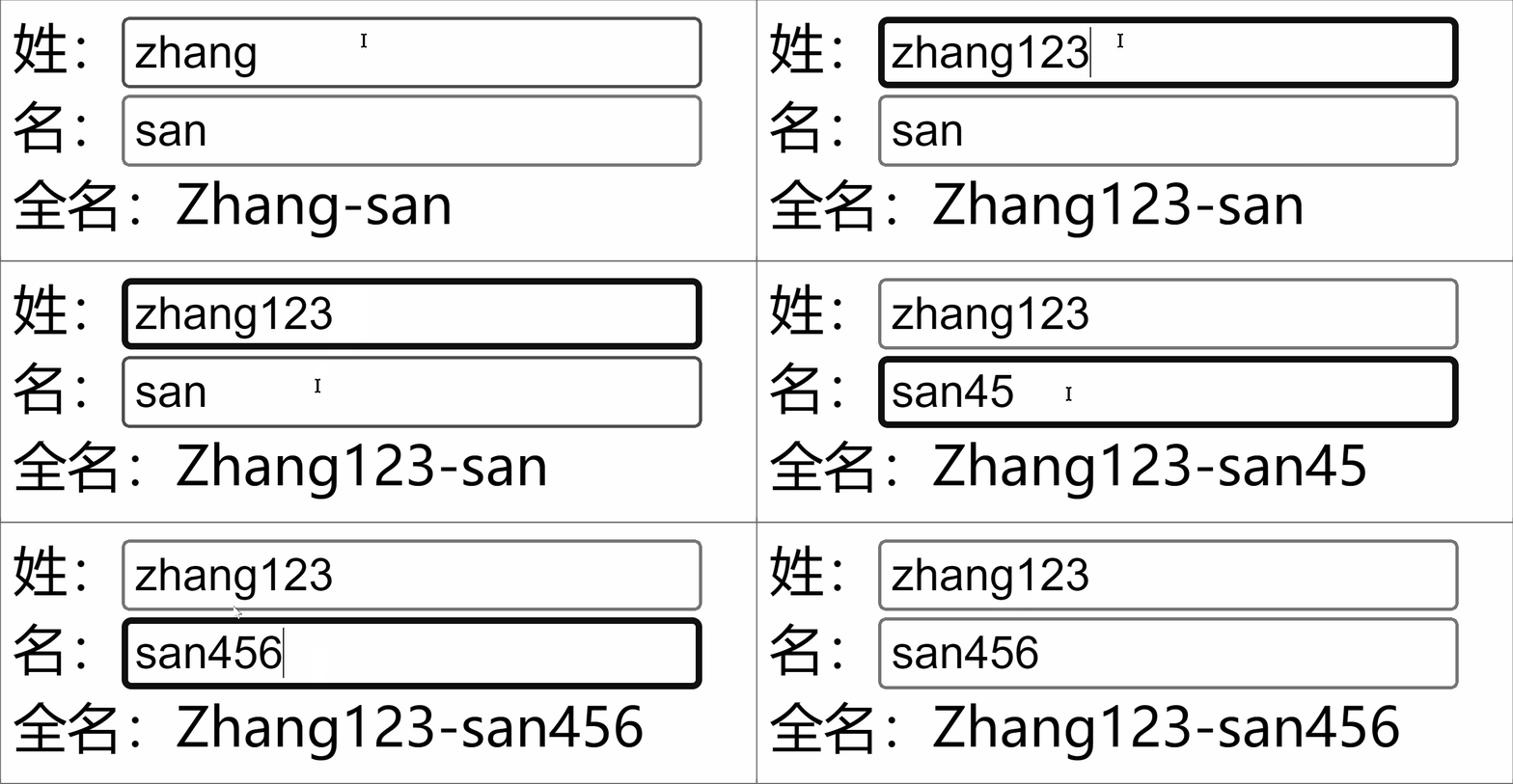
<template>
  <div class="person">
    姓:<input type="text" v-model="firstName"> <br>
    名:<input type="text" v-model="lastName"> <br>
    全名:<span>{{fullName}}</span> <br>
    <button @click="changeFullName">全名改为:li-si</button>
  </div>
</template>

<script setup lang="ts" name="App">
  import {ref,computed} from 'vue'

  let firstName = ref('zhang')
  let lastName = ref('san')

  // 计算属性——只读取,不修改
  /* let fullName = computed(()=>{
    return firstName.value + '-' + lastName.value
  }) */


  // 计算属性——既读取又修改
  let fullName = computed({
    // 读取
    get(){
      return firstName.value + '-' + lastName.value
    },
    // 修改
    set(val){
      console.log('有人修改了fullName',val)
      firstName.value = val.split('-')[0]
      lastName.value = val.split('-')[1]
    }
  })

  function changeFullName(){
    fullName.value = 'li-si'
  }
</script>
2
3
4
5
6
7
8
9
10
11
12
13
14
15
16
17
18
19
20
21
22
23
24
25
26
27
28
29
30
31
32
33
34
35
36
37
38
39
# watch
- 作用:监视数据的变化(和
Vue2中的watch作用一致) - 特点:
Vue3中的watch只能监视以下四种数据:ref定义的数据。reactive定义的数据。- 函数返回一个值(
getter函数)。 - 一个包含上述内容的数组。
我们在 Vue3 中使用 watch 的时候,通常会遇到以下几种情况:
# 情况一
监视 ref 定义的【基本类型】数据:直接写数据名即可,监视的是其 value 值的改变。
<template>
  <div class="person">
    <h1>情况一:监视【ref】定义的【基本类型】数据</h1>
    <h2>当前求和为:{{sum}}</h2>
    <button @click="changeSum">点我sum+1</button>
  </div>
</template>

<script lang="ts" setup name="Person">
  import {ref,watch} from 'vue'
  // 数据
  let sum = ref(0)
  // 方法
  function changeSum(){
    sum.value += 1
  }
  // 监视,情况一:监视【ref】定义的【基本类型】数据
  const stopWatch = watch(sum,(newValue,oldValue)=>{
    console.log('sum变化了',newValue,oldValue)
    if(newValue >= 10){
      stopWatch()
    }
  })
</script>
2
3
4
5
6
7
8
9
10
11
12
13
14
15
16
17
18
19
20
21
22
23
24
# 情况二
监视 ref 定义的【对象类型】数据:直接写数据名,监视的是对象的【地址值】,若想监视对象内部的数据,要手动开启深度监视。
注意:
若修改的是
ref定义的对象中的属性,newValue和oldValue都是新值,因为它们是同一个对象。若修改整个
ref定义的对象,newValue是新值,oldValue是旧值,因为不是同一个对象了。
<template>
  <div class="person">
    <h1>情况二:监视【ref】定义的【对象类型】数据</h1>
    <h2>姓名:{{ person.name }}</h2>
    <h2>年龄:{{ person.age }}</h2>
    <button @click="changeName">修改名字</button>
    <button @click="changeAge">修改年龄</button>
    <button @click="changePerson">修改整个人</button>
  </div>
</template>

<script lang="ts" setup name="Person">
  import {ref,watch} from 'vue'
  // 数据
  let person = ref({
    name:'张三',
    age:18
  })
  // 方法
  function changeName(){
    person.value.name += '~'
  }
  function changeAge(){
    person.value.age += 1
  }
  function changePerson(){
    person.value = {name:'李四',age:90}
  }
  /*
    监视,情况一:监视【ref】定义的【对象类型】数据,监视的是对象的地址值,若想监视对象内部属性的变化,需要手动开启深度监视
    watch的第一个参数是:被监视的数据
    watch的第二个参数是:监视的回调
    watch的第三个参数是:配置对象(deep、immediate等等.....)
  */
  watch(person,(newValue,oldValue)=>{
    console.log('person变化了',newValue,oldValue)
  },{deep:true})

</script>
2
3
4
5
6
7
8
9
10
11
12
13
14
15
16
17
18
19
20
21
22
23
24
25
26
27
28
29
30
31
32
33
34
35
36
37
38
39
# 情况三
监视 reactive 定义的【对象类型】数据,且默认开启了深度监视。
<template>
  <div class="person">
    <h1>情况三:监视【reactive】定义的【对象类型】数据</h1>
    <h2>姓名:{{ person.name }}</h2>
    <h2>年龄:{{ person.age }}</h2>
    <button @click="changeName">修改名字</button>
    <button @click="changeAge">修改年龄</button>
    <button @click="changePerson">修改整个人</button>
    <hr>
    <h2>测试:{{obj.a.b.c}}</h2>
    <button @click="test">修改obj.a.b.c</button>
  </div>
</template>

<script lang="ts" setup name="Person">
  import {reactive,watch} from 'vue'
  // 数据
  let person = reactive({
    name:'张三',
    age:18
  })
  let obj = reactive({
    a:{
      b:{
        c:666
      }
    }
  })
  // 方法
  function changeName(){
    person.name += '~'
  }
  function changeAge(){
    person.age += 1
  }
  function changePerson(){
    Object.assign(person,{name:'李四',age:80})
  }
  function test(){
    obj.a.b.c = 888
  }

  // 监视,情况三:监视【reactive】定义的【对象类型】数据,且默认是开启深度监视的
  watch(person,(newValue,oldValue)=>{
    console.log('person变化了',newValue,oldValue)
  })
  watch(obj,(newValue,oldValue)=>{
    console.log('Obj变化了',newValue,oldValue)
  })
</script>
2
3
4
5
6
7
8
9
10
11
12
13
14
15
16
17
18
19
20
21
22
23
24
25
26
27
28
29
30
31
32
33
34
35
36
37
38
39
40
41
42
43
44
45
46
47
48
49
50
# 情况四
监视 ref 或 reactive 定义的【对象类型】数据中的某个属性,注意点如下:
- 若该属性值不是【对象类型】,需要写成函数形式。
- 若该属性值是依然是【对象类型】,可直接编,也可写成函数,建议写成函数。
结论:监视的要是对象里的属性,那么最好写函数式,注意点:若是对象监视的是地址值,需要关注对象内部,需要手动开启深度监视。
<template>
  <div class="person">
    <h1>情况四:监视【ref】或【reactive】定义的【对象类型】数据中的某个属性</h1>
    <h2>姓名:{{ person.name }}</h2>
    <h2>年龄:{{ person.age }}</h2>
    <h2>汽车:{{ person.car.c1 }}、{{ person.car.c2 }}</h2>
    <button @click="changeName">修改名字</button>
    <button @click="changeAge">修改年龄</button>
    <button @click="changeC1">修改第一台车</button>
    <button @click="changeC2">修改第二台车</button>
    <button @click="changeCar">修改整个车</button>
  </div>
</template>

<script lang="ts" setup name="Person">
  import {reactive,watch} from 'vue'

  // 数据
  let person = reactive({
    name:'张三',
    age:18,
    car:{
      c1:'奔驰',
      c2:'宝马'
    }
  })
  // 方法
  function changeName(){
    person.name += '~'
  }
  function changeAge(){
    person.age += 1
  }
  function changeC1(){
    person.car.c1 = '奥迪'
  }
  function changeC2(){
    person.car.c2 = '大众'
  }
  function changeCar(){
    person.car = {c1:'雅迪',c2:'爱玛'}
  }

  // 监视,情况四:监视响应式对象中的某个属性,且该属性是基本类型的,要写成函数式
  /* watch(()=> person.name,(newValue,oldValue)=>{
    console.log('person.name变化了',newValue,oldValue)
  }) */

  // 监视,情况四:监视响应式对象中的某个属性,且该属性是对象类型的,可以直接写,也能写函数,更推荐写函数
  watch(()=>person.car,(newValue,oldValue)=>{
    console.log('person.car变化了',newValue,oldValue)
  },{deep:true})
</script>
2
3
4
5
6
7
8
9
10
11
12
13
14
15
16
17
18
19
20
21
22
23
24
25
26
27
28
29
30
31
32
33
34
35
36
37
38
39
40
41
42
43
44
45
46
47
48
49
50
51
52
53
# 情况五
监视上述的多个数据
<template>
  <div class="person">
    <h1>情况五:监视上述的多个数据</h1>
    <h2>姓名:{{ person.name }}</h2>
    <h2>年龄:{{ person.age }}</h2>
    <h2>汽车:{{ person.car.c1 }}、{{ person.car.c2 }}</h2>
    <button @click="changeName">修改名字</button>
    <button @click="changeAge">修改年龄</button>
    <button @click="changeC1">修改第一台车</button>
    <button @click="changeC2">修改第二台车</button>
    <button @click="changeCar">修改整个车</button>
  </div>
</template>

<script lang="ts" setup name="Person">
  import {reactive,watch} from 'vue'

  // 数据
  let person = reactive({
    name:'张三',
    age:18,
    car:{
      c1:'奔驰',
      c2:'宝马'
    }
  })
  // 方法
  function changeName(){
    person.name += '~'
  }
  function changeAge(){
    person.age += 1
  }
  function changeC1(){
    person.car.c1 = '奥迪'
  }
  function changeC2(){
    person.car.c2 = '大众'
  }
  function changeCar(){
    person.car = {c1:'雅迪',c2:'爱玛'}
  }

  // 监视,情况五:监视上述的多个数据
  watch([()=>person.name,person.car],(newValue,oldValue)=>{
    console.log('person.car变化了',newValue,oldValue)
  },{deep:true})

</script>
2
3
4
5
6
7
8
9
10
11
12
13
14
15
16
17
18
19
20
21
22
23
24
25
26
27
28
29
30
31
32
33
34
35
36
37
38
39
40
41
42
43
44
45
46
47
48
49
# watchEffect
watchEffect:立即运行一个函数,同时响应式地追踪其依赖,并在依赖更改时重新执行该函数。
watch 对比 watchEffect :
都能监听响应式数据的变化,不同的是监听数据变化的方式不同
watch:要明确指出监视的数据watchEffect:不用明确指出监视的数据(函数中用到哪些属性,那就监视哪些属性)。
<template>
  <div class="person">
    <h1>需求:水温达到50℃,或水位达到20cm,则联系服务器</h1>
    <h2 id="demo">水温:{{temp}}</h2>
    <h2>水位:{{height}}</h2>
    <button @click="changePrice">水温+1</button>
    <button @click="changeSum">水位+10</button>
  </div>
</template>

<script lang="ts" setup name="Person">
  import {ref,watch,watchEffect} from 'vue'
  // 数据
  let temp = ref(0)
  let height = ref(0)

  // 方法
  function changePrice(){
    temp.value += 10
  }
  function changeSum(){
    height.value += 1
  }

  // 用watch实现,需要明确的指出要监视:temp、height
  watch([temp,height],(value)=>{
    // 从value中获取最新的temp值、height值
    const [newTemp,newHeight] = value
    // 室温达到50℃,或水位达到20cm,立刻联系服务器
    if(newTemp >= 50 || newHeight >= 20){
      console.log('联系服务器')
    }
  })

  // 用watchEffect实现,不用
  const stopWtach = watchEffect(()=>{
    // 室温达到50℃,或水位达到20cm,立刻联系服务器
    if(temp.value >= 50 || height.value >= 20){
      console.log(document.getElementById('demo')?.innerText)
      console.log('联系服务器')
    }
    // 水温达到100,或水位达到50,取消监视
    if(temp.value === 100 || height.value === 50){
      console.log('清理了')
      stopWtach()
    }
  })
</script>
2
3
4
5
6
7
8
9
10
11
12
13
14
15
16
17
18
19
20
21
22
23
24
25
26
27
28
29
30
31
32
33
34
35
36
37
38
39
40
41
42
43
44
45
46
47
48
# 标签的 ref 属性
作用:用于注册模板引用。
用在普通
DOM标签上,获取的是DOM节点。用在组件标签上,获取的是组件实例对象。
用在普通 DOM 标签上:
<template>
  <div class="person">
    <h1 ref="title1">尚硅谷</h1>
    <h2 ref="title2">前端</h2>
    <h3 ref="title3">Vue</h3>
    <input type="text" ref="inpt"> <br><br>
    <button @click="showLog">点我打印内容</button>
  </div>
</template>

<script lang="ts" setup name="Person">
  import {ref} from 'vue'

  let title1 = ref()
  let title2 = ref()
  let title3 = ref()

  function showLog(){
    // 通过id获取元素
    const t1 = document.getElementById('title1')
    // 打印内容
    console.log((t1 as HTMLElement).innerText)
    console.log((<HTMLElement>t1).innerText)
    console.log(t1?.innerText)

		/************************************/

    // 通过ref获取元素
    console.log(title1.value)
    console.log(title2.value)
    console.log(title3.value)
  }
</script>
2
3
4
5
6
7
8
9
10
11
12
13
14
15
16
17
18
19
20
21
22
23
24
25
26
27
28
29
30
31
32
33
用在组件标签上:
<!-- 父组件App.vue -->
<template>
  <Person ref="ren"/>
  <button @click="test">测试</button>
</template>

<script lang="ts" setup name="App">
  import Person from './components/Person.vue'
  import {ref} from 'vue'

  let ren = ref()

  function test(){
    console.log(ren.value.name)
    console.log(ren.value.age)
  }
</script>


<!-- 子组件Person.vue中要使用defineExpose暴露内容 -->
<script lang="ts" setup name="Person">
  import {ref,defineExpose} from 'vue'
	// 数据
  let name = ref('张三')
  let age = ref(18)
  /****************************/
  /****************************/
  // 使用defineExpose将组件中的数据交给外部
  defineExpose({name,age})
</script>
2
3
4
5
6
7
8
9
10
11
12
13
14
15
16
17
18
19
20
21
22
23
24
25
26
27
28
29
30
# props
组件之间传递值,即父组件传子组件
// 定义一个接口,限制每个Person对象的格式
export interface PersonInter {
id:string,
name:string,
 age:number
}

// 定义一个自定义类型Persons
export type Persons = Array<PersonInter>
2
3
4
5
6
7
8
9
App.vue 中代码:
<template>
	<Person :list="persons"/>
</template>

<script lang="ts" setup name="App">
import Person from './components/Person.vue'
import {reactive} from 'vue'
 import {type Persons} from './types'

 let persons = reactive<Persons>([
  {id:'e98219e12',name:'张三',age:18},
   {id:'e98219e13',name:'李四',age:19},
    {id:'e98219e14',name:'王五',age:20}
  ])
</script>
2
3
4
5
6
7
8
9
10
11
12
13
14
15
16
Person.vue 中代码:
<template>
<div class="person">
<ul>
  <li v-for="item in list" :key="item.id">
     {{item.name}}--{{item.age}}
   </li>
 </ul>
</div>
</template>

<script lang="ts" setup name="Person">
import {defineProps} from 'vue'
import {type PersonInter} from '@/types'

// 第一种写法:仅接收
// const props = defineProps(['list'])

// 第二种写法:接收+限制类型
// defineProps<{list:Persons}>()

// 第三种写法:接收+限制类型+指定默认值+限制必要性
let props = withDefaults(defineProps<{list?:Persons}>(),{
  list:()=>[{id:'asdasg01',name:'小猪佩奇',age:18}]
})
console.log(props)
</script>
2
3
4
5
6
7
8
9
10
11
12
13
14
15
16
17
18
19
20
21
22
23
24
25
26
# 生命周期
概念: Vue 组件实例在创建时要经历一系列的初始化步骤,在此过程中 Vue 会在合适的时机,调用特定的函数,从而让开发者有机会在特定阶段运行自己的代码,这些特定的函数统称为:生命周期钩子
规律:生命周期整体分为四个阶段,分别是:创建、挂载、更新、销毁,每个阶段都有两个钩子,一前一后。
Vue2 的生命周期
创建阶段:
beforeCreate、created挂载阶段:
beforeMount、mounted更新阶段:
beforeUpdate、updated销毁阶段:
beforeDestroy、destroyed
Vue3 的生命周期
创建阶段:
setup挂载阶段:
onBeforeMount、onMounted更新阶段:
onBeforeUpdate、onUpdated卸载阶段:
onBeforeUnmount、onUnmounted
常用的钩子: onMounted (挂载完毕)、 onUpdated (更新完毕)、 onBeforeUnmount (卸载之前)
<template>
  <div class="person">
    <h2>当前求和为:{{ sum }}</h2>
    <button @click="changeSum">点我sum+1</button>
  </div>
</template>

<!-- vue3写法 -->
<script lang="ts" setup name="Person">
  import {
    ref,
    onBeforeMount,
    onMounted,
    onBeforeUpdate,
    onUpdated,
    onBeforeUnmount,
    onUnmounted
  } from 'vue'

  // 数据
  let sum = ref(0)
  // 方法
  function changeSum() {
    sum.value += 1
  }
  console.log('setup')
  // 生命周期钩子
  onBeforeMount(()=>{
    console.log('挂载之前')
  })
  onMounted(()=>{
    console.log('挂载完毕')
  })
  onBeforeUpdate(()=>{
    console.log('更新之前')
  })
  onUpdated(()=>{
    console.log('更新完毕')
  })
  onBeforeUnmount(()=>{
    console.log('卸载之前')
  })
  onUnmounted(()=>{
    console.log('卸载完毕')
  })
</script>
2
3
4
5
6
7
8
9
10
11
12
13
14
15
16
17
18
19
20
21
22
23
24
25
26
27
28
29
30
31
32
33
34
35
36
37
38
39
40
41
42
43
44
45
46
# 自定义 hook
什么是 hook ?—— 本质是一个函数,把 setup 函数中使用的 Composition API 进行了封装,类似于 vue2.x 中的 mixin 。
自定义 hook 的优势:复用代码,让 setup 中的逻辑更清楚易懂。
示例代码:
useSum.ts 中内容如下:
import {ref,onMounted} from 'vue'

export default function(){
  let sum = ref(0)

  const increment = ()=>{
    sum.value += 1
  }
  const decrement = ()=>{
    sum.value -= 1
  }
  onMounted(()=>{
    increment()
  })

  //向外部暴露数据
  return {sum,increment,decrement}
}
2
3
4
5
6
7
8
9
10
11
12
13
14
15
16
17
18
useDog.ts 中内容如下:
import {reactive,onMounted} from 'vue'
import axios,{AxiosError} from 'axios'

export default function(){
  let dogList = reactive<string[]>([])

  // 方法
  async function getDog(){
    try {
      // 发请求
      let {data} = await axios.get('https://dog.ceo/api/breed/pembroke/images/random')
      // 维护数据
      dogList.push(data.message)
    } catch (error) {
      // 处理错误
      const err = <AxiosError>error
      console.log(err.message)
    }
  }

  // 挂载钩子
  onMounted(()=>{
    getDog()
  })

  //向外部暴露数据
  return {dogList,getDog}
}
2
3
4
5
6
7
8
9
10
11
12
13
14
15
16
17
18
19
20
21
22
23
24
25
26
27
28
组件中具体使用:
<template>
  <h2>当前求和为:{{sum}}</h2>
  <button @click="increment">点我+1</button>
  <button @click="decrement">点我-1</button>
  <hr>
  <img v-for="(u,index) in dogList.urlList" :key="index" :src="(u as string)">
  <span v-show="dogList.isLoading">加载中......</span><br>
  <button @click="getDog">再来一只狗</button>
</template>

<script lang="ts">
  import {defineComponent} from 'vue'

  export default defineComponent({
    name:'App',
  })
</script>

<script setup lang="ts">
  import useSum from './hooks/useSum'
  import useDog from './hooks/useDog'

  let {sum,increment,decrement} = useSum()
  let {dogList,getDog} = useDog()
</script>
2
3
4
5
6
7
8
9
10
11
12
13
14
15
16
17
18
19
20
21
22
23
24
25