
 后台管理系统-点播管理模块
# 后台管理系统 - 点播管理模块
# 点播管理模块模块
添加点播课程,包含课程基本信息,课程章节,课程小结和最终发布

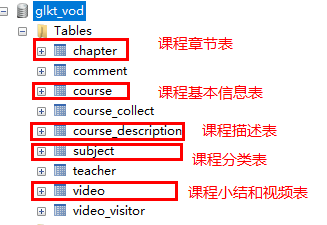
课程相关表
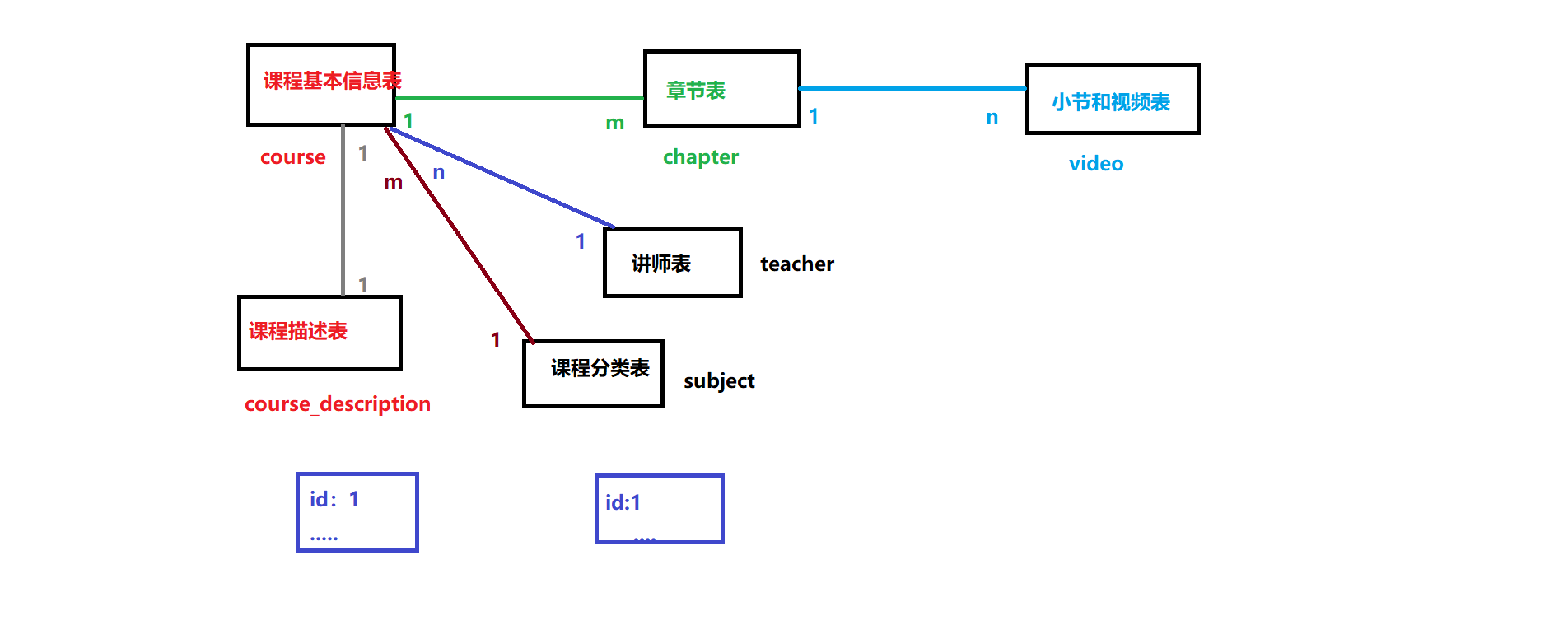
表与表之间关系
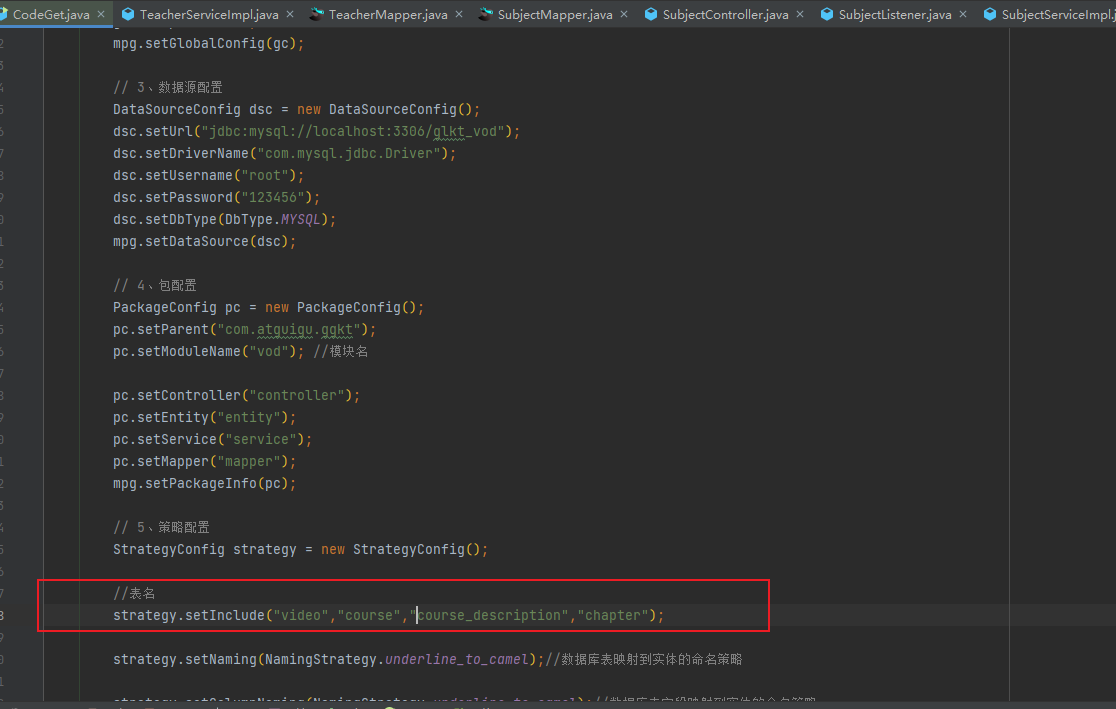
通过 mybatis-plus 生成器 生成这几个表的模型
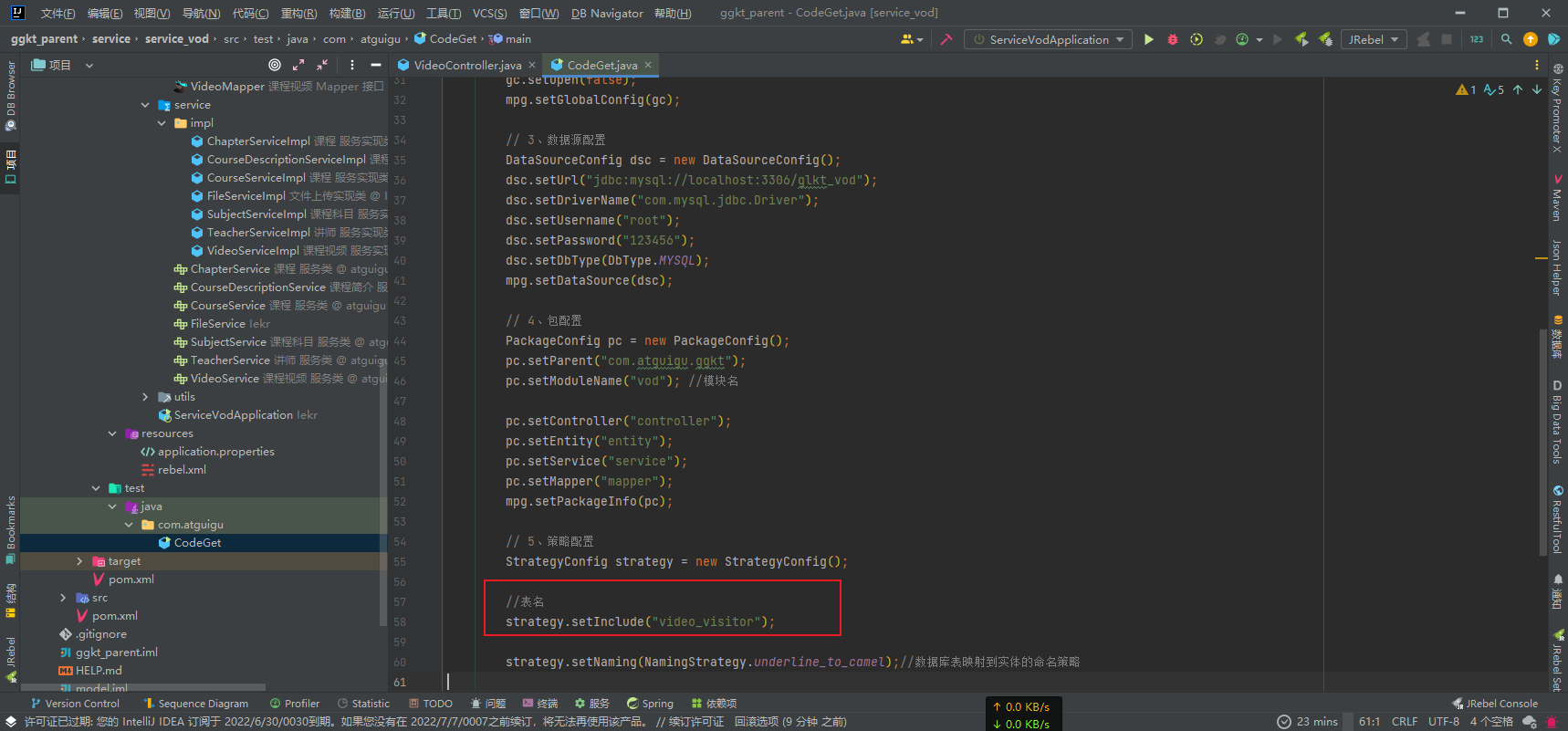
strategy.setInclude("video","course","course_description","chapter");
删除生成的 entity 包 换成 common 中的 entity 并修改 mapper 层和 service 层的 entity 路径
# 功能实现 - 课程列表
实现分页条件查询点播课程功能
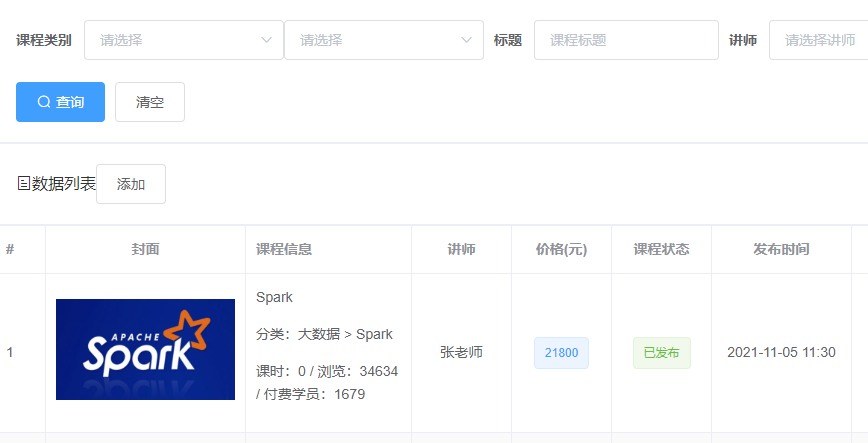
编写 CourseController
@Api(tags = "课程管理接口")
@RestController
@RequestMapping(value="/admin/vod/course")
@CrossOrigin
public class CourseController {
    @Autowired
    private CourseService courseService;

    /**
     * 获取点播课程分页列表
     * @param page
     * @param limit
     * @param courseQueryVo
     * @return
     */
    @ApiOperation(value = "点播课程分页变量")
    @GetMapping("/{page}/{limit}")
    public Result index(
            @ApiParam(name = "page", value = "当前页码", required = true)
            @PathVariable Long page,
            @ApiParam(name = "limit", value = "每页记录数", required = true)
            @PathVariable Long limit,
            @ApiParam(name = "courseVo", value = "查询对象", required = false)
            CourseQueryVo courseQueryVo) {
        Page<Course> pageParam = new Page<>(page, limit);
        Map<String,Object> map = courseService.findPage(pageParam, courseQueryVo);
        return Result.ok(map);
    }
}
2
3
4
5
6
7
8
9
10
11
12
13
14
15
16
17
18
19
20
21
22
23
24
25
26
27
28
29
编写 CourseService
public interface CourseService extends IService<Course> {
    /**
     * 点播课程列表
     * @param pageParam
     * @param courseQueryVo
     * @return
     */
    Map<String, Object> findPageCourse(Page<Course> pageParam, CourseQueryVo courseQueryVo);
}
2
3
4
5
6
7
8
9
编写 CourseServiceImpl
@Service
public class CourseServiceImpl extends ServiceImpl<CourseMapper, Course> implements CourseService {

    @Autowired
    private TeacherService teacherService;

    @Autowired
    private SubjectService subjectService;

    /**
     * 点播课程列表
     *
     * @param pageParam
     * @param courseQueryVo
     * @return
     */
    @Override
    public Map<String, Object> findPageCourse(Page<Course> pageParam, CourseQueryVo courseQueryVo) {
        //获取条件值
        //二层分类
        Long subjectId = courseQueryVo.getSubjectId();
        //一层分类
        Long subjectParentId = courseQueryVo.getSubjectParentId();
        //名称
        String title = courseQueryVo.getTitle();
        //讲师id
        Long teacherId = courseQueryVo.getTeacherId();

        //封装条件
        QueryWrapper<Course> wrapper = new QueryWrapper<>();
        if(!StringUtils.isEmpty(title)) {
            wrapper.like("title",title);
        }
        if(!StringUtils.isEmpty(subjectId)) {
            wrapper.eq("subject_id",subjectId);
        }
        if(!StringUtils.isEmpty(subjectParentId)) {
            wrapper.eq("subject_parent_id",subjectParentId);
        }
        if(!StringUtils.isEmpty(teacherId)) {
            wrapper.eq("teacher_id",teacherId);
        }

        //调用方法查询
        Page<Course> pages = baseMapper.selectPage(pageParam, wrapper);
        long totalCount = pages.getTotal();//总记录数
        long totalPage = pages.getPages();//总页数
        long currentPage = pages.getCurrent();//当前页
        long size = pages.getSize();//每页记录数

        //每页数据集合
        List<Course> records = pages.getRecords();
        //遍历封装讲师和分类名称
        records.stream().forEach(item -> {
            //获取这些id对应名称或者讲师名称 进行封装
            this.getTeacherOrSubjectName(item);
        });
        //封装返回数据
        Map<String,Object> map = new HashMap<>();
        map.put("totalCount",totalCount);
        map.put("totalPage",totalPage);
        map.put("records",records);
        return map;
    }

    /**
     * 获取讲师和分类名称
     */
    private Course getTeacherOrSubjectName(Course course) {
        //查询讲师名称
        Teacher teacher = teacherService.getById(course.getTeacherId());
        if(teacher != null) {
            course.getParam().put("teacherName",teacher.getName());
        }
        //查询分类名称
        Subject subjectOne = subjectService.getById(course.getSubjectParentId());
        if(subjectOne != null) {
            course.getParam().put("subjectParentTitle",subjectOne.getTitle());
        }
        Subject subjectTwo = subjectService.getById(course.getSubjectId());
        if(subjectTwo != null) {
            course.getParam().put("subjectTitle",subjectTwo.getTitle());
        }
        return course;
    }
}
2
3
4
5
6
7
8
9
10
11
12
13
14
15
16
17
18
19
20
21
22
23
24
25
26
27
28
29
30
31
32
33
34
35
36
37
38
39
40
41
42
43
44
45
46
47
48
49
50
51
52
53
54
55
56
57
58
59
60
61
62
63
64
65
66
67
68
69
70
71
72
73
74
75
76
77
78
79
80
81
82
83
84
85
86
# 课程列表前端
src 目录下 index.js 文件添加路由
  // 课程管理
  {
    path: '/vodcourse',
    component: Layout,
    redirect: '/vodcourse/course/list',
    name: 'Vodcourse',
    meta: {
      title: '点播管理',
      icon: 'el-icon-bank-card'
    },
    alwaysShow: true,
    children: [
      {
        path: 'course/list',
        name: 'CourseList',
        component: () => import('@/views/vod/course/list'),
        meta: { title: '课程列表' , icon: 'table'}
      },
      {
        path: 'course/info',
        name: 'CourseInfo',
        component: () => import('@/views/vod/course/form'),
        meta: { title: '发布课程' },
        hidden: true
      },
      {
        path: 'course/info/:id',
        name: 'CourseInfoEdit',
        component: () => import('@/views/vod/course/form'),
        meta: { title: '编辑课程' },
        hidden: true
      },
      {
        path: 'course/chapter/:id',
        name: 'CourseChapterEdit',
        component: () => import('@/views/vod/course/form'),
        meta: { title: '编辑大纲' },
        hidden: true
      },
      {
        path: 'course/chart/:id',
        name: 'CourseChart',
        component: () => import('@/views/vod/course/chart'),
        meta: { title: '课程统计' },
        hidden: true
      }
    ]
  },
2
3
4
5
6
7
8
9
10
11
12
13
14
15
16
17
18
19
20
21
22
23
24
25
26
27
28
29
30
31
32
33
34
35
36
37
38
39
40
41
42
43
44
45
46
47
48
在 /vod/ course 创建 form.vue list.vue chart.ue 页面
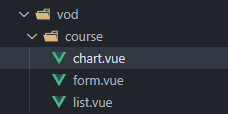
在 api/vod 目录创建 course.js 文件
import request from '@/utils/request'

const api_name = '/admin/vod/course'

export default {
  // 课程列表
  getPageList(page, limit, searchObj) {
    return request({
      url: `${api_name}/${page}/${limit}`,
      method: 'get',
      params: searchObj
    })
  }
}
2
3
4
5
6
7
8
9
10
11
12
13
14
15
在 api 目录 teacher.js 文件定义接口 添加查询所有讲师 axios 请求
    //所有讲师
    list() {
      return request({
        url: `${api_name}/findAll`,
        method: `get`
      })
  }
2
3
4
5
6
7
编写 list.vue 页面
<template>
  <div class="app-container">
    <!--查询表单-->
    <el-card class="operate-container" shadow="never">
    <el-form :inline="true" class="demo-form-inline">

      <!-- 所属分类:级联下拉列表 -->
      <!-- 一级分类 -->
      <el-form-item label="课程类别">
        <el-select
          v-model="searchObj.subjectParentId"
          placeholder="请选择"
          @change="subjectLevelOneChanged">
          <el-option
            v-for="subject in subjectList"
            :key="subject.id"
            :label="subject.title"
            :value="subject.id"/>
        </el-select>

        <!-- 二级分类 -->
        <el-select v-model="searchObj.subjectId" placeholder="请选择">
          <el-option
            v-for="subject in subjectLevelTwoList"
            :key="subject.id"
            :label="subject.title"
            :value="subject.id"/>
        </el-select>
      </el-form-item>

      <!-- 标题 -->
      <el-form-item label="标题">
        <el-input v-model="searchObj.title" placeholder="课程标题"/>
      </el-form-item>
      <!-- 讲师 -->
      <el-form-item label="讲师">
        <el-select
          v-model="searchObj.teacherId"
          placeholder="请选择讲师">
          <el-option
            v-for="teacher in teacherList"
            :key="teacher.id"
            :label="teacher.name"
            :value="teacher.id"/>
        </el-select>
      </el-form-item>

      <el-button type="primary" icon="el-icon-search" @click="fetchData()">查询</el-button>
      <el-button type="default" @click="resetData()">清空</el-button>
    </el-form>
    </el-card>

    <!-- 工具按钮 -->
    <el-card class="operate-container" shadow="never">
      <i class="el-icon-tickets" style="margin-top: 5px"></i>
      <span style="margin-top: 5px">数据列表</span>
      <el-button class="btn-add" @click="add()">添加</el-button>
    </el-card>

    <!-- 表格 -->
    <el-table :data="list" border stripe>
        <el-table-column label="#" width="50">
        <template slot-scope="scope">
          {{ (page - 1) * limit + scope.$index + 1 }}
        </template>
      </el-table-column>

      <el-table-column label="封面" width="200" align="center">
        <template slot-scope="scope">
          <img :src="scope.row.cover" alt="scope.row.title" width="100%">
        </template>
      </el-table-column>
      <el-table-column label="课程信息">
        <template slot-scope="scope">
          <a href="">{{ scope.row.title }}</a>
          <p>
            分类:{{ scope.row.param.subjectParentTitle }} > {{ scope.row.param.subjectTitle }}
          </p>
          <p>
            课时:{{ scope.row.lessonNum }} /
            浏览:{{ scope.row.viewCount }} /
            付费学员:{{ scope.row.buyCount }}
          </p>
        </template>
      </el-table-column>
      <el-table-column label="讲师" width="100" align="center">
        <template slot-scope="scope">
          {{ scope.row.param.teacherName }}
        </template>
      </el-table-column>
      <el-table-column label="价格(元)" width="100" align="center" >
        <template slot-scope="scope">
          <!-- {{ typeof '0' }}  {{ typeof 0 }} {{ '0' == 0 }} -->
          <!-- {{ typeof scope.row.price }}
          {{ typeof Number(scope.row.price) }}
          {{ typeof Number(scope.row.price).toFixed(2) }} -->

          <el-tag v-if="Number(scope.row.price) === 0" type="success">免费</el-tag>

          <!-- 前端解决保留两位小数的问题 -->
          <!-- <el-tag v-else>{{ Number(scope.row.price).toFixed(2) }}</el-tag> -->

          <!-- 后端解决保留两位小数的问题,前端不用处理 -->
          <el-tag v-else>{{ scope.row.price }}</el-tag>
        </template>
      </el-table-column>
      <el-table-column prop="status" label="课程状态" width="100" align="center" >
        <template slot-scope="scope">
          <el-tag :type="scope.row.status === 0 ? 'warning' : 'success'">{{ scope.row.status === 0 ? '未发布' : '已发布' }}</el-tag>
        </template>
      </el-table-column>
      <el-table-column label="发布时间" width="140" align="center">
        <template slot-scope="scope">
          {{ scope.row.createTime ? scope.row.createTime.substr(0, 16) : '' }}
        </template>
      </el-table-column>

      <el-table-column label="操作" width="210" align="center">
        <template slot-scope="scope">
          <router-link :to="'/vodcourse/course/info/'+scope.row.id">
            <el-button type="text" icon="el-icon-edit" >修改</el-button>
          </router-link>
          <router-link :to="'/vodcourse/course/chapter/'+scope.row.id">
            <el-button type="text" icon="el-icon-edit" >编辑大纲</el-button>
          </router-link>
          <router-link :to="'/vodcourse/course/chart/'+scope.row.id">
            <el-button type="text" icon="el-icon-edit">课程统计</el-button>
          </router-link>
          <el-button type="text" icon="el-icon-delete" @click="removeById(scope.row.id)" >删除</el-button>
        </template>
      </el-table-column>
    </el-table>

    <!-- 分页组件 -->
    <el-pagination
      :current-page="page"
      :total="total"
      :page-size="limit"
      :page-sizes="[5, 10, 20, 30, 40, 50, 100]"
      style="padding: 30px 0; text-align: center;"
      layout="total, sizes, prev, pager, next, jumper"
      @size-change="changePageSize"
      @current-change="changeCurrentPage"
    />
  </div>
</template>

<script>
import courseApi from '@/api/vod/course'
import teacherApi from '@/api/vod/teacher'
import subjectApi from '@/api/vod/subject'

export default {

  data() {
    return {
      list: [], // 课程列表
      total: 0, // 总记录数
      page: 1, // 页码
      limit: 10, // 每页记录数
      searchObj: {
        subjectId: ''// 解决查询表单无法选中二级类别
      }, // 查询条件
      teacherList: [], // 讲师列表
      subjectList: [], // 一级分类列表
      subjectLevelTwoList: [] // 二级分类列表,
    }
  },

  created() {
    this.fetchData()
    // 初始化分类列表
    this.initSubjectList()
    // 获取讲师列表
    this.initTeacherList()
  },

  methods: {
    fetchData() {
      courseApi.getPageList(this.page, this.limit, this.searchObj).then(response => {
        this.list = response.data.records
        console.log(this.list)
        this.total = response.data.totalCount
      })
    },

    initTeacherList() {
      teacherApi.list().then(response => {
        this.teacherList = response.data
      })
    },

    initSubjectList() {
      subjectApi.getChildList(0).then(response => {
        this.subjectList = response.data
      })
    },

    subjectLevelOneChanged(value) {
      subjectApi.getChildList(value).then(response => {
        this.subjectLevelTwoList = response.data
        this.searchObj.subjectId = ''
      })
    },


    // 每页记录数改变,size:回调参数,表示当前选中的“每页条数”
    changePageSize(size) {
      this.limit = size
      this.fetchData()
    },

    // 改变页码,page:回调参数,表示当前选中的“页码”
    changeCurrentPage(page) {
      this.page = page
      this.fetchData()
    },

    // 重置表单
    resetData() {
      this.searchObj = {}
      this.subjectLevelTwoList = [] // 二级分类列表
      this.fetchData()
    }
  }
}
</script>
2
3
4
5
6
7
8
9
10
11
12
13
14
15
16
17
18
19
20
21
22
23
24
25
26
27
28
29
30
31
32
33
34
35
36
37
38
39
40
41
42
43
44
45
46
47
48
49
50
51
52
53
54
55
56
57
58
59
60
61
62
63
64
65
66
67
68
69
70
71
72
73
74
75
76
77
78
79
80
81
82
83
84
85
86
87
88
89
90
91
92
93
94
95
96
97
98
99
100
101
102
103
104
105
106
107
108
109
110
111
112
113
114
115
116
117
118
119
120
121
122
123
124
125
126
127
128
129
130
131
132
133
134
135
136
137
138
139
140
141
142
143
144
145
146
147
148
149
150
151
152
153
154
155
156
157
158
159
160
161
162
163
164
165
166
167
168
169
170
171
172
173
174
175
176
177
178
179
180
181
182
183
184
185
186
187
188
189
190
191
192
193
194
195
196
197
198
199
200
201
202
203
204
205
206
207
208
209
210
211
212
213
214
215
216
217
218
219
220
221
222
223
224
225
226
227
# 发布课程 - 填写课程基本信息

controller
    /**
     * 添加课程基本信息
     */
    @ApiOperation("添加课程基本信息")
    @PostMapping("/save")
    public Result save(@RequestBody CourseFormVo courseFormVo){
        Long courseId =courseService.saveCourseInfo(courseFormVo);
        return Result.ok(courseId);
    }
2
3
4
5
6
7
8
9
service
    /**
     * 添加课程基本信息
     * @param courseFormVo
     * @return
     */
    Long saveCourseInfo(CourseFormVo courseFormVo);
2
3
4
5
6
serviceimpl
    /**
     * 添加课程基本信息
     * @param courseFormVo
     * @return
     */
    @Override
    public Long saveCourseInfo(CourseFormVo courseFormVo) {
        //添加课程基本信息 操作course表
        Course course = new Course();
        BeanUtils.copyProperties(courseFormVo,course);
        baseMapper.insert(course);

        //添加课程描述信息 操作course_description表
        CourseDescription courseDescription = new CourseDescription();
        //设置课程id
        courseDescription.setId(course.getId());
        courseDescription.setDescription(courseFormVo.getDescription());
        courseDescriptionService.save(courseDescription);
        return course.getId();
    }
2
3
4
5
6
7
8
9
10
11
12
13
14
15
16
17
18
19
20
# 添加课程基本信息前端
课程列表 list.vue 添加方法
add() {
    this.$router.push({ path: '/vodcourse/course/info' })
},
2
3
course.js 定义接口
//添加课程基本信息
saveCourseInfo(courseInfo) {
  return request({
    url: `${api_name}/save`,
    method: 'post',
    data: courseInfo
  })
},
2
3
4
5
6
7
8
/course/ form.vue
<template>
  <div class="app-container">
    <h2 style="text-align: center;">发布新课程</h2>
    <el-steps :active="active" finish-status="success" simple style="margin-bottom: 40px">
      <el-step title="填写课程基本信息" />
      <el-step title="创建课程大纲" />
      <el-step title="发布课程" />
    </el-steps>
    <!-- 填写课程基本信息 -->
    <info v-if="active === 0" />
    <!-- 创建课程大纲 -->
    <chapter v-if="active === 1" />
    <!-- 发布课程 -->
    <Publish v-if="active === 2 || active === 3" />
  </div>
</template>

<script>
// 引入子组件
import Info from '@/views/vod/course/components/Info'
import Chapter from '@/views/vod/course/components/Chapter'
import Publish from '@/views/vod/course/components/Publish'

export default {
  components: { Info, Chapter, Publish }, // 注册子组件
  data() {
    return {
      active: 0,
      courseId: null
    }
  },
  created() {
    // 获取路由id
    if (this.$route.params.id) {
      this.courseId = this.$route.params.id
    }
    if (this.$route.name === 'CourseInfoEdit') {
      this.active = 0
    }
    if (this.$route.name === 'CourseChapterEdit') {
      this.active = 1
    }
  }
}
</script>
2
3
4
5
6
7
8
9
10
11
12
13
14
15
16
17
18
19
20
21
22
23
24
25
26
27
28
29
30
31
32
33
34
35
36
37
38
39
40
41
42
43
44
45
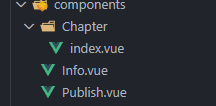
创建文件夹 /course/components
创建 /course/components/ Info.vue
<template>
  <div class="app-container">
    <!-- 课程信息表单 -->
    <el-form label-width="120px">
      <el-form-item label="课程标题">
        <el-input v-model="courseInfo.title" placeholder=" 示例:机器学习项目课:从基础到搭建项目视频课程。专业名称注意大小写" />
      </el-form-item>
      <!-- 课程讲师 -->
      <el-form-item label="课程讲师">
        <el-select
          v-model="courseInfo.teacherId"
          placeholder="请选择"
        >
          <el-option
            v-for="teacher in teacherList"
            :key="teacher.id"
            :label="teacher.name"
            :value="teacher.id"
          />
        </el-select>
      </el-form-item>
      <!-- 所属分类:级联下拉列表 -->
      <el-form-item label="课程类别">
        <!-- 一级分类 -->
        <el-select
          v-model="courseInfo.subjectParentId"
          placeholder="请选择"
          @change="subjectChanged"
        >
          <el-option
            v-for="subject in subjectList"
            :key="subject.id"
            :label="subject.title"
            :value="subject.id"
          />
        </el-select>
        <!-- 二级分类 -->
        <el-select v-model="courseInfo.subjectId" placeholder="请选择">
          <el-option
            v-for="subject in subjectLevelTwoList"
            :key="subject.id"
            :label="subject.title"
            :value="subject.id"
          />
        </el-select>
      </el-form-item>
      <el-form-item label="总课时">
        <el-input-number v-model="courseInfo.lessonNum" :min="0" controls-position="right" placeholder="请填写课程的总课时数" />
      </el-form-item>
      <!-- 课程简介-->
      <el-form-item label="课程简介">
        <el-input v-model="courseInfo.description" type="textarea" rows="5" />
      </el-form-item>
      <!-- 课程封面 -->
      <el-form-item label="课程封面">
        <el-upload
          :show-file-list="false"
          :on-success="handleCoverSuccess"
          :before-upload="beforeCoverUpload"
          :on-error="handleCoverError"
          :action="BASE_API+'/admin/vod/file/upload'"
          class="cover-uploader"
        >
          <img v-if="courseInfo.cover" :src="courseInfo.cover">
          <i v-else class="el-icon-plus avatar-uploader-icon" />
        </el-upload>
      </el-form-item>
      <el-form-item label="课程价格">
        <el-input-number v-model="courseInfo.price" :min="0" controls-position="right" placeholder="免费课程请设置为0元" /> 元
      </el-form-item>
    </el-form>

    <div style="text-align:center">
      <el-button :disabled="saveBtnDisabled" type="primary" @click="saveAndNext()">保存并下一步</el-button>
    </div>
  </div>
</template>
<script>
import courseApi from '@/api/vod/course'
import teacherApi from '@/api/vod/teacher'
import subjectApi from '@/api/vod/subject'

export default {
  data() {
    return {
      BASE_API: 'http://localhost:8301',
      saveBtnDisabled: false, // 按钮是否禁用
      courseInfo: { // 表单数据
        price: 0,
        lessonNum: 0,
        // 以下解决表单数据不全时insert语句非空校验
        teacherId: '',
        subjectId: '',
        subjectParentId: '',
        cover: '',
        description: ''
      },
      teacherList: [], // 讲师列表
      subjectList: [], // 一级分类列表
      subjectLevelTwoList: []// 二级分类列表
    }
  },
  created() {
    // 初始化分类列表
    this.initSubjectList()
    // 获取讲师列表
    this.initTeacherList()
  },
  methods: {
    // 获取讲师列表
    initTeacherList() {
      teacherApi.list().then(response => {
        this.teacherList = response.data
      })
    },

    // 初始化分类列表
    initSubjectList() {
      subjectApi.getChildList(0).then(response => {
        this.subjectList = response.data
      })
    },

    // 选择一级分类,切换二级分类
    subjectChanged(value) {
      subjectApi.getChildList(value).then(response => {
        this.courseInfo.subjectId = ''
        this.subjectLevelTwoList = response.data
      })
    },

    // 上传成功回调
    handleCoverSuccess(res, file) {
      this.courseInfo.cover = res.data
    },

    // 上传校验
    beforeCoverUpload(file) {
      const isJPG = file.type === 'image/jpeg'
      const isLt2M = file.size / 1024 / 1024 < 2

      if (!isJPG) {
        this.$message.error('上传头像图片只能是 JPG 格式!')
      }
      if (!isLt2M) {
        this.$message.error('上传头像图片大小不能超过 2MB!')
      }
      return isJPG && isLt2M
    },

    // 错误处理
    handleCoverError() {
      console.log('error')
      this.$message.error('上传失败2')
    },

    // 保存并下一步
    saveAndNext() {
      this.saveBtnDisabled = true
      if (!this.$parent.courseId) {
        this.saveData()
      } else {
        // this.updateData()
      }
    },

    // 保存
    saveData() {
      courseApi.saveCourseInfo(this.courseInfo).then(response => {
        this.$message.success(response.message)
        this.$parent.courseId = response.data // 获取courseId
        this.$parent.active = 1 // 下一步
      })
    }
  }
}
</script>
<style scoped>
.tinymce-container {
  position: relative;
  line-height: normal;
}
.cover-uploader .avatar-uploader-icon {
  border: 1px dashed #d9d9d9;
  border-radius: 6px;
  cursor: pointer;
  position: relative;
  overflow: hidden;

  font-size: 28px;
  color: #8c939d;
  width: 640px;
  height: 357px;
  line-height: 357px;
  text-align: center;
}
.cover-uploader .avatar-uploader-icon:hover {
  border-color: #409EFF;
}
.cover-uploader img {
  width: 640px;
  height: 357px;
  display: block;
}
</style>
2
3
4
5
6
7
8
9
10
11
12
13
14
15
16
17
18
19
20
21
22
23
24
25
26
27
28
29
30
31
32
33
34
35
36
37
38
39
40
41
42
43
44
45
46
47
48
49
50
51
52
53
54
55
56
57
58
59
60
61
62
63
64
65
66
67
68
69
70
71
72
73
74
75
76
77
78
79
80
81
82
83
84
85
86
87
88
89
90
91
92
93
94
95
96
97
98
99
100
101
102
103
104
105
106
107
108
109
110
111
112
113
114
115
116
117
118
119
120
121
122
123
124
125
126
127
128
129
130
131
132
133
134
135
136
137
138
139
140
141
142
143
144
145
146
147
148
149
150
151
152
153
154
155
156
157
158
159
160
161
162
163
164
165
166
167
168
169
170
171
172
173
174
175
176
177
178
179
180
181
182
183
184
185
186
187
188
189
190
191
192
193
194
195
196
197
198
199
200
201
202
203
204
205
** 创建文件夹 /components/ Chapter 再创建 /components/Chapter/ index.vue **
创建文件 /components/ Publish.vue
# 发布课程 - 修改课程基本信息
CourseService 定义方法
    /**
     * 修改课程信息
     * @param courseFormVo
     */
    void updateCourseId(CourseFormVo courseFormVo);

    /**
     * 根据id查询课程信息
     * @param id
     * @return
     */
    CourseFormVo getCourseInfoById(Long id);
2
3
4
5
6
7
8
9
10
11
12
CourseServiceImpl 实现方法
    @Override
    public void updateCourseId(CourseFormVo courseFormVo) {
        //修改课程基本信息
        Course course = new Course();
        BeanUtils.copyProperties(courseFormVo, course);
        baseMapper.updateById(course);

        //修改课程描述信息
        CourseDescription courseDescription = new CourseDescription();
        courseDescription.setDescription(courseFormVo.getDescription());
        //设置课程描述id
        courseDescription.setId(course.getId());
        courseDescriptionService.updateById(courseDescription);
    }

    @Override
    public CourseFormVo getCourseInfoById(Long id) {
        //课程的基本信息
        Course course = baseMapper.selectById(id);
        if (course == null) {
            return null;
        }

        //课程的描述信息
        CourseDescription courseDescription = courseDescriptionService.getById(id);

        //封装信息
        CourseFormVo courseFormVo = new CourseFormVo();
        BeanUtils.copyProperties(course, courseFormVo);
        //封装描述
        if (courseDescription != null) {
            courseFormVo.setDescription(courseDescription.getDescription());
        }

        return courseFormVo;
    }
2
3
4
5
6
7
8
9
10
11
12
13
14
15
16
17
18
19
20
21
22
23
24
25
26
27
28
29
30
31
32
33
34
35
36
CourseController 实现方法
/**
 * 根据id获取课程信息
 */
@ApiOperation("根据id查询课程信息")
@GetMapping("/get/{id}")
public Result get(@PathVariable Long id){
   CourseFormVo courseFormVo =  courseService.getCourseInfoById(id);
   return Result.ok(courseFormVo);
}

/**
 * 修改课程信息
 */
@ApiOperation("修改课程信息")
@PostMapping("/update")
public Result update(@RequestBody CourseFormVo courseFormVo){
    courseService.updateCourseId(courseFormVo);
    //返回课程id
    return Result.ok(courseFormVo.getId());
}
2
3
4
5
6
7
8
9
10
11
12
13
14
15
16
17
18
19
20
# 修改课程基本信息前端
course.js 定义方法
  //id获取课程信息
  getCourseInfoById(id) {
    return request({
      url: `${api_name}/get/${id}`,
      method: 'get'
    })
  },
  //修改课程信息
  updateCourseInfoById(courseInfo) {
    return request({
      url: `${api_name}/update`,
      method: 'post',
      data: courseInfo
    })
  },
2
3
4
5
6
7
8
9
10
11
12
13
14
15
修改 Info.vue 页面 修改 / 添加以下几个方法
<script>
....
created() {
    if (this.$parent.courseId) { // 回显
      this.fetchCourseInfoById(this.$parent.courseId)
    } else { // 新增
      // 初始化分类列表
      this.initSubjectList()
    }
    // 获取讲师列表
    this.initTeacherList()
  },

  methods: {
    ......
    // 获取课程信息
    fetchCourseInfoById(id) {
      courseApi.getCourseInfoById(id).then(response => {
        this.courseInfo = response.data
        // 初始化分类列表
        subjectApi.getChildList(0).then(response => {
          this.subjectList = response.data
          // 填充二级菜单:遍历一级菜单列表,
          this.subjectList.forEach(subject => {
            // 找到和courseInfo.subjectParentId一致的父类别记录
            if (subject.id === this.courseInfo.subjectParentId) {
              // 拿到当前类别下的子类别列表,将子类别列表填入二级下拉菜单列表
              subjectApi.getChildList(subject.id).then(response => {
                this.subjectLevelTwoList = response.data
              })
            }
          })
        })
      })
    },
    // 保存并下一步
    saveAndNext() {
      this.saveBtnDisabled = true
      if (!this.$parent.courseId) {
        this.saveData()
      } else {
        this.updateData()
      }
    },
    // 修改
    updateData() {
      courseApi.updateCourseInfoById(this.courseInfo).then(response => {
        this.$message.success(response.message)
        this.$parent.courseId = response.data // 获取courseId
        this.$parent.active = 1 // 下一步
      })
    },
    ......
  }
}
</script>
2
3
4
5
6
7
8
9
10
11
12
13
14
15
16
17
18
19
20
21
22
23
24
25
26
27
28
29
30
31
32
33
34
35
36
37
38
39
40
41
42
43
44
45
46
47
48
49
50
51
52
53
54
55
56
修改 Chapter/index.vue 页面
<template>
  <div class="app-container">
    <div style="text-align:center">
      <el-button type="primary" @click="prev()">上一步</el-button>
      <el-button type="primary" @click="next()">下一步</el-button>
    </div>
  </div>
</template>
<script>
export default {
  data() {
    return {

    }
  },
  created() {

  },
  methods: {
    // 上一步
    prev() {
      this.$parent.active = 0
    },
    // 下一步
    next() {
      this.$parent.active = 2
    }
  }
}
</script>
<style scoped>
.chapterList{
    position: relative;
    list-style: none;
    margin: 0;
    padding: 0;
}
.chapterList li{
  position: relative;
}
.chapterList p{
  float: left;
  font-size: 20px;
  margin: 10px 0;
  padding: 10px;
  height: 70px;
  line-height: 50px;
  width: 100%;
  border: 1px solid #DDD;
}
.chapterList .acts {
    float: right;
    font-size: 14px;
}
.videoList{
  padding-left: 50px;
}
.videoList p{
  float: left;
  font-size: 14px;
  margin: 10px 0;
  padding: 10px;
  height: 50px;
  line-height: 30px;
  width: 100%;
  border: 1px dashed #DDD;
}
</style>
2
3
4
5
6
7
8
9
10
11
12
13
14
15
16
17
18
19
20
21
22
23
24
25
26
27
28
29
30
31
32
33
34
35
36
37
38
39
40
41
42
43
44
45
46
47
48
49
50
51
52
53
54
55
56
57
58
59
60
61
62
63
64
65
66
67
68
# 发布课程 - 创建课程大纲
# 课程章节接口
实现课程章节的列表、添加、修改和删除功能
编写章节 Controller
@RestController
@RequestMapping(value="/admin/vod/chapter")
@CrossOrigin
public class ChapterController {
    @Autowired
    private ChapterService chapterService;

    /**
     * 大纲列表 (章节和小节列表)
     */
    @ApiOperation("大纲列表")
    @GetMapping("/getNestedTreeList/{courseId}")
    public Result getTreeList(@PathVariable Long courseId){
        List<ChapterVo> list = chapterService.getTreeList(courseId);
        return Result.ok(list);
    }


    /**
     * 添加章节
     */
    @ApiOperation("添加章节")
    @PostMapping("/save")
    public Result save(@RequestBody Chapter chapter) {
        chapterService.save(chapter);
        return Result.ok();
    }

    /**
     * 根据id查询章节
     */
    @ApiOperation("根据id查询章节")
    @GetMapping("/get/{id}")
    public Result get(@PathVariable Long id) {
        Chapter chapter = chapterService.getById(id);
        return Result.ok(chapter);
    }

    /**
     * 修改章节
     */
    @ApiOperation("修改章节")
    @PostMapping("/update")
    public Result update(@RequestBody Chapter chapter) {
        chapterService.updateById(chapter);
        return Result.ok(null);
    }

    /**
     * 删除章节
     */
    @ApiOperation("删除章节")
    @DeleteMapping("remove/{id}")
    public Result remove(@PathVariable Long id) {
        chapterService.removeById(id);
        return Result.ok(null);
    }


}
2
3
4
5
6
7
8
9
10
11
12
13
14
15
16
17
18
19
20
21
22
23
24
25
26
27
28
29
30
31
32
33
34
35
36
37
38
39
40
41
42
43
44
45
46
47
48
49
50
51
52
53
54
55
56
57
58
59
60
61
62
63
64
ChapterService
public interface ChapterService extends IService<Chapter> {

    /**
     * 大纲列表
     * @param courseId
     * @return
     */
    List<ChapterVo> getTreeList(Long courseId);
}
2
3
4
5
6
7
8
9
ChapterServiceImpl
@Service
public class ChapterServiceImpl extends ServiceImpl<ChapterMapper, Chapter> implements ChapterService {


    @Autowired
    private VideoService videoService;


    @Override
    public List<ChapterVo> getTreeList(Long courseId) {
        //结果list集合
        List<ChapterVo> finalChapterList = new ArrayList<>();

        //根据courseId获取课程里面所有章节
        QueryWrapper<Chapter> queryWrapper = new QueryWrapper<>();
        queryWrapper.eq("course_id",courseId);
        List<Chapter> chapterList = baseMapper.selectList(queryWrapper);

        //根据courseId获取课程里面所有小节
        LambdaQueryWrapper<Video> lambdaQueryWrapper = new LambdaQueryWrapper<>();
        lambdaQueryWrapper.eq(Video::getCourseId,courseId);
        List<Video> videoList = videoService.list(lambdaQueryWrapper);


        for (Chapter chapter : chapterList) {
            //封装章节
            ChapterVo chapterVo = new ChapterVo();
            BeanUtils.copyProperties(chapter,chapterVo);
            finalChapterList.add(chapterVo);

            //封装小节
            List<VideoVo> videoVoList = new ArrayList<>();
            for (int j = 0; j < videoList.size(); j++) {
                Video video = videoList.get(j);
                if(chapter.getId().equals(video.getChapterId())){

                    VideoVo videoVo = new VideoVo();
                    BeanUtils.copyProperties(video, videoVo);
                    videoVoList.add(videoVo);
                }
            }
            chapterVo.setChildren(videoVoList);

        }


        return finalChapterList;
    }
}
2
3
4
5
6
7
8
9
10
11
12
13
14
15
16
17
18
19
20
21
22
23
24
25
26
27
28
29
30
31
32
33
34
35
36
37
38
39
40
41
42
43
44
45
46
47
48
49
# 课程小节接口
编写 VideoController
@Api(tags = "课程小结(课时)")
@RestController
@RequestMapping(value="/admin/vod/video")
@CrossOrigin
public class VideoController {

    @Autowired
    private VideoService videoService;

    @ApiOperation(value = "获取课程")
    @GetMapping("/get/{id}")
    public Result get(@PathVariable Long id) {
        Video video = videoService.getById(id);
        return Result.ok(video);
    }

    @ApiOperation(value = "新增课程")
    @PostMapping("/save")
    public Result save(@RequestBody Video video) {
        videoService.save(video);
        return Result.ok(null);
    }

    @ApiOperation(value = "修改课程")
    @PostMapping("/update")
    public Result updateById(@RequestBody Video video) {
        videoService.updateById(video);
        return Result.ok(null);
    }

    @ApiOperation(value = "删除课程")
    @DeleteMapping("/remove/{id}")
    public Result remove(@PathVariable Long id) {
        videoService.removeById(id);
        return Result.ok(null);
    }
}
2
3
4
5
6
7
8
9
10
11
12
13
14
15
16
17
18
19
20
21
22
23
24
25
26
27
28
29
30
31
32
33
34
35
36
37
# 课程大纲前端
# 定义接口
/vod/api/ chapter.js
import request from '@/utils/request'

const api_name = '/admin/vod/chapter'

export default {

  getNestedTreeList(courseId) {
    return request({
      url: `${api_name}/getNestedTreeList/${courseId}`,
      method: 'get'
    })
  },

  removeById(id) {
    return request({
      url: `${api_name}/remove/${id}`,
      method: 'delete'
    })
  },

  save(chapter) {
    return request({
      url: `${api_name}/save`,
      method: 'post',
      data: chapter
    })
  },

  getById(id) {
    return request({
      url: `${api_name}/get/${id}`,
      method: 'get'
    })
  },

  updateById(chapter) {
    return request({
      url: `${api_name}/update`,
      method: 'post',
      data: chapter
    })
  }
}
2
3
4
5
6
7
8
9
10
11
12
13
14
15
16
17
18
19
20
21
22
23
24
25
26
27
28
29
30
31
32
33
34
35
36
37
38
39
40
41
42
43
/vod/api/ video.js
import request from '@/utils/request'

const api_name = '/admin/vod/video'

export default {

  save(video) {
    return request({
      url: `${api_name}/save`,
      method: 'post',
      data: video
    })
  },

  getById(id) {
    return request({
      url: `${api_name}/get/${id}`,
      method: 'get'
    })
  },

  updateById(video) {
    return request({
      url: `${api_name}/update`,
      method: 'post',
      data: video
    })
  },

  removeById(id) {
    return request({
      url: `${api_name}/remove/${id}`,
      method: 'delete'
    })
  }
}
2
3
4
5
6
7
8
9
10
11
12
13
14
15
16
17
18
19
20
21
22
23
24
25
26
27
28
29
30
31
32
33
34
35
36
# 编写章节页面
/components/Chapter/ index.vue
直接覆盖修改页面
<template>
  <div class="app-container">

    <!-- 添加章节按钮 -->
    <div>
      <el-button type="primary" @click="addChapter()">添加章节</el-button>
    </div>

    <!-- 章节列表 -->
    <ul class="chapterList">
      <li
        v-for="chapter in chapterList"
        :key="chapter.id">
        <p>
          {{ chapter.title }}
          <span class="acts">
            <el-button type="text" @click="addVideo(chapter.id)">添加课时</el-button>
            <el-button type="text" @click="editChapter(chapter.id)">编辑</el-button>
            <el-button type="text" @click="removeChapterById(chapter.id)">删除</el-button>
          </span>
        </p>
        <!-- 视频 -->
        <ul class="chapterList videoList">
          <li
            v-for="video in chapter.children"
            :key="video.id">
            <p>
              {{ video.title }}
              <el-tag v-if="!video.videoSourceId" size="mini" type="danger">
                {{ '尚未上传视频' }}
              </el-tag>
              <span class="acts">
                <el-tag v-if="video.isFree" size="mini" type="success">{{ '免费观看' }}</el-tag>
                <el-button type="text" @click="editVideo(chapter.id, video.id)">编辑</el-button>
                <el-button type="text" @click="removeVideoById(video.id)">删除</el-button>
              </span>
            </p>
          </li>
        </ul>
      </li>
    </ul>
    <!-- 章节表单对话框 -->
    <chapter-form ref="chapterForm" />
    <!-- 课时表单对话框 -->
    <video-form ref="videoForm" />
    <div style="text-align:center">
      <el-button type="primary" @click="prev()">上一步</el-button>
      <el-button type="primary" @click="next()">下一步</el-button>
    </div>
  </div>
</template>
<script>
import chapterApi from '@/api/vod/chapter'
import videoApi from '@/api/vod/video'

// 引入组件
import ChapterForm from '@/views/vod/course/components/Chapter/Form'
import VideoForm from '@/views/vod/course/components/Video/Form'

export default {
  // 注册组件
  components: { ChapterForm, VideoForm },
  data() {
    return {
      chapterList: [] // 章节嵌套列表
    }
  },
  created() {
    this.fetchNodeList()
  },
  methods: {
    // 获取章节小节数据
    fetchNodeList() {
      chapterApi.getNestedTreeList(this.$parent.courseId).then(response => {
        this.chapterList = response.data
      })
    },
    //删除章节
    removeChapterById(chapterId) {
      this.$confirm('此操作将永久删除该章节,是否继续?', '提示', {
        confirmButtonText: '确定',
        cancelButtonText: '取消',
        type: 'warning'
      }).then(() => {
        return chapterApi.removeById(chapterId)
      }).then(response => {
        this.fetchNodeList()
        this.$message.success(response.message)
      }).catch((response) => {
        if (response === 'cancel') {
          this.$message.info('取消删除')
        }
      })
    },
    // 添加章节
    addChapter() {
      this.$refs.chapterForm.open()
    },
    // 编辑章节
    editChapter(chapterId) {
      this.$refs.chapterForm.open(chapterId)
    },
    // 添加课时
    addVideo(chapterId) {
      this.$refs.videoForm.open(chapterId)
    },
    // 编辑课时
    editVideo(chapterId, videoId) {
      this.$refs.videoForm.open(chapterId, videoId)
    },
    // 删除课时
    removeVideoById(videoId) {
      this.$confirm('此操作将永久删除该课时, 是否继续?', '提示', {
        confirmButtonText: '确定',
        cancelButtonText: '取消',
        type: 'warning'
      }).then(() => {
        return videoApi.removeById(videoId)
      }).then(response => {
        this.fetchNodeList()
        this.$message.success(response.message)
      }).catch((response) => {
        if (response === 'cancel') {
          this.$message.info('取消删除')
        }
      })
    },
    // 上一步
    prev() {
      this.$parent.active = 0
    },
    // 下一步
    next() {
      this.$parent.active = 2
    }
  }
}
</script>
<style scoped>
.chapterList{
    position: relative;
    list-style: none;
    margin: 0;
    padding: 0;
}
.chapterList li{
  position: relative;
}
.chapterList p{
  float: left;
  font-size: 20px;
  margin: 10px 0;
  padding: 10px;
  height: 70px;
  line-height: 50px;
  width: 100%;
  border: 1px solid #DDD;
}
.chapterList .acts {
    float: right;
    font-size: 14px;
}

.videoList{
  padding-left: 50px;
}
.videoList p{
  float: left;
  font-size: 14px;
  margin: 10px 0;
  padding: 10px;
  height: 50px;
  line-height: 30px;
  width: 100%;
  border: 1px dashed #DDD;
}
</style>
2
3
4
5
6
7
8
9
10
11
12
13
14
15
16
17
18
19
20
21
22
23
24
25
26
27
28
29
30
31
32
33
34
35
36
37
38
39
40
41
42
43
44
45
46
47
48
49
50
51
52
53
54
55
56
57
58
59
60
61
62
63
64
65
66
67
68
69
70
71
72
73
74
75
76
77
78
79
80
81
82
83
84
85
86
87
88
89
90
91
92
93
94
95
96
97
98
99
100
101
102
103
104
105
106
107
108
109
110
111
112
113
114
115
116
117
118
119
120
121
122
123
124
125
126
127
128
129
130
131
132
133
134
135
136
137
138
139
140
141
142
143
144
145
146
147
148
149
150
151
152
153
154
155
156
157
158
159
160
161
162
163
164
165
166
167
168
169
170
171
172
173
174
175
176
177
创建 /components/Chapter/ Form.vue
<template>
  <!-- 添加和修改章节表单 -->
  <el-dialog :visible="dialogVisible" title="添加章节" @close="close()">
    <el-form :model="chapter" label-width="120px">
      <el-form-item label="章节标题">
        <el-input v-model="chapter.title"/>
      </el-form-item>
      <el-form-item label="章节排序">
        <el-input-number v-model="chapter.sort" :min="0"/>
      </el-form-item>
    </el-form>
    <div slot="footer" class="dialog-footer">
      <el-button @click="close()">取 消</el-button>
      <el-button type="primary" @click="saveOrUpdate()">确 定</el-button>
    </div>
  </el-dialog>
</template>

<script>
import chapterApi from '@/api/vod/chapter'
export default {

  data() {
    return {
      dialogVisible: false,
      chapter: {
        sort: 0
      }
    }
  },
  methods: {
    open(chapterId) {
      this.dialogVisible = true
      if (chapterId) {
        chapterApi.getById(chapterId).then(response => {
          this.chapter = response.data
        })
      }
    },

    close() {
      this.dialogVisible = false
      // 重置表单
      this.resetForm()
    },

    resetForm() {
      this.chapter = {
        sort: 0
      }
    },

    saveOrUpdate() {
      if (!this.chapter.id) {
        this.save()
      } else {
        this.update()
      }
    },

    save() {
      this.chapter.courseId = this.$parent.$parent.courseId
      chapterApi.save(this.chapter).then(response => {
        this.$message.success(response.message)
        // 关闭组件
        this.close()
        // 刷新列表
        this.$parent.fetchNodeList()
      })
    },

    update() {
      chapterApi.updateById(this.chapter).then(response => {
        this.$message.success(response.message)
        // 关闭组件
        this.close()
        // 刷新列表
        this.$parent.fetchNodeList()
      })
    }
  }
}
</script>
2
3
4
5
6
7
8
9
10
11
12
13
14
15
16
17
18
19
20
21
22
23
24
25
26
27
28
29
30
31
32
33
34
35
36
37
38
39
40
41
42
43
44
45
46
47
48
49
50
51
52
53
54
55
56
57
58
59
60
61
62
63
64
65
66
67
68
69
70
71
72
73
74
75
76
77
78
79
80
81
82
83
# 编写小节(课时)页面
创建 /components/Video/ Form.vue
<template>
  <!-- 添加和修改课时表单 -->
  <el-dialog :visible="dialogVisible" title="添加课时" @close="close()">
    <el-form :model="video" label-width="120px">
      <el-form-item label="课时标题">
        <el-input v-model="video.title"/>
      </el-form-item>
      <el-form-item label="课时排序">
        <el-input-number v-model="video.sort" :min="0" />
      </el-form-item>
      <el-form-item label="是否免费">
        <el-radio-group v-model="video.isFree">
          <el-radio :label="0">免费</el-radio>
          <el-radio :label="1">默认</el-radio>
        </el-radio-group>
      </el-form-item>

      <!-- 上传视频 -->
      <el-form-item label="上传视频">
        <el-upload
          ref="upload"
          :auto-upload="false"
          :on-success="handleUploadSuccess"
          :on-error="handleUploadError"
          :on-exceed="handleUploadExceed"
          :file-list="fileList"
          :limit="1"
          :before-remove="handleBeforeRemove"
          :on-remove="handleOnRemove"
          :action="BASE_API+'/admin/vod/upload'">
          <el-button slot="trigger" size="small" type="primary">选择视频</el-button>
          <el-button
            :disabled="uploadBtnDisabled"
            style="margin-left: 10px;"
            size="small"
            type="success"
            @click="submitUpload()">上传</el-button>
        </el-upload>
      </el-form-item>
    </el-form>
    <div slot="footer" class="dialog-footer">
      <el-button @click="close()">取 消</el-button>
      <el-button type="primary" @click="saveOrUpdate()">确 定</el-button>
    </div>
  </el-dialog>
</template>

<script>
import videoApi from '@/api/vod/video'
//import vodApi from '@/api/vod/vod'
export default {

  data() {
    return {
      BASE_API: 'http://localhost:8301',
      dialogVisible: false,
      video: {
        sort: 0,
        free: false
      },
      fileList: [], // 上传文件列表
      uploadBtnDisabled: false
    }
  },

  methods: {
    open(chapterId, videoId) {
      this.dialogVisible = true
      this.video.chapterId = chapterId
      if (videoId) {
        videoApi.getById(videoId).then(response => {
          this.video = response.data
          // 回显
          if (this.video.videoOriginalName) {
            this.fileList = [{ 'name': this.video.videoOriginalName }]
          }
        })
      }
    },

    close() {
      this.dialogVisible = false
      // 重置表单
      this.resetForm()
    },

    resetForm() {
      this.video = {
        sort: 0,
        free: false
      }

      this.fileList = [] // 重置视频上传列表
    },

    saveOrUpdate() {
      if (!this.video.id) {
        this.save()
      } else {
        this.update()
      }
    },

    save() {
      this.video.courseId = this.$parent.$parent.courseId
      videoApi.save(this.video).then(response => {
        this.$message.success(response.message)
        // 关闭组件
        this.close()
        // 刷新列表
        this.$parent.fetchNodeList()
      })
    },

    update() {
      videoApi.updateById(this.video).then(response => {
        this.$message.success(response.message)
        // 关闭组件
        this.close()
        // 刷新列表
        this.$parent.fetchNodeList()
      })
    },

    // 上传多于一个视频
    handleUploadExceed(files, fileList) {
      this.$message.warning('想要重新上传视频,请先删除已上传的视频')
    },

    // 上传
    submitUpload() {
      this.uploadBtnDisabled = true
      this.$refs.upload.submit() // 提交上传请求
    },

    // 视频上传成功的回调
    handleUploadSuccess(response, file, fileList) {
      this.uploadBtnDisabled = false
      this.video.videoSourceId = response.data
      this.video.videoOriginalName = file.name
    },

    // 失败回调
    handleUploadError() {
      this.uploadBtnDisabled = false
      this.$message.error('上传失败2')
    },

    // 删除视频文件确认
    handleBeforeRemove(file, fileList) {
      return this.$confirm(`确定移除 ${file.name}?`)
    },

    // 执行视频文件的删除
    handleOnRemove(file, fileList) {
      if (!this.video.videoSourceId) {
        return
      }
    }
  }
}
</script>
2
3
4
5
6
7
8
9
10
11
12
13
14
15
16
17
18
19
20
21
22
23
24
25
26
27
28
29
30
31
32
33
34
35
36
37
38
39
40
41
42
43
44
45
46
47
48
49
50
51
52
53
54
55
56
57
58
59
60
61
62
63
64
65
66
67
68
69
70
71
72
73
74
75
76
77
78
79
80
81
82
83
84
85
86
87
88
89
90
91
92
93
94
95
96
97
98
99
100
101
102
103
104
105
106
107
108
109
110
111
112
113
114
115
116
117
118
119
120
121
122
123
124
125
126
127
128
129
130
131
132
133
134
135
136
137
138
139
140
141
142
143
144
145
146
147
148
149
150
151
152
153
154
155
156
157
158
159
160
161
162
# 发布课程 - 课程最终发布
# 最终发布接口
编写 CourseController
/**
 * 根据课程id查询发布课程信息
 */
@ApiOperation("根据课程id查询发布课程信息")
@GetMapping("/getCoursePublishVo/{id}")
public Result getCoursePublishVoById(@PathVariable Long id){
    CoursePublishVo coursePublishVo = courseService.getCoursePublishVoById(id);
    return Result.ok(coursePublishVo);
}

/**
 * 课程最终发布
 */
@ApiOperation("课程最终发布")
@PutMapping("/publishCourseById/{id}")
public Result publishCourseById(
        @ApiParam(value = "课程ID", required = true)
        @PathVariable Long id){
    courseService.publishCourseById(id);
    return Result.ok();
}
2
3
4
5
6
7
8
9
10
11
12
13
14
15
16
17
18
19
20
21
编写 CourseService
/**
 * 根据课程id查询发布课程信息
 * @param id
 * @return
 */
CoursePublishVo getCoursePublishVoById(Long id);

/**
 * 课程最终发布
 * @param id
 */
void publishCourseById(Long id);
2
3
4
5
6
7
8
9
10
11
12
编写 CourseServiceImpl
/**
 * 根据课程id查询发布课程信息
 * @param id
 * @return
 */
@Override
public CoursePublishVo getCoursePublishVoById(Long id) {
    return baseMapper.selectCoursePublishVoById(id);
}

/**
 * 课程最终发布
 * @param id
 */
@Override
public void publishCourseById(Long id) {
    Course course = baseMapper.selectById(id);
    // 课程发布状态 0为未发布 1为已发布
    course.setStatus(1);
    course.setPublishTime(new Date());
    baseMapper.updateById(course);
}
2
3
4
5
6
7
8
9
10
11
12
13
14
15
16
17
18
19
20
21
22
编写 CourseMapper
/**
 * 根据课程id查询发布课程信息
 * @param id
 * @return
 */

CoursePublishVo selectCoursePublishVoById(Long id);
2
3
4
5
6
7
编写 CourseMapper.xml
<select id="selectCoursePublishVoById" resultType="com.atguigu.ggkt.vo.vod.CoursePublishVo">
    SELECT
    c.id,
    c.title,
    c.cover,
    c.lesson_num AS lessonNum,
    c.price,
    t.name AS teacherName,
    s1.title AS subjectParentTitle,
    s2.title AS subjectTitle
    FROM course c
    LEFT OUTER JOIN teacher t ON c.teacher_id=t.id
    LEFT OUTER JOIN `subject` s1 ON c.subject_parent_id=s1.id
    LEFT OUTER JOIN `subject` s2 ON c.subject_id=s2.id
    <where>
        <if test="id != null">
            c.id=#{id}
        </if>
    </where>
</select>
2
3
4
5
6
7
8
9
10
11
12
13
14
15
16
17
18
19
20
# maven 加载自定义 xml
maven 默认情况下 只会加载 src.main.java 目录下的 java 类型文件 其他类型是不会加载
而我们的生成的 mapper.xml 是放 src.main.java.mapper.xml 包下的
所以我们上面自定义的 mapper.xml 是无法被加载到
解决方法:
- 将 xml 复制到 target 中
- 将 xml 包复制到 resource 目录下
- 通过修改配置方式自动加载
如何修改配置方式自动加载:
application.properties 添加
mybatis-plus.mapper-locations=classpath:com/atguigu/ggkt/vod/mapper/xml/*.xml
service 模块 pom.xml 添加
<build>
    <plugins>
        <plugin>
            <groupId>org.springframework.boot</groupId>
            <artifactId>spring-boot-maven-plugin</artifactId>
        </plugin>
    </plugins>
    <resources>
        <resource>
            <directory>src/main/java</directory>
            <includes>
                <include>**/*.yml</include>
                <include>**/*.properties</include>
                <include>**/*.xml</include>
            </includes>
            <filtering>false</filtering>
        </resource>
        <resource>
            <directory>src/main/resources</directory>
            <includes> <include>**/*.yml</include>
                <include>**/*.properties</include>
                <include>**/*.xml</include>
            </includes>
            <filtering>false</filtering>
        </resource>
    </resources>
</build>
2
3
4
5
6
7
8
9
10
11
12
13
14
15
16
17
18
19
20
21
22
23
24
25
26
27
# 课程最终发布前端
/api/vod/ course.js 定义接口
  // 获取发布课程信息
  getCoursePublishById(id) {
    return request({
      url: `${api_name}/getCoursePublishVo/${id}`,
      method: 'get'
    })
  },
  // 发布课程
  publishCourseById(id) {
    return request({
      url: `${api_name}/publishCourseById/${id}`,
      method: 'put'
    })
  }
2
3
4
5
6
7
8
9
10
11
12
13
14
/course/components/ Publish.vue
<template>
  <div class="app-container">
    <!--课程预览-->
    <div class="ccInfo">
      <img :src="coursePublish.cover">
      <div class="main">
        <h2>{{ coursePublish.title }}</h2>
        <p class="gray"><span>共{{ coursePublish.lessonNum }}课时</span></p>
        <p><span>所属分类:{{ coursePublish.subjectParentTitle }} — {{ coursePublish.subjectTitle }}</span></p>
        <p>课程讲师:{{ coursePublish.teacherName }}</p>
        <h3 class="red">¥{{ coursePublish.price }}</h3>
      </div>
    </div>
    <div style="text-align:center">
      <el-button type="primary" @click="prev()">上一步</el-button>
      <el-button :disabled="publishBtnDisabled" type="primary" @click="publish()">发布课程</el-button>
    </div>
  </div>
</template>

<script>
import courseApi from '@/api/vod/course'

export default {
  data() {
    return {
      publishBtnDisabled: false, // 按钮是否禁用
      coursePublish: {}
    }
  },
  created() {
    if (this.$parent.courseId) {
      this.fetchCoursePublishById(this.$parent.courseId)
    }
  },
  methods: {
    // 获取课程发布信息
    fetchCoursePublishById(id) {
      courseApi.getCoursePublishById(id).then(response => {
        this.coursePublish = response.data
      })
    },
    // 上一步
    prev() {
      this.$parent.active = 1
    },
    // 下一步
    publish() {
      this.publishBtnDisabled = true
      courseApi.publishCourseById(this.$parent.courseId).then(response => {
        this.$parent.active = 3
        this.$message.success(response.message)
        this.$router.push({ path: '/vodcourse/course/list' })
      })
    }
  }
}
</script>
<style scoped>
.ccInfo {
    background: #f5f5f5;
    padding: 20px;
    overflow: hidden;
    border: 1px dashed #DDD;
    margin-bottom: 40px;
    position: relative;
}
.ccInfo img {
    background: #d6d6d6;
    width: 500px;
    height: 278px;
    display: block;
    float: left;
    border: none;
}
.ccInfo .main {
    margin-left: 520px;
}
.ccInfo .main h2 {
    font-size: 28px;
    margin-bottom: 30px;
    line-height: 1;
    font-weight: normal;
}
.ccInfo .main p {
    margin-bottom: 10px;
    word-wrap: break-word;
    line-height: 24px;
    max-height: 48px;
    overflow: hidden;
}
.ccInfo .main p {
    margin-bottom: 10px;
    word-wrap: break-word;
    line-height: 24px;
    max-height: 48px;
    overflow: hidden;
}
.ccInfo .main h3 {
    left: 540px;
    bottom: 20px;
    line-height: 1;
    font-size: 28px;
    color: #d32f24;
    font-weight: normal;
    position: absolute;
}
</style>
2
3
4
5
6
7
8
9
10
11
12
13
14
15
16
17
18
19
20
21
22
23
24
25
26
27
28
29
30
31
32
33
34
35
36
37
38
39
40
41
42
43
44
45
46
47
48
49
50
51
52
53
54
55
56
57
58
59
60
61
62
63
64
65
66
67
68
69
70
71
72
73
74
75
76
77
78
79
80
81
82
83
84
85
86
87
88
89
90
91
92
93
94
95
96
97
98
99
100
101
102
103
104
105
106
107
108
# 功能实现 - 课程删除
# 课程删除接口
编写课程 Controller
    /**
     * 删除课程
     * @param id
     * @return
     */
    @ApiOperation(value = "删除课程")
    @DeleteMapping("/remove/{id}")
    public Result remove(@PathVariable Long id) {
        courseService.removeCourseById(id);
        return Result.ok();
    }
2
3
4
5
6
7
8
9
10
11
编写课程 Service
    @Autowired
    private VideoService videoService;

    @Autowired
    private ChapterService chapterService;

    /**
     * 删除课程
     */
    @Override
    public void removeCourseById(Long id) {
        //根据课程id删除小节
        videoService.removeVideoByCourseId(id);
        //根据课程id删除章节
        chapterService.removeChapterByCourseId(id);
        //根据课程id删除描述
        courseDescriptionService.removeById(id);
        //根据课程id删除课程
        baseMapper.deleteById(id);
    }
2
3
4
5
6
7
8
9
10
11
12
13
14
15
16
17
18
19
20
编写 VideoService
    /**
     * 根据课程id删除小节
     * @param id
     */
    @Override
    public void removeVideoByCourseId(Long id) {
        QueryWrapper<Video> wrapper = new QueryWrapper<>();
        wrapper.eq("course_id",id);
        baseMapper.delete(wrapper);
    }
2
3
4
5
6
7
8
9
10
编写 ChapterService
    /**
     * 根据id删除章节
     *
     * @param id
     */
    @Override
    public void removeChapterByCourseId(Long id) {
        QueryWrapper<Chapter> wrapper = new QueryWrapper<>();
        wrapper.eq("course_id", id);
        baseMapper.delete(wrapper);
    }
2
3
4
5
6
7
8
9
10
11
# 课程删除前端
course.js 定义接口
  removeById(id) {
    return request({
      url: `${api_name}/remove/${id}`,
      method: 'delete'
    })
  },
2
3
4
5
6
course/list.vue 添加方法
methods: {
	......
	// 根据id删除数据
    removeById(id) {
      this.$confirm('此操作将永久删除该课程,以及该课程下的章节和视频,是否继续?', '提示', {
        confirmButtonText: '确定',
        cancelButtonText: '取消',
        type: 'warning'
      }).then(() => {
        return courseApi.removeById(id)
      }).then(response => {
        this.fetchData()
        this.$message.success(response.message)
      }).catch((response) => { // 失败
        if (response === 'cancel') {
          this.$message.info('取消删除')
        }
      })
    }
}
2
3
4
5
6
7
8
9
10
11
12
13
14
15
16
17
18
19
20
# 点播管理模块 - 课程统计

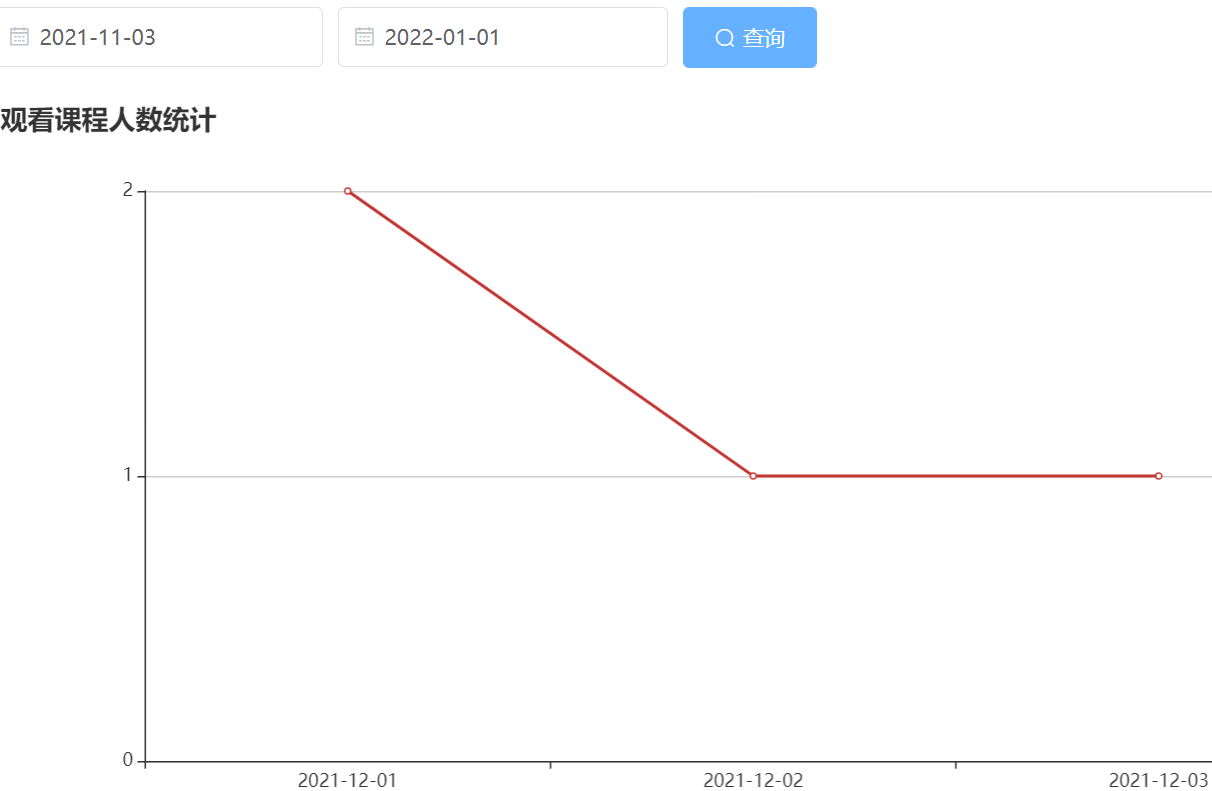
# 课程统计接口
生成 video_visitor 表的相关模型 并修改 entity 路径
VideoVisitorController 添加
@Api(value = "VideoVisitor管理", tags = "VideoVisitor管理")
@RestController
@RequestMapping(value="/admin/vod/videoVisitor")
@CrossOrigin
public class VideoVisitorController {

    @Autowired
    private VideoVisitorService videoVisitorService;

    /**
     * 课程统计接口
     */
    @ApiOperation("显示统计数据")
    @GetMapping("/findCount/{courseId}/{startDate}/{endDate}")
    public Result showChart(
            @ApiParam("课程id") @PathVariable Long courseId,
            @ApiParam("开始时间") @PathVariable String startDate,
            @ApiParam("结束时间") @PathVariable String endDate){

        Map<String, Object> map = videoVisitorService.findCount(courseId, startDate, endDate);
        return Result.ok(map);
    }
}
2
3
4
5
6
7
8
9
10
11
12
13
14
15
16
17
18
19
20
21
22
23
VideoVisitorService 和 VideoVisitorServiceImpl
    /**
     * 课程统计
     */
    @Override
    public Map<String, Object> findCount(Long courseId, String startDate, String endDate) {
        //调用mapper的方法
        List<VideoVisitorCountVo> videoVisitorVoList =
                baseMapper.findCount(courseId,startDate,endDate);
        //创建map集合
        Map<String, Object> map = new HashMap<>();
        //创建两个list集合,一个代表所有日期,一个代表日期对应数量
        //封装数据  代表所有日期
        SimpleDateFormat sdf = new SimpleDateFormat("yyyy-MM-dd");
        List<String> dateList = videoVisitorVoList.stream().
                map(videoVisitorCountVo ->sdf.format(videoVisitorCountVo.getJoinTime())).
                collect(Collectors.toList());
        //代表日期对应数量
        List<Integer> countList = videoVisitorVoList.stream().map(VideoVisitorCountVo::getUserCount)
                .collect(Collectors.toList());
        //放到map集合
        map.put("xData", dateList);
        map.put("yData", countList);
        return map;
    }
2
3
4
5
6
7
8
9
10
11
12
13
14
15
16
17
18
19
20
21
22
23
24
VideoVisitorMapper
    /**
     * 课程统计
     * @param courseId 课程id
     * @param startDate 课程加入时间
     * @param endDate 课程结束时间
     * @return
     */
    List<VideoVisitorCountVo> findCount(@Param("courseId") Long courseId,@Param("startDate") String startDate,@Param("endDate") String endDate);
2
3
4
5
6
7
8
VideoVisitorMapper.xml
<select id="findCount" resultType="com.atguigu.ggkt.vo.vod.VideoVisitorCountVo">
SELECT
DATE(join_time) AS joinTime,
COUNT(*) AS userCount
FROM video_visitor
<where>
<if test="startDate != null and startDate != ''">
AND DATE(join_time) >= #{startDate}
</if>
<if test="endDate != null and endDate != ''">
AND DATE(join_time) <= #{endDate}
</if>
and course_id=#{courseId}
</where>
GROUP BY DATE(join_time)
ORDER BY DATE(join_time)
</select>
2
3
4
5
6
7
8
9
10
11
12
13
14
15
16
17
# 课程统计前端
# 定义接口
创建 /api/vod/ videoVisitor.js 定义接口
import request from '@/utils/request'

const api_name = '/admin/vod/videoVisitor'

export default {

  findCount(courseId, startDate, endDate) {
    return request({
      url: `${api_name}/findCount/${courseId}/${startDate}/${endDate}`,
      method: 'get'
    })
  }
}
2
3
4
5
6
7
8
9
10
11
12
13
# 安装 Echarsts 组件
官方网站:https://echarts.apache.org/zh/index.html
npm install --save [email protected]
#yarn add -s echarts
2
# 编写页面
创建 /course/ chart.vue 页面
<template>
  <div class="app-container">
    <!--表单-->
    <el-form :inline="true" class="demo-form-inline">
      <el-form-item>
        <el-date-picker
          v-model="startDate"
          type="date"
          placeholder="选择开始日期"
          value-format="yyyy-MM-dd" />
      </el-form-item>
      <el-form-item>
        <el-date-picker
          v-model="endDate"
          type="date"
          placeholder="选择截止日期"
          value-format="yyyy-MM-dd" />
      </el-form-item>
      <el-button
        :disabled="btnDisabled"
        type="primary"
        icon="el-icon-search"
        @click="showChart()">查询</el-button>
    </el-form>
    <div id="chart" class="chart" style="height:500px;" />
  </div>
</template>
<script>
//import echarts from 'echarts'
//如果你安装的最新版即5以上的版本 要以下面方式引用echarts
import * as echarts from 'echarts'
import api from '@/api/vod/videoVisitor'

export default {
  data() {
    return {
      courseId: '',
      startDate: '',
      endDate: '',
      btnDisabled: false
    }
  },
  created() {
    this.courseId = this.$route.params.id
    // 初始化最近十天数据
    let currentDate = new Date();
    this.startDate = this.dateFormat(new Date(currentDate.getTime()-7*24*3600*1000))
    this.endDate = this.dateFormat(currentDate)
    this.showChart()
  },
  methods: {
    showChart() {
      api.findCount(this.courseId, this.startDate, this.endDate).then(response => {
        this.setChartData(response.data)
      })
    },
    setChartData(data) {
      // 基于准备好的dom,初始化echarts实例
      var myChart = echarts.init(document.getElementById('chart'))
      // 指定图表的配置项和数据
      var option = {
        title: {
          text: '观看课程人数统计'
        },
        xAxis: {
          data: data.xData
        },
        yAxis: {
          minInterval: 1
        },
        series: [{
          type: 'line',
          data: data.yData
        }]
      }
      // 使用刚指定的配置项和数据显示图表。
      myChart.setOption(option)
    },
    dateFormat(date) {
      let fmt = 'YYYY-mm-dd'
      let ret;
      const opt = {
        "Y+": date.getFullYear().toString(),        // 年
        "m+": (date.getMonth() + 1).toString(),     // 月
        "d+": date.getDate().toString(),            // 日
        "H+": date.getHours().toString(),           // 时
        "M+": date.getMinutes().toString(),         // 分
        "S+": date.getSeconds().toString()          // 秒
        // 有其他格式化字符需求可以继续添加,必须转化成字符串
      };
      for (let k in opt) {
        ret = new RegExp("(" + k + ")").exec(fmt);
        if (ret) {
          fmt = fmt.replace(ret[1], (ret[1].length == 1) ? (opt[k]) : (opt[k].padStart(ret[1].length, "0")))
        };
      };
      return fmt;
    }
  }
}
</script>
2
3
4
5
6
7
8
9
10
11
12
13
14
15
16
17
18
19
20
21
22
23
24
25
26
27
28
29
30
31
32
33
34
35
36
37
38
39
40
41
42
43
44
45
46
47
48
49
50
51
52
53
54
55
56
57
58
59
60
61
62
63
64
65
66
67
68
69
70
71
72
73
74
75
76
77
78
79
80
81
82
83
84
85
86
87
88
89
90
91
92
93
94
95
96
97
98
99
100
101
# 关于 echarts 引用
2022 年后安装的 echarts 都是 5.X 版本,可以在 package.json 中看到,或者你可以在安装时指定版本
下面给出 5 版本引用错误的解决方法:
方法 1
全局引入:在 main.js 中全局引入 echarts
import * as echarts from 'echarts'
Vue.prototype.$echarts = echarts
2
方法 2
页面引用:在页面中局部引用
import * as echarts from 'echarts'
# 整合腾讯云点播
在发布课程时候,需要添加课时并且上传课程视频,这个时候需要使用到腾讯云点播服务进行上传视频管理
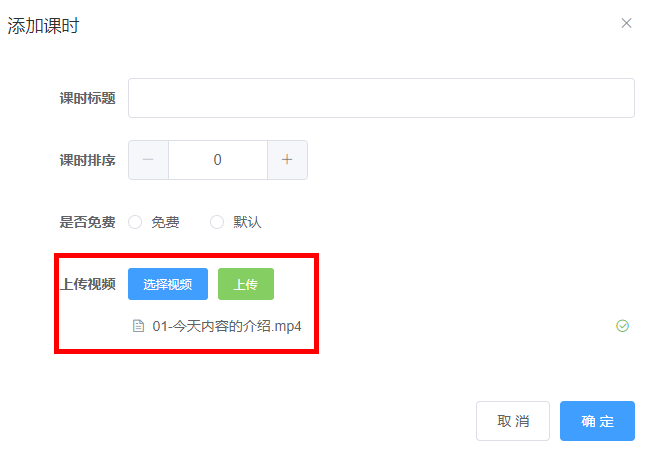
(1)添加小节,上传课程视频
(2)删除小节时候,需要删除视频
(3)删除课程时候,需要删除课程,章节,小节和视频
腾讯云点播
文档中心:https://cloud.tencent.com/document/product/266
# 编写视频点播接口
** 手动创建相关类 VodController VodService VodServiceImpl **
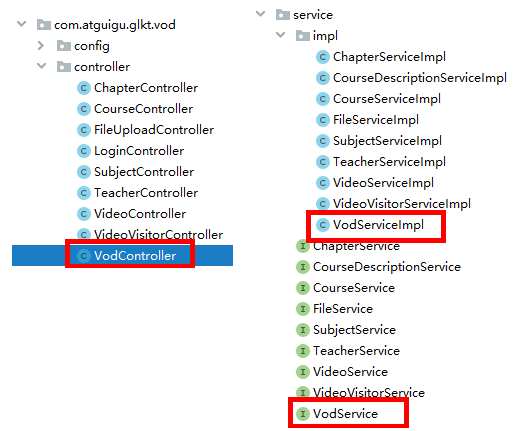
在 service_vod 模块引入依赖
<dependency>
    <groupId>com.qcloud</groupId>
    <artifactId>vod_api</artifactId>
    <version>2.1.4</version>
    <exclusions>
        <exclusion>
            <groupId>org.slf4j</groupId>
            <artifactId>slf4j-log4j12</artifactId>
        </exclusion>
    </exclusions>
</dependency>
2
3
4
5
6
7
8
9
10
11
** 上传视频集成方案:https://cloud.tencent.com/document/product/266/10276
删除视频
可在线生成代码:
地址:https://console.cloud.tencent.com/api/explorer?Product=vod&Version=2018-07-17&Action=DescribeMediaInfos&SignVersion=
编写 Controller
@Api(tags = "腾讯云点播")
@RestController
@RequestMapping("/admin/vod")
@CrossOrigin
public class VodController {

    @Autowired
    private VodService vodService;

    /**
     * 上传视频接口
     */
    @ApiOperation("上传视频")
    @PostMapping("/upload")
    public Result uploadVideo(
            @ApiParam(name = "file", value = "文件", required = true)
            @RequestParam("file") MultipartFile file) throws IOException {
        InputStream inputStream = file.getInputStream();
        String originalFilename = file.getOriginalFilename();
        String videoId = vodService.uploadVideo(inputStream, originalFilename);
        return Result.ok(videoId);
    }

    /**
     * 删除视频
     */
    @ApiOperation("删除视频")
    @DeleteMapping("/remove/{videoSourceId}")
    public Result removeVideo( @PathVariable String videoSourceId) {
        vodService.removeVideo(videoSourceId);
        return Result.ok();
    }
}
2
3
4
5
6
7
8
9
10
11
12
13
14
15
16
17
18
19
20
21
22
23
24
25
26
27
28
29
30
31
32
33
编写 Service
VodService 定义方法
public interface VodService {

    /**
     * 上传视频
     */
    String uploadVideo(InputStream inputStream, String originalFilename);

    /**
     * 删除视频
     *
     * @param videoSourceId
     */
    void removeVideo(String videoSourceId);
}
2
3
4
5
6
7
8
9
10
11
12
13
14
VodServiceImpl 实现方法
@Service
public class VodServiceImpl implements VodService {
    /**
     * 上传视频
     *
     * @param inputStream
     * @param originalFilename
     * @return
     */
    @Override
    public String uploadVideo(InputStream inputStream, String originalFilename) {
        try {
            VodUploadClient client =
                    new VodUploadClient(ConstantPropertiesUtil.ACCESS_KEY_ID,
                            ConstantPropertiesUtil.ACCESS_KEY_SECRET);
            VodUploadRequest request = new VodUploadRequest();
            //视频本地地址
            request.setMediaFilePath("D:\\001.mp4");
            //指定任务流
            request.setProcedure("LongVideoPreset");
            //调用上传方法,传入接入点地域及上传请求。
            VodUploadResponse response = client.upload("ap-guangzhou", request);
            //返回文件id保存到业务表,用于控制视频播放
            String fileId = response.getFileId();
            return fileId;
        } catch (Exception e) {
            e.printStackTrace();
            throw new GgktException(20001, "上传视频失败");
        }
    }

    /**
     * 删除视频
     *
     * @param videoSourceId
     */
    @Override
    public void removeVideo(String videoSourceId) {
        try {
            // 实例化一个认证对象,入参需要传入腾讯云账户secretId,secretKey,此处还需注意密钥对的保密
            Credential cred =
                    new Credential(ConstantPropertiesUtil.ACCESS_KEY_ID,
                            ConstantPropertiesUtil.ACCESS_KEY_SECRET);
            // 实例化要请求产品的client对象,clientProfile是可选的
            VodClient client = new VodClient(cred, "");
            // 实例化一个请求对象,每个接口都会对应一个request对象
            DeleteMediaRequest req = new DeleteMediaRequest();
            req.setFileId(videoSourceId);
            // 返回的resp是一个DeleteMediaResponse的实例,与请求对象对应
            DeleteMediaResponse resp = client.DeleteMedia(req);
            // 输出json格式的字符串回包
            System.out.println(DeleteMediaResponse.toJsonString(resp));
        } catch (TencentCloudSDKException e) {
            e.printStackTrace();
            throw new GgktException(20001, "删除视频失败");

        }
    }
}
2
3
4
5
6
7
8
9
10
11
12
13
14
15
16
17
18
19
20
21
22
23
24
25
26
27
28
29
30
31
32
33
34
35
36
37
38
39
40
41
42
43
44
45
46
47
48
49
50
51
52
53
54
55
56
57
58
59
# 前端 - 完善上传视频功能
创建 /api/vod/ vod.js 定义接口
import request from '@/utils/request'

export default {
  //删除视频
  removeByVodId(id) {
    return request({
      url: `/admin/vod/remove/${id}`,
      method: 'delete'
    })
  }
}
2
3
4
5
6
7
8
9
10
11
添加上传视频
修改 /components/Video/ Form.vue 页面
直接覆盖修改整个页面
<template>
  <!-- 添加和修改课时表单 -->
  <el-dialog :visible="dialogVisible" title="添加课时" @close="close()">
    <el-form :model="video" label-width="120px">
      <el-form-item label="课时标题">
        <el-input v-model="video.title"/>
      </el-form-item>
      <el-form-item label="课时排序">
        <el-input-number v-model="video.sort" :min="0" />
      </el-form-item>
      <el-form-item label="是否免费">
        <el-radio-group v-model="video.isFree">
          <el-radio :label="0">免费</el-radio>
          <el-radio :label="1">默认</el-radio>
        </el-radio-group>
      </el-form-item>
      <!-- 上传视频 -->
      <el-form-item label="上传视频">
        <el-upload
          ref="upload"
          :auto-upload="false"
          :on-success="handleUploadSuccess"
          :on-error="handleUploadError"
          :on-exceed="handleUploadExceed"
          :file-list="fileList"
          :limit="1"
          :before-remove="handleBeforeRemove"
          :on-remove="handleOnRemove"
          :action="BASE_API+'/admin/vod/upload'">
          <el-button slot="trigger" size="small" type="primary">选择视频</el-button>
          <el-button
            :disabled="uploadBtnDisabled"
            style="margin-left: 10px;"
            size="small"
            type="success"
            @click="submitUpload()">上传</el-button>
        </el-upload>
      </el-form-item>
    </el-form>
    <div slot="footer" class="dialog-footer">
      <el-button @click="close()">取 消</el-button>
      <el-button type="primary" @click="saveOrUpdate()">确 定</el-button>
    </div>
  </el-dialog>
</template>
<script>
import videoApi from '@/api/vod/video'
import vodApi from '@/api/vod/vod'
export default {
  data() {
    return {
      BASE_API: 'http://localhost:8301',
      dialogVisible: false,
      video: {
        sort: 0,
        free: false
      },
      fileList: [], // 上传文件列表
      uploadBtnDisabled: false
    }
  },
  methods: {
    open(chapterId, videoId) {
      this.dialogVisible = true
      this.video.chapterId = chapterId
      if (videoId) {
        videoApi.getById(videoId).then(response => {
          this.video = response.data
          // 回显
          if (this.video.videoOriginalName) {
            this.fileList = [{ 'name': this.video.videoOriginalName }]
          }
        })
      }
    },
    close() {
      this.dialogVisible = false
      // 重置表单
      this.resetForm()
    },
    resetForm() {
      this.video = {
        sort: 0,
        free: false
      }
      this.fileList = [] // 重置视频上传列表
    },
    saveOrUpdate() {
      if (!this.video.id) {
        this.save()
      } else {
        this.update()
      }
    },
    save() {
      this.video.courseId = this.$parent.$parent.courseId
      videoApi.save(this.video).then(response => {
        this.$message.success(response.message)
        // 关闭组件
        this.close()
        // 刷新列表
        this.$parent.fetchNodeList()
      })
    },
    update() {
      videoApi.updateById(this.video).then(response => {
        this.$message.success(response.message)
        // 关闭组件
        this.close()
        // 刷新列表
        this.$parent.fetchNodeList()
      })
    },
    // 上传多于一个视频
    handleUploadExceed(files, fileList) {
      this.$message.warning('想要重新上传视频,请先删除已上传的视频')
    },
    // 上传
    submitUpload() {
      this.uploadBtnDisabled = true
      this.$refs.upload.submit() // 提交上传请求
    },
    // 视频上传成功的回调
    handleUploadSuccess(response, file, fileList) {
      this.uploadBtnDisabled = false
      this.video.videoSourceId = response.data
      this.video.videoOriginalName = file.name
    },
    // 失败回调
    handleUploadError() {
      this.uploadBtnDisabled = false
      this.$message.error('上传失败2')
    },
    // 删除视频文件确认
    handleBeforeRemove(file, fileList) {
      return this.$confirm(`确定移除 ${file.name}?`)
    },
    // 执行视频文件的删除
    handleOnRemove(file, fileList) {
      if (!this.video.videoSourceId) {
        return
      }
      vodApi.removeByVodId(this.video.videoSourceId).then(response => {
        this.video.videoSourceId = ''
        this.video.videoOriginalName = ''
        videoApi.updateById(this.video)
        this.$message.success(response.message)
      })
    }
  }
}
</script>
2
3
4
5
6
7
8
9
10
11
12
13
14
15
16
17
18
19
20
21
22
23
24
25
26
27
28
29
30
31
32
33
34
35
36
37
38
39
40
41
42
43
44
45
46
47
48
49
50
51
52
53
54
55
56
57
58
59
60
61
62
63
64
65
66
67
68
69
70
71
72
73
74
75
76
77
78
79
80
81
82
83
84
85
86
87
88
89
90
91
92
93
94
95
96
97
98
99
100
101
102
103
104
105
106
107
108
109
110
111
112
113
114
115
116
117
118
119
120
121
122
123
124
125
126
127
128
129
130
131
132
133
134
135
136
137
138
139
140
141
142
143
144
145
146
147
148
149
150
151
152
# 腾讯云上传视频其他方式
下面以客户端上传视频方式编码
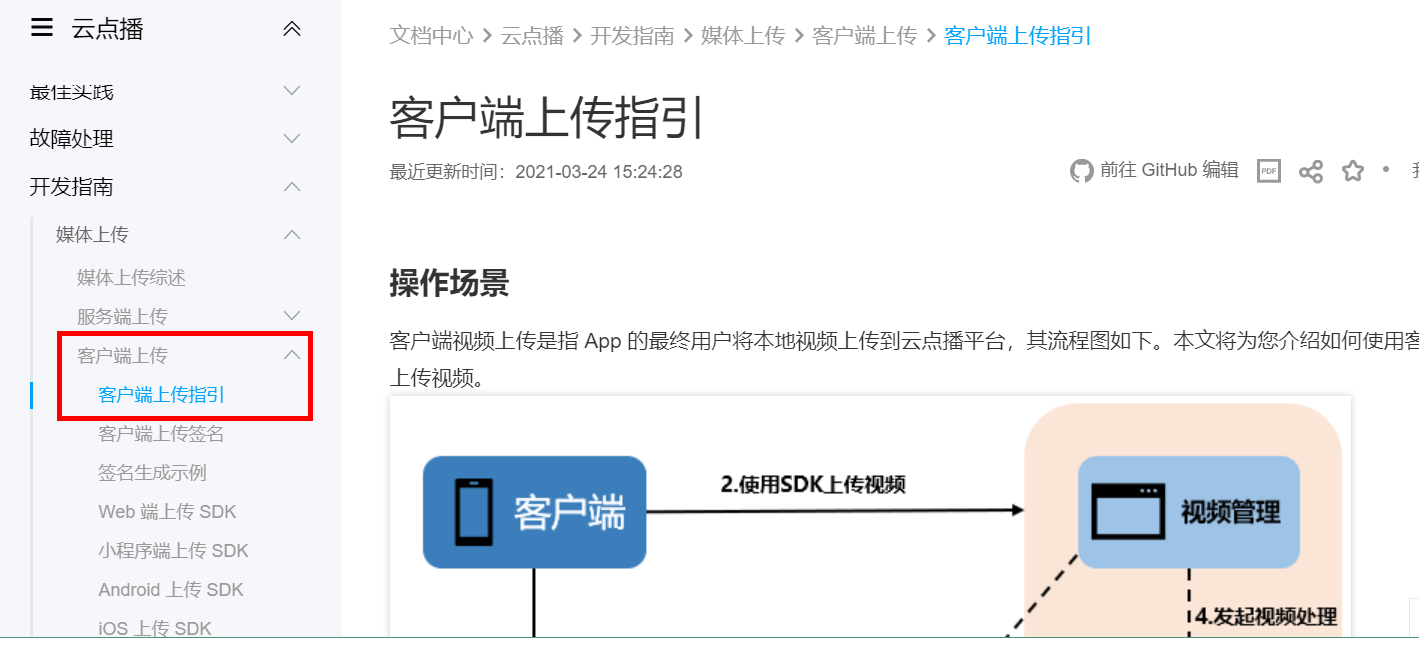
找到 Java 签名示例
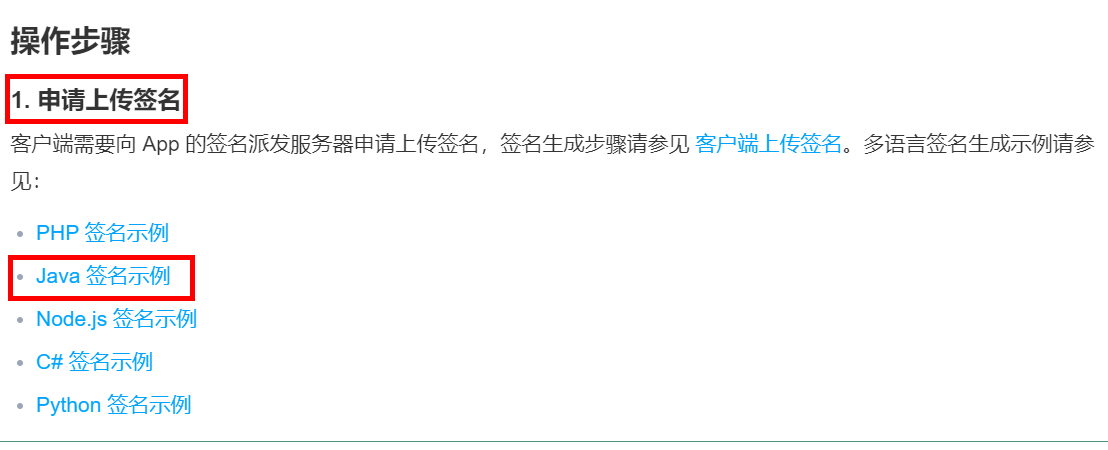
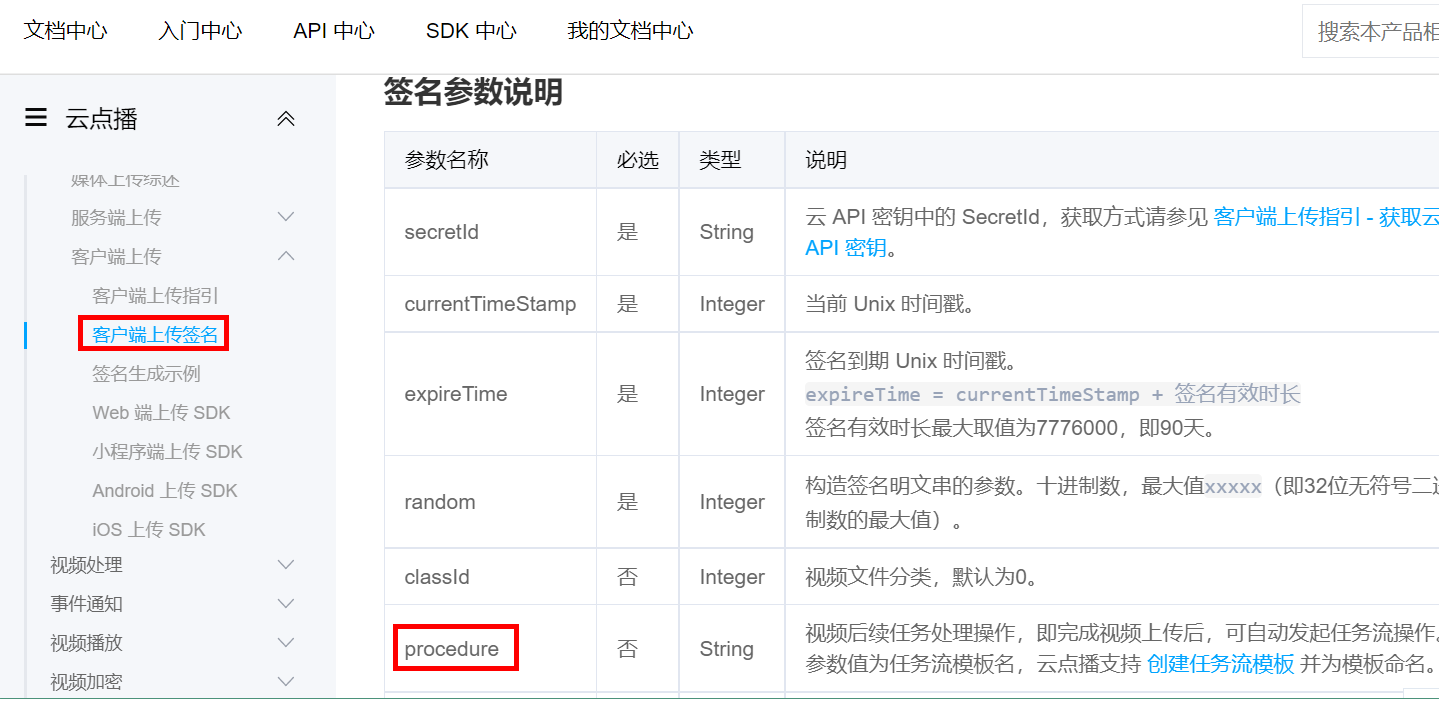
VodController 编写签名接口
创建 /utils/ Signature 类
import java.util.Random;
import javax.crypto.Mac;
import javax.crypto.spec.SecretKeySpec;
import sun.misc.BASE64Encoder;
public class Signature {
private String secretId;
private String secretKey;
private long currentTime;
private int random;
private int signValidDuration;
private static final String HMAC_ALGORITHM = "HmacSHA1"; //签名算法
private static final String CONTENT_CHARSET = "UTF-8";
public static byte[] byteMerger(byte[] byte1, byte[] byte2) {
byte[] byte3 = new byte[byte1.length + byte2.length];
System.arraycopy(byte1, 0, byte3, 0, byte1.length);
System.arraycopy(byte2, 0, byte3, byte1.length, byte2.length);
return byte3;
}
// 获取签名
public String getUploadSignature() throws Exception {
String strSign = "";
String contextStr = "";
// 生成原始参数字符串
long endTime = (currentTime + signValidDuration);
contextStr += "secretId=" + java.net.URLEncoder.encode(secretId, "utf8");
contextStr += "¤tTimeStamp=" + currentTime;
contextStr += "&expireTime=" + endTime;
contextStr += "&random=" + random;
//设置转码任务流
contextStr += "&procedure=LongVideoPreset";
try {
Mac mac = Mac.getInstance(HMAC_ALGORITHM);
SecretKeySpec secretKey = new SecretKeySpec(this.secretKey.getBytes(CONTENT_CHARSET), mac.getAlgorithm());
mac.init(secretKey);
byte[] hash = mac.doFinal(contextStr.getBytes(CONTENT_CHARSET));
byte[] sigBuf = byteMerger(hash, contextStr.getBytes("utf8"));
strSign = base64Encode(sigBuf);
strSign = strSign.replace(" ", "").replace("\n", "").replace("\r", "");
} catch (Exception e) {
throw e;
}
return strSign;
}
private String base64Encode(byte[] buffer) {
BASE64Encoder encoder = new BASE64Encoder();
return encoder.encode(buffer);
}
public void setSecretId(String secretId) {
this.secretId = secretId;
}
public void setSecretKey(String secretKey) {
this.secretKey = secretKey;
}
public void setCurrentTime(long currentTime) {
this.currentTime = currentTime;
}
public void setRandom(int random) {
this.random = random;
}
public void setSignValidDuration(int signValidDuration) {
this.signValidDuration = signValidDuration;
}
}
2
3
4
5
6
7
8
9
10
11
12
13
14
15
16
17
18
19
20
21
22
23
24
25
26
27
28
29
30
31
32
33
34
35
36
37
38
39
40
41
42
43
44
45
46
47
48
49
50
51
52
53
54
55
56
57
58
59
60
61
62
63
64
65
VodController 类
	/**
     * 获取客户端上传视频的签名
     * @return
     */
    @GetMapping("/sign")
    public Result sign() {
        Signature sign = new Signature();
        // 设置 App 的云 API 密钥
        sign.setSecretId(ConstantPropertiesUtil.ACCESS_KEY_ID);
        sign.setSecretKey(ConstantPropertiesUtil.ACCESS_KEY_SECRET);
        sign.setCurrentTime(System.currentTimeMillis() / 1000);
        sign.setRandom(new Random().nextInt(java.lang.Integer.MAX_VALUE));
        sign.setSignValidDuration(3600 * 24 * 2); // 签名有效期:2天
        try {
            String signature = sign.getUploadSignature();
            System.out.println("signature : " + signature);
            return Result.ok(signature);
        } catch (Exception e) {
            System.out.print("获取签名失败");
            e.printStackTrace();
            return Result.fail(null);
        }
    }
2
3
4
5
6
7
8
9
10
11
12
13
14
15
16
17
18
19
20
21
22
23
操作步骤二(SDK 上传)
下载 Demo 源码修改
<!DOCTYPE html>
<html>
<head>
  <meta charset="utf-8">
  <meta http-equiv="Content-Type" content="text/html; charset=UTF-8" />
  <meta http-equiv="X-UA-Compatible" content="IE=edge">
  <meta name="viewport" content="width=device-width, initial-scale=1">
  <title>QCloud VIDEO UGC UPLOAD SDK</title>
  <link href="//cdnjs.cloudflare.com/ajax/libs/twitter-bootstrap/3.3.5/css/bootstrap.min.css" rel="stylesheet">
  <style type="text/css">
    .text-danger {
      color: red;
    }

    .control-label {
      text-align: left !important;
    }

    #resultBox {
      width: 100%;
      height: 300px;
      border: 1px solid #888;
      padding: 5px;
      overflow: auto;
      margin-bottom: 20px;
    }

    .uploaderMsgBox {
      width: 100%;
      border-bottom: 1px solid #888;
    }

    .cancel-upload {
      text-decoration: none;
      cursor: pointer;
    }
  </style>
</head>
<body>
  <div id="content">
    <div class="container">
      <h1>UGC-Uploader</h1>
    </div>
  </div>
  <div class="container" id="main-area">
    <div class="row" style="padding:10px;">
      <p>
        示例1点击“直接上传视频”按钮即可上传视频。<br>。
      </p>
    </div>
    <form ref="vExample">
      <input type="file" style="display:none;" ref="vExampleFile" @change="vExampleUpload" />
    </form>
    <div class="row" style="padding:10px;">
      <h4>示例1:直接上传视频</h4>
      <a href="javascript:void(0);" class="btn btn-default" @click="vExampleAdd">直接上传视频</a>
    </div>
      <!-- 上传信息组件	 -->
      <div class="uploaderMsgBox" v-for="uploaderInfo in uploaderInfos">
        <div v-if="uploaderInfo.videoInfo">
          视频名称:{{uploaderInfo.videoInfo.name + '.' + uploaderInfo.videoInfo.type}};
          上传进度:{{Math.floor(uploaderInfo.progress * 100) + '%'}};
          fileId:{{uploaderInfo.fileId}};
          上传结果:{{uploaderInfo.isVideoUploadCancel ? '已取消' : uploaderInfo.isVideoUploadSuccess ? '上传成功' : '上传中'}};
          <br>
          地址:{{uploaderInfo.videoUrl}};
          <a href="javascript:void(0);" class="cancel-upload" v-if="!uploaderInfo.isVideoUploadSuccess && !uploaderInfo.isVideoUploadCancel" @click="uploaderInfo.cancel()">取消上传</a><br>
        </div>
        <div v-if="uploaderInfo.coverInfo">
          封面名称:{{uploaderInfo.coverInfo.name}};
          上传进度:{{Math.floor(uploaderInfo.coverProgress * 100) + '%'}};
          上传结果:{{uploaderInfo.isCoverUploadSuccess ? '上传成功' : '上传中'}};
          <br>
          地址:{{uploaderInfo.coverUrl}};
          <br>
        </div>
      </div>
  </div>
  <script src="https://cdn.jsdelivr.net/npm/es6-promise@4/dist/es6-promise.auto.js"></script>
  <script src="//cdnjs.cloudflare.com/ajax/libs/vue/2.5.21/vue.js"></script>
  <script src="//cdnjs.cloudflare.com/ajax/libs/axios/0.18.0/axios.js"></script>
  <script src="https://cdn-go.cn/cdn/vod-js-sdk-v6/latest/vod-js-sdk-v6.js"></script>

  <script type="text/javascript">

    ;(function () {

      /**
       * 计算签名。调用签名接口获取
      **/
      function getSignature() {
        return axios.get("http://localhost:8301/admin/vod/user/sign").then(response =>{
          return response.data.data
        })
      };
      var app = new Vue({
        el: '#main-area',
        data: {
          uploaderInfos: [],

          vcExampleVideoName: '',
          vcExampleCoverName: '',

          cExampleFileId: '',
        },
        created: function () {
          this.tcVod = new TcVod.default({
            getSignature: getSignature
          })
        },
        methods: {
          /**
           * vExample示例。添加视频
          **/
          vExampleAdd: function () {
            this.$refs.vExampleFile.click()
          },
          /**
           * vExample示例。上传视频过程。
          **/
          vExampleUpload: function () {
            var self = this;
            var mediaFile = this.$refs.vExampleFile.files[0]

            var uploader = this.tcVod.upload({
              mediaFile: mediaFile,
            })
            uploader.on('media_progress', function (info) {
              uploaderInfo.progress = info.percent;
            })
            uploader.on('media_upload', function (info) {
              uploaderInfo.isVideoUploadSuccess = true;
            })

            console.log(uploader, 'uploader')

            var uploaderInfo = {
              videoInfo: uploader.videoInfo,
              isVideoUploadSuccess: false,
              isVideoUploadCancel: false,
              progress: 0,
              fileId: '',
              videoUrl: '',
              cancel: function() {
                uploaderInfo.isVideoUploadCancel = true;
                uploader.cancel()
              },
            }

            this.uploaderInfos.push(uploaderInfo)
            uploader.done().then(function(doneResult) {
              console.log('doneResult', doneResult)
              uploaderInfo.fileId = doneResult.fileId;
              return doneResult.video.url;
            }).then(function (videoUrl) {
              uploaderInfo.videoUrl = videoUrl
              self.$refs.vExample.reset();
            })
          },
          // cExample 上传过程
          cExampleUpload: function() {
            var self = this;
            var coverFile = this.$refs.cExampleCover.files[0];

            var uploader = this.tcVod.upload({
              fileId: this.cExampleFileId,
              coverFile: coverFile,
            })
            uploader.on('cover_progress', function(info) {
              uploaderInfo.coverProgress = info.percent;
            })
            uploader.on('cover_upload', function(info) {
              uploaderInfo.isCoverUploadSuccess = true;
            })
            console.log(uploader, 'uploader')

            var uploaderInfo = {
              coverInfo: uploader.coverInfo,
              isCoverUploadSuccess: false,
              coverProgress: 0,
              coverUrl: '',
              cancel: function () {
                uploader.cancel()
              },
            }

            this.uploaderInfos.push(uploaderInfo)

            uploader.done().then(function (doneResult) {
              console.log('doneResult', doneResult)
              uploaderInfo.coverUrl = doneResult.cover.url;
              self.$refs.cExample.reset();
            })
          },
        },
      })
    })();

  </script>
  <!-- Global site tag (gtag.js) - Google Analytics -->
  <script async src="https://www.googletagmanager.com/gtag/js?id=UA-26476625-7"></script>
  <script>
    // add by [email protected]
    window.dataLayer = window.dataLayer || [];
    function gtag(){dataLayer.push(arguments);}
    gtag('js', new Date());
    gtag('config', 'UA-26476625-7');
  </script>
</body>
</html>
2
3
4
5
6
7
8
9
10
11
12
13
14
15
16
17
18
19
20
21
22
23
24
25
26
27
28
29
30
31
32
33
34
35
36
37
38
39
40
41
42
43
44
45
46
47
48
49
50
51
52
53
54
55
56
57
58
59
60
61
62
63
64
65
66
67
68
69
70
71
72
73
74
75
76
77
78
79
80
81
82
83
84
85
86
87
88
89
90
91
92
93
94
95
96
97
98
99
100
101
102
103
104
105
106
107
108
109
110
111
112
113
114
115
116
117
118
119
120
121
122
123
124
125
126
127
128
129
130
131
132
133
134
135
136
137
138
139
140
141
142
143
144
145
146
147
148
149
150
151
152
153
154
155
156
157
158
159
160
161
162
163
164
165
166
167
168
169
170
171
172
173
174
175
176
177
178
179
180
181
182
183
184
185
186
187
188
189
190
191
192
193
194
195
196
197
198
199
200
201
202
203
204
205
206
207
208
209
210
# 完善删除视频功能
修改 VideoController 方法
    @ApiOperation(value = "删除课程")
    @DeleteMapping("/remove/{id}")
    public Result remove(@PathVariable Long id) {
//        videoService.removeById(id);
        videoService.removeVideoById(id);
        return Result.ok(null);
    }
2
3
4
5
6
7
修改 VideoService 和 VideoServiceImpl
@Service
public class VideoServiceImpl extends ServiceImpl<VideoMapper, Video> implements VideoService {


    @Autowired
    private VodService vodService;

    /**
     * 根据课程id删除小节
     *
     * @param id
     */
    @Override
    public void removeVideoByCourseId(Long id) {
        //1 删除小节中的视频
        //根据课程id获取课程里面所有小节
        QueryWrapper<Video> wrapper = new QueryWrapper<>();
        wrapper.eq("course_id",id);
        List<Video> videoList = baseMapper.selectList(wrapper);
        //遍历获取每个小节中的视频id
        for(Video video:videoList) {
            String videoSourceId = video.getVideoSourceId();
            //如果视频id不为空,调用方法删除
            if(!StringUtils.isEmpty(videoSourceId)) {
                vodService.removeVideo(videoSourceId);
            }
        }
        //2 根据课程id删除小节
        baseMapper.delete(wrapper);
    }

    /**
     * 根据小节id删除小节删除视频
     *
     * @param id
     */
    @Override
    public void removeVideoById(Long id) {
        //1 删除视频
        Video video = baseMapper.selectById(id);
        //获取视频id
        String videoSourceId = video.getVideoSourceId();
        //如果视频id不为空,调用方法删除
        if (!StringUtils.isEmpty(videoSourceId)) {
            //删除腾讯云中的视频
            vodService.removeVideo(videoSourceId);
        }
        //2 删除小节
        baseMapper.deleteById(id);
    }
}
2
3
4
5
6
7
8
9
10
11
12
13
14
15
16
17
18
19
20
21
22
23
24
25
26
27
28
29
30
31
32
33
34
35
36
37
38
39
40
41
42
43
44
45
46
47
48
49
50
51