
 公众号点播和直播管理
# 公众号点播和直播管理
# 公众号点播课程相关功能
# 课程列表和详情
需求实现
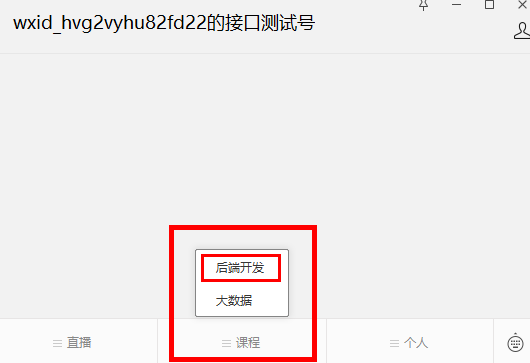
点击课程中的分类,根据分类查询课程列表
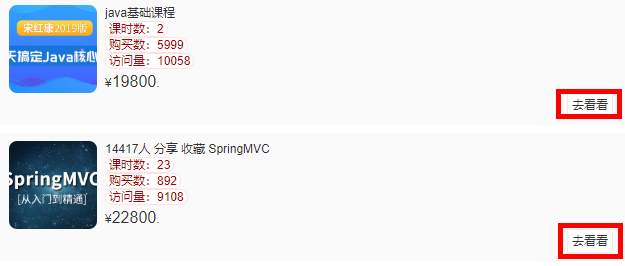
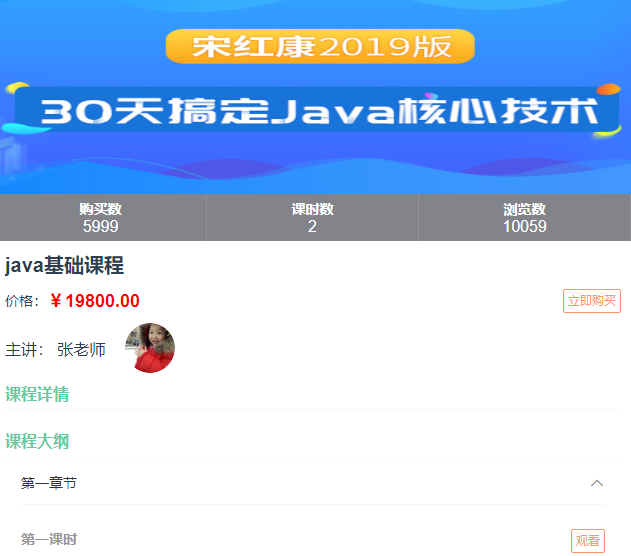
点击 去看看,进入课程详情页面
创建 CourseApiController
@Api(tags = "课程")
@RestController
@RequestMapping("/api/vod/course")
public class CourseApiController {

    @Autowired
    private CourseService courseService;

    @Autowired
    private ChapterService chapterService;

    //根据课程分类查询课程列表(分页)
    @ApiOperation("根据课程分类查询课程列表")
    @GetMapping("{subjectParentId}/{page}/{limit}")
    public Result findPageCourse(@ApiParam(value = "课程一级分类ID", required = true) @PathVariable Long subjectParentId,
                                 @ApiParam(name = "page", value = "当前页码", required = true) @PathVariable Long page,
                                 @ApiParam(name = "limit", value = "每页记录数", required = true) @PathVariable Long limit) {
        //封装条件
        CourseQueryVo courseQueryVo = new CourseQueryVo();
        courseQueryVo.setSubjectParentId(subjectParentId);
        //创建page对象
        Page<Course> pageParam = new Page<>(page,limit);
        Map<String,Object> map = courseService.findPage(pageParam,courseQueryVo);
        return Result.ok(map);
    }

    //根据ID查询课程
    @ApiOperation("根据ID查询课程")
    @GetMapping("getInfo/{courseId}")
    public Result getInfo(
            @ApiParam(value = "课程ID", required = true)
            @PathVariable Long courseId){
        Map<String, Object> map = courseService.getInfoById(courseId);
        return Result.ok(map);
    }
}
2
3
4
5
6
7
8
9
10
11
12
13
14
15
16
17
18
19
20
21
22
23
24
25
26
27
28
29
30
31
32
33
34
35
36
CourseService
//课程列表
Map<String,Object> findPage(Page<Course> pageParam, CourseQueryVo courseQueryVo);

//根据id查询课程
Map<String, Object> getInfoById(Long courseId);
2
3
4
5
CourseServiceImpl
//课程列表
@Override
public Map<String,Object> findPage(Page<Course> pageParam, CourseQueryVo courseQueryVo) {
    //获取条件值
    String title = courseQueryVo.getTitle();//名称
    Long subjectId = courseQueryVo.getSubjectId();//二级分类
    Long subjectParentId = courseQueryVo.getSubjectParentId();//一级分类
    Long teacherId = courseQueryVo.getTeacherId();//讲师
    //封装条件
    QueryWrapper<Course> wrapper = new QueryWrapper<>();
    if(!StringUtils.isEmpty(title)) {
        wrapper.like("title",title);
    }
    if(!StringUtils.isEmpty(subjectId)) {
        wrapper.eq("subject_id",subjectId);
    }
    if(!StringUtils.isEmpty(subjectParentId)) {
        wrapper.eq("subject_parent_id",subjectParentId);
    }
    if(!StringUtils.isEmpty(teacherId)) {
        wrapper.eq("teacher_id",teacherId);
    }
    //调用方法查询
    Page<Course> pages = baseMapper.selectPage(pageParam, wrapper);

    long totalCount = pages.getTotal();//总记录数
    long totalPage = pages.getPages();//总页数
    long currentPage = pages.getCurrent();//当前页
    long size = pages.getSize();//每页记录数
    //每页数据集合
    List<Course> records = pages.getRecords();
    records.stream().forEach(item -> {
        this.getTeacherOrSubjectName(item);
    });

    Map<String,Object> map = new HashMap<>();
    map.put("totalCount",totalCount);
    map.put("totalPage",totalPage);
    map.put("records",records);

    return map;
}

//获取讲师和分类名称
private Course getTeacherOrSubjectName(Course course) {
    Teacher teacher = teacherService.getById(course.getTeacherId());
    if(teacher != null) {
        course.getParam().put("teacherName",teacher.getName());
    }

    Subject subjectOne = subjectService.getById(course.getSubjectParentId());
    if(subjectOne != null) {
        course.getParam().put("subjectParentTitle",subjectOne.getTitle());
    }
    Subject subjectTwo = subjectService.getById(course.getSubjectId());
    if(subjectTwo != null) {
        course.getParam().put("subjectTitle",subjectTwo.getTitle());
    }
    return course;
}

//根据id查询课程
@Override
public Map<String, Object> getInfoById(Long id) {
    //更新流量量
    Course course = baseMapper.selectById(id);
    course.setViewCount(course.getViewCount() + 1);
    baseMapper.updateById(course);

    Map<String, Object> map = new HashMap<>();
    CourseVo courseVo = baseMapper.selectCourseVoById(id);
    List<ChapterVo> chapterVoList = chapterService.getNestedTreeList(id);
    CourseDescription courseDescription = descriptionService.getById(id);
    Teacher teacher = teacherService.getById(course.getTeacherId());

    //TODO后续完善
    Boolean isBuy = false;

    map.put("courseVo", courseVo);
    map.put("chapterVoList", chapterVoList);
    map.put("description", null != courseDescription ?
            courseDescription.getDescription() : "");
    map.put("teacher", teacher);
    map.put("isBuy", isBuy);//是否购买
    return map;
}
2
3
4
5
6
7
8
9
10
11
12
13
14
15
16
17
18
19
20
21
22
23
24
25
26
27
28
29
30
31
32
33
34
35
36
37
38
39
40
41
42
43
44
45
46
47
48
49
50
51
52
53
54
55
56
57
58
59
60
61
62
63
64
65
66
67
68
69
70
71
72
73
74
75
76
77
78
79
80
81
82
83
84
85
86
CourseMapper
public interface CourseMapper extends BaseMapper<Course> {

    CoursePublishVo selectCoursePublishVoById(Long id);

    CourseVo selectCourseVoById(Long id);
}
2
3
4
5
6
CourseMapper.xml
<?xml version="1.0" encoding="UTF-8"?>
<!DOCTYPE mapper PUBLIC "-//mybatis.org//DTD Mapper 3.0//EN" "http://mybatis.org/dtd/mybatis-3-mapper.dtd">
<mapper namespace="com.atguigu.ggkt.vod.mapper.CourseMapper">

    <select id="selectCoursePublishVoById" resultType="com.atguigu.ggkt.vo.vod.CoursePublishVo">
        SELECT
        c.id,
        c.title,
        c.cover,
        c.lesson_num AS lessonNum,
        c.price,
        t.name AS teacherName,
        s1.title AS subjectParentTitle,
        s2.title AS subjectTitle
        FROM
        <include refid="tables" />
        WHERE c.id = #{id}
    </select>

    <select id="selectCourseVoById" resultType="com.atguigu.ggkt.vo.vod.CourseVo">
        SELECT
        <include refid="columns" />
        FROM
        <include refid="tables" />
        WHERE c.id = #{id}
    </select>

    <sql id="columns">
        c.id,
        c.title,
        c.lesson_num AS lessonNum,
        c.price,
        c.cover,
        c.buy_count AS buyCount,
        c.view_count AS viewCount,
        c.status,
        c.publish_time AS publishTime,
        c.teacher_id as teacherId,
        t.name AS teacherName,
        s1.title AS subjectParentTitle,
        s2.title AS subjectTitle
    </sql>

    <sql id="tables">
        course c
        LEFT JOIN teacher t ON c.teacher_id = t.id
        LEFT JOIN subject s1 ON c.subject_parent_id = s1.id
        LEFT JOIN subject s2 ON c.subject_id = s2.id
    </sql>
</mapper>
2
3
4
5
6
7
8
9
10
11
12
13
14
15
16
17
18
19
20
21
22
23
24
25
26
27
28
29
30
31
32
33
34
35
36
37
38
39
40
41
42
43
44
45
46
47
48
49
50
# 课程列表和详情前端
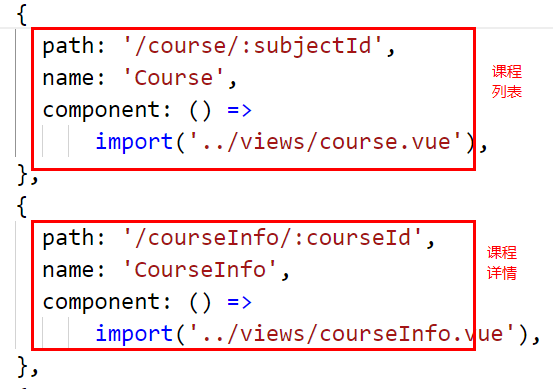
查看路由文件 /src/router/index.js
创建 js 文件定义接口 /src/api/course.js
import request from '@/utils/request'
const api_name = '/api/vod/course'
export default {
  // 课程分页列表
  findPage(subjectParentId, pageNo, pageSize) {
    return request({
      url: `${api_name}/${subjectParentId}/${pageNo}/${pageSize}`,
      method: 'get'
    })
  },
  // 课程详情
  getInfo(courseId) {
    return request({
      url: `${api_name}/getInfo/${courseId}`,
      method: 'get'
    })
  }
}
2
3
4
5
6
7
8
9
10
11
12
13
14
15
16
17
18
编写页面 views/course.vue
<template>
    <div>
        <van-image width="100%" height="200" src="https://cdn.uviewui.com/uview/swiper/1.jpg"/>
        <van-pull-refresh v-model="refreshing" @refresh="onRefresh">
            <!-- offset:滚动条与底部距离小于 offset 时触发load事件 默认300,因此要改小,否则首次进入一直触发  -->
            <van-list v-model="loading" :finished="finished" finished-text="没有更多了" offset="10" @load="onLoad">
                <van-card
                        v-for="(item,index) in list" :key="index"
                        :price="item.price"
                        :title="item.title"
                        :thumb="item.cover"
                >
                    <template #tags>
                        <van-tag round plain color="#ffe1e1" text-color="#ad0000">课时数:{{ item.lessonNum }}</van-tag>
                        <br/>
                        <van-tag round plain color="#ffe1e1" text-color="#ad0000">购买数:{{ item.buyCount }}</van-tag>
                        <br/>
                        <van-tag round plain color="#ffe1e1" text-color="#ad0000">访问量:{{ item.viewCount }}</van-tag>
                    </template>
                    <template #footer>
                        <van-button size="mini" @click="info(item.id)">去看看</van-button>
                    </template>
                </van-card>
            </van-list>
        </van-pull-refresh>
    </div>
</template>
<script>
import courseApi from '@/api/course'
export default {
    name: "Course",
    data() {
        return {
            subjectParentId: 1,
            loading: false,
            finished: false,
            refreshing: false,
            pageNo: 1,
            pageSize: 5,
            pages: 1,
            list: []
        };
    },
    created() {
        this.subjectParentId = this.$route.params.subjectId;
    },
    methods: {
        onLoad() {
            this.fetchData();
        },
        onRefresh() {
            // 清空列表数据
            this.finished = false;
            this.pageNo = 1;
            // 重新加载数据
            // 将 loading 设置为 true,表示处于加载状态
            this.loading = true;
            this.fetchData();
        },
        fetchData() {
            courseApi.findPage(this.subjectParentId, this.pageNo, this.pageSize).then(response => {
                console.log(response.data);
                if (this.refreshing) {
                    this.list = [];
                    this.refreshing = false;
                }
                for (let i=0;i<response.data.records.length;i++) {
                    this.list.push(response.data.records[i]);
                }
                this.pages = response.data.pages;
                this.loading = false;
                if(this.pageNo >= this.pages) {
                    this.finished = true;
                }
                this.pageNo++;
            });
        },
        info(id) {
            this.$router.push({path: '/courseInfo/' + id})
        }
    }
}
</script>
<style lang="scss" scoped>
    .list {
        li {
            margin: 10px;
            padding-bottom: 5px;
            border-bottom: 1px solid #e5e5e5;
            h1 {
                font-size: 20px;
            }
            .list-box {
                display: flex;
                font-size: 14px;
                ul {
                    flex: 1;
                    margin: 0;
                    li {
                        margin: 0;
                        border-bottom: none;
                    }
                }
                p {
                    margin: 0;
                    width: 50px;
                    align-items: center;
                    align-self: flex-end;
                }
            }
        }
    }
</style>
2
3
4
5
6
7
8
9
10
11
12
13
14
15
16
17
18
19
20
21
22
23
24
25
26
27
28
29
30
31
32
33
34
35
36
37
38
39
40
41
42
43
44
45
46
47
48
49
50
51
52
53
54
55
56
57
58
59
60
61
62
63
64
65
66
67
68
69
70
71
72
73
74
75
76
77
78
79
80
81
82
83
84
85
86
87
88
89
90
91
92
93
94
95
96
97
98
99
100
101
102
103
104
105
106
107
108
109
110
111
112
113
views/courseInfo.vue
<template>
  <div>
    <van-image width="100%" height="200" :src="courseVo.cover"/>
    <van-row>
      <van-col span="8">
        <div class="course_count">
          <h1>购买数</h1>
          <p>{{ courseVo.buyCount }}</p>
        </div>
      </van-col>
      <van-col span="8">
        <div class="course_count">
          <h1>课时数</h1>
          <p>{{ courseVo.lessonNum }}</p>
        </div>
      </van-col>
      <van-col span="8">
        <div class="course_count">
          <h1>浏览数</h1>
          <p>{{ courseVo.viewCount }}</p>
        </div>
      </van-col>
    </van-row>
    <h1 class="van-ellipsis course_title">{{ courseVo.title }}</h1>
    <div class="course_teacher_price_box">
      <div class="course_teacher_price">
        <div class="course_price">价格:</div>
        <div class="course_price_number">¥{{ courseVo.price }}</div>
      </div>
      <div>
        <van-button @click="see()" v-if="isBuy || courseVo.price == '0.00'" plain type="warning" size="mini">立即观看</van-button>
        <van-button @click="buy" v-else plain type="warning" size="mini">立即购买</van-button>
      </div>
    </div>
    <div class="course_teacher_price_box">
      <div class="course_teacher_box">
        <div class="course_teacher">主讲: {{ teacher.name }}</div>
        <van-image :src="teacher.avatar" round width="50px" height="50px" />
      </div>
    </div>
    <div class="course_contents">
      <div class="course_title_font">课程详情</div>
      <van-divider :style="{ margin: '5px 0 ' }" />
      <div class="course_content" v-html="description">
      </div>
      <div class="course_title_font">课程大纲</div>
      <div class="gap"></div>
      <van-collapse v-model="activeNames">
        <van-collapse-item :title="item.title" :name="item.id" v-for="item in chapterVoList" :key="item.id">
          <ul class="course_chapter_list" v-for="child in item.children" :key="child.id">
            <h2>{{child.title}}</h2>
            <p v-if="child.isFree == 1">
              <van-button @click="play(child)" type="warning" size="mini" plain>免费观看</van-button>
            </p>
            <p v-else>
              <van-button @click="play(child)" type="warning" size="mini" plain>观看</van-button>
            </p>
          </ul>
        </van-collapse-item>
      </van-collapse>
    </div>
    <van-loading vertical="true" v-show="loading">加载中...</van-loading>
  </div>
</template>

<script>
import courseApi from '@/api/course'
export default {
  data() {
    return {
      loading: false,
      courseId: null,
      courseVo: {},
      description: '',
      teacher: {},
      chapterVoList: [],
      isBuy: false,
      activeNames: ["1"]
    };
  },
  created() {
    this.courseId = this.$route.params.courseId;
    this.fetchData();
  },
  methods: {
    fetchData() {
      this.loading = true;
      courseApi.getInfo(this.courseId).then(response => {
        console.log(response.data);

        this.courseVo = response.data.courseVo;
        this.description = response.data.description;
        this.isBuy = response.data.isBuy;
        this.chapterVoList = response.data.chapterVoList;
        this.teacher = response.data.teacher;

        this.loading = false;
      });
    },
    buy() {
      this.$router.push({ path: '/trade/'+this.courseId })
    },
    play(video) {

    },
    see() {
      this.$router.push({ path: '/play/'+this.courseId+'/0' })
    }
  }
};
</script>
<style lang="scss" scoped>
.gap {
  height: 10px;
}
::v-deep.van-image {
  display: block;
}
.course_count {
  background-color: #82848a;
  color: white;
  padding: 5px;
  text-align: center;
  border-right: 1px solid #939393;
  h1 {
    font-size: 14px;
    margin: 0;
  }
  p {
    margin: 0;
    font-size: 16px;
  }
}
.course_title {
  font-size: 20px;
  margin: 10px;
}
.course_teacher_price_box {
  margin: 10px;
  display: flex;
  justify-content: space-between;
  align-items: center;
  .course_teacher_price {
    display: flex;
    font-size: 14px;
    align-items: center;
    .course_price_number {
      color: red;
      font-size: 18px;
      font-weight: bold;
    }
    .course_teacher {
      margin-left: 20px;
    }
  }
  .course_teacher_box {
    display: flex;
    justify-content: center;
    align-items: center;

    .course_teacher {
      margin-right: 20px;
    }
  }
}
.course_contents {
  margin: 10px;
  .course_title_font {
    color: #68cb9b;
    font-weight: bold;
  }
  .course_content {
    margin-bottom: 20px;
  }
}
.course_chapter_list {
  display: flex;
  justify-content: space-between;
  align-items: center;
  h2 {
    font-size: 14px;
  }
  p {
    margin: 0;
  }
}
</style>
2
3
4
5
6
7
8
9
10
11
12
13
14
15
16
17
18
19
20
21
22
23
24
25
26
27
28
29
30
31
32
33
34
35
36
37
38
39
40
41
42
43
44
45
46
47
48
49
50
51
52
53
54
55
56
57
58
59
60
61
62
63
64
65
66
67
68
69
70
71
72
73
74
75
76
77
78
79
80
81
82
83
84
85
86
87
88
89
90
91
92
93
94
95
96
97
98
99
100
101
102
103
104
105
106
107
108
109
110
111
112
113
114
115
116
117
118
119
120
121
122
123
124
125
126
127
128
129
130
131
132
133
134
135
136
137
138
139
140
141
142
143
144
145
146
147
148
149
150
151
152
153
154
155
156
157
158
159
160
161
162
163
164
165
166
167
168
169
170
171
172
173
174
175
176
177
178
179
180
181
182
183
184
185
186
187
# 点播视频播放
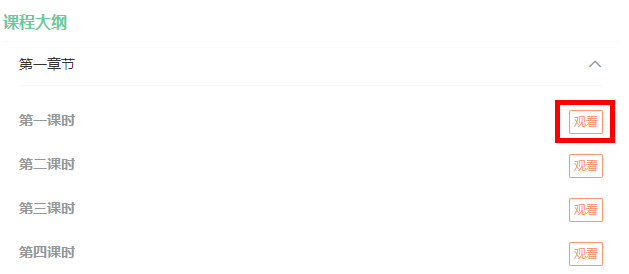
获取视频播放参数,创建 VodApiController
@Api(tags = "腾讯视频点播")
@RestController
@RequestMapping("/api/vod")
public class VodApiController {

    @Autowired
    private VodService vodService;

    @GetMapping("getPlayAuth/{courseId}/{videoId}")
    public Result getPlayAuth(
            @ApiParam(value = "课程id", required = true)
            @PathVariable Long courseId,
            @ApiParam(value = "视频id", required = true)
            @PathVariable Long videoId) {
        return  Result.ok(vodService.getPlayAuth(courseId, videoId));
    }
}
2
3
4
5
6
7
8
9
10
11
12
13
14
15
16
17
application.properties 添加
tencent.video.appid=1312624373
VodService 创建方法
//获取视频播放凭证
Map<String,Object> getPlayAuth(Long courseId, Long videoId);
2
VodServiceImpl
@Value("${tencent.video.appid}")
private String appId;

//点播视频播放接口
@Override
public Map<String, Object> getPlayAuth(Long courseId, Long videoId) {
    //根据小节id获取小节对象,获取腾讯云视频id
    Video video = videoService.getById(videoId);
    if(video == null) {
        throw new GgktException(20001,"小节信息不存在");
    }

    Map<String, Object> map = new HashMap<>();
    map.put("videoSourceId",video.getVideoSourceId());
    map.put("appId",appId);
    return map;
}
2
3
4
5
6
7
8
9
10
11
12
13
14
15
16
17
# 点播视频播放前端
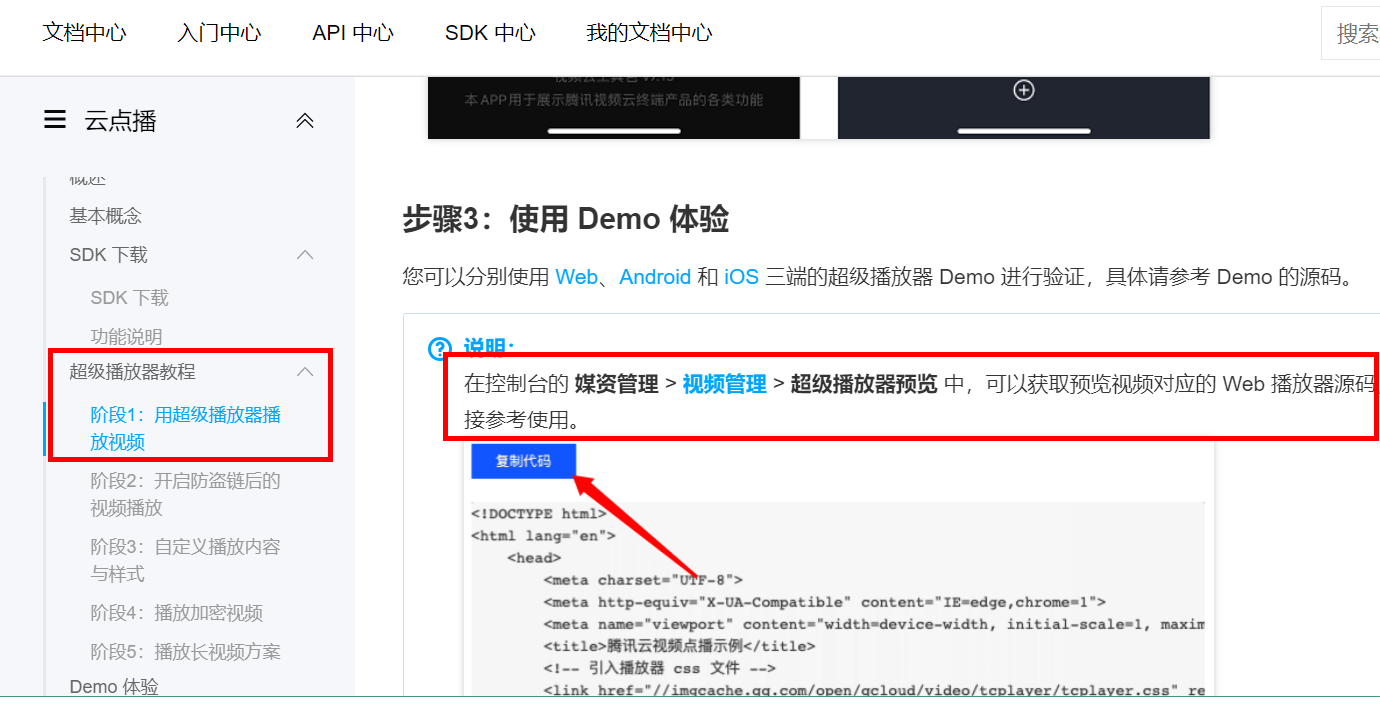
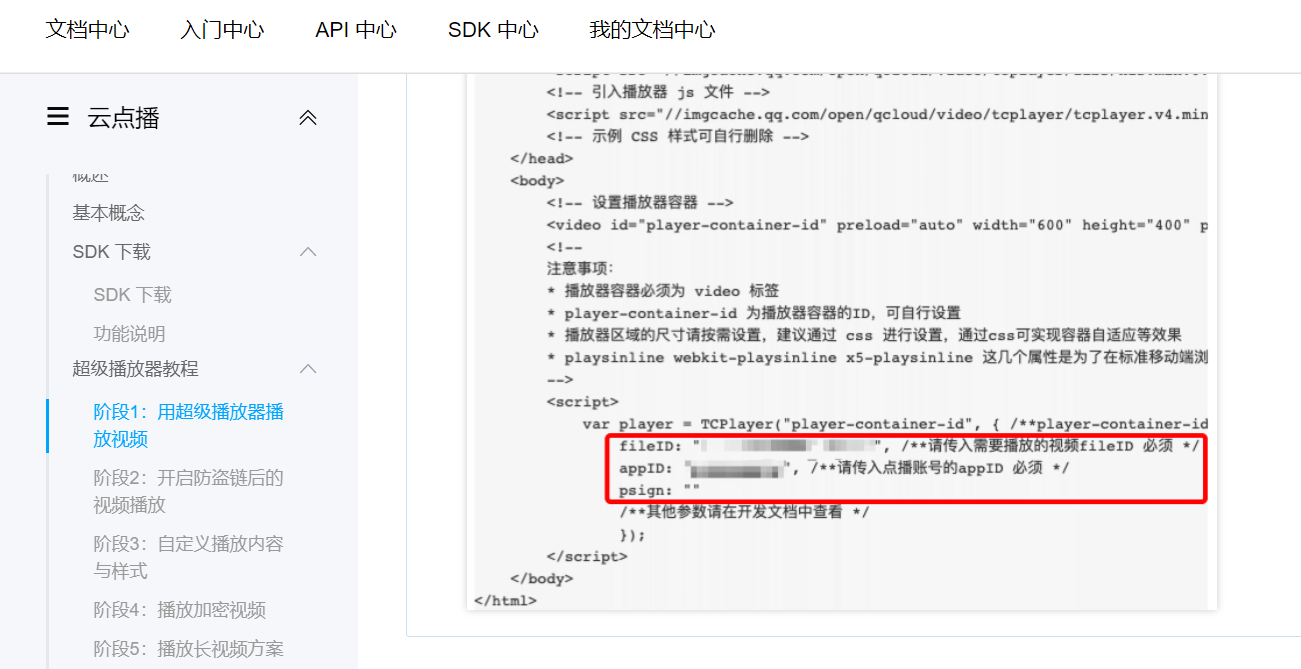
创建 js 定义接口 /src/api/vod.js
import request from '@/utils/request'
const api_name = '/api/vod'
export default {
  // 获取播放凭证
  getPlayAuth(courseId, videoId) {
    return request({
      url: `${api_name}/getPlayAuth/${courseId}/${videoId}`,
      method: 'get'
    })
  }
}
2
3
4
5
6
7
8
9
10
11
courseInfo.vue 修改 play 方法
    play(video) {
      let videoId = video.id;
      let isFree = video.isFree;
      this.$router.push({ path: '/play/'+this.courseId+'/'+videoId })
    },
2
3
4
5
public/index.html 引入文件
<link href="//cloudcache.tencent-cloud.com/open/qcloud/video/tcplayer/tcplayer.css" rel="stylesheet">
<!-- 如需在IE8、9浏览器中初始化播放器,浏览器需支持Flash并在页面中引入 -->
<!--[if lt IE 9] >
<script src="//cloudcache.tencent-cloud.com/open/qcloud/video/tcplayer/ie8/videojs-ie8.js"></script>
<![endif]-->
<!-- 如果需要在 Chrome 和 Firefox 等现代浏览器中通过 H5 播放 HLS 格式的视频,需要在 tcplayer.v4.1.min.js 之前引入 hls.min.0.13.2m.js -->
<script src="//imgcache.qq.com/open/qcloud/video/tcplayer/libs/hls.min.0.13.2m.js"></script>
<!-- 引入播放器 js 文件 -->
<script src="//imgcache.qq.com/open/qcloud/video/tcplayer/tcplayer.v4.1.min.js"></script>
2
3
4
5
6
7
8
9
创建 play.vue 页面
<template>
    <div>
        <video id="player-container-id" preload="auto" width="600" height="400" playsinline webkit-playsinline x5-playsinline></video>
        <h1 class="van-ellipsis course_title">{{ courseVo.title }}</h1>

        <div class="course_teacher_price_box">
            <div class="course_teacher_price">
                <div class="course_price">价格:</div>
                <div class="course_price_number">¥{{ courseVo.price }}</div>
                <div class="course_teacher">主讲: {{ courseVo.teacherName }}</div>
            </div>
            <div>
                <van-button @click="getPlayAuth('0')" v-if="isBuy || courseVo.price == '0.00'" plain type="warning" size="mini">立即观看</van-button>
                <van-button @click="buy" v-else plain type="warning" size="mini">立即购买</van-button>
            </div>
        </div>

        <div class="course_contents">
            <div class="course_title_font">课程大纲</div>
            <div class="gap"></div>
            <van-collapse v-model="activeNames">
                <van-collapse-item :title="item.title" :name="item.id" v-for="item in chapterVoList" :key="item.id">
                    <ul class="course_chapter_list" v-for="child in item.children" :key="child.id">
                        <h2 :style="activeVideoId == child.id ? 'color:blue' : ''">{{child.title}}</h2>
                        <p v-if="child.isFree == 1">
                            <van-button @click="see(child)" type="warning" size="mini" plain>免费观看</van-button>
                        </p>
                        <p v-else>
                            <van-button @click="see(child)" type="warning" size="mini" plain>观看</van-button>
                        </p>
                    </ul>
                </van-collapse-item>
            </van-collapse>
        </div>

        <van-loading vertical="true" v-show="loading">加载中...</van-loading>
    </div>
</template>

<script>
import courseApi from '@/api/course'
import vodApi from '@/api/vod'
// import videoVisitorApi from '@/api/videoVisitor'
export default {
    data() {
        return {
            loading: false,

            courseId: null,
            videoId: null,

            courseVo: {},
            description: '',
            chapterVoList: [],
            isBuy: false,
            // firstVideo: null,

            activeNames: ["1"],
            activeVideoId: 0, //记录当前正在播放的视频
            player: null
        };
    },

    created() {
        this.courseId = this.$route.params.courseId;
        this.videoId = this.$route.params.videoId || '0';

        this.fetchData();
        this.getPlayAuth(this.videoId);
    },

    methods: {
        fetchData() {
            this.loading = true;
            courseApi.getInfo(this.courseId).then(response => {
                console.log(response.data);

                this.courseVo = response.data.courseVo;
                this.description = response.data.description;
                this.isBuy = response.data.isBuy;
                this.chapterVoList = response.data.chapterVoList;

                //获取第一个播放视频id
                // this.firstVideo = this.chapterVoList[0].children[0]
                // if(this.videoSourceId == '0') {
                //     this.see(this.firstVideo);
                // }
                this.loading = false;
            });
        },

        see(video) {
            let videoId = video.id;
            let isFree = video.isFree;
            //if(isFree === 1 || this.isBuy || this.courseVo.price == '0.00') {
                this.getPlayAuth(videoId);
            // } else {
            //     if (window.confirm("购买了才可以观看, 是否继续?")) {
            //         this.buy()
            //     }
            // }
        },

        buy() {
            this.$router.push({ path: '/trade/'+this.courseId })
        },

        getPlayAuth(videoId) {
            if (this.player != null) {
                // 是销毁之前的视频,不销毁的话,它会一直存在
                this.player.dispose();
            }

            vodApi.getPlayAuth(this.courseId, videoId).then(response => {
                console.log(response.data);
                this.play(response.data);

                //展开章节
                this.activeNames = [response.data.chapterId]
                //选中播放视频
                this.activeVideoId = response.data.videoId
            })
        },
		//视频播放
        play(data) {
            var player = TCPlayer("player-container-id", { /**player-container-id 为播放器容器ID,必须与html中一致*/
                fileID: data.videoSourceId, /**请传入需要播放的视频fileID 必须 */
                appID: data.appId, /**请传入点播账号的子应用appID 必须 */
                psign: ""
                /**其他参数请在开发文档中查看 */
             });
        }
    }
};
</script>

<style lang="scss" scoped>
.gap {
    height: 10px;
}

::v-deep.van-image {
    display: block;
}

.course_count {
    background-color: #82848a;
    color: white;
    padding: 5px;
    text-align: center;
    border-right: 1px solid #939393;

    h1 {
        font-size: 14px;
        margin: 0;
    }

    p {
        margin: 0;
        font-size: 16px;
    }
}

.course_title {
    font-size: 20px;
    margin: 10px;
}

.course_teacher_price_box {
    margin: 10px;
    display: flex;
    justify-content: space-between;
    align-items: center;

    .course_teacher_price {
        display: flex;
        font-size: 14px;
        align-items: center;

        .course_price_number {
            color: red;
            font-size: 18px;
            font-weight: bold;
        }

        .course_teacher {
            margin-left: 20px;
        }
    }
}

.course_contents {
    margin: 10px;

    .course_title_font {
        color: #68cb9b;
        font-weight: bold;
    }

    .course_content {
        margin-bottom: 20px;
    }
}

.course_chapter_list {
    display: flex;
    justify-content: space-between;
    align-items: center;

    h2 {
        font-size: 14px;
    }

    p {
        margin: 0;
    }
}
</style>
2
3
4
5
6
7
8
9
10
11
12
13
14
15
16
17
18
19
20
21
22
23
24
25
26
27
28
29
30
31
32
33
34
35
36
37
38
39
40
41
42
43
44
45
46
47
48
49
50
51
52
53
54
55
56
57
58
59
60
61
62
63
64
65
66
67
68
69
70
71
72
73
74
75
76
77
78
79
80
81
82
83
84
85
86
87
88
89
90
91
92
93
94
95
96
97
98
99
100
101
102
103
104
105
106
107
108
109
110
111
112
113
114
115
116
117
118
119
120
121
122
123
124
125
126
127
128
129
130
131
132
133
134
135
136
137
138
139
140
141
142
143
144
145
146
147
148
149
150
151
152
153
154
155
156
157
158
159
160
161
162
163
164
165
166
167
168
169
170
171
172
173
174
175
176
177
178
179
180
181
182
183
184
185
186
187
188
189
190
191
192
193
194
195
196
197
198
199
200
201
202
203
204
205
206
207
208
209
210
211
212
213
214
215
216
217
218
# 付费观看点播课程接口
需求介绍
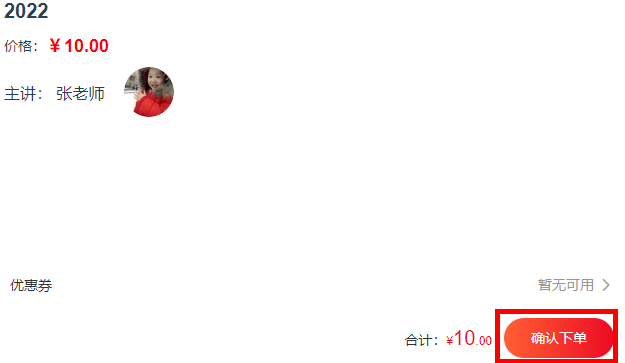
点击课程详情页立即购买
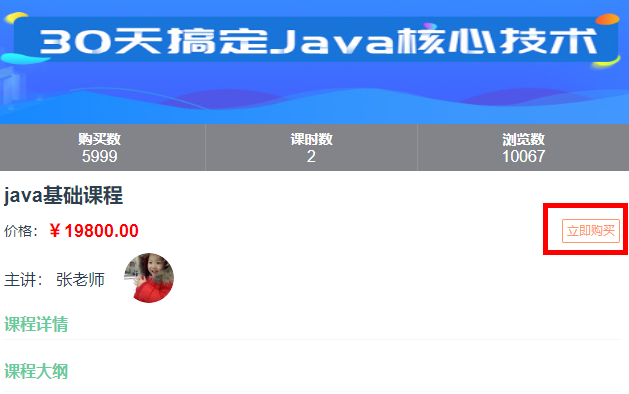
点击确认下单,生成课程订单
# 获取课程信息
创建 OrderInfoApiController
@RestController
@RequestMapping("api/order/orderInfo")
public class OrderInfoApiController {

    @Autowired
    private OrderInfoService orderInfoService;

    @ApiOperation("新增点播课程订单")
    @PostMapping("submitOrder")
    public Result submitOrder(@RequestBody OrderFormVo orderFormVo, HttpServletRequest request) {
        //返回订单id
        Long orderId = orderInfoService.submitOrder(orderFormVo);
        return Result.ok(orderId);
    }
}
2
3
4
5
6
7
8
9
10
11
12
13
14
15
OrderInfoService
//生成点播课程订单
Long submitOrder(OrderFormVo orderFormVo);
2
在 service_vod 模块下的 CourseApiController 添加方法
@ApiOperation("根据ID查询课程")
@GetMapping("inner/getById/{courseId}")
public Course getById(
        @ApiParam(value = "课程ID", required = true)
        @PathVariable Long courseId){
    return courseService.getById(courseId);
}
2
3
4
5
6
7
在 service_course_client 下的 CourseFeignClient 添加远程调用方法
@ApiOperation("根据ID查询课程")
@GetMapping("/api/vod/course/inner/getById/{courseId}")
Course getById(@PathVariable Long courseId);
2
3
# 获取优惠卷
在 service_activity 模块创建 CouponInfoApiController
@Api(tags = "优惠券接口")
@RestController
@RequestMapping("/api/activity/couponInfo")
public class CouponInfoApiController {

	@Autowired
	private CouponInfoService couponInfoService;

	@ApiOperation(value = "获取优惠券")
	@GetMapping(value = "inner/getById/{couponId}")
	public CouponInfo getById(@PathVariable("couponId") Long couponId) {
		return couponInfoService.getById(couponId);
	}

    @ApiOperation(value = "更新优惠券使用状态")
	@GetMapping(value = "inner/updateCouponInfoUseStatus/{couponUseId}/{orderId}")
	public Boolean updateCouponInfoUseStatus(@PathVariable("couponUseId") Long couponUseId, @PathVariable("orderId") Long orderId) {
		couponInfoService.updateCouponInfoUseStatus(couponUseId, orderId);
		return true;
	}
}
2
3
4
5
6
7
8
9
10
11
12
13
14
15
16
17
18
19
20
21
CouponInfoService
    @Override
    public void updateCouponInfoUseStatus(Long couponUseId, Long orderId) {
        CouponUse couponUse = new CouponUse();
        couponUse.setId(couponUseId);
        couponUse.setOrderId(orderId);
        couponUse.setCouponStatus("1");
        couponUse.setUsingTime(new Date());
        couponUseService.updateById(couponUse);
    }
2
3
4
5
6
7
8
9
在 service-activity-client 创建 CouponInfoFeignClient 远程调用接口
@FeignClient(value = "service-activity")
public interface CouponInfoFeignClient {

    @ApiOperation(value = "获取优惠券")
    @GetMapping(value = "/api/activity/couponInfo/inner/getById/{couponId}")
    CouponInfo getById(@PathVariable("couponId") Long couponId);

    /**
     * 更新优惠券使用状态
     */
    @GetMapping(value = "/api/activity/couponInfo/inner/updateCouponInfoUseStatus/{couponUseId}/{orderId}")
    Boolean updateCouponInfoUseStatus(@PathVariable("couponUseId") Long couponUseId, @PathVariable("orderId") Long orderId);

}
2
3
4
5
6
7
8
9
10
11
12
13
14
# 获取当前用户 id
在 common 模块引入依赖
<!-- redis -->
<dependency>
    <groupId>org.springframework.boot</groupId>
    <artifactId>spring-boot-starter-data-redis</artifactId>
</dependency>

<!-- spring2.X集成redis所需common-pool2-->
<dependency>
    <groupId>org.apache.commons</groupId>
    <artifactId>commons-pool2</artifactId>
    <version>2.6.0</version>
</dependency>
2
3
4
5
6
7
8
9
10
11
12
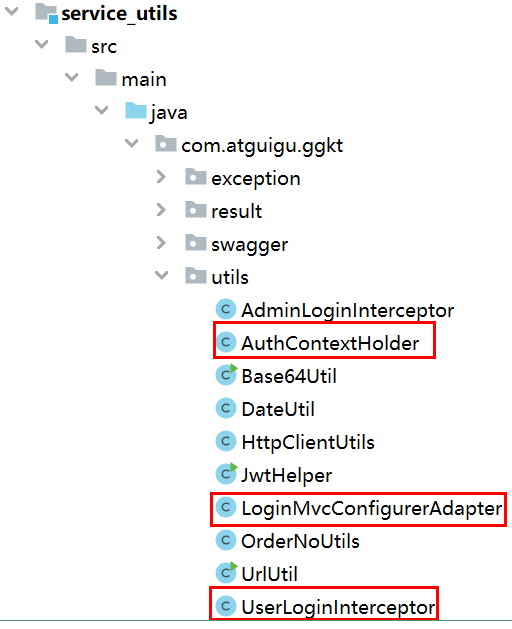
复制工具类到 common 下的 service_utils 模块
前端实现方式,在 /utils/request.js 添加拦截器
// http request 拦截器
service.interceptors.request.use(config => {
        //获取localStorage里面的token值
        let token = window.localStorage.getItem('token') || '';
        if (token != '') {
            //把token值放到header里面
            config.headers['token'] = token;
        }
        return config
    },
    err => {
        return Promise.reject(err);
    })
2
3
4
5
6
7
8
9
10
11
12
13
service_order 引入依赖
<dependencies>
    <dependency>
        <groupId>com.atguigu</groupId>
        <artifactId>service_course_client</artifactId>
        <version>0.0.1-SNAPSHOT</version>
    </dependency>
    <dependency>
        <groupId>com.atguigu</groupId>
        <artifactId>service_user_client</artifactId>
        <version>0.0.1-SNAPSHOT</version>
    </dependency>
    <dependency>
        <groupId>com.atguigu</groupId>
        <artifactId>service_activity_client</artifactId>
        <version>0.0.1-SNAPSHOT</version>
    </dependency>
</dependencies>
2
3
4
5
6
7
8
9
10
11
12
13
14
15
16
17
OrderInfoServiceImpl
@Autowired
private CourseFeignClient courseFeignClient;

@Autowired
private UserInfoFeignClient userInfoFeignClient;

@Autowired
private CouponInfoFeignClient couponInfoFeignClient;

//生成点播课程订单
@Override
public Long submitOrder(OrderFormVo orderFormVo) {
    Long userId = AuthContextHolder.getUserId();
    Long courseId = orderFormVo.getCourseId();
    Long couponId = orderFormVo.getCouponId();
    //查询当前用户是否已有当前课程的订单
    LambdaQueryWrapper<OrderDetail> queryWrapper = new LambdaQueryWrapper<>();
    queryWrapper.eq(OrderDetail::getCourseId, courseId);
    queryWrapper.eq(OrderDetail::getUserId, userId);
    OrderDetail orderDetailExist = orderDetailService.getOne(queryWrapper);
    if(orderDetailExist != null){
        return orderDetailExist.getId(); //如果订单已存在,则直接返回订单id
    }

    //查询课程信息
    Course course = courseFeignClient.getById(courseId);
    if (course == null) {
        throw new GlktException(ResultCodeEnum.DATA_ERROR.getCode(),
                ResultCodeEnum.DATA_ERROR.getMessage());
    }

    //查询用户信息
    UserInfo userInfo = userInfoFeignClient.getById(userId);
    if (userInfo == null) {
        throw new GlktException(ResultCodeEnum.DATA_ERROR.getCode(),
                ResultCodeEnum.DATA_ERROR.getMessage());
    }

    //优惠券金额
    BigDecimal couponReduce = new BigDecimal(0);
    if(null != couponId) {
        CouponInfo couponInfo = couponInfoFeignClient.getById(couponId);
        couponReduce = couponInfo.getAmount();
    }

    //创建订单
    OrderInfo orderInfo = new OrderInfo();
    orderInfo.setUserId(userId);
    orderInfo.setNickName(userInfo.getNickName());
    orderInfo.setPhone(userInfo.getPhone());
    orderInfo.setProvince(userInfo.getProvince());
    orderInfo.setOriginAmount(course.getPrice());
    orderInfo.setCouponReduce(couponReduce);
    orderInfo.setFinalAmount(orderInfo.getOriginAmount().subtract(orderInfo.getCouponReduce()));
    orderInfo.setOutTradeNo(OrderNoUtils.getOrderNo());
    orderInfo.setTradeBody(course.getTitle());
    orderInfo.setOrderStatus("0");
    this.save(orderInfo);

    OrderDetail orderDetail = new OrderDetail();
    orderDetail.setOrderId(orderInfo.getId());
    orderDetail.setUserId(userId);
    orderDetail.setCourseId(courseId);
    orderDetail.setCourseName(course.getTitle());
    orderDetail.setCover(course.getCover());
    orderDetail.setOriginAmount(course.getPrice());
    orderDetail.setCouponReduce(new BigDecimal(0));
    orderDetail.setFinalAmount(orderDetail.getOriginAmount().subtract(orderDetail.getCouponReduce()));
    orderDetailService.save(orderDetail);

    //更新优惠券状态
    if(null != orderFormVo.getCouponUseId()) {
        couponInfoFeignClient.updateCouponInfoUseStatus(orderFormVo.getCouponUseId(), orderInfo.getId());
    }
    return orderInfo.getId();
}
2
3
4
5
6
7
8
9
10
11
12
13
14
15
16
17
18
19
20
21
22
23
24
25
26
27
28
29
30
31
32
33
34
35
36
37
38
39
40
41
42
43
44
45
46
47
48
49
50
51
52
53
54
55
56
57
58
59
60
61
62
63
64
65
66
67
68
69
70
71
72
73
74
75
76
# 微信支付
接口文档:https://pay.weixin.qq.com/wiki/doc/api/jsapi.php?chapter=7_1
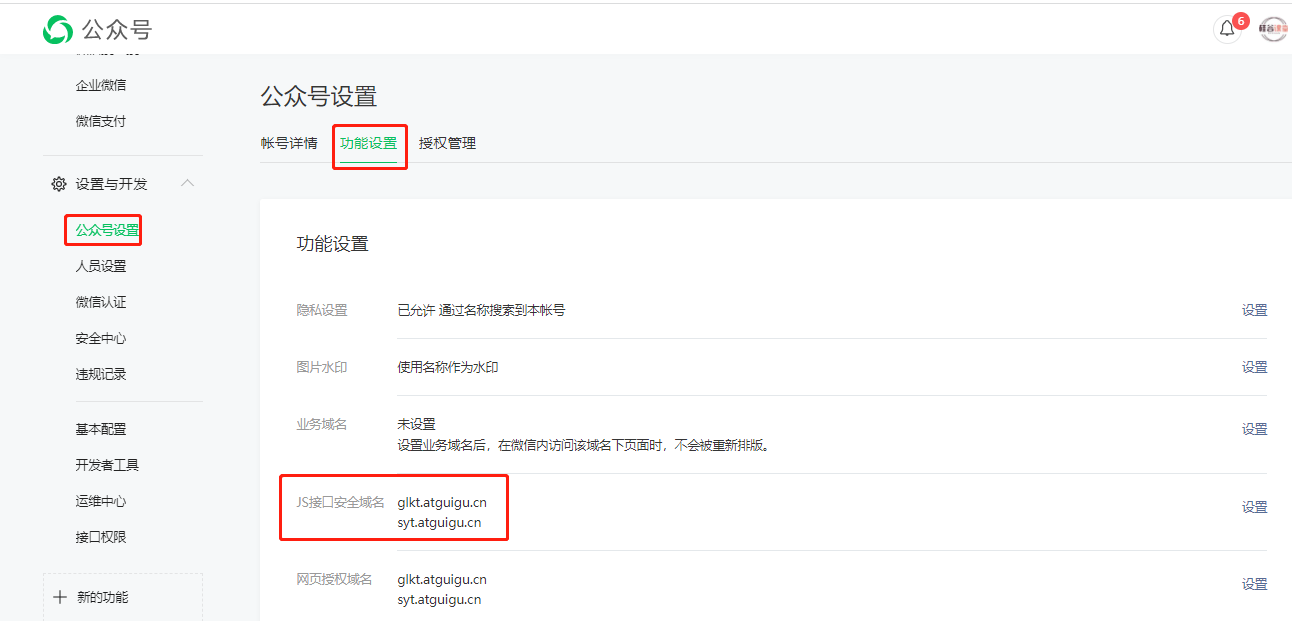
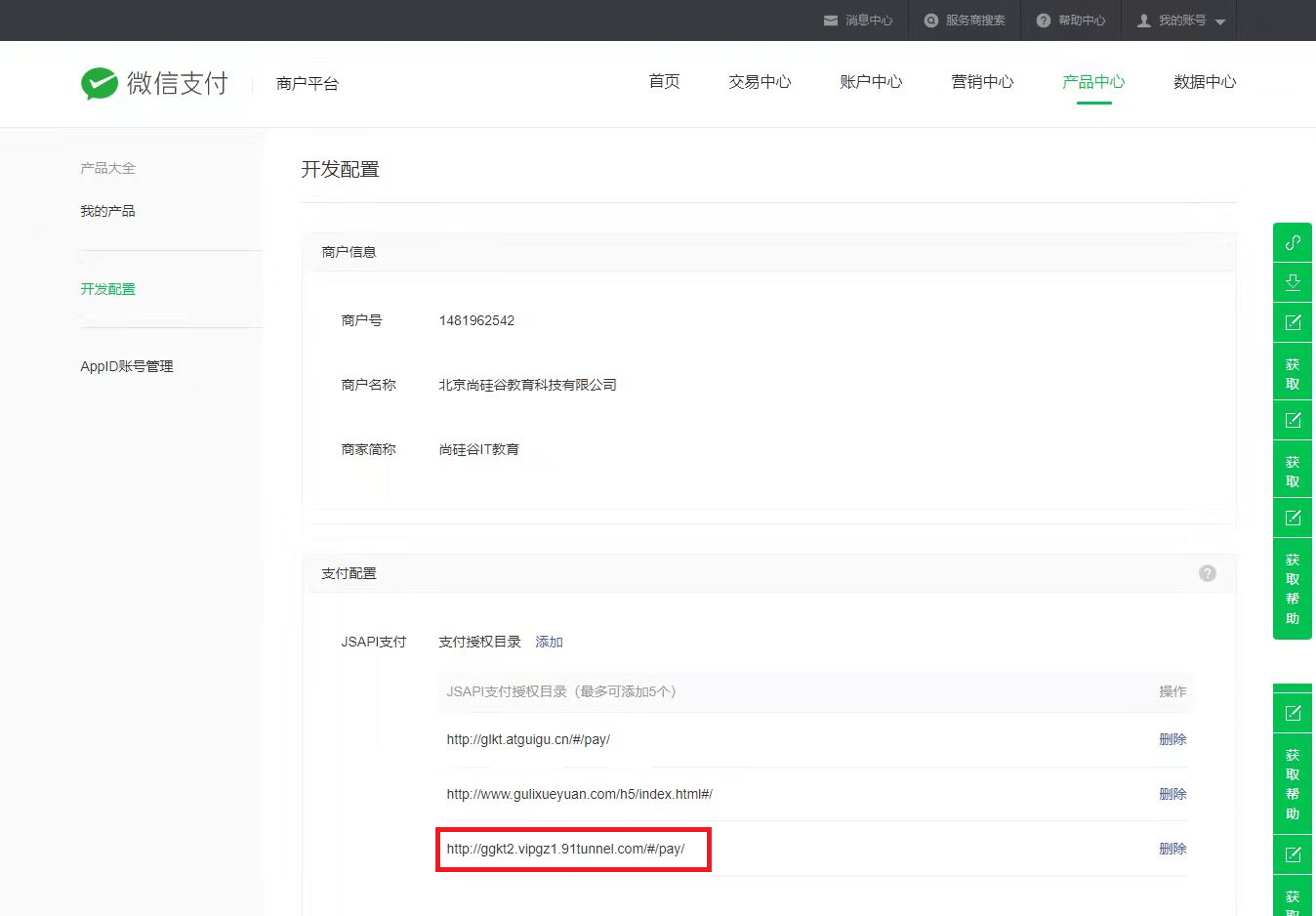
绑定域名,与微信分享一致
先登录微信公众平台进入 “设置与开发”,“公众号设置” 的 “功能设置” 里填写 “JS 接口安全域名”。
说明:因为测试号不支持支付功能,需要使用正式号才能进行测试。
创建 WXPayController
@Api(tags = "微信支付接口")
@RestController
@RequestMapping("/api/order/wxPay")
public class WXPayController {

    @Autowired
    private WXPayService wxPayService;

    @ApiOperation(value = "下单 小程序支付")
    @GetMapping("/createJsapi/{orderNo}")
    public Result createJsapi(
            @ApiParam(name = "orderNo", value = "订单No", required = true)
            @PathVariable("orderNo") String orderNo) {
        return Result.ok(wxPayService.createJsapi(orderNo));
    }
}
2
3
4
5
6
7
8
9
10
11
12
13
14
15
16
WXPayService
public interface WXPayService {
	Map createJsapi(String orderNo);
}
2
3
在 service_order 引入依赖
<dependency>
	<groupId>com.github.wxpay</groupId>
	<artifactId>wxpay-sdk</artifactId>
	<version>0.0.3</version>
</dependency>
2
3
4
5
WXPayServiceImpl
@Service
@Slf4j
public class WXPayServiceImpl implements WXPayService {

	@Autowired
	private OrderInfoService orderInfoService;
	@Resource
	private UserInfoFeignClient userInfoFeignClient;

	@Override
	public Map<String, String> createJsapi(String orderNo) {
		try {

			Map<String, String> paramMap = new HashMap();
			//1、设置参数
			paramMap.put("appid", "wxf913bfa3a2c7eeeb");
			paramMap.put("mch_id", "1481962542");
			paramMap.put("nonce_str", WXPayUtil.generateNonceStr());
			paramMap.put("body", "test");
			paramMap.put("out_trade_no", orderNo);
			paramMap.put("total_fee", "1");
			paramMap.put("spbill_create_ip", "127.0.0.1");
			paramMap.put("notify_url", "http://glkt.atguigu.cn/api/order/wxPay/notify");
			paramMap.put("trade_type", "JSAPI");
//			paramMap.put("openid", "o1R-t5trto9c5sdYt6l1ncGmY5Y");
			//UserInfo userInfo = userInfoFeignClient.getById(paymentInfo.getUserId());
//			paramMap.put("openid", "oepf36SawvvS8Rdqva-Cy4flFFg");
			paramMap.put("openid", "oQTXC56lAy3xMOCkKCImHtHoLL");

			//2、HTTPClient来根据URL访问第三方接口并且传递参数
			HttpClientUtils client = new HttpClientUtils("https://api.mch.weixin.qq.com/pay/unifiedorder");

			//client设置参数
			client.setXmlParam(WXPayUtil.generateSignedXml(paramMap, "MXb72b9RfshXZD4FRGV5KLqmv5bx9LT9"));
			client.setHttps(true);
			client.post();
			//3、返回第三方的数据
			String xml = client.getContent();
			Map<String, String> resultMap = WXPayUtil.xmlToMap(xml);
			if(null != resultMap.get("result_code")  && !"SUCCESS".equals(resultMap.get("result_code"))) {
				System.out.println("error1");
			}

			//4、再次封装参数
			Map<String, String> parameterMap = new HashMap<>();
			String prepayId = String.valueOf(resultMap.get("prepay_id"));
			String packages = "prepay_id=" + prepayId;
			parameterMap.put("appId", "wxf913bfa3a2c7eeeb");
			parameterMap.put("nonceStr", resultMap.get("nonce_str"));
			parameterMap.put("package", packages);
			parameterMap.put("signType", "MD5");
			parameterMap.put("timeStamp", String.valueOf(new Date().getTime()));
			String sign = WXPayUtil.generateSignature(parameterMap, "MXb72b9RfshXZD4FRGV5KLqmv5bx9LT9");

			//返回结果
			Map<String, String> result = new HashMap();
			result.put("appId", "wxf913bfa3a2c7eeeb");
			result.put("timeStamp", parameterMap.get("timeStamp"));
			result.put("nonceStr", parameterMap.get("nonceStr"));
			result.put("signType", "MD5");
			result.put("paySign", sign);
			result.put("package", packages);
			System.out.println(result);
			return result;
		} catch (Exception e) {
			e.printStackTrace();
			return new HashMap<>();
		}
	}
}
2
3
4
5
6
7
8
9
10
11
12
13
14
15
16
17
18
19
20
21
22
23
24
25
26
27
28
29
30
31
32
33
34
35
36
37
38
39
40
41
42
43
44
45
46
47
48
49
50
51
52
53
54
55
56
57
58
59
60
61
62
63
64
65
66
67
68
69
70
修改 service-user 模块配置文件
wechat.mpAppId: wxf913bfa3a2c7eeeb
## 硅谷课堂微信公众平台api秘钥
wechat.mpAppSecret: cd360d429e5c8db0c638d5ef9df74f6d
2
3
service-user 模块创建 GetOpenIdController
@Controller
@RequestMapping("/api/user/openid")
public class GetOpenIdController {

    @Autowired
    private WxMpService wxMpService;

    @GetMapping("/authorize")
    public String authorize(@RequestParam("returnUrl") String returnUrl, HttpServletRequest request) {
        String userInfoUrl =
                "http://ggkt.vipgz1.91tunnel.com/api/user/openid/userInfo";
        String redirectURL = wxMpService
                .oauth2buildAuthorizationUrl(userInfoUrl,
                                             WxConsts.OAUTH2_SCOPE_USER_INFO,
                                             URLEncoder.encode(returnUrl.replace("guiguketan", "#")));
        return "redirect:" + redirectURL;
    }

    @GetMapping("/userInfo")
    @ResponseBody
    public String userInfo(@RequestParam("code") String code,
                           @RequestParam("state") String returnUrl) throws Exception {
        WxMpOAuth2AccessToken wxMpOAuth2AccessToken = this.wxMpService.oauth2getAccessToken(code);
        String openId = wxMpOAuth2AccessToken.getOpenId();
        System.out.println("【微信网页授权】openId={}"+openId);
        return openId;
    }
}
2
3
4
5
6
7
8
9
10
11
12
13
14
15
16
17
18
19
20
21
22
23
24
25
26
27
28
修改前端 App.vue
if (token == '') {
    let url = window.location.href.replace('#', 'guiguketan')
    //修改认证controller路径
    window.location = 'http://ggkt.vipgz1.91tunnel.com/api/user/openid/authorize?returnUrl=' + url
}
2
3
4
5
复制返回的 openid 到支付接口中测试

# 点播视频支付前端
trade.vue
<template>

    <div>
        <van-image width="100%" height="200" :src="courseVo.cover"/>

        <h1 class="van-ellipsis course_title">{{ courseVo.title }}</h1>

        <div class="course_teacher_price_box">
            <div class="course_teacher_price">
                <div class="course_price">价格:</div>
                <div class="course_price_number">¥{{ courseVo.price }}</div>
            </div>
        </div>
        <div class="course_teacher_price_box">
            <div class="course_teacher_box">
                <div class="course_teacher">主讲: {{ teacher.name }}</div>
                <van-image :src="teacher.avatar" round width="50px" height="50px" />
            </div>
        </div>

        <van-loading vertical="true" v-show="loading">加载中...</van-loading>

        <div style="position:fixed;left:0px;bottom:50px;width:100%;height:50px;z-index:999;">
            <!-- 优惠券单元格 -->
            <van-coupon-cell
                    :coupons="coupons"
                    :chosen-coupon="chosenCoupon"
                    @click="showList = true"
            />
            <!-- 优惠券列表 -->
            <van-popup
                    v-model="showList"
                    round
                    position="bottom"
                    style="height: 90%; padding-top: 4px;"
            >
                <van-coupon-list
                        :coupons="coupons"
                        :chosen-coupon="chosenCoupon"
                        :disabled-coupons="disabledCoupons"
                        @change="onChange"
                />
            </van-popup>
        </div>

        <van-goods-action>
            <van-submit-bar :price="finalAmount" button-text="确认下单" @submit="sureOrder"/>
        </van-goods-action>
    </div>
</template>

<script>
import courseApi from '@/api/course'
import orderApi from '@/api/order'
import couponApi from '@/api/coupon'
export default {
    data() {
        return {
            loading: false,

            courseId: null,
            courseVo: {},
            teacher: {},

            orderId: null,

            showList:false,
            chosenCoupon: -1,
            coupons: [],
            disabledCoupons: [],
            couponId: null,
            couponUseId: null,

            couponReduce: 0,
            finalAmount: 0
        };
    },

    created() {
        this.courseId = this.$route.params.courseId;
        this.fetchData()
        this.getCouponInfo();
    },

    methods: {
        onChange(index) {
            debugger
            this.showList = false;
            this.chosenCoupon = index;

            this.couponId = this.coupons[index].id;
            this.couponUseId = this.coupons[index].couponUseId;
            this.couponReduce = this.coupons[index].value;
            this.finalAmount = parseFloat(this.finalAmount) - parseFloat(this.couponReduce)
        },

        fetchData() {
            debugger
            this.loading = true;
            courseApi.getInfo(this.courseId).then(response => {
                // console.log(response.data);
                this.courseVo = response.data.courseVo;
                this.teacher = response.data.teacher;
                //转换为分
                this.finalAmount = parseFloat(this.courseVo.price)*100;

                this.loading = false;
            });
        },


        getCouponInfo() {
            //debugger
            couponApi.findCouponInfo().then(response => {
                // console.log(response.data);
                this.coupons = response.data.abledCouponsList;
                this.disabledCoupons = response.data.disabledCouponsList;
            });
        },

        sureOrder() {
            //debugger
            this.loading = true;
            let orderFormVo = {
                'courseId': this.courseId,
                'couponId': this.couponId,
                'couponUseId': this.couponUseId
            }
            orderApi.submitOrder(orderFormVo).then(response => {
                console.log(response.data)
                this.$router.push({ path: '/pay/'+response.data })
            })
        }
    }
};
</script>

<style lang="scss" scoped>
    .gap {
        height: 10px;
    }

    ::v-deep.van-image {
        display: block;
    }

    .course_count {
        background-color: #82848a;
        color: white;
        padding: 5px;
        text-align: center;
        border-right: 1px solid #939393;

        h1 {
            font-size: 14px;
            margin: 0;
        }

        p {
            margin: 0;
            font-size: 16px;
        }
    }

    .course_title {
        font-size: 20px;
        margin: 10px;
    }

    .course_teacher_price_box {
        margin: 10px;
        display: flex;
        justify-content: space-between;
        align-items: center;

        .course_teacher_price {
            display: flex;
            font-size: 14px;
            align-items: center;

            .course_price_number {
                color: red;
                font-size: 18px;
                font-weight: bold;
            }
        }

        .course_teacher_box {
            display: flex;
            justify-content: center;
            align-items: center;

            .course_teacher {
                margin-right: 20px;
            }
        }
    }

    .course_contents {
        margin: 10px;

        .course_title_font {
            color: #68cb9b;
            font-weight: bold;
        }

        .course_content {
            margin-bottom: 20px;
        }
    }

    .course_chapter_list {
        display: flex;
        justify-content: space-between;
        align-items: center;

        h2 {
            font-size: 14px;
        }

        p {
            margin: 0;
        }
    }
</style>
2
3
4
5
6
7
8
9
10
11
12
13
14
15
16
17
18
19
20
21
22
23
24
25
26
27
28
29
30
31
32
33
34
35
36
37
38
39
40
41
42
43
44
45
46
47
48
49
50
51
52
53
54
55
56
57
58
59
60
61
62
63
64
65
66
67
68
69
70
71
72
73
74
75
76
77
78
79
80
81
82
83
84
85
86
87
88
89
90
91
92
93
94
95
96
97
98
99
100
101
102
103
104
105
106
107
108
109
110
111
112
113
114
115
116
117
118
119
120
121
122
123
124
125
126
127
128
129
130
131
132
133
134
135
136
137
138
139
140
141
142
143
144
145
146
147
148
149
150
151
152
153
154
155
156
157
158
159
160
161
162
163
164
165
166
167
168
169
170
171
172
173
174
175
176
177
178
179
180
181
182
183
184
185
186
187
188
189
190
191
192
193
194
195
196
197
198
199
200
201
202
203
204
205
206
207
208
209
210
211
212
213
214
215
216
217
218
219
220
221
222
223
224
225
pay.vue
<template>

    <div>
        <van-image width="100%" height="200" src="https://cdn.uviewui.com/uview/swiper/1.jpg"/>

        <h1 class="van-ellipsis course_title">课程名称: {{ orderInfo.courseName }}</h1>

        <div class="course_teacher_price_box">
            <div class="course_price">订单号:{{ orderInfo.outTradeNo }}</div>
        </div>
        <div class="course_teacher_price_box">
            <div class="course_price">下单时间:{{ orderInfo.createTime }}</div>
        </div>
        <div class="course_teacher_price_box">
            <div class="course_price">支付状态:{{ orderInfo.orderStatus == 'UNPAID' ? '未支付' : '已支付' }}</div>
        </div>
        <div class="course_teacher_price_box" v-if="orderInfo.orderStatus == 'PAID'">
            <div class="course_price">支付时间:{{ orderInfo.payTime }}</div>
        </div>
        <van-divider />
        <div class="course_teacher_price_box">
            <div class="course_price">订单金额:<span style="color: red">¥{{ orderInfo.originAmount }}</span></div>
        </div>
        <div class="course_teacher_price_box">
            <div class="course_price">优惠券金额:<span style="color: red">¥{{ orderInfo.couponReduce }}</span></div>
        </div>
        <div class="course_teacher_price_box">
            <div class="course_price">支付金额:<span style="color: red">¥{{ orderInfo.finalAmount }}</span></div>
        </div>

        <van-goods-action>
            <van-goods-action-button type="danger" text="支付" @click="pay" v-if="orderInfo.orderStatus == '0'"/>
            <van-goods-action-button type="warning" text="去观看" @click="see" v-else/>
        </van-goods-action>

        <van-loading vertical="true" v-show="loading">加载中...</van-loading>
    </div>
</template>

<script>
import orderApi from '@/api/order'
export default {
    data() {
        return {
            loading: false,

            orderId: null,
            orderInfo: {},

            showList:false,
            chosenCoupon: -1,
            coupons: [],
            disabledCoupons: [],

            couponReduce: 0,
            finalAmount: 0
        };
    },

    created() {
        this.orderId = this.$route.params.orderId;

        this.fetchData();
    },

    methods: {
        fetchData() {
            this.loading = true;
            orderApi.getInfo(this.orderId).then(response => {
                this.orderInfo = response.data;
                this.finalAmount = parseFloat(this.orderInfo.finalAmount) * 100;

                this.loading = false;
            });
        },

        pay() {
            this.loading = true;
            orderApi.createJsapi(this.orderInfo.outTradeNo).then(response => {
                console.log(response.data)
                this.loading = false;
                this.onBridgeReady(response.data)
            })
        },

        onBridgeReady(data) {
            let that = this;
            console.log(data)
            WeixinJSBridge.invoke(
                'getBrandWCPayRequest', {
                   'appId': data.appId,     //公众号ID,由商户传入
                    'timeStamp': data.timeStamp,         //时间戳,自1970年以来的秒数
                    'nonceStr': data.nonceStr, //随机串
                    'package': data.package,
                    'signType': data.signType,         //微信签名方式:
                    'paySign': data.paySign //微信签名
                },
                function (res) {
                    if (res.err_msg == 'get_brand_wcpay_request:ok') {
                        // 使用以上方式判断前端返回,微信团队郑重提示:
                        //res.err_msg将在用户支付成功后返回ok,但并不保证它绝对可靠。
                        console.log('支付成功')
                        that.queryPayStatus();
                    }
                });
        },

        queryPayStatus() {
            // 回调查询
            orderApi.queryPayStatus(this.orderInfo.outTradeNo).then(response => {
                console.log(response.data)
                this.fetchData()
            })
        },

        see() {
            this.$router.push({path: '/courseInfo/' + this.orderInfo.courseId})
        }
    }
};
</script>

<style lang="scss" scoped>
    .gap {
        height: 10px;
    }

    ::v-deep.van-image {
        display: block;
    }

    .course_count {
        background-color: #82848a;
        color: white;
        padding: 5px;
        text-align: center;
        border-right: 1px solid #939393;

        h1 {
            font-size: 14px;
            margin: 0;
        }

        p {
            margin: 0;
            font-size: 16px;
        }
    }

    .course_title {
        font-size: 20px;
        margin: 10px;
    }

    .course_teacher_price_box {
        margin: 10px;
        display: flex;
        justify-content: space-between;
        align-items: center;

        .course_teacher_price {
            display: flex;
            font-size: 14px;
            align-items: center;

            .course_price_number {
                color: red;
                font-size: 18px;
                font-weight: bold;
            }
        }

        .course_teacher_box {
            display: flex;
            justify-content: center;
            align-items: center;

            .course_teacher {
                margin-right: 20px;
            }
        }
    }

    .course_contents {
        margin: 10px;

        .course_title_font {
            color: #68cb9b;
            font-weight: bold;
        }

        .course_content {
            margin-bottom: 20px;
        }
    }

    .course_chapter_list {
        display: flex;
        justify-content: space-between;
        align-items: center;

        h2 {
            font-size: 14px;
        }

        p {
            margin: 0;
        }
    }
</style>
2
3
4
5
6
7
8
9
10
11
12
13
14
15
16
17
18
19
20
21
22
23
24
25
26
27
28
29
30
31
32
33
34
35
36
37
38
39
40
41
42
43
44
45
46
47
48
49
50
51
52
53
54
55
56
57
58
59
60
61
62
63
64
65
66
67
68
69
70
71
72
73
74
75
76
77
78
79
80
81
82
83
84
85
86
87
88
89
90
91
92
93
94
95
96
97
98
99
100
101
102
103
104
105
106
107
108
109
110
111
112
113
114
115
116
117
118
119
120
121
122
123
124
125
126
127
128
129
130
131
132
133
134
135
136
137
138
139
140
141
142
143
144
145
146
147
148
149
150
151
152
153
154
155
156
157
158
159
160
161
162
163
164
165
166
167
168
169
170
171
172
173
174
175
176
177
178
179
180
181
182
183
184
185
186
187
188
189
190
191
192
193
194
195
196
197
198
199
200
201
202
203
204
205
206
207
208
209
210
# 订单详情接口
OrderInfoApiController 添加方法
@ApiOperation(value = "获取")
@GetMapping("getInfo/{id}")
public Result getInfo(@PathVariable Long id) {
    OrderInfoVo orderInfoVo = orderInfoService.getOrderInfoVoById(id);
    return Result.ok(orderInfoVo);
}
2
3
4
5
6
OrderInfoServiceImpl
@Override
public OrderInfoVo getOrderInfoVoById(Long id) {
    OrderInfo orderInfo = this.getById(id);
    OrderDetail orderDetail = orderDetailService.getById(id);

    OrderInfoVo orderInfoVo = new OrderInfoVo();
    BeanUtils.copyProperties(orderInfo, orderInfoVo);
    orderInfoVo.setCourseId(orderDetail.getCourseId());
    orderInfoVo.setCourseName(orderDetail.getCourseName());
    return orderInfoVo;
}
2
3
4
5
6
7
8
9
10
11
查询支付结果
WXPayController 添加方法
@ApiOperation(value = "查询支付状态")
@GetMapping("/queryPayStatus/{orderNo}")
public Result queryPayStatus(
        @ApiParam(name = "orderNo", value = "订单No", required = true)
        @PathVariable("orderNo") String orderNo) {

    System.out.println("orderNo:"+orderNo);
    //调用查询接口
    Map<String, String> resultMap = wxPayService.queryPayStatus(orderNo);
    if (resultMap == null) {//出错
        return Result.fail(null).message("支付出错");
    }
    if ("SUCCESS".equals(resultMap.get("trade_state"))) {//如果成功
        //更改订单状态,处理支付结果
        String out_trade_no = resultMap.get("out_trade_no");
        System.out.println("out_trade_no:"+out_trade_no);
        orderInfoService.updateOrderStatus(out_trade_no);
        return Result.ok(null).message("支付成功");
    }
    return Result.ok(null).message("支付中");
}
2
3
4
5
6
7
8
9
10
11
12
13
14
15
16
17
18
19
20
21
WXPayServiceImpl
@Override
public Map queryPayStatus(String orderNo) {
	try {
		//1、封装参数
		Map paramMap = new HashMap<>();
		paramMap.put("appid", wxPayAccountConfig.getAppId());
		paramMap.put("mch_id", wxPayAccountConfig.getMchId());
		paramMap.put("out_trade_no", orderNo);
		paramMap.put("nonce_str", WXPayUtil.generateNonceStr());

		//2、设置请求
		HttpClientUtils client = new HttpClientUtils("https://api.mch.weixin.qq.com/pay/orderquery");
		client.setXmlParam(WXPayUtil.generateSignedXml(paramMap, wxPayAccountConfig.getKey()));
		client.setHttps(true);
		client.post();
		//3、返回第三方的数据
		String xml = client.getContent();
		Map<String, String> resultMap = WXPayUtil.xmlToMap(xml);
		//6、转成Map
		//7、返回
		return resultMap;
	} catch (Exception e) {
		e.printStackTrace();
	}
	return null;
}
2
3
4
5
6
7
8
9
10
11
12
13
14
15
16
17
18
19
20
21
22
23
24
25
26
OrderInfoServiceImpl
@Override
public void updateOrderStatus(String out_trade_no) {
    //根据out_trade_no查询订单
    LambdaQueryWrapper<OrderInfo> wrapper = new LambdaQueryWrapper<>();
    wrapper.eq(OrderInfo::getOutTradeNo,out_trade_no);
    OrderInfo orderInfo = baseMapper.selectOne(wrapper);
    //更新订单状态 1 已经支付
    orderInfo.setOrderStatus("1");
    baseMapper.updateById(orderInfo);
}
2
3
4
5
6
7
8
9
10
# 直播管理
# 直播介绍
硅谷课堂会定期推出直播课程,方便学员与名师之间的交流互动,在直播间老师可以推荐点播课程(类似直播带货),学员可以点赞交流,购买推荐的点播课程。
一个完整直播实现流程:
1. 采集
1. 滤镜处理
1. 编码
1. 推流
1. [CDN](https://so.csdn.net/so/search?q=CDN&spm=1001.2101.3001.7020)分发
1. 拉流
1. 解码
1. 播放
1. 聊天互动
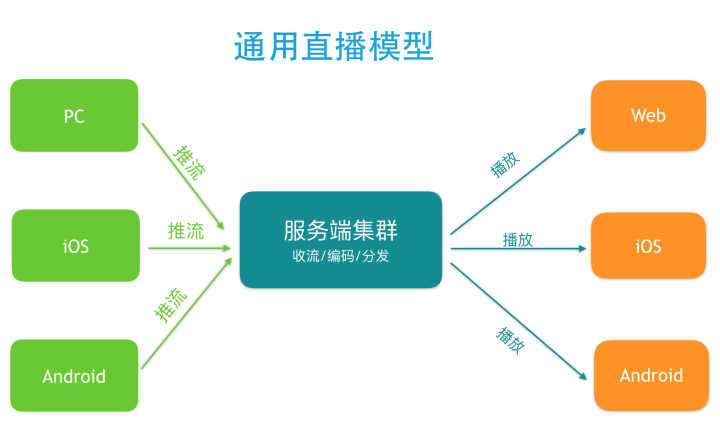
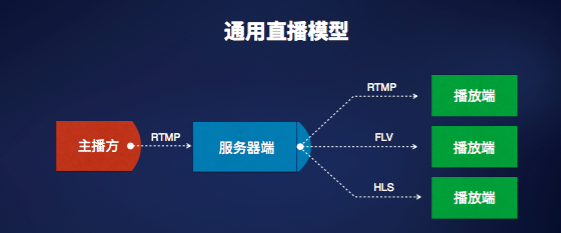
- 首先是主播方,它是产生视频流的源头,由一系列流程组成:第一,通过一定的设备来采集数据;第二,将采集的这些视频进行一系列的处理,比如水印、美颜和特效滤镜等处理;第三,将处理后的结果视频编码压缩成可观看可传输的视频流;第四,分发推流,即将压缩后的视频流通过网络通道传输出去。
- 其次是播放端,播放端功能有两个层面,第一个层面是关键性的需求;另一层面是业务层面的。先看第一个层面,它涉及到一些非常关键的指标,比如秒开,在很多场景当中都有这样的要求,然后是对于一些重要内容的版权保护。为了达到更好的效果,我们还需要配合服务端做智能解析,这在某些场景下也是关键性需求。再来看第二个层面也即业务层面的功能,对于一个社交直播产品来说,在播放端,观众希望能够实时的看到主播端推过来的视频流,并且和主播以及其他观众产生一定的互动,因此它可能包含一些像点赞、聊天和弹幕这样的功能,以及礼物这样更高级的道具。
- 我们知道,内容产生方和消费方一般都不是一一对应的。对于一个直播产品来讲,最直观的体现就是一个主播可能会有很多粉丝。因此,我们不能直接让主播端和所有播放端进行点对点通信,这在技术上是做不到或者很有难度。主播方播出的视频到达播放端之前,需要经过一系列的中间环节,也就是我们这里讲的直播服务器端。
- 直播服务器端提供的最核心功能是收集主播端的视频推流,并将其放大后推送给所有观众端。除了这个核心功能,还有很多运营级别的诉求,比如鉴权认证,视频连线和实时转码,自动鉴黄,多屏合一,以及云端录制存储等功能。另外,对于一个主播端推出的视频流,中间需要经过一些环节才能到达播放端,因此对中间环节的质量进行监控,以及根据这些监控来进行智能调度,也是非常重要的诉求。
- 实际上无论是主播端还是播放端,他们的诉求都不会仅仅是拍摄视频和播放视频这么简单。在这个核心诉求被满足之后,还有很多关键诉求需要被满足。比如,对于一个消费级的直播产品来说,除了这三大模块之外,还需要实现一个业务服务端来进行推流和播放控制,以及所有用户状态的维持。如此,就构成了一个消费级可用的直播产品。
# 第三方 SDK 开发
- 七牛云 (opens new window):七牛直播云是专为直播平台打造的全球化直播流服务和一站式实现 SDK 端到端直播场景的企业级直播云服务平台. ☞ 熊猫 TV, 龙珠 TV 等直播平台都是用的七牛云
- 网易视频云 (opens new window):基于专业的跨平台视频编解码技术和大规模视频内容分发网络,提供稳定流畅、低延时、高并发的实时音视频服务,可将视频直播无缝对接到自身 App.
- 阿里云视频直播解决方案 (opens new window) ☞ 直播推流 SDK (iOS/Android) (opens new window) ☞ 直播播放器 SDK (iOS/Android) (opens new window)
- 欢拓云直播平台:欢拓是一家以直播技术为核心的网络平台,旨在帮助人们通过网络也能实现真实互动通讯。
第三方 SDK 好处
- 降低成本 ☞ 使用好的第三方企业服务,将不用再花费大量的人力物力去研发
- 提升效率 ☞ 第三方服务的专注与代码集成所带来的方便,所花费的时间可能仅仅是 1-2 个小时,节约近 99% 的时间,足够换取更多的时间去和竞争对手斗智斗勇,增加更大的成功可能性
- 降低风险 ☞ 借助专业的第三方服务,由于它的快速、专业、稳定等特点,能够极大地加强产品的竞争能力(优质服务、研发速度等),缩短试错时间,必将是创业中保命的手段之一
- 专业的事,找专业的人来做 ☞ 第三方服务最少是 10-20 人的团队专注地解决同一个问题,做同一件事情。
# 欢拓云直播
根据上面的综合对比和调研,我们最终选择了 “欢拓与直播平台”,它为我们提供了完整的可以直接使用的示例代码,方便我们开发对接。
欢拓是一家以直播技术为核心的网络平台,旨在帮助人们通过网络也能实现真实互动通讯。从 2010 年开始,欢拓就专注于音频、视频的采样、编码、后处理及智能传输研究,并于 2013 年底正式推出了针对企业 / 开发者的直播云服务系统,帮助开发者轻松实现真人互动。该系统适用场景包括在线教育、游戏语音、娱乐互动、远程会议(PC、移动均可)等等。针对应用场景,采用先进技术解决方案和产品形态,让客户和客户的用户满意!
官网:https://www.talk-fun.com/
接口文档地址:http://open.talk-fun.com/docs/getstartV2/document.html
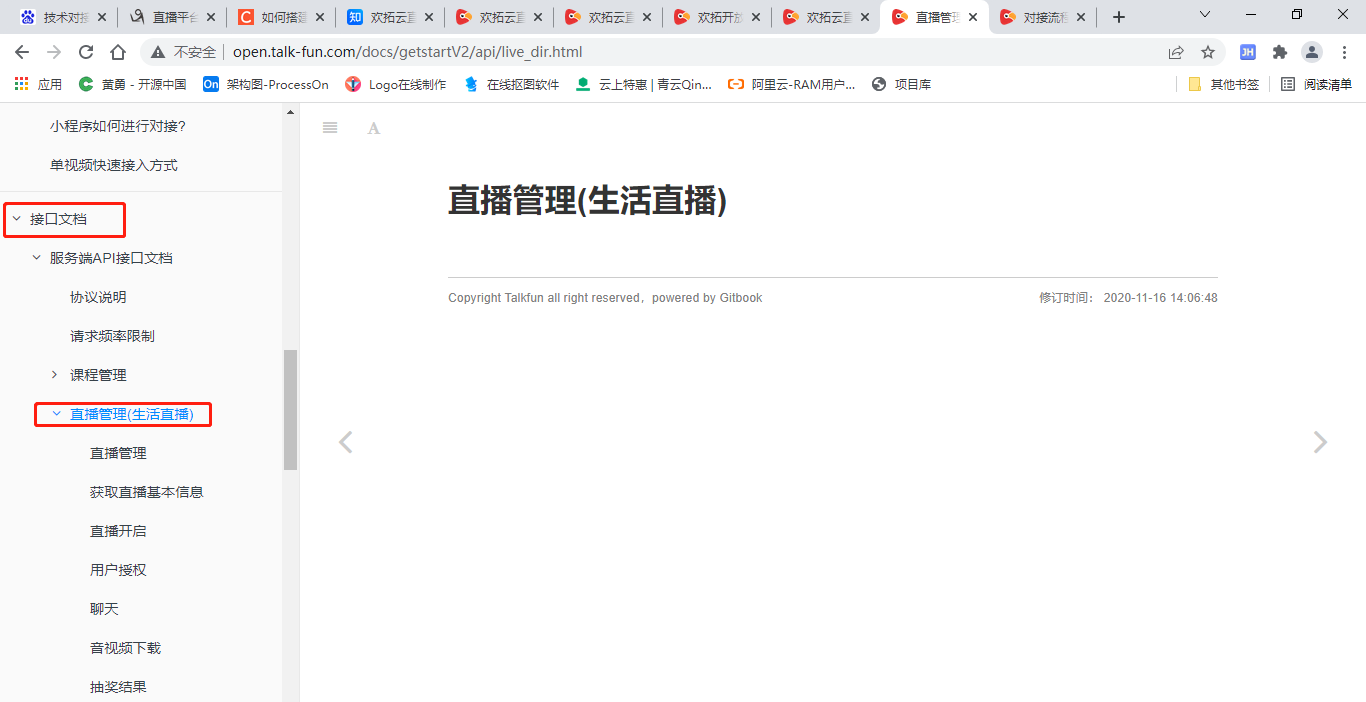
通过官网:https://www.talk-fun.com/,联系客户或 400 电话开通账号,开通 **“生活直播”** 权限。开通后注意使用有效期,一般一周左右,可以再次申请延期。
说明:官网免费试用,功能有限制,不建议使用
在直播管理创建直播
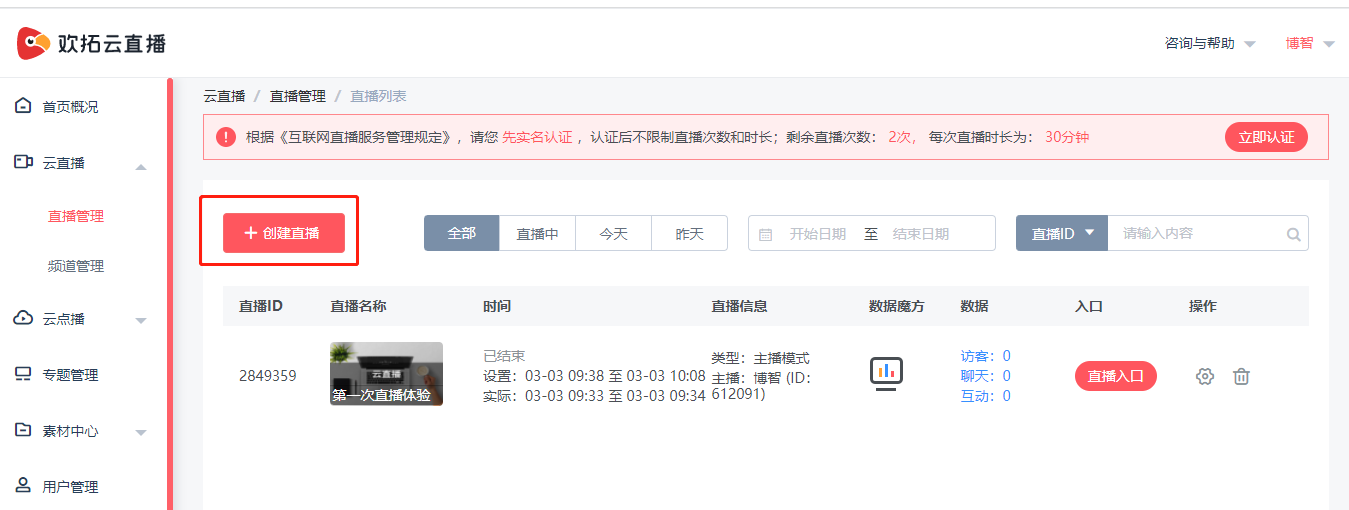
创建直播,选择主播模式
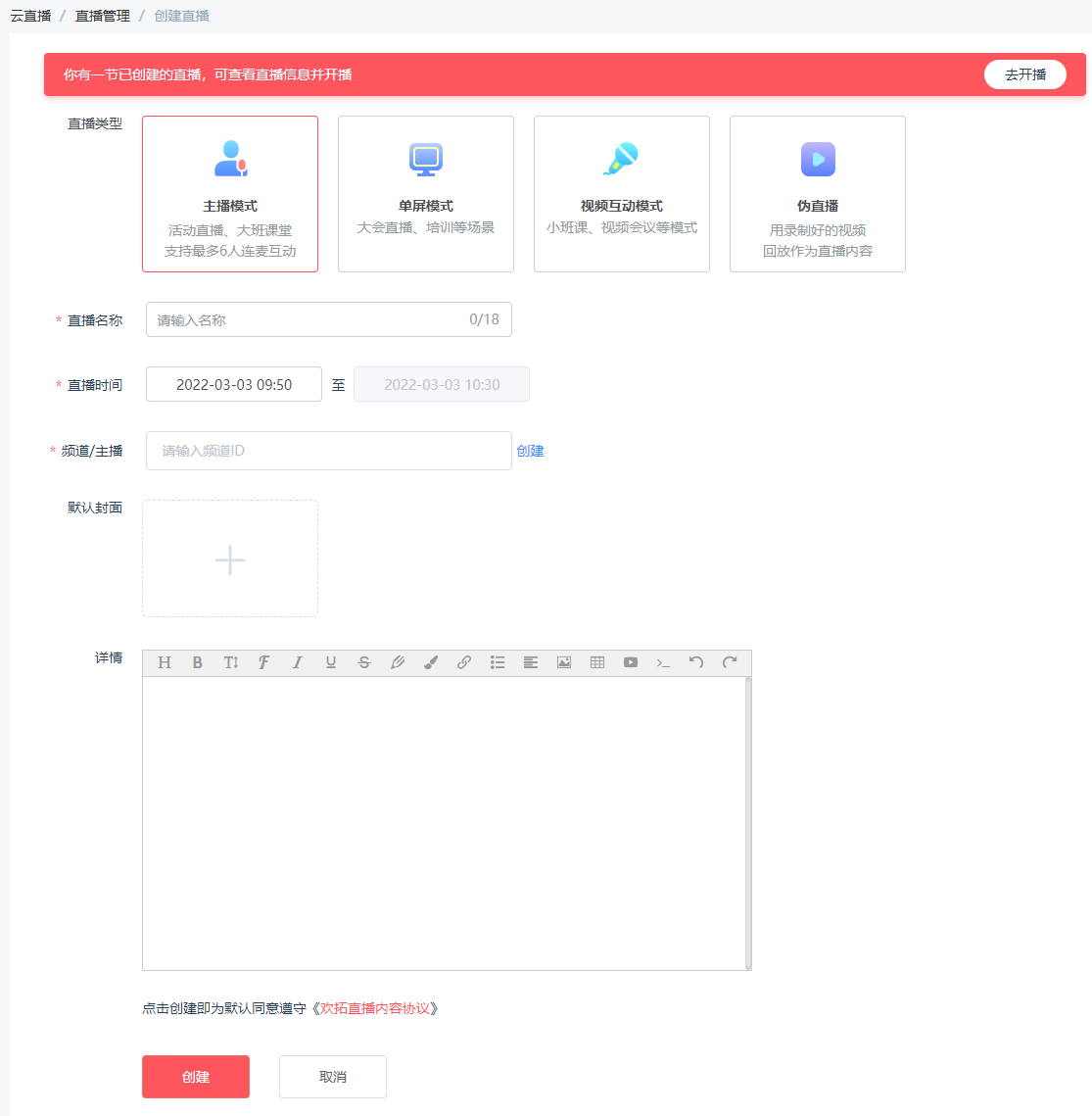
配置直播,可以自行查看
# 后台直播管理
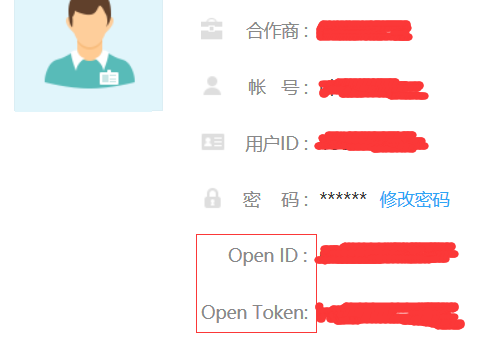
# 获取 openId 与 openToken
登录进入开放后台,后台首页即可获取 openId 与 openToken
# 对接说明
1、使用 HTTP 协议进行信息交互,字符编码统一采用 UTF-8
2、除非特殊说明,接口地址统一为:https://api.talk-fun.com/portal.php
3、除非特殊说明,同时支持 GET 和 POST 两种参数传递方式
4、除非特殊说明,返回信息支持 JSON 格式
5、除了 sign 外,其余所有请求参数值都需要进行 URL 编码
6、参数表中,类型一栏声明的定义为:int 代表整数类型;string 代表字符串类型,如果后面有括号,括号中的数字代表该参数的最大长度;array/object 表示数组类型
7、openID、openToken 参数的获取见 [对接流程说明](
接口文档地址:https://open.talk-fun.com/docs/getstartV2/api/live_dir.html
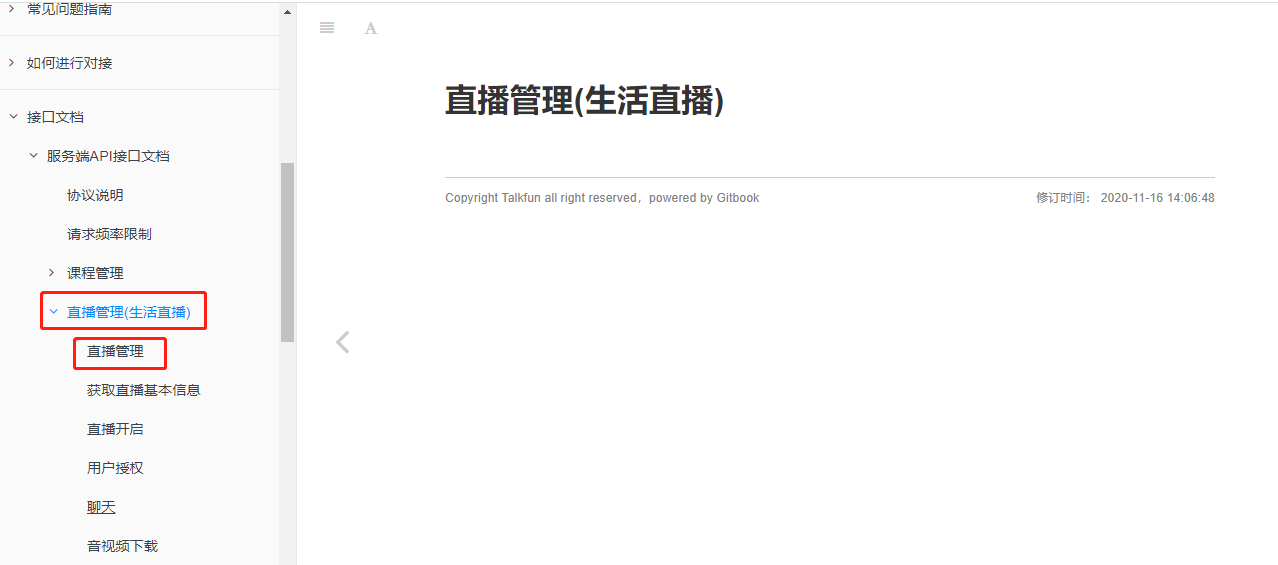
- 添加直播:api 名称:
course.add,SDK 对应方法:courseAdd - 更新直播信息:api 名称:
course.update,SDK 对应方法courseUpdate - 删除直播信息:api 名称:
course.delete,SDK 对应方法:courseDelete - 修改生活直播相关配置:api 名称:
course.updateLifeConfig,SDK 对应方法:updateLifeConfig
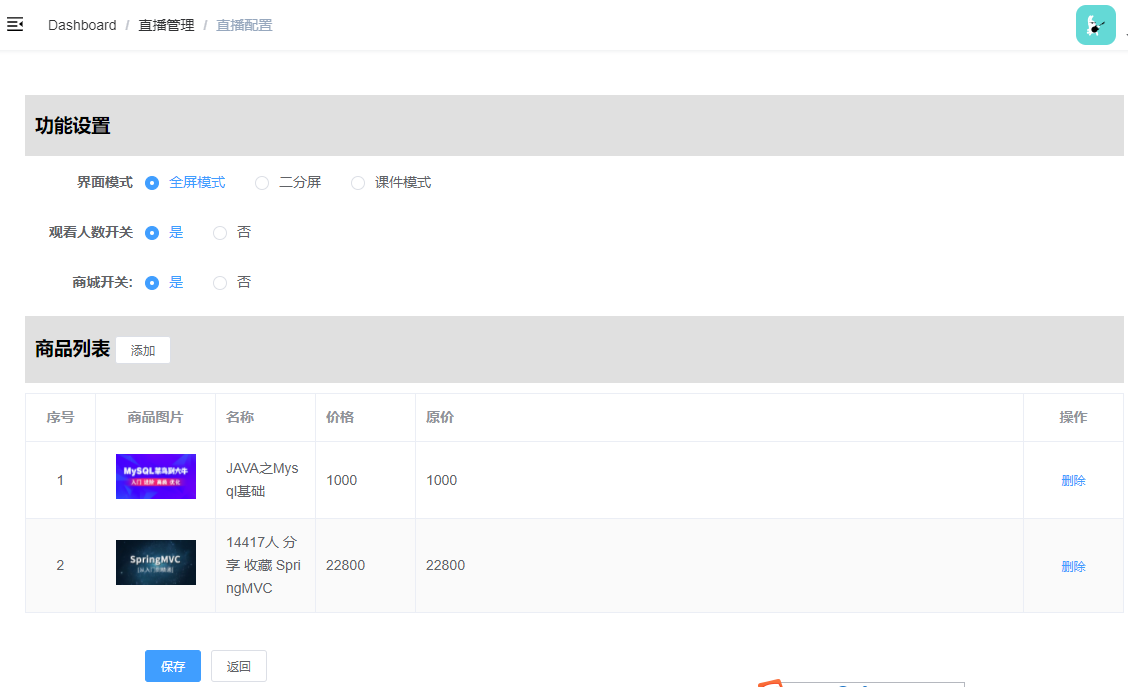
设置功能很多,但是我们只需要几个即可,这个接口我们需要做如下设置:
1. **界面模式**:pageViewMode 界面模式 1全屏模式 0二分屏 2课件模式
1. **观看人数开关**:number 观看人数开关;number.enable 是否开启 观看人数 0否 1是;示例:{"enable":"1"}
1. **商城开关**(直播推荐课程):goodsListEdit 商品列表编辑,状态goodsListEdit.status 0覆盖,1追加,不传默认为0;示例:{"status":1};
按照课程 ID 获取访客列表:
改接口在:"访客 / 管理员列表" 下面
通过该接口统计课程观看人数信息
直播访客 api 名称:
course.visitor.list,SDK 对应方法:courseVisitorList
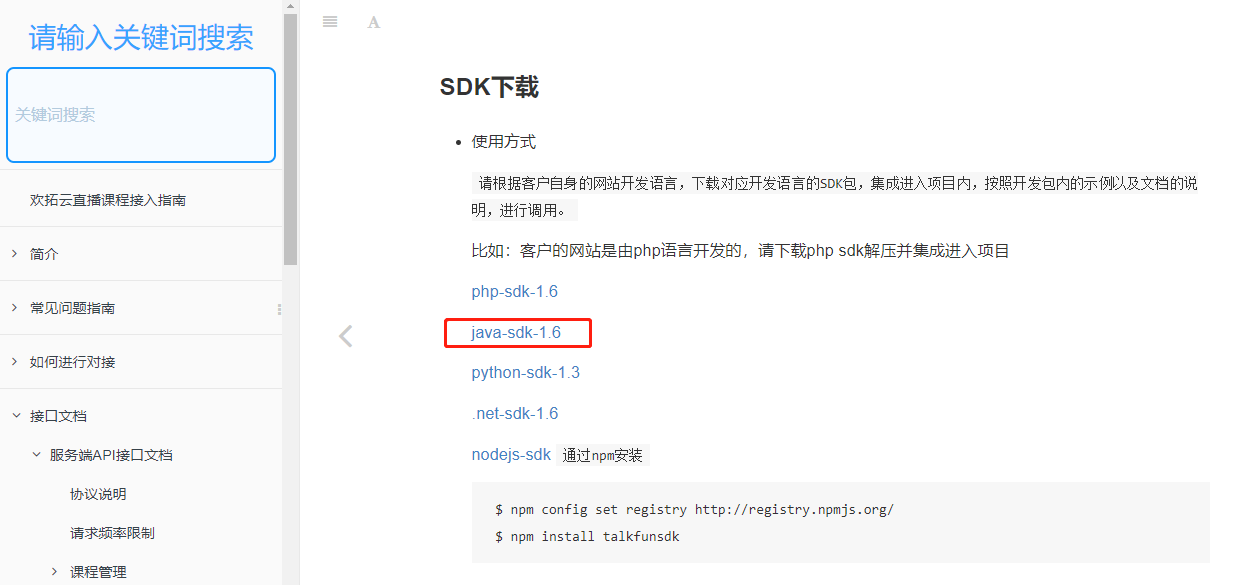
直播平台为我们准备了 SDK,我们直接使用
下载地址:https://open.talk-fun.com/docs/getstartV2/api/introduce/sdkdownload.html
已下载:当前目录 / MTCloud-java-sdk-1.6.zip
# 直播课程列表
创建 service_live 模块
添加直播 SDK 需要的依赖
<!-- 直播  -->
<dependency>
    <groupId>commons-httpclient</groupId>
    <artifactId>commons-httpclient</artifactId>
    <version>3.0.1</version>
</dependency>
<dependency>
    <groupId>net.sf.json-lib</groupId>
    <artifactId>json-lib</artifactId>
    <version>2.4</version>
    <classifier>jdk15</classifier>
</dependency>
2
3
4
5
6
7
8
9
10
11
12
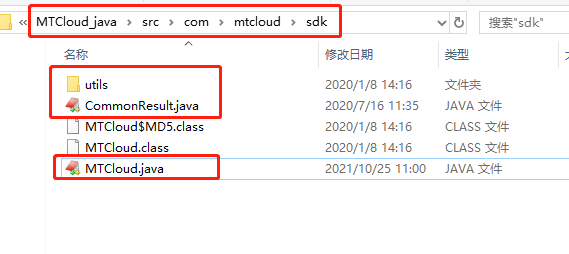
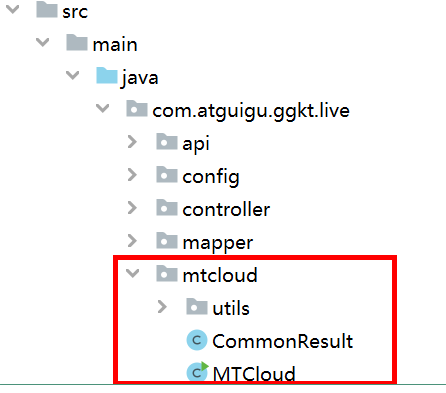
解压 MTCloud-java-sdk-1.6.zip,复制 MTCloud-java-sdk-1.6\MTCloud_java\src\com\mtcloud\sdk 下面的 java 文件到 com.atguigu.ggkt.live.mtcloud 包下,如图
更改 MTCloud 类配置
说明:
1、更改 openID 与 openToken
2、该类官方已经做了接口集成,我们可以直接使用。
public class MTCloud {

    /**
     * 合作方ID: 合作方在欢拓平台的唯一ID
     */
    public String openID = "37013";

    /**
     * 合作方秘钥: 合作方ID对应的参数加密秘钥
     */
    public String openToken = "5cfa64c1be5f479aea8296bb4e2c37d3";

    ...
}
2
3
4
5
6
7
8
9
10
11
12
13
14
application.properties
# 服务端口
server.port=8306
# 服务名
spring.application.name=service-live

# 环境设置:dev、test、prod
spring.profiles.active=dev

# mysql数据库连接
spring.datasource.driver-class-name=com.mysql.jdbc.Driver
spring.datasource.url=jdbc:mysql://localhost:3306/glkt_live?characterEncoding=utf-8&useSSL=false
spring.datasource.username=root
spring.datasource.password=root

#返回json的全局时间格式
spring.jackson.date-format=yyyy-MM-dd HH:mm:ss
spring.jackson.time-zone=GMT+8

#mybatis日志
mybatis-plus.configuration.log-impl=org.apache.ibatis.logging.stdout.StdOutImpl

mybatis-plus.mapper-locations=classpath:com/atguigu/ggkt/live/mapper/xml/*.xml

# nacos服务地址
spring.cloud.nacos.discovery.server-addr=127.0.0.1:8848

mtcloud.openId=43873
mtcloud.openToken=1f3681df876eb31474be8c479b9f1ffe
2
3
4
5
6
7
8
9
10
11
12
13
14
15
16
17
18
19
20
21
22
23
24
25
26
27
28
启动类 ServiceLiveApplication
@SpringBootApplication
@EnableDiscoveryClient
@EnableFeignClients(basePackages = "com.atguigu")
@ComponentScan(basePackages = "com.atguigu")
@MapperScan("com.atguigu.ggkt.live.mapper")
public class ServiceLiveApplication {

    public static void main(String[] args) {
        SpringApplication.run(ServiceLiveApplication.class, args);
    }

}
2
3
4
5
6
7
8
9
10
11
12
生成相关代码
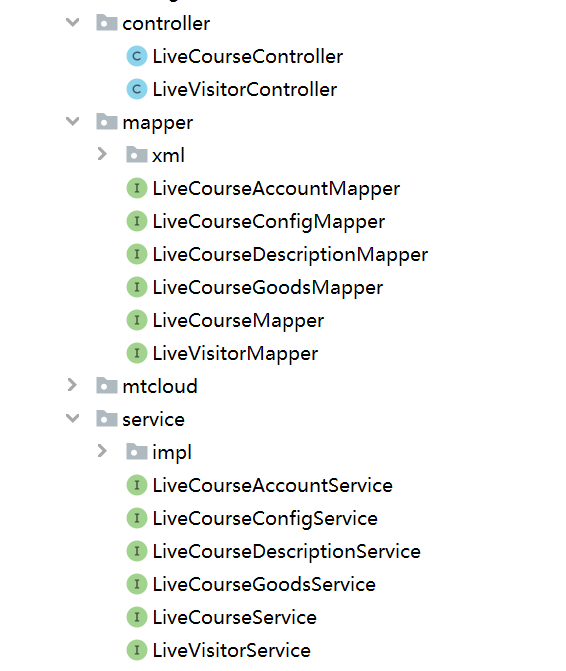
根据直播平台与我们自身业务设计直播相关的业务表,如:glkt_live
LiveCourseController
@RestController
@RequestMapping(value="/admin/live/liveCourse")
public class LiveCourseController {

    @Autowired
    private LiveCourseService liveCourseService;

    @Autowired
    private LiveCourseAccountService liveCourseAccountService;

    @ApiOperation(value = "获取分页列表")
    @GetMapping("{page}/{limit}")
    public Result index(
            @ApiParam(name = "page", value = "当前页码", required = true)
            @PathVariable Long page,
            @ApiParam(name = "limit", value = "每页记录数", required = true)
            @PathVariable Long limit) {
        Page<LiveCourse> pageParam = new Page<>(page, limit);
        IPage<LiveCourse> pageModel = liveCourseService.selectPage(pageParam);
        return Result.ok(pageModel);
    }
}
2
3
4
5
6
7
8
9
10
11
12
13
14
15
16
17
18
19
20
21
22
LiveCourseService
public interface LiveCourseService extends IService<LiveCourse> {
    //直播课程分页查询
    IPage<LiveCourse> selectPage(Page<LiveCourse> pageParam);
}
2
3
4
在 service_vod 模块中的 TecherController 中添加方法
@ApiOperation("根据id查询")
@GetMapping("inner/getTeacher/{id}")
public Teacher getTeacherLive(@PathVariable Long id) {
    Teacher teacher = teacherService.getById(id);
    return teacher;
}
2
3
4
5
6
在 service_course_client 中的 CourseFeignClient 添加远程调用方法
@GetMapping("/admin/vod/teacher/inner/getTeacher/{id}")
Teacher getTeacherLive(@PathVariable Long id);
2
在 service_live 引入依赖
<dependency>
    <groupId>com.atguigu</groupId>
    <artifactId>service_course_client</artifactId>
    <version>0.0.1-SNAPSHOT</version>
</dependency>
2
3
4
5
LiveCourseServiceImpl
@Service
public class LiveCourseServiceImpl extends ServiceImpl<LiveCourseMapper, LiveCourse> implements LiveCourseService {

    @Autowired
    private CourseFeignClient courseFeignClient;

    //直播课程分页查询
    @Override
    public IPage<LiveCourse> selectPage(Page<LiveCourse> pageParam) {
        IPage<LiveCourse> page = baseMapper.selectPage(pageParam, null);
        List<LiveCourse> liveCourseList = page.getRecords();

        for(LiveCourse liveCourse : liveCourseList) {
            Teacher teacher = courseFeignClient.getTeacherLive(liveCourse.getTeacherId());
            liveCourse.getParam().put("teacherName", teacher.getName());
            liveCourse.getParam().put("teacherLevel", teacher.getLevel());
        }
        return page;
    }
}
2
3
4
5
6
7
8
9
10
11
12
13
14
15
16
17
18
19
20
直播课程添加
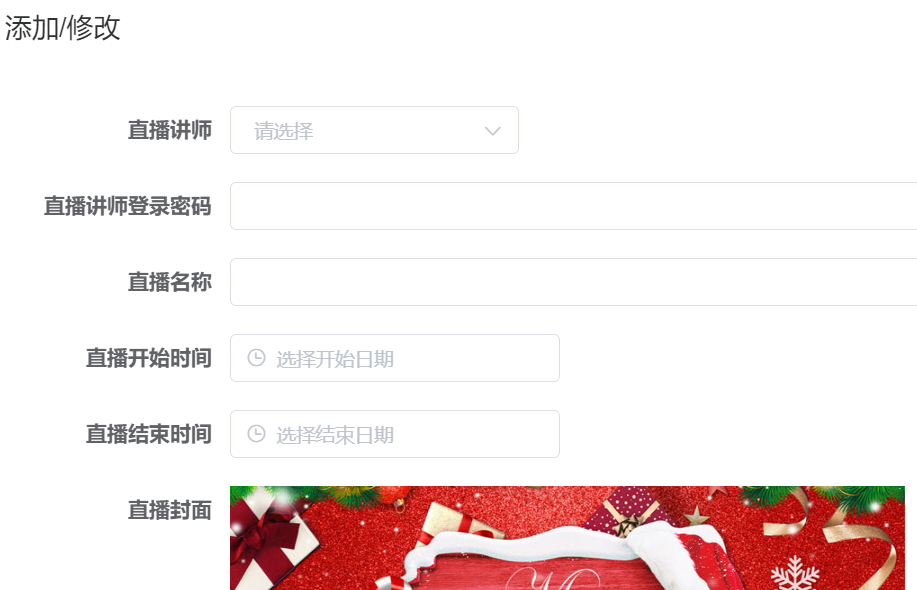
添加工具类 MTCloudAccountConfig
@Data
@Component
@ConfigurationProperties(prefix = "mtcloud")
public class MTCloudAccountConfig {

    private String openId;
    private String openToken;

}
2
3
4
5
6
7
8
9
MTCloudConfig
@Component
public class MTCloudConfig {

    @Autowired
    private MTCloudAccountConfig mtCloudAccountConfig;

    @Bean
    public MTCloud mtCloudClient(){
        return new MTCloud(mtCloudAccountConfig.getOpenId(), mtCloudAccountConfig.getOpenToken());
    }
}
2
3
4
5
6
7
8
9
10
11
LiveCourseController
@ApiOperation(value = "新增")
@PostMapping("save")
public Result save(@RequestBody LiveCourseFormVo liveCourseVo) {
    liveCourseService.save(liveCourseVo);
    return Result.ok(null);
}
2
3
4
5
6
LiveCourseService
Boolean save(LiveCourseFormVo liveCourseVo);
LiveCourseServiceImpl
@Resource
private LiveCourseAccountService liveCourseAccountService;

@Resource
private LiveCourseDescriptionService liveCourseDescriptionService;

@Autowired
private CourseFeignClient teacherFeignClient;

@Resource
private MTCloud mtCloudClient;
@SneakyThrows
@Transactional(rollbackFor = {Exception.class})
@Override
public Boolean save(LiveCourseFormVo liveCourseFormVo) {
    LiveCourse liveCourse = new LiveCourse();
    BeanUtils.copyProperties(liveCourseFormVo, liveCourse);

    Teacher teacher = teacherFeignClient.getTeacherLive(liveCourseFormVo.getTeacherId());
    HashMap<Object, Object> options = new HashMap<>();
    options.put("scenes", 2);//直播类型。1: 教育直播,2: 生活直播。默认 1,说明:根据平台开通的直播类型填写
    options.put("password", liveCourseFormVo.getPassword());
    String res = mtCloudClient.courseAdd(liveCourse.getCourseName(), teacher.getId().toString(), new DateTime(liveCourse.getStartTime()).toString("yyyy-MM-dd HH:mm:ss"), new DateTime(liveCourse.getEndTime()).toString("yyyy-MM-dd HH:mm:ss"), teacher.getName(), teacher.getIntro(), options);

    System.out.println("return:: "+res);
    CommonResult<JSONObject> commonResult = JSON.parseObject(res, CommonResult.class);
    if(Integer.parseInt(commonResult.getCode()) == MTCloud.CODE_SUCCESS) {
        JSONObject object = commonResult.getData();
        liveCourse.setCourseId(object.getLong("course_id"));
        baseMapper.insert(liveCourse);

        //保存课程详情信息
        LiveCourseDescription liveCourseDescription = new LiveCourseDescription();
        liveCourseDescription.setDescription(liveCourseFormVo.getDescription());
        liveCourseDescription.setLiveCourseId(liveCourse.getId());
        liveCourseDescriptionService.save(liveCourseDescription);

        //保存课程账号信息
        LiveCourseAccount liveCourseAccount = new LiveCourseAccount();
        liveCourseAccount.setLiveCourseId(liveCourse.getId());
        liveCourseAccount.setZhuboAccount(object.getString("bid"));
        liveCourseAccount.setZhuboPassword(liveCourseFormVo.getPassword());
        liveCourseAccount.setAdminKey(object.getString("admin_key"));
        liveCourseAccount.setUserKey(object.getString("user_key"));
        liveCourseAccount.setZhuboKey(object.getString("zhubo_key"));
        liveCourseAccountService.save(liveCourseAccount);
    } else {
        String getmsg = commonResult.getmsg();
        throw new GlktException(20001,getmsg);
    }
    return true;
}
2
3
4
5
6
7
8
9
10
11
12
13
14
15
16
17
18
19
20
21
22
23
24
25
26
27
28
29
30
31
32
33
34
35
36
37
38
39
40
41
42
43
44
45
46
47
48
49
50
51
52
直播课程删除
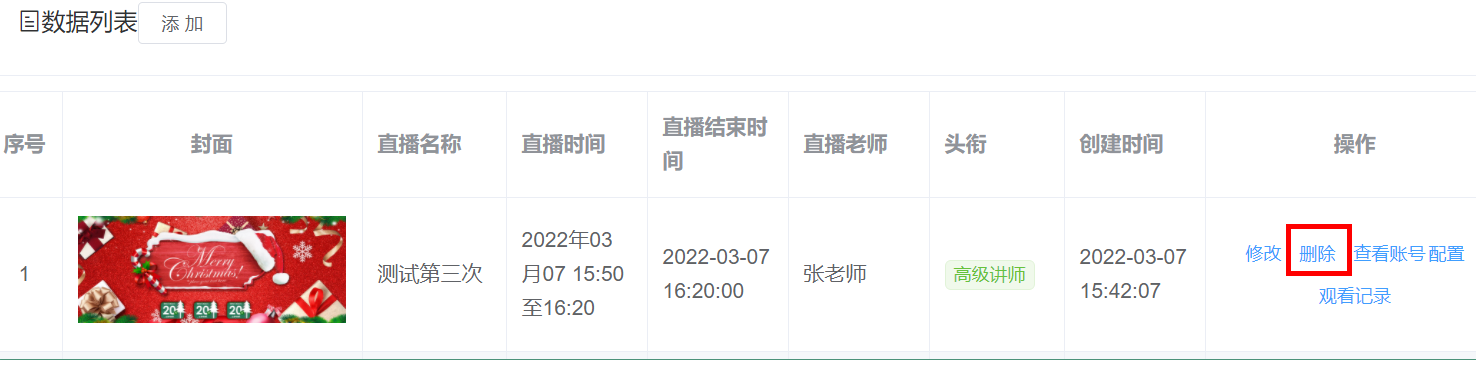
LiveCourseController
@ApiOperation(value = "删除")
@DeleteMapping("remove/{id}")
public Result remove(@PathVariable Long id) {
    liveCourseService.removeLive(id);
    return Result.ok(null);
}
2
3
4
5
6
LiveCourseService
//删除直播课程
void removeLive(Long id);
2
LiveCourseServiceImpl
//删除直播课程
@Override
public void removeLive(Long id) {
    //根据id查询直播课程信息
    LiveCourse liveCourse = baseMapper.selectById(id);
    if(liveCourse != null) {
        //获取直播courseid
        Long courseId = liveCourse.getCourseId();
        try {
            //调用方法删除平台直播课程
            mtCloudClient.courseDelete(courseId.toString());
            //删除表数据
            baseMapper.deleteById(id);
        } catch (Exception e) {
            e.printStackTrace();
            throw new GgktException(20001,"删除直播课程失败");
        }
    }
}
2
3
4
5
6
7
8
9
10
11
12
13
14
15
16
17
18
19
直播课程修改
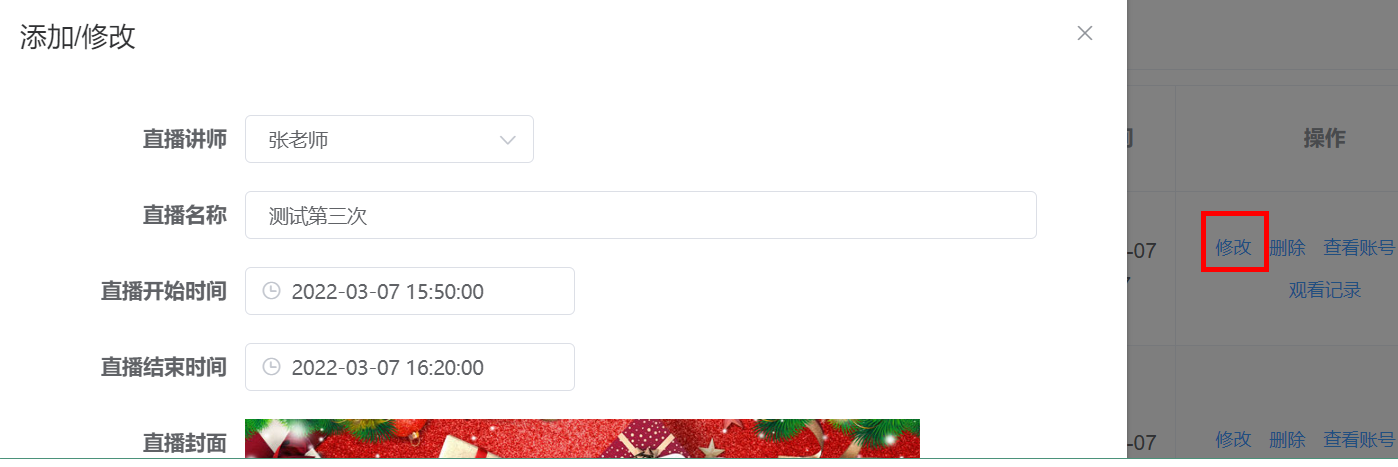
LiveCourseController
@ApiOperation(value = "获取")
@GetMapping("get/{id}")
public Result<LiveCourse> get(@PathVariable Long id) {
    LiveCourse liveCourse = liveCourseService.getById(id);
    return Result.ok(liveCourse);
}

@ApiOperation(value = "获取")
@GetMapping("getInfo/{id}")
public Result<LiveCourseFormVo> getInfo(@PathVariable Long id) {
    return Result.ok(liveCourseService.getLiveCourseFormVo(id));
}

@ApiOperation(value = "修改")
@PutMapping("update")
public Result updateById(@RequestBody LiveCourseFormVo liveCourseVo) {
    liveCourseService.updateById(liveCourseVo);
    return Result.ok(null);
}
2
3
4
5
6
7
8
9
10
11
12
13
14
15
16
17
18
19
LiveCourseService
//修改
void updateById(LiveCourseFormVo liveCourseVo);

//获取
LiveCourseFormVo getLiveCourseFormVo(Long id);
2
3
4
5
LiveCourseServiceImpl
@Resource
private LiveCourseAccountService liveCourseAccountService;

@Resource
private LiveCourseDescriptionService liveCourseDescriptionService;

@Autowired
private CourseFeignClient teacherFeignClient;

@Resource
private MTCloud mtCloudClient;

//更新
@Override
public void updateLiveById(LiveCourseFormVo liveCourseFormVo) {
    //根据id获取直播课程基本信息
    LiveCourse liveCourse = baseMapper.selectById(liveCourseFormVo.getId());
    BeanUtils.copyProperties(liveCourseFormVo,liveCourse);
    //讲师
    Teacher teacher =
            teacherFeignClient.getTeacherInfo(liveCourseFormVo.getTeacherId());

//             *   course_id 课程ID
//     *   account 发起直播课程的主播账号
//     *   course_name 课程名称
//     *   start_time 课程开始时间,格式:2015-01-01 12:00:00
//                *   end_time 课程结束时间,格式:2015-01-01 13:00:00
//                *   nickname 	主播的昵称
//                *   accountIntro 	主播的简介
//                *  options 		可选参数
    HashMap<Object, Object> options = new HashMap<>();
    try {
        String res = mtCloudClient.courseUpdate(liveCourse.getCourseId().toString(),
                teacher.getId().toString(),
                liveCourse.getCourseName(),
                new DateTime(liveCourse.getStartTime()).toString("yyyy-MM-dd HH:mm:ss"),
                new DateTime(liveCourse.getEndTime()).toString("yyyy-MM-dd HH:mm:ss"),
                teacher.getName(),
                teacher.getIntro(),
                options);
        //返回结果转换,判断是否成功
        CommonResult<JSONObject> commonResult = JSON.parseObject(res, CommonResult.class);
        if(Integer.parseInt(commonResult.getCode()) == MTCloud.CODE_SUCCESS) {
            JSONObject object = commonResult.getData();
            //更新直播课程基本信息
            liveCourse.setCourseId(object.getLong("course_id"));
            baseMapper.updateById(liveCourse);
            //直播课程描述信息更新
            LiveCourseDescription liveCourseDescription =
                    liveCourseDescriptionService.getLiveCourseById(liveCourse.getId());
            liveCourseDescription.setDescription(liveCourseFormVo.getDescription());
            liveCourseDescriptionService.updateById(liveCourseDescription);
        } else {
            throw new GgktException(20001,"修改直播课程失败");
        }
    } catch (Exception e) {
        e.printStackTrace();
    }
}

@Override
public LiveCourseFormVo getLiveCourseFormVo(Long id) {
    LiveCourse liveCourse = this.getById(id);
    LiveCourseDescription liveCourseDescription = liveCourseDescriptionService.getByLiveCourseId(id);

    LiveCourseFormVo liveCourseFormVo = new LiveCourseFormVo();
    BeanUtils.copyProperties(liveCourse, liveCourseFormVo);
    liveCourseFormVo.setDescription(liveCourseDescription.getDescription());
    return liveCourseFormVo;
}
2
3
4
5
6
7
8
9
10
11
12
13
14
15
16
17
18
19
20
21
22
23
24
25
26
27
28
29
30
31
32
33
34
35
36
37
38
39
40
41
42
43
44
45
46
47
48
49
50
51
52
53
54
55
56
57
58
59
60
61
62
63
64
65
66
67
68
69
70
LiveCourseDescriptionService
public interface LiveCourseDescriptionService extends IService<LiveCourseDescription> {
    LiveCourseDescription getByLiveCourseId(Long liveCourseId);
}
2
3
LiveCourseDescriptionServiceImpl
@Service
public class LiveCourseDescriptionServiceImpl extends ServiceImpl<LiveCourseDescriptionMapper, LiveCourseDescription> implements LiveCourseDescriptionService {

    @Override
    public LiveCourseDescription getByLiveCourseId(Long liveCourseId) {
        return this.getOne(new LambdaQueryWrapper<LiveCourseDescription>().eq(LiveCourseDescription::getLiveCourseId, liveCourseId));
    }
}
2
3
4
5
6
7
8
查看账号

LiveCourseController
@Autowired
private LiveCourseAccountService liveCourseAccountService;

@ApiOperation(value = "获取")
@GetMapping("getLiveCourseAccount/{id}")
public Result<LiveCourseAccount> getLiveCourseAccount(@PathVariable Long id) {
    return Result.ok(liveCourseAccountService.getByLiveCourseId(id));
}
2
3
4
5
6
7
8
LiveCourseAccountService
public interface LiveCourseAccountService extends IService<LiveCourseAccount> {
    LiveCourseAccount getByLiveCourseId(Long liveCourseId);
}
2
3
LiveCourseAccountServiceImpl
@Service
public class LiveCourseAccountServiceImpl extends ServiceImpl<LiveCourseAccountMapper, LiveCourseAccount> implements LiveCourseAccountService {

    @Override
    public LiveCourseAccount getByLiveCourseId(Long liveCourseId) {
        return baseMapper.selectOne(new LambdaQueryWrapper<LiveCourseAccount>().eq(LiveCourseAccount::getLiveCourseId, liveCourseId));
    }
}
2
3
4
5
6
7
8
配置和观看记录

LiveCourseController
@ApiOperation(value = "获取")
@GetMapping("getCourseConfig/{id}")
public Result getCourseConfig(@PathVariable Long id) {
    return Result.ok(liveCourseService.getCourseConfig(id));
}
2
3
4
5
LiveCourseService
//获取配置
LiveCourseConfigVo getCourseConfig(Long id);
2
LiveCourseServiceImpl
@Autowired
private LiveCourseConfigService liveCourseConfigService;

@Autowired
private LiveCourseGoodsService liveCourseGoodsService;

@Override
public LiveCourseConfigVo getCourseConfig(Long id) {
    LiveCourseConfigVo liveCourseConfigVo = new LiveCourseConfigVo();
    LiveCourseConfig liveCourseConfig = liveCourseConfigService.getByLiveCourseId(id);
    if(null != liveCourseConfig) {
        List<LiveCourseGoods> liveCourseGoodsList = liveCourseGoodsService.findByLiveCourseId(id);
        BeanUtils.copyProperties(liveCourseConfig, liveCourseConfigVo);
        liveCourseConfigVo.setLiveCourseGoodsList(liveCourseGoodsList);
    }
    return liveCourseConfigVo;
}
2
3
4
5
6
7
8
9
10
11
12
13
14
15
16
17
LiveCourseConfigService
public interface LiveCourseConfigService extends IService<LiveCourseConfig> {
    //查看配置信息
    LiveCourseConfig getByLiveCourseId(Long id);
}
2
3
4
LiveCourseConfigServiceImpl
@Service
public class LiveCourseConfigServiceImpl extends ServiceImpl<LiveCourseConfigMapper, LiveCourseConfig> implements LiveCourseConfigService {

    //查看配置信息
    @Override
    public LiveCourseConfig getByLiveCourseId(Long liveCourseId) {
        return baseMapper.selectOne(new LambdaQueryWrapper<LiveCourseConfig>().eq(
                LiveCourseConfig::getLiveCourseId,
                liveCourseId));
    }
}
2
3
4
5
6
7
8
9
10
11
LiveCourseGoodsService
public interface LiveCourseGoodsService extends IService<LiveCourseGoods> {
    //获取课程商品列表
    List<LiveCourseGoods> findByLiveCourseId(Long id);
}
2
3
4
LiveCourseGoodsServiceImpl
@Service
public class LiveCourseGoodsServiceImpl extends ServiceImpl<LiveCourseGoodsMapper, LiveCourseGoods> implements LiveCourseGoodsService {

    //获取课程商品列表
    @Override
    public List<LiveCourseGoods> findByLiveCourseId(Long liveCourseId) {
        return baseMapper.selectList(new LambdaQueryWrapper<LiveCourseGoods>()
                .eq(LiveCourseGoods::getLiveCourseId, liveCourseId));
    }
}
2
3
4
5
6
7
8
9
10
修改直播配置信息
LiveCourseController
@ApiOperation(value = "修改配置")
@PutMapping("updateConfig")
public Result updateConfig(@RequestBody LiveCourseConfigVo liveCourseConfigVo) {
    liveCourseService.updateConfig(liveCourseConfigVo);
    return Result.ok(null);
}
2
3
4
5
6
LiveCourseService
//修改配置
void updateConfig(LiveCourseConfigVo liveCourseConfigVo);
2
LiveCourseServiceImpl
@Override
public void updateConfig(LiveCourseConfigVo liveCourseConfigVo) {
    LiveCourseConfig liveCourseConfigUpt = new LiveCourseConfig();
    BeanUtils.copyProperties(liveCourseConfigVo, liveCourseConfigUpt);
    if(null == liveCourseConfigVo.getId()) {
        liveCourseConfigService.save(liveCourseConfigUpt);
    } else {
        liveCourseConfigService.updateById(liveCourseConfigUpt);
    }
    liveCourseGoodsService.remove(new LambdaQueryWrapper<LiveCourseGoods>().eq(LiveCourseGoods::getLiveCourseId, liveCourseConfigVo.getLiveCourseId()));
    if(!CollectionUtils.isEmpty(liveCourseConfigVo.getLiveCourseGoodsList())) {
        liveCourseGoodsService.saveBatch(liveCourseConfigVo.getLiveCourseGoodsList());
    }
    this.updateLifeConfig(liveCourseConfigVo);
}
/**
 * 上传直播配置
 * @param liveCourseConfigVo
 */
@SneakyThrows
private void updateLifeConfig(LiveCourseConfigVo liveCourseConfigVo) {
    LiveCourse liveCourse = this.getById(liveCourseConfigVo.getLiveCourseId());

    //参数设置
    HashMap<Object,Object> options = new HashMap<Object, Object>();
    //界面模式
    options.put("pageViewMode", liveCourseConfigVo.getPageViewMode());
    //观看人数开关
    JSONObject number = new JSONObject();
    number.put("enable", liveCourseConfigVo.getNumberEnable());
    options.put("number", number.toJSONString());
    //观看人数开关
    JSONObject store = new JSONObject();
    number.put("enable", liveCourseConfigVo.getStoreEnable());
    number.put("type", liveCourseConfigVo.getStoreType());
    options.put("store", number.toJSONString());
    //商城列表
    List<LiveCourseGoods> liveCourseGoodsList = liveCourseConfigVo.getLiveCourseGoodsList();
    if(!CollectionUtils.isEmpty(liveCourseGoodsList)) {
        List<LiveCourseGoodsView> liveCourseGoodsViewList = new ArrayList<>();
        for(LiveCourseGoods liveCourseGoods : liveCourseGoodsList) {
            LiveCourseGoodsView liveCourseGoodsView = new LiveCourseGoodsView();
            BeanUtils.copyProperties(liveCourseGoods, liveCourseGoodsView);
            liveCourseGoodsViewList.add(liveCourseGoodsView);
        }
        JSONObject goodsListEdit = new JSONObject();
        goodsListEdit.put("status", "0");
        options.put("goodsListEdit ", goodsListEdit.toJSONString());
        options.put("goodsList", JSON.toJSONString(liveCourseGoodsViewList));
    }

    String res = mtCloudClient.courseUpdateLifeConfig(liveCourse.getCourseId().toString(), options);

    CommonResult<JSONObject> commonResult = JSON.parseObject(res, CommonResult.class);
    if(Integer.parseInt(commonResult.getCode()) != MTCloud.CODE_SUCCESS) {
        throw new GgktException(20001,"修改配置信息失败");
    }
}
2
3
4
5
6
7
8
9
10
11
12
13
14
15
16
17
18
19
20
21
22
23
24
25
26
27
28
29
30
31
32
33
34
35
36
37
38
39
40
41
42
43
44
45
46
47
48
49
50
51
52
53
54
55
56
57
58
获取最近直播课程
LiveCourseController
@ApiOperation(value = "获取最近的直播")
@GetMapping("findLatelyList")
public Result findLatelyList() {
    return Result.ok(liveCourseService.findLatelyList());
}
2
3
4
5
LiveCourseService
//获取最近的直播
List<LiveCourseVo> findLatelyList();
2
LiveCourseServiceImpl
@Override
public List<LiveCourseVo> findLatelyList() {
    List<LiveCourseVo> liveCourseVoList = baseMapper.findLatelyList();

    for(LiveCourseVo liveCourseVo : liveCourseVoList) {
        liveCourseVo.setStartTimeString(new DateTime(liveCourseVo.getStartTime()).toString("yyyy年MM月dd HH:mm"));
        liveCourseVo.setEndTimeString(new DateTime(liveCourseVo.getEndTime()).toString("HH:mm"));

        Long teacherId = liveCourseVo.getTeacherId();
        Teacher teacher = teacherFeignClient.getTeacherInfo(teacherId);
        liveCourseVo.setTeacher(teacher);

        liveCourseVo.setLiveStatus(this.getLiveStatus(liveCourseVo));
    }
    return liveCourseVoList;
}

/**
 * 直播状态 0:未开始 1:直播中 2:直播结束
 * @param liveCourse
 * @return
 */
private int getLiveStatus(LiveCourse liveCourse) {
    // 直播状态 0:未开始 1:直播中 2:直播结束
    int liveStatus = 0;
    Date curTime = new Date();
    if(DateUtil.dateCompare(curTime, liveCourse.getStartTime())) {
        liveStatus = 0;
    } else if(DateUtil.dateCompare(curTime, liveCourse.getEndTime())) {
        liveStatus = 1;
    } else {
        liveStatus = 2;
    }
    return liveStatus;
}
2
3
4
5
6
7
8
9
10
11
12
13
14
15
16
17
18
19
20
21
22
23
24
25
26
27
28
29
30
31
32
33
34
35
LiveCourseMapper
public interface LiveCourseMapper extends BaseMapper<LiveCourse> {
    //获取最近直播
    List<LiveCourseVo> findLatelyList();
}
2
3
4
LiveCourseMapper.xml
<?xml version="1.0" encoding="UTF-8"?>
<!DOCTYPE mapper PUBLIC "-//mybatis.org//DTD Mapper 3.0//EN" "http://mybatis.org/dtd/mybatis-3-mapper.dtd">
<mapper namespace="com.atguigu.ggkt.live.mapper.LiveCourseMapper">
    <resultMap id="liveCourseMap" type="com.atguigu.ggkt.vo.live.LiveCourseVo" autoMapping="true">
    </resultMap>

    <!-- 用于select查询公用抽取的列 -->
    <sql id="columns">
id,course_id,course_name,start_time,end_time,teacher_id,cover,create_time,update_time,is_deleted
	</sql>

    <select id="findLatelyList" resultMap="liveCourseMap">
        select <include refid="columns" />
        from live_course
        where date(start_time) >= curdate()
        order by id asc
        limit 5
    </select>
</mapper>
2
3
4
5
6
7
8
9
10
11
12
13
14
15
16
17
18
19
# 直播课程管理前端
在 service_vod 模块中的 CourseController 添加方法
@GetMapping("findAll")
public Result findAll() {
    List<Course> list = courseService.findlist();
    return Result.ok(list);
}
2
3
4
5
CourseService
@Override
public List<Course> findlist() {
    List<Course> list = baseMapper.selectList(null);
    list.stream().forEach(item -> {
        this.getTeacherAndSubjectName(item);
    });
    return list;
}
2
3
4
5
6
7
8
添加 vue 路由表 /router/index.js
{
  path: '/live',
  component: Layout,
  redirect: '/live/liveCourse/list',
  name: 'Live',
  meta: {
    title: '直播管理',
    icon: 'el-icon-bangzhu'
  },
  alwaysShow: true,
  children: [
    {
      path: 'liveCourse/list',
      name: 'liveCourseList',
      component: () => import('@/views/live/liveCourse/list'),
      meta: { title: '直播列表' }
    },
    {
      path: 'liveCourse/config/:id',
      name: 'liveCourseConfig',
      component: () => import('@/views/live/liveCourse/config'),
      meta: { title: '直播配置' },
      hidden: true
    },
    {
      path: 'liveVisitor/list/:id',
      name: 'liveVisitor',
      component: () => import('@/views/live/liveVisitor/list'),
      meta: { title: '观看记录' },
      hidden: true
    }
  ]
},
2
3
4
5
6
7
8
9
10
11
12
13
14
15
16
17
18
19
20
21
22
23
24
25
26
27
28
29
30
31
32
33
定义调用接口 /src/api/live/liveCourse.js
import request from '@/utils/request'

const api_name = '/admin/live/liveCourse'

export default {

  getPageList(page, limit) {
    return request({
      url: `${api_name}/${page}/${limit}`,
      method: 'get'
    })
  },

  findLatelyList() {
    return request({
      url: `${api_name}/findLatelyList`,
      method: 'get'
    })
  },

  getById(id) {
    return request({
      url: `${api_name}/getInfo/${id}`,
      method: 'get'
    })
  },

  getLiveCourseAccount(id) {
    return request({
      url: `${api_name}/getLiveCourseAccount/${id}`,
      method: 'get'
    })
  },

  save(liveCourse) {
    return request({
      url: `${api_name}/save`,
      method: 'post',
      data: liveCourse
    })
  },

  updateById(liveCourse) {
    return request({
      url: `${api_name}/update`,
      method: 'put',
      data: liveCourse
    })
  },
  removeById(id) {
    return request({
      url: `${api_name}/remove/${id}`,
      method: 'delete'
    })
  },
  removeRows(idList) {
    return request({
      url: `${api_name}/batchRemove`,
      method: 'delete',
      data: idList
    })
  },

  getCourseConfig(id) {
    return request({
      url: `${api_name}/getCourseConfig/${id}`,
      method: 'get'
    })
  },

  updateConfig(liveCourseConfigVo) {
    return request({
      url: `${api_name}/updateConfig`,
      method: 'put',
      data: liveCourseConfigVo
    })
  },
}
2
3
4
5
6
7
8
9
10
11
12
13
14
15
16
17
18
19
20
21
22
23
24
25
26
27
28
29
30
31
32
33
34
35
36
37
38
39
40
41
42
43
44
45
46
47
48
49
50
51
52
53
54
55
56
57
58
59
60
61
62
63
64
65
66
67
68
69
70
71
72
73
74
75
76
77
78
在 /src/api/vod/course.js 添加 api 请求
findAll() {
  return request({
    url: `${api_name}/findAll`,
    method: 'get'
  })
},
2
3
4
5
6
创建直播页面 /views/live/liveCourse/list.vue
<template>
  <div class="app-container">

    <!-- 工具条 -->
    <el-card class="operate-container" shadow="never">
      <i class="el-icon-tickets" style="margin-top: 5px"></i>
      <span style="margin-top: 5px">数据列表</span>
      <el-button class="btn-add" size="mini" @click="add">添 加</el-button>
    </el-card>

    <!-- banner列表 -->
    <el-table
      v-loading="listLoading"
      :data="list"
      stripe
      border
      style="width: 100%;margin-top: 10px;">

      <el-table-column
        label="序号"
        width="50"
        align="center">
        <template slot-scope="scope">
          {{ (page - 1) * limit + scope.$index + 1 }}
        </template>
      </el-table-column>
      <el-table-column label="封面" width="200" align="center">
        <template slot-scope="scope">
          <img :src="scope.row.cover" width="100%">
        </template>
      </el-table-column>
      <el-table-column prop="courseName" label="直播名称" />
      <el-table-column prop="startTime" label="直播时间">
        <template slot-scope="scope">
          {{ scope.row.param.startTimeString }}至{{ scope.row.param.endTimeString }}
        </template>
      </el-table-column>
      <el-table-column prop="endTime" label="直播结束时间" />
      <el-table-column prop="param.teacherName" label="直播老师" />
      <el-table-column label="头衔" width="90">
        <template slot-scope="scope">
          <el-tag v-if="scope.row.param.teacherLevel === 1" type="success" size="mini">高级讲师</el-tag>
          <el-tag v-if="scope.row.param.teacherLevel === 0" size="mini">首席讲师</el-tag>
        </template>
      </el-table-column>
      <el-table-column prop="createTime" label="创建时间" />

      <el-table-column label="操作" width="200" align="center">
        <template slot-scope="scope">
          <el-button type="text" size="mini" @click="edit(scope.row.id)">修改</el-button>
          <el-button type="text" size="mini" @click="removeDataById(scope.row.id)">删除</el-button>
          <el-button type="text" size="mini" @click="showAccount(scope.row)">查看账号</el-button>
          <router-link :to="'/live/liveCourse/config/'+scope.row.id">
            <el-button type="text" size="mini">配置</el-button>
          </router-link>
          <router-link :to="'/live/liveVisitor/list/'+scope.row.id">
            <el-button type="text" size="mini">观看记录</el-button>
          </router-link>
        </template>
      </el-table-column>
    </el-table>

    <!-- 分页组件 -->
    <el-pagination
      :current-page="page"
      :total="total"
      :page-size="limit"
      :page-sizes="[5, 10, 20, 30, 40, 50, 100]"
      style="padding: 30px 0; text-align: center;"
      layout="sizes, prev, pager, next, jumper, ->, total, slot"
      @current-change="fetchData"
      @size-change="changeSize"
    />

    <el-dialog title="添加/修改" :visible.sync="dialogVisible" width="60%" >
      <el-form ref="flashPromotionForm" label-width="150px" size="small" style="padding-right: 40px;">
        <!-- 课程讲师 -->
        <el-form-item label="直播讲师">
          <el-select
            v-model="liveCourse.teacherId"
            placeholder="请选择">
            <el-option
              v-for="teacher in teacherList"
              :key="teacher.id"
              :label="teacher.name"
              :value="teacher.id"/>
          </el-select>
        </el-form-item>
        <el-form-item label="直播讲师登录密码" v-if="liveCourse.id === ''">
          <el-input v-model="liveCourse.password"/>
        </el-form-item>
        <el-form-item label="直播名称">
          <el-input v-model="liveCourse.courseName"/>
        </el-form-item>
        <el-form-item label="直播开始时间">
          <el-date-picker
            v-model="liveCourse.startTime"
            type="datetime"
            placeholder="选择开始日期"
            value-format="yyyy-MM-dd HH:mm:ss" />
        </el-form-item>
        <el-form-item label="直播结束时间">
          <el-date-picker
            v-model="liveCourse.endTime"
            type="datetime"
            placeholder="选择结束日期"
            value-format="yyyy-MM-dd HH:mm:ss" />
        </el-form-item>
        <el-form-item label="直播封面">
          <el-upload
            :show-file-list="false"
            :on-success="handleCoverSuccess"
            :before-upload="beforeCoverUpload"
            :on-error="handleCoverError"
            :action="BASE_API+'/admin/vod/file/upload?module=cover'"
            class="cover-uploader">
            <img v-if="liveCourse.cover" :src="liveCourse.cover" width="60%">
            <i v-else class="el-icon-plus avatar-uploader-icon"/>
          </el-upload>
        </el-form-item>
        <el-form-item label="直播详情">
          <el-input v-model="liveCourse.description" type="textarea" rows="5"/>
        </el-form-item>
      </el-form>
      <span slot="footer" class="dialog-footer">
        <el-button @click="dialogVisible = false" size="small">取 消</el-button>
        <el-button type="primary" @click="saveOrUpdate()" size="small">确 定</el-button>
      </span>
    </el-dialog>

    <el-dialog title="查看账号" :visible.sync="accountDialogVisible" width="60%" >
      <el-form ref="accountForm" label-width="150px" size="small" style="padding-right: 40px;">
        <div style="margin-left: 40px;">
          <h4>主播帮助信息</h4>
          <el-row style="height:35px;">
            <el-co >
              <span class="spd-info">主播登录链接:</span>
              <span class="spd-info">https://live.zhibodun.com/live/courseLogin.php?course_id={{ liveCourseAccount.courseId }}&role=admin</span>
            </el-co>
          </el-row>
          <el-row style="height:35px;">
            <el-col >
              <span class="spd-info">主播登录密码:{{ liveCourseAccount.zhuboKey }}</span>
            </el-col>
          </el-row>
        </div>
        <div style="margin-left: 40px;">
          <h4>主播客户端账号信息</h4>
          <el-row style="height:35px;">
            <el-col >
              <span class="spd-info">主播登录账户:{{ liveCourseAccount.zhuboAccount }}</span>
            </el-col>
          </el-row>
          <el-row style="height:35px;">
            <el-col >
              <span class="spd-info">主播登录密码:{{ liveCourseAccount.zhuboPassword }}</span>
            </el-col>
          </el-row>
        </div>

        <div style="margin-left: 40px;">
          <h4>助教信息</h4>
          <el-row style="height:35px;">
            <el-co >
              <span class="spd-info">助教登录连接:</span>
              <span class="spd-info">https://live.zhibodun.com/live/courseLogin.php?course_id={{ liveCourseAccount.courseId }}&role=admin</span>
            </el-co>
          </el-row>
          <el-row style="height:35px;">
            <el-col>
              <span class="spd-info">主播登录密码:{{ liveCourseAccount.adminKey }}</span>
            </el-col>
          </el-row>
        </div>
        <div style="margin-left: 40px;">
          <h4>学生观看信息</h4>
          <el-row style="height:35px;">
            <el-co >
              <span class="spd-info">观看连接:</span>
              <span class="spd-info">http://glkt-api.atguigu.cn/#/liveInfo/{{ liveCourseAccount.courseId }}</span>
            </el-co>
          </el-row>
          <el-row style="height:35px;">
            <el-col>
              <span class="spd-info">观看二维码:<img src="@/styles/qrcode.png" width="80px"/></span>
            </el-col>
          </el-row>
        </div>
      </el-form>
      <span slot="footer" class="dialog-footer">
        <el-button @click="accountDialogVisible = false" size="small">关 闭</el-button>
      </span>
    </el-dialog>
  </div>
</template>

<script>
import api from '@/api/live/liveCourse'
import teacherApi from '@/api/vod/teacher'

const defaultForm = {
  id: '',
  courseName: '',
  startTime: '',
  endTime: '',
  teacherId: '',
  password: '',
  description: '',
  cover: 'https://cdn.uviewui.com/uview/swiper/1.jpg'
}
export default {
  data() {
    return {
      BASE_API: 'http://localhost:8333',
      listLoading: true, // 数据是否正在加载
      list: null, // banner列表
      total: 0, // 数据库中的总记录数
      page: 1, // 默认页码
      limit: 10, // 每页记录数
      searchObj: {}, // 查询表单对象

      teacherList: [], // 讲师列表

       dialogVisible: false,
       liveCourse: defaultForm,
       saveBtnDisabled: false,

      accountDialogVisible: false,
      liveCourseAccount: {
        courseId: ''
      }
    }
  },

  // 生命周期函数:内存准备完毕,页面尚未渲染
  created() {
    console.log('list created......')
    this.fetchData()

    // 获取讲师列表
    this.initTeacherList()
  },

  // 生命周期函数:内存准备完毕,页面渲染成功
  mounted() {
    console.log('list mounted......')
  },

  methods: {

    // 当页码发生改变的时候
    changeSize(size) {
      console.log(size)
      this.limit = size
      this.fetchData(1)
    },

    // 加载banner列表数据
    fetchData(page = 1) {
      console.log('翻页。。。' + page)
      // 异步获取远程数据(ajax)
      this.page = page

      api.getPageList(this.page, this.limit).then(
        response => {
          this.list = response.data.records
          this.total = response.data.total

          // 数据加载并绑定成功
          this.listLoading = false
        }
      )
    },

    // 获取讲师列表
    initTeacherList() {
      teacherApi.list().then(response => {
        this.teacherList = response.data
      })
    },

    // 重置查询表单
    resetData() {
      console.log('重置查询表单')
      this.searchObj = {}
      this.fetchData()
    },

    // 根据id删除数据
    removeDataById(id) {
      // debugger
      this.$confirm('此操作将永久删除该记录, 是否继续?', '提示', {
        confirmButtonText: '确定',
        cancelButtonText: '取消',
        type: 'warning'
      }).then(() => { // promise
        // 点击确定,远程调用ajax
        return api.removeById(id)
      }).then((response) => {
        this.fetchData(this.page)
        if (response.code) {
          this.$message({
            type: 'success',
            message: '删除成功!'
          })
        }
      }).catch(() => {
        this.$message({
          type: 'info',
          message: '已取消删除'
        })
      })
    },

    // -------------
    add(){
      this.dialogVisible = true
      this.liveCourse = Object.assign({}, defaultForm)
    },

    edit(id) {
      this.dialogVisible = true
      this.fetchDataById(id)
    },

    fetchDataById(id) {
      api.getById(id).then(response => {
        this.liveCourse = response.data
      })
    },

    saveOrUpdate() {
      this.saveBtnDisabled = true // 防止表单重复提交
      if (!this.liveCourse.id) {
        this.saveData()
      } else {
        this.updateData()
      }
    },

    // 新增
    saveData() {
      api.save(this.liveCourse).then(response => {
        if (response.code) {
          this.$message({
            type: 'success',
            message: response.message
          })
          this.dialogVisible = false
          this.fetchData(this.page)
        }
      })
    },

    // 根据id更新记录
    updateData() {
      api.updateById(this.liveCourse).then(response => {
        if (response.code) {
          this.$message({
            type: 'success',
            message: response.message
          })
          this.dialogVisible = false
          this.fetchData(this.page)
        }
      })
    },

    // 根据id查询记录
    fetchDataById(id) {
      api.getById(id).then(response => {
        this.liveCourse = response.data
      })
    },

    showAccount(row) {
      this.accountDialogVisible = true
      api.getLiveCourseAccount(row.id).then(response => {
        this.liveCourseAccount = response.data
        this.liveCourseAccount.courseId = row.courseId
      })
    },

    // ------------upload------------
    // 上传成功回调
    handleCoverSuccess(res, file) {
      this.liveCourse.cover = res.data
    },

    // 上传校验
    beforeCoverUpload(file) {
      const isJPG = file.type === 'image/jpeg'
      const isLt2M = file.size / 1024 / 1024 < 2

      if (!isJPG) {
        this.$message.error('上传头像图片只能是 JPG 格式!')
      }
      if (!isLt2M) {
        this.$message.error('上传头像图片大小不能超过 2MB!')
      }
      return isJPG && isLt2M
    },

    // 错误处理
    handleCoverError() {
      console.log('error')
      this.$message.error('上传失败2')
    },
  }
}
</script>
<style scoped>
  .cover-uploader .avatar-uploader-icon {
    border: 1px dashed #d9d9d9;
    border-radius: 6px;
    cursor: pointer;
    position: relative;
    overflow: hidden;

    font-size: 28px;
    color: #8c939d;
    width: 450px;
    height: 200px;
    line-height: 200px;
    text-align: center;
  }
  .cover-uploader .avatar-uploader-icon:hover {
    border-color: #409EFF;
  }
  .cover-uploader img {
    width: 450px;
    height: 200px;
    display: block;
  }
</style>
2
3
4
5
6
7
8
9
10
11
12
13
14
15
16
17
18
19
20
21
22
23
24
25
26
27
28
29
30
31
32
33
34
35
36
37
38
39
40
41
42
43
44
45
46
47
48
49
50
51
52
53
54
55
56
57
58
59
60
61
62
63
64
65
66
67
68
69
70
71
72
73
74
75
76
77
78
79
80
81
82
83
84
85
86
87
88
89
90
91
92
93
94
95
96
97
98
99
100
101
102
103
104
105
106
107
108
109
110
111
112
113
114
115
116
117
118
119
120
121
122
123
124
125
126
127
128
129
130
131
132
133
134
135
136
137
138
139
140
141
142
143
144
145
146
147
148
149
150
151
152
153
154
155
156
157
158
159
160
161
162
163
164
165
166
167
168
169
170
171
172
173
174
175
176
177
178
179
180
181
182
183
184
185
186
187
188
189
190
191
192
193
194
195
196
197
198
199
200
201
202
203
204
205
206
207
208
209
210
211
212
213
214
215
216
217
218
219
220
221
222
223
224
225
226
227
228
229
230
231
232
233
234
235
236
237
238
239
240
241
242
243
244
245
246
247
248
249
250
251
252
253
254
255
256
257
258
259
260
261
262
263
264
265
266
267
268
269
270
271
272
273
274
275
276
277
278
279
280
281
282
283
284
285
286
287
288
289
290
291
292
293
294
295
296
297
298
299
300
301
302
303
304
305
306
307
308
309
310
311
312
313
314
315
316
317
318
319
320
321
322
323
324
325
326
327
328
329
330
331
332
333
334
335
336
337
338
339
340
341
342
343
344
345
346
347
348
349
350
351
352
353
354
355
356
357
358
359
360
361
362
363
364
365
366
367
368
369
370
371
372
373
374
375
376
377
378
379
380
381
382
383
384
385
386
387
388
389
390
391
392
393
394
395
396
397
398
399
400
401
402
403
404
405
406
407
408
409
410
411
412
413
414
415
416
417
418
419
420
421
422
423
424
425
426
427
428
429
430
431
432
433
434
435
config.vue
<template>
<div class="app-container">
<el-form label-width="120px" size="small">
<div style="background-color:#E0E0E0;width: 100%;padding: 1px 10px;margin: 10px 0;"><h3>
功能设置
</h3></div>
<el-form-item label="界面模式">
<el-radio-group v-model="liveCourseConfigVo.pageViewMode">
<el-radio :label="1">全屏模式</el-radio>
<el-radio :label="0">二分屏</el-radio>
<el-radio :label="2">课件模式</el-radio>
</el-radio-group>
</el-form-item>
<el-form-item label="观看人数开关">
<el-radio-group v-model="liveCourseConfigVo.numberEnable">
<el-radio :label="1">是</el-radio>
<el-radio :label="0">否</el-radio>
</el-radio-group>
</el-form-item>
<el-form-item label="商城开关:">
<el-radio-group v-model="liveCourseConfigVo.storeEnable">
<el-radio :label="1">是</el-radio>
<el-radio :label="0">否</el-radio>
</el-radio-group>
</el-form-item>
<div style="background-color:#E0E0E0;width: 100%;padding: 1px 10px;margin: 10px 0;"><h3>
商品列表
<el-button type="" size="mini" @click="addCourse()">添加</el-button>
</h3></div>
<el-table
v-loading="listLoading"
:data="liveCourseConfigVo.liveCourseGoodsList"
stripe
border
style="width: 100%;margin-top: 10px;">
<el-table-column
label="序号"
width="70"
align="center">
<template slot-scope="scope">
{{ scope.$index + 1 }}
</template>
</el-table-column>
<el-table-column label="商品图片" width="120" align="center">
<template slot-scope="scope">
<img :src="scope.row.img" width="80px">
</template>
</el-table-column>
<el-table-column prop="name" label="名称" width="100"/>
<el-table-column prop="price" label="价格" width="100"/>
<el-table-column prop="originalPrice" label="原价"/>
<el-table-column label="操作" width="100" align="center">
<template slot-scope="scope">
<el-button type="text" size="mini" @click="removeCourseById(scope.$index)">删除</el-button>
</template>
</el-table-column>
</el-table>
<el-dialog title="添加课程" :visible.sync="dialogVisible" width="50%">
<el-form :inline="true" label-width="150px" size="small" style="padding-right: 40px;">
<el-table
v-loading="listLoading"
:data="courseList"
stripe
border
style="width: 100%;margin-top: 10px;"
@selection-change="handleSelectionChange">
<el-table-column
type="selection"
width="55" />
<el-table-column
label="序号"
width="70"
align="center">
<template slot-scope="scope">
{{ scope.$index + 1 }}
</template>
</el-table-column>
<el-table-column label="分类">
<template slot-scope="scope">
{{ scope.row.param.subjectParentTitle }} > {{ scope.row.param.subjectTitle }}
</template>
</el-table-column>
<el-table-column prop="title" label="课程名称" width="150"/>
<el-table-column prop="lessonNum" label="课时" width="100"/>
<el-table-column prop="param.teacherName" label="讲师"/>
</el-table>
<el-form-item style="margin-top: 10px;">
<el-button type="" @click="dialogVisible = false">取消</el-button>
<el-button type="" @click="selectCourse()">保存</el-button>
</el-form-item>
</el-form>
</el-dialog>
<br/><br/>
<el-form-item>
<el-button type="primary" @click="saveOrUpdate">保存</el-button>
<el-button @click="back">返回</el-button>
</el-form-item>
</el-form>
</div>
</template>
<script>
import api from '@/api/live/liveCourse'
import courseApi from '@/api/vod/course'
const defaultForm = {
id: '',
liveCourseId: '',
pageViewMode: 1,
numberEnable: 1,
storeEnable: 1,
storeType: 1,
liveCourseGoodsList: []
}
export default {
data() {
return {
listLoading: true, // 数据是否正在加载
liveCourseConfigVo: defaultForm,
saveBtnDisabled: false,
dialogVisible: false,
courseList: [],
multipleSelection: [] // 批量选择中选择的记录列表
}
},
// 监听器
watch: {
$route(to, from) {
console.log('路由变化......')
console.log(to)
console.log(from)
this.init()
}
},
// 生命周期方法(在路由切换,组件不变的情况下不会被调用)
created() {
console.log('form created ......')
this.init()
},
methods: {
// 表单初始化
init() {
this.liveCourseConfigVo.liveCourseId = this.$route.params.id
this.fetchDataById(this.liveCourseConfigVo.liveCourseId)
this.fetchCourseList()
},
back() {
this.$router.push({ path: '/live/liveCourse/list' })
},
// 根据id查询记录
fetchDataById(id) {
api.getCourseConfig(id).then(response => {
if(null !== response.data.id) {
this.liveCourseConfigVo = response.data
}
this.listLoading = false
})
},
fetchCourseList() {
courseApi.findAll().then(response => {
//debugger
this.courseList = response.data
})
},
handleSelectionChange(selection) {
console.log(selection)
this.multipleSelection = selection
},
addCourse() {
this.dialogVisible = true
},
selectCourse() {
if (this.multipleSelection.length === 0) {
this.$message({
type: 'warning',
message: '请选择对应课程!'
})
return
}
var list = []
this.multipleSelection.forEach(item => {
var obj = {
liveCourseId: this.liveCourseConfigVo.liveCourseId,
goodsId: item.id,
name: item.title,
img: item.cover,
price: item.price,
originalPrice: item.price,
tab: '1',
url: 'http://glkt-api.atguigu.cn/#/courseInfo/'+item.id,
putaway: '1',
pay: '1',
qrcode: ''
}
list.push(obj)
})
this.liveCourseConfigVo.liveCourseGoodsList = list
this.dialogVisible = false
},
removeCourseById(index) {
this.liveCourseConfigVo.liveCourseGoodsList.splice(index, 1)
},
saveOrUpdate() {
api.updateConfig(this.liveCourseConfigVo).then(response => {
this.$message({
type: 'success',
message: response.message
})
this.$router.push({ path: '/live/liveCourse/list' })
})
}
}
}
</script>
<style scoped>
.littleMarginTop {
margin-top: 10px;
}
.paramInput {
width: 250px;
}
.paramInputLabel {
display: inline-block;
width: 100px;
text-align: right;
padding-right: 10px
}
.cardBg {
background: #F8F9FC;
}
</style>
2
3
4
5
6
7
8
9
10
11
12
13
14
15
16
17
18
19
20
21
22
23
24
25
26
27
28
29
30
31
32
33
34
35
36
37
38
39
40
41
42
43
44
45
46
47
48
49
50
51
52
53
54
55
56
57
58
59
60
61
62
63
64
65
66
67
68
69
70
71
72
73
74
75
76
77
78
79
80
81
82
83
84
85
86
87
88
89
90
91
92
93
94
95
96
97
98
99
100
101
102
103
104
105
106
107
108
109
110
111
112
113
114
115
116
117
118
119
120
121
122
123
124
125
126
127
128
129
130
131
132
133
134
135
136
137
138
139
140
141
142
143
144
145
146
147
148
149
150
151
152
153
154
155
156
157
158
159
160
161
162
163
164
165
166
167
168
169
170
171
172
173
174
175
176
177
178
179
180
181
182
183
184
185
186
187
188
189
190
191
192
193
194
195
196
197
198
199
200
201
202
203
204
205
206
207
208
209
210
211
212
213
214
215
216
217
218
219
220
221
222
223
224
225
226
227
228
229
230
231
232
233
234
235
236
237
238
239
240
241
242
243
244
245
246
247
248
249
250
251
252
253
254
255
256
# 公众号直播对接
接口文档:https://open.talk-fun.com/docs/js/index.html
用户要观看直播,必须获取对应的用户 access_token,通过 access_token 获取观看的直播课程;
接口参数:直播 id,用户 id
创建 LiveCourseApiController
@RestController
@RequestMapping("api/live/liveCourse")
public class LiveCourseApiController {

	@Resource
	private LiveCourseService liveCourseService;

    @ApiOperation(value = "获取用户access_token")
    @GetMapping("getPlayAuth/{id}")
    public Result<JSONObject> getPlayAuth(@PathVariable Long id) {
        JSONObject object = liveCourseService.getPlayAuth(id, AuthContextHolder.getUserId());
        return Result.ok(object);
    }

}
2
3
4
5
6
7
8
9
10
11
12
13
14
15
LiveCourseService
JSONObject getPlayAuth(Long id, Long userId);
LiveCourseServiceImpl
@SneakyThrows
@Override
public JSONObject getPlayAuth(Long id, Long userId) {
    LiveCourse liveCourse = this.getById(id);
    UserInfo userInfo = userInfoFeignClient.getById(userId);
    HashMap<Object,Object> options = new HashMap<Object, Object>();
    String res = mtCloudClient.courseAccess(liveCourse.getCourseId().toString(), userId.toString(), userInfo.getNickName(), MTCloud.ROLE_USER, 80*80*80, options);
    CommonResult<JSONObject> commonResult = JSON.parseObject(res, CommonResult.class);
    if(Integer.parseInt(commonResult.getCode()) == MTCloud.CODE_SUCCESS) {
        JSONObject object = commonResult.getData();
        System.out.println("access::"+object.getString("access_token"));
        return object;
    } else {
        throw new GgktException(20001,"获取失败");
    }
}
2
3
4
5
6
7
8
9
10
11
12
13
14
15
16
下载前端 SDK
下载地址:https://open.talk-fun.com/docs/js/download.html
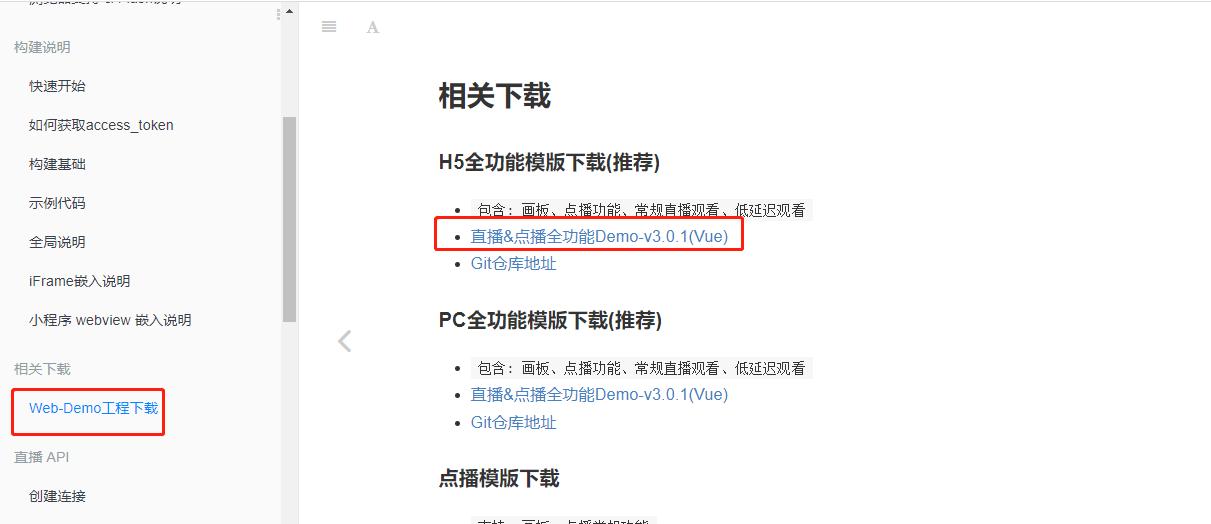
下载模板,修改 token 获取方式
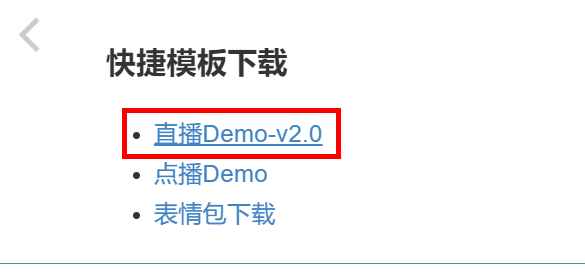
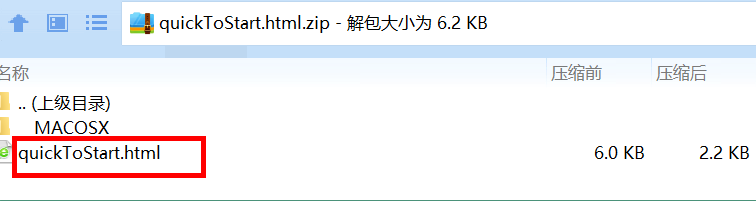
var url  = window.location.search
var token = url.split("=")[1]
2
创建直播播放页面 /pulbic/live.html
<!DOCTYPE html>
<html>
<head>
  <meta charset="utf-8" />
  <meta name="viewport" content="width=device-width, initial-scale=1.0, maximum-scale=1.0, user-scalable=0" />
  <title>TalkFun Live QuickStart v2.2</title>
  <style type="text/css">
    * {
      margin: 0;
      padding: 0;
      list-style-type: none;
      font-family: "Microsoft YaHei", "STHeiti";
    }
    .flash-wran {
      display: none;
      position: absolute;
      top: 0;
      width: 100%;
      padding: 5px 0;
      text-align: center;
      background: #fff6a2;
      border: 1px solid #ffd913;
    }
    .flash-wran a {
      color: red;
    }
    .wrapper {
      /*display: flex;*/
      padding: 10px;
    }
    #cameraPlayer,
    #pptPlayer {
      height: auto;
      flex: 1;
      text-align: center;
      font-size: 12px;
      overflow: hidden;
    }
    #pptPlayer {
      height: 300px;
      width: 100%;
    }
    #modPptPlayer,
    #modCameraPlayer {
      margin-top: 10px;
      border: 1px solid #c7c7c7;
    }
    .chat-wrap {
      padding: 5px;
      margin: 10px;
      border: 2px solid #cccccc;
      background: #f1f1f1
    }
    .mod-chat-list {
      margin: 20px 0;
      border: 1px solid #CCCCCC;
      min-height: 100px;
      font-size: 12px;
      background: #dedede;
      padding: 5px;
      max-height: 200px;
      overflow-y: scroll;
    }
    .mod-chat-list li {
      padding: 2px 0;
      margin-bottom: 5px;
      border-bottom: 1px dotted #CCCCCC;
    }
    input {
      display: inline-block;
      width: 200px;
      padding: 5px;
    }
    button {
      display: inline-block;
      padding: 5px;
      margin-left: 5px;
    }
    #toast {
      padding: 20px;
      position: fixed;
      z-index: 100;
      display: none;
      background: rgba(212, 28, 28, 0.8);
      left: 50%;
      top: 30%;
      border-radius: 50em;
      font-size: 14px;
      color: #FFFFFF;
      box-shadow: 0 0 6px 0px #bb2d2d;
    }
    #talkfun-video-wrap, #talkfun-camera-wrap {
      position: relative;
      background: #000;
    }
  </style>
  <!-- #SDK版本 -->
  <!-- #获取最新版本 ==> http://open.talk-fun.com/docs/js/changelog/live.html -->
  <script type="text/javascript" src="https://static-1.talk-fun.com/open/TalkFun_SDK_Pack/v6.0/TalkFunWebSDK-6.2-2.min.js"></script>
</head>
<body>
  <!-- #toast -->
  <div id="toast"></div>
  <!-- #wrap -->
  <div class="wrapper">
    <!-- #画板播放器 -->
    <div id="pptPlayer">
      <p id="loaddoc">播放器 Loading...</p>
    </div>
    <!-- #摄像头模式 -->
    <div id="cameraPlayer">
      <p id="loadcam">摄像头 Loading...</p>
    </div>
    <!-- #桌面分享|视频插播模式 -->
    <div id="videoPlayer">
      <p id="loadplayer">视频播放器 Loading...</p>
    </div>
  </div>
  <!-- #chat -->
  <div class="chat-wrap">
    <h4>聊天模块</h4>
    <ul id="chat-list" class="mod-chat-list"></ul>
    <label>
      <input id="chatVal" type="text" /><button id="chatSubmit">发送聊天</button>
    </label>
  </div>
  <script>
    // [第一步] 如何获取 access_token => http://open.talk-fun.com/docs/getstartV2/access_token.html
    // [第二步] 根据Api文档方法 监听 / 调用方法 JS Api => http://open.talk-fun.com/docs/js/sdk.js.getstart.html
    var url  = window.location.search
	var token = url.split("=")[1]
    // 更多配置项 => https://open.talk-fun.com/docs/js/sdk.js.getstart.html?h=%E9%85%8D%E7%BD%AE%E9%A1%B9
    var HT = new MT.SDK.main(token, {
      config: {
        techOrder: 'FLV' // Safari 浏览器建议设置为 HLS
      }
    }, function (data) {
      console.warn('sdk加载完成', data)
    })
    // 连接状态
    HT.on('connect', function () {
      console.log('TalkFun通信 => 连接成功...')
    })
    // 课件播放器
    HT.whiteboardPlayer('pptPlayer', 'docPlayer', function (player) {
      console.log('课件播放器 => 初始化成功')
      document.querySelector('#loadplayer').innerHTML = '画板模块加载完成'
    })
    // 视频插播 | 桌面分享
    HT.videoPlayer('videoPlayer', 'modVideoplayer', function (player) {
      console.log('视频播放器 => 初始化成功')
      document.querySelector('#loadplayer').innerHTML = '视频插播加载完成'
    })
    // 摄像头播放器
    HT.camera('cameraPlayer', 'modCameraPlayer', function () {
      console.log('摄像头播放器 => 初始化成功')
      document.querySelector('#loadcam').innerHTML = '摄像头模块加载完成'
    })
    // 接收聊天
    var receivedChat = function (chat) {
      var tpl = chat.nickname + ': ' + chat.msg
      var chatItem = document.createElement('li')
      chatItem.innerHTML = tpl
      chatItem.className = 'chat-' + chat.xid
      document.querySelector('#chat-list').appendChild(chatItem)
    }
    // 接收聊天信息
    HT.on('chat:send', function (chat) {
      receivedChat(chat)
    })
    // 发送聊天信息
    document.querySelector('#chatSubmit').addEventListener('click', function () {
      var chatIpt = document.querySelector('#chatVal')
      var chatValue = chatIpt.value
      HT.emit('chat:send', { msg: chatValue }, function (res) {
        // 发送成功
        if (Number(res.code) === 0) {
          receivedChat(res.data)
          chatIpt.value = ''
        }
        // 发送失败
        else {
          console.warn(res.msg)
        }
      })
    }, false)
    // Flash插件异常
    HT.on('flash:load:error', function (obj) {
      if (!obj.flash) {
        document.querySelector('#flashTip').style.display = 'block'
      }
    })
    // 课程错误信息
    HT.on('live:course:access:error', function (res) {
      console.error('错误信息 ==>', res)
    })
    // 课程错误信息
    HT.on('system:room:error', function (res) {
      var toast = document.querySelector('#toast')
      if (typeof res === 'string') {
        toast.innerHTML = res.msg
      }
      else if (res.msg) {
        toast.innerHTML = res.msg
      }
      toast.style.display = 'block'
      var _left = toast.clientWidth / 2
      toast.style.marginLeft = -_left + 'px'
    })
  </script>
</body>
</html>
2
3
4
5
6
7
8
9
10
11
12
13
14
15
16
17
18
19
20
21
22
23
24
25
26
27
28
29
30
31
32
33
34
35
36
37
38
39
40
41
42
43
44
45
46
47
48
49
50
51
52
53
54
55
56
57
58
59
60
61
62
63
64
65
66
67
68
69
70
71
72
73
74
75
76
77
78
79
80
81
82
83
84
85
86
87
88
89
90
91
92
93
94
95
96
97
98
99
100
101
102
103
104
105
106
107
108
109
110
111
112
113
114
115
116
117
118
119
120
121
122
123
124
125
126
127
128
129
130
131
132
133
134
135
136
137
138
139
140
141
142
143
144
145
146
147
148
149
150
151
152
153
154
155
156
157
158
159
160
161
162
163
164
165
166
167
168
169
170
171
172
173
174
175
176
177
178
179
180
181
182
183
184
185
186
187
188
189
190
191
192
193
194
195
196
197
198
199
200
201
202
203
204
205
206
207
208
209
210
211
212
观众在直播详情页面点击观看,获取通过接口获取 access_token,然后带上 access_token 参数跳转到直播观看页面即可,关键代码:
liveInfo.vue
play() {
  api.getPlayAuth(this.liveCourseId).then(response => {
    console.log(response.data);
    window.location = './live.html?token='+response.data.access_token;
    this.finished = true;
  });
},
2
3
4
5
6
7
http://localhost:8080/live.html 为直播观看访问方式
LiveCourseApiController
@ApiOperation("根据ID查询课程")
@GetMapping("getInfo/{courseId}")
public Result getInfo(
    @ApiParam(value = "课程ID", required = true)
    @PathVariable Long courseId){
    Map<String, Object> map = liveCourseService.getInfoById(courseId);
    return Result.ok(map);
}
2
3
4
5
6
7
8
LiveCourseServiceImpl
@Override
public Map<String, Object> getInfoById(Long id) {
    LiveCourse liveCourse = this.getById(id);
    liveCourse.getParam().put("startTimeString", new DateTime(liveCourse.getStartTime()).toString("yyyy年MM月dd HH:mm"));
    liveCourse.getParam().put("endTimeString", new DateTime(liveCourse.getEndTime()).toString("yyyy年MM月dd HH:mm"));
    Teacher teacher = teacherFeignClient.get(liveCourse.getTeacherId());
    LiveCourseDescription liveCourseDescription = liveCourseDescriptionService.getByLiveCourseId(id);

    Map<String, Object> map = new HashMap<>();
    map.put("liveCourse", liveCourse);
    map.put("liveStatus", this.getLiveStatus(liveCourse));
    map.put("teacher", teacher);
    if(null != liveCourseDescription) {
        map.put("description", liveCourseDescription.getDescription());
    } else {
        map.put("description", "");
    }
    return map;
}
2
3
4
5
6
7
8
9
10
11
12
13
14
15
16
17
18
19
# 微信分享
参考文档:https://developers.weixin.qq.com/doc/offiaccount/OA_Web_Apps/JS-SDK.html
先登录微信公众平台进入 “设置与开发”,“公众号设置” 的 “功能设置” 里填写 “JS 接口安全域名”。
说明:本地测试设置内网穿透地址。
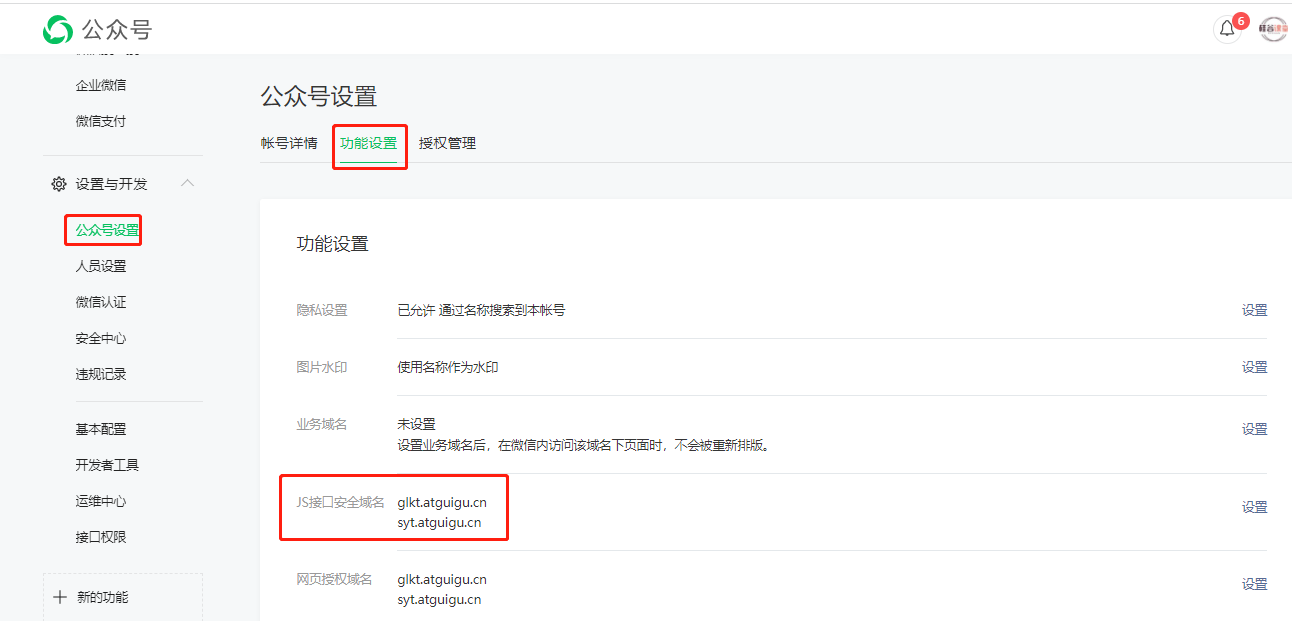
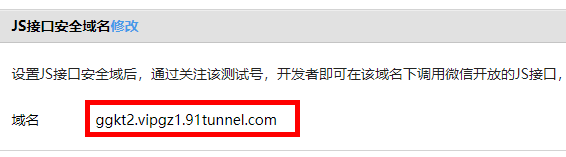
在 vue-mobile 项目中的 /public/index.html 引入 JS 文件
<script src="http://res.wx.qq.com/open/js/jweixin-1.4.0.js" type="text/javascript"></script>
参考官方文档封装接口
我们需要分享的页面有直播详情页、点播课程详情页等,因此我们把分享代码封装后,在对应的页面直接引入与调用即可
新建 src/util/wxShare.js 文件 `
/**
 * 微信js-sdk
 * 参考文档:https://mp.weixin.qq.com/wiki?t=resource/res_main&id=mp1421141115
 */
const wxShare = {
    /**
     * [wxRegister 微信Api初始化]
     * @param  {Function} callback [ready回调函数]
     */
    wxRegister(data,option) { //data是微信配置信息,option是分享的配置内容

        wx.config({
            debug: true, // 开启调试模式
            appId: data.appId, // 必填,公众号的唯一标识
            timestamp: data.timestamp, // 必填,生成签名的时间戳
            nonceStr: data.nonceStr, // 必填,生成签名的随机串
            signature: data.signature,// 必填,签名,见附录1
            jsApiList: [
                'onMenuShareAppMessage'
            ] // 必填,需要使用的JS接口列表,所有JS接口列表见附录2
        });
        wx.ready(function(){

            wx.onMenuShareAppMessage({
                title: option.title, // 分享标题
                desc: option.desc, // 分享描述
                link: option.link, // 分享链接
                imgUrl: option.imgUrl, // 分享图标
                success() {
                    // 用户成功分享后执行的回调函数
                    //  option.success()
                    console.log('ok');
                },
                cancel() {
                    // 用户取消分享后执行的回调函数
                    // option.error()
                    console.log('cancel');
                }
            });
        });

        wx.error(function(res){
          // config信息验证失败会执行error函数,如签名过期导致验证失败,具体错误信息可以打开config的debug模式查看,也可以在返回的res参数中查看,对于SPA可以在这里更新签名。
          //alert('error:'+JSON.stringify(res));
        });
    }
}
export default wxShare
2
3
4
5
6
7
8
9
10
11
12
13
14
15
16
17
18
19
20
21
22
23
24
25
26
27
28
29
30
31
32
33
34
35
36
37
38
39
40
41
42
43
44
45
46
47
48
新增 ShareController 类
说明:微信分享要对当前 url 加密处理,由于我们的 url 路由都是带 “#” 符号,服务器端接收不到,因此通过 “guiguketan” 单词代替了 “#”。
@RestController
@RequestMapping("/api/wechat/share")
@Slf4j
public class ShareController {

    @Autowired
    private WxMpService wxMpService;

    @GetMapping("/getSignature")
    public Result getSignature(@RequestParam("url") String url) throws WxErrorException {
        String currentUrl = url.replace("guiguketan", "#");
        WxJsapiSignature jsapiSignature = wxMpService.createJsapiSignature(currentUrl);

        WxJsapiSignatureVo wxJsapiSignatureVo = new WxJsapiSignatureVo();
        BeanUtils.copyProperties(jsapiSignature, wxJsapiSignatureVo);
        wxJsapiSignatureVo.setUserEedId(Base64Util.base64Encode(AuthContextHolder.getUserId()+""));
        return Result.ok(wxJsapiSignatureVo);
    }

}
2
3
4
5
6
7
8
9
10
11
12
13
14
15
16
17
18
19
20
点播课程详情分享
courseInfo.vue
引入分享
import wxShare from '@/utils/wxShare'

wxRegister() {
  //说明:后台加密url必须与当前页面url一致
  let url = window.location.href.replace('#', 'guiguketan')
  shareApi.getSignature(url).then(response => {
    console.log(response.data);
    //记录分享用户
    let link = '';
    if(window.location.href.indexOf('?') != -1) {
      link = window.location.href + '&recommend=' + response.data.userEedId;
    } else {
      link = window.location.href + '?recommend=' + response.data.userEedId;
    }
    let option = {
      'title': this.courseVo.title,
      'desc': this.description,
      'link': link,
      'imgUrl': this.courseVo.cover
    }
    wxShare.wxRegister(response.data, option);
  });
}
2
3
4
5
6
7
8
9
10
11
12
13
14
15
16
17
18
19
20
21
22
23
使用手机测试,其他端测试可能会出现错误问题
# 腾讯云部署
# 项目部署方案
原始部署方式
整合 Jenkins
整合 CODING
https://console.cloud.tencent.com/coding/container-devops
# 腾讯云 CODING DevOps
** 腾讯云使用文档:**https://help.coding.net/docs/start/new.html
DevOps 是 Development 和 Operations 的组合词,代表着重视「软件开发人员 (Dev)」和「IT 运维技术人员 (Ops)」之间沟通合作的文化;旨在透过自动化「软件交付」和「架构变更」的流程,使得构建、 测试、发布软件的过程能够更加地快捷、频繁和可靠。Gartner 咨询公司认为 DevOps 代表了 IT 文化的变化趋势。
CODING DevOps 是面向软件研发团队的一站式研发协作管理平台,提供从需求到设计、开发、构建、测试、发布到部署的全流程协同及研发工具支撑。CODING 解决方案可助力企业实现代码的统一安全管控,并快速实践敏捷开发与 DevOps,提升软件交付质量与速度,降低企业研发成本,实现研发效能升级。
CODING DevOps 优势
一站式协作平台及研发工具链,提升研发效能
CODING 与云端优势相结合,依托业界敏捷项目管理与 DevOps 体系方法融入到产品中,打通研发过程中的工具链孤岛及协作壁垒,覆盖敏捷开发全生命周期,帮助团队实现需求、迭代、开发、测试、持续集成、持续部署全方位研发管理,提升软件研发效能。
支持双态研发体系建设,满足多样化业务需求
CODING 适用于不同规模的开发团队以及不同类型的软件开发模式(如瀑布模型、敏捷模型),满足多业务场景的协作需求。
项目工作流和度量数据可视化,项目管理更轻松
CODING 提供可视化看板,支持对代码、项目进度、人员工作量等不同维度输出详尽的数据报告,为团队管理者提供决策依据,调整项目计划和合理安排研发人力。
丰富的扩展能力,无缝集成第三方平台
CODING 支持无缝集成 GitHub、GitLab 等第三方代码库及各类常见的运维系统和云原生环境,让用户实现跨平台的无缝迁移。
# CODING DevOps 功能特性
CODING DevOps 平台主要提供以下功能特性:
团队级功能:
- 团队管理:团队管理员通过可视化的仪表盘 (opens new window)可以快速掌握团队成员工作数据、监控项目运行状态;通过团队目标 (opens new window)助力团队成员聚焦组织目标,全方位协同执行,凝聚团队战斗力,让战略坚实落地;利用工作负载 (opens new window)统一查看对比成员的工作量和工作安排;利用研发度量 (opens new window)统计并分析团队成员在一段时间内的事项分布、事项概览、代码分布等数据,度量团队成员在周期内完成工作量与工作动态。
项目级功能:
- 项目协同 (opens new window):软件开发团队可自由选择适合的研发管理模式,支持多项目管理、敏捷迭代管理、需求管理、缺陷跟踪、多维度报表数据等功能。
- 代码仓库 (opens new window):提供企业级的 Git/SVN 代码管理服务,支持精细化权限管控、多分支并行开发、多版本管理等功能。
- 代码扫描 (opens new window):提供针对不同编程语言的代码扫描方案,支持对扫描规则、度量规则等进行自定义配置。根据代码扫描测试结果,开发人员可及时发现代码缺陷并作出修正,有效管控代码质量。
- 持续集成 (opens new window):提供基于云端的自动化代码构建、测试、分析和部署工作流服务,支持通过模板快速创建构建任务并进行可视化编排,极大提高软件开发团队的构建效率。
- 持续部署 (opens new window):提供全自动化软件部署,可持续、可控地把软件制品在线发布到服务集群中,支持蓝绿分发布、灰度发布(金丝雀发布)等多种发布策略。
- 制品管理 (opens new window):提供云端构建产物管理服务,支持云端构建和本地构建推送,可快速索引存档构建物、进行版本控制。
- 测试管理 (opens new window):提供面向敏捷团队的测试一站式云端测试平台,支持可视化的测试规划和多维度的测试报告,满足敏捷团队对测试过程的多样化需求。
- 文档管理 (opens new window):提供灵活易用的文档管理服务,可用于记录整个项目的来龙去脉,展示当前项目状态,也可让项目成员更好地进行文档书写及协作。
以下流程图展示了 CODING DevOps 软件开发平台的基本操作流程,您可以按照实际需求有选择性阅读。
# 使用流程
如要开始使用 CODING DevOps,您需要先注册创建或接受邀请后加入一个团队。
新建项目
加入团队之后,您可以在团队内创建项目或受他人邀请加入别的项目。“项目” 是核心单元,几乎大部分工作都需要在项目中展开。
开始项目协同
项目创建之后,项目经理、开发、测试等不同的项目角色可通过项目协同实现简单高效的项目协作,包含迭代管理、需求管理、任务管理等。
使用代码仓库
完成项目规划之后,可利用代码仓库管理项目代码。该功能提供企业级的基于 Git 的云端代码管理服务,支持精细化权限管控、多分支并行开发、多版本管理等功能。
启动代码扫描
对于使用 CODING 代码仓库管理的代码,开发者可使用代码扫描功能进行代码检查,以便及时发现代码缺陷并作出修正,有效管控代码质量。
编译构建
项目代码开发完成之后,可通过持续集成功能快速创建构建任务,将项目代码编译打包成软件包。
管理制品
在您将项目代码构建好之后,可以使用制品管理功能管理构建产物。CODING 支持多种制品库类型,包括 Docker、Maven、Helm 和 npm。
实施持续部署
当您的项目代码已经完成构建,可使用持续部署把控构建之后的项目发布与部署到生产环境中去。
管理测试用例
当您在 CODING 平台创建项目之后,您可以使用面向敏捷团队的测试管理功能来管理项目内的测试活动,确保产品的高质量交付。
管理项目文档
在项目进行中,必然会产生大量的信息,并且需要对这些信息进行记录、传递、分享。文档管理功能提供灵活易用的文档管理服务,可用于记录整个项目的来龙去脉。