
 ElasticSearch
# ElasticSearch
ElasticSearch 是基于 Lucene 的搜索服务器 是一个分布式 高扩展 高实时的搜索与数据分析引擎
基于 RESTful web 接口
ElasticSearch 是用 java 开发 并作为 apache 的开源项目
https://www.elastic.co/cn/
一般用于 海量数据的查询 日志数据分析 实时数据分析
# 倒排索引
将各个文档中内容。进行分词 形成词条 记录词条和数据的唯一标识 (id) 的对应关系 形成的产物
# ElasticSearch 搜索和传统数据库查询的区别
- 传统关系型数据 使用模糊查询 左边有通配符 不会走索引 会全表扫描 性能低
- 只能以一个关键字作为查询条件 而 ElasticSearch 会把一个关键字拆分为多个词 进行查询
- ElasticSearch 以关键字 生成的倒排索引 词条会排序 形成一颗树形结构 提升词条的查询速度
- Mysql 有事务性 而 ElasticSearch 没有事务性 所以删了的数据是无法恢复的
- ElasticSearch 没有物理外键这个特性 如果数据的一致性要求比较高 不建议使用
- ElasticSearch 和 Mysql 分工不同 Mysql 负责存储数据 ElasticSearch 负责搜索数据
# 安装 ElasticSearch
tar -zxvf elasticsearch-7.15.0-linux-x86_64.tar.gz -C /opt
#编辑配置
vim /opt/elasticsearch-7.15.0/config/elasticsearch.yml

#追加以下内容
cluster.name: my-application
node.name: node-1
network.host: 0.0.0.0
http.port: 9200
cluster.initial_master_nodes: ["node-1"]

#出于安全问题ElasticSearch不允许root用户直接运行
useradd iekr
passwd 123456
#授权
chown -R iekr:iekr /opt/elasticsearch-7.15.0/
2
3
4
5
6
7
8
9
10
11
12
13
14
15
16
新建的用户最大创建文件和最大虚拟内存太小 需要修改配置文件
#修改最大创建文件数
vim /etc/security/limits.conf

#追加内容
iekr soft nofile 65536
iekr hard nofile 65536

vim /etc/security/limits.d/20-nproc.conf
#追加内容
iekr soft nofile 65536
iekr hard nofile 65536
* hard nproc 4096


#修改虚拟内容大小
vim /etc/sysctl.conf

#追加内容
vm.max_map_count=655360
#重载
sysctl -p

firewall-cmd --zone=public --add-port=9200/tcp --permanent
2
3
4
5
6
7
8
9
10
11
12
13
14
15
16
17
18
19
20
21
22
23
启动
su iekr
cd /opt/elasticsearch-7.15.0/bin/
./elasticsearch -d  #-d后台运行
2
3
访问 http://192.168.130.124:9200/ 出现 json 字符串则启动成功
# 安装辅助工具 Kibana
https://www.elastic.co/cn/kibana/
tar -zxvf kibana-7.15.0-linux-x86_64.tar.gz -C /opt
#配置
vim /opt/kibana-7.15.0-linux-x86_64/config/kibana.yml

#追加内容
server.port: 5601
server.host: "0.0.0.0"
server.name: "your-hostname"  #自定义名称
elasticsearch.hosts: ["http://localhost:9200"]
elasticsearch.requestTimeout: 30000  #连接ES超时时间
i18n.locale: "zh-CN"  #设置为中文

#授权
chown -R iekr:iekr /opt/kibana-7.15.0-linux-x86_64/
firewall-cmd --zone=public --add-port=5601/tcp --permanent
2
3
4
5
6
7
8
9
10
11
12
13
14
15
启动
su iekr
cd /opt/kibana-7.15.0-linux-x86_64/bin/
nohup ./kibana &  #后台运行  前台./kibana
2
3
# ElasticSearch 核心概念
索引 (index) ElasticSearch 存储数据的地方 可以理解为关系型数据库中的数据库概念
映射 (mapping)
mapping 定义了每个字段的类型 字段所使用的分词器等 相定义关系型数据库中的表结构
文档 (document) ElasticSearch 中的最小数据单元 以 json 格式显示 一个 document 相当于 关系型数据库的一行数据
倒排索引 一个倒排索引由文档中所有不重复此的列表构成 对应其中每个词 对应一个包含它的文档 id 列表
类型 (type)
一种 type 就像一类表 如用户表 角色表等 在 ElasticSearch7.x type 默认为_doc
5.x 中一个 index 可以有多种 type
6.x 中一个 index 只能有一种 type
# 操作 ElasticSearch
# RESTful 风格
REST 表述性状态转移 是一组架构约束条件和原则 满足这些约束条件和原则的应用程序或设计就是 RESTful 是与只能怪定义接口的规范
# 操作索引
以下操作使用 postman 工具发送请求
# 添加索引
使用 PUT 请求 在 uri 地址后加上索引名称
192.168.130.124:9200/goods_index
# 查询索引
使用 GET 请求 在 uri 地址后加上索引名称
192.168.130.124:9200/goods_index
查询多个使用逗号分隔
192.168.130.124:9200/goods_index,goods_index2
查询全部使用_all
192.168.130.124:9200/_all
# 删除索引
使用 DELETE 请求 在 uri 地址后加上索引名称
192.168.130.124:9200/goods_index
# 关闭指定索引
关闭后只是无法使用 并不会删除此索引
192.168.130.124:9200/goods_index/_close
打开索引
192.168.130.124:9200/goods_index/_open
# 操作映射
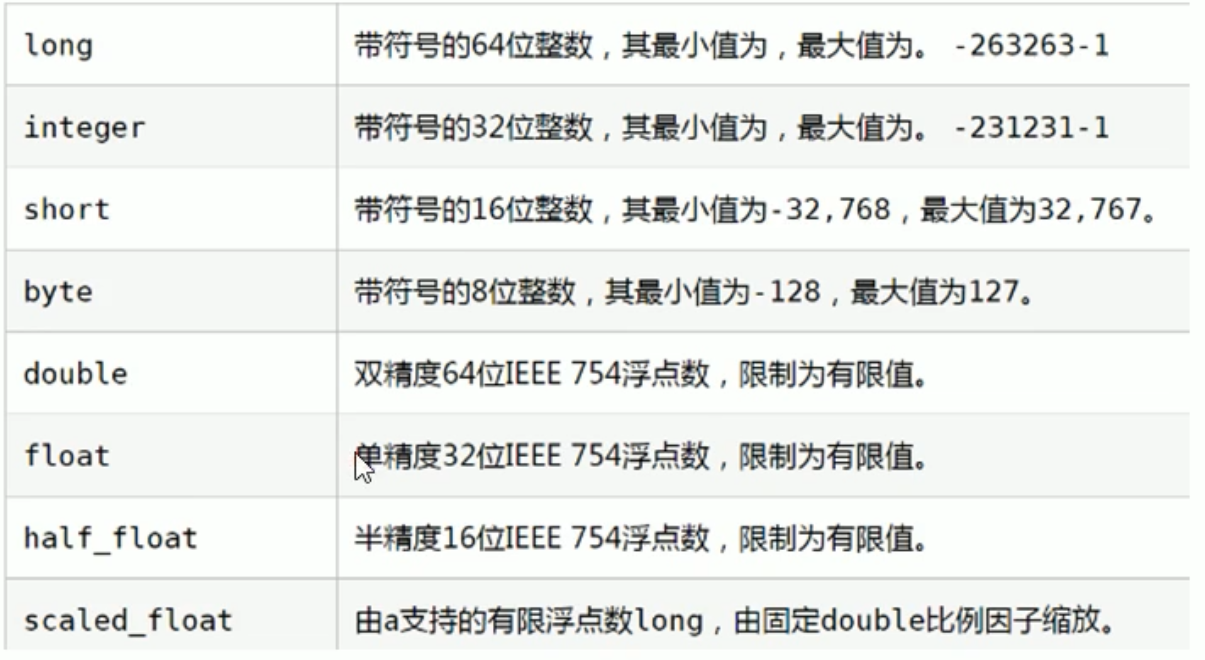
- 简单数据类型
- 字符串
- text 会分词,不支持聚合
- keyword 不会分词 将全部内容作为一个词条 支持聚合
- 数组
- 布尔
- 二进制
- binary
- 范围类型
- integer_range
- float_range
- long_range
- double_range
- date_range
- 日期
- 字符串
- 复杂数据类型
- 数组:[]
- 对象:{}
# 添加映射
以下操作使用 Kibana 操作
http://192.168.130.124:5601/app/dev_tools#/console
# 创建索引
PUT person
# 查询索引
GET person

# 添加映射
PUT person/_mapping
{
  "properties":{
    "name":{
      "type":"keyword"
    },
    "age":{
      "type":"integer"
    }
  }
}

# 查询映射
GET person/_mapping

# 删除索引
DELETE person

# 创建索引并添加映射
PUT person
{
  "mappings": {
    "properties": {
        "name":{
      "type":"keyword"
    },
    "age":{
      "type":"integer"
    }
    }
  }
}

# 查询索引
GET person

# 添加字段
PUT person/_mapping
{
  "properties":{
    "address":{
      "type":"text"
    }
  }
}
2
3
4
5
6
7
8
9
10
11
12
13
14
15
16
17
18
19
20
21
22
23
24
25
26
27
28
29
30
31
32
33
34
35
36
37
38
39
40
41
42
43
44
45
46
47
48
49
50
51
# 操作文档
# 查询索引
GET person


# 添加文档 指定id   可以使用PUT或POST请求
PUT person/_doc/1
{
  "name":"zhangsan",
  "age":20,
  "address":"北京"
}


# 添加文档 不指定id  必须为POST请求
POST person/_doc
{
  "name":"李四",
  "age":30,
  "address":"广东"
}


# 根据id查询文档
GET person/_doc/1


# 查询所有文档
GET person/_search

# 修改文档   必须为PUT请求  如果id存在则修改 不存在则自动创建
PUT person/_doc/1
{
  "name":"wangwu",
  "age":20,
  "address":"北京"
}

# 根据ID删除文档
DELETE person/_doc/1
2
3
4
5
6
7
8
9
10
11
12
13
14
15
16
17
18
19
20
21
22
23
24
25
26
27
28
29
30
31
32
33
34
35
36
37
38
39
# 分词器
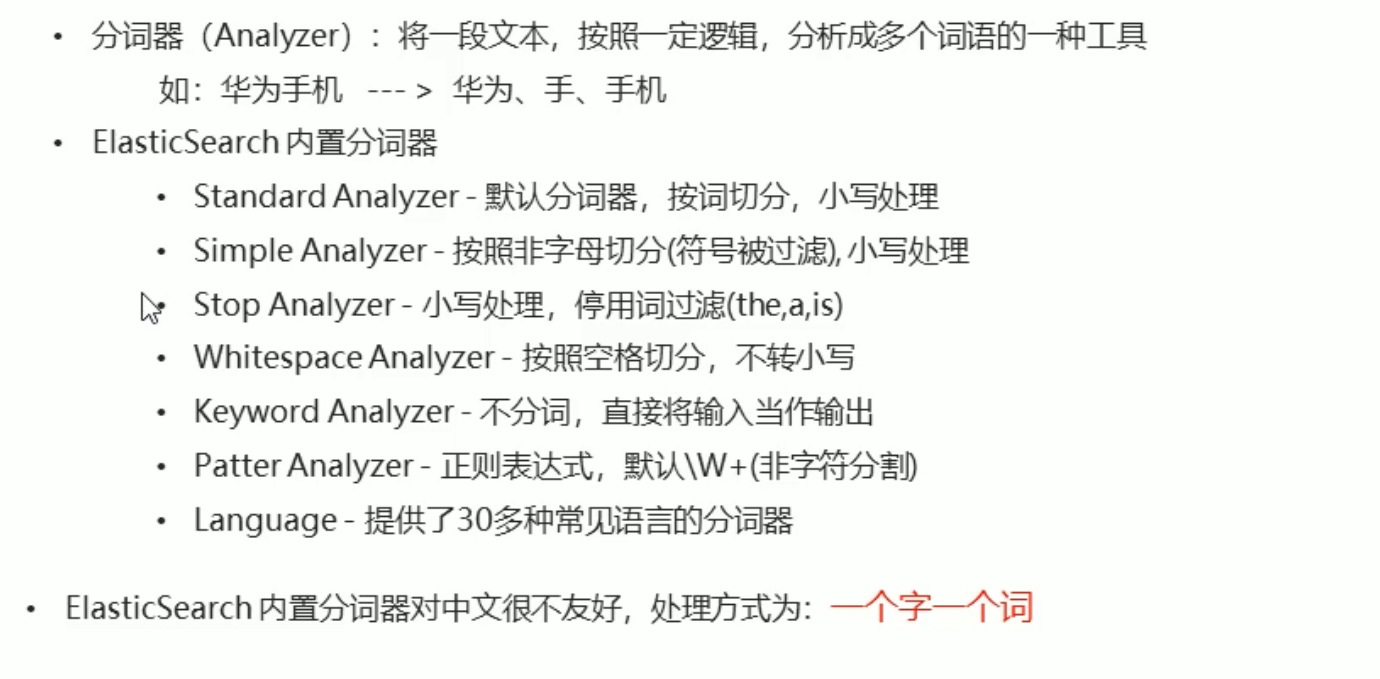
但 ES 原始的分词器对中文不太友好
# IK 分词器
IKAnalyzer 是一个开源的 基于 java 语言开发的轻量级的中文分词工具包
是一个基于 Maven 构建的项目 具有 60 万字 / 秒的高速处理能力 支持用户词典扩展定义
https://github.com/medcl/elasticsearch-analysis-ik
# 安装
- 安装 JDK 由于 ES 内置了 JDK 我们将 ES 内置的 JDK 设置为系统环境变量
vim /etc/profile

export JAVA_HOME=/opt/elasticsearch-7.15.0/jdk
export PATH=$PATH:${JAVA_HOME}/bin

source /etc/profile
2
3
4
5
6
- 安装 Maven -- 已不需要
wget https://mirrors.bfsu.edu.cn/apache/maven/maven-3/3.8.3/binaries/apache-maven-3.8.3-bin.tar.gz
tar -zxvf apache-maven-3.8.3-bin.tar.gz
ln -s apache-maven-3.8.3 maven
#配置环境变量
vim /etc/profile.d/maven.sh

export MAVEN_HOME=/root/maven
export PATH=${MAVEN_HOME}/bin:${PATH}

source /etc/profile.d/maven.sh
mvn -v
2
3
4
5
6
7
8
9
10
11
- 安装 IK 分词器 -- 已不需要
wget https://github.com/medcl/elasticsearch-analysis-ik/archive/refs/tags/v7.15.0.zip  #这里下载的是源码
# 由于是zip文件所以需要unzip命令
yum install -y zip
yum install -y unzip
#解压
unzip v7.15.0.zip

cd /root/elasticsearch-analysis-ik-7.15.0/
#编译打包
mvn package
2
3
4
5
6
7
8
9
10
- 将编译好的插件导入到 ES 中
cd /opt/elasticsearch-7.15.0/plugins/
mkdir analysis-ik
cd analysis-ik/
#重启es
2
3
4
5
# 使用
# ES内置分词器
GET _analyze
{
  "analyzer": "standard",
  "text": "你是试试水"
}

# ik分词器,粗粒度分词
GET _analyze
{
  "analyzer": "ik_smart",
  "text": "你是试试水"
}

# ik分词器,粗粒度分词
GET _analyze
{
  "analyzer": "ik_max_word",
  "text": "你是试试水"
}
2
3
4
5
6
7
8
9
10
11
12
13
14
15
16
17
18
19
20
21
22
# 查询文档
- 词条查询:tern
- 词条查询不会分析查询条件 只有当词条和查询字符串完全匹配时才匹配搜索
- 全文查询:match
- 全文查询会分析查询条件 先将查询条件进行分词 然后查询 求并集
PUT person/_doc/2
{
  "name":"李四",
  "age":30,
  "address":"华为5G手机"
}

GET person/_doc/2

# term 词条查询 查询条件字符串和词条要完全匹配
# es默认使用的分词器是standard 一个子一个词
GET person/_search
{
  "query":{
    "term": {
      "address": {
        "value": "手机"
      }
    }
  }
}

DELETE person

# 创建索引 添加映射 指定使用ik分词器
PUT person
{
  "mappings": {
    "properties": {
      "name":{
        "type": "keyword"
      },
      "address":{
        "type": "text",
        "analyzer": "ik_max_word"
      }
    }
  }
}

GET person

# 添加文档
PUT person/_doc/1
{
  "name":"张三",
  "age":30,
  "address":"华为5G手机"
}
PUT person/_doc/2
{
  "name":"李四",
  "age":30,
  "address":"广东"
}
PUT person/_doc/3
{
  "name":"王五",
  "age":30,
  "address":"小米5G手机"
}

GET person/_search

# 查询 term词条查询
GET person/_search
{
  "query":{
    "term": {
      "address": {
        "value": "手机"
      }
    }
  }
}

# match 先会对查询的字符串进行分词 在查询 求交集
GET person/_search
{
  "query": {
    "match": {
      "address": "苹果手机"
    }
  }
}
2
3
4
5
6
7
8
9
10
11
12
13
14
15
16
17
18
19
20
21
22
23
24
25
26
27
28
29
30
31
32
33
34
35
36
37
38
39
40
41
42
43
44
45
46
47
48
49
50
51
52
53
54
55
56
57
58
59
60
61
62
63
64
65
66
67
68
69
70
71
72
73
74
75
76
77
78
79
80
81
82
83
84
85
86
# JavaApi
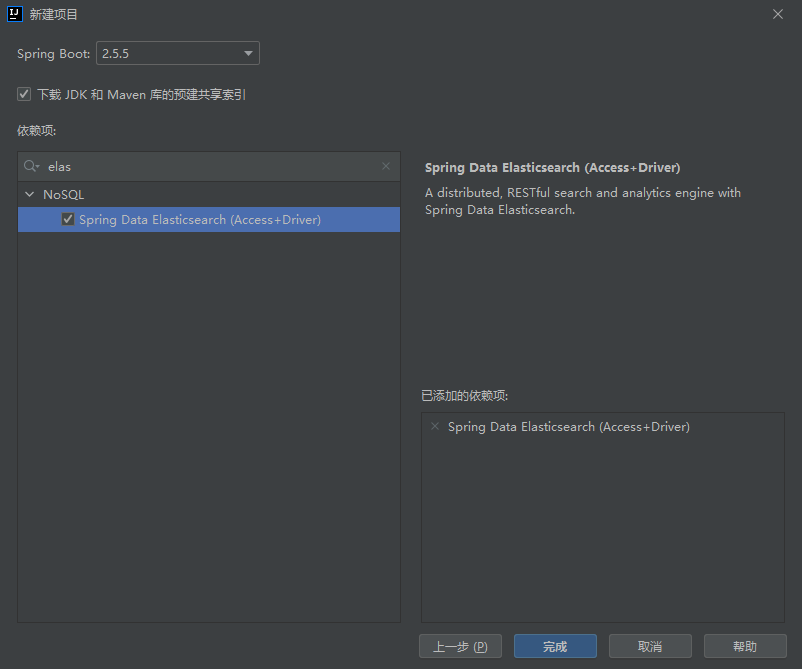
创建 springboot 项目 并引入 ES
创建 application.yml 配置文件
elasticsearch:
  host: 192.168.130.124
  port: 9200
1
2
3创建 ElasticSearchConfig 配置类 加载配置文件 并返回一个 es 客户端对象
package com.itheima.elasticsearchdemo.config;


import org.apache.http.HttpHost;
import org.elasticsearch.client.RestClient;
import org.elasticsearch.client.RestHighLevelClient;
import org.springframework.boot.context.properties.ConfigurationProperties;
import org.springframework.context.annotation.Bean;
import org.springframework.context.annotation.Configuration;

@Configuration
@ConfigurationProperties(prefix = "elasticsearch")
public class ElasticSearchConfig {

    private String host;
    private int port;

    public String getHost() {
        return host;
    }

    public void setHost(String host) {
        this.host = host;
    }

    public int getPort() {
        return port;
    }

    public void setPort(int port) {
        this.port = port;
    }

    @Bean
    public RestHighLevelClient client(){
        return new RestHighLevelClient(RestClient.builder(
                new HttpHost(host,port,"http")
        ));

    }
}
1
2
3
4
5
6
7
8
9
10
11
12
13
14
15
16
17
18
19
20
21
22
23
24
25
26
27
28
29
30
31
32
33
34
35
36
37
38
39
40
41注入对象 使用
//1.创建es客户端对象
@Autowired
private RestHighLevelClient restHighLevelClient;
1
2
3
# 添加索引
//添加索引
@Test
void addIndex() throws IOException {
    //获取操作索引的对象
    IndicesClient indices = restHighLevelClient.indices();
    //添加
    CreateIndexRequest createIndex = new CreateIndexRequest("itheima");  //索引名称
    CreateIndexResponse createIndexResponse = indices.create(createIndex, RequestOptions.DEFAULT);
    //根据返回值判断结果
    System.out.println(createIndexResponse.isAcknowledged());
}
2
3
4
5
6
7
8
9
10
11
- 添加索引并添加映射
//添加索引并添加映射
@Test
void addIndexAndMapping() throws IOException {
    //获取操作索引的对象
    IndicesClient indices = restHighLevelClient.indices();
    CreateIndexRequest request = new CreateIndexRequest("twitter");

    // 向索引添加映射
    request.source("{\n" +
            "    \"settings\" : {\n" +
            "        \"number_of_shards\" : 3,\n" +
            "        \"number_of_replicas\" : 2\n" +
            "    },\n" +
            "    \"mappings\" : {\n" +
            "        \"tweet\" : {\n" +
            "            \"properties\" : {\n" +
            "                \"message\" : { \"type\" : \"text\" }\n" +
            "            }\n" +
            "        }\n" +
            "    },\n" +
            "    \"aliases\" : {\n" +
            "        \"twitter_alias\" : {}\n" +
            "    }\n" +
            "}", XContentType.JSON);
    CreateIndexResponse createIndexResponse = indices.create(request, RequestOptions.DEFAULT);
    //根据返回值判断结果
    System.out.println(createIndexResponse.isAcknowledged());
}
2
3
4
5
6
7
8
9
10
11
12
13
14
15
16
17
18
19
20
21
22
23
24
25
26
27
28
# 查询索引
//查询索引
@Test
public void queryIndex() throws IOException {
    GetIndexRequest request = new GetIndexRequest("twitter");
    GetIndexResponse getIndexResponse = restHighLevelClient.indices().get(request, RequestOptions.DEFAULT);
    System.out.println(getIndexResponse.getAliases());
    System.out.println(getIndexResponse.getMappings());
}
2
3
4
5
6
7
8
# 删除索引
//删除索引
@Test
public void deleteIndex() throws IOException {
    IndicesClient indices = restHighLevelClient.indices();
    DeleteIndexRequest deleteIndexRequest = new DeleteIndexRequest("itheima");
    AcknowledgedResponse acknowledgedResponse = indices.delete(deleteIndexRequest, RequestOptions.DEFAULT);
    System.out.println(acknowledgedResponse.isAcknowledged());
}
2
3
4
5
6
7
8
# 判断索引是否存在
//判断索引是否存在
@Test
public void existIndex() throws IOException {
    IndicesClient indices = restHighLevelClient.indices();
    GetIndexRequest getRequest = new GetIndexRequest("itheima");
    boolean exists = indices.exists(getRequest, RequestOptions.DEFAULT);
    System.out.println(exists);

}
2
3
4
5
6
7
8
9
# 添加 / 修改文档
当 id 存在时则修改 不存在时则添加
# Map
//添加/修改 map
@Test
public void addDoc() throws IOException {
    //添加数据对象 map
    Map<String, String> data = new HashMap<>();
    data.put("address","背景");
    data.put("name","钻石");
    data.put("age","11");
    //1.获取文档对象
    IndexRequest indexRequest = new IndexRequest("twitter").id("1").source(data);
    //添加数据
    IndexResponse index = restHighLevelClient.index(indexRequest, RequestOptions.DEFAULT);
    //打印响应结果
    System.out.println(index.getId());
}
2
3
4
5
6
7
8
9
10
11
12
13
14
15
# JSON
//添加/修改 json
@Test
public void addDoc2() throws IOException {
   //创建对象
    Person p =new Person();
    p.setId("2");
    p.setName("iekr");
    p.setAge(15);
    p.setAddress("广东");
    String json = JSON.toJSONString(p);
    //1.获取文档对象
    IndexRequest indexRequest = new IndexRequest("twitter").id(p.getId()).source(json,XContentType.JSON);
    //添加数据
    IndexResponse index = restHighLevelClient.index(indexRequest, RequestOptions.DEFAULT);
    //打印响应结果
    System.out.println(index.getId());
}
2
3
4
5
6
7
8
9
10
11
12
13
14
15
16
17
# 查询文档
    //根据id查询文档
    @Test
    public void findDocById() throws IOException {
        GetRequest getRequest = new GetRequest("twitter", "1");
//        getRequest.id("1");  //单独指定id
        GetResponse documentFields = restHighLevelClient.get(getRequest, RequestOptions.DEFAULT);
        System.out.println(documentFields.getSourceAsString()); //获取JSON字符串

    }
2
3
4
5
6
7
8
9
# 删除文档
//根据id删除文档
@Test
public void delDoc() throws IOException {
    DeleteRequest delete = new DeleteRequest("twitter", "1");
    DeleteResponse response = restHighLevelClient.delete(delete, RequestOptions.DEFAULT);
    System.out.println(response.getId());

}
2
3
4
5
6
7
8