
 Freemarker
# Freemarker
页面静态化技术 将原来的动态页面 改为静态网页 这样用户在访问网页时 不必每次查询动态数据库过程
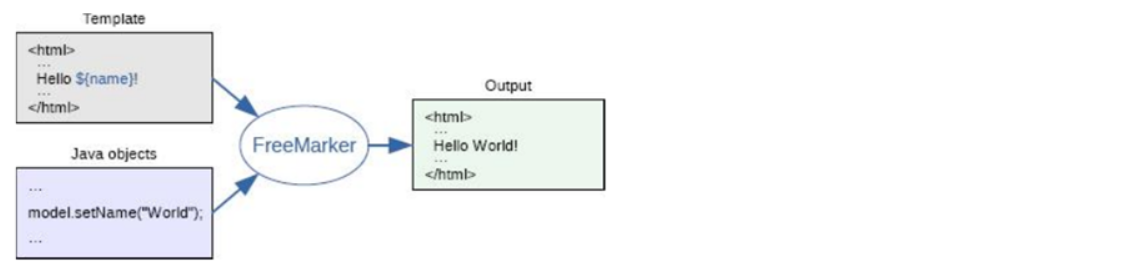
我们可以通过专门的页面静态化技术帮我们生成所需的静态 HTML 页面,例如:Freemarker、thymeleaf 等。
坐标
<dependency>
  <groupId>org.freemarker</groupId>
  <artifactId>freemarker</artifactId>
  <version>2.3.23</version>
</dependency>
2
3
4
5
# 创建模板
模板文件中有四种元素:
- 文本,直接输出的部分
- 注释,即 <#--...--> 格式不会输出
- 插值(Interpolation):即 ${..} 部分,将使用数据模型中的部分替代输出
- FTL 指令:FreeMarker 指令,和 HTML 标记类似,名字前加 #予以区分,不会输出
Freemarker 的模板文件后缀可以任意,一般建议为 ftl。
<html>
<head>
    <meta charset="utf-8">
    <title>Freemarker入门</title>
</head>
<body>
    <#--我只是一个注释,我不会有任何输出  -->
    ${name}你好,${message}
</body>
</html>
2
3
4
5
6
7
8
9
10
# 生成文件
第一步:创建一个 Configuration 对象,直接 new 一个对象。构造方法的参数就是 freemarker 的版本号。
第二步:设置模板文件所在的路径。
第三步:设置模板文件使用的字符集。一般就是 utf-8。
第四步:加载一个模板,创建一个模板对象。
第五步:创建一个模板使用的数据集,可以是 pojo 也可以是 map。一般是 Map。
第六步:创建一个 Writer 对象,一般创建 FileWriter 对象,指定生成的文件名。
第七步:调用模板对象的 process 方法输出文件。
第八步:关闭流。
public static void main(String[] args) throws Exception{
    //1.创建配置类
    Configuration configuration=new Configuration(Configuration.getVersion());
    //2.设置模板所在的目录
    configuration.setDirectoryForTemplateLoading(new File("D:\\ftl"));
    //3.设置字符集
    configuration.setDefaultEncoding("utf-8");
    //4.加载模板
    Template template = configuration.getTemplate("test.ftl");
    //5.创建数据模型
    Map map=new HashMap();
    map.put("name", "张三");
    map.put("message", "欢迎来到传智播客!");
    //6.创建Writer对象
    Writer out =new FileWriter(new File("d:\\test.html"));
    //7.输出
    template.process(map, out);
    //8.关闭Writer对象
    out.close();
}
2
3
4
5
6
7
8
9
10
11
12
13
14
15
16
17
18
19
20
# Freemarker 指令
# assign 指令
assign 指令用于在页面上定义一个变量
(1)定义简单类型
<#assign linkman="周先生">
联系人:${linkman}
2
(2)定义对象类型
<#assign info={"mobile":"13812345678",'address':'北京市昌平区'} >
电话:${info.mobile}  地址:${info.address}
2
# include 指令
include 指令用于模板文件的嵌套
(1)创建模板文件 head.ftl
<h1>黑马程序员</h1>
(2)修改入门案例中的 test.ftl,在 test.ftl 模板文件中使用 include 指令引入上面的模板文件
<#include "head.ftl"/>
# if 指令
if 指令用于判断
(1)在模板文件中使用 if 指令进行判断
<#if success=true>
  你已通过实名认证
<#else>
  你未通过实名认证
</#if>
2
3
4
5
(2)在 java 代码中为 success 变量赋值
map.put("success", true);
在 freemarker 的判断中,可以使用 = 也可以使用 ==
# list 指令
list 指令用于遍历
(1)在模板文件中使用 list 指令进行遍历
<#list goodsList as goods>
  商品名称: ${goods.name} 价格:${goods.price}<br>
</#list>
2
3
(2)在 java 代码中为 goodsList 赋值
List goodsList=new ArrayList();

Map goods1=new HashMap();
goods1.put("name", "苹果");
goods1.put("price", 5.8);

Map goods2=new HashMap();
goods2.put("name", "香蕉");
goods2.put("price", 2.5);

Map goods3=new HashMap();
goods3.put("name", "橘子");
goods3.put("price", 3.2);

goodsList.add(goods1);
goodsList.add(goods2);
goodsList.add(goods3);

map.put("goodsList", goodsList);
2
3
4
5
6
7
8
9
10
11
12
13
14
15
16
17
18
19
# 环境搭建
# 坐标
<dependency>
  <groupId>org.freemarker</groupId>
  <artifactId>freemarker</artifactId>
  <version>2.3.23</version>
</dependency>
2
3
4
5
# 创建模板文件
mobile_setmeal.ftl
<!DOCTYPE html>
<html lang="zh-CN">
<head>
    <meta charset="utf-8">
    <meta http-equiv="X-UA-Compatible" content="IE=edge">
    <!-- 上述3个meta标签*必须*放在最前面,任何其他内容都*必须*跟随其后! -->
    <meta name="viewport" content="width=device-width, initial-scale=1.0, maximum-scale=1.0, user-scalable=0,user-scalable=no,minimal-ui">
    <meta name="description" content="">
    <meta name="author" content="">
    <link rel="icon" href="../img/asset-favico.ico">
    <title>预约</title>
    <link rel="stylesheet" href="../css/page-health-order.css" />
</head>
<body data-spy="scroll" data-target="#myNavbar" data-offset="150">
<div class="app" id="app">
    <!-- 页面头部 -->
    <div class="top-header">
        <span class="f-left"><i class="icon-back" onclick="history.go(-1)"></i></span>
        <span class="center">传智健康</span>
        <span class="f-right"><i class="icon-more"></i></span>
    </div>
    <!-- 页面内容 -->
    <div class="contentBox">
        <div class="list-column1">
            <ul class="list">
                <#list setmealList as setmeal>
                    <li class="list-item">
                        <a class="link-page" href="setmeal_detail_${setmeal.id}.html">
                            <img class="img-object f-left"
                                 src="http://puco9aur6.bkt.clouddn.com/${setmeal.img}"
                                 alt="">
                            <div class="item-body">
                                <h4 class="ellipsis item-title">${setmeal.name}</h4>
                                <p class="ellipsis-more item-desc">${setmeal.remark}</p>
                                <p class="item-keywords">
                                    <span>
                                        <#if setmeal.sex == '0'>
                                            性别不限
                                            <#else>
                                                <#if setmeal.sex == '1'>
                                                男
                                                <#else>
                                                女
                                                </#if>
                                        </#if>
                                    </span>
                                    <span>${setmeal.age}</span>
                                </p>
                            </div>
                        </a>
                    </li>
                </#list>
            </ul>
        </div>
    </div>
</div>
<!-- 页面 css js -->
<script src="../plugins/vue/vue.js"></script>
<script src="../plugins/vue/axios-0.18.0.js"></script>
</body>
2
3
4
5
6
7
8
9
10
11
12
13
14
15
16
17
18
19
20
21
22
23
24
25
26
27
28
29
30
31
32
33
34
35
36
37
38
39
40
41
42
43
44
45
46
47
48
49
50
51
52
53
54
55
56
57
58
59
60
mobile_setmeal_detail.ftl
<!DOCTYPE html>
<html lang="zh-CN">
<head>
    <meta charset="utf-8">
    <meta http-equiv="X-UA-Compatible" content="IE=edge">
    <!-- 上述3个meta标签*必须*放在最前面,任何其他内容都*必须*跟随其后! -->
    <meta name="viewport" content="width=device-width, initial-scale=1.0, maximum-scale=1.0, user-scalable=0,user-scalable=no,minimal-ui">
    <meta name="description" content="">
    <meta name="author" content="">
    <link rel="icon" href="../img/asset-favico.ico">
    <title>预约详情</title>
    <link rel="stylesheet" href="../css/page-health-orderDetail.css" />
    <script src="../plugins/vue/vue.js"></script>
    <script src="../plugins/vue/axios-0.18.0.js"></script>
    <script src="../plugins/healthmobile.js"></script>
</head>
<body data-spy="scroll" data-target="#myNavbar" data-offset="150">
<div id="app" class="app">
    <!-- 页面头部 -->
    <div class="top-header">
        <span class="f-left"><i class="icon-back" onclick="history.go(-1)"></i></span>
        <span class="center">传智健康</span>
        <span class="f-right"><i class="icon-more"></i></span>
    </div>
    <!-- 页面内容 -->
    <div class="contentBox">
        <div class="card">
            <div class="project-img">
                <img src="http://puco9aur6.bkt.clouddn.com/${setmeal.img}"
                     width="100%" height="100%" />
            </div>
            <div class="project-text">
                <h4 class="tit">${setmeal.name}</h4>
                <p class="subtit">${setmeal.remark}</p>
                <p class="keywords">
                    <span>
                        <#if setmeal.sex == '0'>
                            性别不限
                            <#else>
                                <#if setmeal.sex == '1'>
                                男
                                <#else>
                                女
                                </#if>
                        </#if>
                    </span>
                    <span>${setmeal.age}</span>
                </p>
            </div>
        </div>
        <div class="table-listbox">
            <div class="box-title">
                <i class="icon-zhen"><span class="path1"></span><span class="path2"></span></i>
                <span>套餐详情</span>
            </div>
            <div class="box-table">
                <div class="table-title">
                    <div class="tit-item flex2">项目名称</div>
                    <div class="tit-item  flex3">项目内容</div>
                    <div class="tit-item  flex3">项目解读</div>
                </div>
                <div class="table-content">
                    <ul class="table-list">
                        <#list setmeal.checkGroups as checkgroup>
                            <li class="table-item">
                                <div class="item flex2">${checkgroup.name}</div>
                                <div class="item flex3">
                                    <#list checkgroup.checkItems as checkitem>
                                        <label>
                                            ${checkitem.name}
                                        </label>
                                    </#list>
                                </div>
                                <div class="item flex3">${checkgroup.remark}</div>
                            </li>
                        </#list>
                    </ul>
                </div>
                <div class="box-button">
                    <a @click="toOrderInfo()" class="order-btn">立即预约</a>
                </div>
            </div>
        </div>
    </div>
</div>
<script>
    var vue = new Vue({
        el:'#app',
        methods:{
            toOrderInfo(){
                window.location.href = "orderInfo.html?id=${setmeal.id}";
            }
        }
    });
</script>
</body>
2
3
4
5
6
7
8
9
10
11
12
13
14
15
16
17
18
19
20
21
22
23
24
25
26
27
28
29
30
31
32
33
34
35
36
37
38
39
40
41
42
43
44
45
46
47
48
49
50
51
52
53
54
55
56
57
58
59
60
61
62
63
64
65
66
67
68
69
70
71
72
73
74
75
76
77
78
79
80
81
82
83
84
85
86
87
88
89
90
91
92
93
94
95
96
# 配置文件
在 health_service_provider 工程中创建属性文件 freemarker.properties
对应为静态网页的访问触发路径
out_put_path=D:/ideaProjects/health_parent/health_mobile/src/main/webapp/pages
在 health_service_provider 工程的 Spring 配置文件中配置
<bean id="freemarkerConfig"
      class="org.springframework.web.servlet.view.freemarker.FreeMarkerConfigurer">
  <!--指定模板文件所在目录-->
  <property name="templateLoaderPath" value="/WEB-INF/ftl/" />
  <!--指定字符集-->
  <property name="defaultEncoding" value="UTF-8" />
</bean>
<context:property-placeholder location="classpath:freemarker.properties"/>
2
3
4
5
6
7
8
# 生成静态页面
注入 freemark
@Autowired
  private JedisPool jedisPool;

  @Value("${out_put_path}")//从属性文件读取输出目录的路径
  private String outputpath ;
2
3
4
5
6
生成方法
 @Value("${out_put_path}")//从属性文件读取输出目录的路径
  private String outputpath ;

  //新增套餐,同时关联检查组
  public void add(Setmeal setmeal, Integer[] checkgroupIds) {
    setmealDao.add(setmeal);
    Integer setmealId = setmeal.getId();//获取套餐id
    this.setSetmealAndCheckGroup(setmealId,checkgroupIds);
    //完成数据库操作后需要将图片名称保存到redis
    jedisPool.getResource().sadd(RedisConstant.SETMEAL_PIC_DB_RESOURCES,setmeal.getImg());

    //新增套餐后需要重新生成静态页面
    generateMobileStaticHtml();
  }

  //生成静态页面
  public void generateMobileStaticHtml() {
    //准备模板文件中所需的数据
    List<Setmeal> setmealList = this.findAll();
    //生成套餐列表静态页面
    generateMobileSetmealListHtml(setmealList);
    //生成套餐详情静态页面(多个)
    generateMobileSetmealDetailHtml(setmealList);
  }

  //生成套餐列表静态页面
  public void generateMobileSetmealListHtml(List<Setmeal> setmealList) {
    Map<String, Object> dataMap = new HashMap<String, Object>();
    dataMap.put("setmealList", setmealList);
    this.generateHtml("mobile_setmeal.ftl","m_setmeal.html",dataMap);
  }

  //生成套餐详情静态页面(多个)
  public void generateMobileSetmealDetailHtml(List<Setmeal> setmealList) {
    for (Setmeal setmeal : setmealList) {
      Map<String, Object> dataMap = new HashMap<String, Object>();
      dataMap.put("setmeal", this.findById(setmeal.getId()));
      this.generateHtml("mobile_setmeal_detail.ftl",
                        "setmeal_detail_"+setmeal.getId()+".html",
                        dataMap);
    }
  }

  public void generateHtml(String templateName,String htmlPageName,Map<String, Object> dataMap){
    Configuration configuration = freeMarkerConfigurer.getConfiguration();
    Writer out = null;
    try {
      // 加载模版文件
      Template template = configuration.getTemplate(templateName);
      // 生成数据
      File docFile = new File(outputpath + "\\" + htmlPageName);
      out = new BufferedWriter(new OutputStreamWriter(new FileOutputStream(docFile)));
      // 输出文件
      template.process(dataMap, out);
    } catch (Exception e) {
      e.printStackTrace();
    } finally {
      try {
        if (null != out) {
          out.flush();
        }
      } catch (Exception e2) {
        e2.printStackTrace();
      }
    }
  }
2
3
4
5
6
7
8
9
10
11
12
13
14
15
16
17
18
19
20
21
22
23
24
25
26
27
28
29
30
31
32
33
34
35
36
37
38
39
40
41
42
43
44
45
46
47
48
49
50
51
52
53
54
55
56
57
58
59
60
61
62
63
64
65
66
更改 index 跳转为 m_setmeal (静态套餐列表 而里详情超链接面访问的也是静态生成详情网页)
<a href="/pages/m_setmeal.html" class="link-page">