Yarn
Yarn
# Yarn
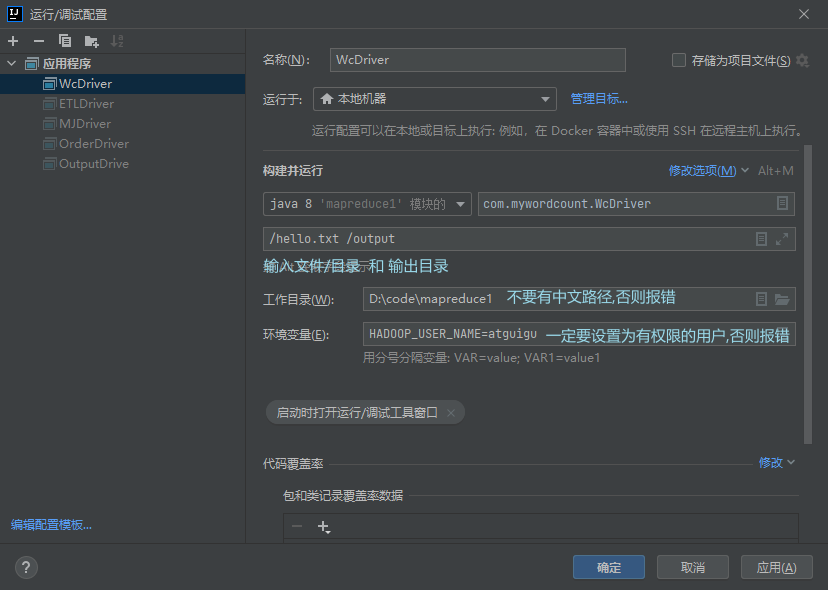
# windows 向 yarn 提交源码任务
- 在 Configuration 配置文件添加 yarn 的配置属性
- 用 Maven 构建 jar
- 修改 job 加载驱动类为 打包后的 jar 包
驱动类编码
package com.mywordcount;

import java.io.IOException;

import org.apache.hadoop.conf.Configuration;
import org.apache.hadoop.fs.Path;
import org.apache.hadoop.io.IntWritable;
import org.apache.hadoop.io.Text;
import org.apache.hadoop.mapreduce.Job;
import org.apache.hadoop.mapreduce.lib.input.FileInputFormat;
import org.apache.hadoop.mapreduce.lib.output.FileOutputFormat;

public class WcDriver {

    public static void main(String[] args) throws IOException, ClassNotFoundException, InterruptedException {

        // 1 获取配置信息以及封装任务
        Configuration configuration = new Configuration();

        configuration.set("fs.defaultFS", "hdfs://hadoop102:8020");
        configuration.set("mapreduce.framework.name", "yarn");
        configuration.set("mapreduce.app-submission.cross-platform", "true");
        configuration.set("yarn.resourcemanager.hostname", "hadoop103");

        Job job = Job.getInstance(configuration);

        // 2 设置jar加载路径
//        job.setJarByClass(WcDriver.class);
        job.setJar("D:\\code\\mapreduce1\\target\\mapreduce1-1.0-SNAPSHOT.jar");
        // 3 设置map和reduce类
        job.setMapperClass(WcMapper.class);
        job.setReducerClass(WcReducer.class);

        // 4 设置map输出
        job.setMapOutputKeyClass(Text.class);
        job.setMapOutputValueClass(IntWritable.class);

        // 5 设置最终输出kv类型
        job.setOutputKeyClass(Text.class);
        job.setOutputValueClass(IntWritable.class);

        // 6 设置输入和输出路径
        FileInputFormat.setInputPaths(job, new Path(args[0]));
        FileOutputFormat.setOutputPath(job, new Path(args[1]));
        // 7 提交
        boolean result = job.waitForCompletion(true);

        System.exit(result ? 0 : 1);
    }
}
2
3
4
5
6
7
8
9
10
11
12
13
14
15
16
17
18
19
20
21
22
23
24
25
26
27
28
29
30
31
32
33
34
35
36
37
38
39
40
41
42
43
44
45
46
47
48
49
50
51
52
# 数据压缩
采用压缩技术减少了磁盘 IO 但同时增加了 CPU 运算负担 所以压缩特性运用得当能提高性能 但运用不当也可能降低性能
| 压缩格式 | hadoop 自带? | 算法 | 文件扩展名 | 是否可切分 | 换成压缩格式后,原来的程序是否需要修改 |
|---|---|---|---|---|---|
| DEFLATE | 是,直接使用 | DEFLATE | .deflate | 否 | 和文本处理一样,不需要修改 |
| Gzip | 是,直接使用 | DEFLATE | .gz | 否 | 和文本处理一样,不需要修改 |
| bzip2 | 是,直接使用 | bzip2 | .bz2 | 是 | 和文本处理一样,不需要修改 |
| LZO | 否,需要安装 | LZO | .lzo | 是 | 需要建索引,还需要指定输入格式 |
| Snappy | 否,需要安装 | Snappy | .snappy | 否 | 和文本处理一样,不需要修改 |
常用 Snappy 压缩 因为较高 其次是 LZO
不同阶段开启压缩:
如果输入阶段时为压缩包 则直接传递即可无需更改 Hadoop 自动解压缩并处理
shuffle 阶段 在驱动类设置开启压缩 并指定压缩格式
//开启压缩模式
configuration.setBoolean("mapreduce.map.output.compress", true);
//压缩格式为
configuration.setClass("mapreduce.map.output.compress.codec", BZip2Codec.class,
        CompressionCodec.class);
1
2
3
4
5reduce 阶段 输出压缩
//reduce阶段压缩
configuration.setBoolean("mapreduce.output.fileoutputformat.compress", true);
//指定压缩格式
configuration.setClass("mapreduce.output.fileoutputformat.compress.codec", SnappyCodec.class,
        CompressionCodec.class);
1
2
3
4
5
# Hadoop 压缩和解压
package com.compression;

import org.apache.hadoop.conf.Configuration;
import org.apache.hadoop.fs.FSDataInputStream;
import org.apache.hadoop.fs.FSDataOutputStream;
import org.apache.hadoop.fs.FileSystem;
import org.apache.hadoop.fs.Path;
import org.apache.hadoop.io.IOUtils;
import org.apache.hadoop.io.compress.*;
import org.apache.hadoop.util.ReflectionUtils;

import java.io.IOException;

public class TestCompression {
    public static void main(String[] args) throws IOException {
        compress("d:/phone_data.txt", BZip2Codec.class);
        decompress("d:/phone_data.txt.bz2");
    }

    //解压
    private static void decompress(String file) throws IOException {
        Configuration configuration = new Configuration();
        //生成压缩格式工厂对象
        CompressionCodecFactory codecFactory = new CompressionCodecFactory(configuration);

        //根据压缩格式工厂获取压缩对象
        CompressionCodec codec = codecFactory.getCodec(new Path(file));

        //输入流
        FileSystem fileSystem = FileSystem.get(configuration);

        FSDataInputStream fsDataInputStream = fileSystem.open(new Path(file));
        CompressionInputStream cis = codec.createInputStream(fsDataInputStream);

        //输出流
        String outputFile = file.substring(0, file.length() - codec.getDefaultExtension().length()); //获取文件名
        FSDataOutputStream fos = fileSystem.create(new Path(outputFile));
        IOUtils.copyBytes(cis, fos, 1024);//复制流 缓存为1024字节

        //关闭流
        IOUtils.closeStream(cis);
        IOUtils.closeStream(fos);


    }

    //压缩
    private static void compress(String file, Class<? extends CompressionCodec> codecClass) throws IOException {
        Configuration configuration = new Configuration();
        FileSystem fileSystem = FileSystem.get(configuration);

        //生成压缩格式对象
        CompressionCodec codec = ReflectionUtils.newInstance(codecClass, configuration);


        //开输入流
        FSDataInputStream fis = fileSystem.open(new Path(file));
        //输出流
        FSDataOutputStream fos = fileSystem.create(new Path(file + codec.getDefaultExtension()));

        //用压缩格式包装输出流
        CompressionOutputStream cos = codec.createOutputStream(fos);
        IOUtils.copyBytes(fis, cos, 1024);
        IOUtils.closeStream(fis);
        IOUtils.closeStream(cos);


    }
}
2
3
4
5
6
7
8
9
10
11
12
13
14
15
16
17
18
19
20
21
22
23
24
25
26
27
28
29
30
31
32
33
34
35
36
37
38
39
40
41
42
43
44
45
46
47
48
49
50
51
52
53
54
55
56
57
58
59
60
61
62
63
64
65
66
67
68
69
# Yarn 架构
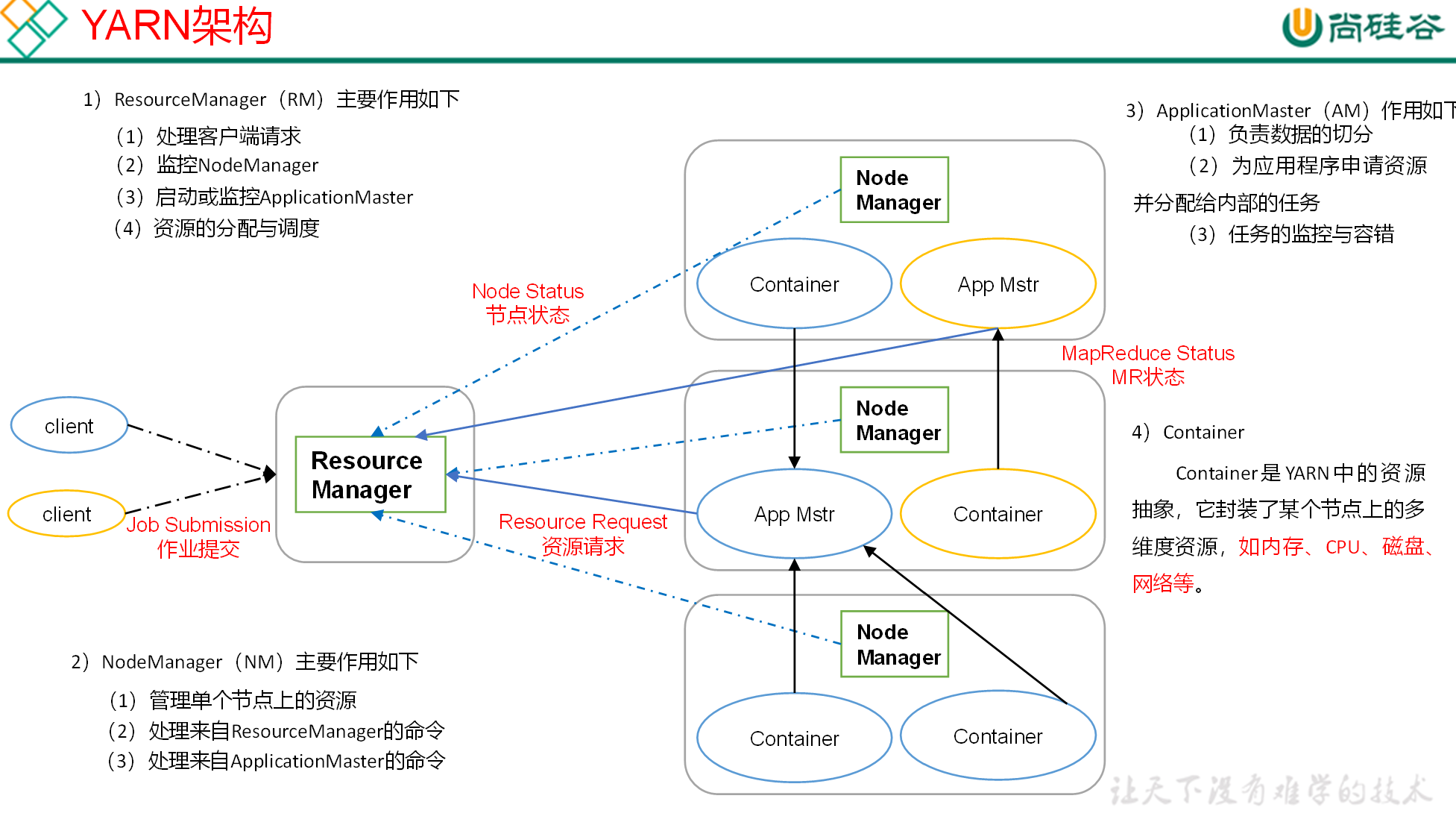
YARN 主要由 ResourceManager、NodeManager、ApplicationMaster 和 Container 等组件构成。
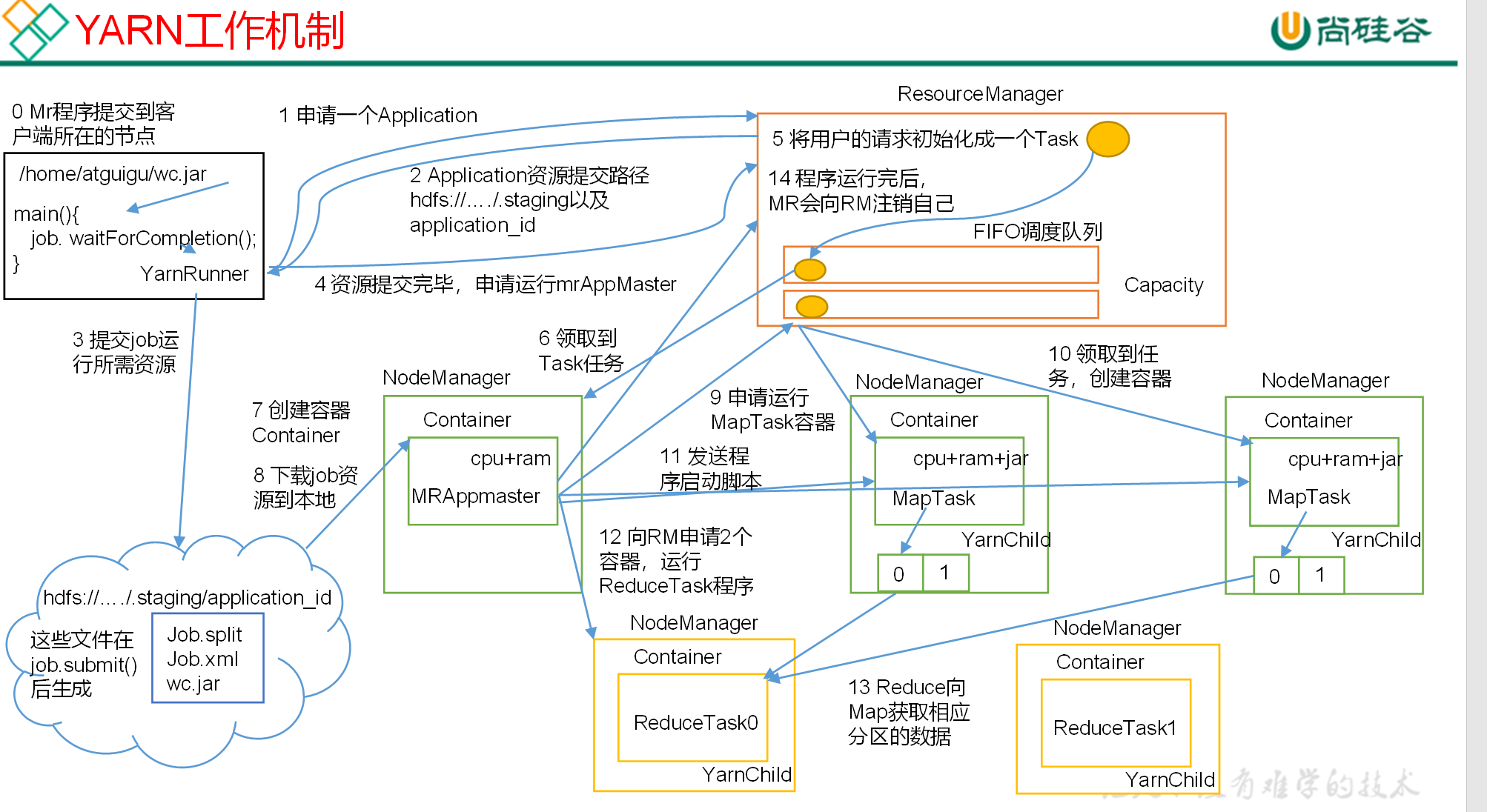
- MR 程序提交到客户端所在的节点。
- YarnRunner 向 ResourceManager 申请一个 Application。
- RM 将该应用程序的资源路径返回给 YarnRunner。
- 该程序将运行所需资源提交到 HDFS 上。
- 程序资源提交完毕后,申请运行 mrAppMaster。
- RM 将用户的请求初始化成一个 Task。
- 其中一个 NodeManager 领取到 Task 任务。
- 该 NodeManager 创建容器 Container,并产生 MRAppmaster。
- Container 从 HDFS 上拷贝资源到本地。
- MRAppmaster 向 RM 申请运行 MapTask 资源。
- RM 将运行 MapTask 任务分配给另外两个 NodeManager,另两个 NodeManager 分别领取任务并创建容器。
- MR 向两个接收到任务的 NodeManager 发送程序启动脚本,这两个 NodeManager 分别启动 MapTask,MapTask 对数据分区排序。
- MrAppMaster 等待所有 MapTask 运行完毕后,向 RM 申请容器,运行 ReduceTask。
- ReduceTask 向 MapTask 获取相应分区的数据。
- 程序运行完毕后,MR 会向 RM 申请注销自己。
# 资源调度器
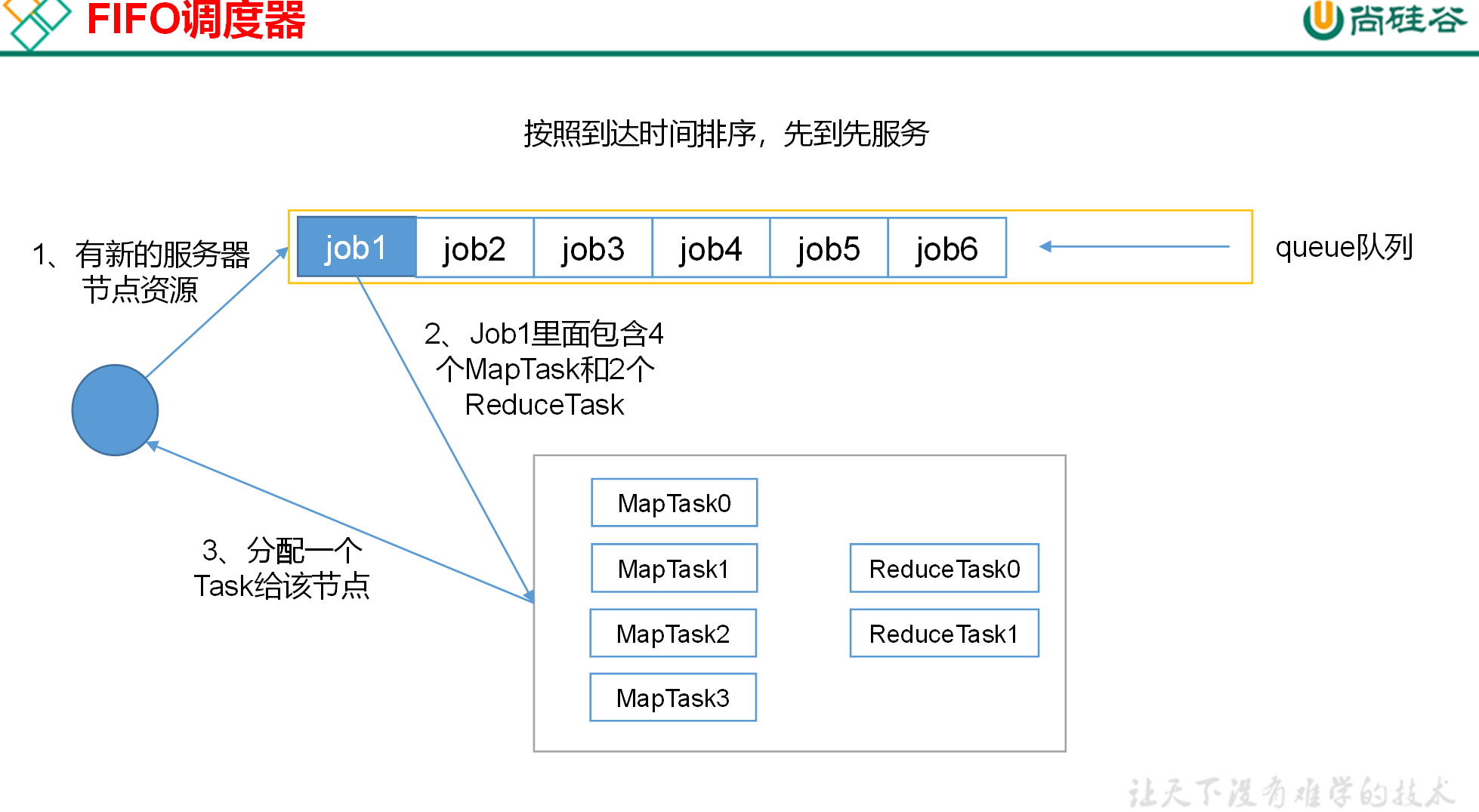
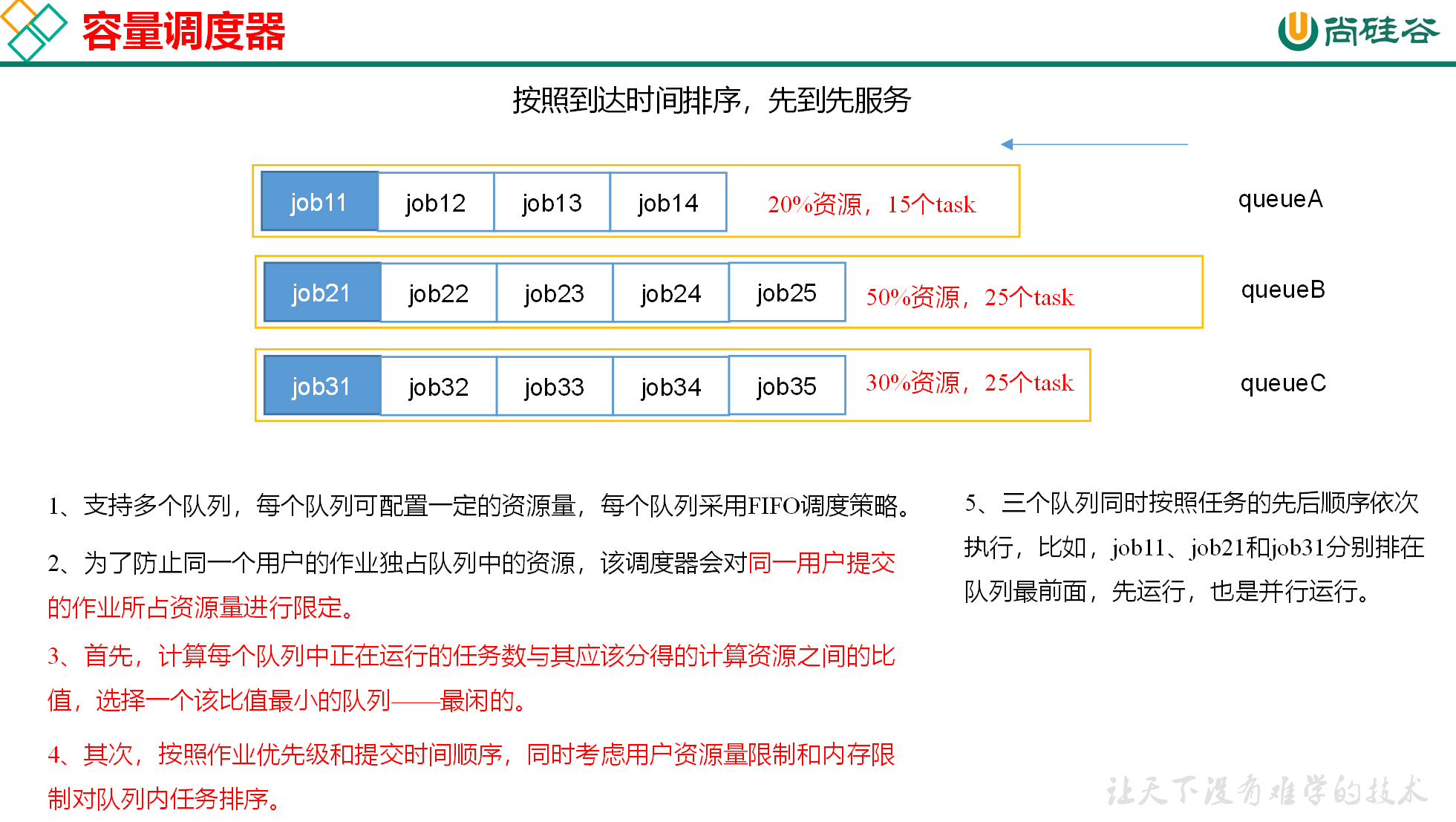
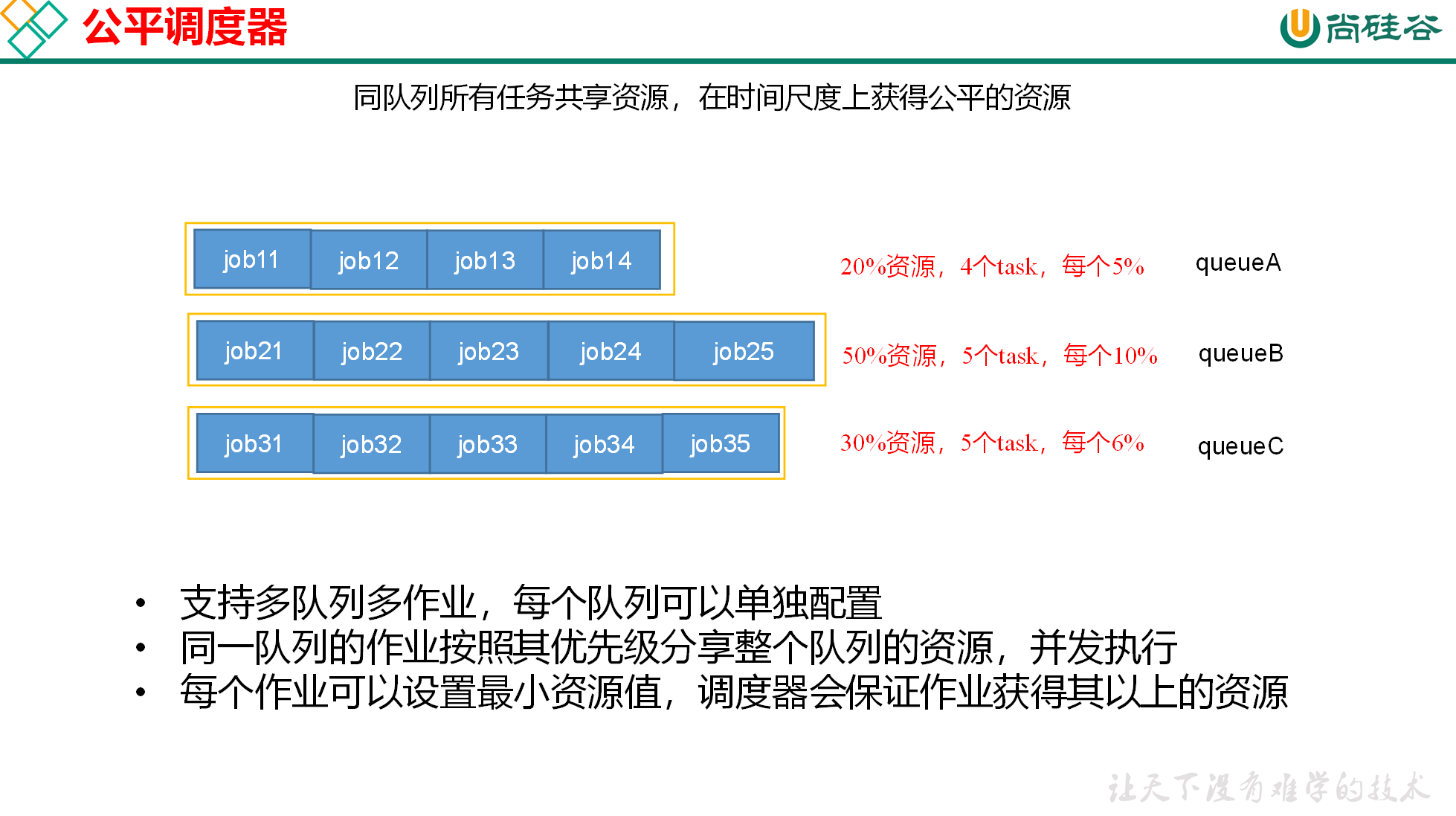
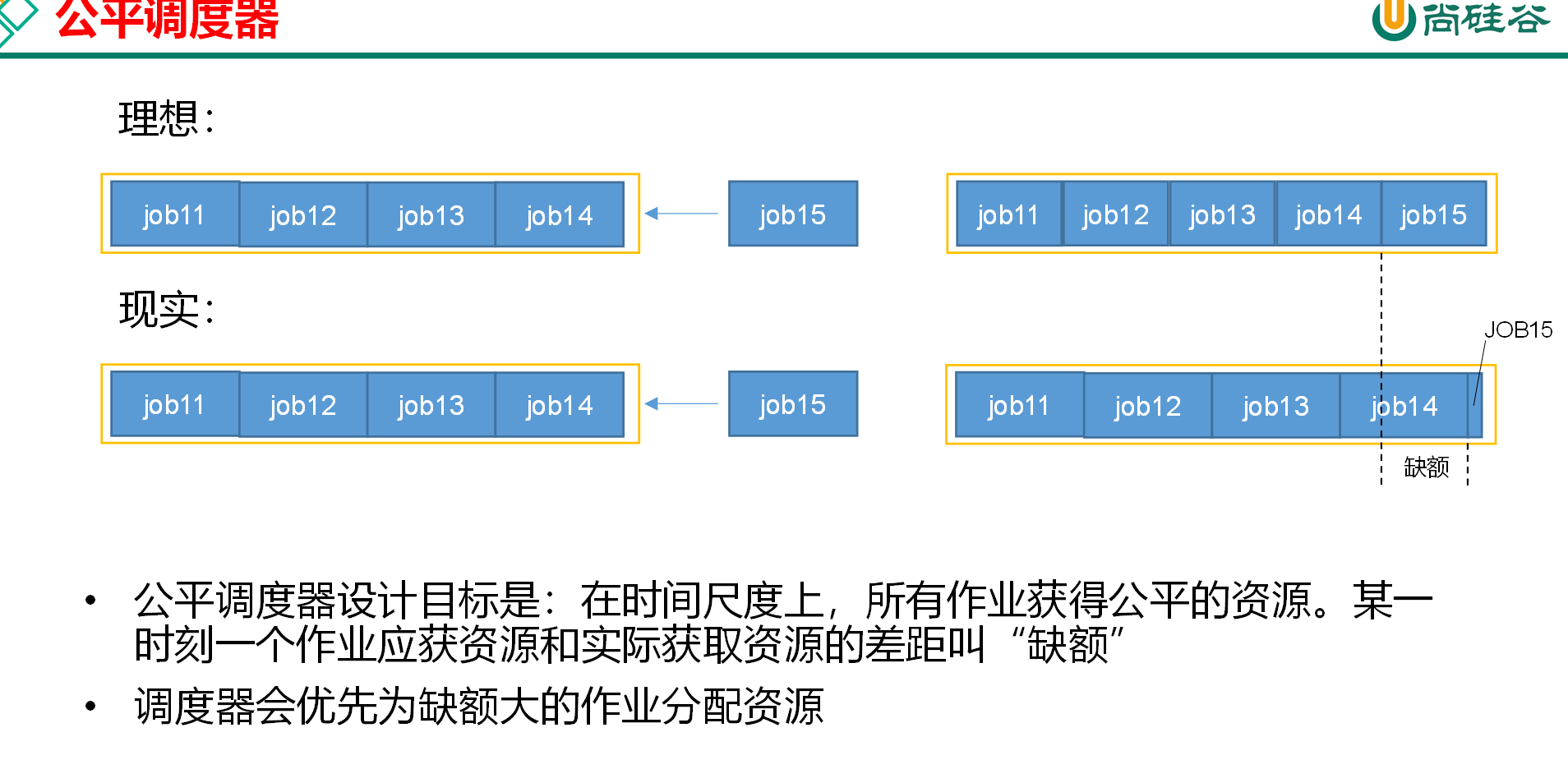
目前,Hadoop 作业调度器主要有三种:FIFO、Capacity Scheduler 和 Fair Scheduler。Hadoop3.1.3 默认的资源调度器是 Capacity Scheduler。
通过 yarn-default.xml 配置
<property>
    <description>The class to use as the resource scheduler.</description>
    <name>yarn.resourcemanager.scheduler.class</name>
<value>org.apache.hadoop.yarn.server.resourcemanager.scheduler.capacity.CapacityScheduler</value>
</property>
2
3
4
5
先进先出调度器(FIFO)
容量调度器(Capacity Scheduler)
公平调度器(Fair Scheduler)
# 容器调度器多队列配置
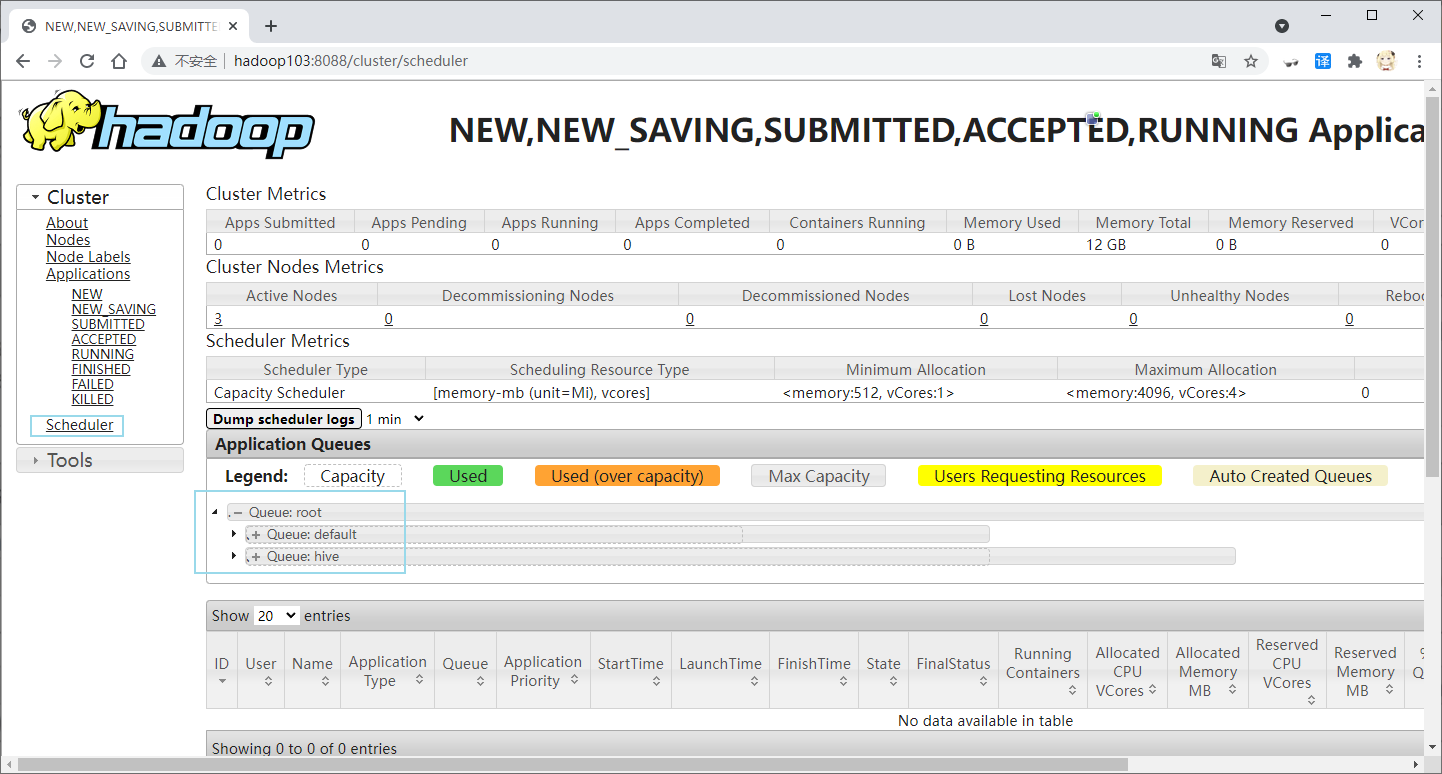
容量调度器默认为 1 个队列 default 通过修改 capacity-scheduler.xml 文件来配置多队列
vim /opt/module/hadoop-3.1.3/etc/hadoop/capacity-scheduler.xml #建议用图像界面
修改 yarn.scheduler.capacity.root.queues 的 value 添加新的队列
<!-- 默认为default队列 可以设置多条队列-->
  <property>
    <name>yarn.scheduler.capacity.root.queues</name>
    <value>default,hive</value>
    <description>
      The queues at the this level (root is the root queue).
    </description>
  </property>
1
2
3
4
5
6
7
8修改 default 队列占比为 40
<!-- default队列默认占比为100  改为百分之40  剩下交给hive -->
  <property>
    <name>yarn.scheduler.capacity.root.default.capacity</name>
    <value>40</value>
    <description>Default queue target capacity.</description>
  </property>
1
2
3
4
5
6修改 default 队列允许的最大占比为 60
<!--default队列最大占比默认为100  改为60 -->
  <property>
    <name>yarn.scheduler.capacity.root.default.maximum-capacity</name>
    <value>60</value>
    <description>
      The maximum capacity of the default queue.
    </description>
  </property>
1
2
3
4
5
6
7
8把 default 队列的配置属性复制一份 修改为新增队列名 hive 并删除其中的 description 标签
<!--hive队列设置-->
 <property>
    <name>yarn.scheduler.capacity.root.hive.capacity</name>
    <value>60</value>
  </property>

  <property>
    <name>yarn.scheduler.capacity.root.hive.user-limit-factor</name>
    <value>1</value>
  </property>
  <property>
    <name>yarn.scheduler.capacity.root.hive.maximum-capacity</name>
    <value>80</value>
  </property>

  <property>
    <name>yarn.scheduler.capacity.root.hive.state</name>
    <value>RUNNING</value>
  </property>

  <property>
    <name>yarn.scheduler.capacity.root.hive.acl_submit_applications</name>
    <value>*</value>
  </property>

  <property>
    <name>yarn.scheduler.capacity.root.hive.acl_administer_queue</name>
    <value>*</value>
  </property>

  <property>
    <name>yarn.scheduler.capacity.root.hive.acl_application_max_priority</name>
    <value>*</value>
  </property>

   <property>
     <name>yarn.scheduler.capacity.root.hive.maximum-application-lifetime
     </name>
     <value>-1</value>
   </property>

   <property>
     <name>yarn.scheduler.capacity.root.hive.default-application-lifetime
     </name>
     <value>-1</value>
   </property>
 <!--hive队列设置结束-->
1
2
3
4
5
6
7
8
9
10
11
12
13
14
15
16
17
18
19
20
21
22
23
24
25
26
27
28
29
30
31
32
33
34
35
36
37
38
39
40
41
42
43
44
45
46
47同步到其他集群中
xsync /opt/module/hadoop-3.1.3/etc/hadoop/capacity-scheduler.xml1重启 hadoop yarn
stop-yarn.sh  #103中
start-yarn.sh
1
2
# 多队列提交任务
通过 configuration 设置 mapred.job.queue.name 为指定队列名
configuration.set("mapred.job.queue.name","hive");
# 任务的推测执行
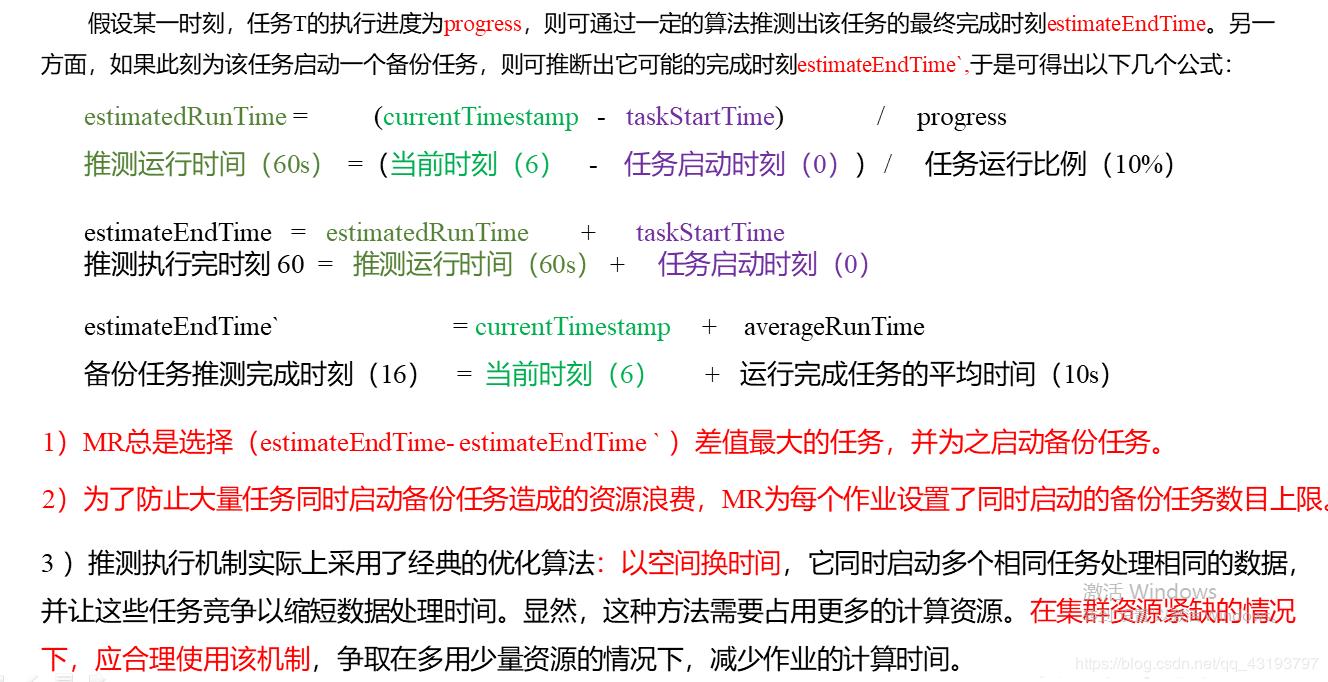
推测执行机制
APPmstr 会监控任务的运行速度如果某个任务运行速度远慢于平均任务 则为拖后腿的任务启动一个备份任务同时运行 谁先运行完 则采取谁的结果
执行推测任务的前提
每个 task 只能有一个备份任务
当前 job 已经完成的 task 必须不小于 5%
开启了推测执行设置 默认为打开的 在 mapred-site.xml 设置
<property>
        <name>mapreduce.map.speculative</name>
        <value>true</value>
</property>
<property>
        <name>mapreduce.reduce.speculative</name>
        <value>true</value>
</property>
1
2
3
4
5
6
7
8
不能启用推测执行机制情况
- 任务间存在严重的负载倾斜
- 特殊任务 如任务向数据库中写数据