
 自定义组件
自定义组件
# 自定义组件
http://flume.apache.org/releases/content/1.9.0/FlumeDeveloperGuide.html
# 自定义 Interceptor 拦截器
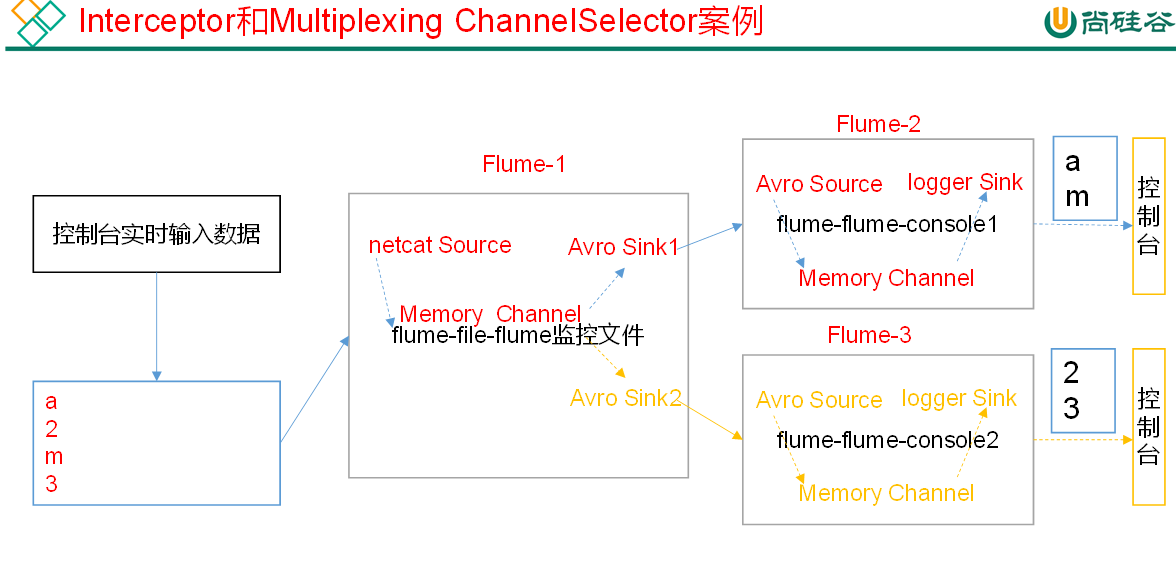
#agent 1  hadoop102
a1.sources = r1

a1.sinks = k1 k2
a1.channels = c1 c2

a1.sources.r1.type = netcat
a1.sources.r1.bing = hadoop102
a1.sources.r1.port = 22222

#复用配置
a1.sources.r1.selector.type = multiplexing
a1.sources.r1.selector.header = type
a1.sources.r1.selector.mapping.letter = c1
a1.sources.r1.selector.mapping.number = c2


a1.sources.r1.interceptors = i1
#自定义拦截器 引入类路径 中 Builder 内部类
a1.sources.r1.interceptors.i1.type = comm.atguigu.demo.MyInterceptor$Builder


a1.sinks.k1.type = arvo
a1.sinks.k1.hostname = hadoop103
a1.sinks.k1.port = 33333

#第二个sinks
a1.sinks.k2.type = arvo
a1.sinks.k2.hostname = hadoop104
a1.sinks.k2.port = 44444

a1.channels.c1.type = memory
a1.channels.c1.capacity = 1000
a1.channels.c1.transactionCapacity = 100
#第二个channel
a1.channels.c2.type = memory
a1.channels.c2.capacity = 1000
a1.channels.c2.transactionCapacity = 100

#一个sources 对接两个channels
a1.sources.r1.channels = c1 c2
#每个sinks对应一个channel
a1.sinks.k1.channel = c1
a1.sinks.k2.channel = c2
2
3
4
5
6
7
8
9
10
11
12
13
14
15
16
17
18
19
20
21
22
23
24
25
26
27
28
29
30
31
32
33
34
35
36
37
38
39
40
41
42
43
44
agent2 和 agent3 与之前无差
导入 pom 依赖
<dependency>
    <groupId>org.apache.flume</groupId>
    <artifactId>flume-ng-core</artifactId>
    <version>1.9.0</version>
</dependency>
2
3
4
5
实现 Interceptor 接口 重写抽象方法 并书写一个内部类实现 Interceptor.Builder 接口 实现抽象方法
package comm.atguigu.demo;

import org.apache.flume.Context;
import org.apache.flume.Event;
import org.apache.flume.interceptor.Interceptor;

import java.util.List;

/**
 * 自定义拦截器
 */
public class MyInterceptor implements Interceptor {
    //初始化
    @Override
    public void initialize() {

    }

    //为每个event中的header添加键值对  channelProcessor调用拦截器时调用此方法并将event传过来
    @Override
    public Event intercept(Event event) {
        //获取event body中的内容
        byte[] body = event.getBody();
        //判断内容是否是字母
        if ((body[0] >= 'A' && body[0] <= 'Z') || (body[0] >= 'a' && body[0] <= 'z')) {
            //向header添加 type = letter
            event.getHeaders().put("type", "letter");
        } else if (body[0] >= '0' && body[0] <= '9') {
            //否则添加 type = number
            event.getHeaders().put("type", "number");
        }

        return event;
    }

    @Override
    public List<Event> intercept(List<Event> list) {
        //遍历
        for (Event event : list) {
            intercept(event);
        }
        return list;
    }

    //关闭资源
    @Override
    public void close() {

    }

    /**
     * 返回MyInterceptor的实例
     * 1.静态内部类 公开权限
     */
    public static class Builder implements Interceptor.Builder{

        //返回自定义拦截器类
        @Override
        public Interceptor build() {
            return new MyInterceptor();
        }

        @Override
        public void configure(Context context) {

        }
    }
}
2
3
4
5
6
7
8
9
10
11
12
13
14
15
16
17
18
19
20
21
22
23
24
25
26
27
28
29
30
31
32
33
34
35
36
37
38
39
40
41
42
43
44
45
46
47
48
49
50
51
52
53
54
55
56
57
58
59
60
61
62
63
64
65
66
67
68
maven 打包 上传到 flume 中 lib 文件夹
flume-ng agent -n a1 -c conf/ -f datas/flume_interceptor.conf -Dflume.root.logger=INFO,console
# 自定义 Source
使用 flume 接收数据,并给每条数据添加前缀,输出到控制台。前缀可从 flume 配置文件中配置。
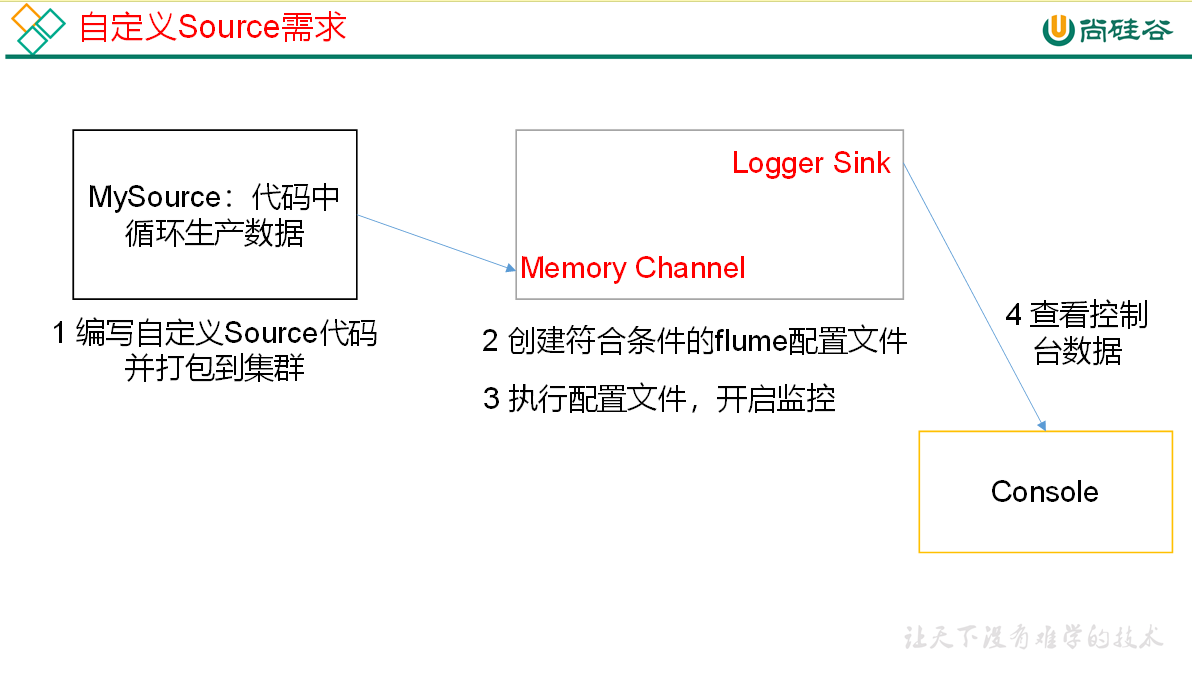
继承 AbstractSource 实现 Configurable, PollableSource
package comm.atguigu.demo;

import org.apache.flume.Context;
import org.apache.flume.Event;
import org.apache.flume.EventDeliveryException;
import org.apache.flume.PollableSource;
import org.apache.flume.channel.ChannelProcessor;
import org.apache.flume.conf.Configurable;
import org.apache.flume.event.SimpleEvent;
import org.apache.flume.source.AbstractSource;

import java.nio.charset.StandardCharsets;
import java.util.ArrayList;
import java.util.List;

//自定义source
//使用flume接收数据,并给每条数据添加前缀,输出到控制台。前缀可从flume配置文件中配置。
public class MySource extends AbstractSource implements Configurable, PollableSource {
    private String prefix;

    /**
     * 获取数据封装成event并写入channel,这个方法将被循环调用。
     *
     * @return status 枚举类 1.READY 添加event成功  2.BACKOFF 添加event失败
     * @throws EventDeliveryException
     */
    @Override
    public Status process() throws EventDeliveryException {

        try {
            List<Event> list = new ArrayList<>();
            for (int i = 0; i < 5; i++) {
                //封装event
                SimpleEvent event = new SimpleEvent();
                //event设置数据 加上前缀
                event.setBody((prefix + "hello" + i).getBytes(StandardCharsets.UTF_8));
                //放入集合中
                list.add(event);
            }
            //获取channelProcessor
            ChannelProcessor channelProcessor = getChannelProcessor();
            //将数据放入到channel中(channelProcessor)
            // channelProcessor.processEvent(event); //单个数据
            channelProcessor.processEventBatch(list); //集合放入
        } catch (Exception e) {
            e.printStackTrace();
            return Status.BACKOFF;
        }
        return Status.READY;
    }

    //暂不用  当source没数据可封装时 会让source所在的线程休息会
    @Override
    public long getBackOffSleepIncrement() {
        return 2000L; //休息2000毫秒
    }

    //暂不用  当source没数据可封装时 会让source所在的线程休息的最大时间 如果前面休息的时间大于设置的max值 则后面都不休息(休息0毫秒)
    @Override
    public long getMaxBackOffSleepInterval() {
        return 5000L;
    }

    //初始化context(读取配置文件内容)
    @Override
    public void configure(Context context) {
        //前缀 默认值为默认值test=
        prefix = context.getString("prefix", "test=");

    }
}
2
3
4
5
6
7
8
9
10
11
12
13
14
15
16
17
18
19
20
21
22
23
24
25
26
27
28
29
30
31
32
33
34
35
36
37
38
39
40
41
42
43
44
45
46
47
48
49
50
51
52
53
54
55
56
57
58
59
60
61
62
63
64
65
66
67
68
69
70
71
打包并上传到 flume 的 lib 中
配置文件
a1.sources = r1
a1.sinks = k1
a1.channels = c1

#自定义sources 引用类路径
a1.sources.r1.type = comm.atguigu.demo.MySource
#自定义设置前缀 如果为空 则使用自定义类中默认值test=
a1.sources.r1.prefix = qaq

a1.sinks.k1.type = logger

a1.channels.c1.type = memory
a1.channels.c1.capacity = 1000
a1.channels.c1.transactionCapacity = 100

a1.sources.r1.channels = c1
a1.sinks.k1.channel = c1
2
3
4
5
6
7
8
9
10
11
12
13
14
15
16
17
# 自定义 Sink
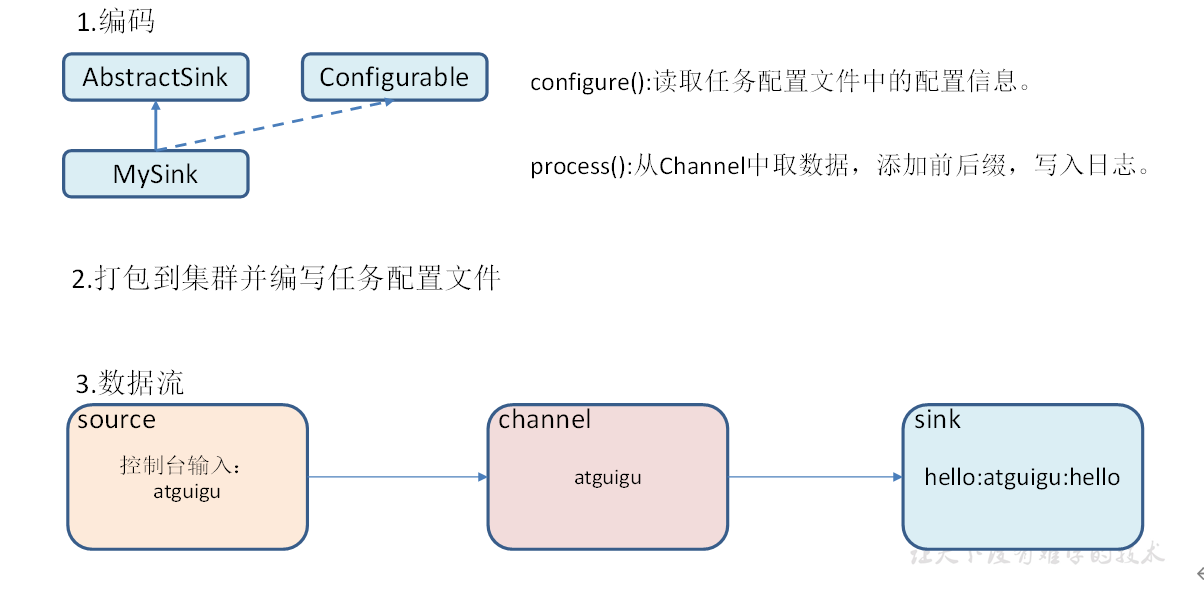
继承 AbstractSink 实现 Configurable
package comm.atguigu.demo;

import org.apache.flume.*;
import org.apache.flume.conf.Configurable;
import org.apache.flume.sink.AbstractSink;
import org.slf4j.Logger;
import org.slf4j.LoggerFactory;

public class MySink extends AbstractSink implements Configurable {

    //从配置文件读取suffix的值
    private String suffix;
    //获取logger对象 可以将数据以日志的方式输出  或以 写入数据本地等持久化数据
    Logger logger = LoggerFactory.getLogger(MySink.class);

    /**
     * 用来处理sink逻辑 将channel中的内容写出去 会被不停的循环调用
     *
     * @return
     * @throws EventDeliveryException
     */
    @Override
    public Status process() throws EventDeliveryException {
        //获取channel
        Channel channel = getChannel();
        //获取事务
        Transaction transaction = channel.getTransaction();
        try {
            Event event = null;
            transaction.begin();//开启事务

            while (true) {
                event = channel.take();//获取数据
                if (event != null) {
                    //保证event中是有数据的
                    break;
                }
            }

            //将数据写出 此处以日志形式输出  以某种持久化形式将数据输出
            logger.info(new String(event.getBody()) + suffix);
            //提交事务
            transaction.commit();
        } catch (ChannelException e) {
            e.printStackTrace();
            transaction.rollback(); //事务回滚
            return Status.BACKOFF; //获取数据失败

        } finally {
            transaction.close(); //关闭资源
        }

        return Status.READY;
    }


    /**
     * 获取上下文 读取配置文件中的内容
     *
     * @param context
     */
    @Override
    public void configure(Context context) {
        suffix = context.getString("suffix", "test");
    }
}
2
3
4
5
6
7
8
9
10
11
12
13
14
15
16
17
18
19
20
21
22
23
24
25
26
27
28
29
30
31
32
33
34
35
36
37
38
39
40
41
42
43
44
45
46
47
48
49
50
51
52
53
54
55
56
57
58
59
60
61
62
63
64
65
66
67
打包上传到 flume 的 lib 中
配置文件
a1.sources = r1
a1.sinks = k1
a1.channels = c1

a1.sources.r1.type = netcat
a1.sources.r1.bind = localhost
a1.sources.r1.port = 44444

#自定义sink
a1.sinks.k1.type = comm.atguigu.demo.MySink
#给数据设置后缀
a1.sinks.k1.suffix = atguigu

a1.channels.c1.type = memory
a1.channels.c1.capacity = 1000
a1.channels.c1.transactionCapacity = 100

a1.sources.r1.channels = c1
a1.sinks.k1.channel = c1
2
3
4
5
6
7
8
9
10
11
12
13
14
15
16
17
18
19
# Flume 数据流监控
# Ganglia 的安装与部署
sudo yum -y install httpd php # 安装 httpd服务 与 php
sudo yum -y install rrdtool perl-rrdtool rrdtool-devel # 依赖
sudo yum -y install apr-devel #依赖

#安装ganglia
sudo yum install epel-release
sudo yum -y install ganglia-gmetad
sudo yum -y install ganglia-web
sudo yum install -y ganglia-gmond
2
3
4
5
6
7
8
9
Ganglia 由 gmond、gmetad 和 gweb 三部分组成。
gmond(Ganglia Monitoring Daemon)是一种轻量级服务,安装在每台需要收集指标数据的节点主机上。使用 gmond,你可以很容易收集很多系统指标数据,如 CPU、内存、磁盘、网络和活跃进程的数据等。
gmetad(Ganglia Meta Daemon)整合所有信息,并将其以 RRD 格式存储至磁盘的服务。
gweb(Ganglia Web)Ganglia 可视化工具,gweb 是一种利用浏览器显示 gmetad 所存储数据的 PHP 前端。在 Web 界面中以图表方式展现集群的运行状态下收集的多种不同指标数据。
# 修改配置
sudo vim /etc/httpd/conf.d/ganglia.conf
# Ganglia monitoring system php web frontend
Alias /ganglia /usr/share/ganglia
<Location /ganglia>
  Require all granted
  #Deny from all
  # Allow from 127.0.0.1
  # Allow from ::1
  # Allow from .example.com
</Location>
2
3
4
5
6
7
8
9
sudo vim /etc/ganglia/gmetad.conf
#更改此字段的ip地址
data_source "my_cluster" 192.168.130.102
2
sudo vim /etc/ganglia/gmond.conf
cluster {
  name = "my_cluster"
  owner = "unspecified"
  latlong = "unspecified"
  url = "unspecified"
}
udp_send_channel {
  #bind_hostname = yes # Highly recommended, soon to be default.
                       # This option tells gmond to use a source address
                       # that resolves to the machine's hostname.  Without
                       # this, the metrics may appear to come from any
                       # interface and the DNS names associated with
                       # those IPs will be used to create the RRDs.
  # mcast_join = 239.2.11.71
  host = 192.168.130.102
  port = 8649
  ttl = 1
}
udp_recv_channel {
  # mcast_join = 239.2.11.71
  port = 8649
  bind = 192.168.130.102
  retry_bind = true
  # Size of the UDP buffer. If you are handling lots of metrics you really
  # should bump it up to e.g. 10MB or even higher.
  # buffer = 10485760
}
2
3
4
5
6
7
8
9
10
11
12
13
14
15
16
17
18
19
20
21
22
23
24
25
26
27
sudo vim /etc/selinux/config
# This file controls the state of SELinux on the system.
# SELINUX= can take one of these three values:
#     enforcing - SELinux security policy is enforced.
#     permissive - SELinux prints warnings instead of enforcing.
#     disabled - No SELinux policy is loaded.
SELINUX=disabled
# SELINUXTYPE= can take one of these two values:
#     targeted - Targeted processes are protected,
#     mls - Multi Level Security protection.
SELINUXTYPE=targeted
2
3
4
5
6
7
8
9
10
selinux 本次生效关闭必须重启,如果此时不想重启,可以临时生效之
sudo setenforce 0
# 启动
sudo service httpd start
sudo service gmetad start
sudo service gmond start
2
3
访问 http://192.168.130.102/ganglia
如果完成以上操作依然出现权限不足错误,请修改 /var/lib/ganglia 目录的权限:
sudo chmod -R 777 /var/lib/ganglia
# 操作 Flume 测试监控
进入 flume 下的 conf 目录
cd /opt/module/flume/conf/
mv flume-env.sh.template flume-env.sh #重命名
vim flume-env.sh
2
3
追加以下配置 ip 地址为 ganglia 主地址
JAVA_OPTS="-Dflume.monitoring.type=ganglia
-Dflume.monitoring.hosts=192.168.130.102:8649
-Xms100m
-Xmx200m"
2
3
4
启动 flume 任务
flume-ng agent \
--conf conf/ \
--name a1 \
--conf-file datas/netcatsource_loggersink.conf \
-Dflume.root.logger==INFO,console \
-Dflume.monitoring.type=ganglia \
-Dflume.monitoring.hosts=192.168.130.102:8649
2
3
4
5
6
7
发送信息
nc localhost 44444
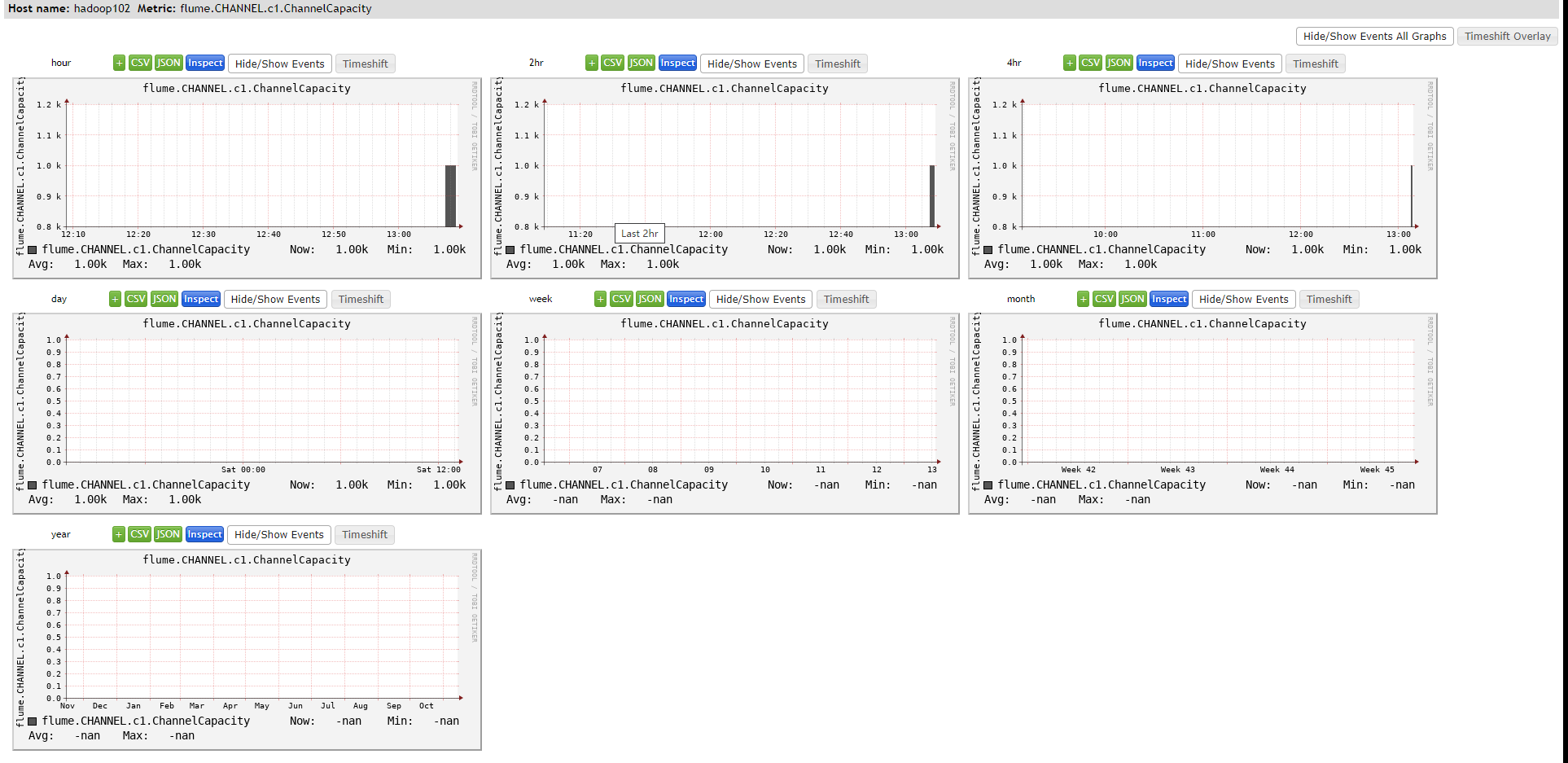
图例说明
| 字段(图表名称) | 字段含义 |
|---|---|
| EventPutAttemptCount | source 尝试写入 channel 的事件总数量 |
| EventPutSuccessCount | 成功写入 channel 且提交的事件总数量 |
| EventTakeAttemptCount | sink 尝试从 channel 拉取事件的总数量。 |
| EventTakeSuccessCount | sink 成功读取的事件的总数量 |
| StartTime | channel 启动的时间(毫秒) |
| StopTime | channel 停止的时间(毫秒) |
| ChannelSize | 目前 channel 中事件的总数量 |
| ChannelFillPercentage | channel 占用百分比 |
| ChannelCapacity | channel 的容量 |