
 Vuex
Vuex
# Vuex
首先:明确一件事件,组件的自定义事件,只能由组件自己来触发。
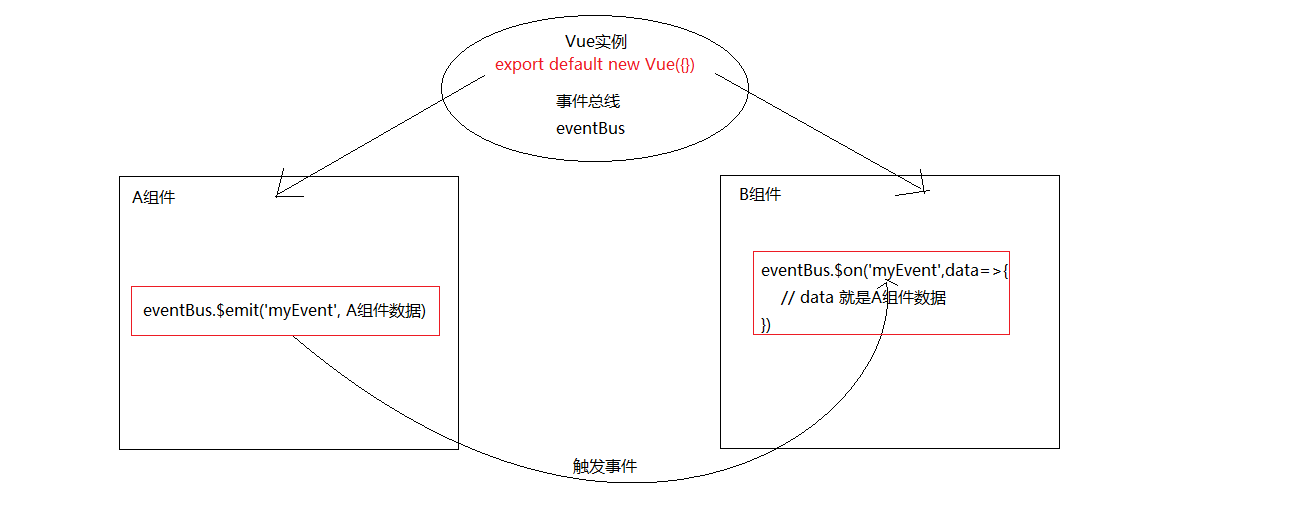
假设 A 组件想传值给 B 组件,AB 组件的非父子。其实也是依赖自定义事件来传递。
- 在 A 组件触发一个自定义事件(myEvent),触发的时候可以传参,参数可以是 A 组件数据
- 在 B 组件触发绑定自定义事件(myEvent),事件的函数接收传参,参数其实是 A 组件数据
- 触发事件和绑定事件由另外一个组件负责,A 导入它触发事件,B 导入它绑定事件,满足自定义事件触发绑定条件。
- 另外一个组件:我们称为
事件总线或者eventBus
eventBus.js
import Vue from 'vue'
export default new Vue({})
2
com-a.vue
<template>
  <div>A组件 <button @click="toB">传递数据给B组件</button></div>
</template>
<script>
import eventBus from './eventBus.js'
export default {
  name: 'ComA',
  data () {
    return {
      count: 911
    }
  },
  methods: {
    toB () {
      eventBus.$emit('myEvent', this.count)
    }
  }
}
</script>
2
3
4
5
6
7
8
9
10
11
12
13
14
15
16
17
18
19
com-b.vue
<template>
  <div>B组件 {{myCount}}</div>
</template>
<script>
import eventBus from './eventBus.js'
export default {
  name: 'ComA',
  data () {
    return {
      myCount: null
    }
  },
  created () {
    eventBus.$on('myEvent', data => {
      this.myCount = data
    })
  }
}
</script>
2
3
4
5
6
7
8
9
10
11
12
13
14
15
16
17
18
19
总结: 事件总线 eventBus 就是一个对象,提供事件绑定和事件触发功能,其他组件使用这个 eventBus 进行事件绑定和事件触发进行传参,可以解决非父子组件传值问题。
# Vuex 介绍
Vuex 是一个专为 Vue.js 应用程序开发的状态管理模式。它采用集中式存储管理应用的所有组件的状态,并以相应的规则保证状态以一种可预测的方式发生变化。
vuex 是采用集中式管理组件依赖的共享数据的一个工具 vue 插件,可以解决不同组件数据共享问题。
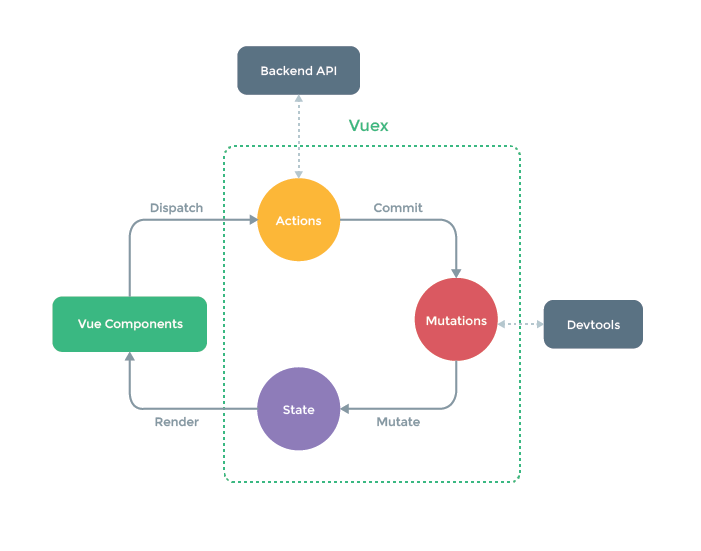
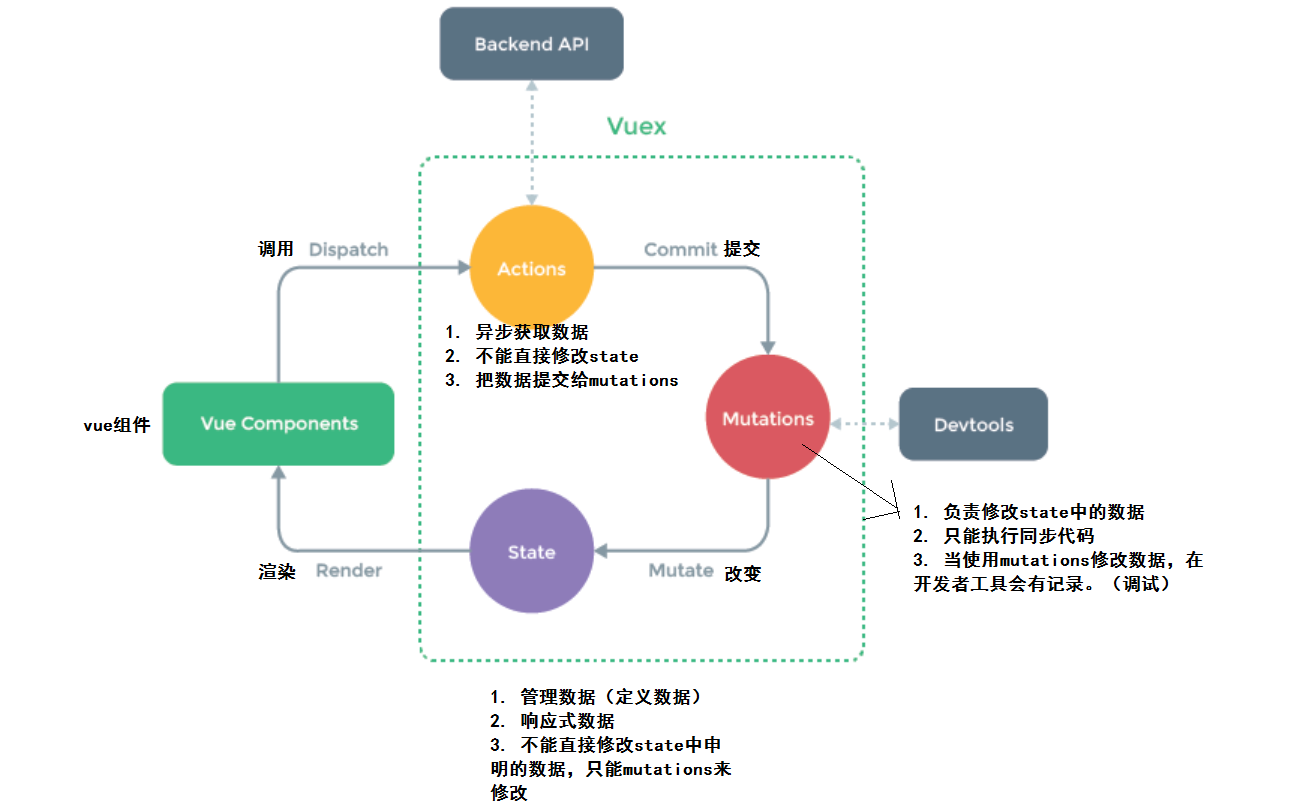
- state 管理数据,管理的数据是响应式的,当数据改变时驱动视图更新。
- mutations 更新数据,state 中的数据只能使用 mutations 去改变数据。
- actions 请求数据,响应成功后把数据提交给 mutations
# Vuex 使用
- 第一步:
npm i vuex --save - 第二步: 创建 store/index.js
import Vuex from 'vuex'import vue from 'vue' - 第三步:
Vue.use(Vuex) - 第四步:
const store = new Vuex.Store({...配置项}) - 第五步:导出
export default store - 第六步:导入 main.js 在根实例配置 store 选项指向 store 实例对象
// 初始化一个vuex的实例(数据仓库) 导出即可
import Vuex from 'vuex'
import Vue from 'vue'

// 使用安装
Vue.use(Vuex)

// 初始化
const store = new Vuex.Store({
  // 配置(state|mutations|actions)
})

export default store
2
3
4
5
6
7
8
9
10
11
12
13
import store from '@/store' //导入store

new Vue({
  store, //使用store
  render: h => h(App),
}).$mount('#app')
2
3
4
5
6
# state
vuex 中如何定义数据,在组件中如何使用数据。步骤
- 定义数据
- 使用数据
- 通过 this 直接使用
- computed 选项中使用
- mapState 辅助函数使用
定义数据
// 初始化vuex对象
const store = new vuex.Store({
  state: {
    // 管理数据
    count: 0
  }
})
2
3
4
5
6
7
使用数据 通过 this 直接使用
<div>A组件 state的数据:{{$store.state.count}}</div>
created () {
    console.log(this.$store.state.count)
}
2
3
computed 选项中使用
<div>A组件 state的数据:{{count}}</div>
computed: {
    count () {
        return this.$store.state.count
    }
}
2
3
4
5
mapState 辅助函数使用
<div>A组件 state的数据:{{count}}</div>
import {mapState } from vuex

computed: {
    ...mapState(['count'])
}
2
3
4
5
# mutations
通过 mutations 函数修改 vuex 中的数据
步骤
- 定义 mutations 函数
- 使用 mutations 函数
- 通过 this 直接使用
- mapMutations 辅助函数使用
定义 mutations 函数
const store = new vuex.Store({
  state: {
    count: 0
  },
  mutations: {
    // 修改数据的函数
    add (state) {
      state.count ++
    },
    // 带参数修改数据的函数
    add2 (state, payload) {
      // payload 是传参的意思
      state.count += payload
    }
  }
})
2
3
4
5
6
7
8
9
10
11
12
13
14
15
16
使用 mutations 函数 通过 this 直接使用
this.$store.commit('add')
this.$store.commit('add2', 10)
2
mapMutations 辅助函数使用
<button @click="add">累加1</button>
<button @click="add2(10)">累加10</button>
2
import {mapMutations } from vuex

methods: {
  ...mapMutations(['add','add2'])
}
2
3
4
5
# actions
通过 actions 函数获取数据
步骤
- 定义 actions 函数
- 使用 actions 函数
- 通过 this 直接使用
- mapActions 辅助函数使用
定义 actions 函数
actions: {
  // 异步获取数据
  getData (ctx, payload) {
    // ctx 是vuex的执行上下文,理解成this
    setTimeout(()=>{
	  const data = 100
      // 通过mutations修改数据
      ctx.commit('add2', data)
    },1000)
  }
}
2
3
4
5
6
7
8
9
10
11
使用 actions 函数 通过 this 直接使用
this.$store.dispatch('getData')
mapActions 辅助函数使用
<button @click="getData">获取数据</button>
import {mapActions } from vuex

methods: {
  ...mapActions(['getData'])
}
2
3
4
5
# getters
vuex 中定义计算属性 getters
步骤
- 定义 getters 数据(理解成 vuex 中的计算属性)
- 使用 getters 数据
- 通过 this 直接使用
- computed 中使用
- mapGetters 辅助函数使用
定义 getters 数据
state: {
  count: 10
},
// 基于state得到一个新数据
getters: {
  cubeCount (state) {
    return Math.pow(state.count, 3)
  }
}
2
3
4
5
6
7
8
9
使用 getters 数据 通过 this 直接使用
<div>{{$store.getters.cubeCount}}</div>
this.$store.getters.cubeCount
computed 中使用
<div>{{cubeCount}}</div>
computed: {
  cubeCount () {
    return this.$store.getters.cubeCount
  }
}
2
3
4
5
mapGetters 辅助函数使用
<div>{{cubeCount}}</div>
import {mapGetters } from vuex

computed: {
  ...mapGetters(['cubeCount'])
}
2
3
4
5
# modules
vuex 中分模块的写法,modules 配置选项的使用。
在 new Vuex.Store({}) 的配置对象中数据函数越来越多不利于维护,vuex 给我们提供了 modules 选项来拆分模块。
步骤
- 定义模块
- 注册模块
- 使用模块的:state,getters,mutations,actions 会有问题
- 建议使用带命名空间的模块的:state,getters,mutations,actions
定义模块,注册模块
import Vuex from 'vuex'
import Vue from 'vue'

Vue.use(Vuex)

// A模块
const moduleA = {
  // 开启命名空间:让你的state mutations getters actions 完全分割
  namespaced: true,
  // 避免数据污染,模块中state建议写成函数
  state () {
    return {
      count: 100
    }
  },
  getters: {
    cubeCount (state) {
      return Math.pow(state.count, 3)
    }
  },
  mutations: {
    add (state) {
      state.count++
    }
  },
  actions: {
    getData (ctx) {
      setTimeout(() => {
        // 获取数据成功
        ctx.commit('add')
      }, 1000)
    }
  }
  // mutations getters actions
}
// B模块
const moduleB = {
  namespaced: true,
  // 避免数据污染,模块中state建议写成函数
  state () {
    return {
      count: 10000
    }
  },
  mutations: {
    add (state) {
      state.count += 100
    }
  }
  // mutations getters actions
}

const store = new Vuex.Store({
  // state mutations actions getters
  // 不建议直接这里定义
  // 建议再 modules 配置选项定义模块
  modules: {
    a: moduleA,
    b: moduleB
  }
})

export default store
2
3
4
5
6
7
8
9
10
11
12
13
14
15
16
17
18
19
20
21
22
23
24
25
26
27
28
29
30
31
32
33
34
35
36
37
38
39
40
41
42
43
44
45
46
47
48
49
50
51
52
53
54
55
56
57
58
59
60
61
62
63
使用带命名空间的模块的:state,getters,mutations,actions
<template>
  <div class="com-a">
    A组件 {{$store.state.a.count}} {{count}}
    <button @click="$store.commit('a/add')">累计1</button>
    <button @click="add">累计1</button>

    <button @click="$store.dispatch('a/getData')">发请求获取数据</button>
    <button @click="getData">发请求获取数据</button>
    <br>
    {{$store.getters['a/cubeCount']}} ---- {{cubeCount}}
  </div>
</template>
<script>
import { mapState, mapMutations, mapActions, mapGetters } from 'vuex'
export default {
  name: 'ComA',
  computed: {
    // 'a' 模块名称  ['count'] 模块中的state数据名称
    ...mapState('a', ['count']),
    ...mapGetters('a', ['cubeCount'])
  },
  methods: {
    // 定义了add函数调用 this.$store.commit('a/add')
    ...mapMutations('a', ['add']),
    // 定义了getData函数调用 this.$store.dispatch('a/getData')
    ...mapActions('a', ['getData'])
  }
}
</script>
2
3
4
5
6
7
8
9
10
11
12
13
14
15
16
17
18
19
20
21
22
23
24
25
26
27
28
29
需要带上模块名称 模块名称/函数名称 使用辅助函数 (模块名称,[函数名称,...])