
 LockSupport与线程中断
# LockSupport 与线程中断
# 线程中断机制
首先一个线程不应该由其他线程来强制中断或停止,而是应该由线程自己自行停止。所以,Thread.stop, Thread.suspend, Thread.resume 都已经被废弃了。
其次在 Java 中没有办法立即停止一条线程,然而停止线程却显得尤为重要,如取消一个耗时操作。因此,Java 提供了一种用于停止线程的机制 —— 中断。
中断只是一种协作机制,Java 没有给中断增加任何语法,中断的过程完全需要程序员自己实现。
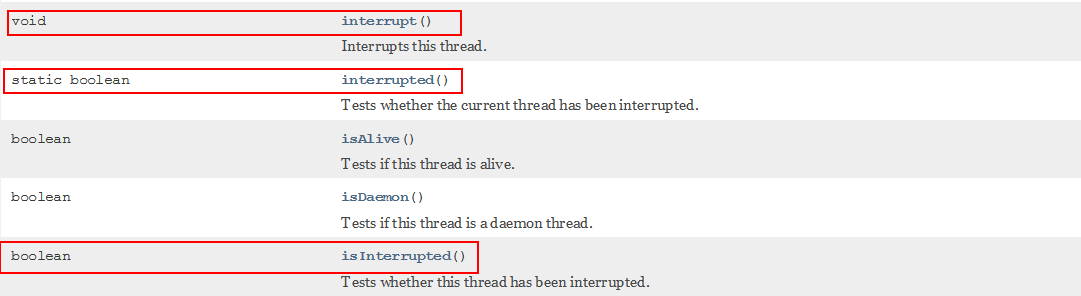
若要中断一个线程,你需要手动调用该线程的 interrupt 方法,该方法也仅仅是将线程对象的中断标识设成 true; 接着你需要自己写代码不断地检测当前线程的标识位,如果为 true,表示别的线程要求这条线程中断, 此时究竟该做什么需要你自己写代码实现。
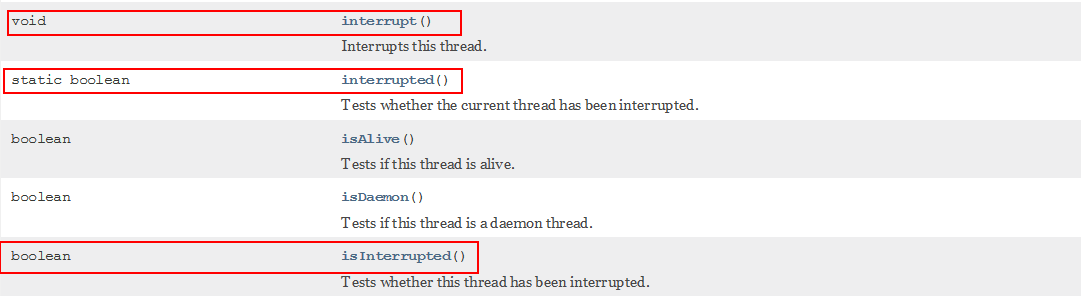
| 方法 | 说明 |
|---|---|
| public void interrupt() | 实例方法, 实例方法 interrupt () 仅仅是设置线程的中断状态为 true,不会停止线程 |
| public static boolean interrupted() | 静态方法,Thread.interrupted (); 判断线程是否被中断,并清除当前中断状态 这个方法做了两件事: 1 返回当前线程的中断状态 2 将当前线程的中断状态设为 false 这个方法有点不好理解,因为连续调用两次的结果可能不一样。 |
| public boolean isInterrupted() | 实例方法,判断当前线程是否被中断(通过检查中断标志位) |
每个线程对象中都有一个标识,用于表示线程是否被中断;该标识位为 true 表示中断,为 false 表示未中断; 通过调用线程对象的 interrupt 方法将该线程的标识位设为 true;可以在别的线程中调用,也可以在自己的线程中调用。
# 如何使用中断标识停止线程?
在需要中断的线程中不断监听中断状态,一旦发生中断,就执行相应的中断处理业务逻辑。修改状态,停止程序的运行。
通过一个 volatile 变量实现
package com.atguigu.juc.senior.test;

import java.util.concurrent.TimeUnit;

/**
 * @auther zzyy
 * @create 2020-05-12 14:19
 */
public class InterruptDemo
{
private static volatile boolean isStop = false;

public static void main(String[] args)
{
    new Thread(() -> {
        while(true)
        {
            if(isStop)
            {
                System.out.println(Thread.currentThread().getName()+"线程------isStop = true,自己退出了");
                break;
            }
            System.out.println("-------hello interrupt");
        }
    },"t1").start();

    //暂停几秒钟线程
    try { TimeUnit.SECONDS.sleep(1); } catch (InterruptedException e) { e.printStackTrace(); }
    isStop = true;
}

}
2
3
4
5
6
7
8
9
10
11
12
13
14
15
16
17
18
19
20
21
22
23
24
25
26
27
28
29
30
31
32
33
34
35
通过 AtomicBoolean
package com.zzyy.study.test;

import java.util.concurrent.TimeUnit;
import java.util.concurrent.atomic.AtomicBoolean;

/**
 * @auther zzyy
 * @create 2020-05-26 23:24
 */
public class StopThreadDemo
{
    private final static AtomicBoolean atomicBoolean = new AtomicBoolean(true);

    public static void main(String[] args)
    {
        Thread t1 = new Thread(() -> {
            while(atomicBoolean.get())
            {
                try { TimeUnit.MILLISECONDS.sleep(500); } catch (InterruptedException e) { e.printStackTrace(); }
                System.out.println("-----hello");
            }
        }, "t1");
        t1.start();

        try { TimeUnit.SECONDS.sleep(3); } catch (InterruptedException e) { e.printStackTrace(); }

        atomicBoolean.set(false);
    }
}
2
3
4
5
6
7
8
9
10
11
12
13
14
15
16
17
18
19
20
21
22
23
24
25
26
27
28
29
30
31
32
通过 Thread 类自带的中断 api 方法实现
package com.atguigu.itdachang;

import java.util.concurrent.TimeUnit;

/**
 * @auther zzyy
 * @create 2020-07-10 17:33
 */
public class InterruptDemo
{
    public static void main(String[] args)
    {
        Thread t1 = new Thread(() -> {
            while(true)
            {
                if(Thread.currentThread().isInterrupted())
                {
                    System.out.println("-----t1 线程被中断了,break,程序结束");
                    break;
                }
                System.out.println("-----hello");
            }
        }, "t1");
        t1.start();

        System.out.println("**************"+t1.isInterrupted());
        //暂停5毫秒
        try { TimeUnit.MILLISECONDS.sleep(5); } catch (InterruptedException e) { e.printStackTrace(); }
        t1.interrupt();
        System.out.println("**************"+t1.isInterrupted());
    }
}
2
3
4
5
6
7
8
9
10
11
12
13
14
15
16
17
18
19
20
21
22
23
24
25
26
27
28
29
30
31
32
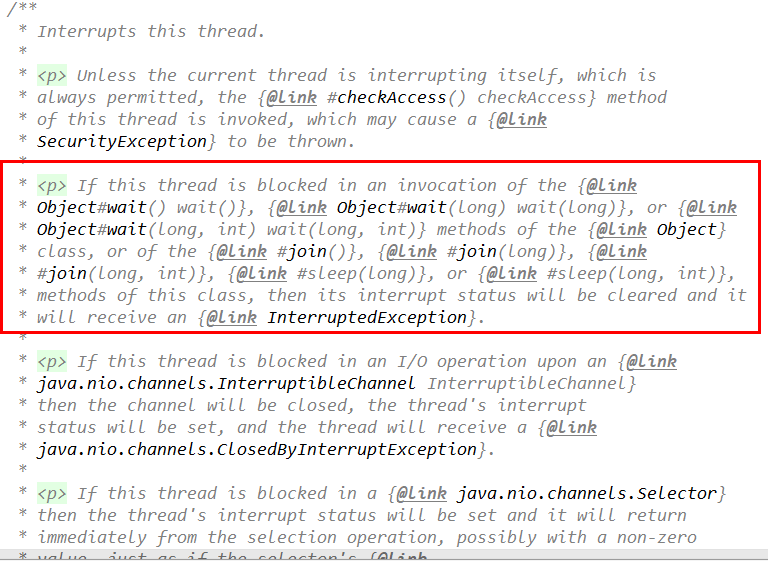
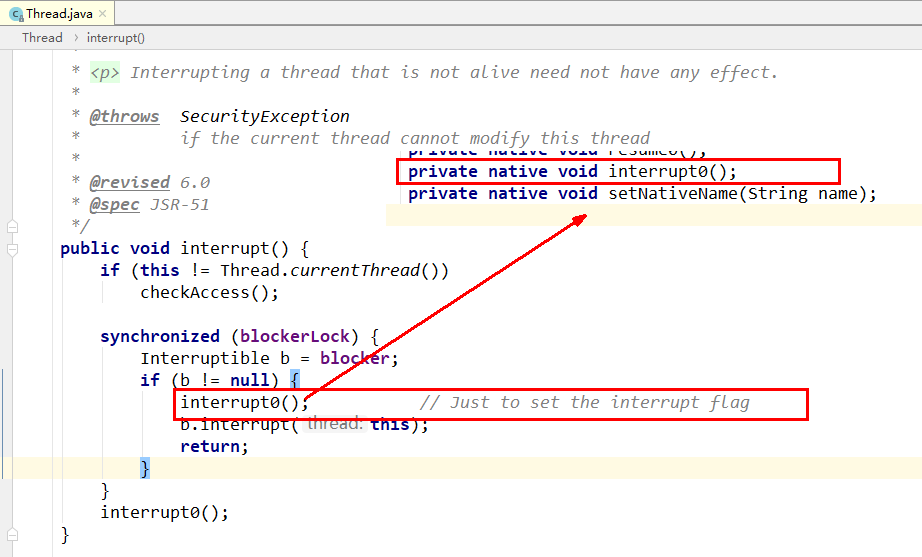
# interrupt()
实例方法 interrupt (),没有返回值
# isInterrupted()
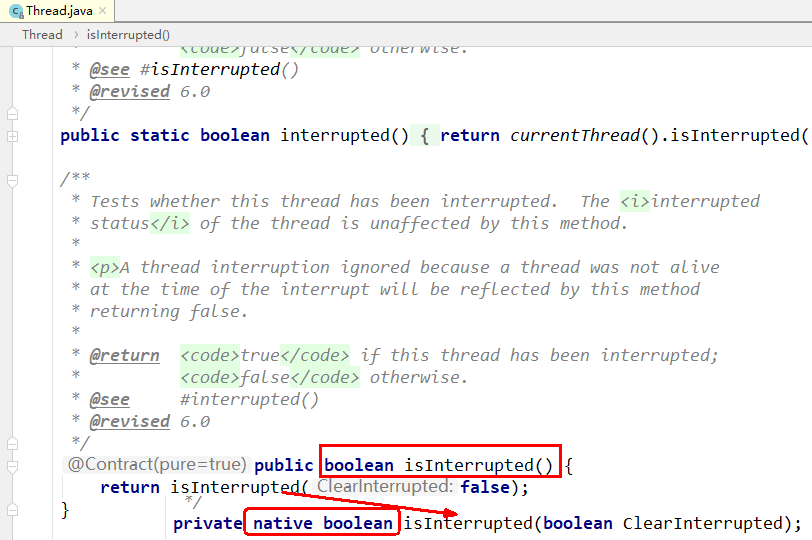
实例方法 isInterrupted,返回布尔值
# 当前线程的中断标识为 true,是不是就立刻停止?
具体来说,当对一个线程,调用 interrupt () 时:
- 如果线程处于正常活动状态,那么会将该线程的中断标志设置为 true,仅此而已。被设置中断标志的线程将继续正常运行,不受影响。所以, interrupt () 并不能真正的中断线程,需要被调用的线程自己进行配合才行。
- 如果线程处于被阻塞状态(例如处于 sleep, wait, join 等状态),在别的线程中调用当前线程对象的 interrupt 方法,那么线程将立即退出被阻塞状态,并抛出一个 InterruptedException 异常。
package com.atguigu.juc.senior.test;

import java.util.concurrent.TimeUnit;

/**
 * @auther zzyy
 * @create 2020-05-13 10:25
 */
public class InterruptDemo2
{
    public static void main(String[] args) throws InterruptedException
    {
        Thread t1 = new Thread(() -> {
            for (int i=0;i<300;i++) {
                System.out.println("-------"+i);
            }
            System.out.println("after t1.interrupt()--第2次---: "+Thread.currentThread().isInterrupted());
        },"t1");
        t1.start();

        System.out.println("before t1.interrupt()----: "+t1.isInterrupted());
        //实例方法interrupt()仅仅是设置线程的中断状态位设置为true,不会停止线程
        t1.interrupt();
        //活动状态,t1线程还在执行中
        try { TimeUnit.MILLISECONDS.sleep(3); } catch (InterruptedException e) { e.printStackTrace(); }
        System.out.println("after t1.interrupt()--第1次---: "+t1.isInterrupted());
        //非活动状态,t1线程不在执行中,已经结束执行了。
        try { TimeUnit.MILLISECONDS.sleep(3000); } catch (InterruptedException e) { e.printStackTrace(); }
        System.out.println("after t1.interrupt()--第3次---: "+t1.isInterrupted());
    }
}
2
3
4
5
6
7
8
9
10
11
12
13
14
15
16
17
18
19
20
21
22
23
24
25
26
27
28
29
30
31
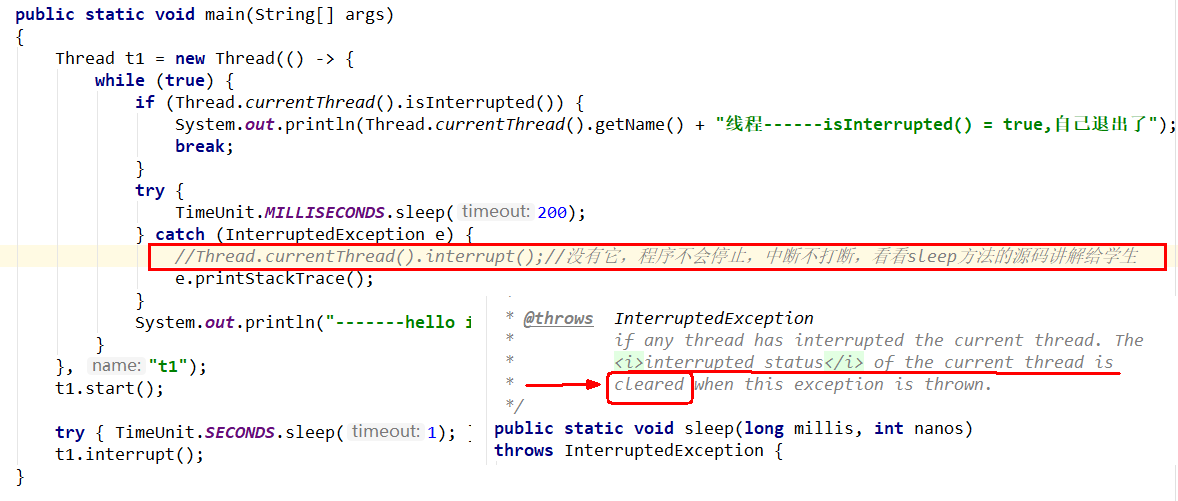
sleep 方法抛出 InterruptedException 后,中断标识也被清空置为 false, 我们在 catch 没有通过调用 th.interrupt () 方法再次将中断标识置为 true, 这就导致无限循环了。
中断只是一种协同机制,修改中断标识位仅此而已,不是立刻 stop 打断。
# 静态方法 Thread.interrupted ()
| public static boolean interrupted() | 静态方法,Thread.interrupted (); 判断线程是否被中断,并清除当前中断状态 这个方法做了两件事: 1 返回当前线程的中断状态 2 将当前线程的中断状态设为 false 这个方法有点不好理解,因为连续调用两次的结果可能不一样。 |
|---|
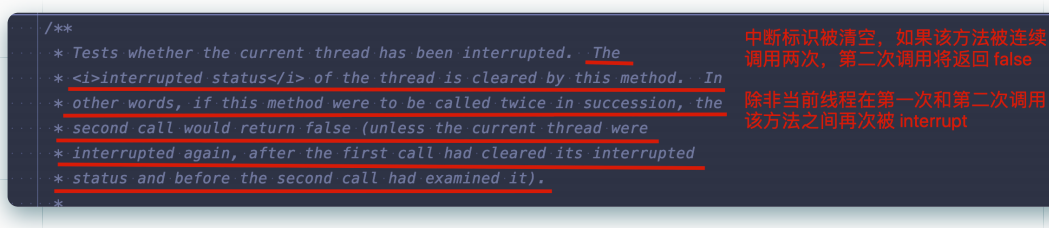
都会返回中断状态,两者对比
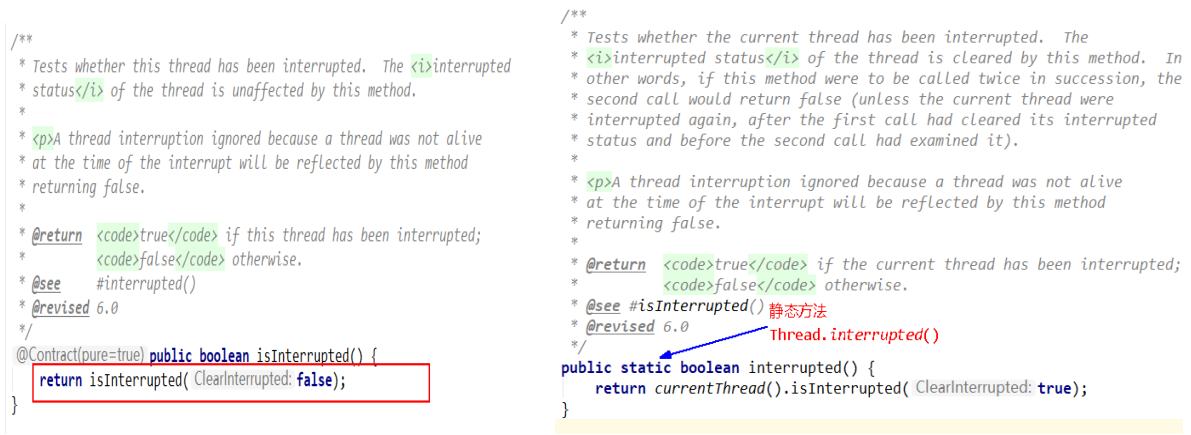


静态方法 interrupted 将 会清除中断状态(传入的参数 ClearInterrupted 为 true),
实例方法 isInterrupted 则不会(传入的参数 ClearInterrupted 为 false)。
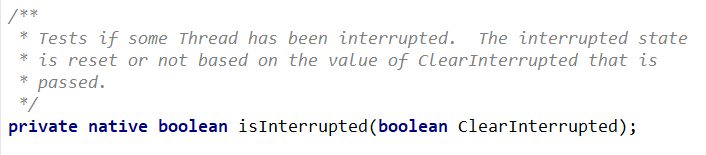
方法的注释也清晰的表达了 “中断状态将会根据传入的 ClearInterrupted 参数值确定是否重置”。
# 小结
线程中断相关的方法:
- interrupt () 方法是一个实例方法 它通知目标线程中断,也就是设置目标线程的中断标志位为 true,中断标志位表示当前线程已经被中断了。
- isInterrupted () 方法也是一个实例方法 它判断当前线程是否被中断(通过检查中断标志位)并获取中断标志
- Thread 类的静态方法 interrupted () 返回当前线程的中断状态 (boolean 类型) 且将当前线程的中断状态设为 false,此方法调用之后会清除当前线程的中断标志位的状态(将中断标志置为 false 了),返回当前值并清零置 false
# LockSupport
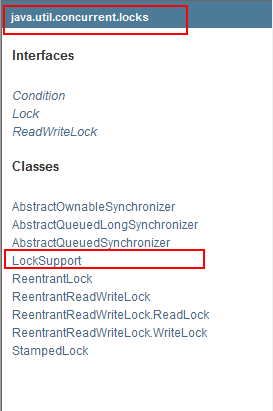
LockSupport 是用来创建锁和其他同步类的基本线程阻塞原语。
LockSupport 中的 park () 和 unpark () 的作用分别是阻塞线程和解除阻塞线程
# 线程等待唤醒机制
# 3 种让线程等待和唤醒的方法
- 方式 1:使用 Object 中的 wait () 方法让线程等待,使用 Object 中的 notify () 方法唤醒线程
- 方式 2:使用 JUC 包中 Condition 的 await () 方法让线程等待,使用 signal () 方法唤醒线程
- 方式 3:LockSupport 类可以阻塞当前线程以及唤醒指定被阻塞的线程
# Object 类中的 wait 和 notify 方法实现线程等待和唤醒
# 等待和唤醒原理
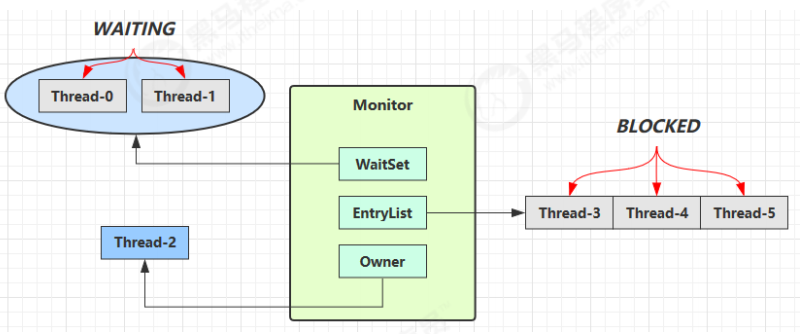
- Owner 线程发现条件不满足,调用 wait 方法,即可进入 WaitSet 变为 WAITING 状态
- BLOCKED 和 WAITING 的线程都处于阻塞状态,不占用 CPU 时间片
- BLOCKED 线程会在 Owner 线程释放锁时唤醒
- WAITING 线程会在 Owner 线程调用 notify 或 notifyAll 时唤醒,但唤醒后并不意味者立刻获得锁,仍需进入 EntryList 重新竞争
# code 演示
obj.wait()让进入 object 监视器的线程到 waitSet 等待obj.notify()在 object 上正在 waitSet 等待的线程中挑一个唤醒obj.notifyAll()让 object 上正在 waitSet 等待的线程全部唤醒
它们都是线程之间进行协作的手段,都属于 Object 对象的方法。必须获得此对象的锁,才能调用这几个方法
正常程序演示
package com.atguigu.juc.prepare;

import java.util.concurrent.TimeUnit;

/**
 * @auther zzyy
 * @create 2020-04-13 17:12
 *
 * 要求:t1线程等待3秒钟,3秒钟后t2线程唤醒t1线程继续工作
 *
 * 1 正常程序演示
 *
 * 以下异常情况:
 * 2 wait方法和notify方法,两个都去掉同步代码块后看运行效果
 *   2.1 异常情况
 *   Exception in thread "t1" java.lang.IllegalMonitorStateException at java.lang.Object.wait(Native Method)
 *   Exception in thread "t2" java.lang.IllegalMonitorStateException at java.lang.Object.notify(Native Method)
 *   2.2 结论
 *   Object类中的wait、notify、notifyAll用于线程等待和唤醒的方法,都必须在synchronized内部执行(必须用到关键字synchronized)。
 *
 * 3 将notify放在wait方法前面
 *   3.1 程序一直无法结束
 *   3.2 结论
 *   先wait后notify、notifyall方法,等待中的线程才会被唤醒,否则无法唤醒
 */
public class LockSupportDemo
{

    public static void main(String[] args)//main方法,主线程一切程序入口
    {
        Object objectLock = new Object(); //同一把锁,类似资源类

        new Thread(() -> {
            synchronized (objectLock) {
                try {
                    objectLock.wait();
                } catch (InterruptedException e) {
                    e.printStackTrace();
                }
            }
            System.out.println(Thread.currentThread().getName()+"\t"+"被唤醒了");
        },"t1").start();

        //暂停几秒钟线程
        try { TimeUnit.SECONDS.sleep(3L); } catch (InterruptedException e) { e.printStackTrace(); }

        new Thread(() -> {
            synchronized (objectLock) {
                objectLock.notify();
            }

            //objectLock.notify();

            /*synchronized (objectLock) {
                try {
                    objectLock.wait();
                } catch (InterruptedException e) {
                    e.printStackTrace();
                }
            }*/
        },"t2").start();


    }
}
2
3
4
5
6
7
8
9
10
11
12
13
14
15
16
17
18
19
20
21
22
23
24
25
26
27
28
29
30
31
32
33
34
35
36
37
38
39
40
41
42
43
44
45
46
47
48
49
50
51
52
53
54
55
56
57
58
59
60
61
62
63
64
65
66
wait() 方法会释放对象的锁,进入 WaitSet 等待区,从而让其他线程就机会获取对象的锁。无限制等待,直到 notify 为止
wait(long n) 有时限的等待,到 n 毫秒后结束等待,或是被 notify
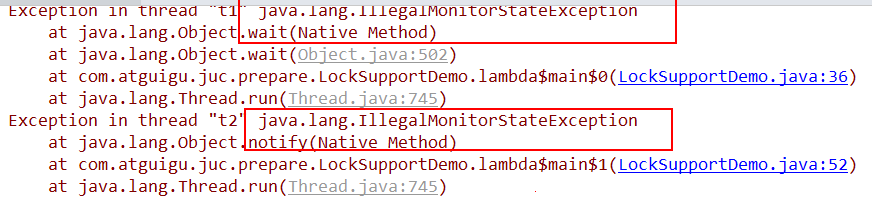
在没有加锁的情况下等待好唤醒,会出现异常原因, condition.await(); 和 condition.signal(); 都触发了 IllegalMonitorStateException 异常
package com.atguigu.juc.prepare;

import java.util.concurrent.TimeUnit;
import java.util.concurrent.locks.Condition;
import java.util.concurrent.locks.Lock;
import java.util.concurrent.locks.ReentrantLock;

/**
 * @auther zzyy
 * @create 2020-04-13 17:55
 * 异常:
 * condition.await();和condition.signal();都触发了IllegalMonitorStateException异常
 *
 * 原因:调用condition中线程等待和唤醒的方法的前提是,要在lock和unlock方法中,要有锁才能调用
 */
public class LockSupportDemo2
{
    public static void main(String[] args)
    {
        Lock lock = new ReentrantLock();
        Condition condition = lock.newCondition();

        new Thread(() -> {
            try
            {
                System.out.println(Thread.currentThread().getName()+"\t"+"start");
                condition.await();
                System.out.println(Thread.currentThread().getName()+"\t"+"被唤醒");
            } catch (InterruptedException e) {
                e.printStackTrace();
            }
        },"t1").start();

        //暂停几秒钟线程
        try { TimeUnit.SECONDS.sleep(3L); } catch (InterruptedException e) { e.printStackTrace(); }

        new Thread(() -> {
            try
            {
                condition.signal();
            } catch (Exception e) {
                e.printStackTrace();
            }
            System.out.println(Thread.currentThread().getName()+"\t"+"通知了");
        },"t2").start();

    }
}
2
3
4
5
6
7
8
9
10
11
12
13
14
15
16
17
18
19
20
21
22
23
24
25
26
27
28
29
30
31
32
33
34
35
36
37
38
39
40
41
42
43
44
45
46
47
48
49
异常 2:将 notify 放在 wait 方法前先执行,t1 先 notify 了,3 秒钟后 t2 线程再执行 wait 方法
package com.atguigu.juc.prepare;

import java.util.concurrent.TimeUnit;

/**
 * @auther zzyy
 * @create 2020-04-13 17:12
 *
 * 要求:t1线程等待3秒钟,3秒钟后t2线程唤醒t1线程继续工作
 *
 * 3 将notify放在wait方法前先执行,t1先notify了,3秒钟后t2线程再执行wait方法
 *   3.1 程序一直无法结束
 *   3.2 结论
 *   先wait后notify、notifyall方法,等待中的线程才会被唤醒,否则无法唤醒
 */
public class LockSupportDemo
{

    public static void main(String[] args)//main方法,主线程一切程序入口
    {
        Object objectLock = new Object(); //同一把锁,类似资源类

        new Thread(() -> {
            synchronized (objectLock) {
                objectLock.notify();
            }
            System.out.println(Thread.currentThread().getName()+"\t"+"通知了");
        },"t1").start();

        //t1先notify了,3秒钟后t2线程再执行wait方法
        try { TimeUnit.SECONDS.sleep(3L); } catch (InterruptedException e) { e.printStackTrace(); }

        new Thread(() -> {
            synchronized (objectLock) {
                try {
                    objectLock.wait();
                } catch (InterruptedException e) {
                    e.printStackTrace();
                }
            }
            System.out.println(Thread.currentThread().getName()+"\t"+"被唤醒了");
        },"t2").start();
    }
}
2
3
4
5
6
7
8
9
10
11
12
13
14
15
16
17
18
19
20
21
22
23
24
25
26
27
28
29
30
31
32
33
34
35
36
37
38
39
40
41
42
43
44
45
将 notify 放在 wait 方法前面,程序无法执行,无法唤醒
总结:wait 和 notify 方法必须要在同步块或者方法里面,且成对出现使用,先 wait 后 notify 才 OK。
# sleep (long n) 和 wait (long n) 的区别
- sleep 是 Thread 方法,而 wait 是 Object 的方法
- sleep 不需要强制和 synchronized 配合使用,但 wait 需要 和 synchronized 一起用
- sleep 在睡眠的同时,不会释放对象锁的,但 wait 在等待的时候会释放对象锁
- 它们 状态 TIMED_WAITING
# wait notify 的正确姿势
# step / 例 1 : sleep 会阻碍其它线程执行
static final Object room = new Object();
static boolean hasCigarette = false;
static boolean hasTakeout = false;
2
3
思考下面的解决方案好不好,为什么?
new Thread(() -> {
    synchronized (room) {
        log.debug("有烟没?[{}]", hasCigarette);
        if (!hasCigarette) {
            log.debug("没烟,先歇会!");
            sleep(2);
        }
        log.debug("有烟没?[{}]", hasCigarette);
        if (hasCigarette) {
            log.debug("可以开始干活了");
        }
    }
}, "小南").start();

for (int i = 0; i < 5; i++) {
    new Thread(() -> {
        synchronized (room) {
            log.debug("可以开始干活了");
        }
    }, "其它人").start();
}

sleep(1);
new Thread(() -> {
    // 这里能不能加 synchronized (room)? 不能
    hasCigarette = true;
    log.debug("烟到了噢!");
}, "送烟的").start();
2
3
4
5
6
7
8
9
10
11
12
13
14
15
16
17
18
19
20
21
22
23
24
25
26
27
28
29
输出
20:49:49.883 [小南] c.TestCorrectPosture - 有烟没?[false]
20:49:49.887 [小南] c.TestCorrectPosture - 没烟,先歇会!
20:49:50.882 [送烟的] c.TestCorrectPosture - 烟到了噢!
20:49:51.887 [小南] c.TestCorrectPosture - 有烟没?[true]
20:49:51.887 [小南] c.TestCorrectPosture - 可以开始干活了
20:49:51.887 [其它人] c.TestCorrectPosture - 可以开始干活了
20:49:51.887 [其它人] c.TestCorrectPosture - 可以开始干活了
20:49:51.888 [其它人] c.TestCorrectPosture - 可以开始干活了
20:49:51.888 [其它人] c.TestCorrectPosture - 可以开始干活了
20:49:51.888 [其它人] c.TestCorrectPosture - 可以开始干活了
2
3
4
5
6
7
8
9
10
- 其它干活的线程,都要一直阻塞,效率太低
- 小南线程必须睡足 2s 后才能醒来,就算烟提前送到,也无法立刻醒来
- 加了 synchronized (room) 后,就好比小南在里面反锁了门睡觉,烟根本没法送进门,main 没加 synchronized 就好像 main 线程是翻窗户进来的
- 解决方法,使用 wait - notify 机制
# step / 例 2 : wait 替代 sleep
思考下面的实现行吗,为什么?
new Thread(() -> {
    synchronized (room) {
        log.debug("有烟没?[{}]", hasCigarette);
        if (!hasCigarette) {
            log.debug("没烟,先歇会!");
            try {
                room.wait(2000);
            } catch (InterruptedException e) {
                e.printStackTrace();
            }
        }
        log.debug("有烟没?[{}]", hasCigarette);
        if (hasCigarette) {
            log.debug("可以开始干活了");
        }
    }
}, "小南").start();

for (int i = 0; i < 5; i++) {
    new Thread(() -> {
        synchronized (room) {
            log.debug("可以开始干活了");
        }
    }, "其它人").start();
}

sleep(1);
new Thread(() -> {
    synchronized (room) {
        hasCigarette = true;
        log.debug("烟到了噢!");
        room.notify();
    }
}, "送烟的").start();
2
3
4
5
6
7
8
9
10
11
12
13
14
15
16
17
18
19
20
21
22
23
24
25
26
27
28
29
30
31
32
33
34
输出
20:51:42.489 [小南] c.TestCorrectPosture - 有烟没?[false]
20:51:42.493 [小南] c.TestCorrectPosture - 没烟,先歇会!
20:51:42.493 [其它人] c.TestCorrectPosture - 可以开始干活了
20:51:42.493 [其它人] c.TestCorrectPosture - 可以开始干活了
20:51:42.494 [其它人] c.TestCorrectPosture - 可以开始干活了
20:51:42.494 [其它人] c.TestCorrectPosture - 可以开始干活了
20:51:42.494 [其它人] c.TestCorrectPosture - 可以开始干活了
20:51:43.490 [送烟的] c.TestCorrectPosture - 烟到了噢!
20:51:43.490 [小南] c.TestCorrectPosture - 有烟没?[true]
20:51:43.490 [小南] c.TestCorrectPosture - 可以开始干活了
2
3
4
5
6
7
8
9
10
- 解决了其它干活的线程阻塞的问题
- 但如果有其它线程也在等待条件呢?
# step / 例 3 : 会发生虚假唤醒
new Thread(() -> {
    synchronized (room) {
        log.debug("有烟没?[{}]", hasCigarette);
        if (!hasCigarette) {
            log.debug("没烟,先歇会!");
            try {
                room.wait();
            } catch (InterruptedException e) {
                e.printStackTrace();
            }
        }
        log.debug("有烟没?[{}]", hasCigarette);
        if (hasCigarette) {
            log.debug("可以开始干活了");
        } else {
            log.debug("没干成活...");
        }
    }
}, "小南").start();

new Thread(() -> {
    synchronized (room) {
        Thread thread = Thread.currentThread();
        log.debug("外卖送到没?[{}]", hasTakeout);
        if (!hasTakeout) {
            log.debug("没外卖,先歇会!");
            try {
                room.wait();
            } catch (InterruptedException e) {
                e.printStackTrace();
            }
        }
        log.debug("外卖送到没?[{}]", hasTakeout);
        if (hasTakeout) {
            log.debug("可以开始干活了");
        } else {
            log.debug("没干成活...");
        }
    }
}, "小女").start();

sleep(1);
new Thread(() -> {
    synchronized (room) {
        hasTakeout = true;
        log.debug("外卖到了噢!");
        room.notify();
    }
}, "送外卖的").start();
2
3
4
5
6
7
8
9
10
11
12
13
14
15
16
17
18
19
20
21
22
23
24
25
26
27
28
29
30
31
32
33
34
35
36
37
38
39
40
41
42
43
44
45
46
47
48
49
输出
20:53:12.173 [小南] c.TestCorrectPosture - 有烟没?[false]
20:53:12.176 [小南] c.TestCorrectPosture - 没烟,先歇会!
20:53:12.176 [小女] c.TestCorrectPosture - 外卖送到没?[false]
20:53:12.176 [小女] c.TestCorrectPosture - 没外卖,先歇会!
20:53:13.174 [送外卖的] c.TestCorrectPosture - 外卖到了噢!
20:53:13.174 [小南] c.TestCorrectPosture - 有烟没?[false]
20:53:13.174 [小南] c.TestCorrectPosture - 没干成活...
2
3
4
5
6
7
- notify 只能随机唤醒一个 WaitSet 中的线程,这时如果有其它线程也在等待,那么就可能唤醒不了正确的线 程,称之为【虚假唤醒】
- 解决方法,改为 notifyAll
# step / 例 4 : if+wait 仅由 1 次判断机会
new Thread(() -> {
    synchronized (room) {
        hasTakeout = true;
        log.debug("外卖到了噢!");
        room.notifyAll();
    }
}, "送外卖的").start();
2
3
4
5
6
7
输出
20:55:23.978 [小南] c.TestCorrectPosture - 有烟没?[false]
20:55:23.982 [小南] c.TestCorrectPosture - 没烟,先歇会!
20:55:23.982 [小女] c.TestCorrectPosture - 外卖送到没?[false]
20:55:23.982 [小女] c.TestCorrectPosture - 没外卖,先歇会!
20:55:24.979 [送外卖的] c.TestCorrectPosture - 外卖到了噢!
20:55:24.979 [小女] c.TestCorrectPosture - 外卖送到没?[true]
20:55:24.980 [小女] c.TestCorrectPosture - 可以开始干活了
20:55:24.980 [小南] c.TestCorrectPosture - 有烟没?[false]
20:55:24.980 [小南] c.TestCorrectPosture - 没干成活...
2
3
4
5
6
7
8
9
- 用 notifyAll 仅解决某个线程的唤醒问题,但使用 if + wait 判断仅有一次机会,一旦条件不成立,就没有重新判断的机会了
- notifyAll 唤醒了所有,但使用 if+wait 仅有一次机会,解决方法,一旦条件不成立,就没有重新判断的机会了。解决办法:用 while + wait,当条件不成立,再次 wait
# step / 例 5 : while+wait
将 if 改为 while
if (!hasCigarette) {
    log.debug("没烟,先歇会!");
    try {
        room.wait();
    } catch (InterruptedException e) {
        e.printStackTrace();
    }
}
2
3
4
5
6
7
8
改动后
while (!hasCigarette) {
    log.debug("没烟,先歇会!");
    try {
        room.wait();
    } catch (InterruptedException e) {
        e.printStackTrace();
    }
}
2
3
4
5
6
7
8
输出
20:58:34.322 [小南] c.TestCorrectPosture - 有烟没?[false]
20:58:34.326 [小南] c.TestCorrectPosture - 没烟,先歇会!
20:58:34.326 [小女] c.TestCorrectPosture - 外卖送到没?[false]
20:58:34.326 [小女] c.TestCorrectPosture - 没外卖,先歇会!
20:58:35.323 [送外卖的] c.TestCorrectPosture - 外卖到了噢!
20:58:35.324 [小女] c.TestCorrectPosture - 外卖送到没?[true]
20:58:35.324 [小女] c.TestCorrectPosture - 可以开始干活了
20:58:35.324 [小南] c.TestCorrectPosture - 没烟,先歇会!
2
3
4
5
6
7
8
synchronized(lock) {
    while(条件不成立) {
        lock.wait();
    }
    // 干活
}
//另一个线程
synchronized(lock) {
    lock.notifyAll();
}
2
3
4
5
6
7
8
9
10
# 模式之保护性暂停
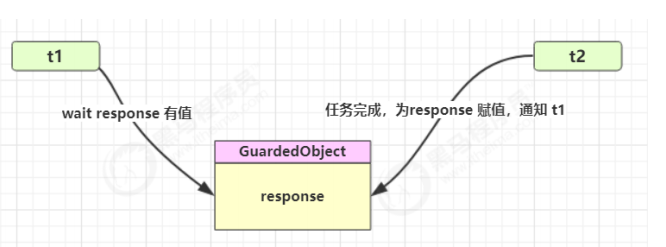
模式之保护性暂停即 Guarded Suspension,用在一个线程等待另一个线程的执行结果
- 有一个结果需要从一个线程传递到另一个线程,让他们关联同一个 GuardedObject
- 如果有结果不断从一个线程到另一个线程那么可以使用消息队列(见生产者 / 消费者)
- JDK 中,join 的实现、Future 的实现,采用的就是此模式
- 因为要等待另一方的结果,因此归类到同步模式
# 实现
class GuardedObject {
    private Object response;
    private final Object lock = new Object();
    public Object get() {
        synchronized (lock) {
// 条件不满足则等待
            while (response == null) {
                try {
                    lock.wait();
                } catch (InterruptedException e) {
                    e.printStackTrace();
                }
            }
            return response;
        }
    }
    public void complete(Object response) {
        synchronized (lock) {
// 条件满足,通知等待线程
            this.response = response;
            lock.notifyAll();
        }
    }
}
2
3
4
5
6
7
8
9
10
11
12
13
14
15
16
17
18
19
20
21
22
23
24
测试,一个线程等待另一个线程的执行结果
@Override
public void run() {
    GuardedObject guardedObject = MailBoxes.getGuardedObject(id);
    guardedObject.set(mail);
    log.debug("送信成功,id={},内容:{}",id,mail);
}
public static void main(String[] args) {
    GuardedObject guardedObject = new GuardedObject();
    new Thread(() -> {
        try {
            // 子线程执行下载
            List<String> response = download();
            log.debug("download complete...");
            guardedObject.complete(response);
        } catch (IOException e) {
            e.printStackTrace();
        }
    }).start();
    log.debug("waiting...");
    // 主线程阻塞等待
    Object response = guardedObject.get();
    log.debug("get response: [{}] lines", ((List<String>) response).size());
}
2
3
4
5
6
7
8
9
10
11
12
13
14
15
16
17
18
19
20
21
22
23
执行结果
08:42:18.568 [main] c.TestGuardedObject - waiting...
08:42:23.312 [Thread-0] c.TestGuardedObject - download complete...
08:42:23.312 [main] c.TestGuardedObject - get response: [3] lines
2
3
# 带超时版 GuardedObject
如果要控制超时时间呢
class GuardedObjectV2 {
    private Object response;
    private final Object lock = new Object();
    public Object get(long millis) {
        synchronized (lock) {
            // 1) 记录最初时间
            long begin = System.currentTimeMillis();
			// 2) 已经经历的时间
            long timePassed = 0;
            while (response == null) {
				// 4) 假设 millis 是 1000,结果在 400 时唤醒了,那么还有 600 要等
                long waitTime = millis - timePassed;
                log.debug("waitTime: {}", waitTime);
                if (waitTime <= 0) {
                    log.debug("break...");
                    break;
                }
                try {
                    lock.wait(waitTime);
                } catch (InterruptedException e) {
                    e.printStackTrace();
                }
				// 3) 如果提前被唤醒,这时已经经历的时间假设为 400
                timePassed = System.currentTimeMillis() - begin;
                log.debug("timePassed: {}, object is null {}",
                        timePassed, response == null);
            }
            return response;
        }
    }
    public void complete(Object response) {
        synchronized (lock) {
			// 条件满足,通知等待线程
            this.response = response;
            log.debug("notify...");
            lock.notifyAll();
        }
    }
}
2
3
4
5
6
7
8
9
10
11
12
13
14
15
16
17
18
19
20
21
22
23
24
25
26
27
28
29
30
31
32
33
34
35
36
37
38
39
测试,没有超时
public static void main(String[] args) {
    GuardedObjectV2 v2 = new GuardedObjectV2();
    new Thread(() -> {
        sleep(1);
        v2.complete(null);
        sleep(1);
        v2.complete(Arrays.asList("a", "b", "c"));
    }).start();
    Object response = v2.get(2500);
    if (response != null) {
        log.debug("get response: [{}] lines", ((List<String>) response).size());
    } else {
        log.debug("can't get response");
    }
}
2
3
4
5
6
7
8
9
10
11
12
13
14
15
08:49:39.917 [main] c.GuardedObjectV2 - waitTime: 2500
08:49:40.917 [Thread-0] c.GuardedObjectV2 - notify...
08:49:40.917 [main] c.GuardedObjectV2 - timePassed: 1003, object is null true
08:49:40.917 [main] c.GuardedObjectV2 - waitTime: 1497
08:49:41.918 [Thread-0] c.GuardedObjectV2 - notify...
08:49:41.918 [main] c.GuardedObjectV2 - timePassed: 2004, object is null false
08:49:41.918 [main] c.TestGuardedObjectV2 - get response: [3] lines
2
3
4
5
6
7
测试超时
// 等待时间不足
List<String> lines = v2.get(1500);
2
输出
08:47:54.963 [main] c.GuardedObjectV2 - waitTime: 1500
08:47:55.963 [Thread-0] c.GuardedObjectV2 - notify...
08:47:55.963 [main] c.GuardedObjectV2 - timePassed: 1002, object is null true
08:47:55.963 [main] c.GuardedObjectV2 - waitTime: 498
08:47:56.461 [main] c.GuardedObjectV2 - timePassed: 1500, object is null true
08:47:56.461 [main] c.GuardedObjectV2 - waitTime: 0
08:47:56.461 [main] c.GuardedObjectV2 - break...
08:47:56.461 [main] c.TestGuardedObjectV2 - can't get response
08:47:56.963 [Thread-0] c.GuardedObjectV2 - notify...
2
3
4
5
6
7
8
9
# 原理之 join
join 其实是调用者轮询检查线程 alive 状态
t1.join();
// 等价于
synchronized (t1) {
    // 调用者线程进入 t1 的 waitSet 等待, 直到 t1 运行结束
    while (t1.isAlive()) {
        t1.wait(0);
    }
}
2
3
4
5
6
7
8
源码:
//不带参
public final void join() throws InterruptedException {
    join(0);
}
//带参
//等待时长的实现类似于之前的保护性暂停
public final synchronized void join(long millis)
    throws InterruptedException {
    long base = System.currentTimeMillis();
    long now = 0;

    if (millis < 0) {
        throw new IllegalArgumentException("timeout value is negative");
    }

    if (millis == 0) {
        while (isAlive()) {
            wait(0);
        }
    } else {
        while (isAlive()) {
            long delay = millis - now;
            if (delay <= 0) {
                break;
            }
            wait(delay);
            now = System.currentTimeMillis() - base;
        }
    }
}
2
3
4
5
6
7
8
9
10
11
12
13
14
15
16
17
18
19
20
21
22
23
24
25
26
27
28
29
30
# 多任务版 GuardedObject
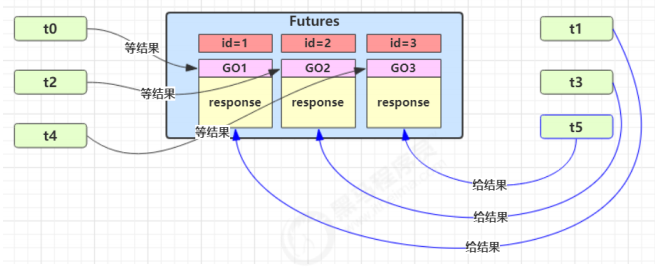
图中 Futures 就好比居民楼一层的信箱(每个信箱有房间编号),左侧的 t0,t2,t4 就好比等待邮件的居民,右
侧的 t1,t3,t5 就好比邮递员
如果需要在多个类之间使用 GuardedObject 对象,作为参数传递不是很方便,因此设计一个用来解耦的中间类, 这样不仅能够解耦【结果等待者】和【结果生产者】,还能够同时支持多个任务的管理。
新增 id 用来标识 Guarded Object
class GuardedObject {
    // 标识 Guarded Object
    private int id;
    public GuardedObject(int id) {
        this.id = id;
    }
    public int getId() {
        return id;
    }
    // 结果
    private Object response;
    // 获取结果
    // timeout 表示要等待多久 2000
    public Object get(long timeout) {
        synchronized (this) {
            // 开始时间 15:00:00
            long begin = System.currentTimeMillis();
            // 经历的时间
            long passedTime = 0;
            while (response == null) {
                // 这一轮循环应该等待的时间
                long waitTime = timeout - passedTime;
                // 经历的时间超过了最大等待时间时,退出循环
                if (timeout - passedTime <= 0) {
                    break;
                }
                try {
                    this.wait(waitTime); // 虚假唤醒 15:00:01
                } catch (InterruptedException e) {
                    e.printStackTrace();
                }
                // 求得经历时间
                passedTime = System.currentTimeMillis() - begin; // 15:00:02 1s
            }
            return response;
        }
    }
    // 产生结果
    public void complete(Object response) {
        synchronized (this) {
            // 给结果成员变量赋值
            this.response = response;
            this.notifyAll();
        }
    }
}
2
3
4
5
6
7
8
9
10
11
12
13
14
15
16
17
18
19
20
21
22
23
24
25
26
27
28
29
30
31
32
33
34
35
36
37
38
39
40
41
42
43
44
45
46
中间解耦类
class Mailboxes {

    private static Map<Integer, GuardedObject> boxes = new Hashtable<>();

    private static int id = 1;
    // 产生唯一 id,方法必须声明为synchronized
    private static synchronized int generateId() {
        return id++;
    }

    public static GuardedObject getGuardedObject(int id) {
        return boxes.remove(id);
    }

    public static GuardedObject createGuardedObject() {
        GuardedObject go = new GuardedObject(generateId());
        boxes.put(go.getId(), go);
        return go;
    }

    public static Set<Integer> getIds() {
        return boxes.keySet();
    }
}
2
3
4
5
6
7
8
9
10
11
12
13
14
15
16
17
18
19
20
21
22
23
24
业务相关类
class People extends Thread{
    @Override
    public void run() {
        // 收信
        GuardedObject guardedObject = Mailboxes.createGuardedObject();
        log.debug("开始收信 id:{}", guardedObject.getId());
        Object mail = guardedObject.get(5000);
        log.debug("收到信 id:{}, 内容:{}", guardedObject.getId(), mail);
    }
}
2
3
4
5
6
7
8
9
10
class Postman extends Thread {
    private int id;
    private String mail;
    public Postman(int id, String mail) {
        this.id = id;
        this.mail = mail;
    }
    @Override
    public void run() {
        GuardedObject guardedObject = Mailboxes.getGuardedObject(id);
        log.debug("送信 id:{}, 内容:{}", id, mail);
        guardedObject.complete(mail);
    }
}
2
3
4
5
6
7
8
9
10
11
12
13
14
测试
public static void main(String[] args) throws InterruptedException {
    for (int i = 0; i < 3; i++) {
        new People().start();
    }
    Sleeper.sleep(1);
    for (Integer id : Mailboxes.getIds()) {
        new Postman(id, "内容" + id).start();
    }
}
2
3
4
5
6
7
8
9
某次运行结果
10:35:05.689 c.People [Thread-1] - 开始收信 id:3
10:35:05.689 c.People [Thread-2] - 开始收信 id:1
10:35:05.689 c.People [Thread-0] - 开始收信 id:2
10:35:06.688 c.Postman [Thread-4] - 送信 id:2, 内容:内容2
10:35:06.688 c.Postman [Thread-5] - 送信 id:1, 内容:内容1
10:35:06.688 c.People [Thread-0] - 收到信 id:2, 内容:内容2
10:35:06.688 c.People [Thread-2] - 收到信 id:1, 内容:内容1
10:35:06.688 c.Postman [Thread-3] - 送信 id:3, 内容:内容3
10:35:06.689 c.People [Thread-1] - 收到信 id:3, 内容:内容3
2
3
4
5
6
7
8
9
# 模式之生产者消费者
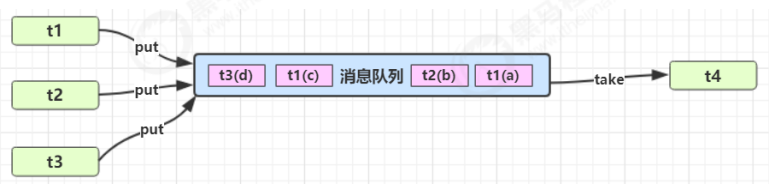
- 与前面的保护性暂停中的 GuardObject 不同,不需要产生结果和消费结果的线程一一对应
- 消费队列可以用来平衡生产和消费的线程资源
- 生产者仅负责产生结果数据,不关心数据该如何处理,而消费者专心处理结果数据
- 消息队列是有容量限制的,满时不会再加入数据,空时不会再消耗数据
- JDK 中各种阻塞队列,采用的就是这种模式
实现
class Message {
    private int id;
    private Object message;
    public Message(int id, Object message) {
        this.id = id;
        this.message = message;
    }
    public int getId() {
        return id;
    }
    public Object getMessage() {
        return message;
    }
}
class MessageQueue {
    private LinkedList<Message> queue;
    private int capacity;
    public MessageQueue(int capacity) {
        this.capacity = capacity;
        queue = new LinkedList<>();
    }
    public Message take() {
        synchronized (queue) {
            while (queue.isEmpty()) {
                log.debug("没货了, wait");
                try {
                    queue.wait();
                } catch (InterruptedException e) {
                    e.printStackTrace();
                }
            }
            Message message = queue.removeFirst();
            queue.notifyAll();
            return message;
        }
    }
    public void put(Message message) {
        synchronized (queue) {
            while (queue.size() == capacity) {
                log.debug("库存已达上限, wait");
                try {
                    queue.wait();
                } catch (InterruptedException e) {
                    e.printStackTrace();
                }
            }
            queue.addLast(message);
            queue.notifyAll();
        }
    }
}
2
3
4
5
6
7
8
9
10
11
12
13
14
15
16
17
18
19
20
21
22
23
24
25
26
27
28
29
30
31
32
33
34
35
36
37
38
39
40
41
42
43
44
45
46
47
48
49
50
51
测试
MessageQueue messageQueue = new MessageQueue(2);
// 4 个生产者线程, 下载任务
for (int i = 0; i < 4; i++) {
    int id = i;
    new Thread(() -> {
        try {
            log.debug("download...");
            List<String> response = Downloader.download();
            log.debug("try put message({})", id);
            messageQueue.put(new Message(id, response));
        } catch (IOException e) {
            e.printStackTrace();
        }
    }, "生产者" + i).start();
}
// 1 个消费者线程, 处理结果
new Thread(() -> {
    while (true) {
        Message message = messageQueue.take();
        List<String> response = (List<String>) message.getMessage();
        log.debug("take message({}): [{}] lines", message.getId(), response.size());
    }
}, "消费者").start();
2
3
4
5
6
7
8
9
10
11
12
13
14
15
16
17
18
19
20
21
22
23
某次运行结果
10:48:38.070 [生产者3] c.TestProducerConsumer - download...
10:48:38.070 [生产者0] c.TestProducerConsumer - download...
10:48:38.070 [消费者] c.MessageQueue - 没货了, wait
10:48:38.070 [生产者1] c.TestProducerConsumer - download...
10:48:38.070 [生产者2] c.TestProducerConsumer - download...
10:48:41.236 [生产者1] c.TestProducerConsumer - try put message(1)
10:48:41.237 [生产者2] c.TestProducerConsumer - try put message(2)
10:48:41.236 [生产者0] c.TestProducerConsumer - try put message(0)
10:48:41.237 [生产者3] c.TestProducerConsumer - try put message(3)
10:48:41.239 [生产者2] c.MessageQueue - 库存已达上限, wait
10:48:41.240 [生产者1] c.MessageQueue - 库存已达上限, wait
10:48:41.240 [消费者] c.TestProducerConsumer - take message(0): [3] lines
10:48:41.240 [生产者2] c.MessageQueue - 库存已达上限, wait
10:48:41.240 [消费者] c.TestProducerConsumer - take message(3): [3] lines
10:48:41.240 [消费者] c.TestProducerConsumer - take message(1): [3] lines
10:48:41.240 [消费者] c.TestProducerConsumer - take message(2): [3] lines
10:48:41.240 [消费者] c.MessageQueue - 没货了, wait
2
3
4
5
6
7
8
9
10
11
12
13
14
15
16
17
# Condition 接口中的 await 后 signal 方法实现线程的等待和唤醒
正常情况
package com.atguigu.juc.prepare;

import java.util.concurrent.TimeUnit;
import java.util.concurrent.locks.Condition;
import java.util.concurrent.locks.Lock;
import java.util.concurrent.locks.ReentrantLock;

/**
 * @auther zzyy
 * @create 2020-04-13 17:55
 */
public class LockSupportDemo2
{
    public static void main(String[] args)
    {
        Lock lock = new ReentrantLock();
        Condition condition = lock.newCondition();

        new Thread(() -> {
            lock.lock();
            try
            {
                System.out.println(Thread.currentThread().getName()+"\t"+"start");
                condition.await();
                System.out.println(Thread.currentThread().getName()+"\t"+"被唤醒");
            } catch (InterruptedException e) {
                e.printStackTrace();
            } finally {
                lock.unlock();
            }
        },"t1").start();

        //暂停几秒钟线程
        try { TimeUnit.SECONDS.sleep(3L); } catch (InterruptedException e) { e.printStackTrace(); }

        new Thread(() -> {
            lock.lock();
            try
            {
                condition.signal();
            } catch (Exception e) {
                e.printStackTrace();
            } finally {
                lock.unlock();
            }
            System.out.println(Thread.currentThread().getName()+"\t"+"通知了");
        },"t2").start();

    }
}
2
3
4
5
6
7
8
9
10
11
12
13
14
15
16
17
18
19
20
21
22
23
24
25
26
27
28
29
30
31
32
33
34
35
36
37
38
39
40
41
42
43
44
45
46
47
48
49
50
51
异常 1:condition.await (); 和 condition.signal (); 都触发了 IllegalMonitorStateException 异常
package com.atguigu.juc.prepare;

import java.util.concurrent.TimeUnit;
import java.util.concurrent.locks.Condition;
import java.util.concurrent.locks.Lock;
import java.util.concurrent.locks.ReentrantLock;

/**
 * @auther zzyy
 * @create 2020-04-13 17:55
 * 异常:
 * condition.await();和condition.signal();都触发了IllegalMonitorStateException异常
 *
 * 原因:调用condition中线程等待和唤醒的方法的前提是,要在lock和unlock方法中,要有锁才能调用
 */
public class LockSupportDemo2
{
    public static void main(String[] args)
    {
        Lock lock = new ReentrantLock();
        Condition condition = lock.newCondition();

        new Thread(() -> {
            try
            {
                System.out.println(Thread.currentThread().getName()+"\t"+"start");
                condition.await();
                System.out.println(Thread.currentThread().getName()+"\t"+"被唤醒");
            } catch (InterruptedException e) {
                e.printStackTrace();
            }
        },"t1").start();

        //暂停几秒钟线程
        try { TimeUnit.SECONDS.sleep(3L); } catch (InterruptedException e) { e.printStackTrace(); }

        new Thread(() -> {
            try
            {
                condition.signal();
            } catch (Exception e) {
                e.printStackTrace();
            }
            System.out.println(Thread.currentThread().getName()+"\t"+"通知了");
        },"t2").start();

    }
}
2
3
4
5
6
7
8
9
10
11
12
13
14
15
16
17
18
19
20
21
22
23
24
25
26
27
28
29
30
31
32
33
34
35
36
37
38
39
40
41
42
43
44
45
46
47
48
49
去掉 lock/unlock
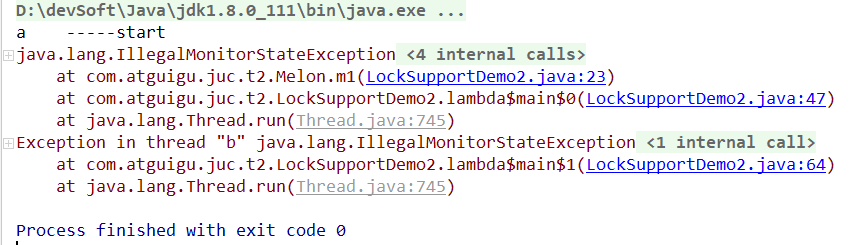
condition.await (); 和 condition.signal (); 都触发了 IllegalMonitorStateException 异常。
结论: lock、unlock 对里面才能正确调用调用 condition 中线程等待和唤醒的方法
异常 2:先 await () 后 signal 才 OK,否则线程无法被唤醒
package com.atguigu.juc.prepare;

import java.util.concurrent.TimeUnit;
import java.util.concurrent.locks.Condition;
import java.util.concurrent.locks.Lock;
import java.util.concurrent.locks.ReentrantLock;

/**
 * @auther zzyy
 * @create 2020-04-13 17:55
 * 异常:
 * 程序无法运行
 *
 * 原因:先await()后signal才OK,否则线程无法被唤醒
 */
public class LockSupportDemo2
{
    public static void main(String[] args)
    {
        Lock lock = new ReentrantLock();
        Condition condition = lock.newCondition();

        new Thread(() -> {
            lock.lock();
            try
            {
                condition.signal();
                System.out.println(Thread.currentThread().getName()+"\t"+"signal");
            } catch (Exception e) {
                e.printStackTrace();
            }finally {
                lock.unlock();
            }
        },"t1").start();

        //暂停几秒钟线程
        try { TimeUnit.SECONDS.sleep(3L); } catch (InterruptedException e) { e.printStackTrace(); }

        new Thread(() -> {
            lock.lock();
            try
            {
                System.out.println(Thread.currentThread().getName()+"\t"+"等待被唤醒");
                condition.await();
                System.out.println(Thread.currentThread().getName()+"\t"+"被唤醒");
            } catch (Exception e) {
                e.printStackTrace();
            }finally {
                lock.unlock();
            }
        },"t2").start();

    }
}
2
3
4
5
6
7
8
9
10
11
12
13
14
15
16
17
18
19
20
21
22
23
24
25
26
27
28
29
30
31
32
33
34
35
36
37
38
39
40
41
42
43
44
45
46
47
48
49
50
51
52
53
54
55
56
先 signal 后 await
总结:Condtion 中的线程等待和唤醒方法之前,需要先获取锁,一定要先 await 后 signal,不要反了
# Object 和 Condition 使用的限制条件
- 线程先要获得并持有锁,必须在锁块 (synchronized 或 lock) 中
- 必须要先等待后唤醒,线程才能够被唤醒
# LockSupport 类中的 park 等待和 unpark 唤醒
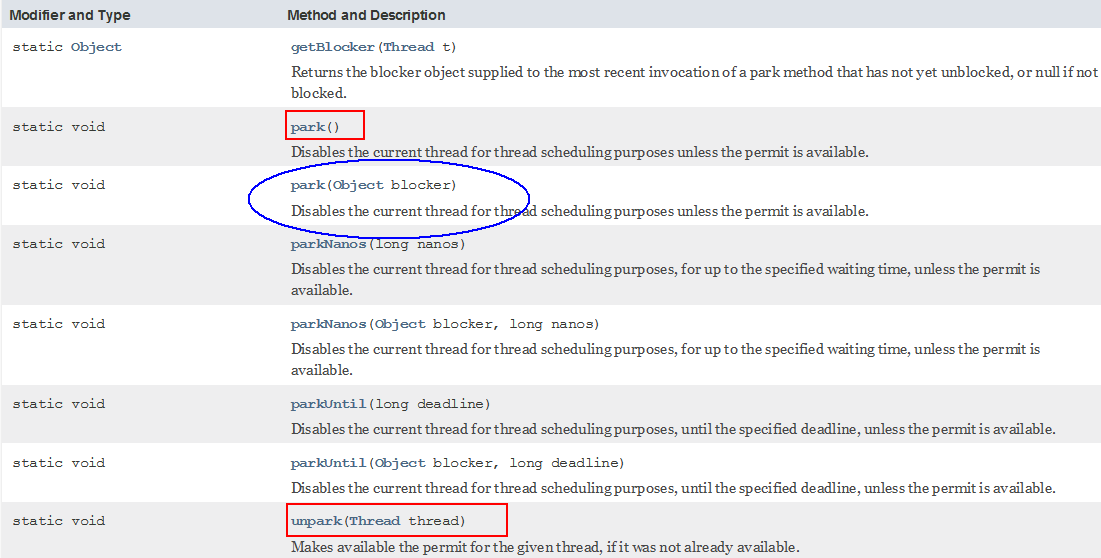
通过 park () 和 unpark (thread) 方法来实现阻塞和唤醒线程的操作

LockSupport 是用来创建锁和其他同步类的基本线程阻塞原语。
LockSupport 类使用了一种名为 Permit(许可)的概念来做到阻塞和唤醒线程的功能, 每个线程都有一个许可 (permit), permit 只有两个值 1 和零,默认是零。 可以把许可看成是一种 (0,1) 信号量(Semaphore),但与 Semaphore 不同的是,许可的累加上限是 1。
# 阻塞
调用 LockSupport.park() 时
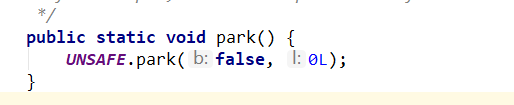
permit 默认是零,所以一开始调用 park () 方法,当前线程就会阻塞,直到别的线程将当前线程的 permit 设置为 1 时,park 方法会被唤醒,然后会将 permit 再次设置为零并返回。
阻塞当前线程 / 阻塞传入的具体线程
# 唤醒
LockSupport.unpark(thread);
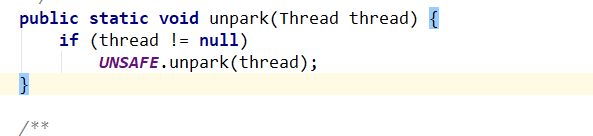
调用 unpark (thread) 方法后,就会将 thread 线程的许可 permit 设置成 1 (注意多次调用 unpark 方法,不会累加,permit 值还是 1) 会自动唤醒 thread 线程,即之前阻塞中的 LockSupport.park () 方法会立即返回。
唤醒处于阻塞状态的指定线程
# 案例
正常 + 无锁块要求
package com.atguigu.juc.prepare;

import java.util.concurrent.TimeUnit;
import java.util.concurrent.locks.LockSupport;

/**
 * @auther zzyy
 * @create 2020-04-13 20:30
 */
public class LockSupportDemo3
{
    public static void main(String[] args)
    {
        //正常使用+不需要锁块
Thread t1 = new Thread(() -> {
    System.out.println(Thread.currentThread().getName()+" "+"1111111111111");
    LockSupport.park();
    System.out.println(Thread.currentThread().getName()+" "+"2222222222222------end被唤醒");
},"t1");
t1.start();

//暂停几秒钟线程
try { TimeUnit.SECONDS.sleep(3); } catch (InterruptedException e) { e.printStackTrace(); }

LockSupport.unpark(t1);
System.out.println(Thread.currentThread().getName()+"   -----LockSupport.unparrk() invoked over");

    }
}
2
3
4
5
6
7
8
9
10
11
12
13
14
15
16
17
18
19
20
21
22
23
24
25
26
27
28
29
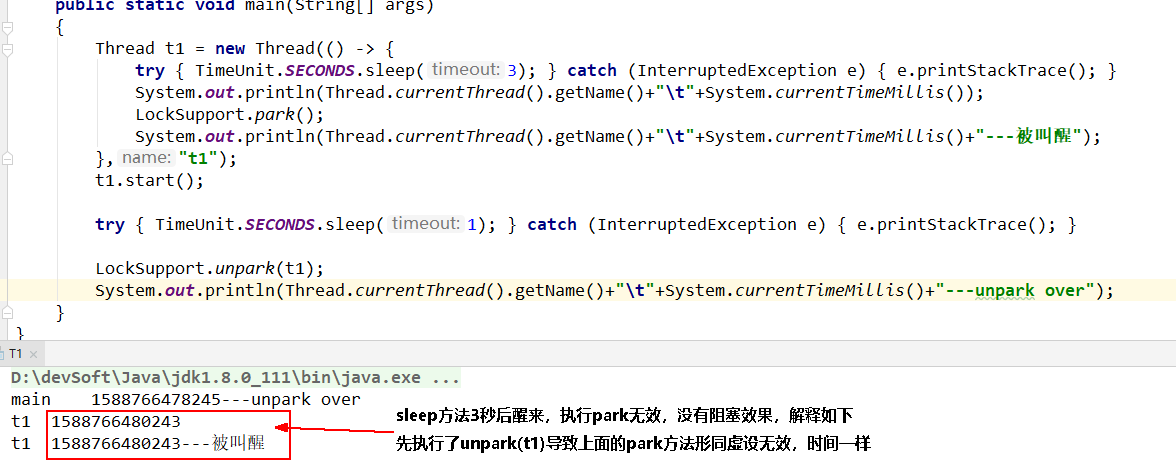
之前错误的先唤醒后等待,LockSupport 照样支持
package com.zzyy.study.test;

import java.util.concurrent.TimeUnit;
import java.util.concurrent.locks.LockSupport;

/**
 * @auther zzyy
 * @create 2020-05-06 17:07
 */
public class T1
{
    public static void main(String[] args)
    {
        Thread t1 = new Thread(() -> {
            try { TimeUnit.SECONDS.sleep(3); } catch (InterruptedException e) { e.printStackTrace(); }
            System.out.println(Thread.currentThread().getName()+"\t"+System.currentTimeMillis());
            LockSupport.park();
            System.out.println(Thread.currentThread().getName()+"\t"+System.currentTimeMillis()+"---被叫醒");
        },"t1");
        t1.start();

        try { TimeUnit.SECONDS.sleep(1); } catch (InterruptedException e) { e.printStackTrace(); }

        LockSupport.unpark(t1);
        System.out.println(Thread.currentThread().getName()+"\t"+System.currentTimeMillis()+"---unpark over");
    }
}
2
3
4
5
6
7
8
9
10
11
12
13
14
15
16
17
18
19
20
21
22
23
24
25
26
27
28
成双成对要牢记
# 特点
与 Object 的 wait & notify 相比
- wait,notify 和 notifyAll 必须配合 Object Monitor 一起使用,而 park,unpark 不必
- park & unpark 是以线程为单位来【阻塞】和【唤醒】线程,而 notify 只能随机唤醒一个等待线程,notifyAll 是唤醒所有等待线程,就不那么【精确】
- park & unpark 可以先 unpark,而 wait & notify 不能先 notify
# 原理之 park 和 unpark
每个线程都有自己的一个 Parker 对象 (由 C++ 编写,java 中不可见),由三部分组成 _counter , _cond 和 _mutex 打个比喻
- 线程就像一个旅人,Parker 就像他随身携带的背包,条件变量就好比背包中的帐篷。_counter 就好比背包中 的备用干粮(0 为耗尽,1 为充足)
- 调用 park 就是要看需不需要停下来歇息
- 如果备用干粮耗尽,那么钻进帐篷歇息
- 如果备用干粮充足,那么不需停留,继续前进
- 调用 unpark,就好比令干粮充足
- 如果这时线程还在帐篷,就唤醒让他继续前进
- 如果这时线程还在运行,那么下次他调用 park 时,仅是消耗掉备用干粮,不需停留继续前进
- 因为背包空间有限,多次调用 unpark 仅会补充一份备用干粮,也就是多次 unpark 后只会让紧跟着的一次 park 失效
# 先调用 park 再调用 unpark
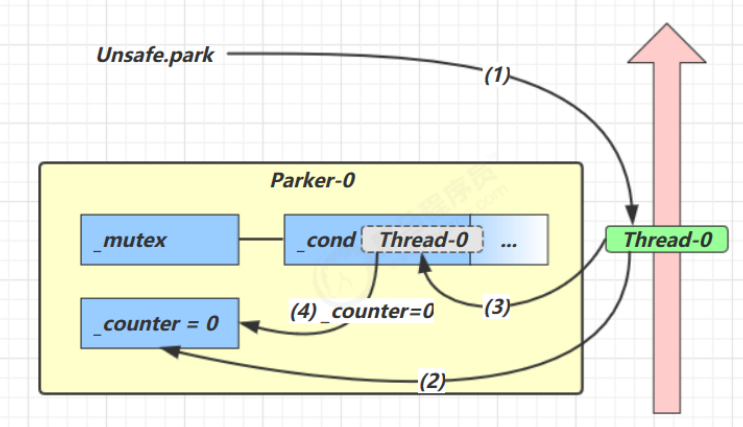
- 当前线程调用 Unsafe.park () 方法
- 检查 _counter ,本情况为 0,这时,获得 _mutex 互斥锁
- 线程进入 _cond 条件变量阻塞
- 设置 _counter = 0
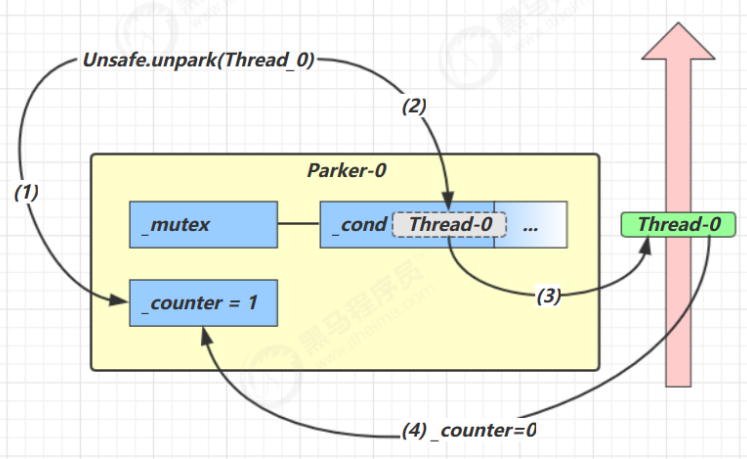
- 调用 Unsafe.unpark (Thread_0) 方法,设置 _counter 为 1
- 唤醒 _cond 条件变量中的 Thread_0
- Thread_0 恢复运行
- 设置 _counter 为 0
# 先调用 unpark 再调用 park
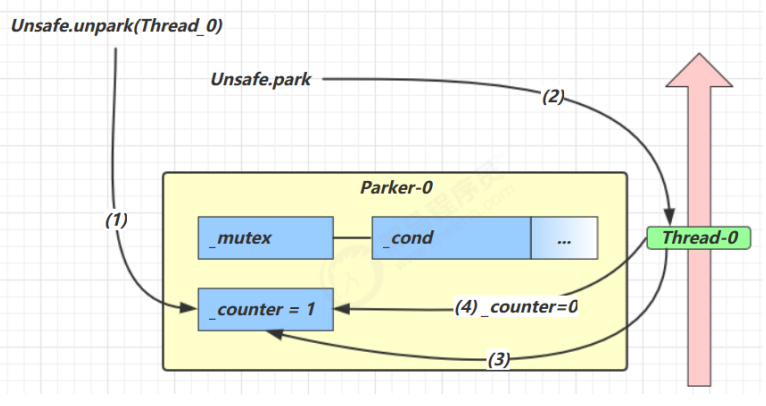
- 调用 Unsafe.unpark (Thread_0) 方法,设置 _counter 为 1
- 当前线程调用 Unsafe.park () 方法
- 检查 _counter ,本情况为 1,这时线程无需阻塞,继续运行
- 设置 _counter 为 0
# 重新理解线程状态转换
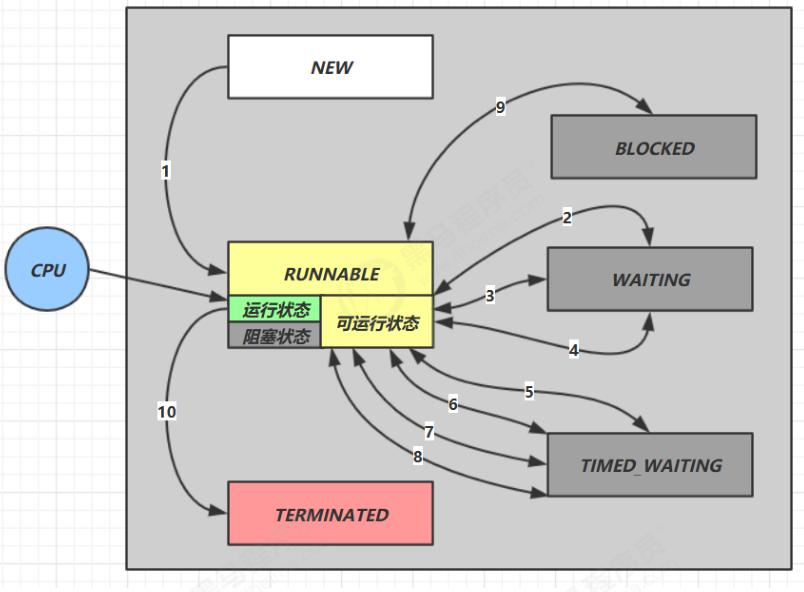
假设有线程 Thread t
# 情况 1 NEW --> RUNNABLE
- 当调用
t.start()方法时,由 NEW --> RUNNABLE
# 情况 2 RUNNABLE <--> WAITING
t 线程用 synchronized(obj) 获取了对象锁后
- 调用
obj.wait()方法时,t 线程从RUNNABLE --> WAITING - 调用
obj.notify(),obj.notifyAll(),t.interrupt()时- 竞争锁成功,t 线程从
WAITING --> RUNNABLE - 竞争锁失败,t 线程从
WAITING --> BLOCKED
- 竞争锁成功,t 线程从
public class TestWaitNotify {
    final static Object obj = new Object();
    public static void main(String[] args) {
        new Thread(() -> {
            synchronized (obj) {
                log.debug("执行....");
                try {
                    obj.wait();
                } catch (InterruptedException e) {
                    e.printStackTrace();
                }
                log.debug("其它代码...."); // 断点
            }
        },"t1").start();
        new Thread(() -> {
            synchronized (obj) {
                log.debug("执行....");
                try {
                    obj.wait();
                } catch (InterruptedException e) {
                    e.printStackTrace();
                }
                log.debug("其它代码...."); // 断点
            }
        },"t2").start();

        sleep(0.5);
        log.debug("唤醒 obj 上其它线程");
        synchronized (obj) {
            obj.notifyAll(); // 唤醒obj上所有等待线程 断点
        }
    }
}
2
3
4
5
6
7
8
9
10
11
12
13
14
15
16
17
18
19
20
21
22
23
24
25
26
27
28
29
30
31
32
33
# 情况 3 RUNNABLE <--> WAITING
- 当前线程调用
t.join()方法时,当前线程从RUNNABLE --> WAITING注意是当前线程在 t 线程对象的监视器上等待 - t 线程运行结束,或调用了当前线程的 interrupt () 时,当前线程从
WAITING --> RUNNABLE
# 情况 4 RUNNABLE <--> WAITING
- 当前线程调用
LockSupport.park()方法会让当前线程从RUNNABLE --> WAITING - 调用
LockSupport.unpark(目标线程) 或调用了线程 的interrupt(),会让目标线程从WAITING --> RUNNABLE
# 情况 5 RUNNABLE <--> TIMED_WAITING
t 线程用 synchronized(obj) 获取了对象锁后
- 调用
obj.wait(long n)方法时,t 线程从RUNNABLE --> TIMED_WAITING - t 线程等待时间超过了 n 毫秒,或调用
obj.notify(),obj.notifyAll(),t.interrupt()时- 竞争锁成功,t 线程从
TIMED_WAITING --> RUNNABLE - 竞争锁失败,t 线程从
TIMED_WAITING --> BLOCKED
- 竞争锁成功,t 线程从
# 情况 6 RUNNABLE <--> TIMED_WAITING
- 当前线程调用
t.join(long n)方法时,当前线程从RUNNABLE --> TIMED_WAITING注意是当前线程在 t 线程对象的监视器上等待 - 当前线程等待时间超过了 n 毫秒,或 t 线程运行结束,或调用了当前线程的
interrupt()时,当前线程从TIMED_WAITING --> RUNNABLE
# 情况 7 RUNNABLE <--> TIMED_WAITING
- 当前线程调用
Thread.sleep(long n),当前线程从RUNNABLE --> TIMED_WAITING - 当前线程等待时间超过了 n 毫秒,当前线程从
TIMED_WAITING --> RUNNABLE
# 情况 8 RUNNABLE <--> TIMED_WAITING
- 当前线程调用
LockSupport.parkNanos(long nanos)或LockSupport.parkUntil(long millis)时,当前线程从RUNNABLE --> TIMED_WAITING - 调用
LockSupport.unpark(目标线程) 或调用了线程 的interrupt(),或是等待超时,会让目标线程从TIMED_WAITING--> RUNNABLE
# 情况 9 RUNNABLE <--> BLOCKED
- t 线程用
synchronized(obj)获取了对象锁时如果竞争失败,从RUNNABLE --> BLOCKED - 持 obj 锁线程的同步代码块执行完毕,会唤醒该对象上所有
BLOCKED的线程重新竞争,如果其中 t 线程竞争 成功,从BLOCKED --> RUNNABLE,其它失败的线程仍然BLOCKED
# 情况 10 RUNNABLE <--> TERMINATED
- 当前线程所有代码运行完毕,进入
TERMINATED