Flink 中的 Window
# Flink 中的 Window
# 窗口(Window)
streaming 流式计算是一种被设计用于处理无限数据集的数据处理引擎,而无限数据集是指一种不断增长的本质上无限的数据集,而 window 是一种切割无限数据为有限块进行处理的手段。
Window 是无限数据流处理的核心,Window 将一个无限的 stream 拆分成有限大小的”buckets” 桶,我们可以在这些桶上做计算操作。
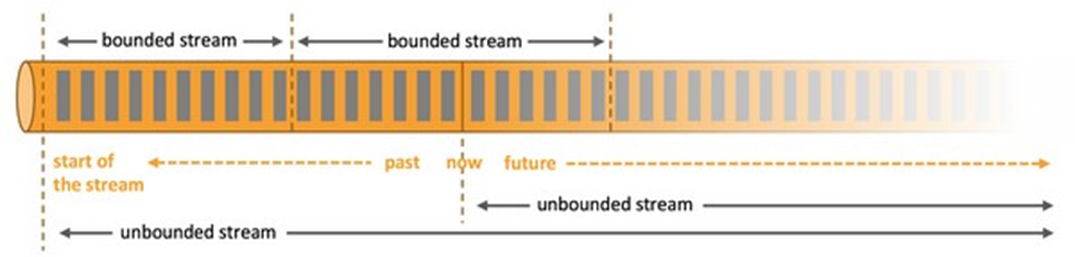
- 可以把无限的数据流进行切分,得到有限的数据集进行处理 —— 也就是得到有界流
- 窗口(window)就是将无限流切割为有限流的一种方式,它会将流数据分发到有限大小的桶(bucket)中进行分析
# 内置的窗口分配器
窗口分配器将会根据事件的事件时间或者处理时间来将事件分配到对应的窗口中去。窗口包含开始时间和结束时间这两个时间戳。
所有的窗口分配器都包含一个默认的触发器:
- 对于事件时间:当水位线超过窗口结束时间,触发窗口的求值操作。
- 对于处理时间:当机器时间超过窗口结束时间,触发窗口的求值操作。
需要注意的是:当处于某个窗口的第一个事件到达的时候,这个窗口才会被创建。Flink 不会对空窗口求值。
Flink 创建的窗口类型是 TimeWindow ,包含开始时间和结束时间,区间是左闭右开的,也就是说包含开始时间戳,不包含结束时间戳。
# Window 类型
Window 可以分成两类:
- CountWindow:按照指定的数据条数生成一个 Window,与时间无关。
- TimeWindow:按照时间生成 Window。
对于 TimeWindow,可以根据窗口实现原理的不同分成三类:滚动窗口(Tumbling Window)、滑动窗口(Sliding Window)和会话窗口(Session Window)。
# 滚动窗口(Tumbling Windows)
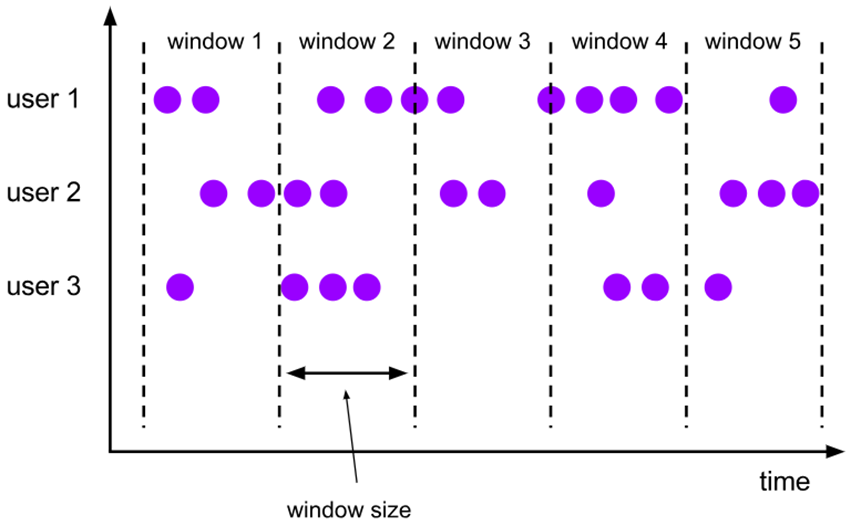
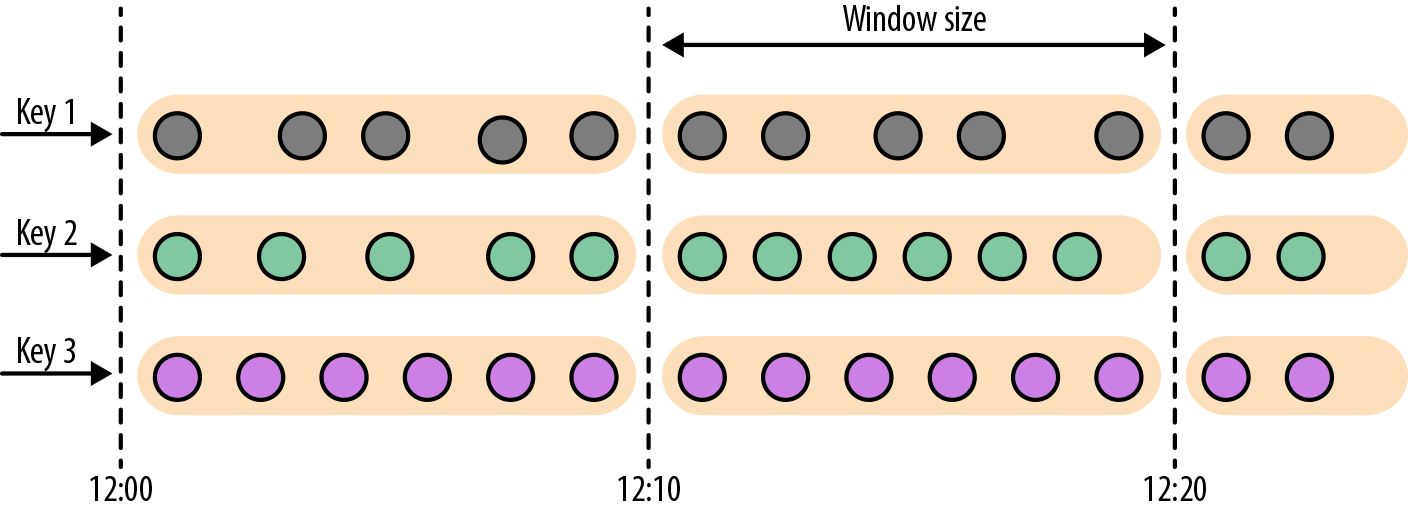
将数据依据固定的窗口长度对数据进行切片。
特点:时间对齐,窗口长度固定,没有重叠。
滚动窗口分配器将每个元素分配到一个指定窗口大小的窗口中,滚动窗口有一个固定的大小,并且不会出现重叠。例如:如果你指定了一个 5 分钟大小的滚动窗口,窗口的创建如下图所示:
适用场景:适合做 BI 统计等(做每个时间段的聚合计算)。
DataStream<SensorReading> sensorData = ...

DataStream<T> avgTemp = sensorData
  .keyBy(r -> r.id)
  // group readings in 1s event-time windows
  .window(TumblingEventTimeWindows.of(Time.seconds(1)))
  .process(new TemperatureAverager);

DataStream<T> avgTemp = sensorData
  .keyBy(r -> r.id)
  // group readings in 1s processing-time windows
  .window(TumblingProcessingTimeWindows.of(Time.seconds(1)))
  .process(new TemperatureAverager);

// 其实就是之前的
// shortcut for window.(TumblingEventTimeWindows.of(size))
DataStream<T> avgTemp = sensorData
  .keyBy(r -> r.id)
  .timeWindow(Time.seconds(1))
  .process(new TemperatureAverager);
2
3
4
5
6
7
8
9
10
11
12
13
14
15
16
17
18
19
20
默认情况下,滚动窗口会和 1970-01-01-00:00:00.000 对齐,例如一个 1 小时的滚动窗口将会定义以下开始时间的窗口:00:00:00,01:00:00,02:00:00,等等。
# 滑动窗口(Sliding Windows)
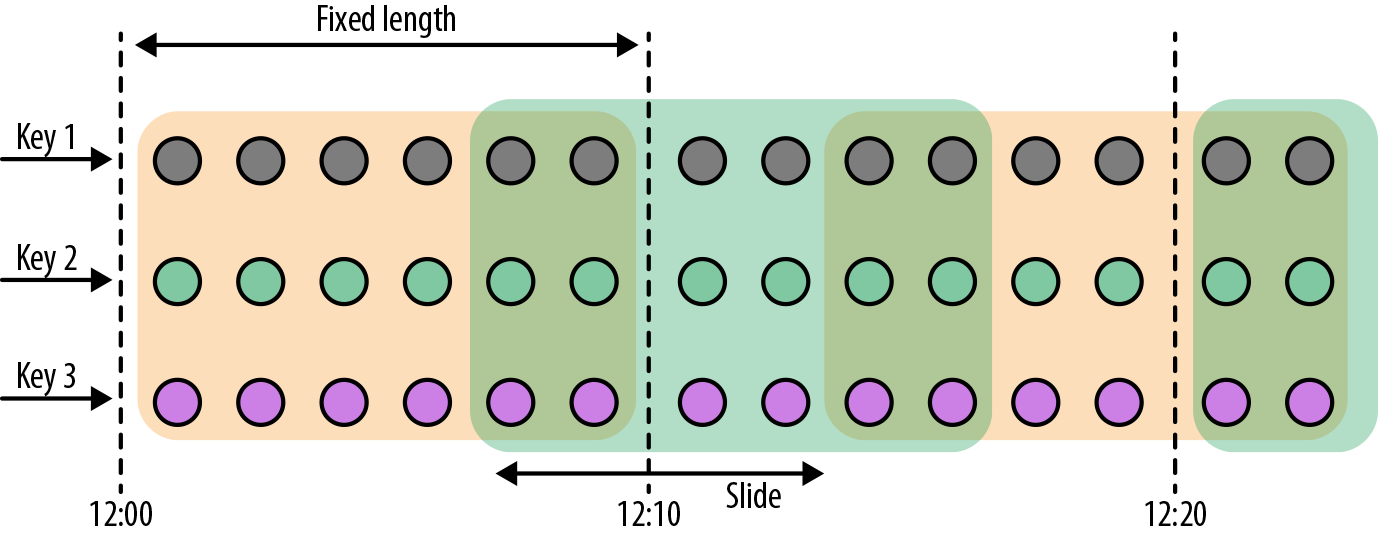
滑动窗口是固定窗口的更广义的一种形式,滑动窗口由固定的窗口长度和滑动间隔组成。
特点:时间对齐,窗口长度固定,可以有重叠。
滑动窗口分配器将元素分配到固定长度的窗口中,与滚动窗口类似,窗口的大小由窗口大小参数来配置,另一个窗口滑动参数控制滑动窗口开始的频率。因此,滑动窗口如果滑动参数小于窗口大小的话,窗口是可以重叠的,在这种情况下元素会被分配到多个窗口中。
例如,你有 10 分钟的窗口和 5 分钟的滑动,那么每个窗口中 5 分钟的窗口里包含着上个 10 分钟产生的数据,如下图所示:
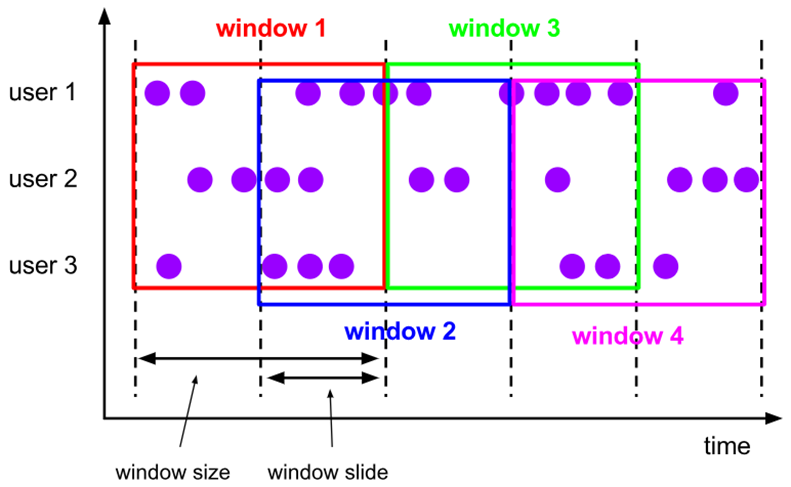
窗口长度 10s,滑动距离 5s
(Value,6s)->(Value,Key,6s)->(Value,6s, Key, [0, 10))
						   ->(Value,6s, Key, [5,15)

窗口长度很长,滑动距离很短,会出现什么问题?
数据会复制很多次,导致性能急剧下降。
[0s, 10s): (7s,"atguigu",[0s, 10s))
[5s, 15s): (7s, "atguigu",[5s, 15s))
2
3
4
5
6
7
8
适用场景:对最近一个时间段内的统计(求某接口最近 5min 的失败率来决定是否要报警)。
对于滑动窗口,我们需要指定窗口的大小和滑动的步长。当滑动步长小于窗口大小时,窗口将会出现重叠,而元素会被分配到不止一个窗口中去。当滑动步长大于窗口大小时,一些元素可能不会被分配到任何窗口中去,会被直接丢弃。
下面的代码定义了窗口大小为 1 小时,滑动步长为 15 分钟的窗口。每一个元素将被分配到 4 个窗口中去。
DataStream<T> slidingAvgTemp = sensorData
  .keyBy(r -> r.id)
  .window(
    SlidingEventTimeWindows.of(Time.hours(1), Time.minutes(15))
  )
  .process(new TemperatureAverager);

DataStream<T> slidingAvgTemp = sensorData
  .keyBy(r -> r.id)
  .window(
    SlidingProcessingTimeWindows.of(Time.hours(1), Time.minutes(15))
  )
  .process(new TemperatureAverager);

DataStream<T> slidingAvgTemp = sensorData
  .keyBy(r -> r.id)
  .timeWindow(Time.hours(1), Time.minutes(15))
  .process(new TemperatureAverager);
2
3
4
5
6
7
8
9
10
11
12
13
14
15
16
17
18
# 会话窗口(Session Windows)
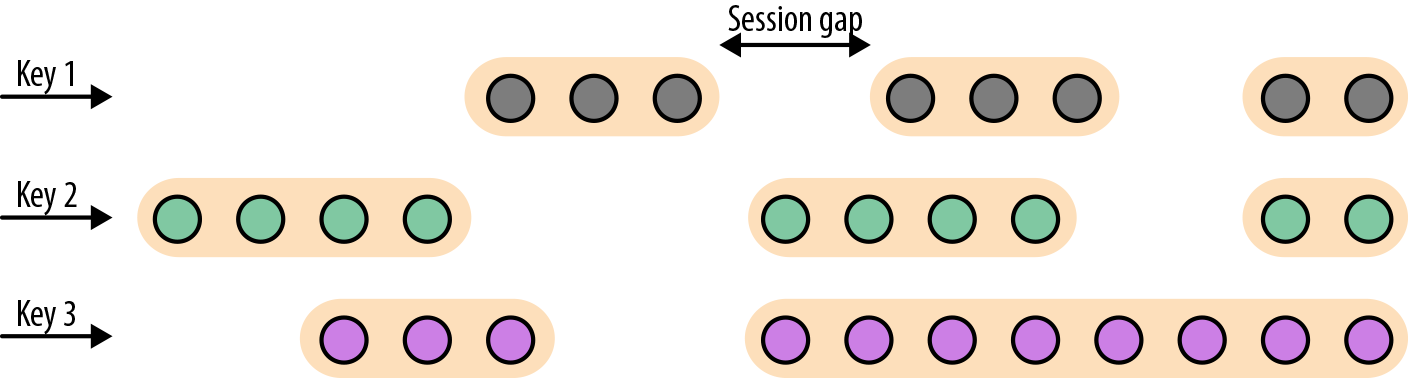
由一系列事件组合一个指定时间长度的 timeout 间隙组成,类似于 web 应用的 session,也就是一段时间没有接收到新数据就会生成新的窗口。
特点:时间无对齐。
只有 Flnik 支持会话窗口
session 窗口分配器通过 session 活动来对元素进行分组,session 窗口跟滚动窗口和滑动窗口相比,不会有重叠和固定的开始时间和结束时间的情况,相反,当它在一个固定的时间周期内不再收到元素,即非活动间隔产生,那个这个窗口就会关闭。一个 session 窗口通过一个 session 间隔来配置,这个 session 间隔定义了非活跃周期的长度,当这个非活跃周期产生,那么当前的 session 将关闭并且后续的元素将被分配到新的 session 窗口中去。
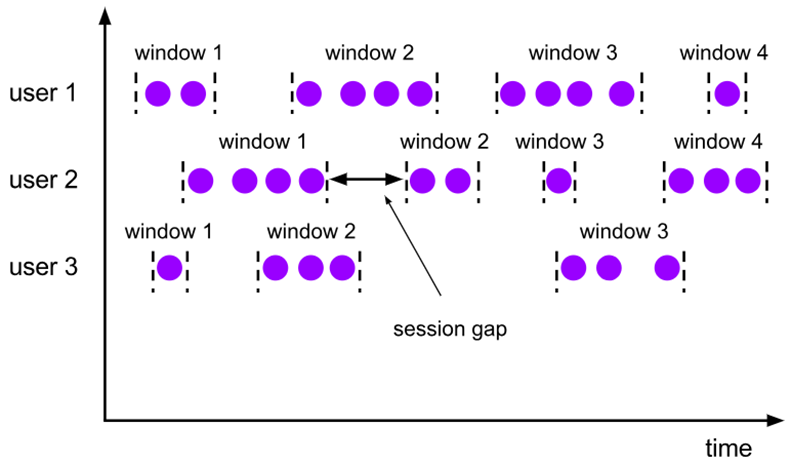
会话窗口不可能重叠,并且会话窗口的大小也不是固定的。不活跃的时间长度定义了会话窗口的界限。不活跃的时间是指这段时间没有元素到达。下图展示了元素如何被分配到会话窗口。
DataStream<T> sessionWindows = sensorData
  .keyBy(r -> r.id)
  .window(EventTimeSessionWindows.withGap(Time.minutes(15)))
  .process(...);

DataStream<T> sessionWindows = sensorData
  .keyBy(r -> r.id)
  .window(ProcessingTimeSessionWindows.withGap(Time.minutes(15)))
  .process(...);
2
3
4
5
6
7
8
9
由于会话窗口的开始时间和结束时间取决于接收到的元素,所以窗口分配器无法立即将所有的元素分配到正确的窗口中去。相反,会话窗口分配器最开始时先将每一个元素分配到它自己独有的窗口中去,窗口开始时间是这个元素的时间戳,窗口大小是 session gap 的大小。接下来,会话窗口分配器会将出现重叠的窗口合并成一个窗口。
# Window API
# 窗口分配器(Window Assigner)
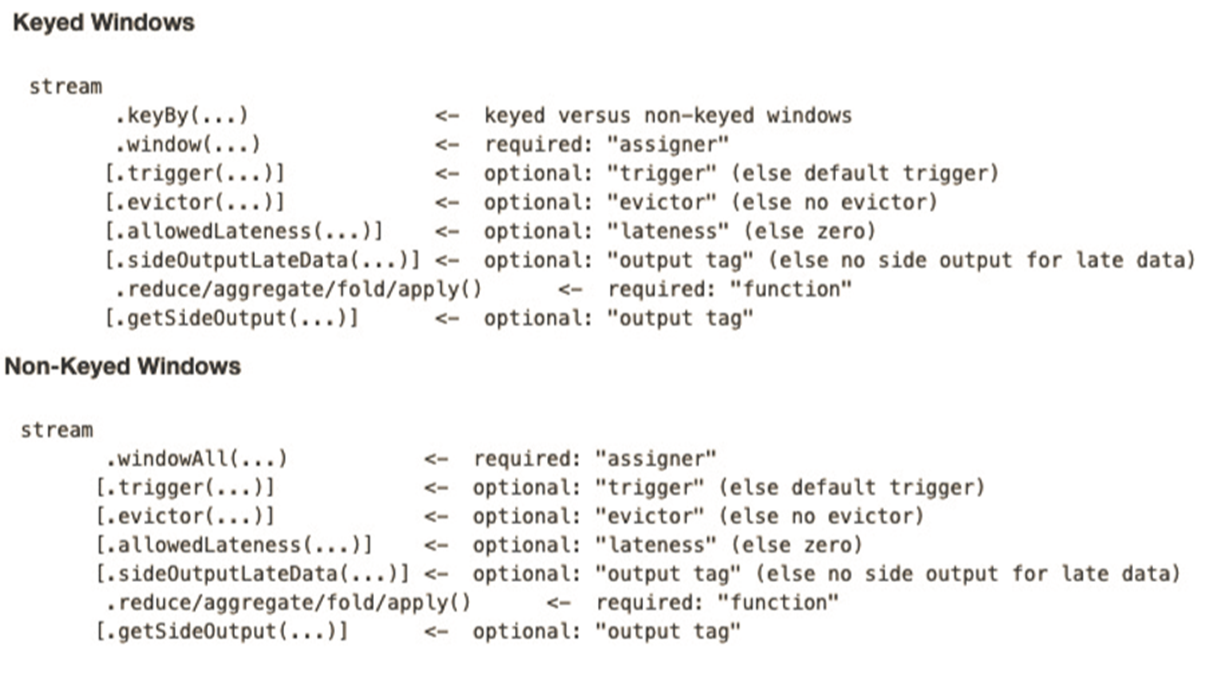
- window () 方法接收的输入参数是一个 WindowAssigner
- WindowAssigner 负责将每条输入的数据分发到正确的 window 中
- Flink 提供了通用的 WindowAssigner
- 滚动窗口(tumbling window)
- 滑动窗口(sliding window)
- 会话窗口(session window)
- 全局窗口(global window)(从流的第一条元素一直到最后)
# 创建不同类型的窗口
滚动时间窗口(tumbling time window)
.timeWindow(Time.seconds(5))1滑动时间窗口(sliding time window)
.timeWindow(Time.seconds(15),Time.seconds(5))1会话窗口(session window)
.window(EventTimeSessionWindows.withGap(Time.minutes(10))1
滚动计数窗口(tumbling count window)
.countWindow(5)1滑动计数窗口(sliding count window)
.countWindow(10,2)1
# 窗口函数(Window Function)
window function 定义了要对窗口中收集的数据做的计算操作,主要可以分为两类:
增量聚合函数(incremental aggregation functions)
- 每条数据到来就进行计算,保持一个简单的状态。
- 典型的增量聚合函数有 ReduceFunction, AggregateFunction。
- 当窗口闭合的时候,增量聚合完成
- 处理时间:当机器时间超过窗口结束时间的时候,窗口闭合
- 来一条数据计算一次
全窗口函数(full window functions)
- 先把窗口所有数据收集起来,等到计算的时候会遍历所有数据。
- ProcessWindowFunction 就是一个全窗口函数。
# 调用窗口计算函数
window functions 定义了窗口中数据的计算逻辑。有两种计算逻辑:
- 增量聚合函数 (Incremental aggregation functions):当一个事件被添加到窗口时,触发函数计算,并且更新 window 的状态 (单个值)。最终聚合的结果将作为输出。ReduceFunction 和 AggregateFunction 是增量聚合函数。
- 全窗口函数 (Full window functions):这个函数将会收集窗口中所有的元素,可以做一些复杂计算。ProcessWindowFunction 是 window function。
# ReduceFunction
例子:计算每个传感器 15s 窗口中的温度最小值
object WindowExample {
  def main(args: Array[String]): Unit = {
    val env = StreamExecutionEnvironment.getExecutionEnvironment
    env.setParallelism(1)

    val stream = env.addSource(new SensorSource)

    val keyedStream: KeyedStream[SensorReading, String] = stream.keyBy(_.id)

    val windowedStream: WindowedStream[SensorReading, String, TimeWindow] = keyedStream
      .timeWindow(Time.seconds(15))

    val reducedStream: DataStream[SensorReading] = windowedStream
      .reduce((r1, r2) => SensorReading(r1.id, 0L, r1.temperature.min(r2.temperature)))

    reducedStream.print()

    env.execute()
  }
}
2
3
4
5
6
7
8
9
10
11
12
13
14
15
16
17
18
19
20
DataStream<Tuple2<String, Double>> minTempPerwindow = sensorData
    .map(new MapFunction<SensorReading, Tuple2<String, Double>>() {
        @Override
        public Tuple2<String, Double> map(SensorReading value) throws Exception {
            return Tuple2.of(value.id, value.temperature);
        }
    })
    .keyBy(r -> r.f0)
    .timeWindow(Time.seconds(5))
    .reduce(new ReduceFunction<Tuple2<String, Double>>() {
        @Override
        public Tuple2<String, Double> reduce(Tuple2<String, Double> value1, Tuple2<String, Double> value2) throws Exception {
            if (value1.f1 < value2.f1) {
                return value1;
            } else {
                return value2;
            }
        }
    })
2
3
4
5
6
7
8
9
10
11
12
13
14
15
16
17
18
19
// Make sure to add code blocks to your code group
# AggregateFunction 增量聚合函数
先来看接口定义
public interface AggregateFunction<IN, ACC, OUT>
  extends Function, Serializable {

  // create a new accumulator to start a new aggregate
  ACC createAccumulator();

  // add an input element to the accumulator and return the accumulator
  ACC add(IN value, ACC accumulator);

  // compute the result from the accumulator and return it.
  OUT getResult(ACC accumulator);

  // merge two accumulators and return the result.
  ACC merge(ACC a, ACC b);
}
2
3
4
5
6
7
8
9
10
11
12
13
14
15
IN 是输入元素的类型,ACC 是累加器的类型,OUT 是输出元素的类型。
例子 5 秒滚动窗口,并输出传感器的平均值
object AvgTempByAggregateFunction {
  def main(args: Array[String]): Unit = {
    val env = StreamExecutionEnvironment.getExecutionEnvironment
    env.setParallelism(1)

    val stream = env.addSource(new SensorSource)

    stream.keyBy(_.id)
      .timeWindow(Time.seconds(5))
      .aggregate(new AvgTempAgg)
      .print()

    env.execute()
  }

  // 第一个泛型:流中元素的类型
  // 第二个泛型:累加器的类型 元组(传感器id,来了多少条温度读数,来的温度读数的总和是多少)
  // 第三个泛型:增量聚合函数的输出类型,元组(传感器id,窗口温度平均值)
  class AvgTempAgg extends AggregateFunction[SensorReading, (String, Long, Double), (String, Double)] {
    // 创建空累加器
    override def createAccumulator() = {
      ("", 0L, 0.0)
    }

    // 聚合逻辑是什么?
    override def add(in: SensorReading, acc: (String, Long, Double)) = {
      (in.id, acc._2 + 1, acc._3 + in.temperature)
    }

    // 窗口闭合时,输出的结果是什么?
    override def getResult(acc: (String, Long, Double)) = {
      (acc._1, acc._3 / acc._2)
    }

    // 两个累加器合并的逻辑是什么?
    override def merge(acc: (String, Long, Double), acc1: (String, Long, Double)) = {
      (acc._1, acc._2 + acc1._2, acc._3 + acc1._3)
    }
  }
}
2
3
4
5
6
7
8
9
10
11
12
13
14
15
16
17
18
19
20
21
22
23
24
25
26
27
28
29
30
31
32
33
34
35
36
37
38
39
40
# ProcessWindowFunction 全窗口函数
一些业务场景,我们需要收集窗口内所有的数据进行计算,例如计算窗口数据的中位数,或者计算窗口数据中出现频率最高的值。这样的需求,使用 ReduceFunction 和 AggregateFunction 就无法实现了。这个时候就需要 ProcessWindowFunction 了。
先来看接口定义
public abstract class ProcessWindowFunction<IN, OUT, KEY, W extends Window>
  extends AbstractRichFunction {

  // Evaluates the window
  void process(KEY key, Context ctx, Iterable<IN> vals, Collector<OUT> out)
    throws Exception;

  // Deletes any custom per-window state when the window is purged
  public void clear(Context ctx) throws Exception {}

  // The context holding window metadata
  public abstract class Context implements Serializable {
    // Returns the metadata of the window
    public abstract W window();

    // Returns the current processing time
    public abstract long currentProcessingTime();

    // Returns the current event-time watermark
    public abstract long currentWatermark();

    // State accessor for per-window state
    public abstract KeyedStateStore windowState();

    // State accessor for per-key global state
    public abstract KeyedStateStore globalState();

    // Emits a record to the side output identified by the OutputTag.
    public abstract <X> void output(OutputTag<X> outputTag, X value);
  }
}
2
3
4
5
6
7
8
9
10
11
12
13
14
15
16
17
18
19
20
21
22
23
24
25
26
27
28
29
30
31
process() 方法接受的参数为:window 的 key,Iterable 迭代器包含窗口的所有元素,Collector 用于输出结果流。Context 参数和别的 process 方法一样。而 ProcessWindowFunction 的 Context 对象还可以访问 window 的元数据 (窗口开始和结束时间),当前处理时间和水位线,per-window state 和 per-key global state,side outputs。
- per-window state: 用于保存一些信息,这些信息可以被
process()访问,只要 process 所处理的元素属于这个窗口。 - per-key global state: 同一个 key,也就是在一条 KeyedStream 上,不同的 window 可以访问 per-key global state 保存的值。
例子 5 秒滚动窗口,并输出传感器的平均值
object AvgTempByProcessWindowFunction {

  case class AvgInfo(id: String, avgTemp: Double, windowStart: Long, windowEnd: Long)

  def main(args: Array[String]): Unit = {
    val env = StreamExecutionEnvironment.getExecutionEnvironment
    env.setParallelism(1)

    val stream = env.addSource(new SensorSource)

    stream
      .keyBy(_.id)
      .timeWindow(Time.seconds(5))
      .process(new AvgTempFunction)
      .print()

    env.execute()
  }

  // 相比于增量聚合函数,缺点是要保存窗口中的所有元素
  // 增量聚合函数只需要保存一个累加器就行了
  // 优点是:全窗口聚合函数可以访问窗口信息
  class AvgTempFunction extends ProcessWindowFunction[SensorReading, AvgInfo, String, TimeWindow] {
    // 在窗口闭合时调用
    override def process(key: String, context: Context, elements: Iterable[SensorReading], out: Collector[AvgInfo]): Unit = {
      val count = elements.size // 窗口闭合时,温度一共有多少条
      var sum = 0.0 //总的温度值
      for (r <- elements) {
        sum += r.temperature
      }
      // 单位是ms
      val windowStart = context.window.getStart
      val windowEnd = context.window.getEnd
      out.collect(AvgInfo(key, sum / count, windowStart, windowEnd))
    }

  }
}
2
3
4
5
6
7
8
9
10
11
12
13
14
15
16
17
18
19
20
21
22
23
24
25
26
27
28
29
30
31
32
33
34
35
36
37
38
39
input
  .keyBy(...)
  .timeWindow(...)
  .reduce(
    incrAggregator: ReduceFunction[IN],
    function: ProcessWindowFunction[IN, OUT, K, W])

input
  .keyBy(...)
  .timeWindow(...)
  .aggregate(
    incrAggregator: AggregateFunction[IN, ACC, V],
    windowFunction: ProcessWindowFunction[V, OUT, K, W])
2
3
4
5
6
7
8
9
10
11
12
13
// Make sure to add code blocks to your code group
我们还可以将 ReduceFunction/AggregateFunction 和 ProcessWindowFunction 结合起来使用。ReduceFunction/AggregateFunction 做增量聚合,ProcessWindowFunction 提供更多的对数据流的访问权限。如果只使用 ProcessWindowFunction (底层的实现为将事件都保存在 ListState 中),将会非常占用空间。分配到某个窗口的元素将被提前聚合,而当窗口的 trigger 触发时,也就是窗口收集完数据关闭时,将会把聚合结果发送到 ProcessWindowFunction 中,这时 Iterable 参数将会只有一个值,就是前面聚合的值。
我们把之前的需求重新使用以上两种方法实现一下,计算 5s 滚动窗口中的最低和最高的温度。输出的元素包含了 (流的 Key, 最低温度,最高温度,窗口结束时间)。
  case class MinMaxTemp(id: String, min: Double, max: Double, endTs: Long)

  def main(args: Array[String]): Unit = {
    val env = StreamExecutionEnvironment.getExecutionEnvironment
    env.setParallelism(1)

    val stream = env.addSource(new SensorSource)

    stream
      .keyBy(_.id)
      .timeWindow(Time.seconds(5))
      .aggregate(new HighAndLowAgg, new WindowResult)
      .print()
    env.execute()

  }

  class HighAndLowAgg extends AggregateFunction[SensorReading, (String, Double, Double), (String, Double, Double)] {
    // 最小温度值的初始值是Double的最大值,最大温度的初始值是Double的最小值
    override def createAccumulator() = {
      ("", Double.MaxValue, Double.MinValue)
    }

    override def add(in: SensorReading, acc: (String, Double, Double)) = {

      (in.id, in.temperature.min(acc._2), in.temperature.max(acc._3))
    }

    override def getResult(acc: (String, Double, Double)) = {
      acc
    }

    override def merge(acc: (String, Double, Double), acc1: (String, Double, Double)) = {
      (acc._1, acc._2.min(acc1._2), acc._3.max(acc1._3))
    }
  }


  class WindowResult extends ProcessWindowFunction[(String, Double, Double), MinMaxTemp, String, TimeWindow] {
    override def process(key: String, context: Context, elements: Iterable[(String, Double, Double)], out: Collector[MinMaxTemp]): Unit = {
      val minMax = elements.head
      out.collect(MinMaxTemp(key, minMax._2, minMax._3, context.window.getEnd))
    }

  }
2
3
4
5
6
7
8
9
10
11
12
13
14
15
16
17
18
19
20
21
22
23
24
25
26
27
28
29
30
31
32
33
34
35
36
37
38
39
40
41
42
43
44
45
我们也可以使用 ReduceFuntion 与 ProcessWinodwFuntion 相结合
case class MinMaxTemp(id: String, min: Double, max: Double, endTs: Long)

val minMaxTempPerWindow2: DataStream[MinMaxTemp] = sensorData
  .map(r => (r.id, r.temperature, r.temperature))
  .keyBy(_._1)
  .timeWindow(Time.seconds(5))
  .reduce(
    (r1: (String, Double, Double), r2: (String, Double, Double)) => {
      (r1._1, r1._2.min(r2._2), r1._3.max(r2._3))
    },
    new AssignWindowEndProcessFunction
  )

class AssignWindowEndProcessFunction
  extends ProcessWindowFunction[(String, Double, Double),
    MinMaxTemp, String, TimeWindow] {
    override def process(key: String,
                       ctx: Context,
                       minMaxIt: Iterable[(String, Double, Double)],
                       out: Collector[MinMaxTemp]): Unit = {
    val minMax = minMaxIt.head
    val windowEnd = ctx.window.getEnd
    out.collect(MinMaxTemp(key, minMax._2, minMax._3, windowEnd))
  }
}
2
3
4
5
6
7
8
9
10
11
12
13
14
15
16
17
18
19
20
21
22
23
24
25
# 其它可选 API
.trigger () —— 触发器
- 定义 window 什么时候关闭,触发计算并输出结果
.evictor () —— 移除器
- 定义移除某些数据的逻辑
.allowedLateness () —— 允许处理迟到的数据
.sideOutputLateData () —— 将迟到的数据放入侧输出流
.getSideOutput () —— 获取侧输出流
# Window API 总览