
 Day05 广告缓存
# Day05 广告缓存
# lua
lua 语言具有以下特性
- 支持面向过程 (procedure-oriented) 编程和函数式编程 (functional programming);
- 自动内存管理;只提供了一种通用类型的表(table),用它可以实现数组,哈希表,集合,对象;
- 语言内置模式匹配;闭包 (closure);函数也可以看做一个值;提供多线程(协同进程,并非操作系统所支持的线程)支持;
- 通过闭包和 table 可以很方便地支持面向对象编程所需要的一些关键机制,比如数据抽象,虚函数,继承和重载等。
# lua 的安装
yum install -y gcc
yum install libtermcap-devel ncurses-devel libevent-devel readline-devel
curl -R -O http://www.lua.org/ftp/lua-5.3.5.tar.gz
tar -zxf lua-5.3.5.tar.gz
cd lua-5.3.5
make linux test
make install
2
3
4
5
6
7
# 编写 helloword
创建 hello.lua 文件,内容为
print("hello");
执行
lua helloworld.lua
#或者直接lua 直接进入命令行模式
lua
print("hello");
2
3
# 基本用法
lua 有交互式编程和脚本式编程。
交互式编程就是直接输入语法,就能执行。
脚本式编程需要编写脚本文件,然后再执行。
一般采用脚本式编程。(例如:编写一个 hello.lua 的文件,输入文件内容,并执行 lua hell.lua 即可)
# 注释
-- 单行注释
--[[
多行注释1
多行注释2
--]]
2
3
4
5
# 关键字
| and | break | do | else |
| elseif | end | false | for |
| function | if | in | local |
| nil | not | or | repeat |
| return | then | true | until |
| while |
# 定义变量
变量默认为全局变量 如果需要局部变量需要声明为 local
a = 1
local b = 2 -- 局部变量
2
如果变量没有初始化:则 它的值为 nil 这和 java 中的 null 不同。
# 数据类型
Lua 是动态类型语言,变量不要类型定义,只需要为变量赋值 值可以存储在变量中,作为参数传递或结果返回。
Lua 中有 8 个基本类型:
| 数据类型 | 描述 |
|---|---|
| nil | 这个最简单,只有值 nil 属于该类,表示一个无效值(在条件表达式中相当于 false)。 |
| boolean | 包含两个值:false 和 true。 |
| number | 表示双精度类型的实浮点数 |
| string | 字符串由一对双引号或单引号来表示 |
| function | 由 C 或 Lua 编写的函数 |
| userdata | 表示任意存储在变量中的 C 数据结构 |
| thread | 表示执行的独立线路,用于执行协同程序 |
| table | Lua 中的表(table)其实是一个 "关联数组"(associative arrays),数组的索引可以是数字、字符串或表类型。在 Lua 里,table 的创建是通过 "构造表达式" 来完成,最简单构造表达式是 {},用来创建一个空表。 |
# 流程控制
--[ 0 为 true ]
if(0) then
    print("0 为 true")
else
    print("0 不为true")
end
2
3
4
5
6
# 函数
--[[ 函数返回两个值的最大值 --]]
function max(num1, num2)

   if (num1 > num2) then
      result = num1;
   else
      result = num2;
   end

   return result;
end
-- 调用函数
print("两值比较最大值为 ",max(10,4))
print("两值比较最大值为 ",max(5,6))
2
3
4
5
6
7
8
9
10
11
12
13
14
# require 函数
require 用于 引入其他的模块,类似于 import
require "<模块名>"
# nginx+lua+redis 实现广告缓存
# OpenResty
OpenResty (又称:ngx_openresty) 是一个基于 NGINX 的可伸缩的 Web 平台,由中国人章亦春发起,提供了很多高质量的第三方模块。
OpenResty 是一个强大的 Web 应用服务器,Web 开发人员可以使用 Lua 脚本语言调动 Nginx 支持的各种 C 以及 Lua 模块,更主要的是在性能方面,OpenResty 可以 快速构造出足以胜任 10K 乃至 1000K 以上并发连接响应的超高性能 Web 应用系统。
OpenResty 简单理解,就相当于封装了 nginx, 并且集成了 LUA 脚本,开发人员只需要简单的其提供了模块就可以实现相关的逻辑,而不再像之前,还需要在 nginx 中自己编写 lua 的脚本,再进行调用了。
安装
yum install yum-utils

yum-config-manager --add-repo https://openresty.org/package/centos/openresty.repo
yum install openresty  #yum安装路径为/usr/local/openresty
2
3
4
OpenResty 内置 nginx 我们需要修改一下 nginx 配置,将配置文件使用的根设置为 root, 目的就是将来要使用 lua 脚本的时候 ,直接可以加载在 root 下的 lua 脚本。
vim /usr/local/openresty/nginx/conf/nginx.conf

#user nobody; 配置文件第一行原来为这样, 现改为下面的配置
user root root;
2
3
4
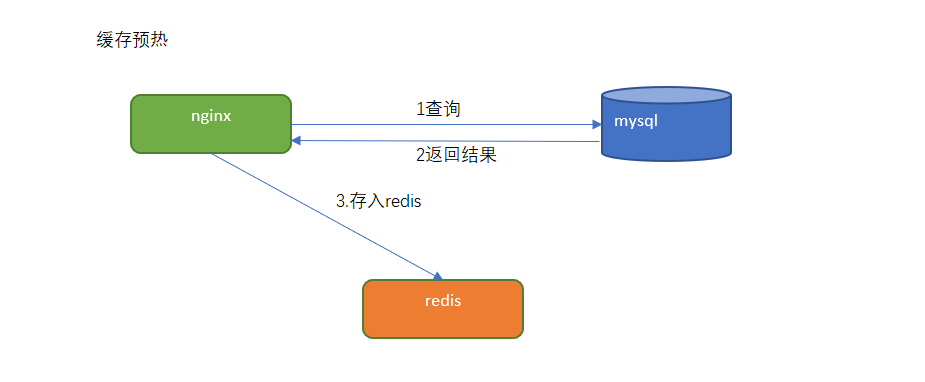
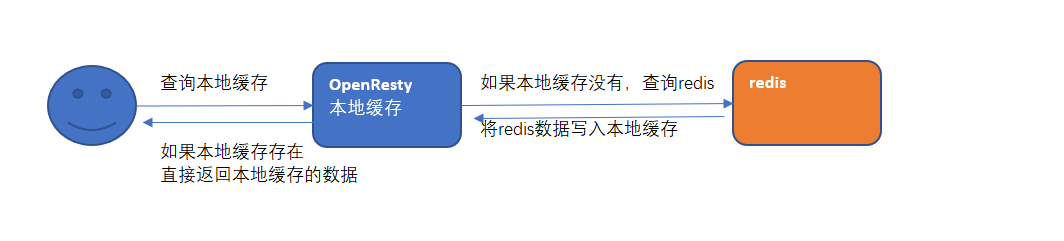
# 缓存预热与二级缓存查询
- 编写 lua 脚本实现缓存预热(将 mysql 里的数据查询出来存入 redis
编写 lua 脚本实现二级缓存读取
# 代码实现
# 缓存预热
实现思路:
定义请求:用于查询数据库中的数据更新到 redis 中。
- 连接 mysql ,按照广告分类 ID 读取广告列表,转换为 json 字符串。
- 连接 redis,将广告列表 json 字符串存入 redis 。
定义请求:
请求:
    /ad_update
参数:
    position  --指定广告位置
返回值:
    json
2
3
4
5
6
在 /root/lua 目录下创建 ad_load.lua ,实现连接 mysql 查询数据 并存储到 redis 中。
cd /root
mkdir lua
cd lua
vim ad_load.lua
2
3
4
ngx.header.content_type="application/json;charset=utf8"
local cjson = require("cjson")
local mysql = require("resty.mysql")
local uri_args = ngx.req.get_uri_args()
local position = uri_args["position"]

local db = mysql:new()
db:set_timeout(1000)
local props = {
    host = "192.168.130.128",
    port = 3306,
    database = "changgou_business",
    user = "root",
    password = "root"
}

local res = db:connect(props)
local select_sql = "select url,image from tb_ad where status ='1' and position='"..position.."' and start_time<= NOW() AND end_time>= NOW()"
res = db:query(select_sql)
db:close()

local redis = require("resty.redis")
local red = redis:new()
red:set_timeout(2000)

local ip ="192.168.130.128"
local port = 6379
red:connect(ip,port)

red:set("ad_"..position,cjson.encode(res))
red:close()

ngx.say("{flag:true}")
2
3
4
5
6
7
8
9
10
11
12
13
14
15
16
17
18
19
20
21
22
23
24
25
26
27
28
29
30
31
32
33
修改 /usr/local/openresty/nginx/conf/nginx.conf 文件
vim /usr/local/openresty/nginx/conf/nginx.conf
在 server 下添加以下内容
# 添加广告 在mysql中查询广告信息 并缓存到redis中
location /ad_update {
content_by_lua_file /root/lua/ad_load.lua;
}
2
3
4
完整配置文件
#user  nobody;
user root root;
worker_processes  1;

#error_log  logs/error.log;
#error_log  logs/error.log  notice;
#error_log  logs/error.log  info;

#pid        logs/nginx.pid;

events {
    worker_connections  1024;
}

http {
    include       mime.types;
    default_type  application/octet-stream;
    sendfile        on;
    #tcp_nopush     on;

    #keepalive_timeout  0;
    keepalive_timeout  65;

    #gzip  on;

    server {
        listen       80;
        server_name  localhost;
        charset utf-8;
        #access_log  logs/host.access.log  main;
        # 添加广告 在mysql中查询广告信息 并缓存到redis中
        location /ad_update {
            content_by_lua_file /root/lua/ad_load.lua;
        }

        # redirect server error pages to the static page /50x.html
        #
        error_page   500 502 503 504  /50x.html;
        location = /50x.html {
            root   html;
        }
    }
}
2
3
4
5
6
7
8
9
10
11
12
13
14
15
16
17
18
19
20
21
22
23
24
25
26
27
28
29
30
31
32
33
34
35
36
37
38
39
40
41
42
43
重启 nginx
cd /usr/local/openresty/nginx/sbin/
./nginx -s reload
2
访问 http://192.168.130.128/ad_update?position=web_index_lb 测试
如果返回 {flag:true} 则成功
可以查看 redis 中 ad_web_index_lb 是否有数据 如无数据 请到数据库中更改 ad 结束时间
# 广告缓存读取
通过 lua 脚本直接从 redis 中获取数据即可。
定义请求:
请求:/ad_read
参数:position
返回值:json
2
3
在 /root/lua 目录下创建 ad_read.lua
vim /root/lua/ad_read.lua
ngx.header.content_type="application/json;charset=utf8"

local uri_args = ngx.req.get_uri_args();
local position = uri_args["position"];

local redis = require("resty.redis");

local red = redis:new()

red:set_timeout(2000)

local ok, err = red:connect("192.168.130.128", 6379)

local rescontent=red:get("ad_"..position)

ngx.say(rescontent)

red:close()
2
3
4
5
6
7
8
9
10
11
12
13
14
15
16
17
18
在 /usr/local/openresty/nginx/conf/nginx.conf 中 server 下添加配置
vim /usr/local/openresty/nginx/conf/nginx.conf
#从redis 读取广告
location /ad_read {
  content_by_lua_file /root/lua/ad_read.lua;
}
2
3
4
重启 nginx
cd /usr/local/openresty/nginx/sbin/
./nginx -s reload
2
测试 http://192.168.130.128/ad_read?position=web_index_lb 输出
# 二级缓存 - 加入 openresty 本地缓存
先查询 openresty 本地缓存 如果没有再查询 redis 中的数据
修改 /root/lua 目录下 ad_read 文件,
ngx.header.content_type="application/json;charset=utf8"
local uri_args = ngx.req.get_uri_args();
local position = uri_args["position"];
local cache_ngx = ngx.shared.dis_cache;
local adCache = cache_ngx:get('ad_cache_'..position);
if adCache == "" or adCache == nil then
    local redis = require("resty.redis");
    local red = redis:new()
    red:set_timeout(2000)
    local ok, err = red:connect("192.168.130.128", 6379)
    local rescontent=red:get("ad_"..position)
    ngx.say(rescontent)
    red:close()
    cache_ngx:set('ad_cache_'..position, rescontent, 10*60);
else
    ngx.say(adCache)
end
2
3
4
5
6
7
8
9
10
11
12
13
14
15
16
17
修改 nginx 配置文件 vi /usr/local/openresty/nginx/conf/nginx.conf ,http 节点下添加配置:
#包含redis初始化模块
lua_shared_dict dis_cache 5m;  #共享内存开启
2
# 前端页面实现
修改 index.html,编写脚本
<script>
       new Vue({
        el: '#app',
        data: {
            ad: {
                web_index_lb:[]
            }
        },
        methods: {
            adRead: function(position) {
                axios.get('ad_read?position='+position).then(response =>{
                    this.ad[position]=response.data
                })
            }
        },
        created(){
            this.adRead('web_index_lb')
        }
      })
</script>
2
3
4
5
6
7
8
9
10
11
12
13
14
15
16
17
18
19
20
修改 index.html 渲染广告轮播图
<div id="myCarousel" data-ride="carousel" data-interval="4000" class="sui-carousel slide">
    <ol class="carousel-indicators">
        <li data-target="#myCarousel" data-slide-to="0" class="active" v-for="item in ad.web_index_lb"></li>
    </ol>
    <div class="carousel-inner" id="lbt">
        <div class="item" v-for="item in contentList">
            <a :href="item.url">
            <img :src="item.pic"  />
          </a>
        </div>
    </div>
    <a href="#myCarousel" data-slide="prev" class="carousel-control left">‹</a>
    <a href="#myCarousel" data-slide="next" class="carousel-control right">›</a>
</div>
2
3
4
5
6
7
8
9
10
11
12
13
14
将整个前端项目 上传到 nginx 下的 html 中
# nginx 限流
一般情况下,首页的并发量是比较大的,即使有了多级缓存,如果有大量恶意的请求,也会对系统造成影响。而限流就是保护措施之一。
nginx 提供两种限流的方式:
- 一是控制速率
- 二是控制并发连接数
# 漏桶算法实现控制速率限流
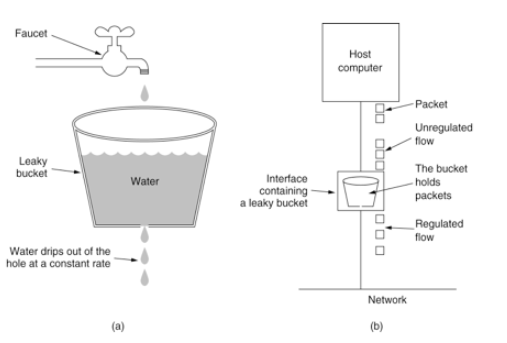
控制速率的方式之一就是采用漏桶算法。
漏桶 (Leaky Bucket) 算法思路很简单,水 (请求) 先进入到漏桶里,漏桶以一定的速度出水 (接口有响应速率), 当水流入速度过大会直接溢出 (访问频率超过接口响应速率), 然后就拒绝请求,可以看出漏桶算法能强行限制数据的传输速率。示意图如下:
nginx 的配置 将以下内容添加到 http 节点下
    limit_req_zone $binary_remote_addr zone=myRateLimit:10m rate=2r/s;
    server {
        listen       8081;
        server_name  localhost;
        charset utf-8;
        location / {
            limit_req zone=myRateLimit;
            root   html;
            index  index.html index.htm;
        }
    }
2
3
4
5
6
7
8
9
10
11
- binary_remote_addr 是一种 key,表示基于 remote_addr (客户端 IP) 来做限流,binary_ 的目的是压缩内存占用量。
- zone:定义共享内存区来存储访问信息, myRateLimit:10m 表示一个大小为 10M,名字为 myRateLimit 的内存区域。1M 能存储 16000 IP 地址的访问信息,10M 可以存储 16W IP 地址访问信息。
- rate 用于设置最大访问速率,rate=10r/s 表示每秒最多处理 10 个请求。Nginx 实际上以毫秒为粒度来跟踪请求信息,因此 10r/s 实际上是限制:每 100 毫秒处理一个请求。这意味着,自上一个请求处理完后,若后续 100 毫秒内又有请求到达,将拒绝处理该请求。我们这里设置成 2 方便测试。
完整配置
#user  nobody;
user root root;
worker_processes  1;

#error_log  logs/error.log;
#error_log  logs/error.log  notice;
#error_log  logs/error.log  info;

#pid        logs/nginx.pid;


events {
    worker_connections  1024;
}


http {
    include       mime.types;
    default_type  application/octet-stream;

    #log_format  main  '$remote_addr - $remote_user [$time_local] "$request" '
    #                  '$status $body_bytes_sent "$http_referer" '
    #                  '"$http_user_agent" "$http_x_forwarded_for"';

    #access_log  logs/access.log  main;

    sendfile        on;
    #tcp_nopush     on;

    #keepalive_timeout  0;
    keepalive_timeout  65;

    #gzip  on;


    limit_req_zone $binary_remote_addr zone=myRateLimit:10m rate=2r/s;

    server {
        listen       8081;
        server_name  localhost;
        charset utf-8;
        location / {
            limit_req zone=myRateLimit;
            root   html;
            index  index.html index.htm;
        }
    }
}
2
3
4
5
6
7
8
9
10
11
12
13
14
15
16
17
18
19
20
21
22
23
24
25
26
27
28
29
30
31
32
33
34
35
36
37
38
39
40
41
42
43
44
45
46
47
48
访问 http://192.168.130.128:8081 / 测试 限流则服务返回 503 错误
# 处理突发流量
上面例子限制 2r/s,如果有时正常流量突然增大,超出的请求将被拒绝,无法处理突发流量,可以结合 burst 参数使用来解决该问题。
server {
    location / {
        limit_req zone=myRateLimit burst=5;
        root   html;
        index  index.html index.htm;
    }
}
2
3
4
5
6
7
burst 译为突发、爆发,表示在超过设定的处理速率后能额外处理的请求数,当 rate=2r/s 时,将 1s 拆成 2 份,即每 500ms 可处理 1 个请求。
此处,burst=5 ,若同时有 6 个请求到达,Nginx 会处理第一个请求,剩余 5 个请求将放入队列,然后每隔 500ms 从队列中获取一个请求进行处理。若请求数大于 6,将拒绝处理多余的请求,直接返回 503.
不过,单独使用 burst 参数并不实用。假设 burst=50 ,rate 为 10r/s,排队中的 50 个请求虽然每 100ms 会处理一个,但第 50 个请求却需要等待 50 * 100ms 即 5s,这么长的处理时间自然难以接受。
因此,burst 往往结合 nodelay 一起使用。
server {
    location / {
        limit_req zone=myRateLimit burst=5 nodelay;
        root   html;
        index  index.html index.htm;
    }
}
2
3
4
5
6
7
处理突发 5 个请求的时候,没有延迟,等到完成之后,按照正常的速率处理。
如上两种配置结合就达到了速率稳定,但突然流量也能正常处理的效果
在 1 秒钟之内可以刷新 5 次,正常处理 但是超过之后,连续刷新 5 次,抛出异常。